
An advanced snippet manager for the command-line.

Project description
snippet
snippet allows you to create, view and use snippets on the command-line.
Usage
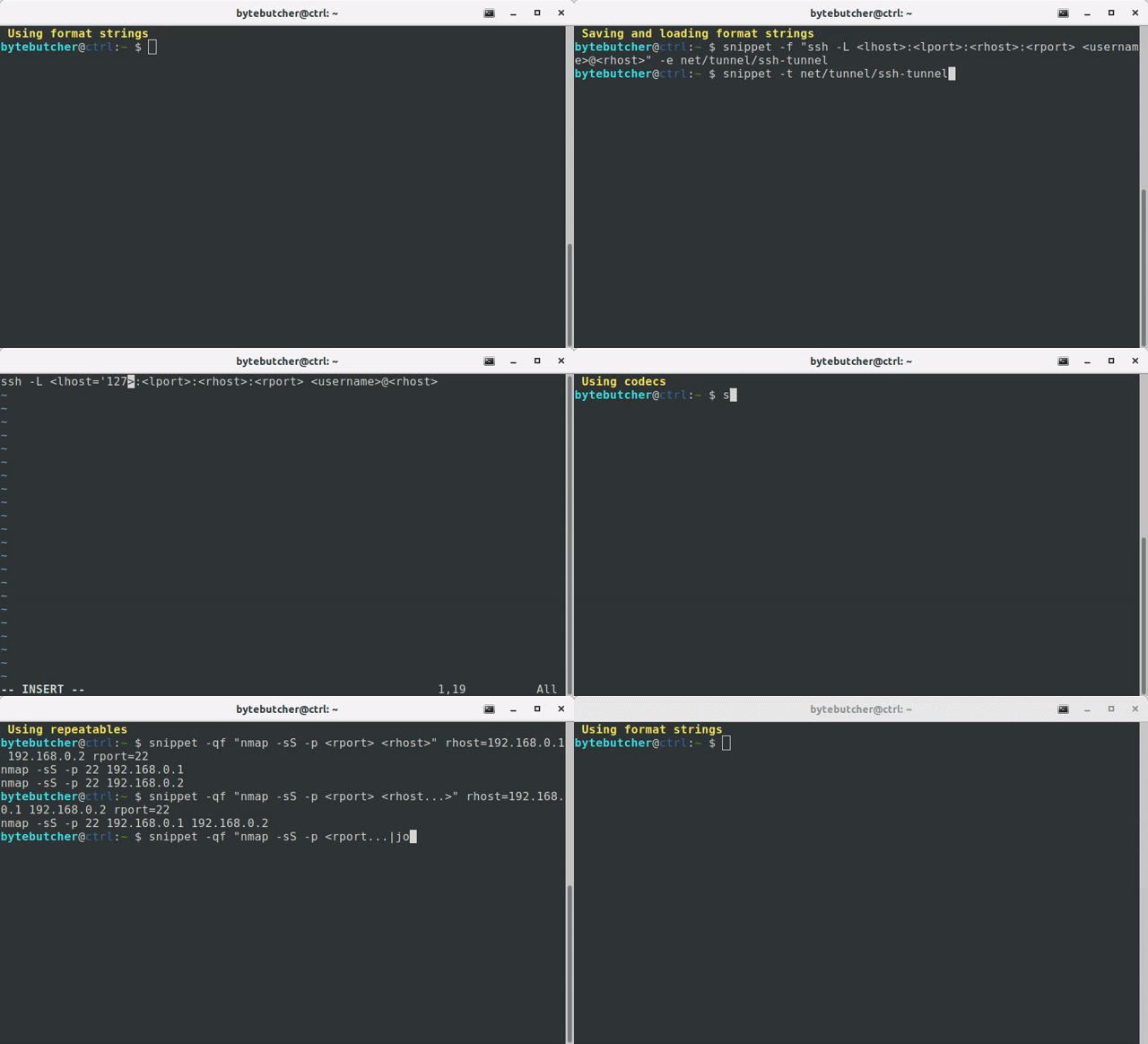
# Add a new snippet to the database
$ snippet -e archive/extract-tgz -f 'tar -xzvf <archive>'

# Edit a snippet (will open vim)
$ snippet -e archive/extract-tgz

# Search a snippet which include the term "extract" (will open fzf)
$ snippet -t extract

# Fill snippet with a value
$ snippet -t archive/extract-tgz /path/to/foo.tar.gz

# Fill snippet with multiple values
$ snippet -t archive/extract-tgz /path/to/foo.tar.gz /path/to/bar.tar.gz

# Fill snippet with multiple values while using repeatable placeholders (e.g. <file...>)
$ snippet -f "tar -czvf <archive> <file...>" /path/to/foo.tar file=foo bar

# Using presets (e.g. '<datetime>' to include current datetime)
$ snippet -f "tar -czvf '<datetime>.tar.gz' <file...>" file=foo bar

# Import values from file
$ snippet -f "tar -czvf '<datetime>.tar.gz' <file...>" file:files.txt

# Using optionals
$ snippet -f "python3 -m http.server[ --bind <lhost>][ <lport>]" lport=4444

# Using defaults
$ snippet -f "python3 -m http.server[ --bind <lhost>] <lport='8000'>"

# Overwriting defaults
$ snippet -f "python3 -m http.server[ --bind <lhost>] <lport='8000'>" lport=9090

# Using codecs
$ snippet -f "tar -czvf <archive|squote> <file...|squote>" /path/to/foo.tar file=foo bar

# Using multiple codecs with arguments
$ snippet -f "cp <file|squote> <file|add:'.bak'|squote>" /path/to/foo /path/to/bar
Setup
pip3 install snippet-cli
To enable bash-completion you might add following line to your .bashrc:
eval "$(register-python-argcomplete3 snippet)"
Advanced usage
Assigning data to placeholders
To assign data to a placeholder you have several options:
Using positional arguments
The most straight forward way of assigning data to a placeholder is to use positional arguments:
$ snippet -f "echo 'hello <arg1>';" snippet
echo 'hello snippet';
To assign multiple values to a specific placeholder you need to explicitly declare the placeholder to which the value should be assigned to:
$ snippet -f "echo '<arg1> <arg2>';" hello arg2=snippet world
echo 'hello snippet';
echo 'hello world';
Using input files
Values can be directly imported from a file:
$ cat <<EOF > input.txt
world
universe
EOF
$ snippet -f "echo 'hello <arg1>';" arg1:input.txt
echo 'hello world';
echo 'hello universe';
Using environment variables
snippet evaluates environment variables and assigns data to any unset
placeholder. To avoid running into conflict with other environment variables snippet only evaluates
lower-case variable names:
$ export arg1=snippet
$ snippet -f "echo 'hello <arg1>';"
echo 'hello snippet';
To assign multiple values to a placeholder following syntax must be used:
$ export arg1="\('snippet' 'world'\)"
$ snippet -f "echo 'hello <arg1>';"
echo 'hello snippet';
echo 'hello world';
Note that positional arguments may override the evaluation of environment variables:
$ export arg1=snippet
$ snippet -f "echo 'hello <arg1>';" world
echo 'hello world';
Using presets
snippet ships with a customizable set of preset placeholders which can be
directly used in your format string
(see .snippet/snippet_profile.py for more information). Preset placeholders may have constant
but also dynamically generated values assigned to them:
$ snippet -f "echo '<datetime>';"
echo '20200322034102';
Using string formats
To use string formats you have several options:
Using the --format-string argument
If you read the previous section you already know the -f | --format-string argument:
$ snippet -f "echo 'hello snippet';"
echo 'hello snippet';
Using input from a pipe
Another option to set the string format is by using a pipe:
$ echo "echo 'hello snippet'" | snippet
echo 'hello snippet';
Using templates
snippet allows you to import format strings from a file by using the -t | --template argument.
There are two ways of creating a template:
- Create a file with the
.snippetextension:
$ echo -n "echo 'hello, <arg>!'" > example.snippet
$ snippet -t example.snippet world!
- Create a template using the
-e | --editargument:
# Create a template called example with the specified string format
$ snippet -e example -f "echo 'hello, <arg>!'"
# Open vim to edit or add a new template
$ snippet -e example world!
# Use the template
$ snippet -t example world!
If you have bash-completion enabled you can press <TAB> twice to autocomplete
template names.
In addition the -t | --template argument will open an interactive search prompt
when the specified template name was not found.
To list all available templates you can use the --list-templates
parameter.
Using codecs
snippet supports simple string transformation. A list of available codecs can be viewed by using the
--list-codecs argument.
To transform a placeholder use the <PLACEHOLDER[|CODEC[:ARGUMENT] ...]> format:
$ snippet -f "<arg|b64>" "hello snippet"
aGVsbG8gcmV2YW1w
$ snippet -f "<arg> <arg|b64|b64>" "hello snippet"
hello snippet YUdWc2JHOGdjbVYyWVcxdw==
$ snippet -f "<arg...|join:', '>!" arg=hello snippet
hello, snippet!
Using defaults
snippet supports specifying default values for your placeholders:
$ snippet -f "<arg1> <arg2='default'>" hello
hello default
Using optionals
snippet supports specifying optional parts in the string format by surrounding them with
square-brackets:
$ snippet -f "<arg1> [<arg2>]" hello snippet
hello snippet
$ snippet -f "<arg1> [<arg2>]" hello
hello
$ snippet -f "<arg> [my <arg2='snippet'>]" hello
hello my snippet
$ snippet -f "<arg> [my <arg2='snippet'>]" hello arg2=
hello
If you need square-brackets to be part of the string format you need to escape them accordingly:
$ snippet -f "\[<arg>\]" hello
[hello]
Using repeatables
If you specify multiple values for placeholders snippet will print all possible permutations.
Since this is not always the thing you wanna do snippet allows marking placeholders as repeatable.
This is done by placing three dots at the end of a placeholder. By default arguments which are
associated with a repeatable placeholder are separated by space.
To specify a custom character sequence you may use the join codec:
$ snippet -f "<arg1>" hello world
hello
world
$ snippet -f "<arg1...>" hello world
hello world
$ snippet -f "<arg1...|join:','>" hello world
hello,world
Executing commands
snippet can be used to easily execute alternating commands in sequence:
$ snippet -f "echo 'hello <arg1>';" arg1=snippet world | bash
hello world
hello snippet
Using xargs the resulting commands can also be executed in parallel:
snippet -f "echo 'hello <arg1>';" arg1=snippet arg1=world | xargs --max-procs=4 -I CMD bash -c CMD
hello world
hello snippet
See also
To make the most out of this tool you might also consider to look into the following projects:
- bgl - manage global bash environment variables
Release history Release notifications | RSS feed


Download files
Download the file for your platform. If you're not sure which to choose, learn more about installing packages.
Source Distribution
Built Distribution
Filter files by name, interpreter, ABI, and platform.
If you're not sure about the file name format, learn more about wheel file names.
Copy a direct link to the current filters
File details
Details for the file snippet_cli-2.3.1.tar.gz.
File metadata
- Download URL: snippet_cli-2.3.1.tar.gz
- Upload date:
- Size: 36.3 kB
- Tags: Source
- Uploaded using Trusted Publishing? No
- Uploaded via: twine/6.2.0 CPython/3.10.12
File hashes
| Algorithm | Hash digest | |
|---|---|---|
| SHA256 |
9ac5848c0e530b2078f7db6dfb2e440a94fb466954f2418a5b3ddf868f2d78c5
|
|
| MD5 |
1b6d1a44855465d4c55fbe9fe9413457
|
|
| BLAKE2b-256 |
10d2d13352bb94edaaee89d204795d3655194a15fd16331353ac509dec824779
|
File details
Details for the file snippet_cli-2.3.1-py3-none-any.whl.
File metadata
- Download URL: snippet_cli-2.3.1-py3-none-any.whl
- Upload date:
- Size: 45.3 kB
- Tags: Python 3
- Uploaded using Trusted Publishing? No
- Uploaded via: twine/6.2.0 CPython/3.10.12
File hashes
| Algorithm | Hash digest | |
|---|---|---|
| SHA256 |
1e129b98b1fb4e477257b1d5754d17fa2176b7176f03ea6ce1a57132cab792f9
|
|
| MD5 |
0a905d830fa3acee78efb25ecb45da21
|
|
| BLAKE2b-256 |
391ae9bd93b734e1145a43b139037d1b9497b621f0e8a76a014d2f8cd39847bd
|






