
so101-calibrator
Step-by-step, checked and versioned calibration for the SO-101 leader and follower arms,
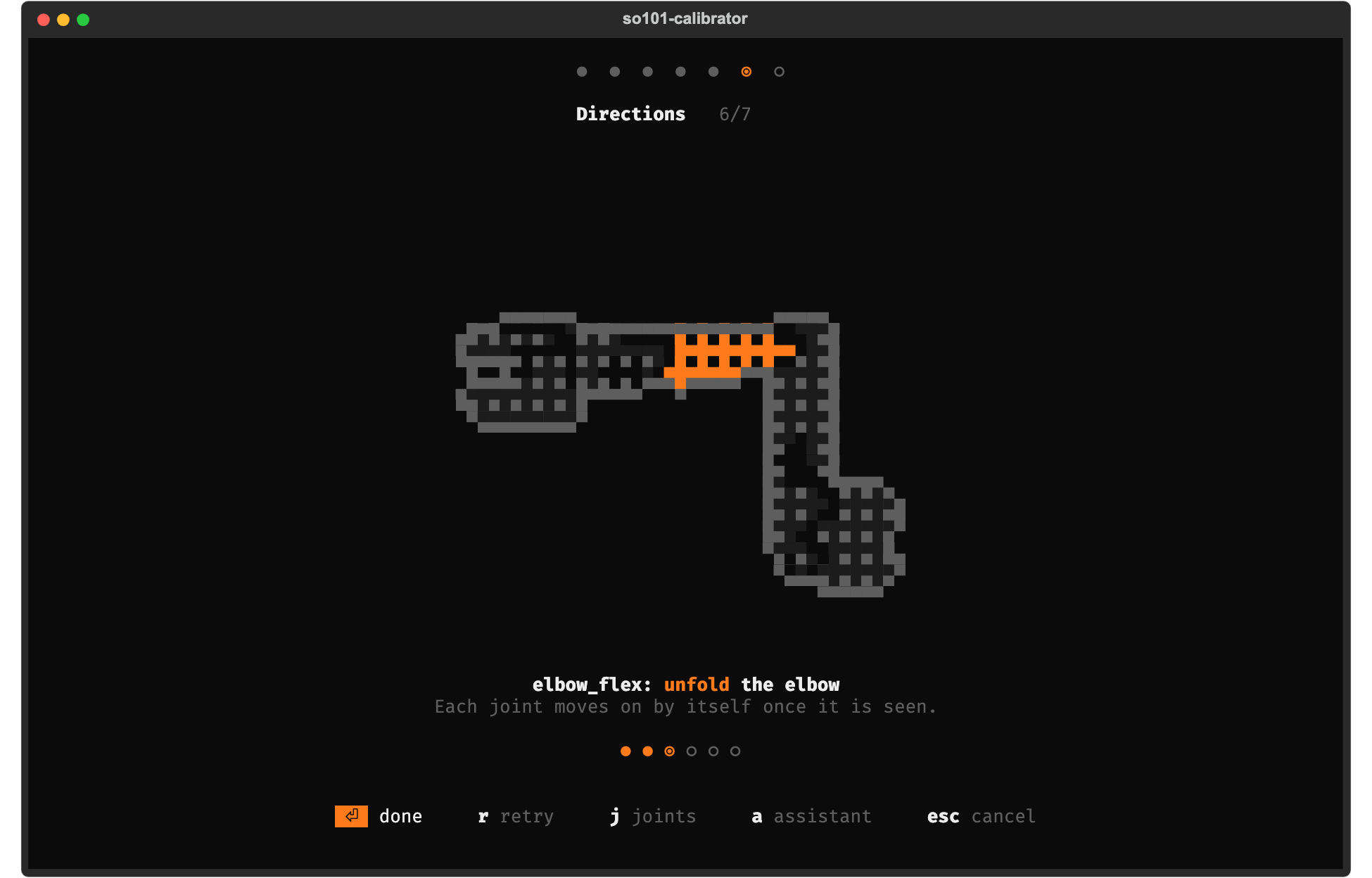
compatible with LeRobot. Type so101-cal: one screen per step,
a pixel-art SO-101 with the joint to move in orange, one sentence, and Enter to go on. In English or
Turkish (l).
lerobot-calibrate does the math right but asks you to do everything blind: press ENTER, move the
arm, hope. When something is off (a motor on the wrong id, the follower running on USB power, a
joint swept only halfway, a motor mounted backwards) you find out later, as a jerky teleop session or a
policy that never learns. This tool runs the same calibration as a sequence of steps, checks every
step, tells you what to do when a check fails, and keeps every calibration as a version you can
diff, roll back and export.
Install
Requires Python ≥ 3.10.
pip install so101-calibrator            # or: uv tool install so101-calibrator / pipx install so101-calibrator
so101-cal --mock                        # try it on a simulated arm first
so101-cal                               # then with your arms plugged in
Everything needed for real STS3215 motors is included. pip install "so101-calibrator[ai]" adds the
optional assistant (Strands Agents for local models, the Anthropic SDK for
Claude).
What it does
-
A wizard with a pass / warn / fail check on every step, and a concrete fix for every failure:
Step What is checked Find the USB port Detected by unplugging the cable; the board's USB serial is remembered, so swapped /dev/ttyACM*paths do not matterMotors Ids 1–6 answer at 1 Mbps; missing ids name the cable to check; unconfigured motors found at other baud rates Supply Follower ~12 V (or 7.4 V preset), leader ~5 V and never 12 V; voltage drop along the chain; motor temperature Middle pose Homing offsets written and read back as 2047; offset near the ±2047 limit; drift vs. the previous calibration Ranges Range too narrow, middle pose outside the range or off-centre, encoder wrap (0/4095), span change vs. last time Directions Which way each encoder counts, compared with the paired arm and with the previous calibration (catches a reversed motor or flipped horn) Save Valid LeRobot format, written to the motors and read back, stored as a new version, exported -
Shows what to do. Each step plays a short pixel-art clip of the SO-101, made from the official MuJoCo model, with only the joint to move drawn in orange. It works in any terminal with true color, and picks the largest of four sizes that fits the window.
-
English and Turkish:
lswitches the language and remembers it (default: your locale, or--lang en|tr). Check messages are English for now. -
Verify an existing calibration: the motor EEPROM still matches the active version, and the arm put back in the middle pose reads ~2047 on every joint.
-
Teleop test: refuses to start unless leader and follower are in the same pose (otherwise the follower would jump), then mirrors leader → follower with a rate limit and measures the tracking error.
-
History: every calibration is stored with its timestamp, role, USB serial, port, note and check results. You can list, show, diff and roll back versions, export to the LeRobot cache or any
calibration_dir, and import existing LeRobot files. -
Optional assistant: explains a failed check or answers a question about the current state or the calibration history, in your language. Local models (Ollama, LM Studio, llama.cpp) run as a Strands agent with read-only tools; Claude runs on the Anthropic SDK.
-
Mock hardware: a simulated leader + follower (register-level STS3215 emulation and a "hand" that moves the arm) with fault injection. Every test runs on it, and you can try the whole tool without an arm.
-
The same wizard also runs as plain CLI commands for scripts, and as a local web dashboard (
so101-cal dashboard).
Calibrating your arms
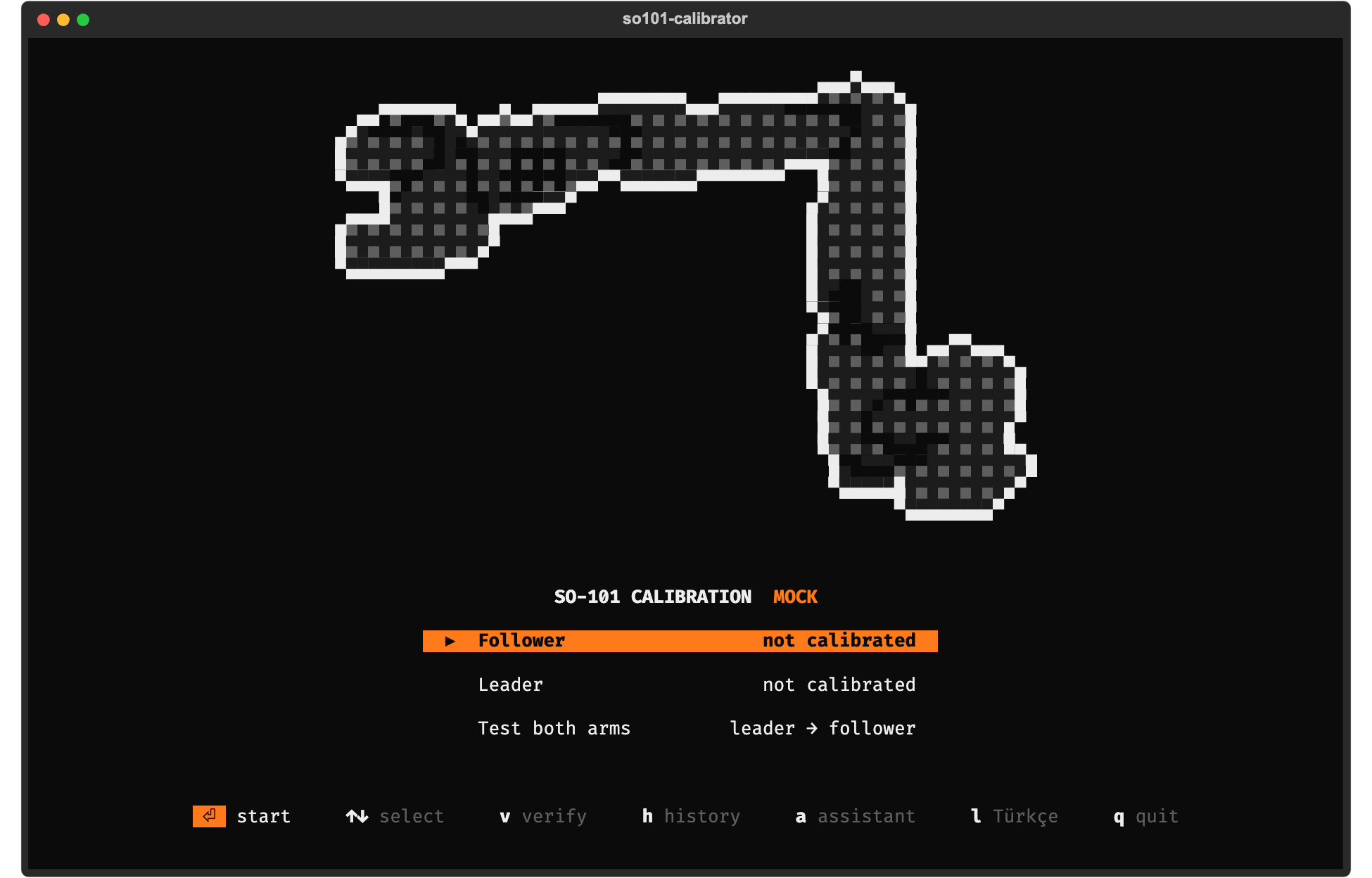
Run so101-cal, then pick Calibrate follower, then Calibrate leader, then Teleop test.
In every step Enter does the obvious thing: start, stop, continue or retry. The keys for everything
else are shown at the bottom of the screen. The arms are stored as follower / leader, which are the
LeRobot ids you later pass as --robot.id / --teleop.id.
- Port: with only this arm's board plugged in, press Enter, unplug its USB cable, then plug it back in.
- Motors, then Supply: the follower needs its 12 V adapter plugged in (use
--supply 7.4vfor kits with 7.4 V motors). The leader runs on 5 V. - Middle pose: torque is off. Put every joint in the middle of its range: upper arm and forearm at a right angle, wrist straight, gripper half open.
- Ranges: move each joint except
wrist_rollslowly to both mechanical stops, then back to the middle. The bars fill as you go. - Directions: move the joint that is shown a little, the way the animation shows. The step moves on by itself.
- Save: the calibration is written to the motors, read back, stored and exported to where LeRobot reads it.
On a warning you can continue or retry; on a failure you retry once you have applied the fix. A
calibration pushed past a failure (f) is stored for reference but not activated or exported. If
you abort after the middle-pose step, the tool tells you how to put the active calibration back into
the motors.
LeRobot then picks the files up with no extra flags:
lerobot-teleoperate --robot.type=so101_follower --robot.port=/dev/tty.usbmodem... --robot.id=follower \
  --teleop.type=so101_leader --teleop.port=/dev/tty.usbmodem... --teleop.id=leader
If LeRobot asks "Press ENTER to use provided calibration file … or type 'c'", press ENTER: the file already matches the motors.
Safety: the teleop test enables follower torque. Start with both arms in the same pose (the test refuses otherwise), keep the workspace clear, and keep a hand near the follower when the test ends: it goes limp again. Torque is switched off on every exit path, including Ctrl+C, closing the terminal, and a USB cable pulled mid-test.
Without the UI (scripts, other ids, a note):
so101-cal calibrate follower --id follower --note "after replacing the elbow motor"
so101-cal calibrate leader --id leader
so101-cal teleop-test
Assistant (optional)
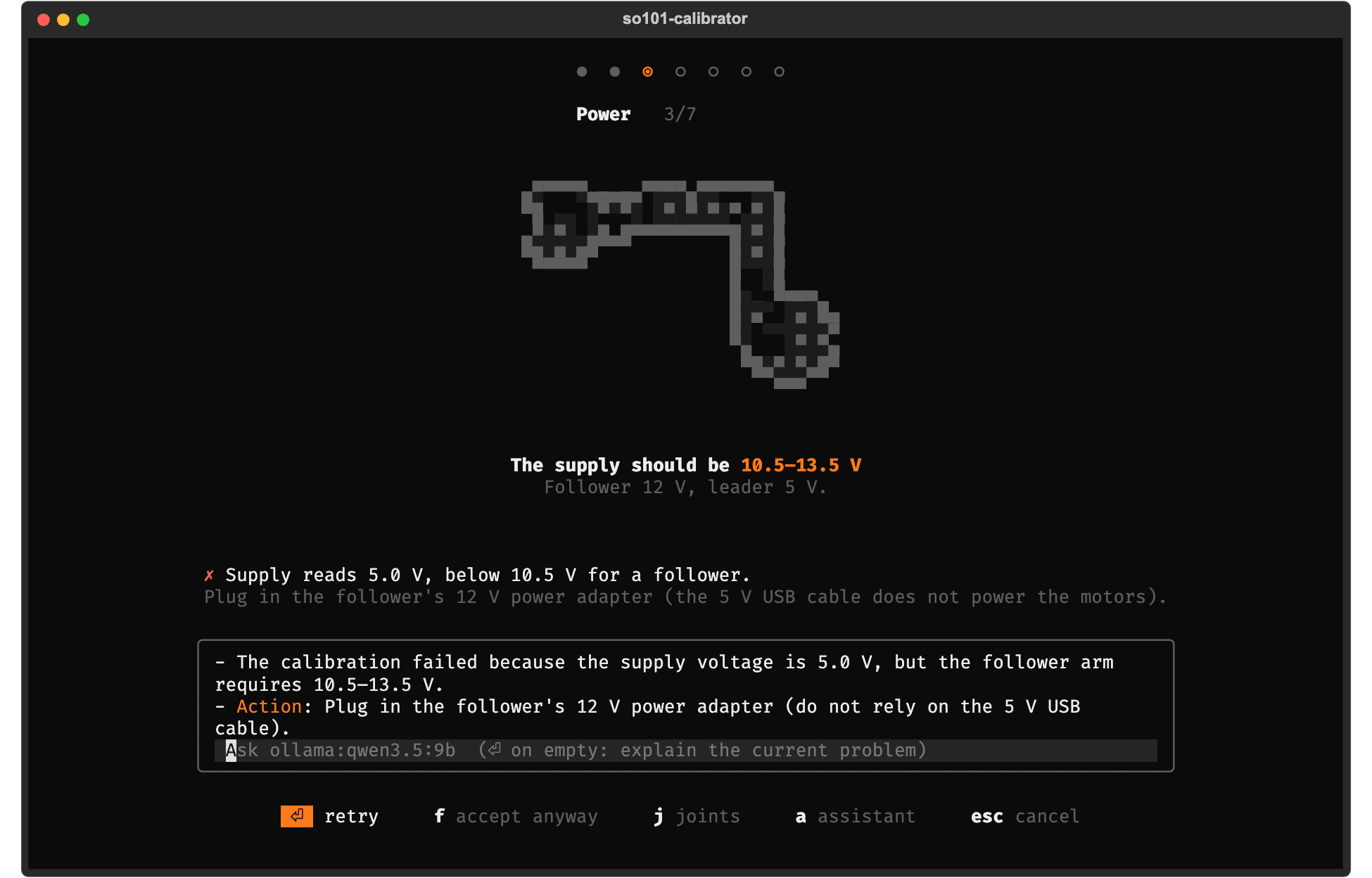
Press a and ask a question, or press Enter on an empty line to have the current problem explained.
The model sees what the screen shows (steps, check results and fixes, joint readings). Local and
OpenAI-compatible models run as a Strands agent that can also look up the
calibration history and compare two versions ("what changed since last week?"); both tools are
read-only. The assistant answers briefly, in your language, and only explains: it has no tool that moves
the arm or changes a calibration. It is off until you pick a model (pip install "so101-calibrator[ai]"):
so101-cal ai use ollama                 # local: the first model `ollama list` shows (or ollama:qwen2.5 ...)
so101-cal ai use openai:my-model        # any OpenAI-compatible server; URL in $SO101CAL_AI_URL,
                                        #   e.g. LM Studio: http://localhost:1234/v1
so101-cal ai use claude                 # Anthropic API: pip install "so101-calibrator[ai]", ANTHROPIC_API_KEY
so101-cal ai ask "why does my gripper only open halfway?"
so101-cal ai off
You can also type the model into the assistant box the first time, pass --ai SPEC, or set
$SO101CAL_AI. Ollama runs thinking models (qwen3, deepseek-r1) with thinking off, so answers come back
in seconds; models without tool support answer from the screen state alone.
The Claude helper uses claude-opus-5-5 at low effort, with Anthropic's server-side refusal fallback;
pick another model with claude:<model>.
Try it without hardware
so101-cal --mock                                     # the terminal UI on a simulated leader + follower
so101-cal --mock --mock-faults voltage:5             # ...with a fault, to see a failing check
so101-cal --mock calibrate follower                  # the plain CLI wizard
so101-cal --mock dashboard                           # the web dashboard, http://127.0.0.1:8101
Faults: missing:<id>, voltage:<V>, reversed:<joint>, stuck:<joint>, hot:<joint>. Prefix one with
leader. to apply it to the leader. Mock calibrations are exported into the mock store, never into your
real LeRobot cache.
History, diff, rollback
so101-cal history                     # all arms and versions
so101-cal show follower               # active version (or: show follower 3, --json)
so101-cal diff follower 2 3           # per joint/field deltas in ticks
so101-cal activate follower 2         # roll back: make v2 active and export it
so101-cal write follower              # also push the active version into the motors' EEPROM
so101-cal export follower --calibration-dir hardware/calibration   # for --robot.calibration_dir users
so101-cal import ~/.cache/huggingface/lerobot/calibration/robots/so_follower/follower.json \
  --role follower --id follower --note "made with lerobot-calibrate"
so101-cal verify follower             # still valid? (EEPROM + middle pose)
so101-cal where follower --id my_arm  # path LeRobot reads for this id
The TUI's History screen does the same with keys: Enter makes a version active (press it twice),
d diffs a version against the active one, and e exports it. Before write touches the EEPROM, it
checks that the arm on the port really is the one you named (motor ids and supply voltage). This
prevents writing a follower calibration into the leader.
The store is plain JSON, written atomically, by default in ~/.so101-calibrator. Use --store DIR or
$SO101CAL_HOME to change it, for example to a folder in your project's git repo:
~/.so101-calibrator/
  follower/
    arm.json        role, USB serial, last port, active version
    v0001.json      metadata, check results, joint directions, LeRobot calibration
    v0002.json
  leader/ …
  config.json       AI helper choice
Exports go to $HF_LEROBOT_CALIBRATION, else $HF_LEROBOT_HOME/calibration, else
~/.cache/huggingface/lerobot/calibration. The files are robots/so_follower/<id>.json and
teleoperators/so_leader/<id>.json, as LeRobot ≥ 0.4 expects; --legacy-export uses the older
so101_follower / so101_leader directories. A different file already at the target is kept as
<name>.bak-<timestamp>.
How it relates to LeRobot
The calibration itself is identical to lerobot-calibrate for the SO-101:
- homing offset = position − 2047 in the middle pose;
- min/max recorded for every joint;
wrist_rollfixed to 0..4095;drive_mode0;- the same JSON format.
Motor access goes through Feetech's scservo_sdk, the SDK LeRobot uses, so this tool does not need
LeRobot or PyTorch. Built against the LeRobot 0.6.1 file layout. SO-100 arms use the same motors and
will probably work, but are untested.
The command line is the stable interface. The Python modules are importable, but their API may change between minor versions until 1.0.
Troubleshooting
| Symptom | Likely cause |
|---|---|
| No serial port disappears when unplugging | Charge-only USB cable, or the CH343 driver is missing (Windows) |
| "No motor answers" | Power adapter off / not plugged, or the cable to the first motor |
| Motors only answer at another baud rate | Motors were never set up: run lerobot-setup-motors once |
| "Missing motor id(s): 4" | Loose daisy-chain cable going into that motor |
| Direction mismatch on one joint | Motor or horn mounted the other way round on one arm |
| Verify: EEPROM differs | Motor replaced, or another tool wrote a different calibration: recalibrate or so101-cal write |
| The arm looks small | It is drawn with text characters; a larger terminal window gets a larger sprite |
Contributing
See CONTRIBUTING.md. Reports
from real arms that help tune the thresholds in profiles.py are very welcome.
License
MIT. The SO-101 pixel art is rendered from the SO-ARM100 model (Apache-2.0).
1 maintainer

Metadata
1 maintainer
Release files for so101-calibrator 0.1.0
For a detailed explanation of source distributions (sdists) and built distributions (wheels), please see the package formats documentation.
Source distribution (sdist)
| File | Size | Uploaded | Provenance | Actions |
|---|---|---|---|---|
| so101_calibrator-0.1.0.tar.gz | 294.5 kB | With provenance | Details for so101_calibrator-0.1.0.tar.gz |
Built distribution (wheel)
| File | Interpreter | ABI | Platform | Actions Reset |
|---|---|---|---|---|
| so101_calibrator-0.1.0-py3-none-any.whl | Python 3 | none | any | Details for so101_calibrator-0.1.0-py3-none-any.whl |
Total release size: 590.5 kB
Release files / so101_calibrator-0.1.0.tar.gz
| Download URL | so101_calibrator-0.1.0.tar.gz |
|---|---|
| Size | 294.5 kB |
| Tags | Source |
|
SHA-256 checksum How to use checksums |
9b0fbe70fef649a92f743fe309071fbba19d43a46e9dceae1b64a9fdd2046152
|
|
BLAKE2b-256 checksum How to use checksums |
98ddec1e7bc68b9e7275d428892bbdab8d93742c3325d2d32e2c7599b7ab1418
|
| Upload date | |
|
Uploaded using Trusted Publishing? What is trusted publishing? |
Yes |
| Uploaded via |
twine/7.0.0 CPython/3.13.16
|
Provenance
Provenance describes where a file came from. On PyPI, provenance is shared via attestations, which provide a verifiable record of the build or publishing details. View details, limitations and caveats.


PyPI Publish Attestation
PyPI verified that this artifact, at this checksum, originated from the publisher listed below.
Signed by GitHub Actions, verified by PyPI on Oct 28, 2026.
Transparency logRelease files / so101_calibrator-0.1.0-py3-none-any.whl
| Download URL | so101_calibrator-0.1.0-py3-none-any.whl |
|---|---|
| Size | 295.9 kB |
| Tags | Python 3 |
|
SHA-256 checksum How to use checksums |
1b08dfeb8c270aff4210668a58b2d6262c3d00ae1e5c695113898eea206aab2e
|
|
BLAKE2b-256 checksum How to use checksums |
ece2b1553046caa86cb91c2d030bc68cc97938bc6b87c6d2f53ad3c6cf5d9590
|
| Upload date | |
|
Uploaded using Trusted Publishing? What is trusted publishing? |
Yes |
| Uploaded via |
twine/7.0.0 CPython/3.13.16
|
Provenance
Provenance describes where a file came from. On PyPI, provenance is shared via attestations, which provide a verifiable record of the build or publishing details. View details, limitations and caveats.
PyPI Publish Attestation
PyPI verified that this artifact, at this checksum, originated from the publisher listed below.
Signed by GitHub Actions, verified by PyPI on Oct 28, 2026.
Transparency logSecurity for so101-calibrator 0.1.0
Provenance
Provenance describes where a file came from. On PyPI, provenance is shared via attestations, which provide a verifiable record of the build or publishing details. View details, limitations and caveats.
Full provenance
Both files in this release have been uploaded with provenance metadata.
Attestation for so101_calibrator-0.1.0.tar.gz
PyPI Publish Attestation
PyPI verified that this artifact, at this checksum, originated from the publisher listed below.
Signed by GitHub Actions, verified by PyPI on Oct 28, 2026.
Transparency logA note on package security
PyPI is a repository for distributing packages, not a service for auditing them. While third-party security researchers and our staff do their best to detect and remove malicious packages, PyPI cannot guarantee the quality, security or suitability of any given package.
To learn more about protecting yourself from malicious actors, visit our package security documentation.














