
soc4onnx
A very simple tool that forces a change in the opset of an ONNX graph. Simple Opset Changer for ONNX.
https://github.com/PINTO0309/simple-onnx-processing-tools




1. Setup
1-1. HostPC
### option
$ echo export PATH="~/.local/bin:$PATH" >> ~/.bashrc \
&& source ~/.bashrc

### run
$ pip install -U onnx \
&& pip install -U soc4onnx
1-2. Docker
https://github.com/PINTO0309/simple-onnx-processing-tools#docker
2. CLI Usage
$ soc4onnx -h

usage:
    soc4onnx [-h]
    -if INPUT_ONNX_FILE_PATH
    -of OUTPUT_ONNX_FILE_PATH
    -os OPSET
    [-n]

optional arguments:
  -h, --help
        show this help message and exit

  -if INPUT_ONNX_FILE_PATH, --input_onnx_file_path INPUT_ONNX_FILE_PATH
        Input onnx file path.

  -of OUTPUT_ONNX_FILE_PATH, --output_onnx_file_path OUTPUT_ONNX_FILE_PATH
        Output onnx file path.

  -os OPSET, --opset OPSET
        opset number to be changed. e.g. --opset 11

  -n, --non_verbose
        Do not show all information logs. Only error logs are displayed.
3. In-script Usage
$ python
>>> from soc4onnx import change
>>> help(change)
Help on function change in module soc4onnx.onnx_opset_change:

change(
  opset: int,
  input_onnx_file_path: Union[str, NoneType] = '',
  output_onnx_file_path: Union[str, NoneType] = '',
  onnx_graph: Union[onnx.onnx_ml_pb2.ModelProto, NoneType] = None,
  non_verbose: Union[bool, NoneType] = False
) -> onnx.onnx_ml_pb2.ModelProto

    Parameters
    ----------
    opset: int
        opset number to be changed.
        e.g. --opset 11

    input_onnx_file_path: Optional[str]
        Input onnx file path.
        Either input_onnx_file_path or onnx_graph must be specified.

    output_onnx_file_path: Optional[str]
        Output onnx file path.
        If output_onnx_file_path is not specified, no .onnx file is output.

    onnx_graph: Optional[onnx.ModelProto]
        onnx.ModelProto.
        Either input_onnx_file_path or onnx_graph must be specified.
        onnx_graph If specified, ignore input_onnx_file_path and process onnx_graph.

    non_verbose: Optional[bool]
        Do not show all information logs. Only error logs are displayed.
        Default: False

    Returns
    -------
    changed_graph: onnx.ModelProto
        opset changed onnx ModelProto
4. CLI Execution
$ soc4onnx \
--input_onnx_file_path NonMaxSuppression.onnx \
--output_onnx_file_path NonMaxSuppression_13.onnx \
--opset 13
5. In-script Execution
from soc4onnx import change

changed_graph = change(
    onnx_graph=graph,
    opset=13,
    non_verbose=True,
)
6. Sample
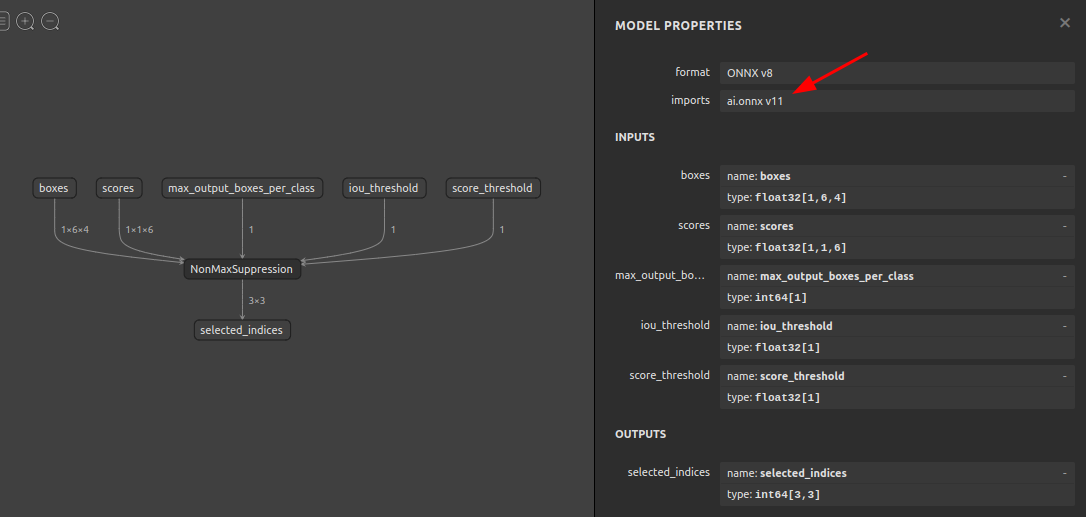
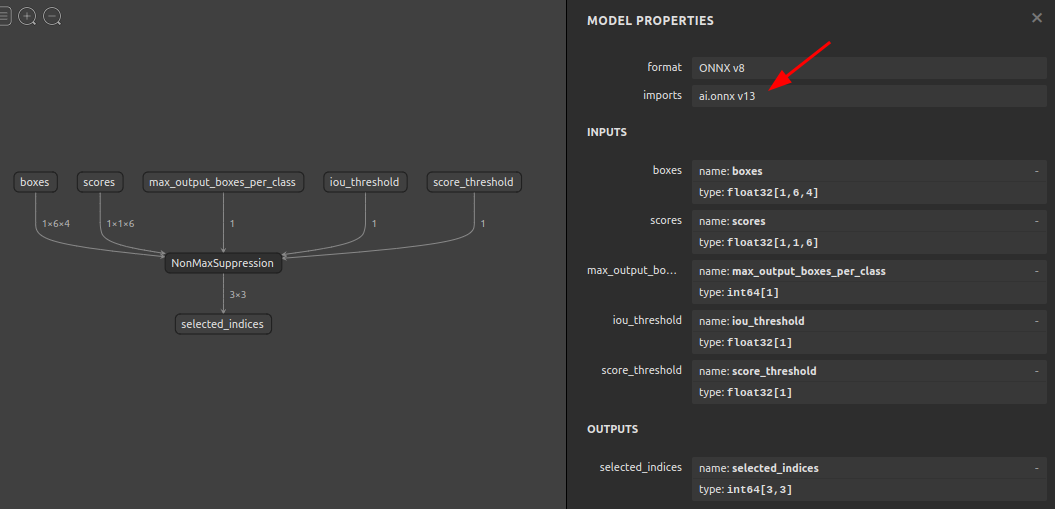
$ soc4onnx \
--input_onnx_file_path NonMaxSuppression.onnx \
--output_onnx_file_path NonMaxSuppression_13.onnx \
--opset 13
7. Issues
https://github.com/PINTO0309/simple-onnx-processing-tools/issues
1 maintainer

Metadata
1 maintainer
Release files for soc4onnx 1.0.2
For a detailed explanation of source distributions (sdists) and built distributions (wheels), please see the package formats documentation.
Source distribution (sdist)
| File | Size | Uploaded | |
|---|---|---|---|
| soc4onnx-1.0.2.tar.gz | 4.8 kB | Details |
Built distribution (wheel)
| File | Interpreter | ABI | Platform | Reset |
|---|---|---|---|---|
| soc4onnx-1.0.2-py3-none-any.whl | Python 3 | none | any | Details |
Total release size: 10.5 kB
Release files / soc4onnx-1.0.2.tar.gz
| Download URL | soc4onnx-1.0.2.tar.gz |
|---|---|
| Size | 4.8 kB |
| Tags | Source |
|
SHA-256 checksum How to use checksums |
3579be6ca42ef94e476f2b8c82dfe7adc0c5a819eac7bf25d760d5d7f0ff4bc2
|
|
BLAKE2b-256 checksum How to use checksums |
9c001a3a4aac26f194e72d0644f24a1d4e3f014a496f20f612a140a2478ea66d
|
| Upload date | |
|
Uploaded using Trusted Publishing? What is trusted publishing? |
No |
| Uploaded via |
twine/4.0.1 CPython/3.9.14
|
Release files / soc4onnx-1.0.2-py3-none-any.whl
| Download URL | soc4onnx-1.0.2-py3-none-any.whl |
|---|---|
| Size | 5.7 kB |
| Tags | Python 3 |
|
SHA-256 checksum How to use checksums |
e89a1b230eef184555489184588528bd2ca61197d5c842a466b00d931cca9961
|
|
BLAKE2b-256 checksum How to use checksums |
6a61d89a0c06062c46e59a588ffe693f40c80c5c7a736ee15bc0742e3d269b8f
|
| Upload date | |
|
Uploaded using Trusted Publishing? What is trusted publishing? |
No |
| Uploaded via |
twine/4.0.1 CPython/3.9.14
|














