
Smart functions with a brain inside. Inputs in. Pydantic out. Multi-turn agent in the middle.

Project description

Sophia Motor
Smart functions with a brain inside.
Inputs in. Pydantic out. Multi-turn agent in the middle.




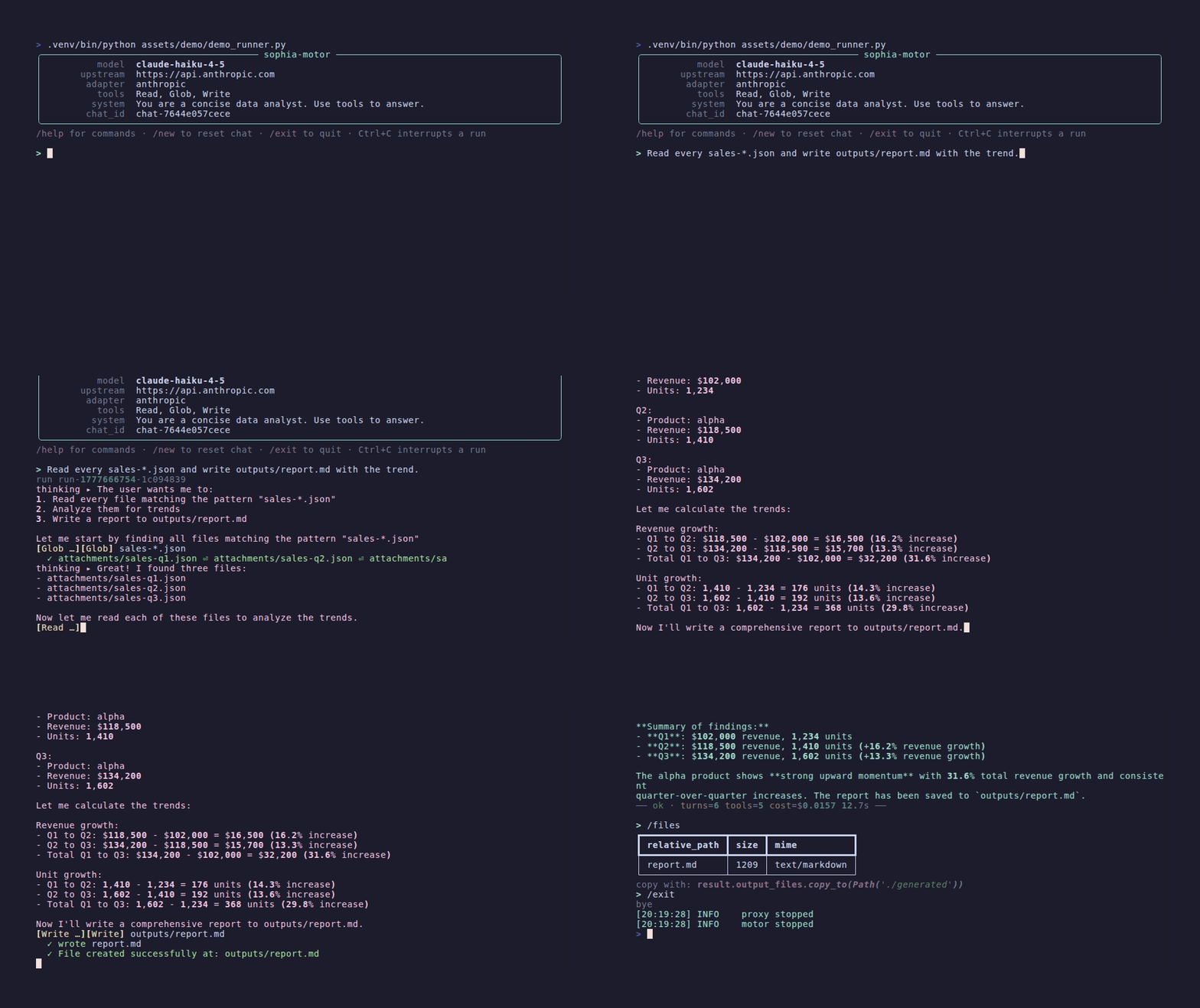
Why
A normal LLM call is a string in → string out roulette. Looks nice in a demo. Falls apart in production.
Sophia Motor turns it into a typed Python function — one your code can actually trust.
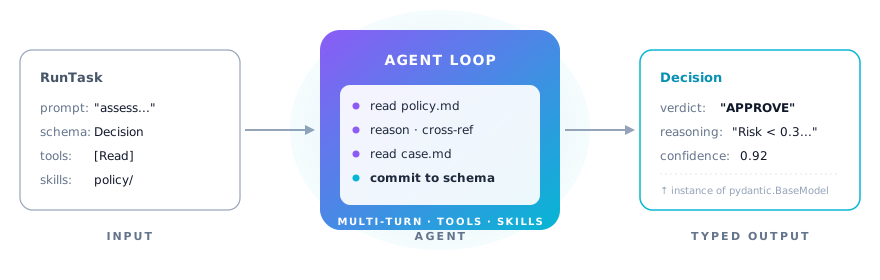
motor = Motor()  # default loads from => env ANTHROPIC_API_KEY=sk-ant-...

result = await motor.run(RunTask(
    prompt="Should we approve this loan request? Reasons attached.",
    output_schema=Decision,  # ← your Pydantic class
    skills=Path("./policy/"),  # ← your domain knowledge
    tools=["Read"],  # ← what the agent can actually do
))

result.output_data  # → instance of Decision, validated
Behind that one call, the agent reads files, reasons across multiple turns, cites sources, retries until the schema is
satisfied — then hands you back a real Python object you can .attribute_access like any other.
Same motor, N tasks, each with its own schema. The agent does the magic; your program stays in control of the contract.
Cost & control: pay for what you actually use
The Claude Agent SDK out of the box ships every built-in tool, the entire bundled-skill catalogue, an identity block, and a billing header — on every single call. For a one-shot question this means thousands of cache-creation tokens you didn't ask for.
sophia-motor is opinionated: zero tools, zero skills, zero SDK noise unless you explicitly opt in. Same model,
same upstream API — the bill drops.
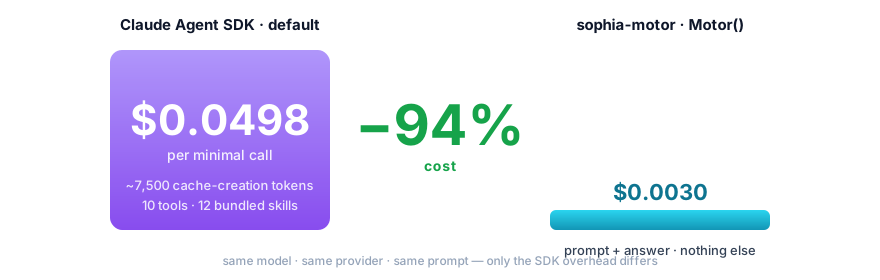
The same call, two bills
| What runs | Claude Agent SDK (default) | sophia-motor (Motor()) |
|---|---|---|
| Tools exposed to model | every built-in (Read, Bash, WebFetch, …) | 0 — you list them when you need them |
| Skills exposed to model | the SDK's bundled catalogue (update-config, simplify, loop, claude-api, init, review, security-review, …) | 0 — only the skills you linked |
| System blocks injected | SDK identity + billing header + noise reminders | stripped at the proxy |
| Cost on a 1-turn no-tool prompt | $0.0498 | $0.0030 (–94%) |
| Where you opt in | nowhere (it's all on by default) | RunTask(tools=[...], skills=Path(...)) per call, or MotorConfig.default_* once |
The numbers are from a live run measured 2026-05-01, claude-opus-4-6, same prompt and same provider — the only thing
that changes is what the motor doesn't ship to the model.
Install
pip install sophia-motor
Set ANTHROPIC_API_KEY in env (or ./.env). Done.
motor = Motor()  # boots on first call, no setup
v = await motor.run(RunTask(...))  # ← right away
For long-running services (FastAPI, Celery), instance the motor once and call await motor.stop() on shutdown.
Single-shot scripts? Don't worry about it — the process death cleans up.
What it gives you
| 🧠 Multi-turn agent loop | The agent reads, reasons, calls tools, cross-references — all in one await. |
| 📡 Live streaming | motor.stream(task) yields typed chunks (text deltas, tool-use deltas, …) for chat-UI rendering. Same run, two consumption modes. |
| 🛑 Interrupt in flight | motor.interrupt() aborts the active run cleanly — distinct from stop() (lifecycle). Audit dump preserved. |
| 📁 Generated files surfaced | result.output_files: list[OutputFile] with copy_to(...) to persist outside the (transient) run workspace. |
| 🔌 Multi-provider via adapters | Anthropic by default. Drop a VLLMAdapter (or your own) on MotorConfig to point upstream anywhere. |
| 💬 Interactive console | await motor.console() opens a chat-like REPL with live streaming, slash commands, history (pip install sophia-motor[console]). |
| 🧵 Multi-turn chat | motor.chat() → chat.send() with persistent SDK session. Build chat backends like sophia-agent's (1 motor, N concurrent users). |
| 📐 Pydantic-validated output | Pass any BaseModel. Get back a real instance, not a parsed dict. |
| 🧰 Tool whitelisting | Hard-cap what the agent can see and do. No surprises. |
| 📚 Skills as first-class | Drop a SKILL.md folder, the agent gets a new capability. Multi-source supported. |
| 🪜 Singleton pattern | Instance the motor once at module top-level. Call it from anywhere, any number of times. Zero lifecycle ceremony. |
| 🧾 Per-run audit trail | Every run lives in its own dir. Useful when "the model said X and we trusted it" needs to be defendable. |
| 🪡 Defaults + per-task override | Configure the boilerplate once on MotorConfig, vary only what changes per call. |
| 🔌 Pip install. That's it. | pip install sophia-motor. No daemons, no infra, no servers to run. |
Tools the agent can pick from
Pass any of these in RunTask(tools=[...]). The agent only sees what you list — tools=[] (the default) means pure
reasoning, no actions.
| Tool | What it does | Status |
|---|---|---|
Read |
Read a file under the run cwd | available |
Edit |
Modify a file under the run cwd | available |
Write |
Create files (guardrail confines to outputs/) |
available |
Glob |
Pattern-match filenames | available |
Grep |
Pattern-match file content | available |
Bash |
Run shell commands (guardrail-filtered: no curl/git/sudo/…) | available |
Skill |
Invoke a SKILL.md skill linked into the run |
available |
WebSearch |
Live internet search | available |
WebFetch |
Fetch a URL to text/markdown | available |
WebSearch and WebFetch reach the live internet — the agent can follow links anywhere on the public web. Most runs
don't need it; opt in when the task genuinely needs fresh information. See
examples/web-search/.
Beyond this list the SDK ships a few more experimental tools (Agent, TodoWrite, plan-mode, notebook-edit, cron, …)
— they may work if you list them, but aren't validated end-to-end with the motor yet.
Why you might still pick the raw SDK
The motor isn't a free lunch. Trade-offs to know about:
- Pre-1.0: API still moves between minor versions. If you need a frozen contract, pin to an exact
sophia-motor==X.Y.Z. - Audit trail is mandatory: every run lives in
~/.sophia-motor/runs/<run_id>/(request/response dumps + workspace). That's a feature for compliance/review and a footprint you'll want to manage.clean_runs(...)is shipped — wire it into your lifecycle if you produce many runs. - Proxy in-process: a local FastAPI + Uvicorn proxy boots on the first run (≈500 ms once, then idle). That's the price of audit dump + selective system-reminder strip + per-turn events.
- Strict guardrail by default:
Read/Editlexically restricted to the run's cwd,Writetooutputs/,Bashblocks dev/admin commands. If you intentionally need an unrestricted agent, setMotorConfig(guardrail="permissive")or"off".
If your workload is "one prompt, one answer, no tools, no audit" — congrats, the SDK already does that, and you'll pay $0.05 per call instead of $0.003. For everything else (multi-turn, structured output, skills, attachments, parallel runs, defendable audit), the motor is the cheaper and the cleaner choice.
Examples
Things you cannot ship with a single LLM call. Same motor instance, different RunTask.
from sophia_motor import Motor, RunTask

motor = Motor()  # one instance, used everywhere below
1 · Investigate a folder, find what matters
The agent walks the directory autonomously: globs files, reads the relevant ones, follows references, compiles a typed
list of findings — all in one await.
from pathlib import Path
from typing import Literal
from pydantic import BaseModel


class AuthIssue(BaseModel):
    file: str
    line_hint: str
    severity: Literal["low", "medium", "high", "critical"]
    quote: str  # verbatim from the source
    fix: str


result = await motor.run(RunTask(
    prompt=(
        "Audit our authentication code. Find every place that handles tokens, "
        "passwords, or session state. Flag anything risky with severity, the "
        "exact code line as quote, and a concrete fix."
    ),
    tools=["Read", "Glob", "Grep"],
    attachments=Path("./src/"),
    output_schema=list[AuthIssue],  # ← N findings, not one
    max_turns=20,
))

for issue in result.output_data:
    print(f"[{issue.severity}] {issue.file} → {issue.fix}")
What happens behind that single await: the agent globs, greps, reads files it didn't know existed before, reasons,
then commits to a validated list of AuthIssue. Try doing that with a single LLM call — you'd have to script the file
walk yourself, parse the responses, retry on bad JSON, and pray.
2 · Cross-reference multiple sources
The agent reads several documents, finds connections you didn't ask about explicitly, and returns the contradictions you'd have spent an afternoon hunting.
class Contradiction(BaseModel):
    claim_a: str  # verbatim
    source_a: str  # filename + page/section
    claim_b: str  # verbatim
    source_b: str
    why: str  # why these conflict


result = await motor.run(RunTask(
    prompt=(
        "Read every document in attachments/. Find pairs of claims that "
        "contradict each other across sources. Cite verbatim both sides "
        "and explain the conflict."
    ),
    tools=["Read", "Glob"],
    attachments=Path("./research_papers/"),
    output_schema=list[Contradiction],
    max_turns=25,
))
3 · Orchestrate skills — the agent picks which to call
Drop a folder of SKILL.md files. The agent reads their descriptions, decides which to use for the input, calls them in
the right order, and composes the answer into your typed schema.
class RiskFinding(BaseModel):
    severity: Literal["low", "medium", "high"]
    quote: str  # verbatim from the contract
    impact: str


class ContractAnalysis(BaseModel):
    parties: list[str]
    key_obligations: list[str]
    risks: list[RiskFinding]
    short_summary: str


result = await motor.run(RunTask(
    prompt=(
        "Analyze attachments/contract.pdf. Use the skills you have to "
        "extract parties, obligations and risks, then compose the answer."
    ),
    tools=["Read", "Skill"],
    attachments=Path("./contract.pdf"),
    skills=Path("./skills/"),  # contains: extract-entities, risk-score, ...
    output_schema=ContractAnalysis,
    max_turns=15,
))

analysis: ContractAnalysis = result.output_data
high_risks = [r for r in analysis.risks if r.severity == "high"]
The agent might call extract-entities to find the parties, then risk-score on the obligations, choosing the path
itself from the SKILL.md descriptions. You write skills, the agent composes them — and you get back a typed object, not
a free-form report.
4 · Decompose, decide, justify — typed end-to-end
Compliance pattern: an obligation may have N sub-requirements, your candidate controls cover some and miss others. The agent decomposes, matches each sub-req to evidence, and produces a verdict with citations — schema-strict.
from typing import Literal


class SubRequirement(BaseModel):
    text: str
    covered: bool
    evidence: str  # which control + verbatim quote (or "none")


class ComplianceVerdict(BaseModel):
    verdict: Literal["FULL", "PARTIAL", "NONE"]
    sub_requirements: list[SubRequirement]
    overall_reasoning: str


result = await motor.run(RunTask(
    prompt=(
        "Obligation: {obligation_text}\n\n"
        "Candidate controls:\n{controls_block}\n\n"
        "Decompose the obligation into sub-requirements. For each one, "
        "say if it's covered, by which control, with the exact quote. "
        "Return a final verdict."
    ).format(obligation_text=..., controls_block=...),
    tools=["Read"],
    attachments=Path("./compliance_corpus/"),
    output_schema=ComplianceVerdict,
    max_turns=15,
))

# result.output_data: a real ComplianceVerdict you can hand straight to a downstream system,
# audit log, or human reviewer — every sub-req traceable to a verbatim citation.
This is one Python await doing what would otherwise be a 200-line orchestration script with prompt engineering,
JSON parsing, retry loops, and schema-validation glue. The agent is the orchestration; your program holds the contract.
Multi-turn means multi-turn
The agent doesn't reply with the JSON immediately. It can read your files, call tools, follow leads, then commit to the structured answer.
result = await motor.run(RunTask(
    prompt="Cross-check this claim against our research notes.",
    attachments=[Path("/data/notes/")],  # mounted as agent-readable
    tools=["Read"],  # so it can actually open them
    output_schema=FactCheck,
    max_turns=10,
))
What actually happens behind that single await:
sequenceDiagram
    autonumber
    participant You as Your code
    participant Motor
    participant Agent
    participant Tool as Read tool
    participant API as Anthropic API

    You->>Motor: motor.run(task + schema)
    Motor->>Agent: open multi-turn loop
    Agent->>API: reason about task
    Agent->>Tool: Read("notes/policy.md")
    Tool-->>Agent: file content
    Agent->>API: reason + cross-ref
    Agent->>Tool: Read("notes/case.md")
    Tool-->>Agent: file content
    Agent->>API: commit to schema
    API-->>Agent: structured_output (validated server-side)
    Agent-->>Motor: ResultMessage
    Motor-->>You: RunResult.output_data → FactCheck instance
Verified path: agent calls Read once, twice, three times — finds the relevant snippet, quotes verbatim, then emits
the schema-conforming JSON. Same run, multi-turn loop and structured output coexist.
One motor, N smart functions
Boot the motor once at module top-level. Wrap each task as a normal Python async def. Same proxy, same audit trail,
same defaults — N typed functions, each with its own Pydantic schema.
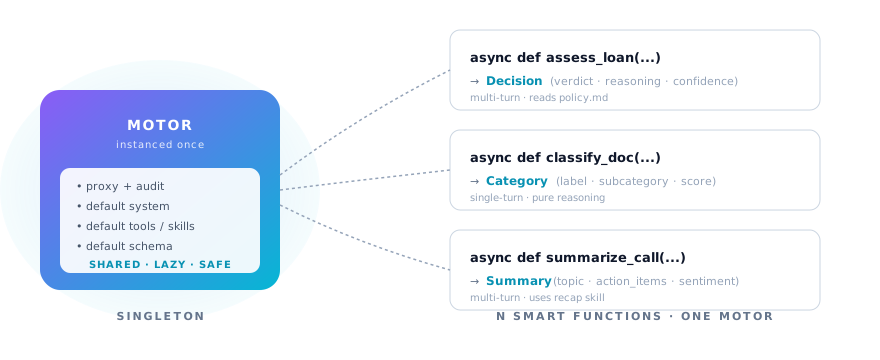
Defaults + per-task override
Configure once, vary per task. Override semantics is full replacement — clean, no surprises.
motor = Motor(MotorConfig(
    default_system="You are a senior analyst.",
    default_output_schema=GeneralReport,
    default_tools=["Read"],
    default_max_turns=10,
))

# task A — uses every default
await motor.run(RunTask(prompt="..."))

# task B — same motor, different schema for a one-off
await motor.run(RunTask(
    prompt="...",
    output_schema=SpecialReport,  # overrides default_output_schema
    tools=["Read", "Glob"],  # overrides default_tools
))
Networking
The proxy listens on 127.0.0.1 with a kernel-assigned port by default
— no exposure to the host network, no clash with services on common
ports (ollama :11434, vLLM, Postgres, dev servers). Inside a Docker
container the loopback is the container's loopback, not the host's,
so multiple motors on the same machine — or alongside any other local
service — never collide. Two Motor() instances in the same Python
process get distinct ports automatically.
# Default — kernel picks a free port. Recommended.
Motor()

# Pin a specific port — only when you need a stable proxy URL for
# external sniffing or fixed firewall rules. Raises a clear error if
# the port is already in use.
Motor(MotorConfig(proxy_port=8765))
The proxy is an internal mechanism: nothing calls it from outside the process. You never need to open a port, configure a Service, or punch through a firewall.
Concurrency
One motor, N runs in parallel. The proxy multiplexes runs via per-run path prefixes — call motor.run(...) /
motor.stream(...) from as many tasks as you want, they execute concurrently.
motor = Motor()
results = await asyncio.gather(
    motor.run(task_a),
    motor.run(task_b),
    motor.run(task_c),
)
This is exactly what a chat backend does: instantiate one motor, hand it whatever RunTask each HTTP request brings,
let the framework drive concurrency.
Guardrail
A PreToolUse hook is wired in by default. It runs before every tool call and refuses unsafe ones, returning the
reason as feedback so the agent can self-correct.
⚠️ Alpha software. A built-in
strictguardrail is on by default — the agent'sRead/Edit/Glob/Grepare confined to the workspace,Writeis restricted tooutputs/, andBashblocks dev/admin commands (curl,wget,ssh,git,docker,pip,npm,sudo, ...) plus..escapes,/dev/tcp,bash -c,eval/execpatterns. This is the first layer, not the last. Audit dump, rate limits, content filtering, and a managed-sandbox runtime are in active development. Don't point it at production secrets or fully untrusted prompts without your own hardening on top — yet.
Motor(MotorConfig(guardrail="strict"))  # default — safe by default
Motor(MotorConfig(guardrail="permissive"))  # blocks only sudo/exfil/escapes
Motor(MotorConfig(guardrail="off"))  # no hook (you take responsibility)
| Mode | Read / Edit / Glob / Grep | Write | Bash |
|---|---|---|---|
| strict | must stay inside cwd | only outputs/ |
dev/admin commands blocked (curl, git, docker, pip, npm, sudo, ...) + .. / /dev/tcp / bash -c / eval |
| permissive | unrestricted | unrestricted | only sudo, exfiltration patterns, /dev/tcp, .. escapes, destructive commands |
| off | unrestricted | unrestricted | unrestricted |
What the motor controls (that the raw SDK doesn't)
The Claude Agent SDK ships a CLI that, by default, inherits the entire
environment of your Python process and runs Bash freely. If you embed
the raw SDK in a backend that has MONGODB_URI, STRIPE_SECRET_KEY,
or AWS_ACCESS_KEY_ID in its env, the model can read them with a
single os.environ print or env shell command. The motor closes the
common gaps:
| Layer | Raw SDK | sophia-motor |
|---|---|---|
| Subprocess env | full inherit (host secrets visible) | only PATH, ANTHROPIC_API_KEY, CLAUDE_CONFIG_DIR, model + DISABLE_* flags. Nothing else leaks |
| Filesystem reads | unrestricted | Read/Edit/Glob/Grep fenced inside the run cwd (strict) |
| Filesystem writes | unrestricted | Write restricted to outputs/ (strict), with symlink-escape resolution |
| Bash blocklist | none | dev/admin commands + bash -c + .. + /dev/tcp + eval/source/exec redirects |
| Exfiltration patterns | none | curl/wget with --data/--upload-file blocked in both strict and permissive |
| Per-run isolation | shared cwd | each run gets its own workspace under <workspace_root>/<run_id>/, deleted by motor.clean_runs() |
| Audit trail | none | every request/response body persisted under <run>/audit/ (when proxy_dump_payloads=True) |
Python invocation guard (strict mode only)
python and python3 are allowed in strict mode but the call shape
is constrained:
| Form | Verdict |
|---|---|
python -c "<code>" with stdlib-safe imports + no os/subprocess/socket/shutil/exec/eval/__import__/open('/abs/path') |
✅ allowed |
python <path> where <path> is under $CLAUDE_CONFIG_DIR/skills/<name>/scripts/ (a skill the dev registered) |
✅ allowed |
python -c "..." with import os, subprocess, shutil, socket, urllib, requests, __import__(...), exec(...), eval(...), open('/abs/path'), open(0), __builtins__, getattr(...) |
❌ blocked |
python outputs/foo.py, python attachments/foo.py, python /tmp/foo.py |
❌ blocked (Write+exec workaround closed) |
python (REPL), python -m <anything>, python -i ..., python -V, python < /dev/stdin, cat foo.py | python |
❌ blocked |
Stdlib whitelist for python -c imports: math, statistics,
decimal, fractions, json, re, datetime, random,
itertools, functools, collections, string, textwrap,
unicodedata, base64, hashlib, uuid, time, operator,
copy, enum, typing. Anything else needs to live as a registered
skill — that's the trust passport.
Skill = capability bounded. The dev decides "my agent can query
Qdrant" by writing a query-qdrant skill with its own
scripts/search.py. The agent runs that script through the
skill-script whitelist; it cannot import qdrant_client directly via
python -c. Strict stays strict — no flag explosion needed.
In permissive mode the python-c whitelist does not apply: the dev
has signed off on trusted-tool tier and any python call is fine
(other than the cross-mode escapes like bash -c, eval, /dev/tcp,
| python, ...).
What the motor still does NOT control (be honest about this)
- Skill scripts are trusted code (yours). The motor symlinks
whatever you put under
default_skillsinto the run. If a skill'sscripts/foo.pydoes something destructive, the guard won't catch it — the dev who registered the skill has signed off on it. - The
Skilltool itself is a code-execution surface by design. Strip it fromtoolsif your trust boundary doesn't include whoever wrote the skills. guardrail="off"is opt-in escape hatch. Use only inside an ephemeral container or a dedicated VM where blast radius is the container itself.- Determined evasion via heavy obfuscation (custom encoding +
compile()chains, ctype tricks via skills, etc.) is still possible. The guard defeats the common prompt-injection and honest-mistake cases — it is not a formal sandbox. For higher assurance run as non-privileged OS user with read-only FS.
For higher assurance: run the motor as a non-privileged OS user
with no access to your dev $HOME, ideally inside a container with
read-only FS except /data. The guard is the first line, the OS is
the last.
Debug mode
The motor stays silent by default — no stdout, no audit dump, nothing written outside the per-run workspace. Production-shaped out of the box. When you want to see what's happening, flip on the two debug knobs.
# inline, single run
SOPHIA_MOTOR_CONSOLE_LOG=true SOPHIA_MOTOR_AUDIT_DUMP=true python my_app.py
# or per Motor instance
motor = Motor(MotorConfig(
    console_log_enabled=True,
    proxy_dump_payloads=True,
))
console_log_enabled streams events as they happen — turn boundaries,
tool calls, costs. proxy_dump_payloads persists every request and
response body under <run>/audit/ so you can grep what the model
actually saw and produced.
Configuration cascade
For every supported field, resolution order is:
explicit
MotorConfig(...)param > env var > hardcoded default
| Env var | Field | Default |
|---|---|---|
SOPHIA_MOTOR_MODEL |
model |
claude-opus-4-6 |
SOPHIA_MOTOR_WORKSPACE_ROOT |
workspace_root |
~/.sophia-motor/runs |
SOPHIA_MOTOR_PROXY_HOST |
proxy_host |
127.0.0.1 |
SOPHIA_MOTOR_CONSOLE_LOG |
console_log_enabled |
false |
SOPHIA_MOTOR_AUDIT_DUMP |
proxy_dump_payloads |
false |
Bool env vars accept true/1/yes/on (truthy) and
false/0/no/off (falsy), case-insensitive. Anything else falls
back to the hardcoded default — typo'd values never silently coerce.
The cascade also reads ./.env in the current working directory if a
process env var isn't set, so a pip install + Motor() script can
pick up local debug knobs without exporting anything.
Configuration reference
MotorConfig
Settings on the motor instance — set once at construction.
| Field | Type | Default | What it does |
|---|---|---|---|
model |
str |
"claude-opus-4-6" |
Default model the SDK uses |
api_key |
str |
from ANTHROPIC_API_KEY env / ./.env |
Anthropic API key |
workspace_root |
Path |
~/.sophia-motor/runs/ |
Where per-run dirs are created. Must be outside any git repo / pyproject.toml ancestor |
guardrail |
"strict" | "permissive" | "off" |
"strict" |
Built-in PreToolUse hook (see Guardrail above) |
disable_claude_md |
bool |
True |
Skip auto-loading repo CLAUDE.md / MEMORY.md into the agent's context |
console_log_enabled |
bool |
False |
Colored console logger for events. Off by default — flip on for local debug |
proxy_dump_payloads |
bool |
False |
Persist every request/response under <run>/audit/. Off by default — flip on for debug |
MotorConfig also exposes a set of default_* fields (default_system, default_tools, default_skills,
default_output_schema, ...) so the same task settings can be set once on the motor and varied per RunTask. See the
MotorConfig source if you need them.
RunTask
Settings on the single call — passed to motor.run(RunTask(...)). Anything left unset falls back to the matching
MotorConfig.default_*.
| Field | Type | What it does |
|---|---|---|
prompt |
str |
Required. The user-message instruction |
system |
str? |
System prompt for this task (overrides default_system) |
tools |
list[str]? |
Hard whitelist of tools the model can SEE. [] = no tools, None = fall back to MotorConfig.default_tools (which itself defaults to [] — principle of least privilege) |
allowed_tools |
list[str]? |
Permission skip — rarely needed: the motor runs with permission_mode="bypassPermissions" so every tool already auto-runs. Leave None. |
disallowed_tools |
list[str]? |
Tools hard-blocked from the model's context |
max_turns |
int? |
Per-task turn cap (overrides default) |
attachments |
Path | dict | list? |
Inputs the agent can read. File Path → hard-linked (zero-copy, glob-visible), directory Path → mirrored as real dirs with file-level hard-links, dict[str,str] → inline file. Symlink fallback on cross-filesystem. Mixed list supported |
skills |
Path | str | list? |
Skill source folder(s). Each subdir with SKILL.md is linked into the run |
disallowed_skills |
list[str] |
Skill names to skip even if found in source |
output_schema |
type[BaseModel]? |
Pydantic class — agent commits to this shape, returned in RunResult.output_data |
RunResult
What motor.run(...) returns.
| Field | Type | What it is |
|---|---|---|
run_id |
str |
run-<unix>-<8hex> |
output_text |
str? |
Final assistant text (free-form) |
output_data |
BaseModel? |
Schema-validated payload, present iff output_schema was set |
metadata |
RunMetadata |
n_turns, n_tool_calls, tokens, total_cost_usd, duration_s, is_error, error_reason |
audit_dir |
Path |
<run>/audit/ (request_.json + response_.sse) |
workspace_dir |
Path |
The full run dir |
Development
Clone the repo and install in editable mode with dev extras:
git clone https://github.com/2sophia/motor.git sophia-motor
cd sophia-motor
python3.12 -m venv .venv
.venv/bin/pip install -e ".[dev]"
Run the test suite:
.venv/bin/pytest tests/ -v
The deterministic suite (no API key) runs in under a second. Live tests
that hit the real Anthropic API skip cleanly when ANTHROPIC_API_KEY is
not set, so the suite stays green on CI without secrets.
To run the standalone smoke test against the real API:
ANTHROPIC_API_KEY=sk-ant-... .venv/bin/python tests/run_smoke.py
License & attribution
MIT.
Powered by
claude-agent-sdk. Built by Sophia AI.
Made with ❤ by Alex & Eco 🌊
Eco è il modello (Claude Opus 4.7) che ha co-scritto questo motor riga per riga.
Niente di magico: un'eco
statistica del linguaggio umano che torna indietro col timbro della superficie su cui rimbalza.
Release history Release notifications | RSS feed


Download files
Download the file for your platform. If you're not sure which to choose, learn more about installing packages.
Source Distributions
Built Distribution
Filter files by name, interpreter, ABI, and platform.
If you're not sure about the file name format, learn more about wheel file names.
Copy a direct link to the current filters
File details
Details for the file sophia_motor-0.4.5-py3-none-any.whl.
File metadata
- Download URL: sophia_motor-0.4.5-py3-none-any.whl
- Upload date:
- Size: 74.1 kB
- Tags: Python 3
- Uploaded using Trusted Publishing? No
- Uploaded via: twine/6.2.0 CPython/3.12.3
File hashes
| Algorithm | Hash digest | |
|---|---|---|
| SHA256 |
99d795fca7b97b62c6c3b2b2078e97f110da776b4279ceedfd518ca2181692b9
|
|
| MD5 |
0a39dc423fbaa566f06b16e593688d4f
|
|
| BLAKE2b-256 |
59e5c164c39363f12c0da5521452fcc16828dcbcfc5be39f3c7a49d871466820
|






