
spaday-vaadin
Typed Vaadin web components and browser assets for spaday.




Overview
from spaday import SetField, element, serve
from spaday_vaadin import VaadinButton, VaadinGrid, VaadinGridColumn, VaadinTextField

page = element("div").child(
    VaadinButton(theme="primary").text("Approve").on("click", SetField("state", "approved")),
    VaadinTextField(label="State", readonly=True).bind("value", "state"),
    VaadinGrid(items=[{"name": "Ada"}, {"name": "Grace"}]).child(VaadinGridColumn(path="name")),
)
serve(page, packages=["vaadin"], store={"state": "pending"})
A curated core of Vaadin's free components — button, checkbox, combo box, date picker, dialog, grid
and its columns, notification, select, tabs and text field, 20 elements in all — has typed classes
generated from their Custom Elements Manifests, so props, events and slots are checked when you
author the tree. Array properties such as a grid's items are keyword arguments too, set on the
element as properties. Installing the package does not inject assets; select it with
packages=["vaadin"] or pass the exported package descriptor.
Run the local example
python -m pip install -e ".[examples]"
python -m spaday_vaadin.example
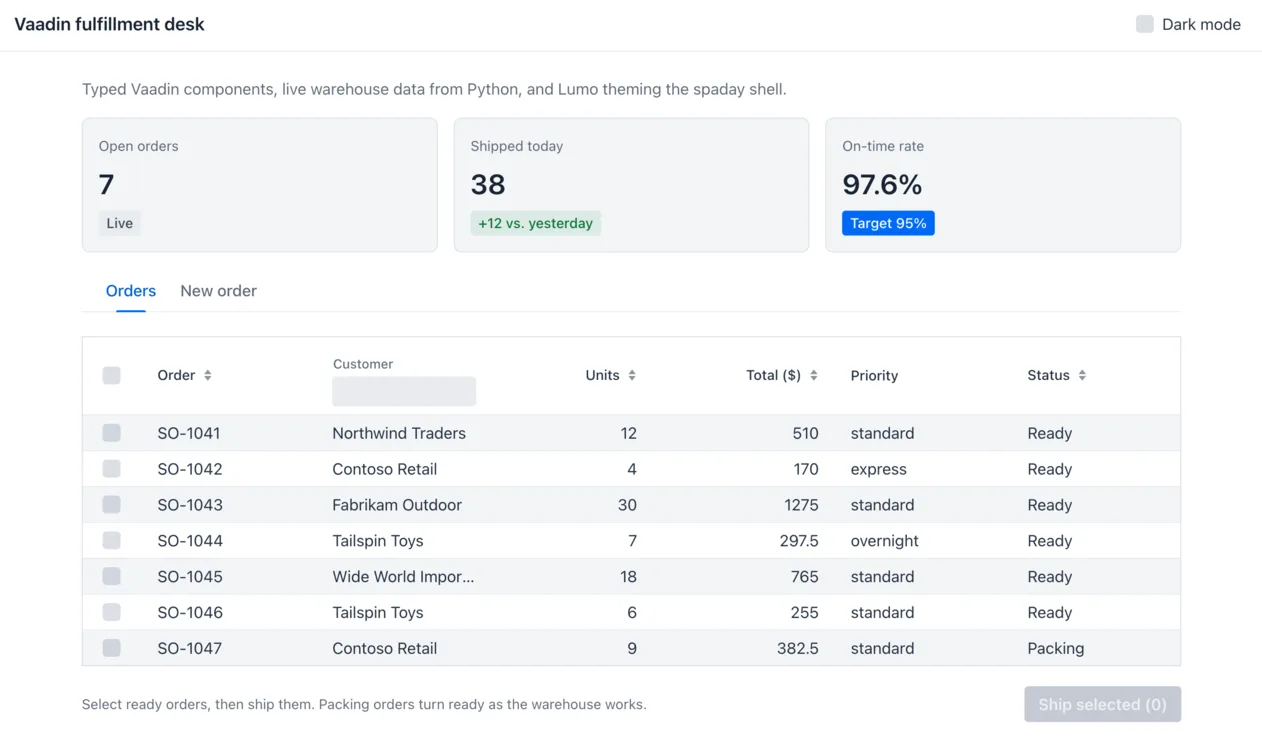
Open http://127.0.0.1:8027 for the fulfillment desk: a grid of orders
streamed live from Python with selection, sorting and filtering, shipping the selected orders through a
Python endpoint, an order form of combo box, text field, select, date picker and checkbox two-way bound
to spaday state, a dialog confirming what the server created, tabs, Lumo badges, and a dark mode that
re-themes Lumo and the spaday shell together.
Theming
The elements are styled with Vaadin's Lumo theme, and the stylesheet maps spaday's --spa-* shell
palette onto Lumo's properties, so restyling Lumo restyles the shell and every other spaday component
package with it. TOKENS lists the properties wired to the palette:
App().css(lumo_primary_color="#0C4253")
The theme follows spaday's page mode: a wa-dark class (for example
App(...).bind_root_class("wa-dark", "dark")) switches Lumo to dark, and a wa-light island inside
a dark page stays light.
Sharing Vaadin with your own library
Vaadin registers global custom element names, so a page can hold only one copy. The package serves
Vaadin's modules under their own bare specifiers — @vaadin/button, @vaadin/grid/…,
@vaadin/component-base/… and the other packages these elements are built from — through the page's
import map. A library that imports or extends them and leaves those imports out of its bundle
(external: ["@vaadin/*"] with esbuild) gets this copy.
The served copy carries the opt-out of Vaadin's development-time usage statistics, which its package
normally installs at npm install time.
[!NOTE] This library was generated using copier from the Base Python Project Template repository.
1 maintainer

Metadata
1 maintainer
Release files for spaday-vaadin 0.1.0
For a detailed explanation of source distributions (sdists) and built distributions (wheels), please see the package formats documentation.
Source distribution (sdist)
| File | Size | Uploaded | |
|---|---|---|---|
| spaday_vaadin-0.1.0.tar.gz | 359.5 kB | Details |
Built distribution (wheel)
| File | Interpreter | ABI | Platform | Reset |
|---|---|---|---|---|
| spaday_vaadin-0.1.0-py3-none-any.whl | Python 3 | none | any | Details |
Total release size: 911.4 kB
Release files / spaday_vaadin-0.1.0.tar.gz
| Download URL | spaday_vaadin-0.1.0.tar.gz |
|---|---|
| Size | 359.5 kB |
| Tags | Source |
|
SHA-256 checksum How to use checksums |
afb9983f74732caaab2455223087dcda56d41755e737fc031a067cc93081a9a7
|
|
BLAKE2b-256 checksum How to use checksums |
2ff1af5649d387548a405e1ab9e3ea3bcc52b65479edea1b673f90d565b2f115
|
| Upload date | |
|
Uploaded using Trusted Publishing? What is trusted publishing? |
No |
| Uploaded via |
twine/7.0.0 CPython/3.12.14
|
Release files / spaday_vaadin-0.1.0-py3-none-any.whl
| Download URL | spaday_vaadin-0.1.0-py3-none-any.whl |
|---|---|
| Size | 551.9 kB |
| Tags | Python 3 |
|
SHA-256 checksum How to use checksums |
71155befa592cfc082f38b8c25add39ba2336fc622ff56bf08b5abc8f000f934
|
|
BLAKE2b-256 checksum How to use checksums |
32f401f24abe3a3ceeea1c6b439903422d8a62380f5b65ba88eff09ddf5566bd
|
| Upload date | |
|
Uploaded using Trusted Publishing? What is trusted publishing? |
No |
| Uploaded via |
twine/7.0.0 CPython/3.12.14
|














