
Spark Pulse
Spark Pulse is a web control plane for deploying inference engines (vLLM, SGLang) on NVIDIA DGX Spark hardware. It drives Docker directly from Python through its own engine plugins — there is no dependency on spark-vllm-docker to deploy. A spark-vllm-docker checkout is optional and, when configured, is used only as a read-only source for importing existing recipes and browsing mods/example launch scripts.
It brings recipe discovery, deployment management, live monitoring, cache cleanup, and configuration into one interface. Multi-node deployment is supported by the same deploy path, but it has not yet been exercised on more than one physical machine — treat it as unproven until a real two-node bring-up validates it.
License: MIT — Copyright © 2026 Kharkevich Engineering Lab
Disclaimer: This project is not sponsored by, endorsed by, or affiliated with NVIDIA Corporation or any of its subsidiaries. NVIDIA, DGX, and related trademarks are property of their respective owners.
Features
- Recipe browsing - Explore deployment recipes, model variants, and mod combinations in a clean catalog view.
- Deployment jobs - Launch deployments, watch live logs, inspect status, and stop running jobs from the UI.
- Real-time monitoring - Track GPU, CPU, RAM, and disk usage with streaming updates.
- Cache management - Review and clean Hugging Face, wheel, ccache, Triton, and related caches.
- Settings and auth - Configure the backend path, defaults, and OIDC authentication.
- MCP server - Expose the same operations to Model Context Protocol clients and automation.
Documentation
kharkevich-engineering-lab.github.io/spark-pulse — a tour of every page, how deploys and reconciliation work, the agent protocol, and the configuration, CLI, API and MCP reference.
Screenshots
Inference
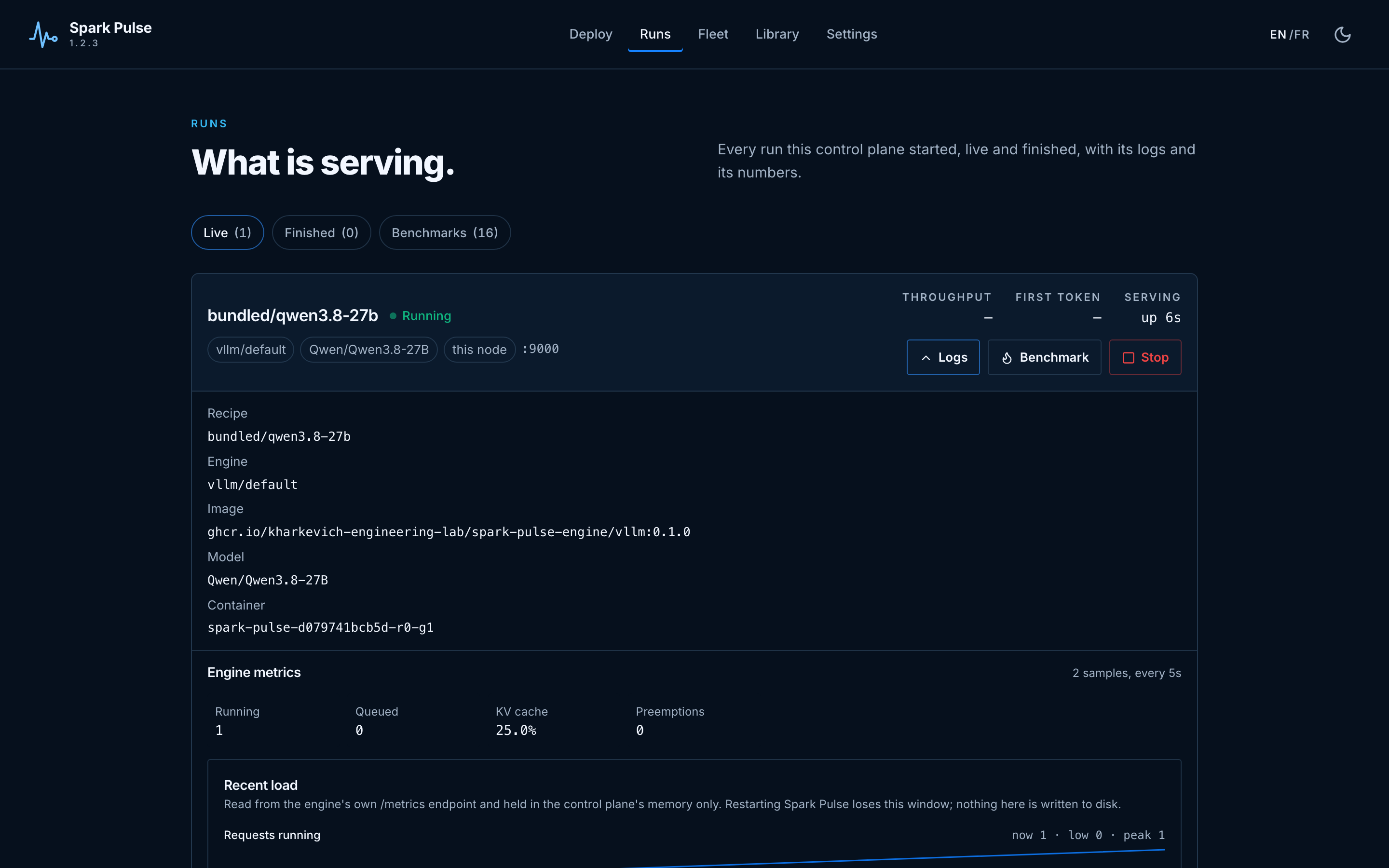
What is running, with per-rank state, the engine's own metrics and the log.
Monitoring

Every node, asked through its own agent: GPUs, memory, disks, and which deployment holds each GPU process.
Recipes
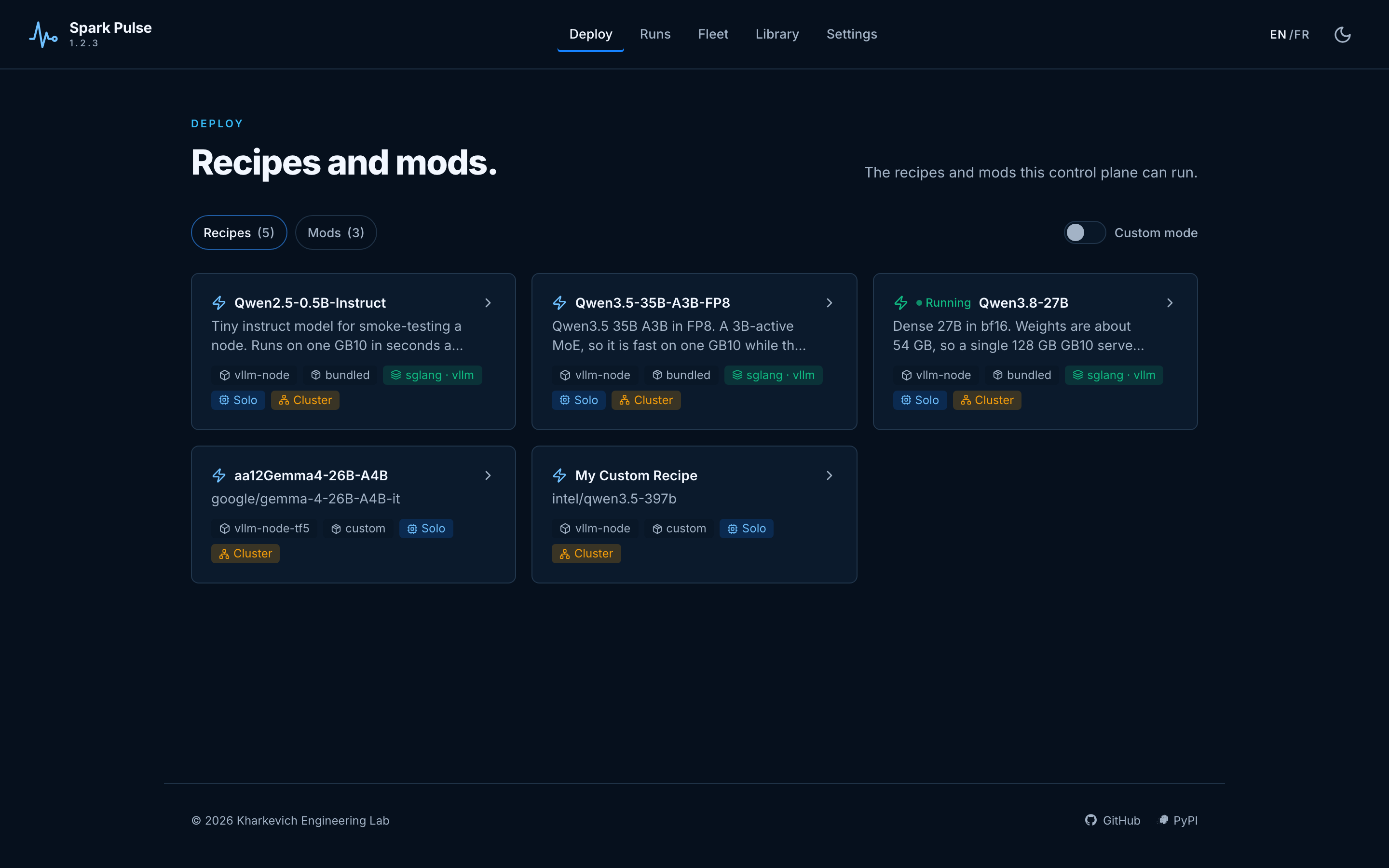
A recipe is a model, an engine and its arguments in one file — bundled, your own, or installed from an OCI registry.
Installation
Install the published package from PyPI:
python3 -m pip install spark-pulse
This installs the spark-pulse command-line interface.
Usage
Start the web app after installation:
spark-pulse start
Then open the UI in your browser. The default port is 8100 unless you changed it in configuration.
Common runtime commands:
# Start the MCP server for assistants and automation
spark-pulse mcp

# Install and manage the app as a systemd service
spark-pulse install
spark-pulse status
spark-pulse start-service
spark-pulse stop-service
spark-pulse uninstall
Add --user to any of the service commands if you want a user-scoped systemd unit.
Authentication is optional. When enabled, Spark Pulse redirects users through your configured OIDC provider and protects the UI and API routes.
Configuration
Spark Pulse reads settings from config.yaml (bundled with the package) and merges user overrides from ~/.config/spark-pulse/settings.json. Environment variables take highest priority.
config.yaml Reference
The full table lives in the configuration reference. The keys most people touch:
| Key | Type | Default | Description |
|---|---|---|---|
webui_port |
int | 8100 |
TCP port the web UI listens on. |
runtime |
string | native |
Deployment runtime. native — Spark Pulse drives Docker itself through the engine registry — is the only one. |
spark_vllm_path |
string | /tmp/spark-vllm-docker |
Optional path to a spark-vllm-docker checkout. Nothing is executed out of it; it is read only as a source of recipes and mods. |
default_port_range_start |
int | 9000 |
Start of the port range deployments are allocated from. |
default_port_range_end |
int | 9100 |
End of that range. |
job_retention_days |
int | 7 |
Days to retain finished deployment records. |
default_engine |
string | vllm |
Engine used when a recipe does not name one. |
cluster_enabled |
bool | false |
Offers recipes marked cluster_only. |
cluster_experimental |
bool | true |
Marks multi-node as unproven in the UI. |
database_url |
string | (empty) | Empty means SQLite under ~/.config/spark-pulse; any SQLAlchemy URL otherwise. |
cors_allowed_origins |
list | [] |
Browser origins allowed to call this API. Never *. |
mcp_enabled |
bool | true |
Enable the MCP endpoint. |
mcp_path |
string | /mcp |
Where it is mounted. |
mcp_api_token |
string | (empty) | Optional token protecting MCP requests. |
auth_enabled |
bool | false |
Enable OIDC authentication. |
oidc_provider_url |
string | (empty) | OIDC provider URL. |
oidc_client_id |
string | (empty) | OIDC client ID. |
oidc_client_secret |
string | (empty) | Stored in ~/.config/spark-pulse/secrets.json, never returned by the API. |
Environment Variable Overrides
The following environment variables override their corresponding config keys:
| Environment Variable | Config Key | Description |
|---|---|---|
SPARK_VLLM_PATH |
spark_vllm_path |
Override the spark-vllm-docker path. |
WEBUI_PORT |
webui_port |
Override the web UI port. |
SPARK_PULSE_DATABASE_URL |
database_url |
Override the database URL. |
SPARK_PULSE_AUTH_ENABLED |
auth_enabled |
Turn OIDC on or off. |
SPARK_PULSE_MCP_ENABLED |
mcp_enabled |
Turn the MCP endpoint on or off. |
SIMULATION_MODE |
— | Run everything against a simulated cluster: no Docker, no GPU. |
File Locations
| File | Purpose |
|---|---|
config.yaml |
Bundled defaults (read-only, overwritten on package update). |
~/.config/spark-pulse/settings.json |
Persistent user overrides (survives package updates). |
~/.config/spark-pulse/secrets.json |
Securely stored secrets (mode 0600). |
Example: Enabling OIDC Authentication
# config.yaml or settings.json
auth_enabled: true
oidc_provider_url: https://keycloak.example.com/realms/myrealm
oidc_client_id: spark-pulse
Then set the client secret via the UI Settings page or directly in secrets.json:
{
  "oidc_client_secret": "your-secret-here"
}
Development Mode with Mock OIDC Provider
For local development, Spark Pulse ships with convenience scripts that start a mock OIDC provider alongside the dev server. This lets you test the full SSO login flow without a real identity provider.
Full stack (backend + frontend with hot-reload):
./scripts/run-dev-oidc-full.sh
This script:
- Starts the mock OIDC provider on
http://localhost:9400 - Creates
~/.config/spark-pulse/settings.jsonandsecrets.jsonwith dev credentials - Launches the backend with
--reload(serves both API and built frontend)
Backend only (for API testing):
./scripts/run-dev-oidc.sh
Dev credentials (both scripts):
- Provider URL:
http://localhost:9400 - Client ID:
spark-pulse-dev - Client Secret:
dev-secret
To stop, press Ctrl+C — the scripts clean up all background processes.
Development
Clone the repository and install local development dependencies:
python3 -m pip install -e ".[dev]"
Build the frontend and run the app locally:
cd web && npm install && npm run build && cd ..
./scripts/run-dev-server.sh
Useful development commands:
./scripts/run-backend.sh
./scripts/run-production.sh
./scripts/build-ui.sh
pytest
python -m build
Architecture, in one paragraph
One control plane coordinates; one agent per node executes — including on the machine the control plane itself runs on, which it reaches over loopback exactly as it reaches a peer. Nothing in the control plane touches a node's Docker daemon, GPU or model cache directly. See the architecture.
API
REST under /api/*, with interactive docs at /docs and /redoc on the running app, plus /auth/* for OIDC login and /mcp for Model Context Protocol clients. The API reference is the map.
License
MIT. See LICENSE.
1 maintainer

Metadata
1 maintainer
Release files for spark-pulse 1.27.1
For a detailed explanation of source distributions (sdists) and built distributions (wheels), please see the package formats documentation.
Source distribution (sdist)
| File | Size | Uploaded | |
|---|---|---|---|
| spark_pulse-1.27.1.tar.gz | 5.6 MB | Details |
Built distribution (wheel)
| File | Interpreter | ABI | Platform | Reset |
|---|---|---|---|---|
| spark_pulse-1.27.1-py3-none-any.whl | Python 3 | none | any | Details |
Total release size: 10.8 MB
Release files / spark_pulse-1.27.1.tar.gz
| Download URL | spark_pulse-1.27.1.tar.gz |
|---|---|
| Size | 5.6 MB |
| Tags | Source |
|
SHA-256 checksum How to use checksums |
590b4e939739c8d1eec89f059b515d5d19143c4a8496d88cea400fa2a335c022
|
|
BLAKE2b-256 checksum How to use checksums |
dc8e8dba606fb363fd3400dd037aab1a32ee8e3caffa2cfb17e116232e29f249
|
| Upload date | |
|
Uploaded using Trusted Publishing? What is trusted publishing? |
Yes |
| Uploaded via |
twine/7.0.0 CPython/3.13.14
|
Provenance
Provenance describes where a file came from. On PyPI, provenance is shared via attestations, which provide a verifiable record of the build or publishing details. View details, limitations and caveats.


PyPI Publish Attestation
PyPI verified that this artifact, at this checksum, originated from the publisher listed below.
Signed by GitHub Actions, verified by PyPI on Sep 16, 2026.
Transparency logRelease files / spark_pulse-1.27.1-py3-none-any.whl
| Download URL | spark_pulse-1.27.1-py3-none-any.whl |
|---|---|
| Size | 5.2 MB |
| Tags | Python 3 |
|
SHA-256 checksum How to use checksums |
e5e1511da652ed36fc404103881b6cc42a0eeaff9c5c6daad317df08735999ea
|
|
BLAKE2b-256 checksum How to use checksums |
d54ebdbf8cf1c0df49de22b2e7571087c89916e1b012533ac8e05e5722f50ebc
|
| Upload date | |
|
Uploaded using Trusted Publishing? What is trusted publishing? |
Yes |
| Uploaded via |
twine/7.0.0 CPython/3.13.14
|
Provenance
Provenance describes where a file came from. On PyPI, provenance is shared via attestations, which provide a verifiable record of the build or publishing details. View details, limitations and caveats.
PyPI Publish Attestation
PyPI verified that this artifact, at this checksum, originated from the publisher listed below.
Signed by GitHub Actions, verified by PyPI on Sep 16, 2026.
Transparency log













