
Jupyter Notebook & Lab extension to monitor Apache Spark jobs from a notebook
Verified details
These details have been verified by PyPIProject links
GitHub Statistics
Maintainers


Project description
SparkMonitor
SparkMonitor is a Jupyter extension for monitoring Apache Spark jobs launched from notebooks. It displays live Spark metrics directly in the notebook interface, making it easier to understand, debug, and profile Spark workloads as they run.
It supports JupyterLab and classic Jupyter Notebook with PySpark 3.x and 4.x.
About

|
+ |

|
= |

|
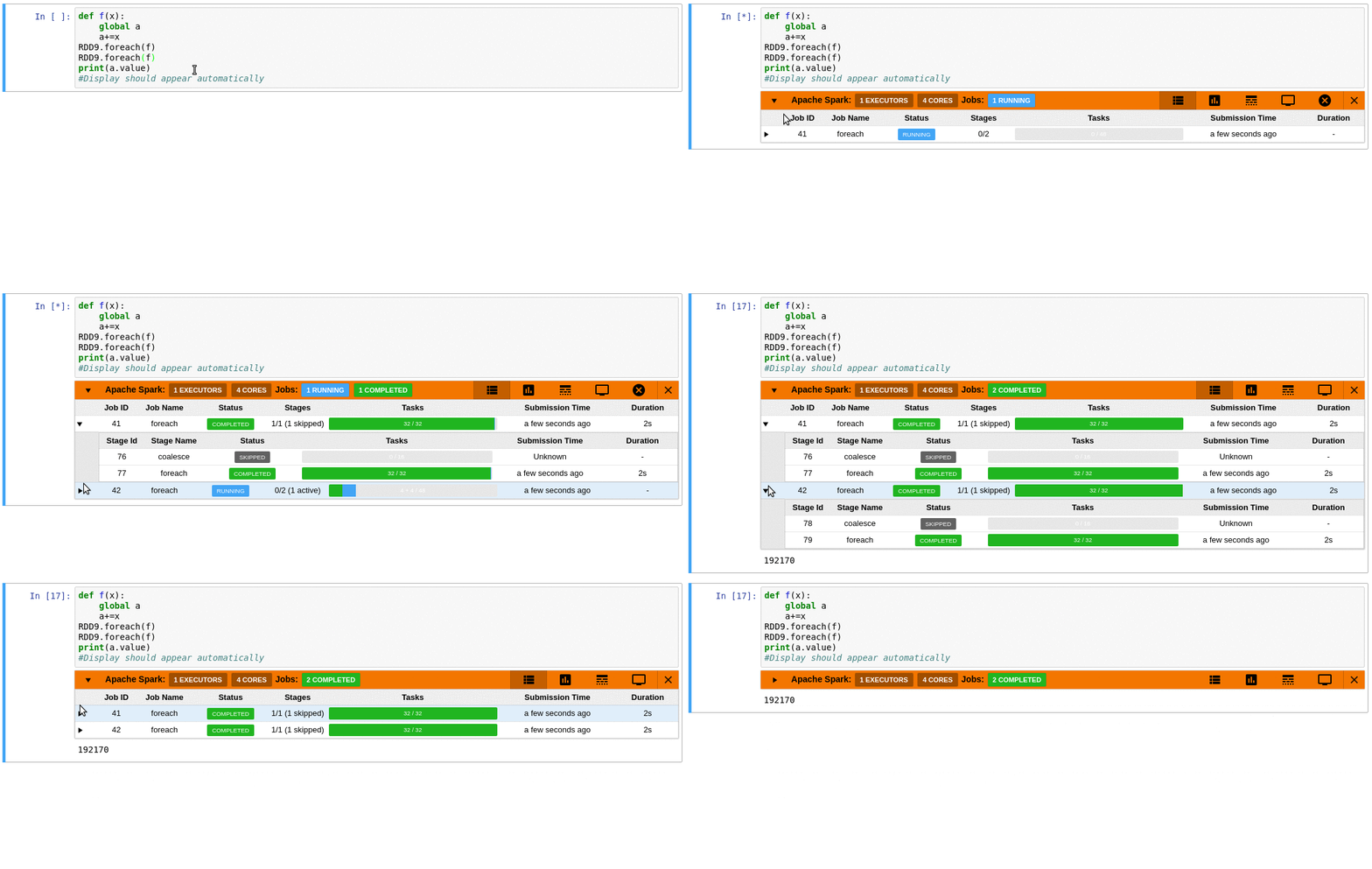
SparkMonitor adds an interactive monitoring panel below notebook cells that trigger Spark jobs, so you can inspect execution progress without leaving the notebook.
Requirements
- Python 3
- PySpark 3.x or 4.x
- JupyterLab 4 or Jupyter Notebook 4.4.0 or later
- Spark Classic API mode
- SparkMonitor works with the traditional Spark driver model used by PySpark.
- It is not compatible with Spark Connect.
Features
- Live monitoring of Spark jobs launched from a notebook cell
- Job and stage table with progress bars and execution details
- Timeline view showing jobs, stages, and tasks over time
- Resource graphs for active tasks and executor core usage

|

|

|
Quick Start
Installation
Create and activate a virtual environment:
python -m venv venv
source venv/bin/activate
Install SparkMonitor together with PySpark and a notebook frontend.
For JupyterLab
pip install sparkmonitor pyspark jupyterlab
Enable the SparkMonitor IPython kernel extension:
ipython profile create
echo "c.InteractiveShellApp.extensions.append('sparkmonitor.kernelextension')" >> "$(ipython profile locate default)/ipython_kernel_config.py"
This only needs to be done once per IPython profile.
Using SparkMonitor in a Notebook
To use SparkMonitor, create your Spark session with the SparkMonitor listener enabled.
This requires two Spark configurations:
| Configuration | Purpose |
|---|---|
spark.extraListeners |
Registers the SparkMonitor listener that collects Spark job metrics |
spark.driver.extraClassPath |
Points to the SparkMonitor listener JAR (listener_<scala_version>.jar) bundled with the sparkmonitor package |
Recommended example
The most robust approach is to resolve the listener JAR path dynamically from the installed Python package instead of hardcoding the full environment path:
from pathlib import Path

import sparkmonitor
from pyspark.sql import SparkSession

sparkmonitor_dir = Path(sparkmonitor.__file__).resolve().parent
listener_jar = sparkmonitor_dir / "listener_2.13.jar"

spark = (
    SparkSession.builder.config(
        "spark.extraListeners",
        "sparkmonitor.listener.JupyterSparkMonitorListener",
    )
    .config("spark.driver.extraClassPath", str(listener_jar))
    .getOrCreate()
)
Example with a fixed environment path
If you already know the exact path in your environment, you can also configure it directly:
from pyspark.sql import SparkSession

spark = (
    SparkSession.builder.config(
        "spark.extraListeners",
        "sparkmonitor.listener.JupyterSparkMonitorListener",
    )
    .config(
        "spark.driver.extraClassPath",
        "venv/lib/python3.13/site-packages/sparkmonitor/listener_2.13.jar",
    )
    .getOrCreate()
)
Important
The correct listener JAR depends on:
- the location of your Python environment
- the Scala version used by your Spark installation
You can inspect the installed package location with:
import sparkmonitor

print(sparkmonitor.__path__)
Then locate the corresponding listener_<scala_version>.jar file
inside that package directory.
If needed, you can also build the listener JAR yourself with sbt, as
described in the development section below.
Development
To work on SparkMonitor locally:
# Install the package in editable mode
pip install -e .

# Build the frontend (see package.json for available scripts)
yarn run build:<action>

# Link the JupyterLab extension into your local Jupyter environment
jupyter labextension develop --overwrite .

# Watch frontend files for changes
yarn run watch

# Build the Spark listener JARs
cd scalalistener_spark4 # Spark 4 / Scala 2.13
sbt package
Troubleshooting
SparkMonitor panel does not appear
Check the following:
sparkmonitoris installed in the same Python environment as your notebook kernelpysparkis installedjupyterlabornotebookis installed- the IPython kernel extension is enabled
- your Spark session includes
spark.extraListeners spark.driver.extraClassPathpoints to a valid listener JAR- you are using Spark Classic, not Spark Connect
Wrong Scala version
The listener JAR must match the Scala version used by your Spark installation. For example, if your Spark environment uses Scala 2.13, use:
listener_2.13.jar
Using the wrong listener JAR may prevent the listener from loading correctly.
Hardcoded virtual environment path does not work
Avoid hardcoding paths when possible. Environment-specific paths vary across systems, Python versions, and virtual environments. The dynamic path resolution example above is usually more portable.
Project History
- The first version of SparkMonitor was written by krishnan-r as a Google Summer of Code project with the SWAN Notebook Service team at CERN.
- Further fixes and improvements were made by the CERN team and community contributors in swan-cern/jupyter-extensions/tree/master/SparkMonitor.
- Jafer Haider updated the extension for JupyterLab during an internship at Yelp.
- Work from the jupyterlab-sparkmonitor fork was later merged into this repository so that both JupyterLab and Jupyter Notebook are supported from a single package.
- Ongoing maintenance and development continue through the SWAN team at CERN and the community.
References
- PyPI package: sparkmonitor
- Releases: swan-cern/sparkmonitor releases
Project details
Verified details
These details have been verified by PyPIProject links
GitHub Statistics
Maintainers
Release history Release notifications | RSS feed


Download files
Download the file for your platform. If you're not sure which to choose, learn more about installing packages.
Source Distribution
Built Distribution
Filter files by name, interpreter, ABI, and platform.
If you're not sure about the file name format, learn more about wheel file names.
Copy a direct link to the current filters
File details
Details for the file sparkmonitor-3.1.2.tar.gz.
File metadata
- Download URL: sparkmonitor-3.1.2.tar.gz
- Upload date:
- Size: 3.5 MB
- Tags: Source
- Uploaded using Trusted Publishing? Yes
- Uploaded via: twine/6.1.0 CPython/3.13.7
File hashes
| Algorithm | Hash digest | |
|---|---|---|
| SHA256 |
75d0a3b03047b283e0fc3af9e5422558a027cbf52b2444fbfda8051bf57a9517
|
|
| MD5 |
290cba995b1d7ba7f1884369b15599f3
|
|
| BLAKE2b-256 |
ac3ca6b64be457806e9eb103584f497004f91208e3df61d130560130bfafb4e3
|
Provenance
The following attestation bundles were made for sparkmonitor-3.1.2.tar.gz:
Publisher:
publish.yml on swan-cern/sparkmonitor
-
Statement:
-
Statement type:
https://in-toto.io/Statement/v1 -
Predicate type:
https://docs.pypi.org/attestations/publish/v1 -
Subject name:
sparkmonitor-3.1.2.tar.gz -
Subject digest:
75d0a3b03047b283e0fc3af9e5422558a027cbf52b2444fbfda8051bf57a9517 - Sigstore transparency entry: 1171615561
- Sigstore integration time:
-
Permalink:
swan-cern/sparkmonitor@3cc45e6a749cf0e5365577263133e8a2aba46b0a -
Branch / Tag:
refs/tags/v3.1.2 - Owner: https://github.com/swan-cern
-
Access:
public
-
Token Issuer:
https://token.actions.githubusercontent.com -
Runner Environment:
github-hosted -
Publication workflow:
publish.yml@3cc45e6a749cf0e5365577263133e8a2aba46b0a -
Trigger Event:
push
-
Statement type:
File details
Details for the file sparkmonitor-3.1.2-py3-none-any.whl.
File metadata
- Download URL: sparkmonitor-3.1.2-py3-none-any.whl
- Upload date:
- Size: 3.4 MB
- Tags: Python 3
- Uploaded using Trusted Publishing? Yes
- Uploaded via: twine/6.1.0 CPython/3.13.7
File hashes
| Algorithm | Hash digest | |
|---|---|---|
| SHA256 |
0b12884c943ac6160bd717f1cf67b24acb083383cfdd278e424395d565946b3a
|
|
| MD5 |
6cfde9f2a8ebfc52197c97ad8d6e8fb1
|
|
| BLAKE2b-256 |
9eb5588438dd36fc4749bcedaedd261f23dba04588f7f02af9d4b48819e70ea4
|
Provenance
The following attestation bundles were made for sparkmonitor-3.1.2-py3-none-any.whl:
Publisher:
publish.yml on swan-cern/sparkmonitor
-
Statement:
-
Statement type:
https://in-toto.io/Statement/v1 -
Predicate type:
https://docs.pypi.org/attestations/publish/v1 -
Subject name:
sparkmonitor-3.1.2-py3-none-any.whl -
Subject digest:
0b12884c943ac6160bd717f1cf67b24acb083383cfdd278e424395d565946b3a - Sigstore transparency entry: 1171615575
- Sigstore integration time:
-
Permalink:
swan-cern/sparkmonitor@3cc45e6a749cf0e5365577263133e8a2aba46b0a -
Branch / Tag:
refs/tags/v3.1.2 - Owner: https://github.com/swan-cern
-
Access:
public
-
Token Issuer:
https://token.actions.githubusercontent.com -
Runner Environment:
github-hosted -
Publication workflow:
publish.yml@3cc45e6a749cf0e5365577263133e8a2aba46b0a -
Trigger Event:
push
-
Statement type:






