

SparsePixels: Efficient convolution for sparse data on FPGAs


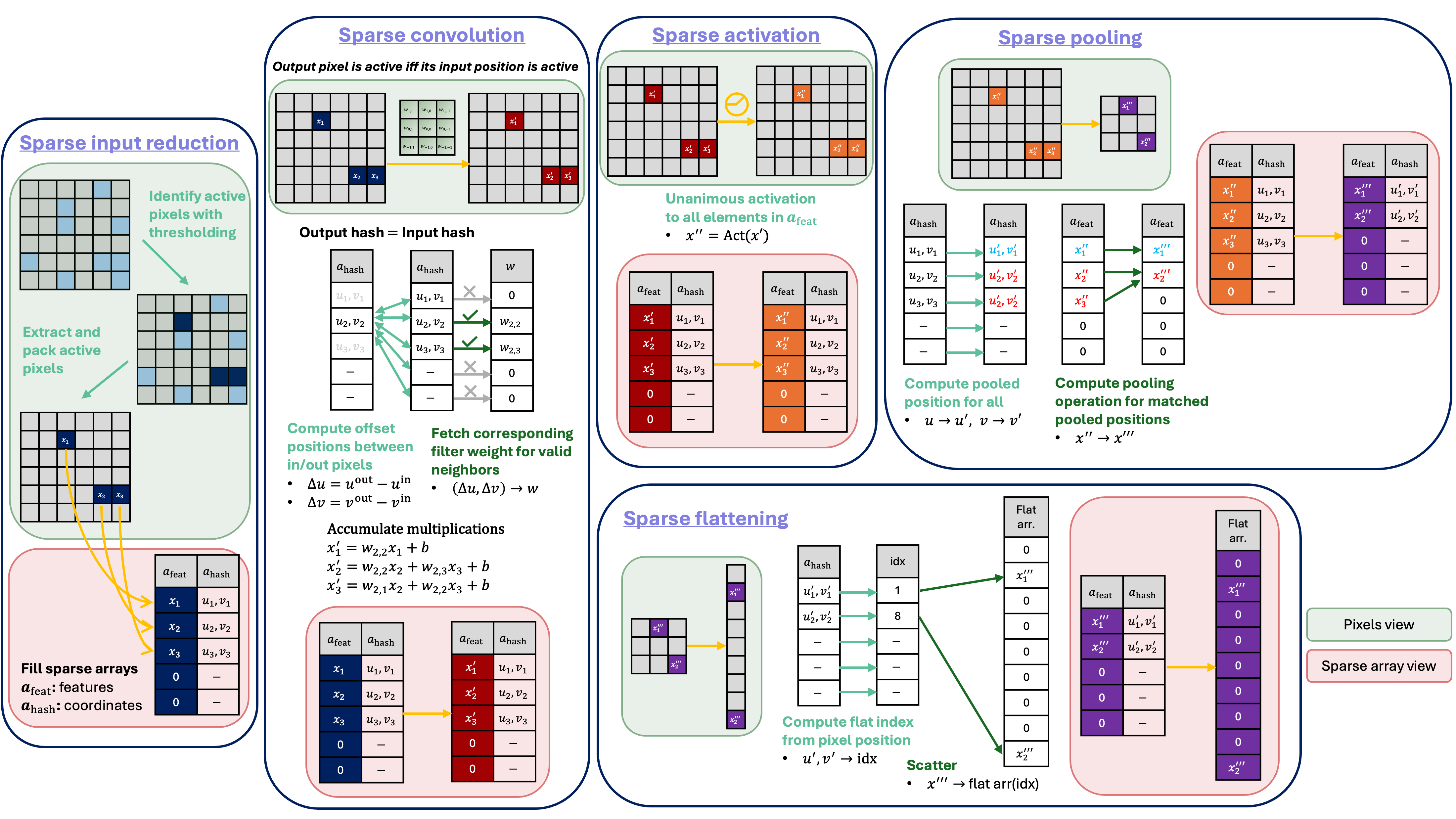
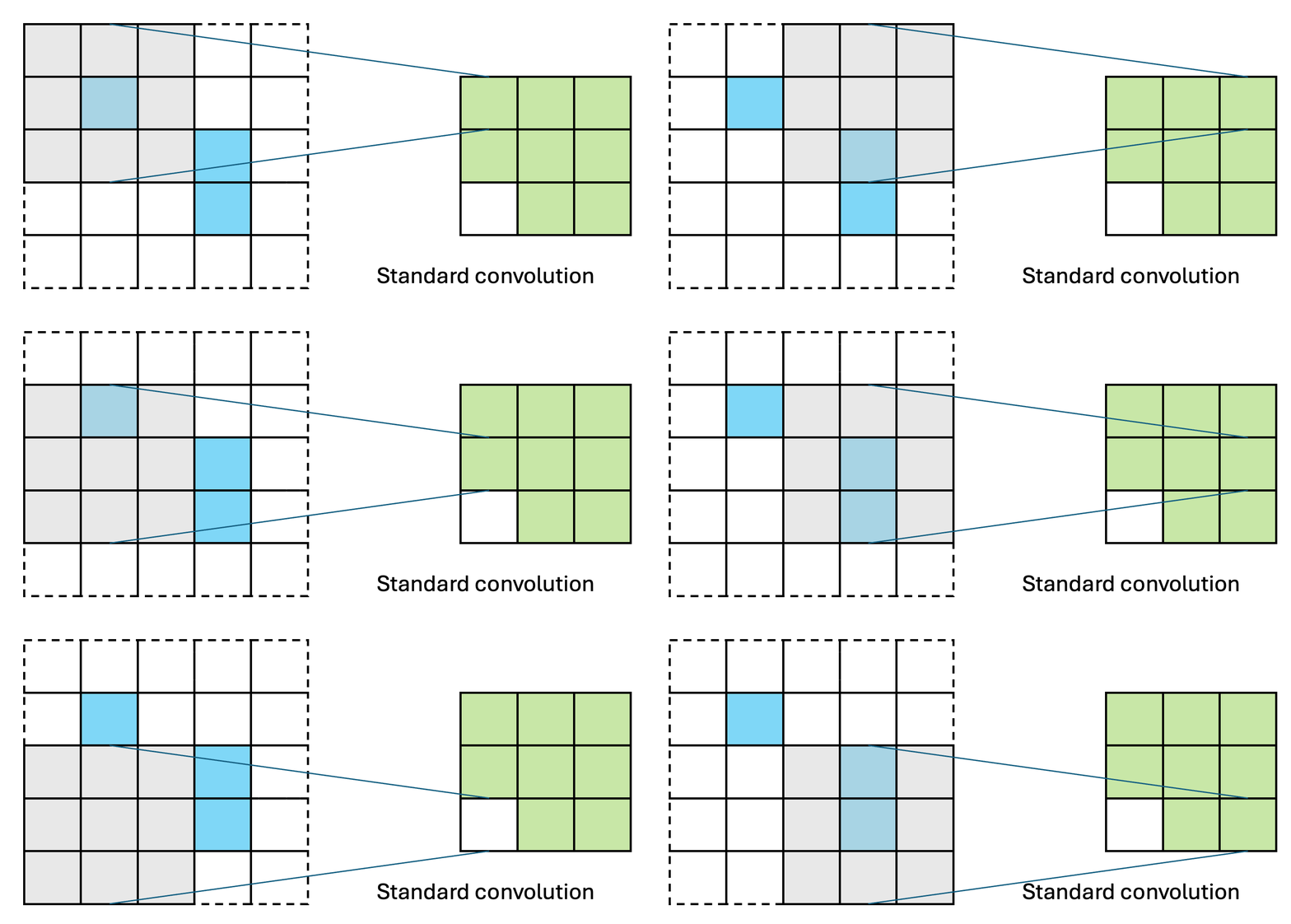
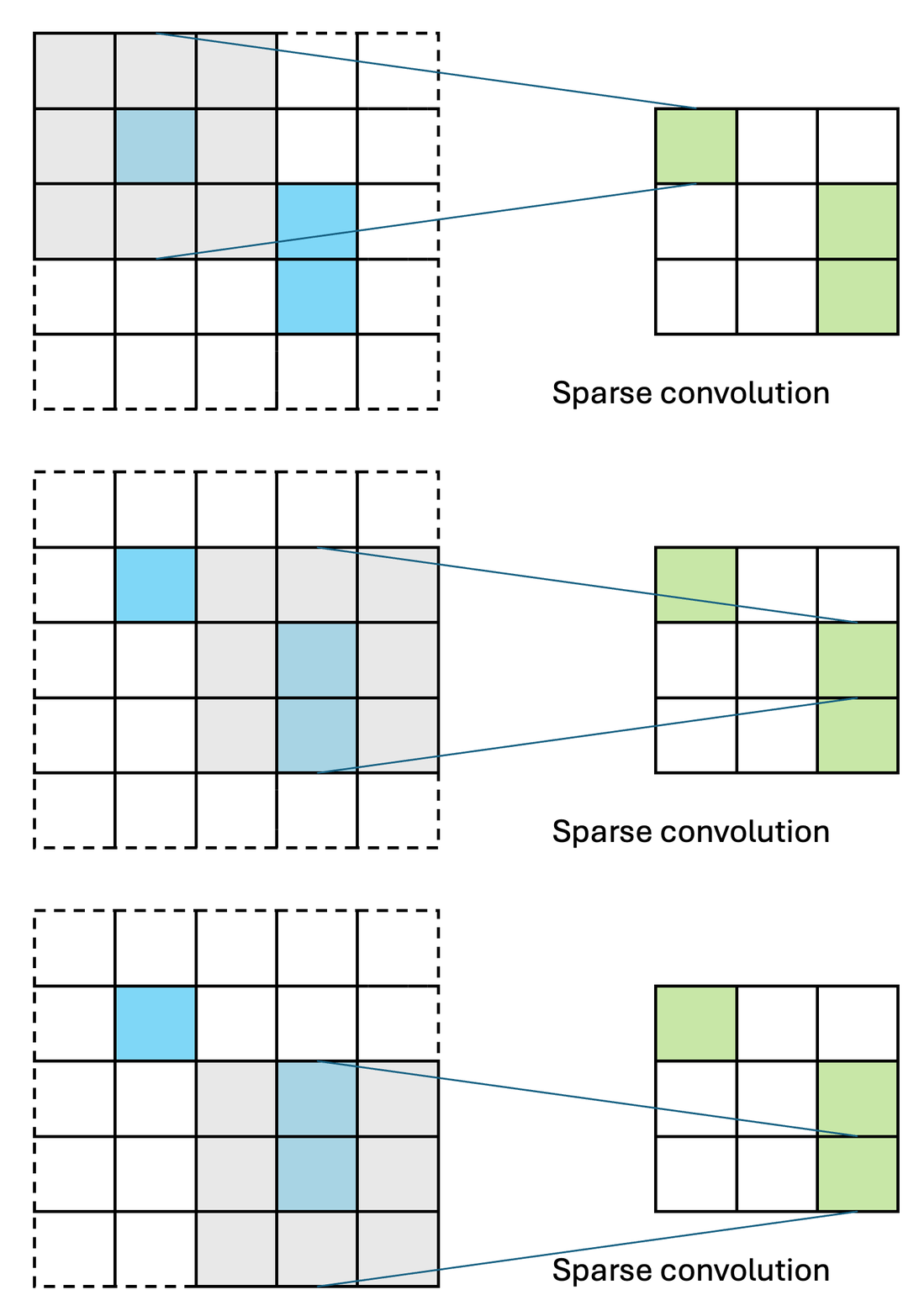
SparsePixels is a Keras 3 library to build, train, and deploy sparse convolutional neural networks on FPGAs. In many detectors, especially in high-energy physics experiments, the images are almost empty: only a handful of pixels carry a signal (the hits), yet a standard CNN still spends compute on every pixel. A sparse CNN convolves only over the active pixels, so its cost scales with the number of hits rather than the image size, which is what makes low-latency, real-time inference (e.g. in a trigger) feasible on an FPGA. This library builds quantization-aware (with HGQ2 as a backend) sparse CNNs in which the pixel budget and the activity threshold can be learned from data, with a hardware-aware penalty that drives the budget toward the fewest pixels the task tolerates. Trained models convert to FPGA firmware through the hls4ml integration, with control over the parallelization of the sparse layers so user can trade latency against resource usage. This training library is designed to mirror our HLS design with bit-exact accuracy.
Installation
With Python >= 3.10:
pip install sparsepixels
This includes all necessary backends (tensorflow, keras, HGQ2).
Getting Started
First, study the data to pick a threshold and an initial pixel budget n: how many pixels stay
active as the threshold rises, and what a candidate (n, threshold) maskes out pixels on a few example images.
from sparsepixels.utils import active_pixels_vs_threshold, plot_reduced_examples

active_pixels_vs_threshold(x_train)
plot_reduced_examples(x_train, n=20, threshold=0.1, n_examples=3)
Build an example sparse CNN within HGQ2 quantization scopes. A custom input quantizer config with
higher initial fractional bits (e.g., f0=8) prevents the lower default (f0=2) from aggressively zeroing out sparse signals
in early training epochs. InputReduce keeps the first n active pixels (based on the first channel above
threshold) in a row-major order.
By default n and threshold are trainable hyperparameters: beta_n controls how aggressively n is driven smaller for a lower hardware footprint, and beta_maskedE penalizes over-masking pixel intensity.
import keras
from hgq.layers import QDense
from hgq.config import QuantizerConfigScope, LayerConfigScope
from hgq.quantizer.config import QuantizerConfig
from sparsepixels.layers import InputReduce, QConv2DSparse, AveragePooling2DSparse, MaxPooling2DSparse

iq_conf = QuantizerConfig(place='datalane', q_type='kif', i0=4, f0=8, overflow_mode='WRAP')

with (
    QuantizerConfigScope(place='all', default_q_type='kbi', overflow_mode='SAT_SYM'),
    QuantizerConfigScope(place='datalane', default_q_type='kif', overflow_mode='WRAP'),
    LayerConfigScope(enable_ebops=True, enable_iq=True, beta0=1e-5),
):
    x_in = keras.Input(shape=(28, 28, 1), name='x_in')

    x, keep_mask = InputReduce(
        n=30,                  # initial pixel budget
        threshold=0.1,         # initial activity threshold
        beta_n=5e-3,           # higher -> drives the pixel budget n smaller
        beta_maskedE=1.0,      # higher -> prevents over-masking
        learn_n=True,          # trainable pixel budget
        learn_threshold=True,  # trainable threshold
        name='input_reduce',
    )(x_in)
    x = QConv2DSparse(filters=3, kernel_size=3, name='conv1', padding='same', strides=1,
                      activation='relu', iq_conf=iq_conf)([x, keep_mask])
    x, keep_mask = AveragePooling2DSparse(2, name='pool1')([x, keep_mask])

    x = keras.layers.Flatten(name='flatten')(x)
    x = QDense(10, name='dense1', activation='relu', iq_conf=iq_conf)(x)
    x = keras.layers.Activation('softmax', name='softmax')(x)

model = keras.Model(x_in, x)
Train the model with SparseTrainingMonitor. It records the loss breakdown, the learned
budget/threshold, the EBOPS and the masked-intensity penalty each epoch, and it corrects the EBOPS
(a proxy for the quantized hardware cost) to the sparse compute automatically.
from sparsepixels.utils import SparseTrainingMonitor

early_stop = keras.callbacks.EarlyStopping(monitor='val_accuracy', mode='max', patience=20, restore_best_weights=True)
model.compile(
    optimizer=keras.optimizers.Adam(1e-3),
    loss='categorical_crossentropy', metrics=['accuracy'],
)
history = model.fit(x_train, y_train, validation_data=(x_val, y_val),
                    epochs=100, batch_size=128, callbacks=[early_stop, SparseTrainingMonitor()])
After training, plot the diagnostics from the monitoring tool. The final pixel budget and threshold values are stored in InputReduce: layer.n_max_pixels and layer.threshold (hls4ml converter will auto-parse these from the model).
from sparsepixels.utils import plot_history, print_quantization, plot_quantization

plot_history(history, early_stopping=early_stop)  # loss breakdown, budget, threshold, EBOPS
print_quantization(model)                         # per-layer bit-width distribution and EBOPS
plot_quantization(model)

ir = model.get_layer('input_reduce')
print(f"n_max_pixels={ir.n_max_pixels}, threshold={ir.threshold:.3f}")
Converting a trained model to HLS with hls4ml
Note: A PR adding
sparsepixelssupport to the official hls4ml repo has been submitted but is not yet merged. In the meantime you can install hls4ml from the PR branch on this fork to use the converter:pip install "git+https://github.com/hftsoi/hls4ml.git@sparsepixels"
Once installed, pull a config from the trained model, optionally set the per-layer parallelization knobs, and convert:
import hls4ml

hls_config = hls4ml.utils.config_from_keras_model(model, granularity='name')
hls_config.setdefault('Model', {})['PipelineStyle'] = 'dataflow'  # "#pragma HLS DATAFLOW"

n_max_pixels = model.get_layer('input_reduce').n_max_pixels

# input reduce: 'tree' (default, lowest latency) or 'stream' (sequential, fewer resources)
hls_config['LayerName']['input_reduce']['Variant'] = 'tree'
# conv: active pixels in parallel (<= n_max_pixels), and filters in parallel (<= that conv's filters)
hls_config['LayerName']['conv1']['PixelParallelFactor'] = n_max_pixels
hls_config['LayerName']['conv1']['FiltParallelFactor'] = 3
# pool: active pixels in parallel, and channels in parallel
hls_config['LayerName']['pool1']['PixelParallelFactor'] = n_max_pixels
hls_config['LayerName']['pool1']['ChanParallelFactor'] = 3
# flatten: scatter positions in parallel (<= out_height * out_width; here 28*28 pools to 14*14)
hls_config['LayerName']['flatten']['ParallelFactor'] = 14 * 14

hls_model = hls4ml.converters.convert_from_keras_model(
    model,
    hls_config=hls_config,
    output_dir='hls_proj/my_sparse_cnn',
    backend='Vitis',
    io_type='io_parallel',
)
hls_model.write()
hls_model.compile()
y_hls = hls_model.predict(x_test)
Documentation
Coming soon!
Citation
If you find this useful in your research, please consider citing:
@article{Tsoi:2025nvg,
    author = "Tsoi, Ho Fung and Rankin, Dylan and Loncar, Vladimir and Harris, Philip",
    title = "{SparsePixels: Efficient Convolution for Sparse Data on FPGAs}",
    eprint = "2512.06208",
    archivePrefix = "arXiv",
    primaryClass = "cs.AR",
    month = "12",
    year = "2025"
}
1 maintainer

Metadata
1 maintainer
Release files for sparsepixels 0.3.2
For a detailed explanation of source distributions (sdists) and built distributions (wheels), please see the package formats documentation.
Source distribution (sdist)
| File | Size | Uploaded | |
|---|---|---|---|
| sparsepixels-0.3.2.tar.gz | 99.3 kB | Details |
Built distribution (wheel)
| File | Interpreter | ABI | Platform | Reset |
|---|---|---|---|---|
| sparsepixels-0.3.2-py3-none-any.whl | Python 3 | none | any | Details |
Total release size: 194.2 kB
Release files / sparsepixels-0.3.2.tar.gz
| Download URL | sparsepixels-0.3.2.tar.gz |
|---|---|
| Size | 99.3 kB |
| Tags | Source |
|
SHA-256 checksum How to use checksums |
016cd5446509cf29666c577b1de25c8020e584b3696a234a5b43694705b4ebd0
|
|
BLAKE2b-256 checksum How to use checksums |
27c50d20d08bce14f1fc2c5792558ac046e803239955cabf3a3f8a3f3a79f0eb
|
| Upload date | |
|
Uploaded using Trusted Publishing? What is trusted publishing? |
Yes |
| Uploaded via |
twine/6.1.0 CPython/3.13.12
|
Provenance
Provenance describes where a file came from. On PyPI, provenance is shared via attestations, which provide a verifiable record of the build or publishing details. View details, limitations and caveats.


PyPI Publish Attestation
PyPI verified that this artifact, at this checksum, originated from the publisher listed below.
Signed by GitHub Actions, verified by PyPI on Jul 4, 2026.
Transparency logRelease files / sparsepixels-0.3.2-py3-none-any.whl
| Download URL | sparsepixels-0.3.2-py3-none-any.whl |
|---|---|
| Size | 94.9 kB |
| Tags | Python 3 |
|
SHA-256 checksum How to use checksums |
a420c633ae8169800259d8200ec9ef35ad46b69f9966164de26f0d50b6bf61df
|
|
BLAKE2b-256 checksum How to use checksums |
1343d8237c8d8f16878ad3077e719808675173a746ff98e78e4360e8da811027
|
| Upload date | |
|
Uploaded using Trusted Publishing? What is trusted publishing? |
Yes |
| Uploaded via |
twine/6.1.0 CPython/3.13.12
|
Provenance
Provenance describes where a file came from. On PyPI, provenance is shared via attestations, which provide a verifiable record of the build or publishing details. View details, limitations and caveats.
PyPI Publish Attestation
PyPI verified that this artifact, at this checksum, originated from the publisher listed below.
Signed by GitHub Actions, verified by PyPI on Jul 4, 2026.
Transparency log













