
Efficient convolution for sparse data on FPGAs
Verified details
These details have been verified by PyPIProject links
GitHub Statistics
Maintainers

Project description
SparsePixels: Efficient convolution for sparse data on FPGAs


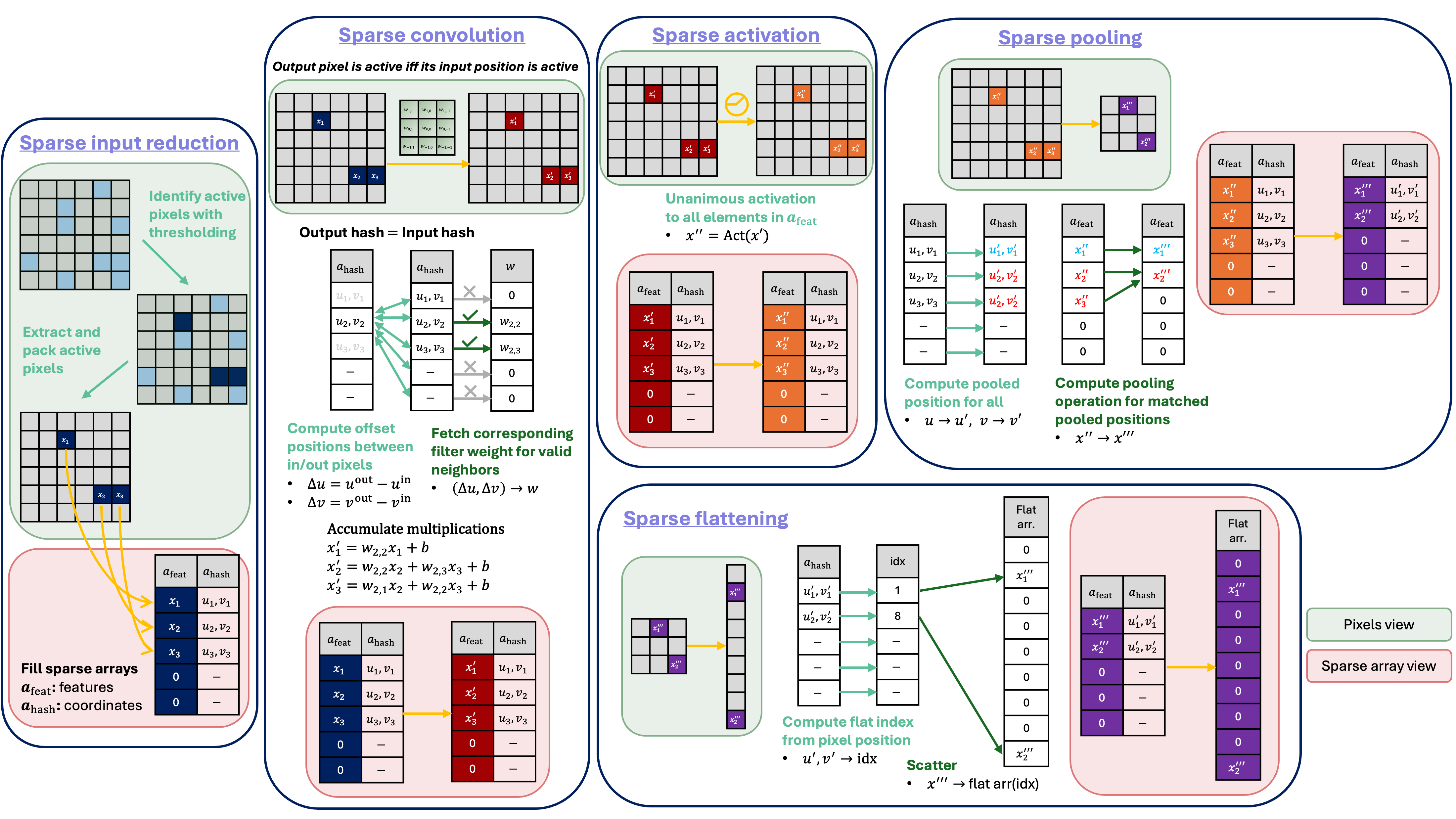
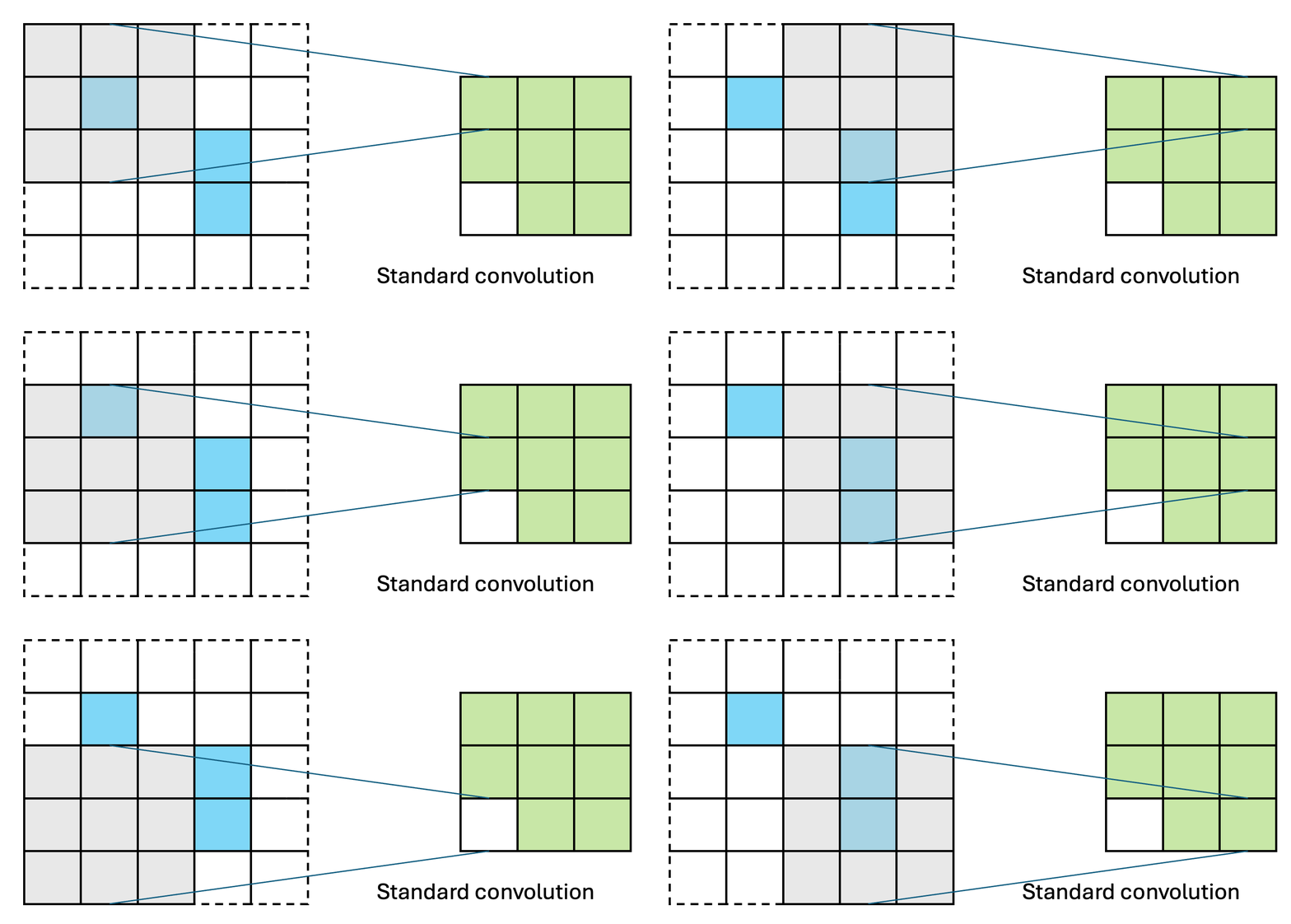
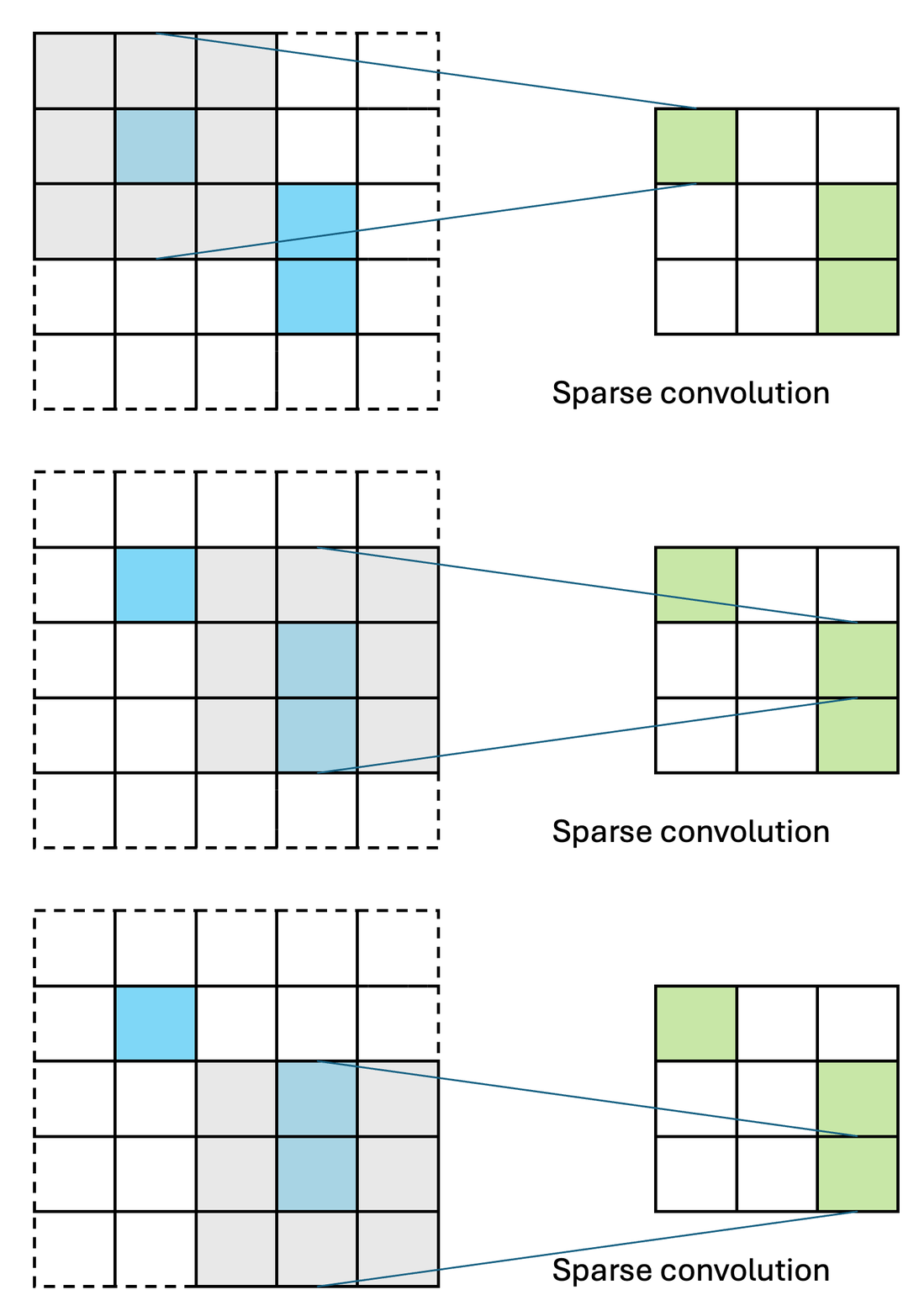
SparsePixels is a Keras 3 library to build, train, and deploy sparse convolutional neural networks on FPGAs. In many detectors, especially in high-energy physics experiments, the images are almost empty: only a handful of pixels carry a signal (the hits), yet a standard CNN still spends compute on every pixel. A sparse CNN convolves only over the active pixels, so its cost scales with the number of hits rather than the image size, which is what makes low-latency, real-time inference (for example in a trigger) feasible on an FPGA. This library builds quantization-aware (via HGQ2) sparse CNNs in which the pixel budget and the activity threshold can be learned from data, with a hardware-aware penalty that drives the budget toward the fewest pixels the task tolerates. Trained models convert to FPGA firmware through the hls4ml integration, with control over the parallelization of the sparse layers to trade latency against resource usage.
Installation
With Python >= 3.10:
pip install sparsepixels
Getting Started
import keras
from keras.layers import Flatten, Activation
from hgq.layers import QDense
from hgq.config import QuantizerConfigScope, LayerConfigScope
from hgq.quantizer.config import QuantizerConfig
from sparsepixels.layers import InputReduce, QConv2DSparse, AveragePooling2DSparse, MaxPooling2DSparse
from sparsepixels.utils import (
    active_pixels_vs_threshold, plot_reduced_examples, cosine_lr,
    SparseTrainingMonitor, plot_history, print_quantization, plot_quantization,
)
First, study the data to pick a threshold and an initial pixel budget n: how many pixels stay
active as the threshold rises, and what a candidate (n, threshold) keeps on a few images.
active_pixels_vs_threshold(x_train)
plot_reduced_examples(x_train, n=20, threshold=0.1, n_examples=4)
Build an example sparse CNN within HGQ2 quantization scopes. A custom input quantizer config with
higher initial fractional bits (f0=8) prevents the default (f0=2) from zeroing out sparse signals
in early training epochs. InputReduce keeps the first n active pixels (first channel above
threshold); by default n and threshold are trainable hyperparameters, and a penalty of weight beta_n
nudges the budget smaller, trading a little accuracy for lower FPGA latency and resources.
iq_conf = QuantizerConfig(place='datalane', q_type='kif', i0=4, f0=8, overflow_mode='WRAP')

with (
    QuantizerConfigScope(place='all', default_q_type='kbi', overflow_mode='SAT_SYM'),
    QuantizerConfigScope(place='datalane', default_q_type='kif', overflow_mode='WRAP'),
    LayerConfigScope(enable_ebops=True, enable_iq=True, beta0=1e-5),
):
    x_in = keras.Input(shape=(28, 28, 1), name='x_in')

    # Sparse input reduction
    x, keep_mask = InputReduce(
        n=30,                    # initial pixel budget
        threshold=0.1,           # initial activity threshold
        beta_n=1e-5,             # weight of the pixel budget penalty
        learn_n=True,            # trainable pixel budget
        learn_threshold=True,    # trainable threshold
        name='input_reduce',
    )(x_in)

    # Sparse convolution
    x = QConv2DSparse(filters=3, kernel_size=3, name='conv1', padding='same', strides=1,
                      activation='relu', iq_conf=iq_conf)([x, keep_mask])

    # Sparse pooling
    x, keep_mask = AveragePooling2DSparse(2, name='pool1')([x, keep_mask])

    x = Flatten(name='flatten')(x)
    x = QDense(10, name='dense1', activation='relu', iq_conf=iq_conf)(x)
    x = Activation('softmax', name='softmax')(x)

model = keras.Model(x_in, x)
Train the model with SparseTrainingMonitor. It records the loss breakdown, the learned
budget/threshold and the EBOPS each epoch, and it corrects the EBOPS (a proxy for the quantized
hardware cost) to the sparse compute automatically, so no extra setup is needed. The
only sparse-specific choices are the cosine-decayed learning rate and restore_best_weights, which
keep the learned budget from over-compressing near the end of training.
early_stop = keras.callbacks.EarlyStopping(monitor='val_accuracy', mode='max', patience=20, restore_best_weights=True)
model.compile(
    optimizer=keras.optimizers.Adam(cosine_lr(1e-3, epochs=100, steps_per_epoch=len(x_train) // 128)),
    loss='categorical_crossentropy', metrics=['accuracy'],
)
history = model.fit(x_train, y_train, validation_data=(x_val, y_val),
                    epochs=100, batch_size=128, callbacks=[early_stop, SparseTrainingMonitor()])
After training, plot the diagnostics and read out the learned sparsity to deploy. plot_history
shows the loss breakdown, the learned budget/threshold and the EBOPS in one figure.
print_quantization / plot_quantization summarize the per-layer bit-widths. The values to
deploy are layer.n_max_pixels and layer.threshold (hls4ml converter will auto-parse these from the model).
plot_history(history, early_stopping=early_stop)   # loss breakdown, budget, threshold, EBOPS
print_quantization(model)                          # per-layer bit-width distribution and EBOPS
plot_quantization(model)

ir = model.get_layer('input_reduce')
print(f"n_max_pixels={ir.n_max_pixels}, threshold={ir.threshold:.3f}")
Converting a trained model to HLS with hls4ml
Note: A PR adding
sparsepixelssupport to the official hls4ml repo has been submitted but is not yet merged. In the meantime you can install hls4ml from the PR branch on this fork to try the converter:pip install "git+https://github.com/hftsoi/hls4ml.git@sparsepixels"
Once installed, pull a config from the trained model, optionally set the per-layer parallelization knobs, and convert:
import hls4ml

hls_config = hls4ml.utils.config_from_keras_model(model, granularity='name')
hls_config.setdefault('Model', {})['PipelineStyle'] = 'dataflow'  # "#pragma HLS DATAFLOW"

# Optional per-layer parallelization knobs. Omit them for the fully-parallel, lowest-latency default.
#   input_reduce  Variant             : 'tree' (default, lowest latency) or 'stream' (fewer resources)
#   conv*         PixelParallelFactor : active pixels in parallel (<= n_max_pixels)
#                 FiltParallelFactor  : filters in parallel (<= that conv's filters)
#   pool*         PixelParallelFactor : active pixels in parallel
#                 ChanParallelFactor  : channels in parallel
#   flatten       ParallelFactor      : scatter positions in parallel (<= out_height * out_width)
n_sparse = model.get_layer('input_reduce').n_max_pixels
knobs = {
    'input_reduce': {'Variant': 'stream'},
    'conv1':   {'PixelParallelFactor': n_sparse, 'FiltParallelFactor': 3},
    'pool1':   {'PixelParallelFactor': n_sparse, 'ChanParallelFactor': 3},
    'flatten': {'ParallelFactor': 14 * 14},  # this model pools 28*28 -> 14*14
}
for name, cfg in knobs.items():
    hls_config['LayerName'].setdefault(name, {}).update(cfg)

hls_model = hls4ml.converters.convert_from_keras_model(
    model,
    hls_config=hls_config,
    output_dir='hls_proj/my_sparse_cnn',
    backend='Vitis',
    io_type='io_parallel',
)
hls_model.write()
hls_model.compile()
y_hls = hls_model.predict(x_test)
Documentation
Coming soon!
Citation
If you find this useful in your research, please consider citing:
@article{Tsoi:2025nvg,
    author = "Tsoi, Ho Fung and Rankin, Dylan and Loncar, Vladimir and Harris, Philip",
    title = "{SparsePixels: Efficient Convolution for Sparse Data on FPGAs}",
    eprint = "2512.06208",
    archivePrefix = "arXiv",
    primaryClass = "cs.AR",
    month = "12",
    year = "2025"
}
Project details
Verified details
These details have been verified by PyPIProject links
GitHub Statistics
Maintainers
Release history Release notifications | RSS feed


Download files
Download the file for your platform. If you're not sure which to choose, learn more about installing packages.
Source Distribution
Built Distribution
Filter files by name, interpreter, ABI, and platform.
If you're not sure about the file name format, learn more about wheel file names.
Copy a direct link to the current filters
File details
Details for the file sparsepixels-0.3.1.tar.gz.
File metadata
- Download URL: sparsepixels-0.3.1.tar.gz
- Upload date:
- Size: 98.3 kB
- Tags: Source
- Uploaded using Trusted Publishing? Yes
- Uploaded via: twine/6.1.0 CPython/3.13.12
File hashes
| Algorithm | Hash digest | |
|---|---|---|
| SHA256 |
3ace3bc940b9f1ca143fc0d10d7586745563ad8db7a38e5b9caf67350650d79a
|
|
| MD5 |
b2828e7609f3b46fe3980f65ae347295
|
|
| BLAKE2b-256 |
42ac29a4d0b9dc93409993b9ca93543b902f421b7ce7f62e94429424b7b8e6b3
|
Provenance
The following attestation bundles were made for sparsepixels-0.3.1.tar.gz:
Publisher:
publish.yml on hftsoi/sparse-pixels
-
Statement:
-
Statement type:
https://in-toto.io/Statement/v1 -
Predicate type:
https://docs.pypi.org/attestations/publish/v1 -
Subject name:
sparsepixels-0.3.1.tar.gz -
Subject digest:
3ace3bc940b9f1ca143fc0d10d7586745563ad8db7a38e5b9caf67350650d79a - Sigstore transparency entry: 2054398498
- Sigstore integration time:
-
Permalink:
hftsoi/sparse-pixels@c287086584e01bcbbabd625324ae310d1e6beca5 -
Branch / Tag:
refs/tags/v0.3.1 - Owner: https://github.com/hftsoi
-
Access:
public
-
Token Issuer:
https://token.actions.githubusercontent.com -
Runner Environment:
github-hosted -
Publication workflow:
publish.yml@c287086584e01bcbbabd625324ae310d1e6beca5 -
Trigger Event:
release
-
Statement type:
File details
Details for the file sparsepixels-0.3.1-py3-none-any.whl.
File metadata
- Download URL: sparsepixels-0.3.1-py3-none-any.whl
- Upload date:
- Size: 93.8 kB
- Tags: Python 3
- Uploaded using Trusted Publishing? Yes
- Uploaded via: twine/6.1.0 CPython/3.13.12
File hashes
| Algorithm | Hash digest | |
|---|---|---|
| SHA256 |
8fb7dff783b240e1e4be8a20d1d3ec61fbd8816668e1acf9e9873ebe3d9eb4fc
|
|
| MD5 |
63138b2185fdee4592ea2334ee46faab
|
|
| BLAKE2b-256 |
d8bee340ce26eb2713ef67c151beb760dae45a5561ae8dc275e1b6b4ecf8aeb8
|
Provenance
The following attestation bundles were made for sparsepixels-0.3.1-py3-none-any.whl:
Publisher:
publish.yml on hftsoi/sparse-pixels
-
Statement:
-
Statement type:
https://in-toto.io/Statement/v1 -
Predicate type:
https://docs.pypi.org/attestations/publish/v1 -
Subject name:
sparsepixels-0.3.1-py3-none-any.whl -
Subject digest:
8fb7dff783b240e1e4be8a20d1d3ec61fbd8816668e1acf9e9873ebe3d9eb4fc - Sigstore transparency entry: 2054398639
- Sigstore integration time:
-
Permalink:
hftsoi/sparse-pixels@c287086584e01bcbbabd625324ae310d1e6beca5 -
Branch / Tag:
refs/tags/v0.3.1 - Owner: https://github.com/hftsoi
-
Access:
public
-
Token Issuer:
https://token.actions.githubusercontent.com -
Runner Environment:
github-hosted -
Publication workflow:
publish.yml@c287086584e01bcbbabd625324ae310d1e6beca5 -
Trigger Event:
release
-
Statement type:






