
SpatialVista - Interactive Spatial Transcriptomics Visualization




Overview
SpatialVista is an interactive 2D/3D spatial transcriptomics visualization tool. Open an .h5ad file directly from the command line in a local browser, or embed the same interface in Jupyter Notebook/Lab.
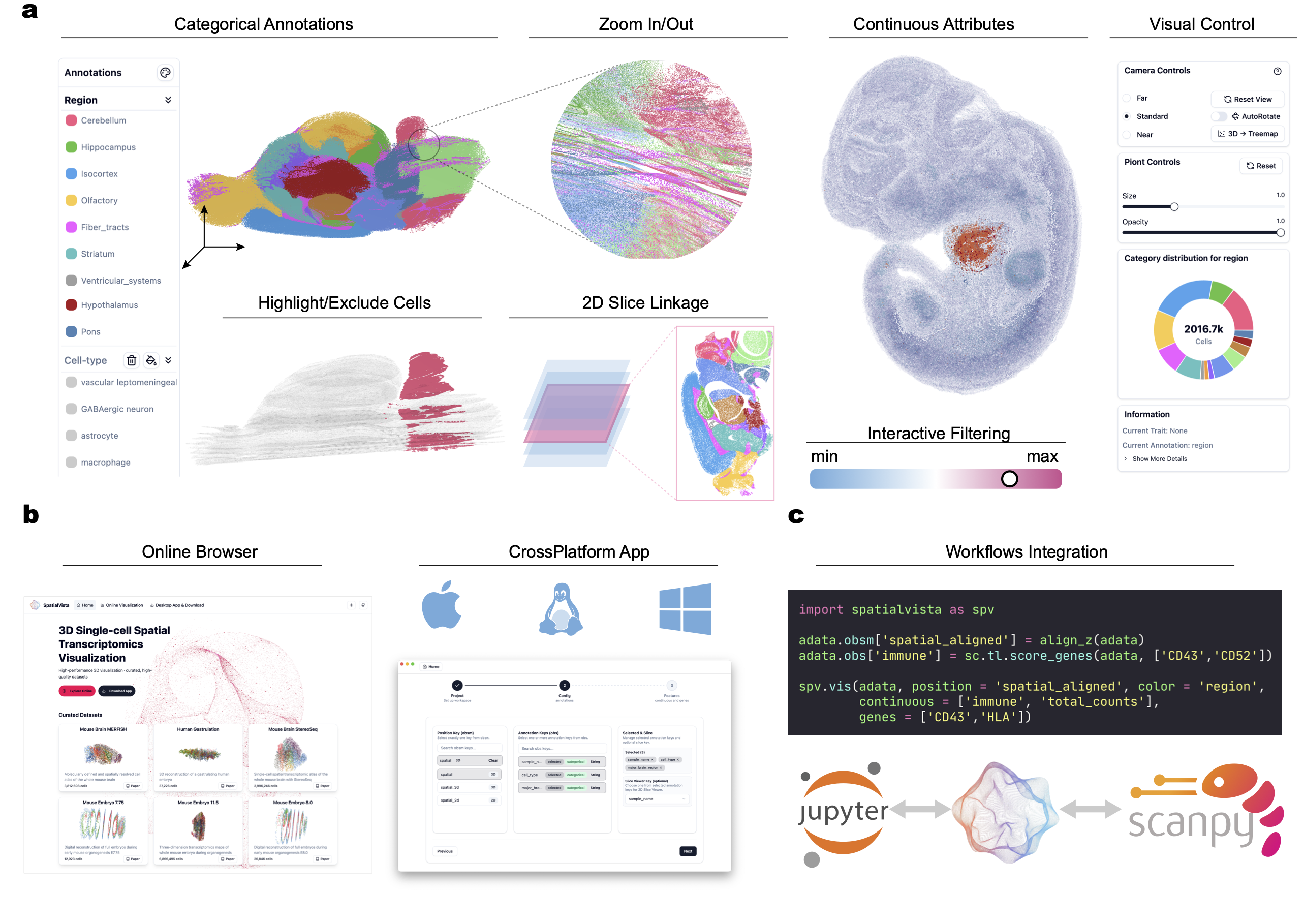
🌐 Web and App Access
In addition to the Jupyter-based interface, SpatialVista is also available as:
- Web version: https://yanglab.westlake.edu.cn/spatialvista/vis
- Desktop Apps: https://yanglab.westlake.edu.cn/spatialvista/download
These options allow users to explore 3D spatial transcriptomics data without setting up a Python environment.
Note that the web/app versions support the same core visualization functionalities, while the Jupyter version enables seamless integration with analysis workflows.
✨ Key Features
- 🚀 High-Performance Rendering - WebGL-based 3D rendering supporting millions of cells
- 📊 Multi-Dimensional Data Display - Support for categorical annotations, continuous values, gene expression, and more
- 🎨 Interactive Controls - Real-time adjustment of colors, transparency, point size, and other parameters
- 🔬 2D/3D View Switching - Flexible switching between 3D point cloud and 2D slice views
- 🧬 Gene Expression Query - Quick visualization of spatial expression patterns for any gene
- 📐 Multiple Layout Modes - Support for original coordinates, 2D Treemap, histogram, and more
- 🎯 Precise Filtering - Filter data points by category, numerical range, and other conditions
- 💾 One-Click Screenshots - Easily save current views for publications and reports
- 🖥️ Local CLI Server - Open
.h5adfiles without writing Python or starting Jupyter - 🪢 Lasso Selection - Select visible cells directly in either 2D or 3D views
🎯 Use Cases
SpatialVista is particularly suitable for:
- Spatial Transcriptomics Data Exploration - Visium, MERFISH, seqFISH, STARmap, and other technologies
- Single-Cell Spatial Data Analysis - Visualize spatial distribution of cell types
- Tissue Architecture Studies - Explore molecular features of tissue regions
- Gene Expression Pattern Analysis - View spatial expression of specific genes
- Data Quality Control - Quickly check data integrity and outliers
🚀 Quick Start
Dependencies:
- Python >= 3.10
- Tested on:
- macOS 12.0+ (Intel/Apple Silicon)
- Linux (Ubuntu 18.04+)
- Windows (windows10/11)
- Recommended browsers: Chrome or other Chromium-based browsers (with WebGL support).
Installation
pip install spatialvista
Or run it without a permanent installation:
uvx spatialvista --input data.h5ad
Command-line usage
The shortest command automatically detects a common spatial coordinate key and categorical annotation:
spatialvista --input data.h5ad
SpatialVista starts a local server at http://127.0.0.1:8765 and opens your browser. Override inferred keys or preload additional data when needed:
spatialvista --input data.h5ad \
  --position spatial \
  --color celltype \
  --section slice_id \
  --annotations leiden,tissue_region \
  --continuous total_counts,n_genes_by_counts \
  --genes PECAM1,CD3E
Use spatialvista --help for options including --host, --port, --mode, --layer, and --no-browser. The default host is loopback-only, so data is not exposed to other machines.
Jupyter usage
Launch your jupyter notebook or jupyter lab. And play with SpatialVista!
jupyter-lab
import spatialvista as spv
import numpy as np

# Create minimal test data
class FakeAnnData:
    def __init__(self, n: int):
        self.obsm = {"spatial": np.random.rand(n, 3)}
        self.obs = {"celltype": np.random.choice(["A", "B", "C"], n)}
        self.var_names = []
        self.X = None
        self.n_obs = n
adata = FakeAnnData(n=10_000)

# Create visualization
spv.vis(adata, position="spatial", color="celltype")


import scanpy as sc
# Load yout real data
adata = sc.read_h5ad("spatial_data.h5ad")

# Create interactive visualization
spv.vis(
    adata,
    position="spatial",  # obsm key containing spatial coordinates
    color="celltype",    # Default annotation for coloring
    height=600               # Widget height in pixels
)
That's it! 🎉
More demo data for test
- Cubic mock data: https://yanglab.westlake.edu.cn/gsmap3d/data/cube.h5ad
- Mouse Brain data: https://yanglab.westlake.edu.cn/gsmap3d/data/mouse_brain_3_IQ.h5ad
📚 Core Features
1. Categorical Annotation Visualization
# Color by cell type
widget = spv.vis(
    adata,
    position="spatial",
    color="celltype",
    annotations=["leiden", "tissue_region"]  # Additional annotations to load
)
2. Continuous Value Visualization
# Visualize continuous values (e.g., QC metrics)
widget = spv.vis(
    adata,
    position="spatial",
    color="celltype",
    continuous=["total_counts", "n_genes"]  # Continuous value fields
)
3. Gene Expression Visualization
# View expression patterns of specific genes
widget = spv.vis(
    adata,
    position="spatial",
    color="celltype",
    genes=["Pecam1", "Cd3e", "Epcam"],  # Gene list
    layer="normalized"  # Optional: use specific layer if available
)
4. 2D/3D View Switching
# If data has section information, switch to 2D view in UI
widget = spv.vis(
    adata,
    position="spatial",
    color="celltype",
    section="slice_id",  # Section identifier field for section browser
)
🎨 Interactive Controls
Once displayed, the widget provides rich interactive controls for exploring your data:
- Navigate in 3D space (rotate, pan, zoom)
- Switch between annotations and customize colors
- Query continuous values and gene expression
- Filter by thresholds and hide specific categories
- Adjust visualization parameters (size, opacity, layout)
- Export screenshots
🤝 Contributing & Support
Issues and Pull Requests are welcome!
- GitHub: https://github.com/JianYang-Lab/spatial-vista-py
- Documentation: https://jianyang-lab.github.io/spatial-vista-py/
📄 License
SpatialVista is open-sourced under the MIT License.
Built by WenjieWei@YangLab
1 maintainer

Metadata
1 maintainer
Release files for spatialvista 1.0.0
For a detailed explanation of source distributions (sdists) and built distributions (wheels), please see the package formats documentation.
Source distribution (sdist)
| File | Size | Uploaded | Provenance | |
|---|---|---|---|---|
| spatialvista-1.0.0.tar.gz | 1.4 MB | Without provenance | Details |
Built distribution (wheel)
| File | Interpreter | ABI | Platform | Reset |
|---|---|---|---|---|
| spatialvista-1.0.0-py3-none-any.whl | Python 3 | none | any | Details |
Total release size: 2.8 MB
Release files / spatialvista-1.0.0.tar.gz
| Download URL | spatialvista-1.0.0.tar.gz |
|---|---|
| Size | 1.4 MB |
| Tags | Source |
|
SHA-256 checksum How to use checksums |
1b85363bbf386b4f8cef53aafd7e2fd37d3c074d9b7eb3a32c7bc90ee753150d
|
|
BLAKE2b-256 checksum How to use checksums |
4b02c6746f38562b086eacb7931a696632831000e11f0198d6924cf1c12e540f
|
| Upload date | |
|
Uploaded using Trusted Publishing? What is trusted publishing? |
No |
| Uploaded via |
twine/7.0.0 CPython/3.12.9
|
Release files / spatialvista-1.0.0-py3-none-any.whl
| Download URL | spatialvista-1.0.0-py3-none-any.whl |
|---|---|
| Size | 1.4 MB |
| Tags | Python 3 |
|
SHA-256 checksum How to use checksums |
d681124d28633a1241ff57ff7feeec66b7981c4e6db154302c8c86852c869e98
|
|
BLAKE2b-256 checksum How to use checksums |
e720c2e25d48e131e80b7c3a18a92ebdfbef02b01edf340faf7be5ec120d51d1
|
| Upload date | |
|
Uploaded using Trusted Publishing? What is trusted publishing? |
No |
| Uploaded via |
twine/7.0.0 CPython/3.12.9
|
Security for spatialvista 1.0.0
Provenance
Provenance describes where a file came from. On PyPI, provenance is shared via attestations, which provide a verifiable record of the build or publishing details. View details, limitations and caveats.
No provenance found
None of the files in this release were uploaded with provenance metadata.
A note on package security
PyPI is a repository for distributing packages, not a service for auditing them. While third-party security researchers and our staff do their best to detect and remove malicious packages, PyPI cannot guarantee the quality, security or suitability of any given package.














