

spatiato: a spatial omics interface for napari.

Built around SpatialData and Harpy for interactive exploration, feature extraction, and object classification.
spatiato is a napari plugin for viewing, exploring, and analyzing
SpatialData datasets. It includes its own viewer for loading and
browsing data inside napari, alongside annotation, feature extraction, and
interactive object classification workflows.
Installation
Install from PyPI:
pip install spatiato
Quickstart
The quickest way to try the plugin is to create a small example SpatialData
object, write it to a temporary zarr store, read it back as an on-disk dataset,
and launch the Spatiato napari interface with Interactive.
import tempfile
from pathlib import Path

import harpy as hp

from spatiato import Interactive
from spatiato.datasets import blobs_multi_region

zarr_path = Path(tempfile.mkdtemp()) / "blobs_multi_region.zarr"

sdata = blobs_multi_region()
sdata.write(zarr_path)

sdata = hp.io.read_zarr(zarr_path)
Interactive(sdata)
This opens napari with the Spatiato widgets docked and the
blobs_multi_region dataset available in the shared viewer state.
hp.io.read_zarr opens table matrices lazily, as Spatiato's own reader does;
spatialdata.read_zarr also works, and loads them into memory.
Shapes triangulation uses the fast Bermuda backend by default. To use Numba
instead, launch with Interactive(sdata, triangulation_backend="numba").
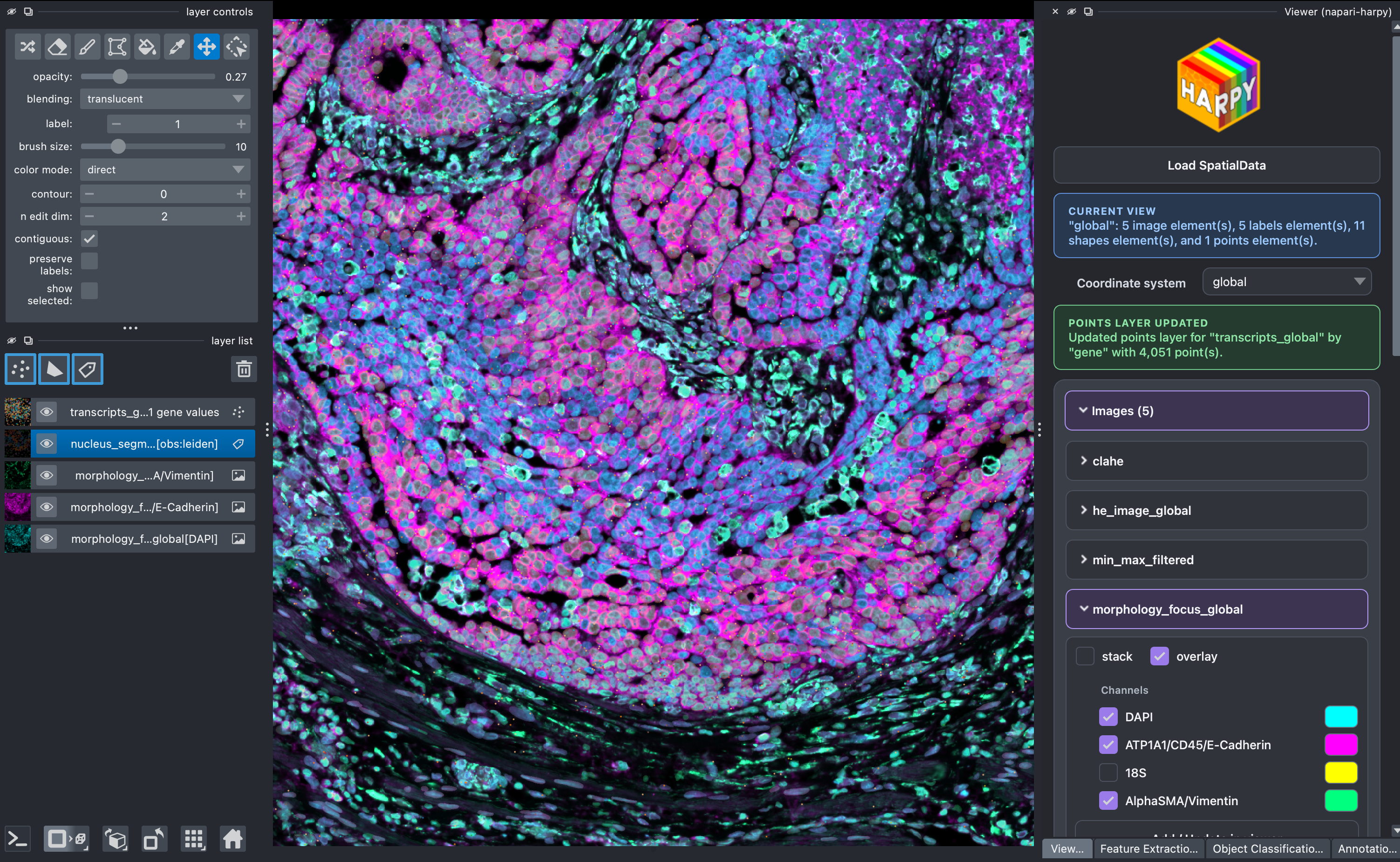
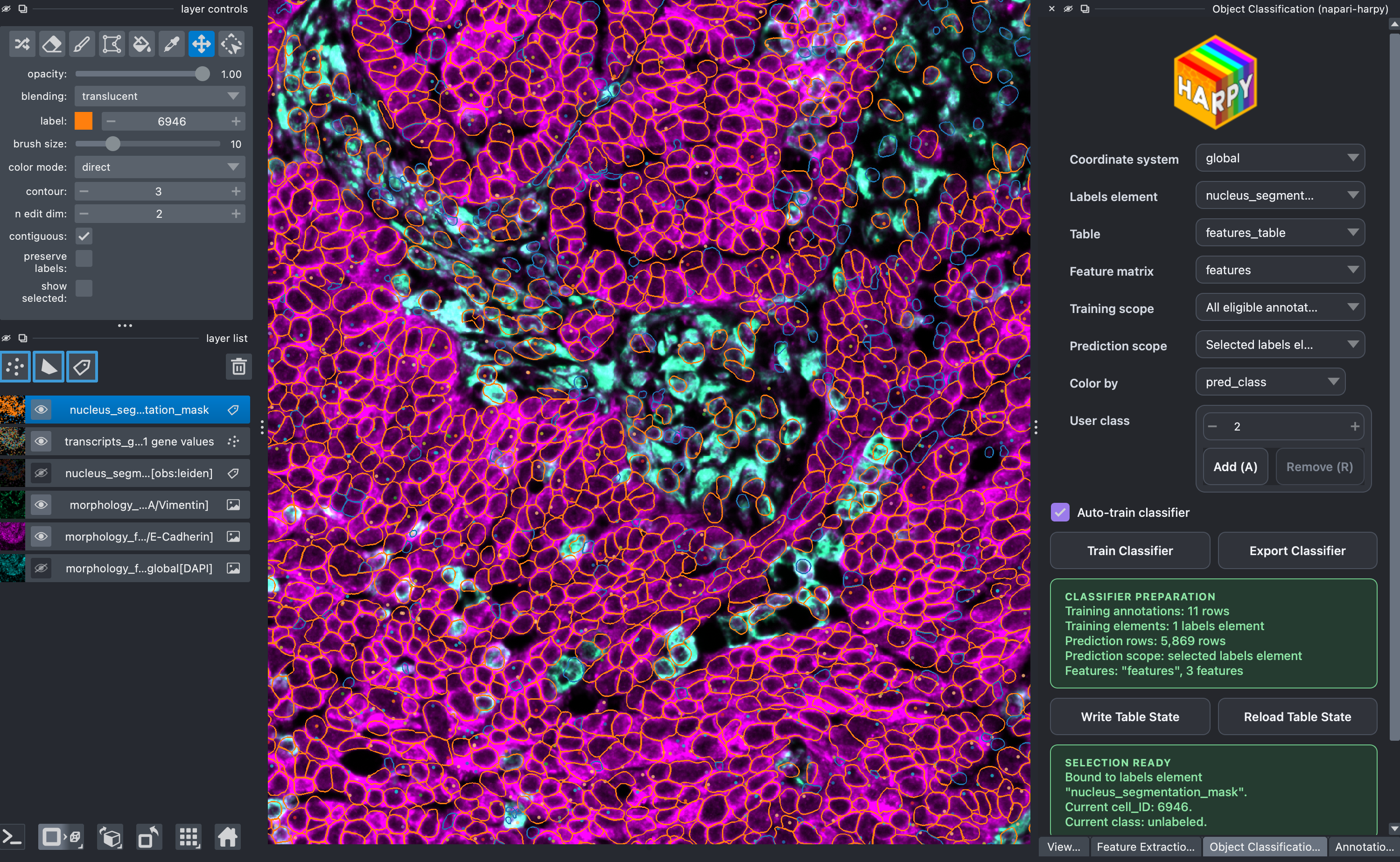
The current repository contains four working widgets:
ViewerFeature ExtractionObject ClassificationAnnotation
Today the plugin supports:
- loading and viewing
SpatialDatathrough the Spatiato viewer widget - selecting a labels element, optional image, compatible coordinate system, and
linked table from the shared loaded
SpatialData - calculating intensity and morphology features through Harpy
- writing feature matrices into the selected
AnnDatatable linked to the labels element, as.obsm[feature_key], with companion metadata in.uns["feature_matrices"][feature_key] - interactive manual annotation of instances in labels elements
- interactive creation and editing of polygon shapes annotations
- background
RandomForestClassifierretraining on the selected feature matrix stored in.obsm[feature_key]of theAnnDatatable linked to the labels element - live prediction updates and labels recoloring
- explicit write-back of in-memory table state to zarr
- explicit reload of on-disk table state back into memory
- multi-sample workflows through multi-region tables and explicit labels/image/coordinate-system matching
- headless feature extraction and classifier application for scripted or batch processing
Example spatiato session:
Headless and Multi-Sample Workflows
For scripted or batch processing, use the public spatiato.headless module.
It can apply an exported classifier to an existing feature matrix, or compute
the required features before applying the classifier.
The headless APIs accept one labels element or a sequence of labels elements.
For multi-sample data, pass matching labels, image, and coordinate-system
sequences so Harpy can build or apply a shared table-level feature matrix across
the selected samples. When features need image intensities, the channel
selection is read from the exported classifier's source_channels metadata.
import harpy as hp

from spatiato import headless

sdata = hp.io.read_zarr("experiment.zarr")

result = headless.apply_classifier_with_feature_extraction_from_path(
    sdata,
    "classifier.spatiato-classifier.joblib",
    table_name="table_multi",
    labels_name=["sample_1_labels", "sample_2_labels"],
    coordinate_system=["sample_1", "sample_2"],
    image_name=["sample_1_image", "sample_2_image"],
)
Predictions go to pred_class and pred_class_confidence. If you pass
another pred_class_column, the confidences go to
<class column>_confidence. How the predictions were made is recorded in
table.uns["classifier_config"][<class column>]. If the Object
Classification widget shows the same data, click Reload in the widget after
the headless run to show the new predictions. If the run wrote pred_class,
the widget shows those predictions, but has no model of its own for them:
its status asks you to train, and Export is unavailable until you do.
Local development
Create the development environment:
./create_env.sh
Then launch napari:
source .venv/bin/activate
napari
Open the widgets from the napari plugin menu:
Plugins -> spatiato -> ViewerPlugins -> spatiato -> Feature ExtractionPlugins -> spatiato -> Object ClassificationPlugins -> spatiato -> Annotation
Optional real-OpenGL renderer qualification
The tiled-points renderer includes one opt-in real-canvas qualification test at
tests/viewer/tiled_points/vispy/test_real_canvas.py.
It is skipped during ordinary test runs because it requires a working
Qt, VisPy, and OpenGL environment. Run it explicitly with:
SPATIATO_RUN_REAL_GL_TESTS=1 \
.venv/bin/pytest -q tests/viewer/tiled_points/vispy/test_real_canvas.py
The focused renderer unit tests remain part of ordinary test runs; this additional qualification creates a real canvas, compiles and executes the custom shaders, and compares the framebuffer result with standard VisPy markers.
Debug script
A small local debug script is available at
scripts/debug_widget.py.
It creates a temporary blobs_multi_region zarr store, loads it into napari,
and docks the Spatiato widgets automatically.
This is useful for quickly reproducing widget behavior during development.
Run it with:
source .venv/bin/activate
python scripts/debug_widget.py
1 maintainer

Metadata
1 maintainer
Release files for spatiato 0.3.1
For a detailed explanation of source distributions (sdists) and built distributions (wheels), please see the package formats documentation.
Source distribution (sdist)
| File | Size | Uploaded | Provenance | Actions |
|---|---|---|---|---|
| spatiato-0.3.1.tar.gz | 20.0 MB | With provenance | Details for spatiato-0.3.1.tar.gz |
Built distribution (wheel)
| File | Interpreter | ABI | Platform | Actions Reset |
|---|---|---|---|---|
| spatiato-0.3.1-py3-none-any.whl | Python 3 | none | any | Details for spatiato-0.3.1-py3-none-any.whl |
Total release size: 20.7 MB
Release files / spatiato-0.3.1.tar.gz
| Download URL | spatiato-0.3.1.tar.gz |
|---|---|
| Size | 20.0 MB |
| Tags | Source |
|
SHA-256 checksum How to use checksums |
6579d7dabcc003f66d13ce072924664131007e87ed3bc697dd0a8452a975c223
|
|
BLAKE2b-256 checksum How to use checksums |
2187c191000097792b4cebe01613bac285077171aec71a576c7e4de42e200a5d
|
| Upload date | |
|
Uploaded using Trusted Publishing? What is trusted publishing? |
Yes |
| Uploaded via |
twine/7.0.0 CPython/3.13.16
|
Provenance
Provenance describes where a file came from. On PyPI, provenance is shared via attestations, which provide a verifiable record of the build or publishing details. View details, limitations and caveats.


PyPI Publish Attestation
PyPI verified that this artifact, at this checksum, originated from the publisher listed below.
Signed by GitHub Actions, verified by PyPI on Nov 12, 2026.
Transparency logRelease files / spatiato-0.3.1-py3-none-any.whl
| Download URL | spatiato-0.3.1-py3-none-any.whl |
|---|---|
| Size | 655.1 kB |
| Tags | Python 3 |
|
SHA-256 checksum How to use checksums |
c5c252f050528666253bc1b8bbb9d2b9dc59d93215adf986d7df034a1e0187cc
|
|
BLAKE2b-256 checksum How to use checksums |
c5b4c1ecb3fb07be35ae7730166530feaa7cbeb962bbbbdbc710bb4a42c89146
|
| Upload date | |
|
Uploaded using Trusted Publishing? What is trusted publishing? |
Yes |
| Uploaded via |
twine/7.0.0 CPython/3.13.16
|
Provenance
Provenance describes where a file came from. On PyPI, provenance is shared via attestations, which provide a verifiable record of the build or publishing details. View details, limitations and caveats.
PyPI Publish Attestation
PyPI verified that this artifact, at this checksum, originated from the publisher listed below.
Signed by GitHub Actions, verified by PyPI on Nov 12, 2026.
Transparency logSecurity for spatiato 0.3.1
Provenance
Provenance describes where a file came from. On PyPI, provenance is shared via attestations, which provide a verifiable record of the build or publishing details. View details, limitations and caveats.
Full provenance
Both files in this release have been uploaded with provenance metadata.
Attestation for spatiato-0.3.1.tar.gz
PyPI Publish Attestation
PyPI verified that this artifact, at this checksum, originated from the publisher listed below.
Signed by GitHub Actions, verified by PyPI on Nov 12, 2026.
Transparency logA note on package security
PyPI is a repository for distributing packages, not a service for auditing them. While third-party security researchers and our staff do their best to detect and remove malicious packages, PyPI cannot guarantee the quality, security or suitability of any given package.
To learn more about protecting yourself from malicious actors, visit our package security documentation.














