

Specatalog
Management of spectroscopic measurement data
Overview
Specatalog is a software tool for the systematic management and archival of spectroscopic measurement data in research environments. It combines a structured directory-based data storage system with a relational database (PostgreSQL) for metadata management.
The software is designed to ensure reproducibility, traceability, and long-term accessibility of experimental data. In addition to raw data storage, Specatalog supports the integration of processed data and evaluation results within a unified framework.
Scope and Supported Methods
Specatalog currently supports the following spectroscopic techniques:
- Time-resolved EPR (trEPR)
- Continuous-wave EPR (cwEPR)
- Pulsed EPR (pulseEPR)
- UV/Vis spectroscopy
- Fluorescence spectroscopy
- Transient absorption (TA)
The system is designed to be extensible, allowing the integration of additional spectroscopic methods. Details on extending the data models are provided in the documentation.
Key Features
- Structured archival system for spectroscopic data
- PostgreSQL-based metadata database
- Integration of raw data, processed data, and evaluation results
- Storage of analysis results within HDF5 files
- Loaders for common spectroscopic data formats
- Programmatic access via Python script
- Graphical user interface (GUI) for interactive data management
- Local or remote (via SMB connection) data storage
A central aspect of Specatalog is the tight coupling between metadata and data storage, enabling consistent and reproducible data handling across projects.
Graphical User Interface
The graphical user interface provides tools for interactive data management and inspection.
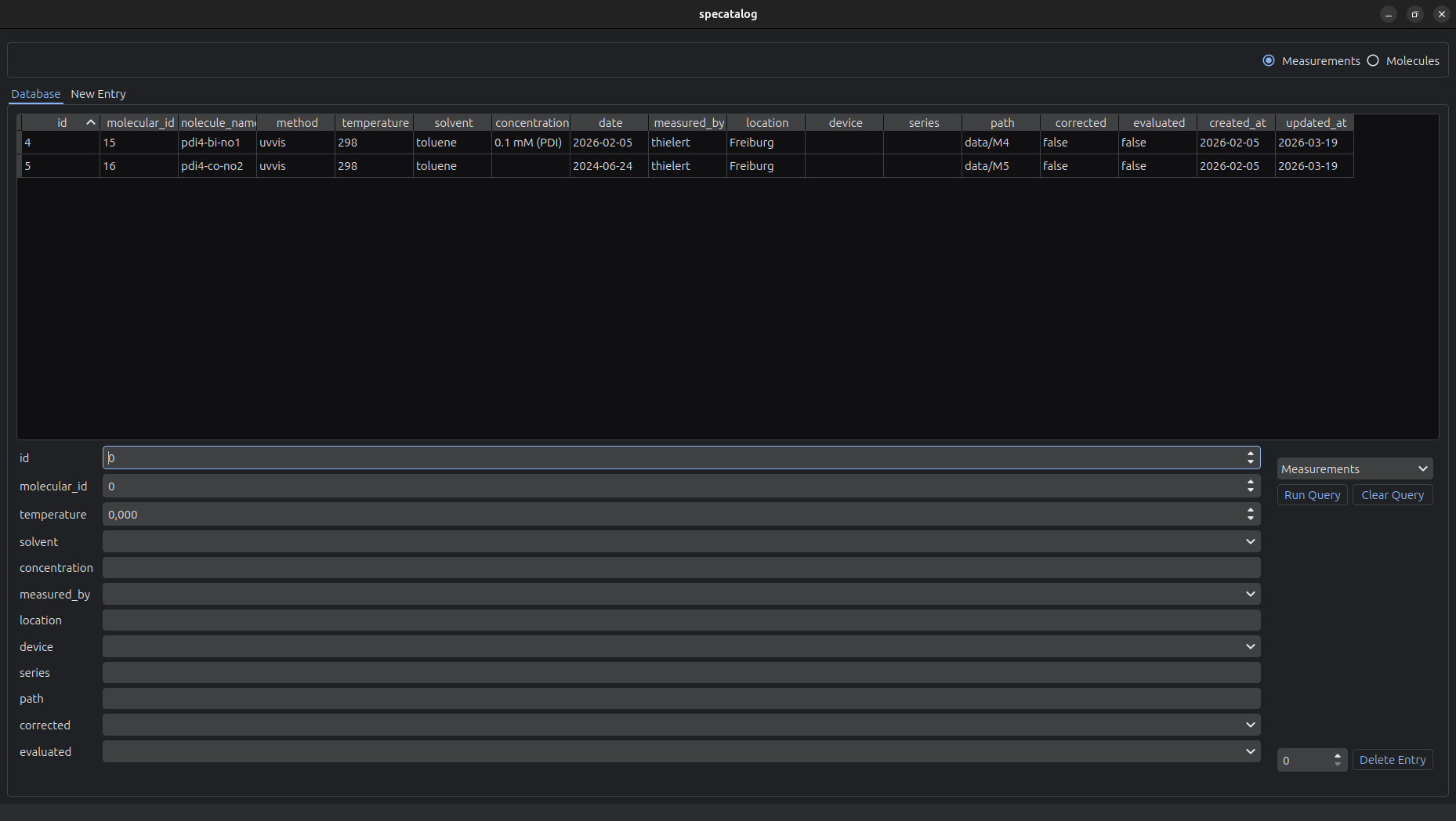
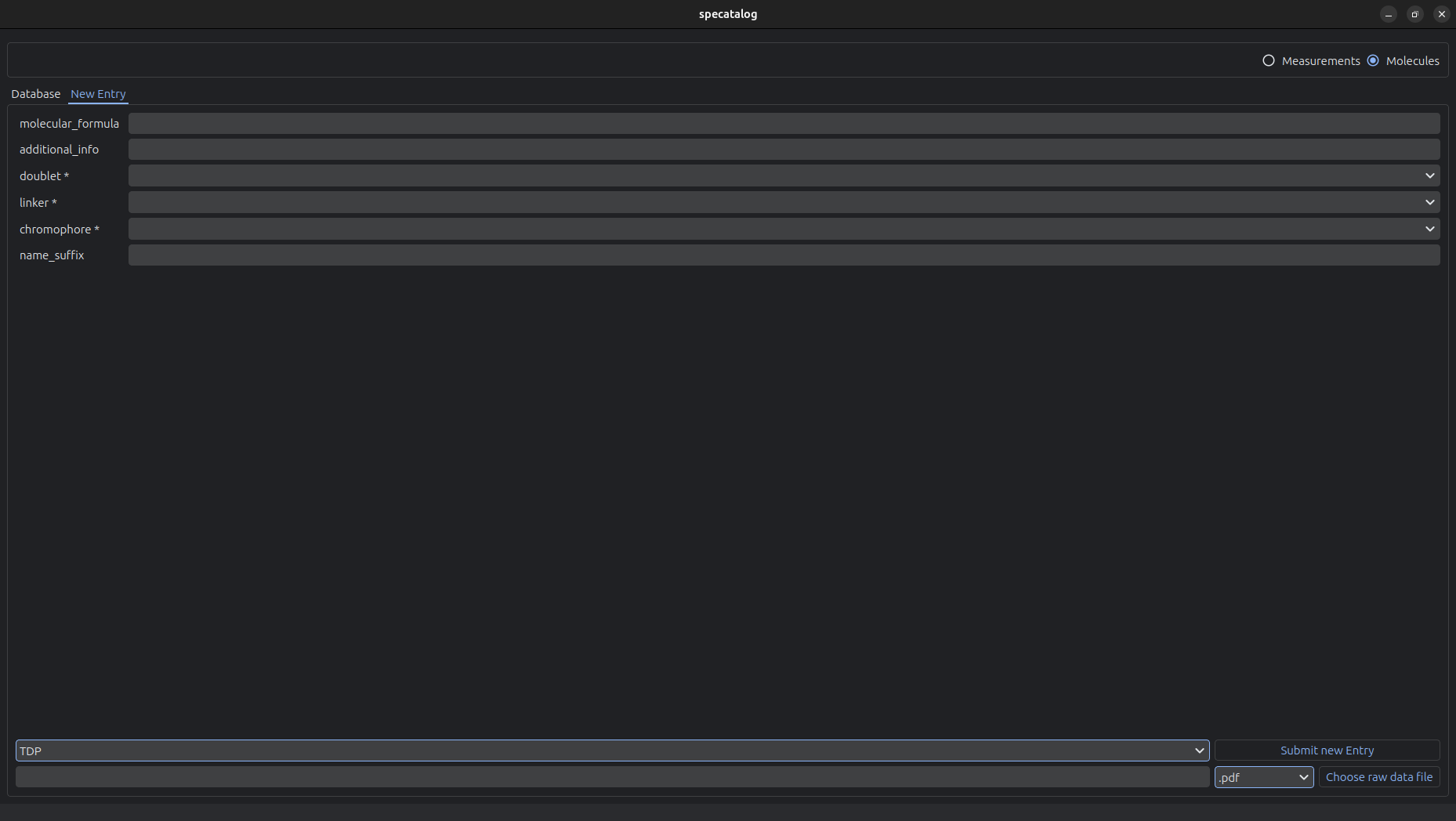
The GUI supports:
- Browsing and searching the database
- Tabular display of entries
- Editing and deletion of existing entries
- Creation of new entries
- Upload of raw measurement data into the archive
Installation
Install the package via pip:
pip install specatalog
All dependencies are specified in the pyproject.toml file.
Consult the documentation for the first-time-setup.
Requirements
- Python = 3.11
- PostgreSQL database
- Operating systems: Linux, macOS, Windows
Command Line Interface
Specatalog provides several command-line tools:
-
specatalog-welcomeVerifies installation and prints the current working directory -
specatalog-configurationInitial configuration of paths / user names / passwords -
specatalog-initInitial setup of working directory and database -
specatalog-init-dirInitial setup of the working directory -
specatalog-update-dbUpdates database models -
specatalog-guiLaunches the graphical user interface
Data Model and Storage Concept
Specatalog separates metadata and data storage while maintaining a strict linkage between both.
Directory Structure
base_dir/
├── data/
│   ├── M1/
│   ├── M2/
│   ├── ...
│   └── M{ms_id}/
│       ├── additional_info/
│       ├── figures/
│       ├── literature/
│       ├── raw/
│       ├── scripts/
│       └── measurement_M{ms_id}.h5
├── molecules/
│   ├── MOL1/
│   ├── MOL2/
│   ├── ...
│   └── MOL{mol_id}/
│       ├── file_with_structure.cdxml
│       └── file_with_structure.pdf
└── allowed_values.py
HDF5 Data Structure
Each measurement is associated with a structured HDF5 file:
measurement_{ms_id}.h5
├── raw_data
│   ├── data
│   ├── data_imag
│   ├── data_real
│   └── xaxis
├── corrected_data
│   └── <user-defined datasets>
└── evaluations
    └── <user-defined datasets>
This structure allows storing both raw data and derived results in a consistent and extendable format.
Example Usage
Creating a New Measurement Entry
from datetime import date

from specatalog.helpers.full_entry import create_full_measurement
from specatalog.models.creation_pydantic_measurements import TREPRModel


new_measurement = TREPRModel(
    molecular_id=1,
    temperature=80.0,
    solvent="toluene",
    date=date(2025, 12, 24),
    measured_by="your_name",
    device="elexsys",
    frequency_band="q",
    attenuation="20 dB",
    excitation_wl=530.0,
    corrected=False,
    evaluated=False,
)

result = create_full_measurement(
    data=new_measurement,
    raw_data_path=[
        "/path/to/measurement"
    ],
    fmt="bruker_bes3t",
)

if result.success:
    print("Measurement successfully created.")
    print(f"Measurement ID: M{result.measurement_id}")
else:
    print("Measurement creation failed.")
    print(result.error)
Querying the Database
from specatalog.crud_db import read as r


filter_model = r.TREPRFilter(
    molecular_id=1,
    temperature__le=80.0,
    measured_by="your_name",
)

ordering_model = r.TREPROrdering(
    date="desc",
)

results = r.run_query(
    filters=filter_model,
    ordering=ordering_model,
)

if results:
    for measurement in results:
        print(measurement)
        print(f"Measurement ID: M{measurement.id}")
        print(f"Molecule: {measurement.molecule.name}")
else:
    print("No matching measurements found.")
Working with HDF5 Data
import matplotlib.pyplot as plt
import numpy as np

from specatalog.data_management.hdf5_reader import load_from_id


with load_from_id(1, mode="a") as (dat, h5_file):
    x = dat.raw_data.xaxis_0
    intensity = dat.raw_data.data_real_0

    plt.plot(x, np.real(intensity))
    plt.xlabel("Magnetic field")
    plt.ylabel("Intensity")
    plt.show()

    offset = 2.3
    corrected_x = x - offset

    fit = -2 * (x - 12000) ** 2 + 2500

    dat.corrected_data.set_attr("x_offset", offset)
    dat.corrected_data.set_dataset("xaxis_0_corrected", corrected_x)
    dat.evaluations.set_dataset("fit_0", fit)

    dat.sync()
Documentation
Comprehensive documentation, including installation details and instructions for extending the data models, is available at:
https://theresiaquintes.github.io/specatalog/
Intended Use
Specatalog is intended for the archival and management of spectroscopic data in academic and industrial research environments. It is particularly suited for laboratories that require structured data storage, standardized metadata handling, and reproducible analysis workflows.
License
This project is licensed under the GNU General Public License v3.0 (GPL-3.0).
Contributing
Contributions, issue reports, and feature requests are welcome.
1 maintainer

Metadata
1 maintainer
Release files for specatalog 2.3.0
For a detailed explanation of source distributions (sdists) and built distributions (wheels), please see the package formats documentation.
Source distribution (sdist)
| File | Size | Uploaded | |
|---|---|---|---|
| specatalog-2.3.0.tar.gz | 94.7 kB | Details |
Built distribution (wheel)
| File | Interpreter | ABI | Platform | Reset |
|---|---|---|---|---|
| specatalog-2.3.0-py3-none-any.whl | Python 3 | none | any | Details |
Total release size: 187.3 kB
Release files / specatalog-2.3.0.tar.gz
| Download URL | specatalog-2.3.0.tar.gz |
|---|---|
| Size | 94.7 kB |
| Tags | Source |
|
SHA-256 checksum How to use checksums |
e248b7e7b6ac0599436e6e2903095167e15aced85f950446c40bb4750a407023
|
|
BLAKE2b-256 checksum How to use checksums |
61091019bc935e4804de7bf9c362c7e5fc38c0bf28676318ae96fc4536af94d6
|
| Upload date | |
|
Uploaded using Trusted Publishing? What is trusted publishing? |
No |
| Uploaded via |
twine/7.0.0 CPython/3.11.15
|
Release files / specatalog-2.3.0-py3-none-any.whl
| Download URL | specatalog-2.3.0-py3-none-any.whl |
|---|---|
| Size | 92.6 kB |
| Tags | Python 3 |
|
SHA-256 checksum How to use checksums |
6ac8d46135b27bf07a6c565c583c761e06411aff55930c88dbaa73349c3f972e
|
|
BLAKE2b-256 checksum How to use checksums |
dfac0de9c4b1cb48ab7f9c1c4e356f6a5ae59f00126dd67e179813ffda28db16
|
| Upload date | |
|
Uploaded using Trusted Publishing? What is trusted publishing? |
No |
| Uploaded via |
twine/7.0.0 CPython/3.11.15
|














