











SpeckleCn2Profiler:
Improving Satellite Communications with SCIDAR and Machine Learning
Overview
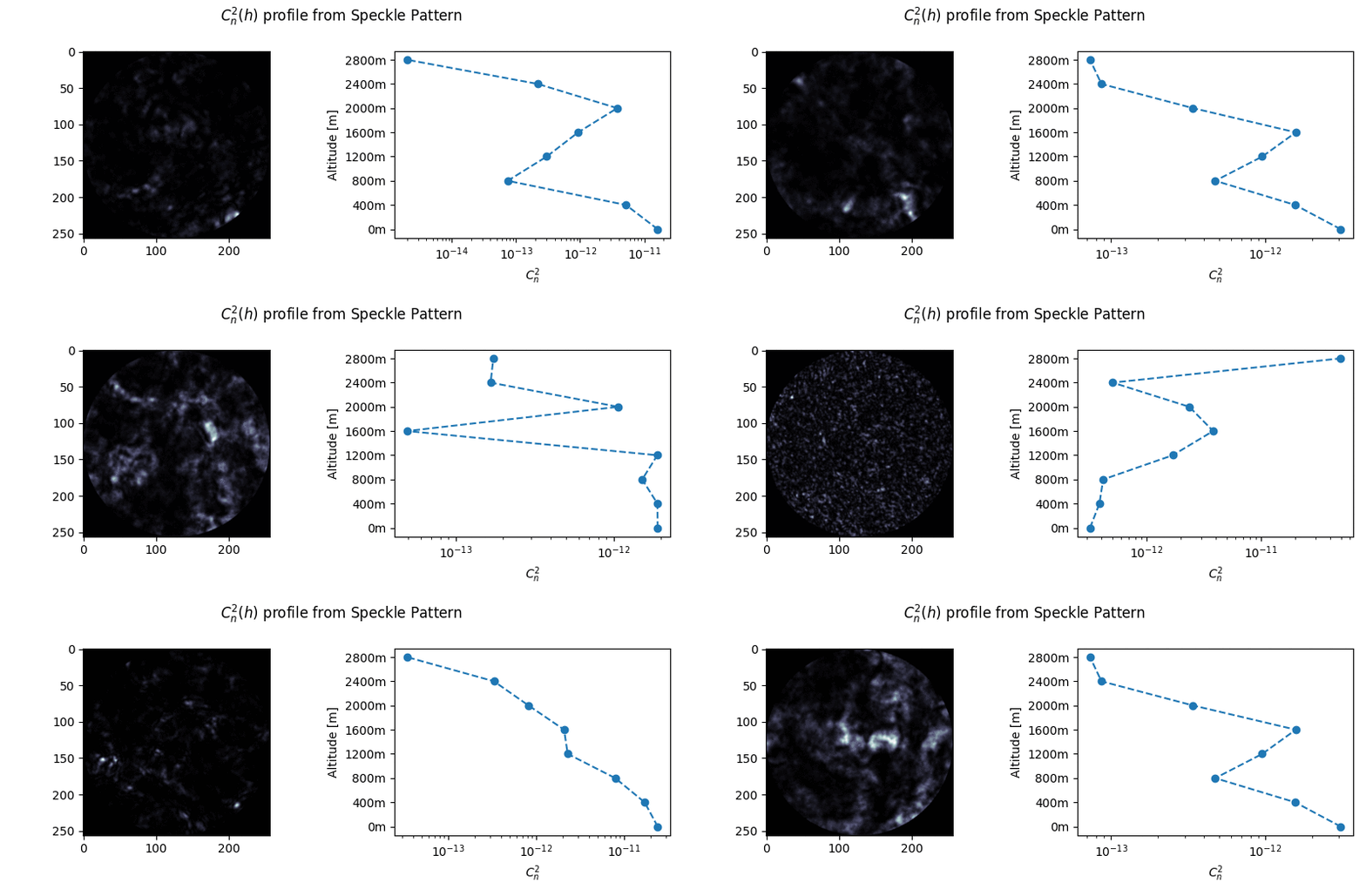
Optical satellite communications is a growing research field with bright commercial perspectives. One of the challenges for optical links through the atmosphere is turbulence, which is also apparent by the twinkling of stars. The reduction of the quality can be calculated, but it needs the turbulence strength over the path the optical beam is running. Estimation of the turbulence strength is done at astronomic sites, but not at rural or urban sites. To be able to do this, a simple instrument is required. We want to propose to use a single star Scintillation Detection and Ranging (SCIDAR), which is an instrument that can estimate the turbulence strength, based on the observation of a single star. In this setting, reliable signal processing of the received images of the star is most challenging. We propose to solve this by Machine Learning.
Statement of Need
SpeckleCn2Profiler addresses the challenge of atmospheric turbulence profiling for optical satellite communications using machine learning-based analysis of SCIDAR data. The primary target users include:
- Aerospace engineers working on free-space optical communication systems
- Atmospheric scientists studying turbulence profiles and optical propagation
- Astronomers characterizing atmospheric seeing conditions
- Researchers in adaptive optics and atmospheric characterization
While traditional SCIDAR instruments require complex signal processing, SpeckleCn2Profiler provides a machine learning-based approach that enables simpler, more accessible turbulence profiling. Unlike classical methods that rely on analytical inversion techniques, our ML-based approach can handle noisy data more robustly and provides uncertainty quantification through ensemble predictions.
Repository Contents
This repository contains the workflow to implement and train machine learning models for turbulence strength estimation from SCIDAR data. Extensive Documentation is available to explain the methodology, algorithms used, and guidelines for using the code.
Getting Started
To get started with the project, follow these steps:
Prerequisites
To correctly install speckcn2, you need Python 3.9 or higher. If you don't have it installed, you can download it from the official website.
You will also need header files required to compile Python extensions (contained in python3-dev):
Ubuntu/Debian:
sudo apt-get install python3-dev
Other systems:
# Fedora/RHEL
sudo dnf install python3-devel

# macOS
xcode-select --install

# Windows: Headers are included with the official Python installer
Installation
Option 1: Install from PyPI (Recommended)
python -m pip install speckcn2
We strongly recommend using a virtual environment:
# Create virtual environment
python -m venv speckcn2-env

# Activate virtual environment
# On Linux/macOS:
source speckcn2-env/bin/activate
# On Windows:
# speckcn2-env\Scripts\activate

# Install the package
python -m pip install speckcn2
Verify installation:
python -c "import speckcn2; print('Installation successful!')"
Option 2: Development Installation
For advanced users and developers who want to modify the code:
git clone https://github.com/MALES-project/SpeckleCn2Profiler.git
cd SpeckleCn2Profiler
git submodule init
git submodule update
pip install -e .
Usage
To use the package, you run the commands such as:
python <mycode.py> <path_to_config.yml>
where <mycode.py> is the name of the script that trains/uses the speckcn2 model and <path_to_config.yml> is the path to the configuration file.
Here you can find a typical example run and an explanation of all the main configuration parameter. In the example submodule you can find multiple examples and multiple configuration to take inspiration from.
Quick Example
Here's a minimal working example to train a model on sample data:
import speckcn2 as sp2
import torch

# Load configuration
config = sp2.load_config('path/to/config.yaml')

# Prepare data
all_images, all_tags, all_ensemble_ids = sp2.prepare_data(config)

# Normalize tags
nz = sp2.Normalizer(config)

# Split data
train_set, test_set = sp2.train_test_split(all_images, all_tags,
                                            all_ensemble_ids, nz)

# Setup model
device = torch.device('cuda' if torch.cuda.is_available() else 'cpu')
model, last_model_state = sp2.setup_model(config)
model = model.to(device)

# Define loss and optimizer
criterion = sp2.ComposableLoss(config, nz, device)
optimizer = sp2.setup_optimizer(config, model)

# Train
model, avg_loss = sp2.train(model, last_model_state, config,
                            train_set, test_set, device,
                            optimizer, criterion, criterion)
print(f'Training complete. Final loss: {avg_loss:.5f}')
Sample data and configuration files are available in the examples/ directory.
What can we predict?
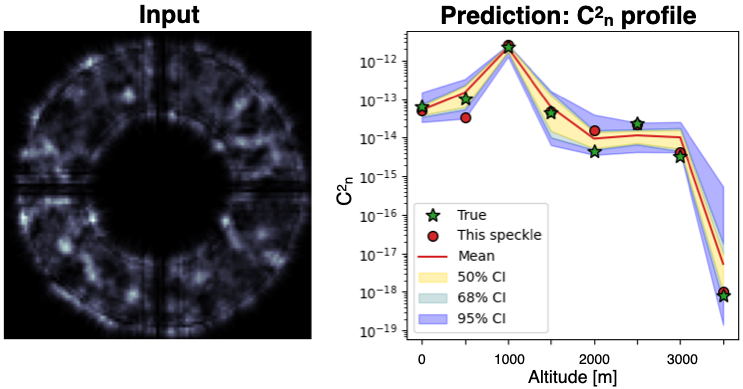
A machine learning model trained using speckcn2 can predict:
1. Instantaneous turbulence strength
2. Parameters estimation
The model can also estimate important parameters that are useful for the analysis of the speckle pattern. At the moment we support:
- Fried parameter
r0 - Isoplanatic angle
θ0 - Rytov Index
σ
We also provide histograms of the estimated parameters and the error of the estimation.
Running Tests
To verify your installation and ensure everything works correctly, you can run the test suite using pytest:
pytest
Note: Some tests may fail on first run because test data needs to be set up. If this happens, run:
python ./scripts/setup_test.py
pytest
For more details on testing and development, see our Contributing Guidelines.
Contribution Guidelines
We welcome contributions to improve and expand the capabilities of this project. If you have ideas, bug fixes, or enhancements, please submit a pull request. Check out our Contributing Guidelines to get started with development.
Generative-AI Disclaimer
Parts of the code have been generated and/or refined using GitHub Copilot. All AI-output has been verified for correctness, accuracy and completeness, revised where needed, and approved by the author(s).
How to cite
Please consider citing this software that is published in Zenodo under the DOI 10.5281/zenodo.11447920.
License
This project is licensed under the Apache 2.0 License - see the LICENSE file for details.
1 maintainer

Metadata
1 maintainer
Release files for speckcn2 2.0.1
For a detailed explanation of source distributions (sdists) and built distributions (wheels), please see the package formats documentation.
Source distribution (sdist)
| File | Size | Uploaded | Provenance | |
|---|---|---|---|---|
| speckcn2-2.0.1.tar.gz | 41.6 kB | With provenance | Details |
Built distribution (wheel)
| File | Interpreter | ABI | Platform | Reset |
|---|---|---|---|---|
| speckcn2-2.0.1-py3-none-any.whl | Python 3 | none | any | Details |
Total release size: 89.1 kB
Release files / speckcn2-2.0.1.tar.gz
| Download URL | speckcn2-2.0.1.tar.gz |
|---|---|
| Size | 41.6 kB |
| Tags | Source |
|
SHA-256 checksum How to use checksums |
716f2597ff5767add13dedd980b29fb2c33ed4943d1481aaf09bec8b0b6a8a22
|
|
BLAKE2b-256 checksum How to use checksums |
a8d8330af25bb81d212312660dea8d9c97678ed6366bb51a9c1e1eeda9b4983d
|
| Upload date | |
|
Uploaded using Trusted Publishing? What is trusted publishing? |
Yes |
| Uploaded via |
twine/6.1.0 CPython/3.13.7
|
Provenance
Provenance describes where a file came from. On PyPI, provenance is shared via attestations, which provide a verifiable record of the build or publishing details. View details, limitations and caveats.


PyPI Publish Attestation
PyPI verified that this artifact, at this checksum, originated from the publisher listed below.
Signed by GitHub Actions, verified by PyPI on Oct 15, 2025.
Transparency logRelease files / speckcn2-2.0.1-py3-none-any.whl
| Download URL | speckcn2-2.0.1-py3-none-any.whl |
|---|---|
| Size | 47.5 kB |
| Tags | Python 3 |
|
SHA-256 checksum How to use checksums |
20436934c3c1087047214c94995499019bd01ce54ad58bab597e568f5a5cdcb4
|
|
BLAKE2b-256 checksum How to use checksums |
ff7d65c72bd9695e2f00e73dae5ca915e1e2cb1adb3f10358c395e2998b9d9f9
|
| Upload date | |
|
Uploaded using Trusted Publishing? What is trusted publishing? |
Yes |
| Uploaded via |
twine/6.1.0 CPython/3.13.7
|
Provenance
Provenance describes where a file came from. On PyPI, provenance is shared via attestations, which provide a verifiable record of the build or publishing details. View details, limitations and caveats.
PyPI Publish Attestation
PyPI verified that this artifact, at this checksum, originated from the publisher listed below.
Signed by GitHub Actions, verified by PyPI on Oct 15, 2025.
Transparency logSecurity for speckcn2 2.0.1
Provenance
Provenance describes where a file came from. On PyPI, provenance is shared via attestations, which provide a verifiable record of the build or publishing details. View details, limitations and caveats.
Full provenance
All 2 files in this release have been uploaded with provenance metadata.
Attestation for speckcn2-2.0.1.tar.gz
PyPI Publish Attestation
PyPI verified that this artifact, at this checksum, originated from the publisher listed below.
Signed by GitHub Actions, verified by PyPI on Oct 15, 2025.
Transparency logA note on package security
PyPI is a repository for distributing packages, not a service for auditing them. While third-party security researchers and our staff do their best to detect and remove malicious packages, PyPI cannot guarantee the quality, security or suitability of any given package.
To learn more about protecting yourself from malicious actors, visit our package security documentation.














