
A unified library for creating, representing, and storing speculative decoding algorithms for LLM serving such as in vLLM.

Project description






Overview
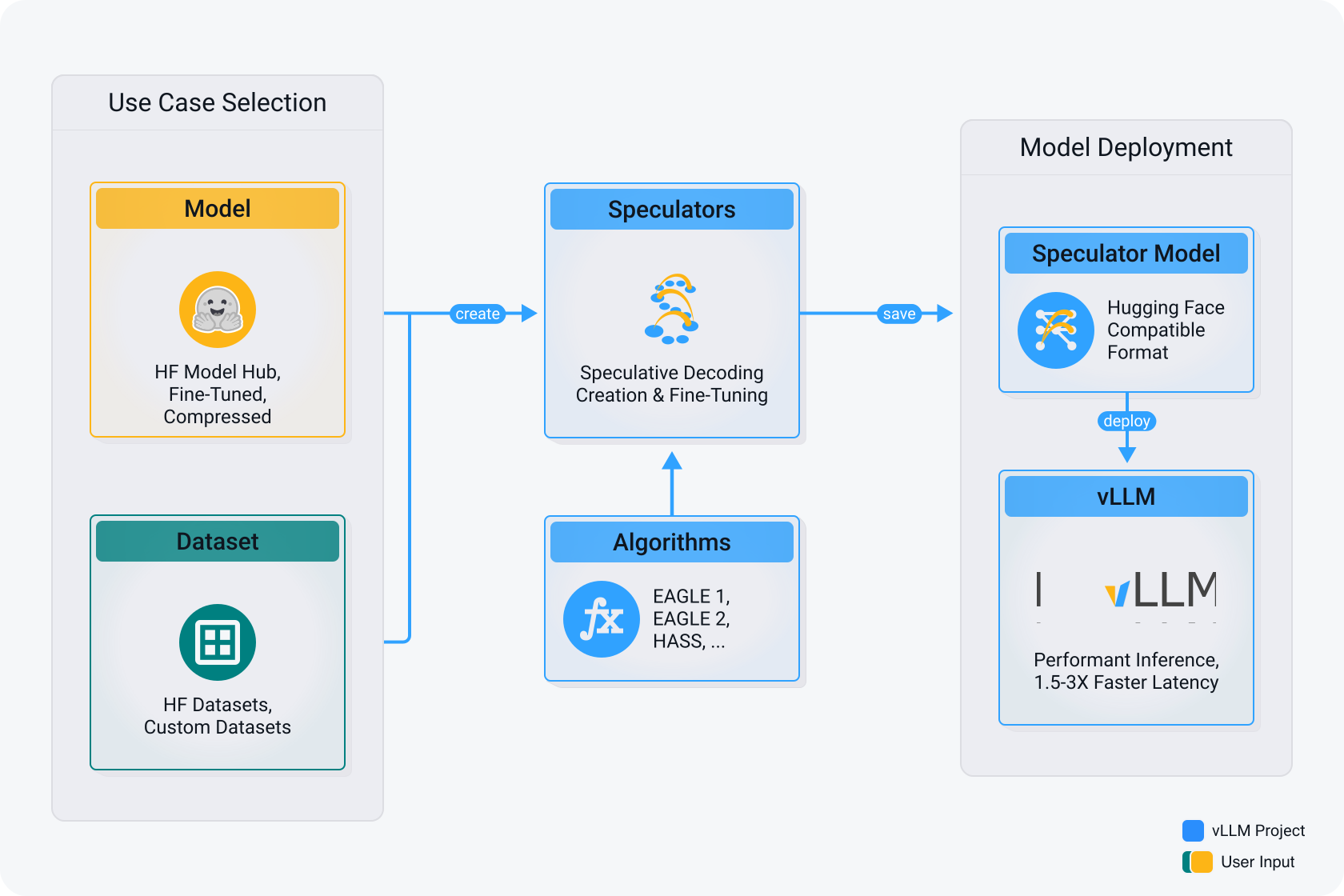
Speculators is a unified library for building, evaluating, and storing speculative decoding algorithms for large language model (LLM) inference, including in frameworks like vLLM. Speculative decoding is a lossless technique that speeds up LLM inference by using a smaller, faster draft model (i.e "the speculators") to propose tokens, which are then verified by the larger base model, reducing latency without compromising output quality. The speculator intelligently drafts multiple tokens ahead of time, and the base model verifies them in a single forward pass. This approach boosts performance without sacrificing output quality, as every accepted token is guaranteed to match what the main model would have generated on its own. Speculators standardizes this process with reusable formats and tools, enabling easier integration and deployment of speculative decoding in production-grade inference servers.
Key Features
- Unified Speculative Decoding Toolkit: Simplifies the development, evaluation, and representation of speculative decoding algorithms, supporting both research and production use cases for LLMs.
- Standardized, Extensible Format: Provides a Hugging Face-compatible format for defining speculative models, with tools to convert from external research repositories into a standard speculators format for easy adoption.
- Seamless vLLM Integration: Built for direct deployment into vLLM, enabling low-latency, production-grade inference with minimal overhead.
- Coming Soon: The ability to train speculators directly through the speculators repository
Supported Models
The following models are currently supported or are planned to be supported in the short term.
| Verifier Architecture | Verifier Size | Training via Speculators | Deployment in vLLM | Conversion of External Checkpoints |
|---|---|---|---|---|
| Llama | 8B-Instruct | EAGLE-3 ✅ | HASS ✅ | ✅ | EAGLE-3 ✅ |
| 70B-Instruct | EAGLE-3 ✅ | ✅ | EAGLE-3 ✅ | |
| DeepSeek-R1-Distill-LLama-8B | EAGLE-3 ❌ | ✅ | EAGLE-3 ✅ | |
| Qwen3 | 8B | EAGLE-3 ✅ | ✅ | ❌ |
| 14B | EAGLE-3 ✅ | ✅ | ❌ | |
| 32B | EAGLE-3 ✅ | ✅ | ❌ | |
| Qwen3 MoE | 30B-A3B | EAGLE-3 ❌ | ⏳ | ❌ |
| 235B-A22B | EAGLE-3 ❌ | ⏳ | EAGLE-3 ⏳ | |
| Llama-4 | Scout-17B-16E-Instruct | EAGLE-3 ❌ | ⏳ | ❌ |
| Maverick-17B-128E-Eagle3 | EAGLE-3 ❌ | ✅ | EAGLE-3 ✅ | |
| DeepSeek-R1 | DeepSeek-R1 | EAGLE-3 ❌ | ⏳ | HASS ⏳ |
✅ = Supported, ⏳ = In Progress, ❌ = Not Yet Supported
vLLM Inference
Once in the speculators format, you can serve the speculator using vLLM:
VLLM_USE_V1=1 vllm serve RedHatAI/Qwen3-8B-speculator.eagle3
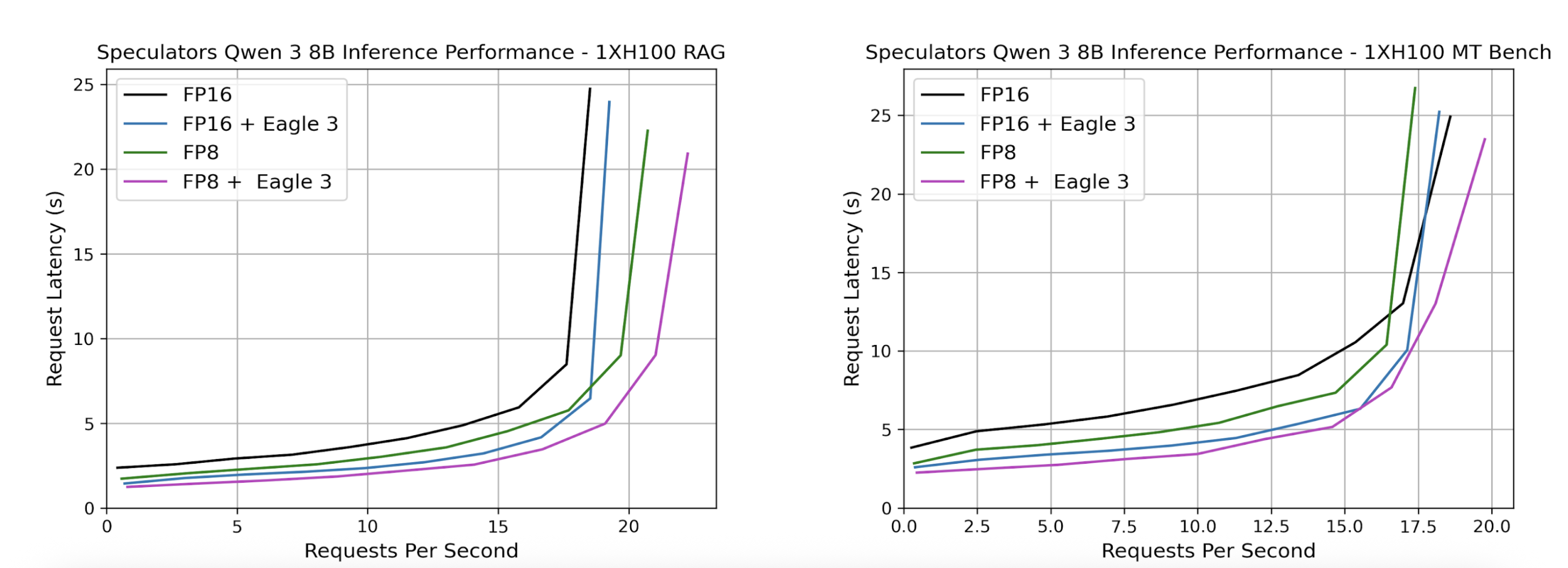
Served models can then be benchmarked using GuideLLM. Below, we show sample benchmark results where we compare our speculator with its dense counterpart. We also additionally compare quantization to explore additional performance improvements by swapping the dense verifier, Qwen/Qwen3-8B with the quantized FP8 model, RedHatAI/Qwen3-8B-FP8-dynamic in the speculator_config.
Getting Started
Installation
Prerequisites
Before installing, ensure you have the following:
- Operating System: Linux or macOS
- Python: 3.10 or higher
- Package Manager: pip (recommended) or conda
Install from PyPI (Recommended)
Install the latest stable release from PyPI:
pip install speculators
Install from Source
For the latest development version or to contribute to the project:
git clone https://github.com/neuralmagic/speculators.git
cd speculators

pip install -e .
For development with additional tools:
pip install -e ".[dev]"
Verify Installation
You can verify your installation by checking the version:
speculators --version
Or by importing the package in Python:
import speculators
print(speculators.__version__)
Resources
Here you can find links to our research implementations. These provide prototype code for immediate enablement and experimentation, with plans for productization into the main package soon.
-
eagle3: This implementation trains models similar to the EAGLE 3 architecture, specifically utilizing the Train Time Test method.
-
hass: This implementation trains models that are a variation on the EAGLE 1 architecture using the HASS method.
License
Speculators is licensed under the Apache License 2.0.
Cite
If you find Speculators helpful in your research or projects, please consider citing it:
@misc{speculators2025,
  title={Speculators: A Unified Library for Speculative Decoding Algorithms in LLM Serving},
  author={Red Hat},
  year={2025},
  howpublished={\url{https://github.com/neuralmagic/speculators}},
}
Release history Release notifications | RSS feed


Download files
Download the file for your platform. If you're not sure which to choose, learn more about installing packages.
Source Distribution
Built Distribution
Filter files by name, interpreter, ABI, and platform.
If you're not sure about the file name format, learn more about wheel file names.
Copy a direct link to the current filters
File details
Details for the file speculators-0.2.0.tar.gz.
File metadata
- Download URL: speculators-0.2.0.tar.gz
- Upload date:
- Size: 53.4 kB
- Tags: Source
- Uploaded using Trusted Publishing? No
- Uploaded via: twine/6.2.0 CPython/3.10.19
File hashes
| Algorithm | Hash digest | |
|---|---|---|
| SHA256 |
0783fe04066b6cff680b1e3ed62f8357c5cf9e233d89cf7de5d9827501da3798
|
|
| MD5 |
b47af59adb2bcb5e9d20490ec5e1ef92
|
|
| BLAKE2b-256 |
cd8fecfdd5cebe8a00e557b7bce86c41599f9057836dde2ece8894be36920d6b
|
File details
Details for the file speculators-0.2.0-py3-none-any.whl.
File metadata
- Download URL: speculators-0.2.0-py3-none-any.whl
- Upload date:
- Size: 58.4 kB
- Tags: Python 3
- Uploaded using Trusted Publishing? No
- Uploaded via: twine/6.2.0 CPython/3.10.19
File hashes
| Algorithm | Hash digest | |
|---|---|---|
| SHA256 |
750a4d4ba08de2e79991295fa7a8c176fb500f91dadf5f2382b620192c9edce8
|
|
| MD5 |
82addd54b215944f5f139cf83fafaedc
|
|
| BLAKE2b-256 |
46017a17f11513cb5a92baa46b60532710f3a097a785e914cae3958462a6e046
|






