
SPGCI is an API Client for the S&P Commodity Insights REST API

Project description
SPGCI
Python Client for the S&P Global Commodity Insights API.
Installation
Requires Python >= 3.8.10.
pip install spgci
Getting Started

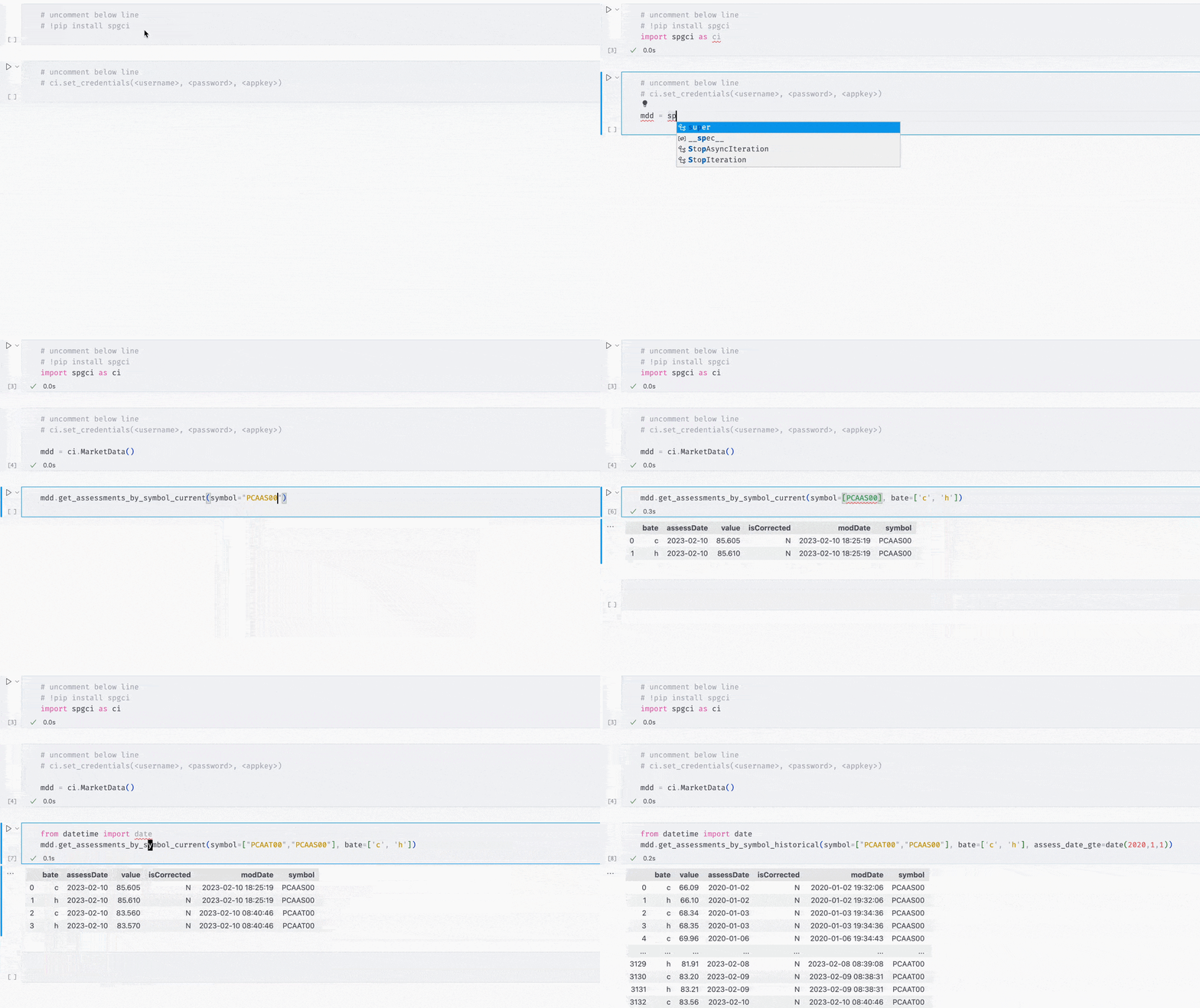
    import spgci as ci

    ci.set_credentials(<username>, <password>, <appkey>)
    mdd = ci.MarketData()

    symbols = ["PCAAS00", "PCAAT00"]
    mdd.get_assessments_by_symbol_current(symbol=symbols)
Alternatively, you can set your credentials via Environment Variables and omit the set_credentials call:
| Environment Variable | Description |
|---|---|
| SPGCI_USERNAME | Your Username |
| SPGCI_PASSWORD | Your Password |
| SPGCI_APPKEY | Your AppKey |
Features
- Automatically generates token prior to making request.
- Returns data as a pandas DataFrame (set
raw=Falseto get the rawrequest.responseobject). - Can auto-paginate response and concatenates into a single DataFrame (set
paginate=Trueto enable). - Sets datatype for
dateanddatetimefields in DataFrame. - Composes nicely with native python/pandas types. Arguments support
listsandpd.Serieswhich are automatically converted into filter expressions.
Datasets Supported
Market Data
import spgci as ci

mdd = ci.MarketData()

mdd.get_symbols(commodity="Crude oil")
# DataFrame of symbols with commodity = "Crude oil".

mdd.get_mdcs(subscribed_only=True)
# DataFrame of all Market Data Categories you are subscribed to.

mdd.get_assessments_by_mdc_current(mdc="ET")
# DataFrame of current assessments for all symbols in the Market Data Category "ET".
Forward Curves
import spgci as ci

fc = ci.ForwardCurves()

fc.get_curves(
    commodity=["Benzene", "Crude oil"],
    derivative_maturity_frequency="Month"
    )
# DataFrame of all curves with commodity in ("Benzene", "Crude Oil") and have a Monthly frequency.

fc.get_assessments(curve_code=["CN003", "CN006"])
# DataFrame of the latest assessments for all symbols in the curves ("CN003", "CN006").
Energy Price Forecast
import spgci as ci

epf = ci.EnergyPriceForecast()

epf.get_prices_shortterm(symbol="PCAAS00", month=[10, 11, 12])
# DataFrame of monthly forecasts for the symbol "PCAAS00" in the last 3 months of the year.

epf.get_prices_longterm(year=[2020, 2021], sector="Energy Transition", delivery_region="Europe")
# DataFrame of the annual forecasts for the years in ("2020", "2021"), where the sector is "Energy Transition" and the delivery region is "Europe".
EWindow Market Data
import spgci as ci
from datetime import date

ewmd = ci.EWindowMarketData()

ewmd.get_markets()
# DataFrame of Markets.

d = date(2023,2,13)
ewmd.get_botes(market=["EU BFOE", "US MidWest"], order_time=d)
# DataFrame of all BOTes in the markets ("EU BFOE", "US MidWest") on Feb 13, 2023.
World Oil Supply
import spgci as ci

wos = ci.WorldOilSupply()

countries = wos.get_reference_data(type=wos.RefTypes.Countries)
# DataFrame of all countries.

wos.get_ownership(country=countries['countryName'][:3], year=2040)
# DataFrame of Ownership for the first three countries from the countries endpoint and year "2040".
World Refinery Database
import spgci as ci

wrd = ci.WorldRefineryData()

wrd.get_yields(year=2020, owner="BP")
# DataFrame of yields for the year "2020" where "BP" is the refinery owner.

ref = wrd.get_reference_data(type=wrd.RefTypes.Refineries)
# DataFrame of all refineries.

az = ref[ref['Name'].str.contains("Al-Zour")]
wrd.get_runs(refinery_id=az["Id"])
# DataFrame of runs for the refineries with "Al-Zour" in the name.

wrd.get_outages(refinery_id=245)
# DataFrame of outages for refineryId 245.
Insights
import spgci as ci

ni = ci.Insights()

ni.get_stories(q="Suez", content_type=ni.ContentType.MarketCommentary)
# DataFrame of articles related to "Suez" where the content type is "Market Commentary".

ni.get_subscriber_notes(q="Naptha")
# DataFrame of all subscriber notes related to "Naptha".

ni.get_heards(q="Steel", content_type=ni.HeardsContentType.Heard, geography=['Europe', 'Middle East'], strip_html=True)
# DataFrame of all Heards related to "Steel" where the geography is in ("Europe", "Middle East") with HTML Tags removed from the headline and body.
Global Oil Demand
import spgci as ci

od = ci.GlobalOilDemand()

od.get_demand(country="Cambodia", product=["Naphtha", "Ethane"])
# DataFrame of forecast monthly demand for ("Naphtha", "Ethane") for Cambodia.

products = od.get_reference_data(type=od.RefTypes.Products)
# DataFrame of all "products" covered by Global Oil Demand dataset.

od.get_demand(product=products["productName"][:3], year_gte=2023)
# DataFrame of forecast monthly demand for the first 3 products in the previous DataFrame and the year >= 2023.

od.get_demand_archive(scenario_id=150, country="Norway")
# DataFrame of an archived (March 2023) forecast of monthly oil demand for Norway.
Disclaimer
Please note that by using this Alpha offering, you agree that you are participating in a prototype to develop these software development kits (“Alpha SDKs”) and that your participation and use of the Alpha SDKs is at your own risk. You will be liable for all activities by anyone using your application in connection with the Alpha SDKs.
If you are dissatisfied with the Alpha SDKs, your sole remedy is to stop using it, and S&P Global Commodity Insights (“SPGCI”) will not pay you any damages (direct, indirect, special, or consequential) in connection with your use of the Alpha SDKs. Commodity Insights SPGCI disclaims any and all representations and warranties, express or implied, including but not limited to any warranties of merchantability or fitness for a particular purpose or use as to the Alpha SDKs, and does not guarantee the adequacy, accuracy, timeliness or completeness of the Alpha SDKs or any component of them.
Release history Release notifications | RSS feed


Download files
Download the file for your platform. If you're not sure which to choose, learn more about installing packages.
Source Distribution
Built Distribution
Filter files by name, interpreter, ABI, and platform.
If you're not sure about the file name format, learn more about wheel file names.
Copy a direct link to the current filters
File details
Details for the file spgci-0.0.21.tar.gz.
File metadata
- Download URL: spgci-0.0.21.tar.gz
- Upload date:
- Size: 29.5 kB
- Tags: Source
- Uploaded using Trusted Publishing? No
- Uploaded via: poetry/1.3.2 CPython/3.8.10 Windows/10
File hashes
| Algorithm | Hash digest | |
|---|---|---|
| SHA256 |
b7f79f0f4517fb125ff60afac916cb4cda2e58f202cb930c769642938ef79ca6
|
|
| MD5 |
f51fe77d4d606b2382f6bea02c82364b
|
|
| BLAKE2b-256 |
19d4150b969d89642523911c403ee34874d5aec543ceefcb7e9a3852c20b5c50
|
File details
Details for the file spgci-0.0.21-py3-none-any.whl.
File metadata
- Download URL: spgci-0.0.21-py3-none-any.whl
- Upload date:
- Size: 35.2 kB
- Tags: Python 3
- Uploaded using Trusted Publishing? No
- Uploaded via: poetry/1.3.2 CPython/3.8.10 Windows/10
File hashes
| Algorithm | Hash digest | |
|---|---|---|
| SHA256 |
7fffe07937ff773b35e1a2c294a167e59c4063dcc7fb356a88c639b7db16d000
|
|
| MD5 |
da839d2fc0efc4dec394c560c01ff684
|
|
| BLAKE2b-256 |
41d4fc93f833fd5df77fa0f058dbe0f4f350aa698f8a247dca9e41ad96f9c098
|






