
🎨 sphinxcolor
Colorize your Sphinx build output with beautiful, customizable colors!
sphinxcolor is a Python package that adds vibrant colors to sphinx-build output, making warnings, errors, and other messages easier to read and identify.




✨ Features
- 🎨 Customizable Colors: Configure colors via TOML file
- 🔌 Multiple Usage Modes:
- Use as command-line pipe
- Import as Sphinx extension
- Use as standalone tool
- 🚀 Rich Terminal Output: Uses the
richlibrary for beautiful formatting - ⚡ Fast: Regex-based pattern matching for efficient processing
- 🛠️ Configurable Patterns: Customize what gets colored and how
📦 Installation
# Install from PyPI (when published)
pip install sphinxcolor

# Or install from source
git clone https://github.com/cumulus13/sphinxcolor.git
cd sphinxcolor
pip install -e .
🚀 Usage
1. Pipe Mode (Recommended)
The most common usage - pipe sphinx-build output through sphinxcolor:
IMPORTANT: Always use 2>&1 to merge stderr to stdout!
# Correct - merges stderr to stdout
sphinx-build -b html . _build 2>&1 | sphinxcolor

# Wrong - will have duplicate output
sphinx-build -b html . _build | sphinxcolor

# With make
make html | sphinxcolor

# With specific color on Windows
rm -rf _build && make html | sphinxcolor
2. As a Sphinx Extension
Add to your conf.py:
# conf.py
extensions = [
    'sphinxcolor',
    # ... other extensions
]

# Optional: specify custom config path
sphinxcolor_config_path = 'path/to/custom/sphinxcolor.toml'

# Optional: disable if needed
sphinxcolor_enabled = True
3. As a Standalone Tool
# Process a log file
sphinxcolor build.log

# From stdin
cat build.log | sphinxcolor

# With custom config
sphinxcolor --config custom.toml < build.log

# Disable colors
sphinxcolor --no-color < build.log
⚙️ Configuration
Create a sphinxcolor.toml file in your project root, home directory (~/.sphinxcolor.toml), or config directory (~/.config/sphinxcolor.toml):
[colors]
# File path color (cyan)
filepath = "#00FFFF"

# WARNING text color (yellow)
warning = "#FFFF00"

# ERROR text color (red)
error = "#FF0000"

# Docstring/location (purple)
docstring = "#aa55ff"

# Warning message (black on green)
message_fg = "#000000"
message_bg = "#00FF00"

# Tips/suggestions (white on purple)
tips_fg = "#FFFFFF"
tips_bg = "#5500FF"

[patterns]
# Customize regex patterns
filepath_pattern = '^([A-Z]:\\[^:]+|/[^:]+)'
warning_pattern = '\b(WARNING|Error|ERROR)\s*:'
tips_pattern = 'use :no-index: for one of them'
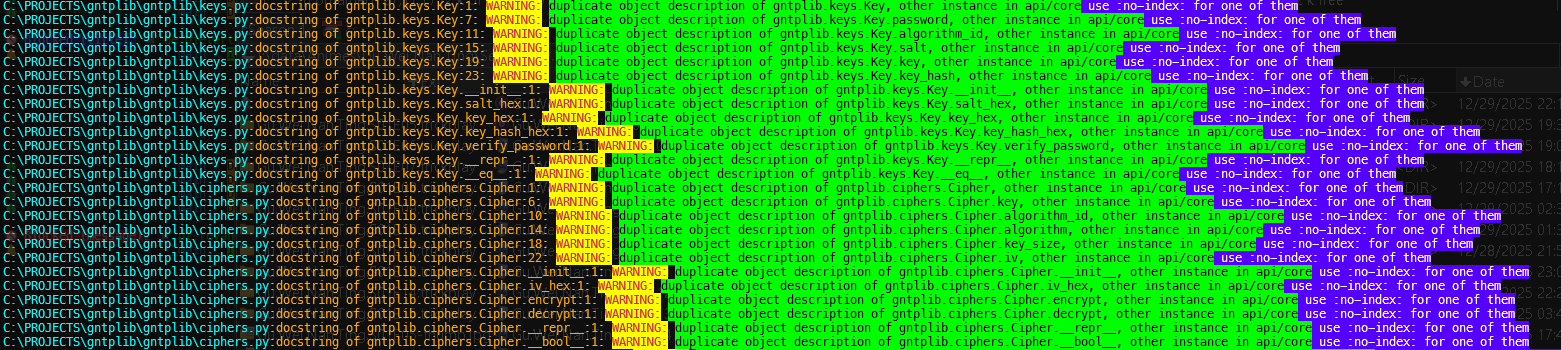
Default Color Scheme
The example you provided will be colored as:
C:\PROJECTS\gntplib\gntplib\requests.py              <- Cyan (#00FFFF)
:docstring of gntplib.requests.Response.get_header:1 <- Purple (#aa55ff)
: WARNING:                                            <- Yellow (#FFFF00) bold
duplicate object description...                      <- Black on Green
use :no-index: for one of them                       <- White on Purple (#5500FF) bold
🎯 Example Output
Before sphinxcolor:
C:\PROJECTS\gntplib\gntplib\keys.py:docstring of gntplib.keys.Key:1: WARNING: duplicate object description of gntplib.keys.Key, other instance in api/core, use :no-index: for one of them
After sphinxcolor:
[Beautiful colored output with cyan paths, yellow warnings, purple locations, and highlighted messages!]
🔧 Advanced Usage
Custom Configuration Location
# Specify config file
sphinxcolor --config /path/to/custom.toml < input.log
In Python Scripts
from sphinxcolor import SphinxColorizer, Config

# Create colorizer with custom config
config = Config('sphinxcolor.toml')
colorizer = SphinxColorizer(config)

# Process lines
with open('build.log', 'r') as f:
    colorizer.process_stream(f)
Disable Temporarily
# Use --no-color flag
make html | sphinxcolor --no-color

# Or set environment variable
SPHINXCOLOR_ENABLED=0 make html | sphinxcolor
📝 Color Format
Colors can be specified in several formats:
- Hex colors:
#RRGGBB(e.g.,#00FFFF) - Named colors:
red,blue,green, etc. - RGB colors:
rgb(255,0,0)
Requirements
- Python 3.8+
- rich >= 13.0.0
- tomli >= 2.0.0 (for Python < 3.11)
Author


📄 License
This project is licensed under the MIT License - see the LICENSE file for details.
🤝 Contributing
Contributions are welcome! Please feel free to submit a Pull Request.
- Fork the repository
- Create your feature branch (
git checkout -b feature/AmazingFeature) - Commit your changes (
git commit -m 'Add some AmazingFeature') - Push to the branch (
git push origin feature/AmazingFeature) - Open a Pull Request
Made with ❤️ for the Sphinx community
1 maintainer

Metadata
1 maintainer
Release files for sphinxcolor 0.1.4
For a detailed explanation of source distributions (sdists) and built distributions (wheels), please see the package formats documentation.
Source distribution (sdist)
| File | Size | Uploaded | |
|---|---|---|---|
| sphinxcolor-0.1.4.tar.gz | 16.0 kB | Details |
Built distribution (wheel)
| File | Interpreter | ABI | Platform | Reset |
|---|---|---|---|---|
| sphinxcolor-0.1.4-py3-none-any.whl | Python 3 | none | any | Details |
Total release size: 29.4 kB
Release files / sphinxcolor-0.1.4.tar.gz
| Download URL | sphinxcolor-0.1.4.tar.gz |
|---|---|
| Size | 16.0 kB |
| Tags | Source |
|
SHA-256 checksum How to use checksums |
263610e14dda2a64f8f0217c8dcb9ad46491e0a9bc95cfc368ae196f4fffe707
|
|
BLAKE2b-256 checksum How to use checksums |
b1dd740b6f3d402d17532ea0aa678359020c133586c90c6282570d60bd758425
|
| Upload date | |
|
Uploaded using Trusted Publishing? What is trusted publishing? |
No |
| Uploaded via |
twine/4.0.2 CPython/3.11.4
|
Release files / sphinxcolor-0.1.4-py3-none-any.whl
| Download URL | sphinxcolor-0.1.4-py3-none-any.whl |
|---|---|
| Size | 13.4 kB |
| Tags | Python 3 |
|
SHA-256 checksum How to use checksums |
710039ef7de85f2b939c2968468aecbf16456b03e1fa4cf3b0941f57eab914fb
|
|
BLAKE2b-256 checksum How to use checksums |
0fda1e914e2a490c407dba8120b67281b6e03e5ae9d72328bcf8491a7e785ffd
|
| Upload date | |
|
Uploaded using Trusted Publishing? What is trusted publishing? |
No |
| Uploaded via |
twine/4.0.2 CPython/3.11.4
|














