
Colorize Sphinx build output with customizable colors

Project description
🎨 sphinxcolor
Colorize your Sphinx build output with beautiful, customizable colors!
sphinxcolor is a Python package that adds vibrant colors to sphinx-build output, making warnings, errors, and other messages easier to read and identify.





✨ Features
- 🎨 Customizable Colors: Configure colors via TOML file
- 🔌 Multiple Usage Modes:
- Use as command-line pipe
- Import as Sphinx extension
- Use as standalone tool
- 🚀 Rich Terminal Output: Uses the
richlibrary for beautiful formatting - ⚡ Fast: Regex-based pattern matching for efficient processing
- 🛠️ Configurable Patterns: Customize what gets colored and how
📦 Installation
# Install from PyPI (when published)
pip install sphinxcolor

# Or install from source
git clone https://github.com/cumulus13/sphinxcolor.git
cd sphinxcolor
pip install -e .
🚀 Usage
1. Pipe Mode (Recommended)
The most common usage - pipe sphinx-build output through sphinxcolor:
IMPORTANT: Always use 2>&1 to merge stderr to stdout!
# Correct - merges stderr to stdout
sphinx-build -b html . _build 2>&1 | sphinxcolor

# Wrong - will have duplicate output
sphinx-build -b html . _build | sphinxcolor

# With make
make html | sphinxcolor

# With specific color on Windows
rm -rf _build && make html | sphinxcolor
2. As a Sphinx Extension
Add to your conf.py:
# conf.py
extensions = [
    'sphinxcolor',
    # ... other extensions
]

# Optional: specify custom config path
sphinxcolor_config_path = 'path/to/custom/sphinxcolor.toml'

# Optional: disable if needed
sphinxcolor_enabled = True
3. As a Standalone Tool
# Process a log file
sphinxcolor build.log

# From stdin
cat build.log | sphinxcolor

# With custom config
sphinxcolor --config custom.toml < build.log

# Disable colors
sphinxcolor --no-color < build.log
⚙️ Configuration
Create a sphinxcolor.toml file in your project root, home directory (~/.sphinxcolor.toml), or config directory (~/.config/sphinxcolor.toml):
[colors]
# File path color (cyan)
filepath = "#00FFFF"

# WARNING text color (yellow)
warning = "#FFFF00"

# ERROR text color (red)
error = "#FF0000"

# Docstring/location (purple)
docstring = "#aa55ff"

# Warning message (black on green)
message_fg = "#000000"
message_bg = "#00FF00"

# Tips/suggestions (white on purple)
tips_fg = "#FFFFFF"
tips_bg = "#5500FF"

[patterns]
# Customize regex patterns
filepath_pattern = '^([A-Z]:\\[^:]+|/[^:]+)'
warning_pattern = '\b(WARNING|Error|ERROR)\s*:'
tips_pattern = 'use :no-index: for one of them'
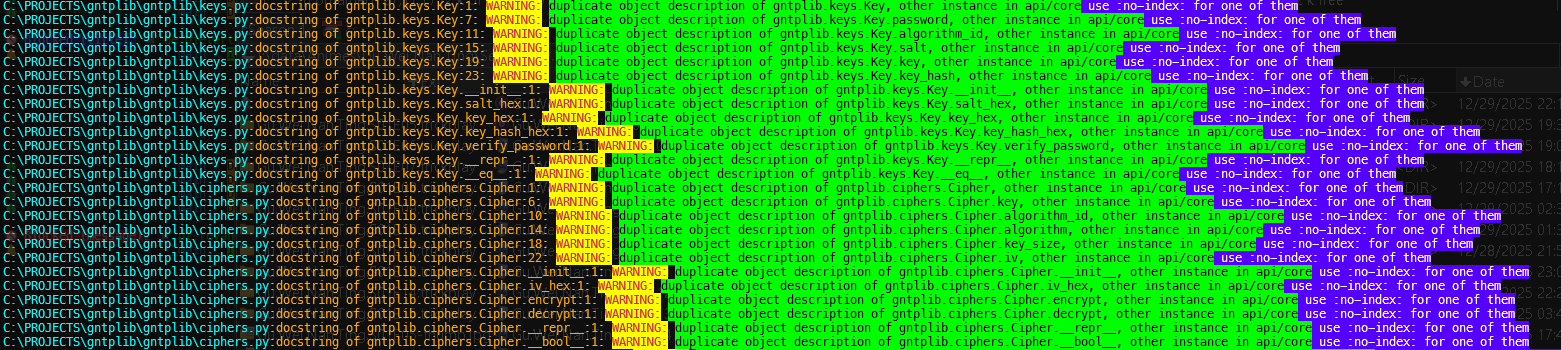
Default Color Scheme
The example you provided will be colored as:
C:\PROJECTS\gntplib\gntplib\requests.py              <- Cyan (#00FFFF)
:docstring of gntplib.requests.Response.get_header:1 <- Purple (#aa55ff)
: WARNING:                                            <- Yellow (#FFFF00) bold
duplicate object description...                      <- Black on Green
use :no-index: for one of them                       <- White on Purple (#5500FF) bold
🎯 Example Output
Before sphinxcolor:
C:\PROJECTS\gntplib\gntplib\keys.py:docstring of gntplib.keys.Key:1: WARNING: duplicate object description of gntplib.keys.Key, other instance in api/core, use :no-index: for one of them
After sphinxcolor:
[Beautiful colored output with cyan paths, yellow warnings, purple locations, and highlighted messages!]
🔧 Advanced Usage
Custom Configuration Location
# Specify config file
sphinxcolor --config /path/to/custom.toml < input.log
In Python Scripts
from sphinxcolor import SphinxColorizer, Config

# Create colorizer with custom config
config = Config('sphinxcolor.toml')
colorizer = SphinxColorizer(config)

# Process lines
with open('build.log', 'r') as f:
    colorizer.process_stream(f)
Disable Temporarily
# Use --no-color flag
make html | sphinxcolor --no-color

# Or set environment variable
SPHINXCOLOR_ENABLED=0 make html | sphinxcolor
📝 Color Format
Colors can be specified in several formats:
- Hex colors:
#RRGGBB(e.g.,#00FFFF) - Named colors:
red,blue,green, etc. - RGB colors:
rgb(255,0,0)
Requirements
- Python 3.8+
- rich >= 13.0.0
- tomli >= 2.0.0 (for Python < 3.11)
Author


📄 License
This project is licensed under the MIT License - see the LICENSE file for details.
🤝 Contributing
Contributions are welcome! Please feel free to submit a Pull Request.
- Fork the repository
- Create your feature branch (
git checkout -b feature/AmazingFeature) - Commit your changes (
git commit -m 'Add some AmazingFeature') - Push to the branch (
git push origin feature/AmazingFeature) - Open a Pull Request
Made with ❤️ for the Sphinx community
Release history Release notifications | RSS feed


Download files
Download the file for your platform. If you're not sure which to choose, learn more about installing packages.
Source Distribution
Built Distribution
Filter files by name, interpreter, ABI, and platform.
If you're not sure about the file name format, learn more about wheel file names.
Copy a direct link to the current filters
File details
Details for the file sphinxcolor-0.1.3.tar.gz.
File metadata
- Download URL: sphinxcolor-0.1.3.tar.gz
- Upload date:
- Size: 16.0 kB
- Tags: Source
- Uploaded using Trusted Publishing? No
- Uploaded via: twine/4.0.2 CPython/3.11.4
File hashes
| Algorithm | Hash digest | |
|---|---|---|
| SHA256 |
f336a9c8925bcc06415dcf26ef67aa82d001862e816215ee82ebecc56667f7a0
|
|
| MD5 |
5154fb058622f048c6d8218c27f1aebf
|
|
| BLAKE2b-256 |
3f12b9702b963450b59becffcacaffe7d7967abe272b75315f27df6119ae7b7d
|
File details
Details for the file sphinxcolor-0.1.3-py3-none-any.whl.
File metadata
- Download URL: sphinxcolor-0.1.3-py3-none-any.whl
- Upload date:
- Size: 13.5 kB
- Tags: Python 3
- Uploaded using Trusted Publishing? No
- Uploaded via: twine/4.0.2 CPython/3.11.4
File hashes
| Algorithm | Hash digest | |
|---|---|---|
| SHA256 |
8db4bf12d0cd89580379b958860fa77b1f8f19c94159beb18489b7f2ee2a521b
|
|
| MD5 |
fc9f3f3948d60ecf6db781eb8c65ab47
|
|
| BLAKE2b-256 |
a4cb3ec79674c8beecbc6bb3a08c6c3f666101b0acc3cbe9c78947dc1b7ce721
|






