
Spice core runtime framework

Project description




Agents can execute.
But they don’t know what to do next.
Spice is a decision-layer runtime — a brain above agents. inspired by the rise of execution agents like OpenClaw and the idea of world model.
While execution agents (Claude Code, OpenClaw, Codex) are getting better at doing things,
Spice focuses on the missing layer:
👉 What should be done next — and why.
🎬 Demo of Spice:
To gain a more intuitive understanding of Spice,
please visit our carefully prepared demo about conflicts between life and work events: Spice-live-demo
Demo Video
- Bilibili

Click the image to watch the full demo video of using Spice to handle conflicts between the digital and physical worlds.
- YouTube

Click the image to watch the full demo video of using Spice to handle conflicts between the digital and physical worlds.
⚡ Why it matters
Today, we have powerful agents that can do almost anything:
- write code
- analyze data
- automate workflows
But when you sit down to use them, you still face the same problem:
What should I do next?
That’s the hard part.
The real bottleneck is:
Decision-making.
Spice is designed to solve that.
🧠 What is Spice?
Spice provides a structured cognitive loop inspired by the concept of world model :
perception → state model → simulation → decision → execution → reflection
It allows AI systems to:
- understand context (state)
- reason about possible futures (simulation)
- make structured decisions (decision)
- delegate actions to agents (execution)
- learn from outcomes (Decision Evolution)
🌱 Meet Spice Personal
Spice is a general decision runtime. —
To make this concrete, we built our first reference application:
It is not just a demo.
It is an AI that helps you:
- think through real decisions (e.g. career, product, strategy)
- structure your situation as state
- explore possible futures
- decide what to do next
- and optionally act via external agents
From:
question → reasoning → decision → action → outcome
All in one loop.
🧩 Example: from idea → decision → next step
1. Scenario
"I want to quickly build a lightweight tool for a small group of friends."
A simple, real-world goal with clear constraints
2. What Spice does
Input: Real-world intent with constraints

starts from intent
Decision → Comparison

From options → structured decision space
Commitment → Next step

Decision becomes action
3. About execution (next step)
Spice focuses on the decision layer.
In a full workflow, the selected decision can be passed to external agents (e.g. codex and claude code) for execution.
This example stops at decision + next step.
➡️ Next, we will take this exact scenario and connect it to an external agent to actually build the tool end-to-end.
Decision → Execution → Outcome → Reflection
This is the full loop Spice is designed to enable.
🌍 Domain-agnostic Runtime
Spice Personal is just one reference.
The underlying model is domain-agnostic.
Spice is a general decision runtime that can be applied to any domain where:
- there is context (state)
- there are possible futures (simulation)
- decisions need to be made
- actions can be executed by agents
This includes:
- individual decision making
- product and business strategy
- software development workflows
- operations and automation systems
Spice is not limited to one use case.
It is a foundation for building decision systems.
👨🔧 Spice: Decision Layer Architecture

🧭 User Interface: decision.md
The main user-facing interface in Spice is decision.md.
Users configure how Spice should compare candidate decisions by editing:
.spice/decision/decision.md
This file is decision guidance. It is not memory, not a prompt dump, not an execution runbook, and not an agent workflow.
Runtime-active in v1:
- Primary Objective — the dominant optimization direction
- Preferences / Weights — score dimensions used during candidate comparison
- Hard Constraints — veto boundaries, when supported by the active policy/domain adapter
- Trade-off Rules — a constrained executable subset for resolving conflicts
Runtime-inactive in v1:
- Decision Principles
- Evaluation Criteria
- Reflection Guidance
The bundled default profile is a starter template. Users should edit their local decision.md; they should not edit support JSON as normal configuration.
Runtime support comes from the active policy or domain adapter. The copied support JSON is only for explain/demo/debug flows.
See docs/decision.md and docs/decision_quickstart.md for the support contract and quickstart.
⚙ Install(Extend the Spice framework to other domains)
Install from source (latest features, for development)
git clone https://github.com/Dyalwayshappy/Spice.git
cd Spice

python -m venv .venv
source .venv/bin/activate  # Windows: .venv\Scripts\activate

pip install -U pip
pip install -e .
Install from PyPI (stable, recommended)
pip install spice-runtime
Upgrade to latest version
pip install -U spice-runtime
spice --help
🚀 Quick Start
The fastest way to experience Spice is the integrated quickstart:
spice quickstart --force
This starts from the bundled example domain and walks through the full Spice boundary:
decision.md -> example domain runtime -> OpenRouter/local LLM -> optional external executor
It creates:
.spice/quickstart/                         # deterministic core-loop example
.spice/quickstart_llm/                     # LLM-ready example runtime
.spice/decision/decision.md                # user-editable decision profile
.spice/decision/support/default_support.json
The generated example runs immediately with deterministic defaults. No API key is required for the first run.
What The Quickstart Shows
perception -> state -> decision -> execution -> reflection
The default quickstart proves that Spice can:
- load a decision profile
- validate and explain decision guidance
- run a domain-specific decision loop
- attach model advisory through an explicit provider
- keep execution optional and pluggable
The bundled quickstart domain is an example. Real projects define their own DomainSpec, domain adapter, supported score dimensions, constraint checks, and executor boundary.
Core-only Mode
If you only want to see the deterministic Spice core loop:
spice quickstart --core-only --force
This creates only:
.spice/quickstart/
Use this when you want to inspect the smallest loop without LLM wiring or decision.md setup.
1. Edit decision.md
The main user-editable file is:
.spice/decision/decision.md
The safest first customization is the scoring weights:
Preferences:
- outcome_value: 0.40
- risk_reduction: 0.25
- reversibility: 0.20
- confidence_alignment: 0.15
For example, to prefer safer and more reversible decisions:
Preferences:
- outcome_value: 0.25
- risk_reduction: 0.35
- reversibility: 0.25
- confidence_alignment: 0.15
decision.md configures decision selection. It is not memory, an agent prompt, or an execution script.
2. Validate And Explain
spice decision explain .spice/decision/decision.md --support-json .spice/decision/support/default_support.json
Use --json for structured output.
The explanation shows:
- loaded artifact id/version
- validation status
- runtime-active and runtime-inactive sections
- supported and unsupported score dimensions
- supported and unsupported hard constraints
- supported and unsupported trade-off rules
Runtime support comes from the active policy or domain adapter. Editing support JSON alone does not add runtime capability.
3. Use OpenRouter
Attach a hosted model to the generated example runtime:
export OPENROUTER_API_KEY="your-openrouter-api-key"
export SPICE_DOMAIN_MODEL="openrouter:anthropic/claude-3.5-sonnet"
python .spice/quickstart_llm/run_demo.py
Optional OpenRouter attribution headers:
export SPICE_OPENROUTER_SITE_URL="https://github.com/Dyalwayshappy/Spice"
export SPICE_OPENROUTER_APP_NAME="Spice"
4. Use A Local Or Custom Model
SPICE_DOMAIN_MODEL="ollama run qwen2.5" python .spice/quickstart_llm/run_demo.py
Model selection is explicit:
deterministicuses the built-in deterministic provideropenrouter:<model-id>uses the OpenRouter provider- any other value is treated as a subprocess command
Any subprocess command must read a prompt from stdin and return structured model output. Spice does not auto-load hidden model configuration in v1.
5. Use decision.md In Runtime Code
The quickstart shows the file-based configuration flow. In application code, attach the profile explicitly:
from spice.decision import guided_policy_from_profile

policy = guided_policy_from_profile(
    base_policy,
    ".spice/decision/decision.md",
)
The active policy/domain adapter remains the source of runtime capability.
6. Connect An External Execution Agent
Models help Spice reason, simulate, and advise. External agents execute when you choose to connect them.
Decision -> ExecutionIntent -> external agent -> ExecutionResult -> Outcome -> Reflection
Run the included SDEP execution demo:
python examples/sdep_agent_demo/run_sdep_adapter_demo.py
For production integrations, use one of the executor boundaries:
MockExecutorfor local/demo runsCLIAdapterExecutorfor command-line toolsSDEPExecutorfor external agent processes that speak the Spice Decision Execution Protocol
Execution is optional and pluggable. It is not mixed into decision.md.
7. Latest User Experience Flow
1. clone and install Spice
2. run spice quickstart
3. edit .spice/decision/decision.md
4. validate with spice decision explain
5. choose OpenRouter, deterministic, or local subprocess model
6. run the example domain
7. replace the example domain with your own DomainSpec/domain adapter
8. optionally connect external executors or SDEP agents
✨ Features
Spice transforms your world into a structured decision system.
It enables a new way to think, decide, and act:
-
Perception
Understand your world and extract meaningful signals -
State Modeling
Turn it into a structured decision model -
Simulation
Explore possible futures before taking action -
Decision
Compare trade-offs and then give you decision-making assistance. -
Execution (optional)
Delegate actions to external agents (e.g. Claude Code, Codex) -
Reflection
Learn from outcomes and continuously improve decisions
🔗 SDEP (Spice Decision Execution Protocol)
SDEP is the protocol defined by Spice for connecting the decision layer with external execution agents.
Spice decides what should be done.
SDEP handles how that decision is executed and how results flow back.
1. Why SDEP
Most AI systems tightly couple reasoning and execution.
SDEP introduces a clean separation:
-
Decision layer (Spice) → determines intent and direction
-
Execution layer (agents/tools) → performs real-world actions
This allows Spice to act as a brain above agents, instead of being tied to any single tool.
2. What SDEP does
SDEP is responsible for:
-
Encoding execution intent
Turning decisions into structured, executable requests -
Dispatching to external agents
(CLI tools, subprocesses, remote services, etc.) -
Receiving structured results
Capturing outputs, status, and signals from execution -
Feeding outcomes back into the system
Enabling state updates, reflection, and next decisions
3. Execution Flow
Decision → ExecutionIntent → Agent → Result → Outcome → Reflection
- Spice produces a decision
- SDEP encodes it as an execution intent
- External agents execute the task
- Results are returned and structured
- Spice updates state and continues reasoning
4. What this enables
- Plug into different execution agents (Claude Code, Codex, etc.)
- Keep decision logic independent from execution tools
- Build auditable, replayable decision systems
- Evolve execution without changing the brain (same brain different agent)
Spice is not an execution agent.
It is the decision layer above agents.
🔌 Wrapper Ecosystem (External Agents)
Spice supports an open wrapper ecosystem.
Even if an external agent does not natively support SDEP, it can still be integrated through a wrapper.
1. What is a wrapper?
A wrapper is a protocol bridge between Spice and external agents.
Spice (SDEP) ↔ Wrapper ↔ External Agent
- Spice speaks in ExecutionIntent / ExecutionResult (SDEP)
- Agents speak in their own formats (CLI, JSON, HTTP, SDK, etc.)
- The wrapper translates between the two
2. Why wrappers matter
SDEP is a newly launched protocol that connects the decision layer with external execution agents; its ecosystem still needs development.
Wrappers make Spice immediately compatible with the existing ecosystem:
- Integrate CLI agents, SDK-based tools, and remote services
- Avoid modifying existing agents
- Enable gradual adoption of SDEP
3. Integration model
- Native SDEP agents → connect directly
- Non-SDEP agents → connect via wrapper
- Multiple agents → route by capability or context
4. Our view
Wrappers exist to make Spice useful today.
They allow us to integrate with existing agents without requiring changes.
But we believe this is a transitional layer.
In the long term, we expect more agents to adopt SDEP natively —
enabling a clean, direct connection between decision systems and execution.
Wrappers make Spice practical.
SDEP is where the real value compounds.
📁 Project Structure
spice/
├── spice/                     # 🧠 Core decision runtime framework
│   ├── core/                  #    Runtime loop + state store
│   ├── protocols/             #    Observation/Decision/Execution contracts
│   ├── decision/              #    Decision policy primitives
│   ├── domain/                #    DomainPack abstractions
│   ├── domain_starter/        #    New-domain scaffold templates
│   ├── executors/             #    Executor interface + SDEP adapter
│   ├── llm/                   #    Optional LLM core/adapters/providers
│   ├── memory/                #    Context/memory components
│   ├── replay/                #    Replay utilities
│   ├── shadow/                #    Shadow-run evaluation
│   ├── evaluation/            #    Eval helpers
│   ├── entry/                 #    Core CLI/tooling (quickstart/init domain)
│   └── adapters/              #    External system adapters
├── tests/                     # ✅ Core test suite
├── docs/                      # 📚 Architecture + protocol docs (incl. SDEP)
├── examples/                  # 🧪 Runtime and SDEP examples
├── pyproject.toml             # 📦 spice-runtime package metadata
├── README.md                  # 📝 Core project overview
├── LICENSE                    # ⚖️ MIT
└── .gitignore                 # 🙈 Ignore rules
🗺️ Roadmap
Spice is an evolving decision-layer system.
We’ve built the core runtime, personal reference app, and SDEP-based execution loop.
Next, we focus on expanding capabilities and ecosystem.
PRs are welcome — the system is designed to be modular and extensible.
Current
- Decision runtime (perception → state → decision → reflection)
- Personal reference app (CLI + onboarding)
- SDEP (Decision → Execution protocol)
- Wrapper ecosystem for external agents
- End-to-end loop (decision → execution → outcome)
Next
-
Richer decision modeling
Better simulation, trade-off analysis, and multi-step reasoning -
Stronger memory layer
Long-term state, context compression, and memory providers -
More execution integrations
Expand agent ecosystem (CLI, APIs, tools, services) -
Multi-step decision workflows
From single decisions → structured plans and execution chains -
Better observability
Inspect decisions, execution traces, and state transitions
Longer-term
-
Domain expansion
Apply Spice to new domains beyond personal (software, ops, research) -
Native SDEP ecosystem
More agents supporting SDEP directly (less reliance on wrappers) -
Persistent decision systems
Systems that continuously learn and evolve over time
🌌 Vision
We believe the future of AI is not just execution —
but better ways to think and decide.
Spice is an attempt to build a new layer in the AI stack:
a decision layer above agents.
Our goal is simple:
Everyone should have a Spice.
A system that:
- understands your world
- maintains your state
- helps you think through decisions
- and takes action when needed
Not just a tool.
Not just a chatbot.
But a personal decision brain
that evolves with you over time.
We've recently been considering the commercialization path for Spice, and to achieve our vision, we'll be moving towards a General AI Brain. We're currently preparing a very compelling demo, so stay tuned!
We are still early.
But we believe this direction leads to:
- more thoughtful decisions
- more capable systems
- and a new way to interact with AI
Spice is not just an assistant.
It is a step toward a decision brain for everyone.
Finally,Thanks to everyone on LinuxDo for their support! Welcome to join https://linux.do/ for all kinds of technical exchanges, cutting-edge AI information, and AI experience sharing, all on Linuxdo!
⭐ Star History
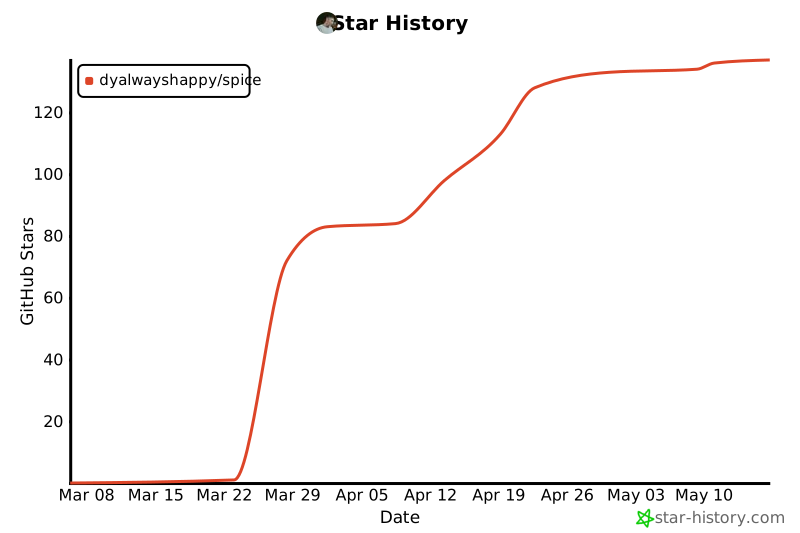
⭐ Star us if you find Spice interesting

Everyone should have a Spice — a decision brain for thinking and action.
Release history Release notifications | RSS feed


Download files
Download the file for your platform. If you're not sure which to choose, learn more about installing packages.
Source Distribution
Built Distribution
Filter files by name, interpreter, ABI, and platform.
If you're not sure about the file name format, learn more about wheel file names.
Copy a direct link to the current filters
File details
Details for the file spice_runtime-0.2.0.tar.gz.
File metadata
- Download URL: spice_runtime-0.2.0.tar.gz
- Upload date:
- Size: 137.7 kB
- Tags: Source
- Uploaded using Trusted Publishing? No
- Uploaded via: twine/6.2.0 CPython/3.13.2
File hashes
| Algorithm | Hash digest | |
|---|---|---|
| SHA256 |
f107e55d1b21cb77a91403cb3ca770f35f6cb271e07a90dc75ddb7a0e967a8d8
|
|
| MD5 |
f2ff4918150f13c09fe7657f40ea0d52
|
|
| BLAKE2b-256 |
c9b61a8569f577b31c60cec1c12071f45bc9d44471f0eb032a9af1a7421bf329
|
File details
Details for the file spice_runtime-0.2.0-py3-none-any.whl.
File metadata
- Download URL: spice_runtime-0.2.0-py3-none-any.whl
- Upload date:
- Size: 141.8 kB
- Tags: Python 3
- Uploaded using Trusted Publishing? No
- Uploaded via: twine/6.2.0 CPython/3.13.2
File hashes
| Algorithm | Hash digest | |
|---|---|---|
| SHA256 |
23e4ee55308f5233e6d4901dd468c9d559c342eb68370eef0e0ccd476a6e744c
|
|
| MD5 |
ff58a361038aa800790b41f1ddd3ab17
|
|
| BLAKE2b-256 |
dad1771c4d0c7117530dde3f2b00f23b090a47289f03ef378291f022b284035d
|






