






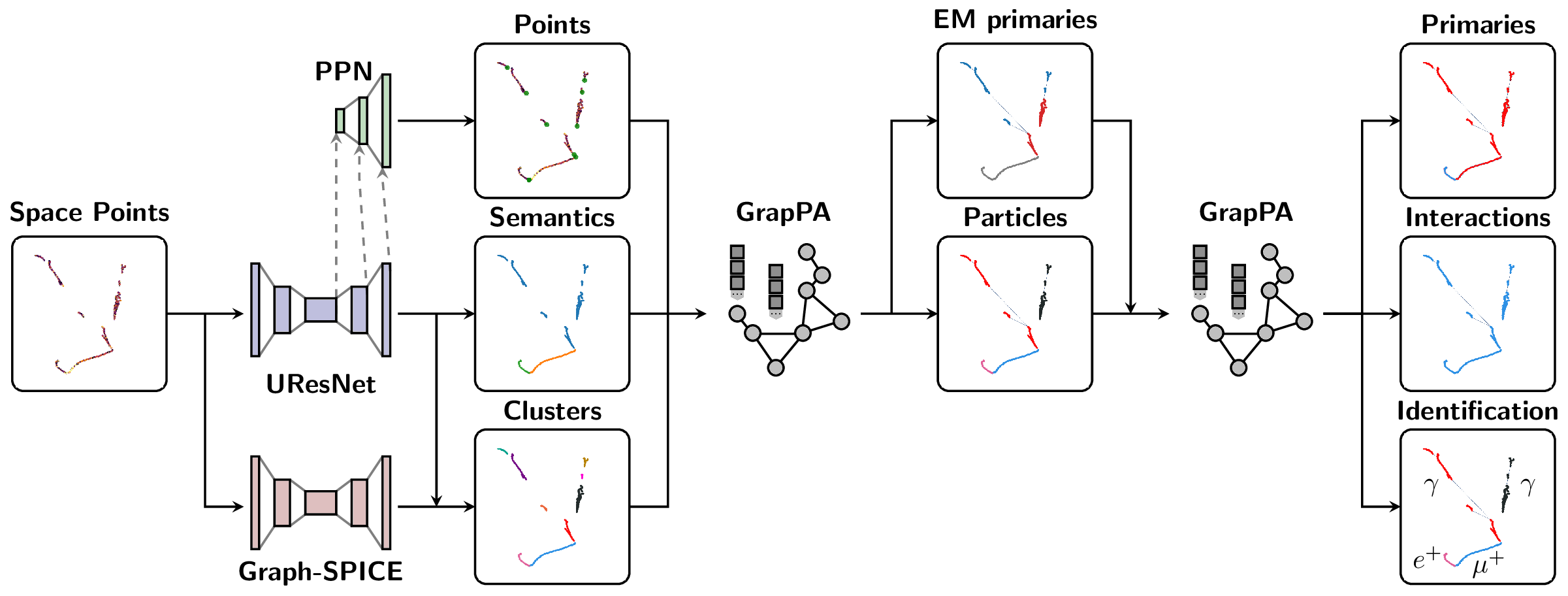
The Scalable Particle Imaging with Neural Embeddings (SPINE) package leverages state-of-the-art Machine Learning (ML) algorithms -- in particular Deep Neural Networks (DNNs) -- to reconstruct particle imaging detector data. This package was primarily developed for Liquid Argon Time-Projection Chamber (LArTPC) data and relies on Convolutional Neural Networks (CNNs) for pixel-level feature extraction and Graph Neural Networks (GNNs) for superstructure formation. The schematic below breaks down the full end-to-end reconstruction flow.
For full SPINE workflows, the recommended runtime is the published SPINE container image released alongside each SPINE version. Use the release-tagged image ghcr.io/deeplearnphysics/spine:<release> when reproducibility matters. When in doubt, use ghcr.io/deeplearnphysics/spine:latest or omit the tag entirely, which is equivalent in Docker-style image references. Docker is the most direct path on workstations and servers; Apptainer/Singularity is the preferred path on HPC systems that do not allow Docker. A local pip installation is mainly intended for post-processing, analysis, visualization, docs, or lightweight development.
Installation
SPINE supports both container-based and local Python installation workflows, but they are not equivalent.
Recommended Runtime: Released SPINE Container
Every SPINE release publishes a matching container image to GHCR. For end-to-end reconstruction, training, and inference, use a release tag when you want a pinned environment. When in doubt, use latest or omit the tag entirely:
# Equivalent to: docker pull ghcr.io/deeplearnphysics/spine:latest
docker pull ghcr.io/deeplearnphysics/spine

# Example: replace <release> with a SPINE release tag such as 1.2.3
docker pull ghcr.io/deeplearnphysics/spine:<release>
Omitting the tag is equivalent to using latest in Docker-style image references.
Docker Path
Use Docker when you have a local workstation or server with container runtime support:
docker run --gpus all -v $(pwd):/workspace \
    ghcr.io/deeplearnphysics/spine:latest \
    spine --config /workspace/config/uresnet/uresnet_train.yaml --source /workspace/data.root

# Or pin to a specific release
docker run --gpus all -v $(pwd):/workspace \
    ghcr.io/deeplearnphysics/spine:<release> \
    spine --config /workspace/config/uresnet/uresnet_train.yaml --source /workspace/data.root
On Apple Silicon macOS systems, the published SPINE image should still be run
as linux/amd64. Specify that explicitly by adding
--platform=linux/amd64 to docker run, for example:
docker run --platform=linux/amd64 --gpus all -v $(pwd):/workspace \
    ghcr.io/deeplearnphysics/spine:<release> \
    spine --config /workspace/config/uresnet/uresnet_train.yaml --source /workspace/data.h5
For Jupyter notebook/lab use specifically, avoid the Docker Desktop combination of Apple Virtualization Framework with Rosetta enabled: the kernel handshake may stall in that setup even though normal SPINE CLI commands still run. Apple Virtualization Framework without Rosetta and Docker VMM have both been verified to work for Jupyter with the published image.
Apptainer / Singularity Path
Use Apptainer or Singularity on HPC systems that do not allow Docker directly. The recommended path is to pull the same released SPINE image from GHCR:
apptainer pull spine_latest.sif docker://ghcr.io/deeplearnphysics/spine:latest
apptainer exec --nv spine_latest.sif \
    spine --config /workspace/config/uresnet/uresnet_train.yaml --source /workspace/data.root

# Or pin to a specific release
apptainer pull spine_<release>.sif docker://ghcr.io/deeplearnphysics/spine:<release>
apptainer exec --nv spine_<release>.sif \
    spine --config /workspace/config/uresnet/uresnet_train.yaml --source /workspace/data.root
The Docker and Apptainer paths consume the same released image; the difference is only the container runtime.
The published image now includes a canonical fallback setup script at
/opt/spine/setup.sh. Normal Docker and Apptainer execution should not require
manual sourcing. Some sites expose the image through CVMFS as an unpacked root
filesystem; in that mode, the site integration should still apply the image
environment automatically. If it does not, diagnose the runtime from inside that
unpacked-image environment with:
source /opt/spine/setup.sh
/opt/spine/check-env.sh
python -c "import ROOT, larcv, spine"
Local Python Installation
Use a local pip installation when you only need downstream tooling such as post-processing, analysis, visualization, documentation, or light development.
1. Core Package (minimal dependencies)
# Essential dependencies: numpy, scipy, pandas, PyYAML, h5py, numba
pip install spine
2. With Visualization Tools
# Adds plotly, matplotlib, seaborn for data visualization
pip install spine[viz]
3. Development Environment
# Adds testing, formatting, and documentation tools
pip install spine[dev]
4. Everything (except non-pip dependencies, i.e. ROOT, larcv, MinkowskiEngine, etc.)
# All optional dependencies (visualization + development tools)
pip install spine[all]
PyTorch ecosystem
Option 1: Released SPINE container (recommended)
The published SPINE image already includes the compatible PyTorch, torch-geometric, MinkowskiEngine, and LArCV stack. Use the release-tagged image through Docker or Apptainer as shown above.
Option 2: Manual installation (advanced users)
# Step 1: Install PyTorch with CUDA
pip install torch --index-url https://download.pytorch.org/whl/cu118

# Step 2: Install ecosystem packages (critical order)
pip install --no-build-isolation torch-scatter torch-cluster torch-geometric MinkowskiEngine

# Step 3: Install SPINE
pip install spine[all]
Why the container is preferred: the PyTorch ecosystem (torch, torch-geometric, torch-scatter, torch-cluster, MinkowskiEngine) forms an interdependent group requiring exact version compatibility and complex compilation. The released SPINE container pins that stack for you.
LArCV2
Option 1: Use the released SPINE container (recommended)
LArCV2 is already bundled in the published SPINE image.
Option 2: Build from source
# Clone and build the latest LArCV2
git clone https://github.com/DeepLearnPhysics/larcv2.git
cd larcv2
# Follow build instructions in the repository
Note: Avoid conda-forge larcv packages as they may be outdated. Use the released SPINE container or build LArCV2 from the official source.
Development Installation
For developers who want to work with the source code:
git clone https://github.com/DeepLearnPhysics/spine.git
cd spine
pip install -e .[dev]
Quick Development Testing (No Installation)
For rapid development and testing without reinstalling the package:
# Clone the repository
git clone https://github.com/DeepLearnPhysics/spine.git
cd spine

# Install only the dependencies (not the package itself)
# Or alternatively simple run the commands inside the above container
pip install numpy scipy pandas pyyaml h5py numba psutil

# Run directly from source
python src/spine/bin/run.py --config config/uresnet/uresnet_train.yaml --source /path/to/data.root

# Or make it executable and run directly
chmod +x src/spine/bin/run.py
./src/spine/bin/run.py --config your_config.yaml --source data.root
💡 Development Tip: This approach lets you test code changes immediately without reinstalling. Perfect for rapid iteration during development.
To build and test packages locally:
# Build the package
./build_packages.sh

# Install locally built package
pip install dist/spine-*.whl[all]
Usage
Command Line Interface
Option 1: Run from the released container:
docker run --gpus all -v $(pwd):/workspace \
    ghcr.io/deeplearnphysics/spine:<release> \
    spine --config /workspace/config/uresnet/uresnet_train.yaml --source /workspace/data.h5
Option 2: After installation, use the spine command locally:
# Run training/inference/analysis
spine --config config/uresnet/uresnet_train.yaml --source /path/to/data.h5
Option 3: Run directly from source (development):
# From the spine repository directory
python src/spine/bin/cli.py --config config/uresnet/uresnet_train.yaml --source /path/to/data.h5
Python API
Basic example:
# Necessary imports
from spine.config import load_config_file
from spine.driver import Driver

# Load configuration file
cfg_path = 'config/uresnet/uresnet_train.yaml'  # or your config file
cfg = load_config_file(cfg_path)

# Initialize driver class
driver = Driver(cfg)

# Execute model following the configuration regimen
driver.run()
- Documentation is available at https://spine.readthedocs.io/latest/.
- Tutorials and examples can be found in the documentation.
Example Configuration Files
Example configurations are available in the config folder:
| Configuration name | Model |
|---|---|
uresnet/uresnet_{train,test}.yaml |
UResNet alone |
uresnet/bayes/uresnet_bayes_{train,test}.yaml |
Bayesian UResNet |
uresnet/ppn/uresnet_ppn_{train,test}.yaml |
UResNet + PPN |
image/pid/image_pid_{train,test}.yaml |
Image PID classification |
image/energy/image_energy_{train,test}.yaml |
Image energy regression |
image/pid/image_pid_ancestor_{train,test}.yaml |
Ancestor-tree PID classification |
image/energy/image_energy_ancestor_{train,test}.yaml |
Ancestor-tree energy regression |
graph_spice/graph_spice_{train,test}.yaml |
Graph-SPICE |
grappa_shower/grappa_shower_{train,test}.yaml |
GrapPA for shower fragment clustering |
grappa_track/grappa_track_{train,test}.yaml |
GrapPA for track fragment clustering |
grappa_inter/grappa_inter_{train,test}.yaml |
GrapPA for interaction clustering |
The maintained model directories provide separate training and inference/test configurations where both modes are supported.
Key configuration parameters you may want to modify:
minibatch_size- per-process batch size for training/inferenceweight_prefix- directory to save model checkpointslog_dir- directory to save training logstensorboard- optional TensorBoard scalar logging configurationepochs- number of training epochsweight_path- path to checkpoint to load (optional)train- training instruction blockgpus- GPU IDs to use (leave empty '' for CPU)
Training instructions live in a top-level train block. Configurations using
the historical base.train location remain supported with a migration warning.
Validation is optional and runs at every configured checkpoint boundary, before
the checkpoint is written:
base:
  epochs: 25.0

train:
  weight_prefix: weights/snapshot
  save_epoch: 1.0
  optimizer:
    name: Adam
    lr: 0.001
  lr_scheduler:
    name: ReduceLROnPlateau
    interval: checkpoint
    monitor: loss
    mode: min
    patience: 2

validation:
  file_keys: /path/to/validation/*.root
  fraction: 1.0
  early_stopping:
    monitor: loss
    mode: min
    patience: 5
    min_delta: 0.0
  best_checkpoint:
    monitor: loss
    mode: min
    min_delta: 0.0
Validation inherits the training loader's schema, batching, collation and worker settings while disabling augmentation and random sampling. Joint and mixed datasets provide both of their validation sources explicitly:
validation:
  sources:
    primary:
      file_keys: /path/to/primary_validation/*.root
    secondary:
      file_keys: /path/to/overlay_validation/*.root
Use source names larcv and hdf5 instead for a mixed dataset. Joint
validation retains the overlay distribution but uses repeatable sequential
primary/secondary pairing. Validation scalar outputs are logged with a
val_ prefix and stored in the checkpoint with early-stopping and
best-checkpoint state. When best_checkpoint is enabled, an improving
snapshot is atomically copied to <weight_prefix>-best.ckpt with its own
checksum. Set best_checkpoint.path to choose another stable destination.
Learning-rate schedulers default to interval: step, preserving the
historical update after every optimizer step. interval: checkpoint advances
the scheduler after each checkpoint-bound validation and before serializing
its state. An optional monitor passes the named validation scalar to metric-
aware schedulers such as ReduceLROnPlateau; monitored schedulers therefore
require a validation block.
During distributed training, scalar model/loss outputs are averaged across ranks before CSV and stdout logging. Rank-specific timings and memory metrics remain local, while TensorBoard events are emitted by rank zero only.
SPINE checkpoints use a versioned, backward-compatible format. In addition to model weights and progress, new checkpoints record optimizer and optional learning-rate-scheduler state, per-rank RNG and loader continuation state, the complete normalized configuration, resolved training/validation dataset sources, and a runtime manifest containing the SPINE/Python/PyTorch versions, creation time, distributed world size and source revision when discoverable. Every checkpoint is written atomically with an adjacent SHA-256 checksum:
snapshot-1000.ckpt
snapshot-1000.ckpt.sha256
When training is configured with one top-level model.weight_path, SPINE
automatically restores all available training state. Use resume: true to
make complete restoration strict: a checkpoint without optimizer state is
then rejected. The historical restore_optimizer: true option remains
supported and has the same strict behavior:
model:
  weight_path: weights/snapshot-1000.ckpt

train:
  resume: true
  optimizer:
    name: Adam
    lr: 0.001
Set resume: false explicitly to use weight_path only as parameter
initialization and start a new training process at iteration zero. The same
choices are available as --resume and --no-resume command-line overrides.
Training accepts exactly one checkpoint; weight_list remains an
inference-only facility. During automatic resume, a legacy checkpoint without
optimizer state retains its saved progress, restarts the optimizer and emits
a warning.
Epoch progress is restored independently from the global iteration number. Changing the batch size while resuming therefore continues from the saved epoch and recomputes the remaining epoch-based run length using the new number of batches per epoch. The global step remains monotonic. A batch-size change preserves the saved sample order when sampler state is available, but necessarily changes subsequent batch boundaries and emits a warning.
Legacy checkpoints without scheduler, RNG or loader state still load. SPINE warns when a requested resume must restart missing state. Exact stochastic continuation requires the same distributed world size. DataLoader worker RNG and prefetch queues cannot be serialized, so configurations with worker-side stochastic transforms may reproduce the same sample order without being bit-for-bit identical. Exact mid-epoch sample order also requires a checkpointable SPINE sampler; generic third-party samplers are replayed to the saved cursor on a best-effort basis. Numba and external-library RNG state is not generally introspectable and is not included.
Checkpoint provenance can be queried without constructing the model:
from spine.model import inspect_checkpoint, verify_checkpoint

assert verify_checkpoint("snapshot-1000.ckpt")
info = inspect_checkpoint("snapshot-1000.ckpt", verify=True)
print(info["manifest"])
print(info["config"])
print(info["datasets"])
Running A Configuration File
Basic usage with the spine command:
# Run training/inference directly
spine --config config/uresnet/uresnet_train.yaml --source /path/to/data.h5

# Or run in background with logging
nohup spine --config config/uresnet/uresnet_train.yaml --source /path/to/data.h5 > log_uresnet.txt 2>&1 &
You can load a configuration file into a Python dictionary using:
from spine.config import load_config_file

# Load configuration file with SPINE's config loader
cfg = load_config_file('config/uresnet/uresnet_train.yaml')
Reading a Log
A quick example of how to read a training log, and plot something
import pandas as pd
import matplotlib.pyplot as plt
fname = 'path/to/log.csv'
df = pd.read_csv(fname)

# plot moving average of accuracy over 10 iterations
df.accuracy.rolling(10, min_periods=1).mean().plot()
plt.ylabel("accuracy")
plt.xlabel("iteration")
plt.title("moving average of accuracy")
plt.show()

# list all column names
print(df.columns.values)
TensorBoard Logging
TensorBoard logging is optional and configured under the base block.
Use the default TensorBoard directory under log_dir:
base:
    log_dir: logs/train_run
    tensorboard: true
This writes TensorBoard event files under logs/train_run/tensorboard.
You can also pass TensorBoard writer options directly:
base:
    log_dir: logs/train_run
    tensorboard:
        log_dir: tb
        flush_secs: 5
In that case, a relative log_dir such as tb is resolved relative to the
main log directory, so event files are written under logs/train_run/tb.
To inspect the logs:
tensorboard --logdir logs/train_run/tensorboard
or, when using a custom TensorBoard directory:
tensorboard --logdir logs/train_run/tb
SPINE still writes its CSV log alongside TensorBoard output. TensorBoard
requires the tensorboard Python package to be installed in the runtime
environment.
Recording network output or running analysis
Documentation for analysis tools and output formatting is available in the main documentation at https://spine.readthedocs.io/latest/.
Repository Structure
bincontains utility scripts for data processingconfighas example configuration filesdocscontains documentation source filessrc/spinecontains the main package codetestcontains unit tests using pytest
Please consult the documentation for detailed information about each component.
Testing and Coverage
Running Tests
The SPINE package includes comprehensive unit tests using pytest:
# Run all tests
pytest

# Run tests for a specific module
pytest test/test_data/

# Run with verbose output
pytest -v
Checking Test Coverage
Test coverage tracking helps ensure code quality and identify untested areas. Coverage reports are automatically generated in our CI pipeline and uploaded to Codecov.
To check coverage locally:
# Run the coverage script (generates terminal, HTML, and XML reports)
./bin/coverage.sh

# Or run pytest with coverage flags directly
pytest --cov=spine --cov-report=term --cov-report=html

# View the HTML report
open htmlcov/index.html
The coverage configuration is defined in pyproject.toml under [tool.coverage.run] and [tool.coverage.report].
Contributing
Before you start contributing to the code, please see the contribution guidelines.
Adding a new model
The SPINE framework is designed to be extensible. To add a new model:
-
Data Loading: Parsers exist for various sparse tensor and particle outputs in
spine.io.core.parse. If you need fundamentally different data formats, you may need to add new parsers or collation functions. -
Model Implementation: Add your model to the
spine.modelpackage. Include your model in the factory dictionary inspine.model.factoriesso it can be found by the configuration system. -
Configuration: Create a configuration file in the
config/folder that specifies your model architecture and training parameters.
Once these steps are complete, you should be able to train your model using the standard SPINE workflow.
1 maintainer

Download files
Download the file for your platform. If you're not sure which to choose, learn more about installing packages.
Source Distribution
Built Distribution
Filter files by name, interpreter, ABI, and platform.
If you're not sure about the file name format, learn more about wheel file names.
Copy a direct link to the current filters
File details
Details for the file spine-0.17.0.tar.gz.
File metadata
- Download URL: spine-0.17.0.tar.gz
- Upload date:
- Size: 756.1 kB
- Tags: Source
- Uploaded using Trusted Publishing? No
- Uploaded via: twine/7.0.0 CPython/3.12.3
File hashes
| Algorithm | Hash digest | |
|---|---|---|
| SHA256 |
12dbab6546cc31bb808f6b607eb66a51471c10e4d716e1ba5b8aef89f39f8260
|
|
| MD5 |
d9aab24804445d884d8faedb5605c954
|
|
| BLAKE2b-256 |
530b17ff057a18bab4867e8ead4f4a6a23d5ab57564faaf1418ce99886a2b0d5
|
File details
Details for the file spine-0.17.0-py3-none-any.whl.
File metadata
- Download URL: spine-0.17.0-py3-none-any.whl
- Upload date:
- Size: 963.9 kB
- Tags: Python 3
- Uploaded using Trusted Publishing? No
- Uploaded via: twine/7.0.0 CPython/3.12.3
File hashes
| Algorithm | Hash digest | |
|---|---|---|
| SHA256 |
d62167abd473690bf1a7f8b07b0851dd5d507445073f35fc481b2ff5be5559db
|
|
| MD5 |
ed613126b0451780ebb4b1e414327082
|
|
| BLAKE2b-256 |
cca2a3793fe6b436dafd85315d7aad4d96f6ec2809ab0baf9e5c98a05e9c7f8d
|







