
Spiritboard
Your agents. One board.
Open it and immediately know which agents need your attention, what they're doing, and where to continue.
Spiritboard is a local dashboard for every coding agent you run. Claude Code, Codex, opencode, Pi and DeepSeek Harness sessions, and the agents of the Grok Bot desktop app, from your terminals, your desktop apps and each of your accounts appear side by side, with what each one is working on, whether it is running, waiting for you or gone, and a button that takes you straight to it.
It only reads what the agents already write to disk. It never starts, steers or stops an agent, and nothing leaves your machine unless you turn on summaries.
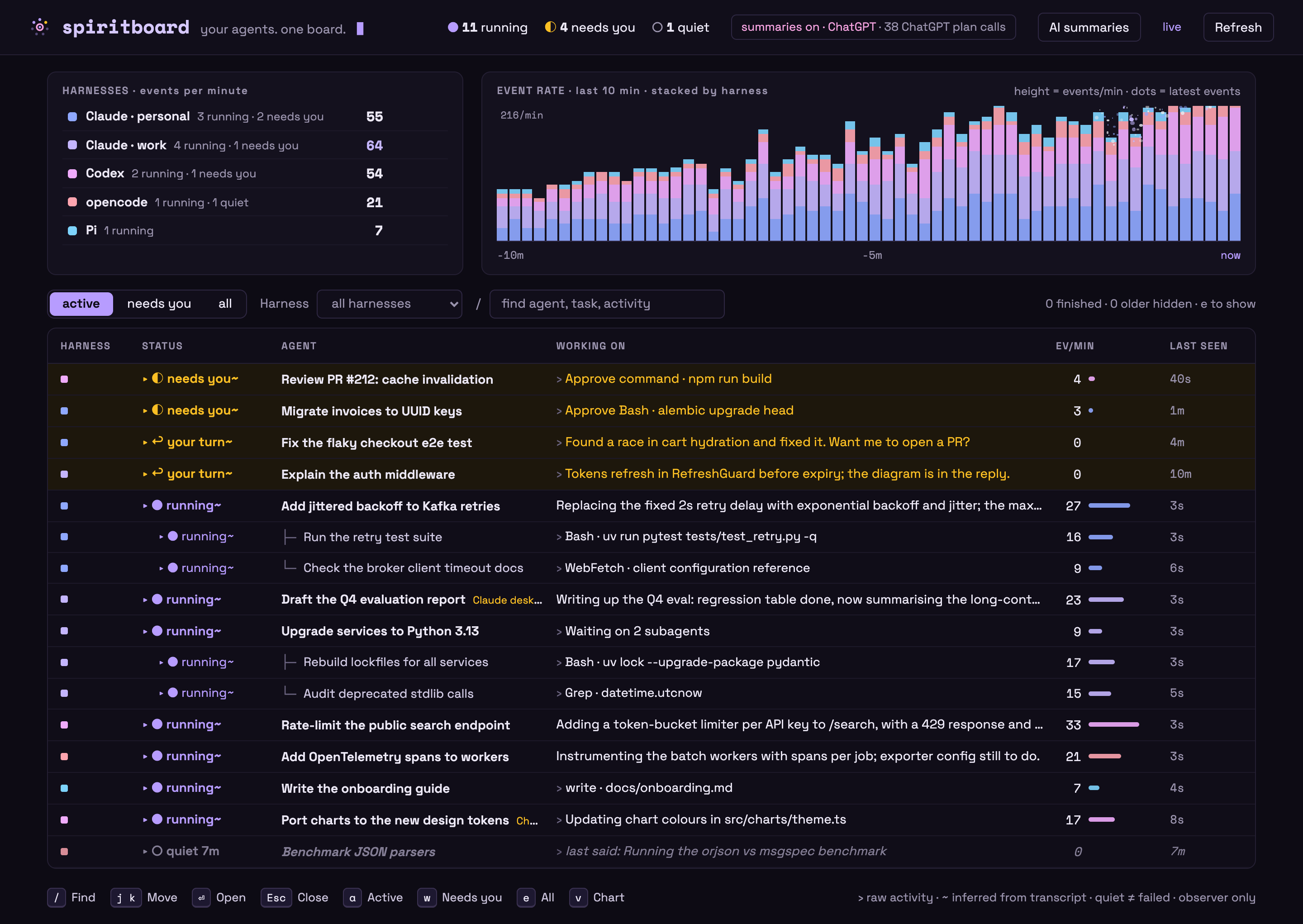
Synthetic data: invented sessions, projects and activity.
Supported harnesses
| Harness | Reads | Live or closed | Open | Resume |
|---|---|---|---|---|
| Claude Code (CLI) | ~/.claude*/projects, CLAUDE_CONFIG_DIR |
sessions/<pid>.json + process start time |
its terminal tab or app window | claude --resume <id> |
| Claude desktop app | the same folders, marked "Claude desktop", enriched from the app's session records | as Claude Code | the exact session (claude://code/continue) |
in a terminal with the CLI |
| Codex (CLI and ChatGPT app) | ~/.codex*, ~/.codex-switch/profiles/*, CODEX_HOME |
the thread locks a codex process holds | its terminal tab, or the ChatGPT window | codex resume <id> |
| opencode | opencode.db, read-only |
an opencode process in the session's directory |
its terminal | opencode -s <id> |
| Pi | ~/.pi/agent/sessions, PI_CODING_AGENT_DIR |
a pi process in the session's directory |
its terminal | pi --session <file> |
| DeepSeek Harness | ~/.dsh (zstd-compressed), DSH_HOME |
the session.lock the app holds |
the app window | not yet |
| Grok Bot (macOS app) | the app's local cache, GROK_BOT_HOME |
unknown: its agents run in the cloud | — | — |
| Your own agents | the Python SDK below | heartbeats | — | — |
Claude Code, Codex and opencode are checked against real sessions. The Claude desktop marker, Pi and DeepSeek Harness are built from each app's own code and documentation and covered by tests, but have seen little or no real data yet. Grok Bot is read from the app's local cache, whose undocumented format was observed on one machine and may change; unrecognized versions are skipped with a warning. New harnesses plug in as one module each (see the source guide).
What you see
-
Every harness at once. Each storage profile (personal and work accounts, the default CLI folders, the desktop apps) is a harness with its own colour, live events per minute, and a 10-minute activity chart stacked by harness. The harness list shows only harnesses with something running; idle ones stay available in the harness filter.
-
Where to put your attention. Every session has one status:
Status Meaning ◐ needs you Waiting for your approval. ↩ your turn Finished its turn in the last 30 minutes and is waiting for your next direction. ● running Working, including while it waits on a tool or a subagent. ◌ open · idle Still open in a terminal or app, idle for longer. ○ quiet No recent activity, and liveness could not be checked. Quiet never means failed. ■ closed No running process owns the session any more. ✓ done An SDK run reported that it finished. -
What each one is doing. The session's own title (your
/rename, the Claude desktop app's title, Claude's generated title, the Codex thread name, the opencode session title, a Pi/name, the DeepSeek Harness title or the Grok Bot agent's name), its goal, your latest request and the agent's latest reply or commentary. Subagents sit under their parent, named by the task the parent gave them. Sessions the Claude desktop app runs are tagged Claude desktop; ones archived there never count as active. -
Jump in. Open a session in the terminal or app that runs it (cmux, tmux, iTerm2, Terminal, VS Code, the ChatGPT, Claude or DeepSeek Harness app), or copy a resume command when it is closed.
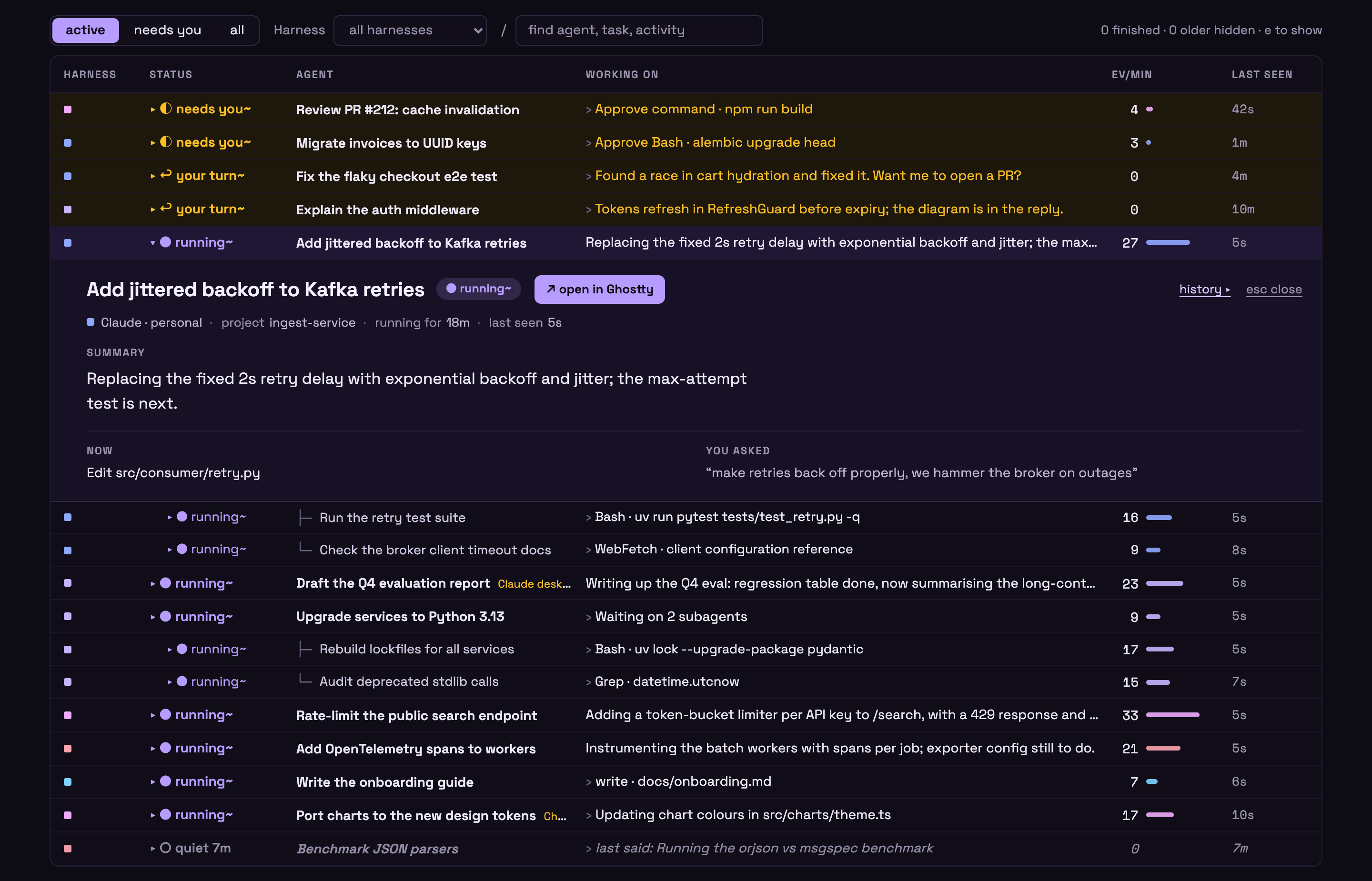
Synthetic data: invented sessions, projects and activity.
Click a row to open it in place; / finds, j/k move, Esc closes, a / w
/ e switch between active, needs-you and all. Click a table heading to sort by
that column, click again to reverse it, and a third time to restore the default
attention order. Subagents stay under their parent while sorting.
Zoom the event-rate chart out to the last hour, day, week or 30 days. Click a
bar to see the board as it was at that moment, rebuilt from the recorded
events; L, "back to live" or the newest bar returns to now. Liveness was
never recorded, so the past board never calls a session closed, and its open
and resume buttons are off.
Quick start
Install uv, then run
Spiritboard from anywhere. No repo checkout or API key is needed; uv manages
the isolated Python environment (Python 3.12+), including the small JWT and
cryptography dependencies used to verify ChatGPT sign-in, plus keyring for
your system's credential store.
Versioned releases
Check PyPI for available versions. To run a published release:
uvx spiritboard
Or install a permanent command:
uv tool install spiritboard
spiritboard
For a specific release, use uvx spiritboard@0.1.0. Try synthetic sessions with
uvx spiritboard --demo. If no release is listed yet, use the GitHub preview below.
GitHub development preview
See your own agents. Supported Codex, Claude, opencode, Pi, DeepSeek Harness and Grok Bot storage is discovered automatically, without opening authentication files or tables:
uvx --from git+https://github.com/topppg/spiritboard.git@main spiritboard
Your browser opens automatically. The terminal prints the loopback-only URL; if port 8766 is busy, a free port is chosen. Leave that terminal running. Ctrl-C stops only Spiritboard, never an agent. Running the same command again reopens the existing board instead of starting a second collector.
Or try an invented scenario with no real agents, tools or models:
uvx --from git+https://github.com/topppg/spiritboard.git@main spiritboard --demo
The demo has separate local history and never discovers real profiles or calls
a model. Add --no-open to print the URL without launching a browser.
For a permanent command:
uv tool install git+https://github.com/topppg/spiritboard.git@main
spiritboard
The GitHub main branch is a development channel, not a fixed release. See the
distribution guide
for upgrades, removal and publishing.
Sources and privacy
-
Discovery. The standard
~/.claude,~/.codex,~/.pi/agentand~/.dshfolders, named variants such as~/.claude-workor~/.codex-switch/profiles/*,CLAUDE_CONFIG_DIR/CODEX_HOME/PI_CODING_AGENT_DIR/PI_CODING_AGENT_SESSION_DIR/DSH_HOME, Grok Bot's cache in~/Library/Application Support/Grok Bot(macOS) orGROK_BOT_HOME, and opencode'sopencode.db(and release-channel databases) in$XDG_DATA_HOME/opencodeor~/.local/share/opencode, orOPENCODE_DB. The opencode database is opened read-only. DeepSeek Harness logs are zstd-compressed: their text needs Python 3.14+ or thezstdcommand; without either, its sessions are listed with liveness but no text. To choose sources yourself, write a private config and pass it:spiritboard discover --write-config ~/.config/spiritboard/profiles.json spiritboard --config ~/.config/spiritboard/profiles.json
An explicit config replaces automatic discovery, so list every folder you want. Equal session IDs or names never merge across profiles, and a profile label is not proof of which account is signed in.
-
Text. Task and reply excerpts are shown by default. Set
"include_text": falseon a profile to hide them. Excerpts can contain private information and stay in local history, so review the board before recording or sharing it. -
History window. Transcripts not modified in the last 7 days are skipped without being read; change it with
--max-age-days N(0reads everything). -
Liveness. Every few seconds Spiritboard checks which sessions a live local process still owns, from Claude's
sessions/<pid>.json, the Codex thread locks and the DeepSeek Harnesssession.lockfiles. opencode and Pi record no per-session owner. With N liveopencodeprocesses in a directory, its N most recently updated top-level sessions and their children count as open. A livepiprocess marks that directory's most recent session open. A session is only marked closed when the relevant check can run. Grok Bot agents run in the cloud, so their liveness is unknown.
What is read, and the bounds on it, are in the source guide.
Open a session in its app
Opening a row looks up which local process owns the session and how to show it:
a cmux panel, a tmux pane, an iTerm2 session, an Apple Terminal tab, or the
owning app's window (VS Code, Ghostty, ChatGPT, Claude desktop, DeepSeek Harness).
A live Claude desktop session opens directly in the app with
claude://code/continue; when the app's record of it is unknown, the app is just
brought forward. On Linux, tmux panes and wmctrl windows are supported.
The button only brings a window forward. It never types into, signals or
controls an agent. The first iTerm2 or Terminal use can trigger a macOS
automation prompt. For a closed session it offers a resume command, such as
claude --resume <id> with the profile's CLAUDE_CONFIG_DIR, for you to copy
and run; Spiritboard never runs it, and never offers it while the session might
still be running elsewhere. DeepSeek Harness sessions offer no resume command. A
closed Claude desktop session resumes in a terminal with the CLI, and its button
says so.
Optional goal summaries
Open AI summaries in the dashboard. Read the excerpt-sharing notice, choose a provider, then sign in or add a key. OpenRouter supports sign-in or an API key; Anthropic and OpenAI support API keys. Continue with ChatGPT uses an eligible Plus or Pro account; Enterprise workspaces are not supported by that sign-in route. No existing agent-account credentials are borrowed. These connections and your summary setting survive restarts. Saved keys and ChatGPT tokens use macOS Keychain, Windows Credential Manager, or Linux Secret Service—not plaintext files. If secure storage is unavailable, Spiritboard asks you to set it up or unlock it; it never falls back to a file.
Each eligible session gets one line describing its overall goal. Claude's own
recaps are used as they are, at no cost. Other sessions use your preferred
provider first: deepseek/deepseek-v4-flash on OpenRouter, gpt-6-luna with
medium reasoning through ChatGPT or OpenAI API, or claude-haiku-5-5 through
Anthropic API. If needed, another explicitly connected provider can be tried.
Pause summaries or disconnect at any time.
API-key connections use separate API billing; ChatGPT sign-in uses your plan allowance and its limits. The header separates known API charges, API calls with unknown cost, and ChatGPT plan calls rather than treating usage as free. Excerpts are redacted on a best-effort basis, not guaranteed safe for confidential work. Read the summary guide.
For a terminal-only setup, spiritboard --summaries accepts
OPENROUTER_API_KEY or --openrouter-key-file /absolute/path/to/private.env.
Launch-provided keys stay in memory and are never served to the browser.
Stop an existing board before changing its launch settings. A second command with different options refuses to reuse it, rather than silently ignoring your privacy or source choices, including edits to an explicit source config.
Report from your own agents
A small SDK lets any Python agent report runs, subagents, activity and tool calls to the same board:
from spiritboard.launcher import default_data_dir, running_url
from spiritboard.sdk import Client

data = default_data_dir()
token = (data / "token").read_text().strip()
with Client(running_url(data), token, account="example") as client:
    with client.run("Coordinator", "Inspect an invented change") as root:
        with root.child("Reviewer", "Check the example") as child:
            child.activity("Checking the invented test fixture")
            with child.operation("tool", "Read synthetic fixture"):
                pass  # Put your actual operation here; no automatic interception.
        root.activity("Review complete")
    delivered = client.flush(timeout=2)
    print("Delivered:", delivered, client.diagnostics)
Start spiritboard first; running_url finds it on whichever port it bound. With
another --data-dir, pass that directory instead. spiritboard demo uses the same
lookup to send its synthetic scenario to the running board. Use heartbeat() during
long quiet work. Failed delivery never changes your application's result; check
flush() and diagnostics to detect loss.
Local storage and cleanup
History stays in a stable per-user directory, independent of your terminal's working folder:
| Platform | Default directory |
|---|---|
| macOS | ~/Library/Application Support/spiritboard |
| Linux | $XDG_DATA_HOME/spiritboard, or ~/.local/share/spiritboard |
| Windows | %LOCALAPPDATA%/spiritboard |
--demo uses its demo subdirectory. --data-dir /your/chosen/directory
overrides either default. Existing checkout-local history is never moved or
deleted; pass its old directory explicitly to keep using it.
On macOS/Linux, existing data directories must be private to your user; unsafe permissions cause a clear error instead of being changed automatically.
This directory holds events.sqlite3, a private ingestion token, an instance
lock and, with summaries on, summaries.sqlite3. Keep it and any custom source
config out of version control. The running dashboard deletes history older
than 30 days at startup and then hourly; --retention-days N changes that and
--retention-days 0 keeps everything. To prune by hand:
spiritboard prune --older-than-days 7
Either way this deletes only old observer records, never your agents' transcripts,
and keeps active runs. Stop the dashboard before a manual prune; it refuses while
that data directory is in use. You can
run separate boards with separate --data-dir values and ports.
Development
Contributors still use a checkout:
uv sync --frozen
uv run spiritboard --demo --no-open
uv run ruff check . && uv run ruff format --check .
uv run pytest
node --check src/spiritboard/static/app.js
Node is optional for the Python tests but runs the browser DOM test; check for skips before relying on that coverage. Contribution rules, including worktrees and one change per PR, are in AGENTS.md.
More detail: sources,
summaries,
historical validation record,
archived functional plan
and reference projects. The references/ folder holds
shallow research checkouts of other projects, excluded from Git history and never
installed, executed or copied.
Direction
Spiritboard stays a small local observer: one board for every agent harness you use, which tells you at a glance what each agent is working on and which one needs you. It is not a cost or process monitor, and it does not launch, steer or approve agents.
The look is ghostly rather than spooky: dark amethyst surfaces, Space Grotesk for reading with Space Mono for numbers and times, violet for activity, amber for attention, pink for summaries, and motion only when something actually changes. Labels stay literal (needs you, your turn, closed, open in cmux) so the board needs no vocabulary of its own.
Next: more harnesses and framework adapters, exact tab focus for Ghostty once a released version exposes it, and a longer scripted demo scenario for recording.
Boundaries
This is an observer, not an agent framework, task scheduler or remote control. It never kills, steers or approves actions; opening a session's app only brings an existing window forward. A clear board must never hide lost events or claim that an unresponsive agent has failed.
License
MIT. The bundled Space Grotesk and Space Mono fonts are under the
SIL Open Font License 1.1; their licences ship next to them in
src/spiritboard/static/fonts/.
1 maintainer

Metadata
1 maintainer
Release files for spiritboard 0.1.0
For a detailed explanation of source distributions (sdists) and built distributions (wheels), please see the package formats documentation.
Source distribution (sdist)
| File | Size | Uploaded | Provenance | Actions |
|---|---|---|---|---|
| spiritboard-0.1.0.tar.gz | 1.3 MB | Without provenance | Details for spiritboard-0.1.0.tar.gz |
Built distribution (wheel)
| File | Interpreter | ABI | Platform | Actions Reset |
|---|---|---|---|---|
| spiritboard-0.1.0-py3-none-any.whl | Python 3 | none | any | Details for spiritboard-0.1.0-py3-none-any.whl |
Total release size: 1.5 MB
Release files / spiritboard-0.1.0.tar.gz
| Download URL | spiritboard-0.1.0.tar.gz |
|---|---|
| Size | 1.3 MB |
| Tags | Source |
|
SHA-256 checksum How to use checksums |
141ea2183b3eee0d3160cac3e15aebfe471b82ef1cbd7900f792b96c7334649e
|
|
BLAKE2b-256 checksum How to use checksums |
bf65673c77f6732f6c61e1c606ec371c39c603d228dab3c66272f9ec078b5f2f
|
| Upload date | |
|
Uploaded using Trusted Publishing? What is trusted publishing? |
Yes |
| Uploaded via |
uv/0.13.4 {"installer":{"name":"uv","version":"0.13.4","subcommand":["publish"]},"python":null,"implementation":{"name":null,"version":null},"distro":{"name":"Ubuntu","version":"24.04","id":"noble","libc":null},"system":{"name":null,"release":null},"cpu":null,"openssl_version":null,"setuptools_version":null,"rustc_version":null,"ci":true}
|
Release files / spiritboard-0.1.0-py3-none-any.whl
| Download URL | spiritboard-0.1.0-py3-none-any.whl |
|---|---|
| Size | 203.1 kB |
| Tags | Python 3 |
|
SHA-256 checksum How to use checksums |
6f712036c99248a293f57728ad038bf6f1d8b9814a04de106cea9d8e21c28fef
|
|
BLAKE2b-256 checksum How to use checksums |
de880db6b3e879dc54c071b5faa37dcb296e3fed4c004c1849183d653b4837f0
|
| Upload date | |
|
Uploaded using Trusted Publishing? What is trusted publishing? |
Yes |
| Uploaded via |
uv/0.13.4 {"installer":{"name":"uv","version":"0.13.4","subcommand":["publish"]},"python":null,"implementation":{"name":null,"version":null},"distro":{"name":"Ubuntu","version":"24.04","id":"noble","libc":null},"system":{"name":null,"release":null},"cpu":null,"openssl_version":null,"setuptools_version":null,"rustc_version":null,"ci":true}
|
Security for spiritboard 0.1.0
Provenance
Provenance describes where a file came from. On PyPI, provenance is shared via attestations, which provide a verifiable record of the build or publishing details. View details, limitations and caveats.
No provenance found
None of the files in this release were uploaded with provenance metadata.
A note on package security
PyPI is a repository for distributing packages, not a service for auditing them. While third-party security researchers and our staff do their best to detect and remove malicious packages, PyPI cannot guarantee the quality, security or suitability of any given package.
To learn more about protecting yourself from malicious actors, visit our package security documentation.














