
splitsmith




Extract per-shot split times from head-mounted camera footage of IPSC matches and generate Final Cut Pro timelines with per-shot markers. Project site: splitsmith.app.
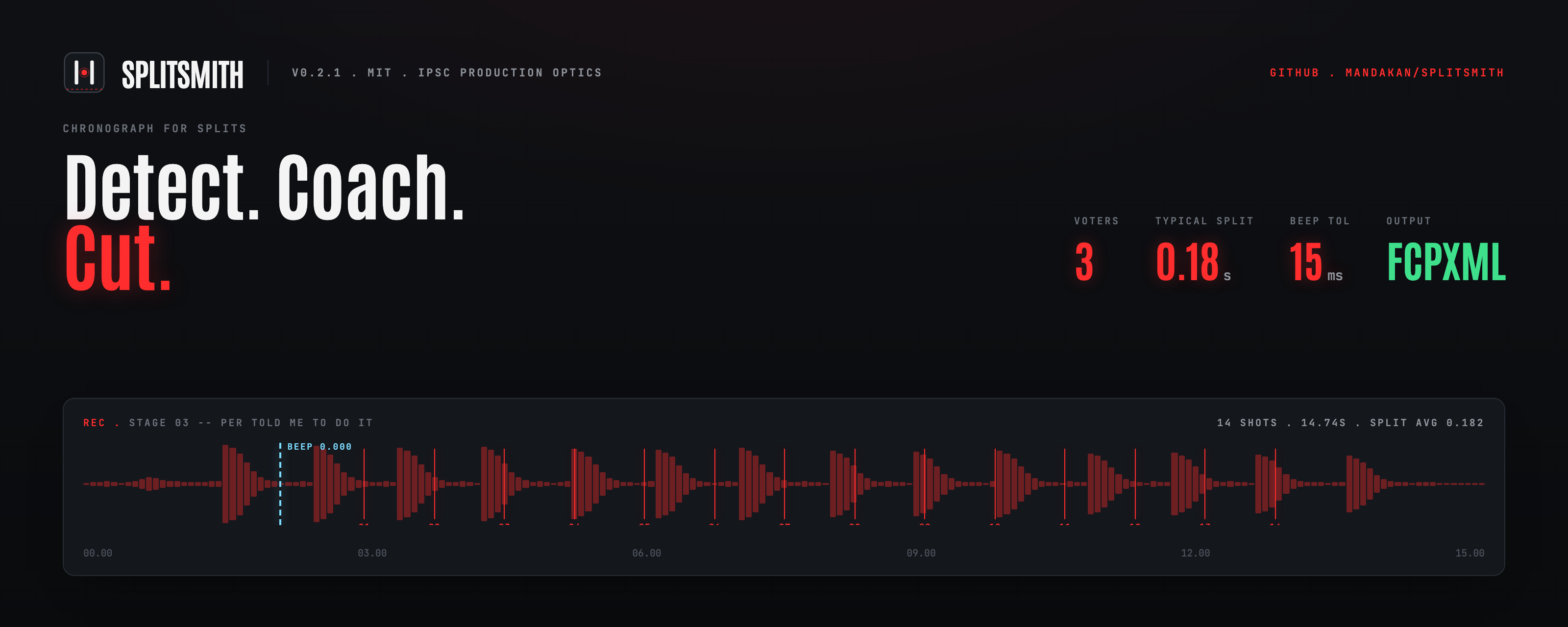
Built to do two things from a single stage video: get per-shot splits for analysis and coaching, and prepare frame-marked clips for match-footage review. Your head-mounted cam (Insta360 Go 3S in this case) already captures audio of every shot; the RO's timer only records your total stage time, so the splits live in the video and nowhere else. Splitsmith extracts them and turns them into a CSV plus an FCPXML timeline with per-shot markers you can step through in Final Cut Pro.
Inputs: raw MP4s from a head-mounted cam, stage time data from SSI Scoreboard. Outputs (per stage): lossless trim around the start beep, splits CSV, FCPXML with frame-aligned markers, anomaly report.
What it looks like
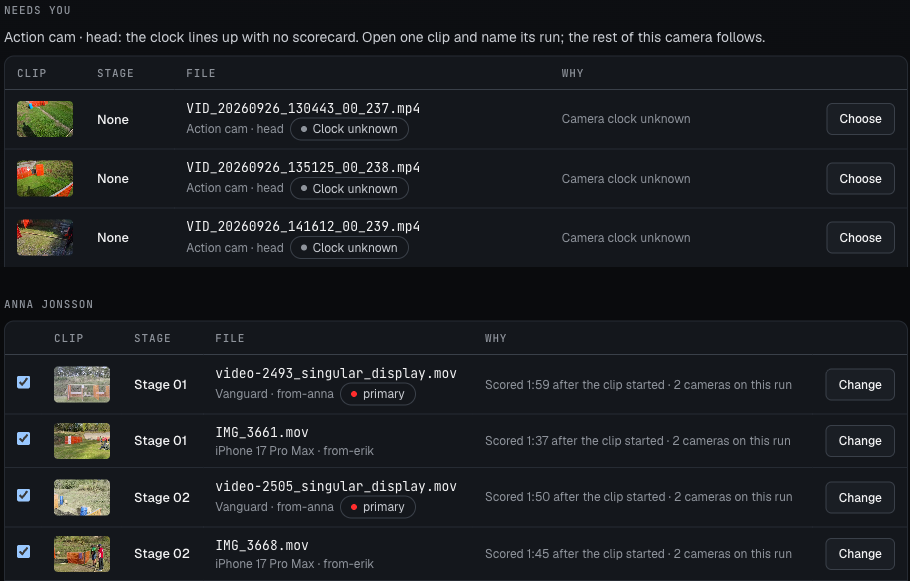 |
Footage. Point it at a folder or a set of files, from one camera or several. Every video lands on the shooter and stage whose scorecard was typed right after it, head cam first when several cameras caught the run. You check the list, then import. |
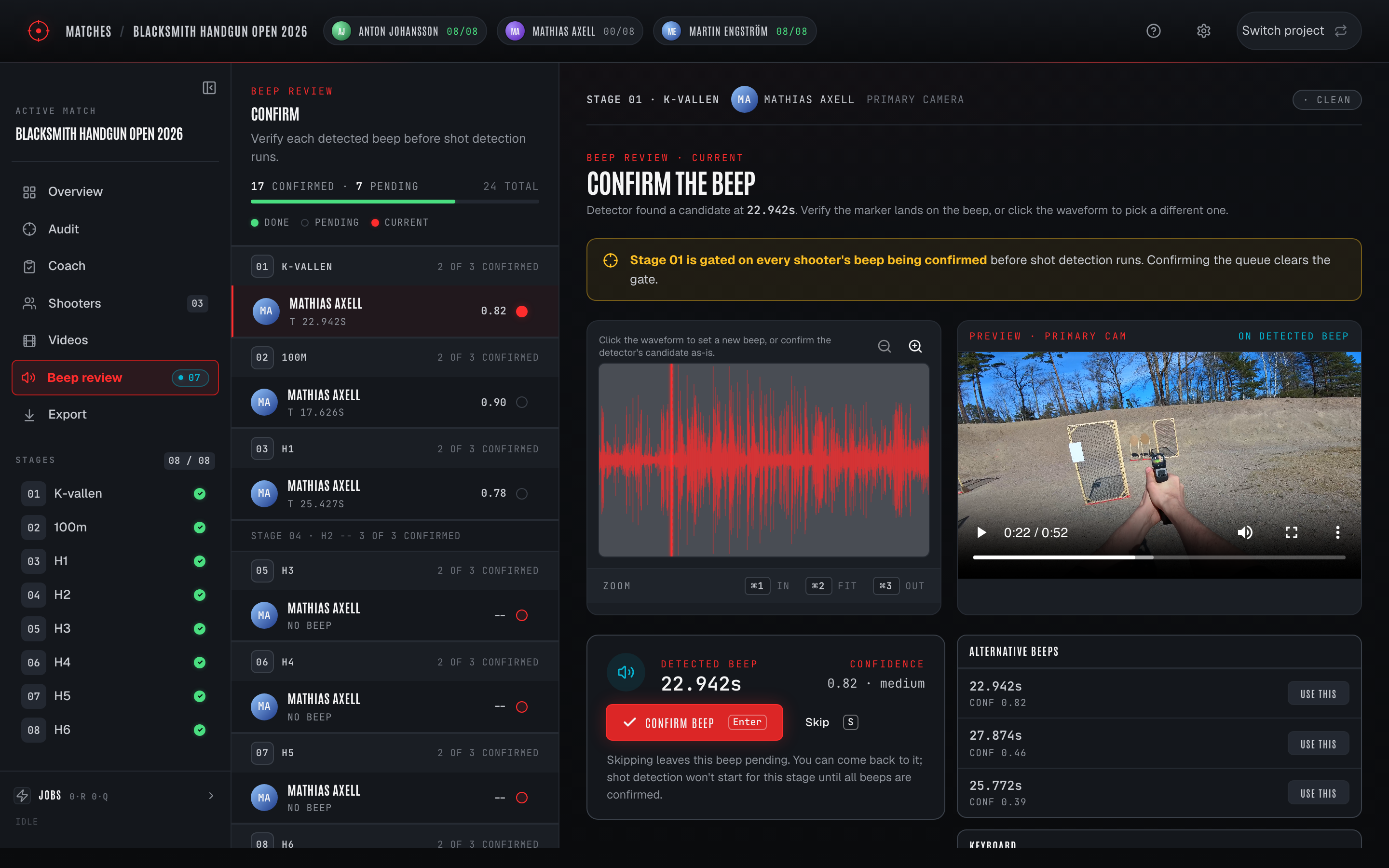 |
Beep review. The start beep is found on every clip. You confirm them one after the other in one queue, the primaries that unlock detection first. |
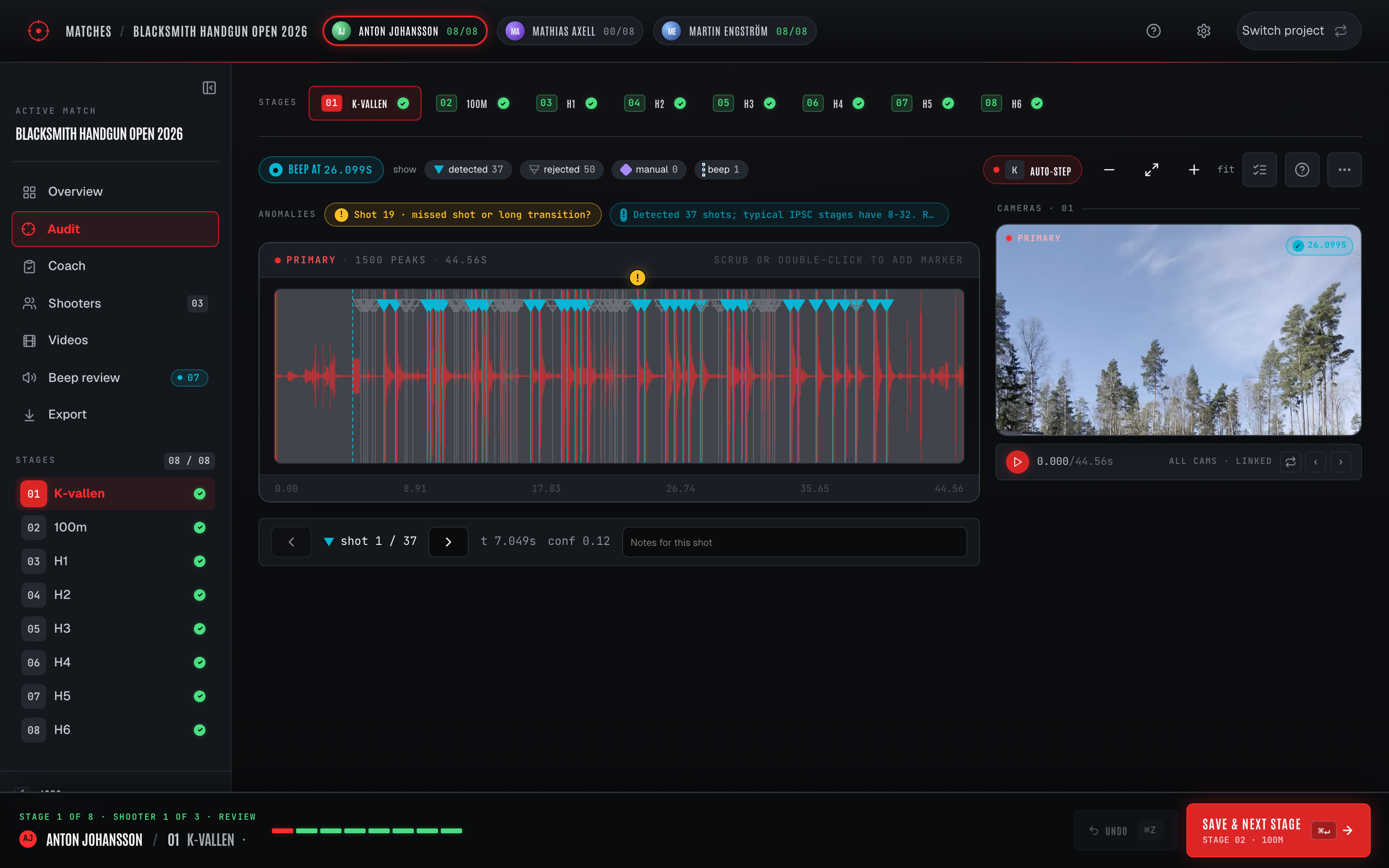 |
Audit. Waveform + per-shot markers from the 3-voter ensemble. Click a marker to inspect votes; drag to fine-tune. |
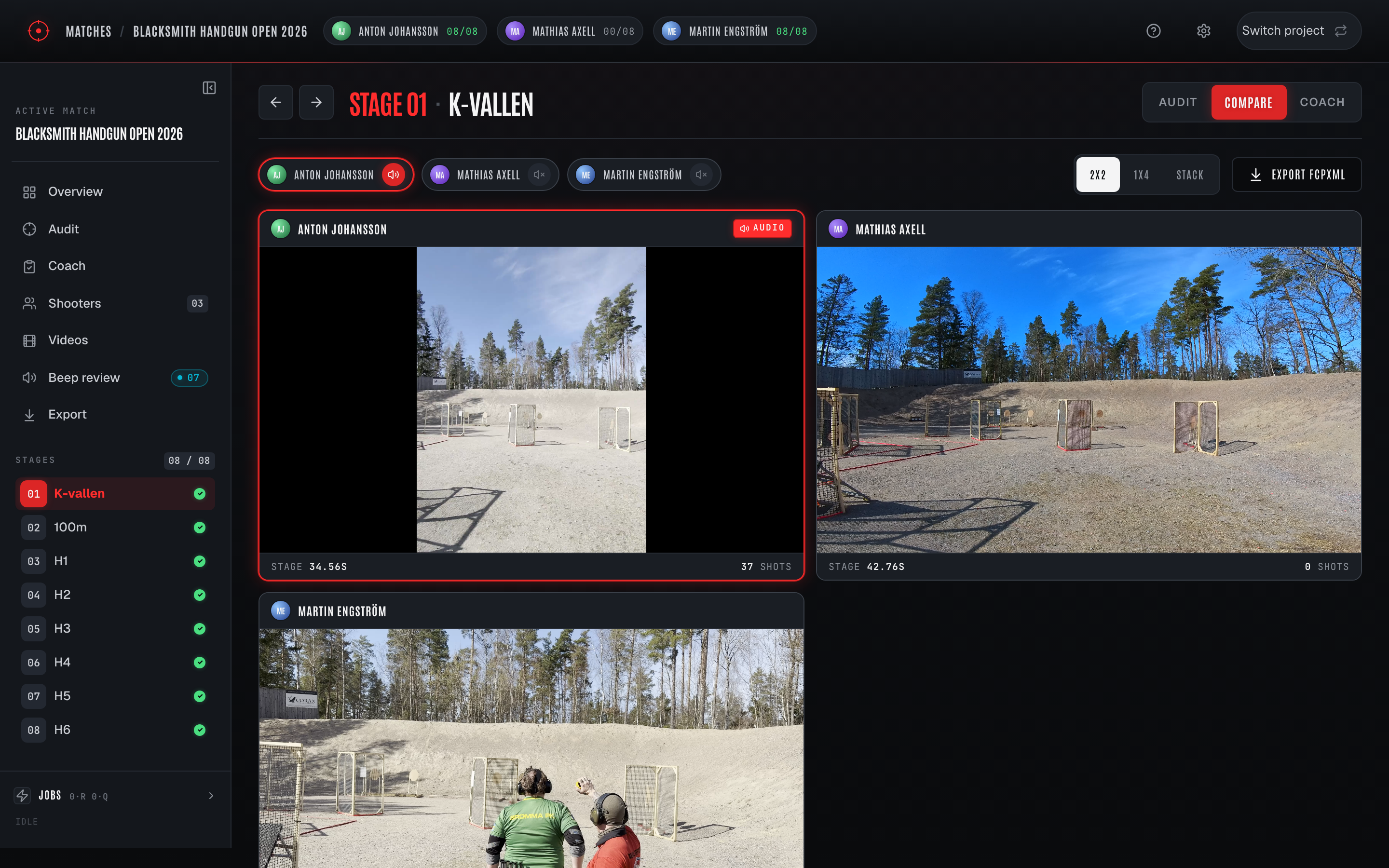 |
Compare. Multi-shooter grid, all beep-aligned to t=0. Audio from one shooter, video tiles for everyone else. |
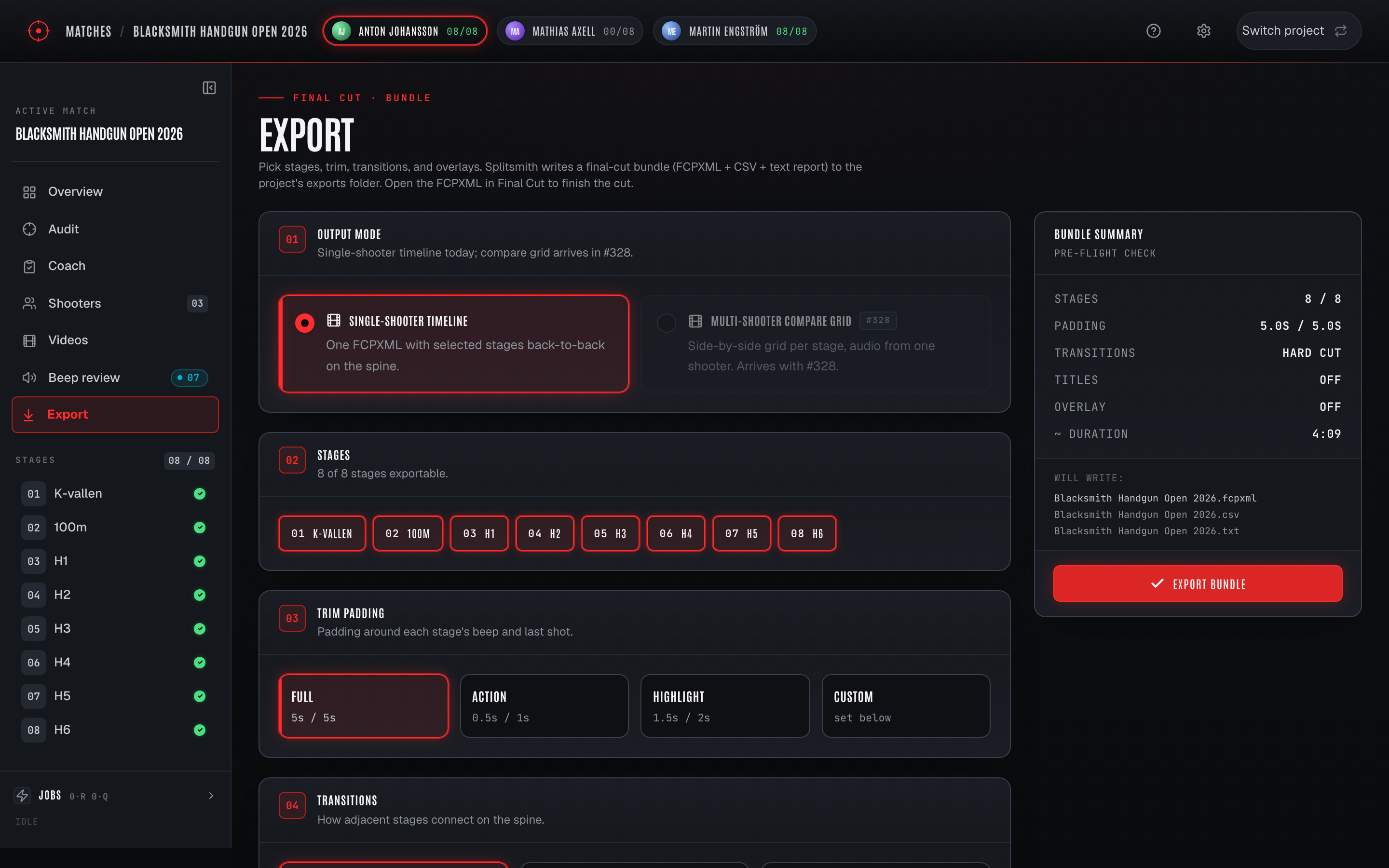 |
Export. Pick a preset (Final Cut bundle, YouTube match video, quick trims, compare grid) or save your own. Every card and effect is a tile, previewed on your own footage before you render. FCPXML with a marker per shot, or a rendered MP4 straight to YouTube. |
Screenshots regenerate from a live
splitsmith uiviascripts/capture_screenshots.py. See Regenerating screenshots below.
Share your results
Hosted matches get shareable results pages. Send one link and the recipient watches each run in a mobile browser - beep-aligned playback, a live splits ticker, and per-stage scorecards. Links are read-only and token-authorized: viewers see finished results, never your workflow, and you can revoke a link at any time from the Share dialog on the results page.
Quickstart
You need: uv and ffmpeg/ffprobe on PATH. See Install for OS-specific package commands.
uv tool install splitsmith                       # slim runtime, ~100 MB
splitsmith ui --project ~/matches/your-match     # auto-fetches ~440 MB of models on first launch
Running a hosted server or a self-hosted worker instead of the desktop app? Pull the container image from GHCR - see Which path is for you.
The UI kicks off the model prefetch as a background job the moment the server boots; the Jobs panel shows progress and the rest of the app (ingest, beep review) stays responsive while it runs. Shot detection waits on the download to finish.
Prefer the CLI? splitsmith single runs the envelope-only detector and needs no model artifacts:
# Bring your own head-cam clip and stage time (or use any IPSC video at hand)
splitsmith single \
    --video path/to/your_stage.mp4 \
    --time 14.74 \
    --output ./demo_analysis \
    --stage-name "Per told me to do it" \
    --stage-number 3

ls -la ./demo_analysis/
cat ./demo_analysis/stage3_per-told-me-to-do-it_report.txt
The repo ships a real Stage 3 audio sample at tests/fixtures/stage-shots-tallmilan-2026-stage3-s97dcec94.wav (Tallmilan 2026, 14.74s, 14 audited shots) plus its sibling JSON with ground-truth shot times. The companion source MP4 is gitignored -- bring your own video to exercise the full ingest pipeline.
The workflow
- Footage -- Add footage takes a folder (every video below it) or picked files and sorts them onto shooters and stages from the scorecard times; you review the proposal and import. See Adding footage.
- Beep review -- the detector finds the start beep on every clip; Review beeps walks the unconfirmed ones one after the other, primaries first. Confirming a primary's beep trims the stage and starts shot detection.
- Audit -- the 3-voter ensemble (envelope onsets + CLAP prompts + GBDT over hand-crafted + PANN features) emits shot times; review the waveform and drag / drop markers to fix outliers.
- Export -- pick a preset or save your own, choose the look from a gallery previewed on your footage, and generate a per-stage or whole-match FCPXML (markers per shot), a rendered MP4, or a multi-shooter Compare grid. Splits CSV ships alongside for the cull workflow.
Adding footage
Footage comes in through one door: Add footage on the Footage page. In
the desktop app or splitsmith ui, once the match is connected to SSI
Scoreboard and its shooters are added, Add footage is the footage sort. It
takes a bunch of videos from one or more sources (head cam, glasses,
phones, in any folder layout) and works out which shooter and stage each
one belongs to.
- Pick a folder or files. Every video below the folder is read, subfolders included; photos are skipped and counted. A file already on a stage is listed as imported and never added twice.
- The sort proposes. Each clip goes to the shooter and stage whose scorecard was entered right after the clip started, using the time the camera wrote into the file (not the file's copy date). Clips of the same run from several cameras are grouped, the head cam first. Confident proposals are pre-checked; anything else is listed with its reason.
- Answer what it asks. A camera whose clock is off by more than it can work out asks once: name one of its clips ("which run is this?") and the rest of that camera follows. Two scorecards entered seconds apart, two runs on one stage, or a clip with no recording time land under "Needs you". Clips nothing follows (warm-ups, other squads) are skipped.
- Check and import. Hover a thumbnail to scrub it, click it to play the clip and step through the list. Change any shooter or stage, tick or untick a clip or a whole shooter, then import everything or one shooter at a time. The run's head cam becomes the stage's primary when the stage has none; every other clip is added as a secondary camera, so an existing primary is never replaced.
- Beeps follow. Beep detection queues for every imported clip. Back on Overview or Footage, Review beeps takes you through the ones waiting for your OK.
A sort can be left and picked up later: Footage lists every unfinished
sort with Continue and Discard. Each import writes a report under
<match>/footage_sort/ with every clip, what was decided, and by whom.
A match without scorecards keeps the plain per-shooter import, and the
hosted app takes uploads per shooter.
How the pieces fit -- system architecture, the per-stage detection job chain, the stage status lifecycle, the share-link request path and the hosted data model -- is drawn in docs/architecture/DIAGRAMS.md (renders inline on GitHub; interactive versions alongside).
Install
Which path is for you
Three ways to get splitsmith, by what you are doing:
- Desktop app (most people). Install from PyPI and run
splitsmith uion your own machine to pull splits and cut timelines. This is the primary tool. Start at Option 1. - Server, worker, or self-hosted agent. Run the container image from GitHub Container Registry (or build it). Same image, the subcommand picks the role. See Option 2.
- Development or contributing. Install from source with
uv. See Option 3.
System prerequisites
-
OS. macOS (primary target), Linux, or Windows. FCPXML is generated everywhere but Final Cut Pro itself is macOS-only -- on Linux/Windows you'll need to copy the
.fcpxmlto a Mac to open it (or just use the splits CSV directly). -
Python 3.11+ via
uv- macOS:
brew install uv - Linux:
curl -LsSf https://astral.sh/uv/install.sh | sh - Windows:
winget install --id=astral-sh.uv -e
- macOS:
-
ffmpegandffprobeonPATH- macOS:
brew install ffmpeg· Linux:apt install ffmpeg· Windows:winget install --id=Gyan.FFmpeg -e
splitsmith uichecks for both on first launch and prints a copy-pasteable install hint if they're missing. - macOS:
Option 1: PyPI slim wheel (desktop app, ~100 MB)
uv tool install splitsmith                       # from PyPI
splitsmith ui --project ~/matches/your-match
Detection models (~440 MB total) are auto-fetched from models.splitsmith.app into ~/.splitsmith/models/ in the background as soon as splitsmith ui starts; the SPA's Jobs panel shows progress. Pre-fetch in a one-shot run with splitsmith fetch-models if you'd rather pay the download up front (CI, metered connections, etc.). No torch, transformers, or panns_inference in the install. The CLI single / process / detect commands use only the envelope-based Voter A and need no model artifacts at all.
Option 1b: macOS app (Apple Silicon)
A signed DMG of the same engine, no uv or Homebrew ffmpeg needed. Download Splitsmith-<version>-arm64.dmg from the GitHub release, drag it to Applications, open it. The app shares ~/.splitsmith with a CLI install, so a match audited in one is there in the other; Splitsmith > Install command line tool puts splitsmith on your PATH from the app's own runtime. The first detection downloads the models (about 430 MB); the first overlay render offers to download Chromium (about 260 MB). The app is built by desktop/build.sh; the design is docs/superpowers/specs/2026-09-20-electron-desktop-packaging-design.md.
Option 2: Docker image (server, worker, or self-hosted agent)
The container image is published to GitHub Container Registry. One image runs every role: the entrypoint is the splitsmith CLI, so the subcommand you pass picks the role.
docker pull ghcr.io/mandakan/splitsmith:latest # :edge tracks main; :X.Y.Z pins a release
Multi-arch (linux/amd64 and linux/arm64). The roles:
serve(the default command) runs the hosted, Postgres-backed API.workerruns a compute worker for the hosted job queue.agentruns a self-hosted worker that lends a home box to a hosted server. The admin UI generates a ready-to-pastedocker runcommand; the full setup is indocs/self-hosted-workers.md.
Prefer to build the image yourself rather than pull it:
git clone https://github.com/mandakan/splitsmith.git
cd splitsmith
docker build -t splitsmith:local .
To run the whole hosted stack (server, worker, and bundled Postgres + MinIO) from the published image, layer the GHCR overlay onto the base compose file:
docker compose -f docker-compose.yml -f docker-compose.ghcr.yml up -d # SPLITSMITH_IMAGE_TAG=edge tracks main
docker-compose.yml on its own builds from source (the dev / test stack); the overlay swaps that build for the released image. This runs the release locally with bundled dependencies - it is not a production deployment (production is Railway + Neon + R2).
The container is for the server and worker roles, not the desktop ui workflow. For that, use the PyPI install above so the app has native access to your video files and Final Cut Pro.
Option 3: from source (required for contributors)
git clone https://github.com/mandakan/splitsmith.git
cd splitsmith
uv sync                                          # slim runtime deps only (~100 MB)
(cd src/splitsmith/ui_static && pnpm install && pnpm build)
uv run splitsmith --help                         # `splitsmith ui` auto-fetches ~440 MB of models on first launch
Source checkouts also need Node.js 20+ and pnpm to build the SPA:
- macOS:
brew install node && npm install -g pnpm - Linux:
apt install nodejs npm && sudo npm install -g pnpm - Windows:
winget install -e --id OpenJS.NodeJS.LTS, open a new shell, thennpm install -g pnpm
Option 4: contributor extras (adds torch + tests + export tooling)
For running the test suite, rebuilding the ONNX artifacts, or enabling the optional Voter E visual probe:
uv sync --all-groups                             # adds torch / transformers / panns / pytest / ruff / onnx export tools
uv run pytest -q                                 # unit tests
uv run pytest -q -m integration                  # ffmpeg/ffprobe-backed tests
The suite runs in parallel by default -- addopts carries -n auto, which
takes the full run from ~3m45s to ~1m on a 12-core box. Add -n0 to any
invocation to go back to a single process, which is what you want when
debugging one test: same collection, same order, readable tracebacks, and no
worker startup on a focused run. --pdb needs no flag, since xdist turns
itself off when it sees one.
uv run pytest -q -n0 tests/test_beep_detect.py # serial, for debugging
Runtime backends (slim ONNX vs dev torch)
The shipped runtime uses ONNX Runtime for Voter B (CLAP) and Voter D (PANN gunshot probability, folded into Voter C). The slim install carries no torch, no transformers, no panns_inference. Artifacts (~440 MB) auto-download from models.splitsmith.app into ~/.splitsmith/models/ as a background job the moment splitsmith ui boots; splitsmith fetch-models is still around for scripted prefetch (CI, metered connections).
The dev backend (torch + transformers + panns_inference) lives in the [dev] group and is required for: re-running scripts/build_ensemble_artifacts.py, the ONNX export scripts (scripts/export_pann_onnx.py, scripts/export_clap_onnx.py), and enabling Voter E (CLIP visual probe -- off by default; turn on with SPLITSMITH_ENABLE_VOTER_E=1 after uv sync --all-groups).
select_backend() resolves to torch when both backends are importable (dev path with HF caches), and to onnxruntime by elimination otherwise (slim install). Override per-process with SPLITSMITH_BACKEND=torch|onnx. See docs/local-slim/ for the full design.
Subcommands
All commands run as uv run splitsmith <subcommand>. Pass --help for the full option list. See docs/COMMANDS.md for usage examples per command.
| command | purpose |
|---|---|
ui |
Production SPA. Persistent project state on disk; the main entry point. |
serve |
Hosted-mode API server (Postgres-backed). Preview; see Hosted mode below. |
detect |
One-shot beep + shot detection preview. No files written. |
single |
Full pipeline on one video with an explicit stage time. |
process |
Batch over an SSI Scoreboard stage JSON, matching videos to stages by timestamp. |
compare |
Render a multi-shooter beep-aligned grid FCPXML across N projects. |
lab |
Algorithm Lab -- fixture eval, parameter sweeps, live tuning. |
review |
Single-page UI for auditing detected shots against a fixture WAV. |
audit-apply |
Merge an audited candidates CSV back into a fixture JSON. |
fcpxml |
Regenerate a timeline from a hand-edited splits CSV. |
mcp |
Model Context Protocol server; pairs with the /splitsmith-match Claude Code skill. |
Hosted mode (preview)
The SaaS-foundation ladder ships a Postgres-backed hosted variant of the server alongside the desktop ui mode. Workers, jobs, and per-user state persist in Postgres + MinIO instead of ~/.splitsmith/. The whole stack boots locally via docker compose up:
docker compose up --build
curl http://localhost:5174/api/health
curl http://localhost:5174/api/me/recent-projects
This is preview-only: one loopback user, no real authentication, no SPA bundle, no upload pipeline yet. Workers still run in-process inside the API container (no separate worker command -- one container is both HTTP and the executor pool).
See docs/saas-readiness/HOSTED-LOCAL.md for the complete inventory of what works today, what doesn't, validation recipes, teardown, and the architecture diagram. The broader SaaS plan lives under docs/saas-readiness/.
Configuration
Defaults live in src/splitsmith/config.py. Override via --config path/to/config.yaml:
beep_detect:
  freq_min_hz: 2000
  freq_max_hz: 5000
  min_duration_ms: 150
  # Cutoff = max(min_amplitude * peak, noise_floor_factor * noise_floor, min_abs_peak).
  min_amplitude: 0.05
  min_abs_peak: 0.005
  noise_floor_factor: 5.0
  envelope_smoothing_ms: 40.0
  tonal_band_lo_hz: 2200
  tonal_band_hi_hz: 3500
  tonal_weight: 0.7
  dur_match_min_ms: 150.0
  dur_match_full_ms: 300.0
  dur_match_weight: 1.0
  silence_window_s: 1.5
  silence_pre_skip_s: 0.2
  min_pre_window_s: 0.2
  search_window_s: 30.0
  top_n_candidates: 5

shot_detect:
  min_gap_ms: 80
  onset_delta: 0.07
  pre_max_ms: 30
  post_max_ms: 30

video_match:
  tolerance_minutes: 15
  prefer_ctime: true

output:
  trim_buffer_seconds: 5.0
  trim_mode: lossless          # "lossless" (CLI default) or "audit"
  trim_gop_frames: 15          # audit mode: keyframe every N frames (0.5s @ 30fps)
  trim_audit_crf: 20           # audit mode: x264 CRF (lower = better quality, larger files)
  trim_audit_preset: fast      # audit mode: x264 preset
  fcpxml_version: "1.10"
  split_color_thresholds:
    green_max: 0.25
    yellow_max: 0.35
    transition_min: 1.0

web_trim:                      # streaming rendition of each audit trim (hosted playback)
  height: 720
  crf: 26
  preset: veryfast
  gop: 30
  audio_bitrate: 128k
trim_mode controls how trim.py cuts videos:
lossless(default):ffmpeg -c copy. Instant; archival quality; inherits the source GOP. Insta360 head-cam typically has keyframes every 1-4 seconds.audit: re-encodes with a short GOP (default 0.5s) so browser<video>scrubbing in the production UI's audit screen lands within ~1 frame of the pointer. Encoding cost is roughly 1-2x realtime on Apple Silicon. Audio is stream-copied either way so the detector's input is bit-exact across modes.
Override per command via --trim-mode lossless|audit on splitsmith single and splitsmith process.
Every audit trim also gets a _web.mp4 beside it: a 720p faststart
rendition cut from the trim (web_trim above), which the hosted
Splitsmith and share links stream instead of the full-resolution trim.
It is cut when the trim is, and a sync cuts any that are missing before
it pushes, so matches trimmed before this existed pick it up on their
next sync.
Lower shot_detect.onset_delta if you're under-detecting shots from a heavily-comped open gun. Tighten beep_detect.min_amplitude if a louder ambient noise is being mistaken for the beep.
Output file layout
analysis/
  stage3_per-told-me-to-do-it_trimmed.mp4   # lossless cut around the beep
  stage3_per-told-me-to-do-it_splits.csv    # editable; the source of truth for fcpxml regen
  stage3_per-told-me-to-do-it.fcpxml        # open in Final Cut Pro; M / Shift+M to navigate markers
  stage3_per-told-me-to-do-it_report.txt    # human-readable summary + anomalies
A .wav cache file is written next to each source video on first run -- this is intentional (re-running detect on the same video skips the audio extraction). Add *.wav to your match-videos directory's .gitignore if it's tracked.
What's in git
Source MP4/MOV recordings are gitignored (multi-GB; not worth git-LFS for a personal tool). The committed inputs are:
tests/fixtures/*.wav-- pre-trimmed audio slices (~1-2 MB each), the canonical input for every detection / classification / eval script.tests/fixtures/*.json-- audited shot times (ground truth) plus_candidates_pending_audit(raw detector output) and asource/fixture_window_in_sourceprovenance pair naming the original video and time window.
Anyone with the repo can run the full pipeline (beep / shot detection, PANN + CLAP feature extraction, ensemble eval) against the WAVs without touching the source videos. What you can't reproduce without the original MP4 is the audit-prep step itself -- if you want a different trim window, padding, or beep override, you need the source video. That step is "input data preparation" rather than "pipeline reproduction"; the WAV is the canonical artefact downstream.
Detection methodology
The detector is built around half-rise leading-edge timing (consistent across recordings; insensitive to AGC and gain) plus a 3-voter ensemble for shot classification. Full write-up in docs/METHODOLOGY.md: beep detection, shot detection, the half-rise rationale, confidence ranking, and the ensemble performance dashboard.
The audited corpus
Shot detection is driven by a 3-voter ensemble (envelope onsets, CLAP audio embeddings, and a per-camera-class GBDT) calibrated against the audited fixtures under tests/fixtures/. Each fixture is a real beep-to-last-shot audio slice with hand-labeled shot times plus a camera / shooter / stage_rounds provenance block.
The corpus grows over time -- right now I curate it by hand from my own matches and a few squadmates'. After dropping new audited fixtures into tests/fixtures/, rebuild the shipped calibration artifacts -- src/splitsmith/data/ensemble_calibration.json plus the ONNX voter graphs next to it (voter_c_gbdt_headcam.onnx, voter_c_gbdt_handheld.onnx, and voter_e_visual_probe.onnx when Voter E is trained) -- with:
uv sync --all-groups   # training + ONNX export tooling lives in the dev group
uv run python scripts/build_ensemble_artifacts.py
Contributing audited stages (planned)
Soon I want to open the corpus to opt-in contributions from anyone running Splitsmith -- a per-stage "share this audited stage to improve detection" prompt at promotion time, so contributors grow the corpus without ever sharing a stage they didn't actively audit. Default will be off; nothing leaves your machine without explicit consent.
Regenerating screenshots
The README gallery comes from a live splitsmith ui driven through Playwright. To refresh after a UI redesign:
uv pip install --with playwright playwright
playwright install chromium

uv run python scripts/capture_screenshots.py \
    --project ~/matches/your-real-match \
    --stage 3 \
    --output docs/screenshots/
Commit the resulting PNGs. The script needs a project that's already been through the workflow (videos ingested, beeps reviewed, shots detected); Compare requires multiple shooters' trims on disk and is skipped with a warning otherwise.
Troubleshooting
- "ffmpeg binary not found" / "ffprobe binary not found" -- install via your platform's package manager (macOS
brew install ffmpeg, Linuxapt install ffmpeg, Windowswinget install --id=Gyan.FFmpeg), or set--ffmpeg-binaryif installed elsewhere. processaborts with "Ambiguous stages" -- two videos fall in the same stage's window, or one video matches multiple stages. Either narrow the input directory or usesinglefor each stage.- Report shows ">> 32 shots, possible false positives" -- expected on busy ranges. Cull in the CSV and regenerate the FCPXML.
- Last shot is detected after the official stage time -- usually a neighbouring-bay shot fired during your last shot's echo window. Drop it in the CSV.
- No FCPXML markers visible in FCP -- ensure FCP 11.x or later (FCPXML 1.10 is required). Older versions need an export of the timeline into 1.9.
Releases
Versioning is driven by release-please on main:
- Conventional commits (
feat:,fix:,perf:,refactor:, ...) accumulate into an always-openchore: release X.Y.ZPR that bumpspyproject.tomlandCHANGELOG.md. Merging that PR cuts the tag + GitHub Release. - The GitHub Release triggers
.github/workflows/release-please.yml'spublish-pypijob, which builds the slim wheel (SPA included via the same SPA-build step as the smoke job) and runsuv publish --trusted-publishing automatic. - No PyPI API token in repo secrets -- authentication uses PyPI trusted publishing (OIDC). One-time setup: at https://pypi.org/manage/account/publishing/, add a "pending publisher" for project name
splitsmith, ownermandakan, reposplitsmith, workflowrelease-please.yml, environmentpypi. - Model artifacts on R2 are SHA-pinned in
src/splitsmith/data/ensemble_calibration.jsonand decoupled from the app version. Re-uploads go throughscripts/upload_model_artifacts.py; the calibration file is the source of truth that the wheel ships with.
Project status
Personal tool, actively developed for the maintainer's own match-recap workflow. The pipeline structure is intentionally narrow (single-shooter or multi-shooter compare, IPSC-style start beep + shot timing, FCPXML output) and not aimed at being a general-purpose audio analysis library. PRs welcome where they fit the use case; see SPEC.md and CLAUDE.md for the design priorities.
1 maintainer

Metadata
1 maintainer
Release files for splitsmith 0.58.0
For a detailed explanation of source distributions (sdists) and built distributions (wheels), please see the package formats documentation.
Source distribution (sdist)
| File | Size | Uploaded | |
|---|---|---|---|
| splitsmith-0.58.0.tar.gz | 4.1 MB | Details |
Built distribution (wheel)
| File | Interpreter | ABI | Platform | Reset |
|---|---|---|---|---|
| splitsmith-0.58.0-py3-none-any.whl | Python 3 | none | any | Details |
Total release size: 7.0 MB
Release files / splitsmith-0.58.0.tar.gz
| Download URL | splitsmith-0.58.0.tar.gz |
|---|---|
| Size | 4.1 MB |
| Tags | Source |
|
SHA-256 checksum How to use checksums |
177745bfa8665b03ba851a7ed6906a6aac979f0c42d1b96c0294220cc71ee7a9
|
|
BLAKE2b-256 checksum How to use checksums |
5bd8f23ce4d607b312e5f87fb20c6f80bf3f7c15654be54f570d3ef69e5c1460
|
| Upload date | |
|
Uploaded using Trusted Publishing? What is trusted publishing? |
Yes |
| Uploaded via |
uv/0.12.23 {"installer":{"name":"uv","version":"0.12.23","subcommand":["publish"]},"python":null,"implementation":{"name":null,"version":null},"distro":{"name":"Ubuntu","version":"24.04","id":"noble","libc":null},"system":{"name":null,"release":null},"cpu":null,"openssl_version":null,"setuptools_version":null,"rustc_version":null,"ci":true}
|
Release files / splitsmith-0.58.0-py3-none-any.whl
| Download URL | splitsmith-0.58.0-py3-none-any.whl |
|---|---|
| Size | 2.9 MB |
| Tags | Python 3 |
|
SHA-256 checksum How to use checksums |
65083e687e3f613152df9c4ef6c1c4df2fc1f93053a928e592694449132439b1
|
|
BLAKE2b-256 checksum How to use checksums |
d0029a451c8abd51ef7e068838d618f87ea4e68bdb9d93b1e09460b0c601ca15
|
| Upload date | |
|
Uploaded using Trusted Publishing? What is trusted publishing? |
Yes |
| Uploaded via |
uv/0.12.23 {"installer":{"name":"uv","version":"0.12.23","subcommand":["publish"]},"python":null,"implementation":{"name":null,"version":null},"distro":{"name":"Ubuntu","version":"24.04","id":"noble","libc":null},"system":{"name":null,"release":null},"cpu":null,"openssl_version":null,"setuptools_version":null,"rustc_version":null,"ci":true}
|














