
A high-level cross-platform 2D game framework for Python with desktop, web, and mobile workflows.
Verified details
These details have been verified by PyPIProject links
GitHub Statistics
Maintainers

Project description
SpritePro
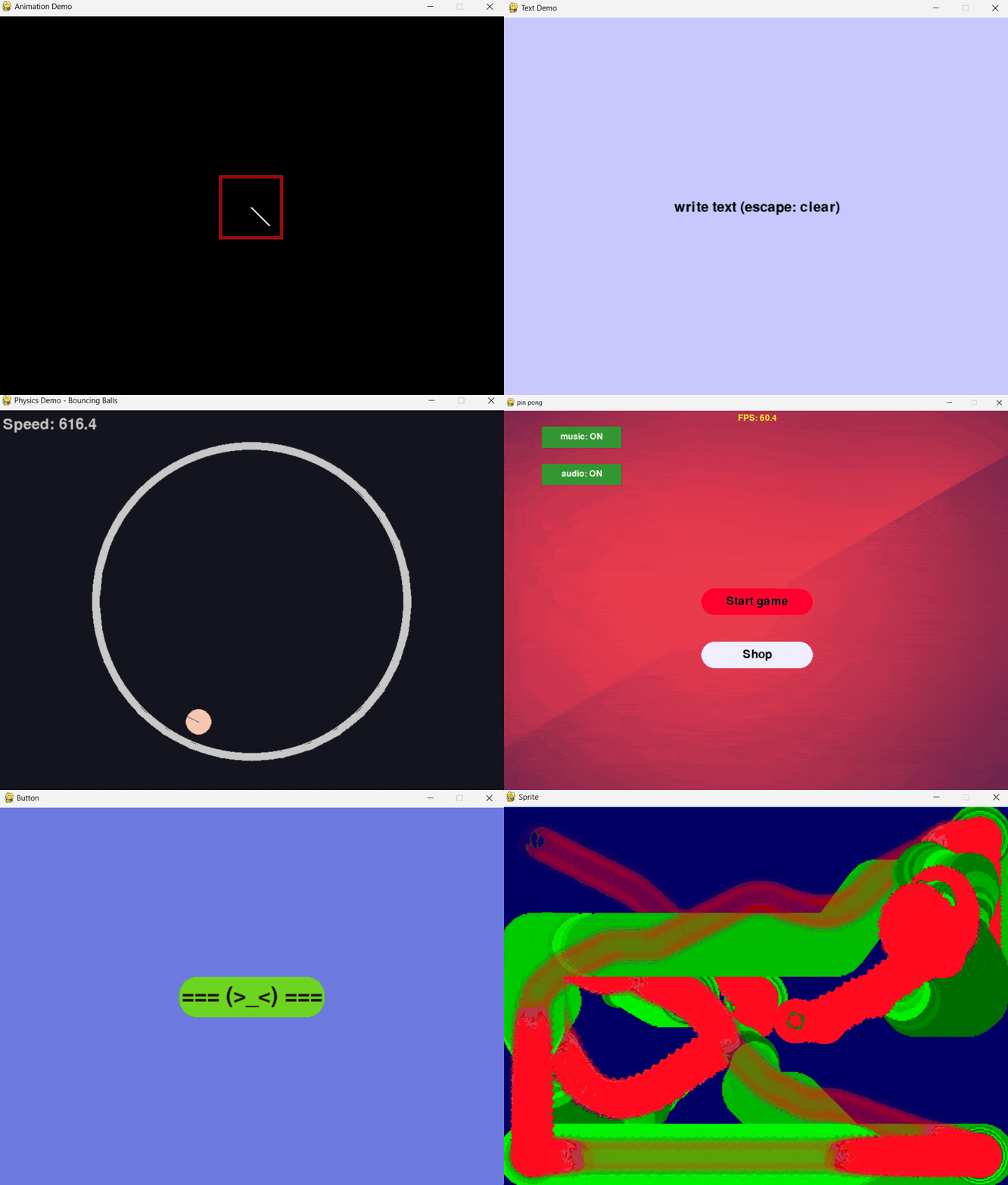
Высокоуровневый 2D game framework на Python (поверх pygame). Desktop, web и mobile из одной кодовой базы.



Установка
pip install spritepro
Для mobile: pip install "spritepro[kivy]"
Шаблон проекта: python -m spritePro.cli --create
Обновление
pip install --upgrade spritepro
Почему SpritePro
| Обычно приходится | В SpritePro |
|---|---|
| Ручной игровой цикл | s.run(scene=...) — сцена + auto-render |
| Своя камера | Camera API, follow, zoom, shake |
| UI с нуля | Button, ToggleButton, TextSprite, Slider, TextInput, Layout |
| Физика отдельно | pymunk-интеграция, типы тел, коллизии |
| Визуальный editor | Sprite Editor → JSON → spawn_scene(...) |
| Сохранения парсить | PlayerPrefs → JSON |
| Мультиплеер с нуля | TCP, лобби, ChatScene, синхронизация |
| Mobile отдельно | platform="kivy" — та же логика |
| Скроллируемый UI | ScrollView + ClipMask — готовый клиппинг |
SpritePro = pygame + физика, Layout, ScrollView, ClipMask, редактор сцен, мультиплеер, UI.
Быстрый старт
import spritePro as s

class MainScene(s.Scene):
    def __init__(self):
        super().__init__()
        self.player = s.Sprite("", (50, 50), s.WH_C, speed=5, scene=self)

    def update(self, dt):
        self.player.handle_keyboard_input()

s.run(scene=MainScene, size=(800, 600), title="My Game")
Всё: окно, сцена, игровой цикл, управление.
Что внутри
- Sprite — базовый класс с движением, эффектами, иерархией parent-child
- UI: Button, ToggleButton, Slider, TextInput, TextSprite, Layout (flex/grid/circle/line)
- ClipMask — маска обрезки для viewport, инвентарей, чатов
- ScrollView — скроллируемый контент с колёсиком и drag-and-drop
- Физика: pymunk, DYNAMIC/STATIC/KINEMATIC тела, коллизии
- Анимации: Tween, Fluent API (
DoMove,DoScale,SetEase...) - Частицы: ParticleEmitter, шаблоны, пулы
- Мультиплеер: TCP, лобби, ChatScene, синхронизация
- Audio: звук и музыка
- Save/Load: PlayerPrefs в JSON
- Sprite Editor: визуальная сборка сцен → JSON
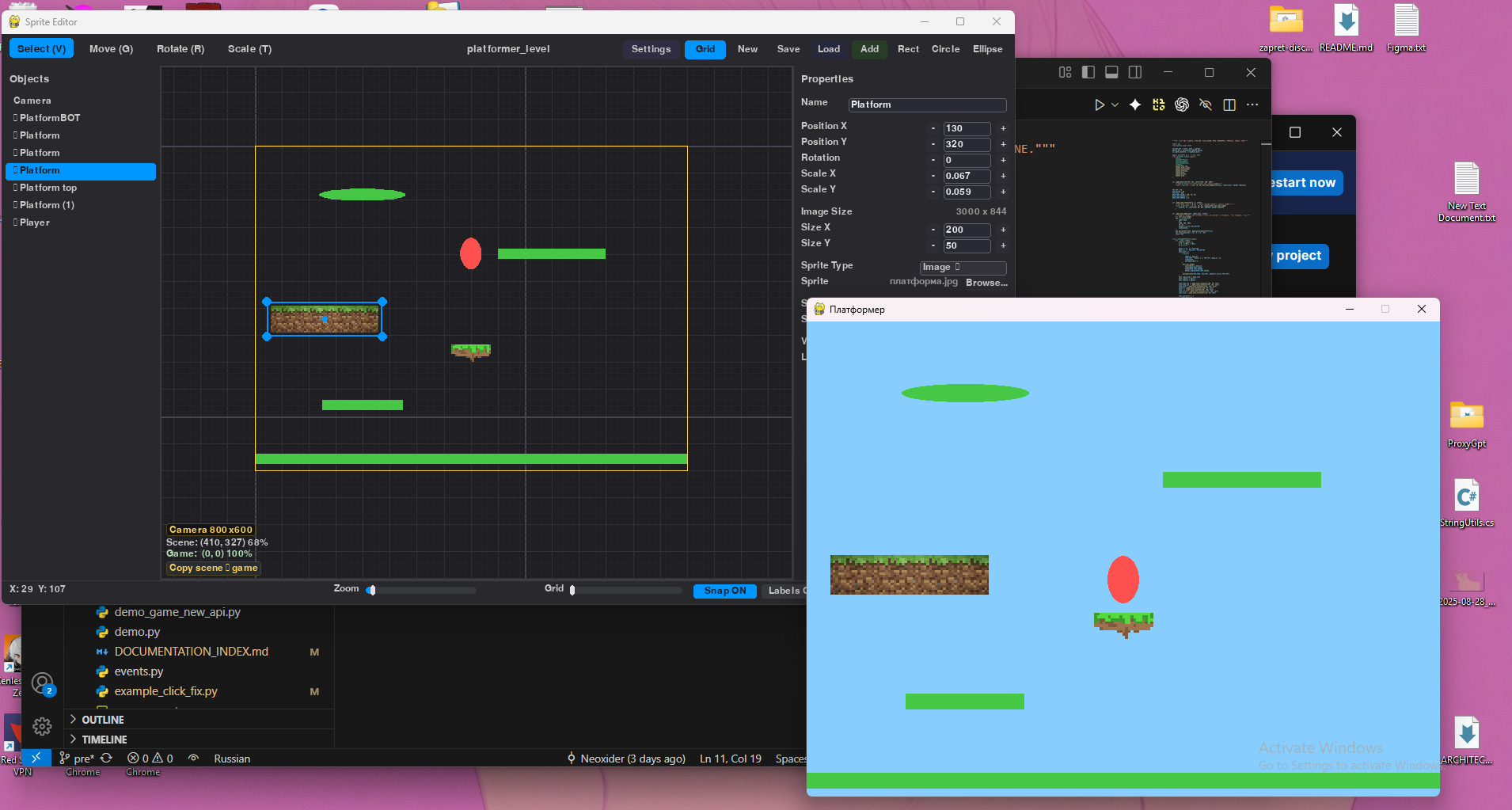
Sprite Editor
Визуальный редактор сцен с иерархией, инспектором, gizmo.
python -m spritePro.cli --editor
Собираете сцену → сохраняете в JSON → загружаете в игре:
rt = spawn_scene("level.json", scene=self)
player = rt.exact("player").Sprite(speed=5)
Мультиплеерный чат
Готовая сцена чата с маской обрезки и скроллом:
from spritePro.readyScenes import ChatScene, ChatStyle
import spritePro as s

s.run(scene=ChatScene, multiplayer=True, use_lobby=True, title="Chat")
Сравнение
| Функция | pygame | arcade | SpritePro |
|---|---|---|---|
| Авто-рендер | ❌ | ✅ | ✅ |
| Готовая камера | ❌ | ✅ | ✅ |
| Физика (pymunk) | ❌ | ✅ | ✅ |
| Layout (flex/grid) | ❌ | ❌ | ✅ |
| Редактор сцен (JSON) | ❌ | ❌ | ✅ |
| Маска обрезки / ScrollView | ❌ | ❌ | ✅ |
| Мультиплеер (TCP) | ❌ | ❌ | ✅ |
| PlayerPrefs | ❌ | ❌ | ✅ |
Что создать
- Платформеры, аркады, RPG
- Пазлы, tower defense
- Мультиплеерные игры
- Мобильные игры (
platform="kivy")
Демо-игры
python -m spritePro.demoGames.physics_demo       # физика
python -m spritePro.demoGames.fluent_tween_demo   # твины
python -m spritePro.demoGames.layout_demo         # лейауты
python -m spritePro.demoGames.local_multiplayer_demo --quick
Mobile и Web
s.run(scene=MainScene, platform="kivy") # Android/iOS
python -m spritePro.cli --android . --android-orientation portrait
Web: docs/builds/building_web.md
Документация
| Что | Где |
|---|---|
| Полный индекс | DOCUMENTATION_INDEX.md |
| API Reference | docs/API_REFERENCE.md |
| Для новичков | docs/GETTING_STARTED.md |
| Физика | docs/core/physics_guide.md |
| UI/Layout | docs/ui/layout_ui.md |
| ClipMask | docs/ui/clip_mask.md |
| Мультиплеер | docs/systems/networking_guide.md |
| Sprite Editor | docs/editor/sprite_editor.md |
| Mobile | docs/builds/mobile_kivy.md |
Вклад
- CONTRIBUTING.md — как внести вклад
- ROADMAP.md — планы развития
- CHANGELOG.md — история изменений
Project details
Verified details
These details have been verified by PyPIProject links
GitHub Statistics
Maintainers
Release history Release notifications | RSS feed


Download files
Download the file for your platform. If you're not sure which to choose, learn more about installing packages.
Source Distribution
Built Distribution
Filter files by name, interpreter, ABI, and platform.
If you're not sure about the file name format, learn more about wheel file names.
Copy a direct link to the current filters
File details
Details for the file spritepro-3.9.0.tar.gz.
File metadata
- Download URL: spritepro-3.9.0.tar.gz
- Upload date:
- Size: 326.6 kB
- Tags: Source
- Uploaded using Trusted Publishing? Yes
- Uploaded via: twine/6.1.0 CPython/3.13.12
File hashes
| Algorithm | Hash digest | |
|---|---|---|
| SHA256 |
eb305b2d49fe069fff280c82b619c6a0982722d75246a1058edb1c3098a86d5e
|
|
| MD5 |
e3070c102cd6671b178574fdab90bef8
|
|
| BLAKE2b-256 |
10972f954b26073a999eeb20e1d79f7d138d66a4a1d4b8e12c91b018d3e41e7f
|
Provenance
The following attestation bundles were made for spritepro-3.9.0.tar.gz:
Publisher:
publish-to-pypi.yml on NeoXider/SpritePro
-
Statement:
-
Statement type:
https://in-toto.io/Statement/v1 -
Predicate type:
https://docs.pypi.org/attestations/publish/v1 -
Subject name:
spritepro-3.9.0.tar.gz -
Subject digest:
eb305b2d49fe069fff280c82b619c6a0982722d75246a1058edb1c3098a86d5e - Sigstore transparency entry: 1280621966
- Sigstore integration time:
-
Permalink:
NeoXider/SpritePro@14ebb5955cd738de4645a5dc0c8e272c9bc695ab -
Branch / Tag:
refs/tags/v3.9.0 - Owner: https://github.com/NeoXider
-
Access:
public
-
Token Issuer:
https://token.actions.githubusercontent.com -
Runner Environment:
github-hosted -
Publication workflow:
publish-to-pypi.yml@14ebb5955cd738de4645a5dc0c8e272c9bc695ab -
Trigger Event:
release
-
Statement type:
File details
Details for the file spritepro-3.9.0-py3-none-any.whl.
File metadata
- Download URL: spritepro-3.9.0-py3-none-any.whl
- Upload date:
- Size: 402.2 kB
- Tags: Python 3
- Uploaded using Trusted Publishing? Yes
- Uploaded via: twine/6.1.0 CPython/3.13.12
File hashes
| Algorithm | Hash digest | |
|---|---|---|
| SHA256 |
80a6700f752ce8d24472189755a90b23f826921006506c1e7eca80ea6edb1f22
|
|
| MD5 |
079a9f1385aa260d7f51d525ea4bfaeb
|
|
| BLAKE2b-256 |
1674db3fbd400c2d31439e6375c81e6b010ab8c8fe0a9eed83379fb411897d92
|
Provenance
The following attestation bundles were made for spritepro-3.9.0-py3-none-any.whl:
Publisher:
publish-to-pypi.yml on NeoXider/SpritePro
-
Statement:
-
Statement type:
https://in-toto.io/Statement/v1 -
Predicate type:
https://docs.pypi.org/attestations/publish/v1 -
Subject name:
spritepro-3.9.0-py3-none-any.whl -
Subject digest:
80a6700f752ce8d24472189755a90b23f826921006506c1e7eca80ea6edb1f22 - Sigstore transparency entry: 1280621968
- Sigstore integration time:
-
Permalink:
NeoXider/SpritePro@14ebb5955cd738de4645a5dc0c8e272c9bc695ab -
Branch / Tag:
refs/tags/v3.9.0 - Owner: https://github.com/NeoXider
-
Access:
public
-
Token Issuer:
https://token.actions.githubusercontent.com -
Runner Environment:
github-hosted -
Publication workflow:
publish-to-pypi.yml@14ebb5955cd738de4645a5dc0c8e272c9bc695ab -
Trigger Event:
release
-
Statement type:






