






spxtacular
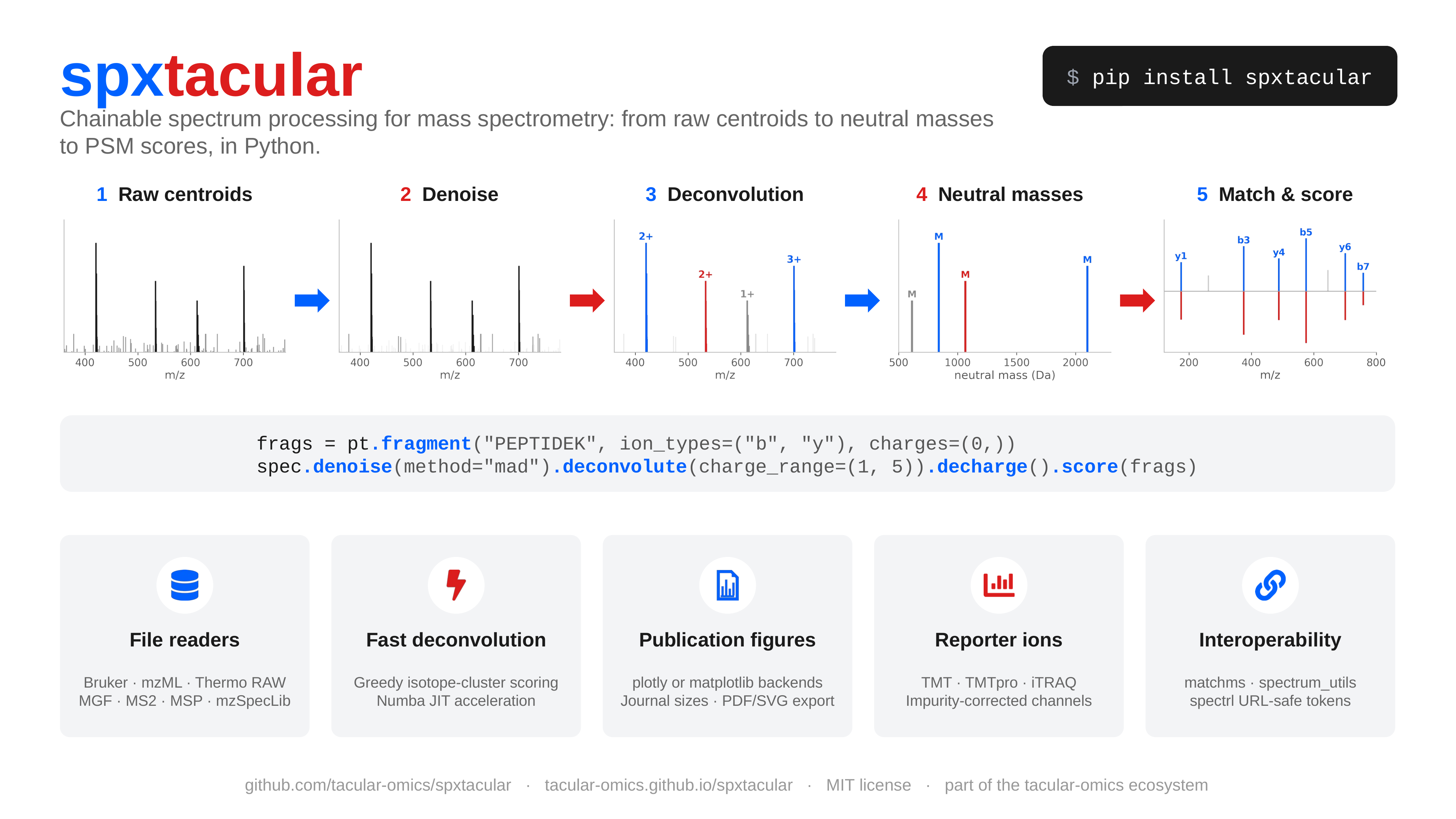
spxtacular is a Python library for mass-spectrum processing: denoising, isotope
deconvolution, charge assignment, matching, scoring, and interactive visualization behind one
chainable Spectrum object. It's for anyone writing proteomics, metabolomics, lipidomics,
glycomics, or oligonucleotide analysis code who wants raw peaks in and clean, annotated results
out without hand-rolling the signal processing.
Part of the tacular-omics ecosystem alongside peptacular, paftacular, and mzmlpy.
Why spxtacular?
- One chainable API for the whole pipeline — denoise, deconvolute, decharge, match, score, and plot — that works the same for peptides, lipids, glycans, and nucleic acids.
- Reads what your instrument wrote.
Readerauto-detects Bruker timsTOF.d, mzML, and Thermo.rawfrom the path, including gzipped and disk-backed mzML. - Accessible visualization by default — a colour-vision-safe palette validated in light and
dark mode, plus an HTML
table_view()for screen readers, not an afterthought extra. - Analyte-aware deconvolution — built-in isotope models for peptides, lipids, glycans, and
nucleic acids, plus adduct-aware neutral-mass conversion (
[M+H]+,[M-H]-,[M+Na]+, custom). - Plays well with the ecosystem — lazy, optional bridges to matchms and spectrum_utils, and compact URL-safe spectrl tokens for sharing a spectrum with no backend.
Install
pip install spxtacular

# Optional: Numba JIT acceleration
pip install spxtacular[numba]

# Optional: share spectra as compact URL-safe tokens (spectrl)
pip install spxtacular[spectrl]

# Optional: raw-file readers — Bruker .d, mzML, Thermo .raw
pip install spxtacular[bruker]      # tdfpy — DReader
pip install spxtacular[mzml]        # mzmlpy — MzmlReader
pip install spxtacular[thermo]     # fisher-py — ThermoReader (also needs a .NET runtime)
pip install spxtacular[readers]     # all three readers

# Optional: publication figures (matplotlib backend) and static export of plotly figures
pip install spxtacular[matplotlib]
pip install spxtacular[plotly-export]

# Everything (numba + readers + spectrl + interoperability adapters + figure backends)
pip install spxtacular[all]
Quick start
import numpy as np
import spxtacular as spx

# A 2+ envelope near m/z 500 and a 3+ envelope near m/z 801, over a noise floor.
mz = np.array([
    352.1100, 418.4400, 476.9200,
    500.2573, 500.7590, 501.2606,
    655.3100, 733.0800,
    801.3073, 801.6417, 801.9762, 802.3106,
    918.6500, 1102.4000,
])
intensity = np.array([
    820.0, 1350.0, 690.0,
    100000.0, 51973.0, 11066.0,
    1580.0, 1015.0,
    52335.0, 60000.0, 34070.0, 12544.0,
    745.0, 1240.0,
])

spec = spx.Spectrum(mz=mz, intensity=intensity)

# Full pipeline: denoise → deconvolute → neutral mass
neutral = (
    spec
    .denoise(method="mad")
    .deconvolute(charge_range=(1, 5), tolerance=15, tolerance_unit="ppm", min_score=0.4)
    .decharge()
)

for peak in neutral.peaks:
    print(peak)
# Peak(mz=998.5000, int=1.52e+05, z=0, score=1.000)
# Peak(mz=2400.8999, int=1.46e+05, z=0, score=0.998)

neutral.plot(title="Neutral masses").show()
Reading raw files works the same for every format — Reader picks DReader, MzmlReader, or
ThermoReader from the path suffix:
with spx.Reader("run.mzML") as reader:   # or spx.Reader("/data/sample.d") / spx.Reader("run.raw")
    print(reader.access_strategy)         # embedded, rapidgzip, memory, stream, plain, or None
    for spec in reader.ms1:              # .ms1/.ms2 are iterable *and* indexable
        ...
Gzipped mzML uses automatic disk-backed access by default. Create a self-indexed gzip artifact
with spx.write_indexed_mzml_gzip("run.mzML", "run.indexed.mzML.gz").
Features
| Feature | Description |
|---|---|
| Isotope deconvolution | Adaptive BRAIN envelopes, apex-first missing-mono recovery, biological/custom models, and optional Numba acceleration |
| Quality filtering | min_score, m/z, intensity, charge, and ion mobility filters |
| Neutral mass conversion | decharge() converts charged clusters to neutral masses |
| Fragment matching | match_fragments() with ppm/Da tolerance |
| PSM scoring | Hyperscore, spectral angle, matched fraction, and more |
| Interactive visualization | Stick, mirror, faceted, mass-error, and annotated fragment plots (Plotly), plus a sequence coverage ladder |
| Accessible by design | Colour-vision-safe palette validated in light and dark modes (spxtacular.theme), relative-intensity y-axis by default, capped/collision-avoided labels, and table_view() for a screen-reader-friendly peak table |
| File reading | Bruker timsTOF .d files (DReader), mzML (MzmlReader), and Thermo .raw (ThermoReader, vendor centroids included), or Reader to auto-detect the format from the path |
| Peak lists & libraries | Read and write MGF, MS2, and MSP spectral libraries (MgfReader, Ms2Reader, MspReader + matching writers) — pure standard library, gzip-aware, no extra to install |
| JSON transport | Versioned, class-preserving JSON round-trips for Spectrum, MsnSpectrum, and Chromatogram, with packaged JSON Schema documents |
| Spectrum sharing | Encode a full spectrum to a compact, URL-safe spectrl token or link (to_spectrl_token / to_spectrl_url) |
Deconvolution pipeline
# 1. Find isotope clusters → assign monoisotopic m/z + charge + Bhattacharyya score
decon = spec.deconvolute(charge_range=(1, 5), tolerance=10, tolerance_unit="ppm")

# charge > 0  → assigned cluster
# charge = -1 → singleton / unassigned
# score 0–1   → isotope profile quality (0.0 for singletons)

# 2. Keep only high-confidence clusters
filtered = decon.filter(min_score=0.5)

# 3. Convert to neutral masses (drops singletons)
neutral = filtered.decharge()
Choose an average-composition model for the analyte class, or supply a custom
IsotopeModel. Peptides remain the default for backward compatibility:
lipid_neutral = spec.deconvolute(
    isotope_model="lipid",
    ionization_model="[M+Na]+",
).decharge()
Polarity and adducts are explicit while charge arrays remain positive magnitudes:
ionization_model="[M-H]-" or "[M+Na]+" covers common adducts, and a custom
IonizationModel handles the rest. See
Deconvolution for the full model
list and how to write your own.
Visualization
Every figure is described once and drawn by either backend: plotly for interactive work
(the default) or matplotlib for print. Three styles size the text and lines for the medium
("paper", "screen", "talk"), and size= takes journal column widths. Ion labels are typeset
(y₇²⁺, b₅−H₂O), coloured by series and placed so they never overlap. Colours come from one
theme module, checked for colour-vision deficiency in light and dark mode.
import peptacular as pt
import spxtacular as spx

frags = pt.fragment("PEPTIDE", ion_types=("b", "y"), charges=(1, 2))

fig = spec.annotate(frags)                                   # interactive plotly figure
spx.save_figure(fig, "spectrum.html")

# A journal figure: one column wide, 7 pt Arial, vector PDF with embedded fonts
fig = spx.annotate_spectrum(spec, frags, peptide="PEPTIDE", mass_error_panel=True,
                            backend="matplotlib", style="paper", size="single")
spx.save_figure(fig, "figure2.pdf")

# Several panels, lettered a-d, at full page width
parts = [spx.annotate_spectrum(spec, frags, backend="spec"),
         spx.mirror_plot(query, library, fragments=frags, similarity="cosine", backend="spec"),
         spx.sequence_coverage_plot(spec, "PEPTIDE", frags, backend="spec"),
         spx.reporter_ion_plot(spec, "TMT10", backend="spec")]
spx.save_figure(spx.compose_figure(parts, ncols=2), "figure3.pdf")

html = spx.table_view(spx.build_annot_plot_table(spec, frags))  # accessible table
docs/gallery/build.py renders every figure type in both backends.
matchms and spectrum_utils
Install spxtacular[matchms], spxtacular[spectrum-utils], or spxtacular[interop] for both.
The integrations are lazy optional adapters, so the base package does not import either stack.
import spxtacular as spx

# matchms pipelines, similarities, Spec2Vec, MS2DeepScore, etc.
matchms_spec = spx.to_matchms(spec, extra_metadata={"smiles": "CCO"})
restored = spx.from_matchms(matchms_spec)

# spectrum_utils ProForma annotation and Matplotlib / Altair plots
su_spec = spx.to_spectrum_utils(ms2_spec)
su_spec.annotate_proforma("PEPTIDE/2", 10, "ppm")
The matchms bridge stable-sorts peaks and includes conventional metadata plus a namespaced payload
that preserves spxtacular's richer fields on return conversion. The spectrum_utils bridge is
necessarily lossy: its model holds one precursor and no per-peak charge, ion mobility, isotope
score, or acquisition metadata. It warns when populated fields are dropped, and its upstream model
stores intensities as float32.
Sharing spectra
With the optional [spectrl] extra, encode a complete spectrum (peaks, charges,
ion mobility, and MSn metadata) into a single compact, URL-safe token — or a
ready-to-share link — with no backend required.
token = spec.to_spectrl_token()                       # spectrl.v3.… token
restored = spx.Spectrum.from_spectrl_token(token)

url = spec.to_spectrl_url(base="https://example.com/view")  # …#spectrl.v3.… (shareable)
restored = spx.Spectrum.from_spectrl_url(url)
Isobaric reporter ions
TMT, TMTpro and iTRAQ reporter intensities, with channels and m/z from tacular and optional isotope impurity correction from the reagent lot sheet:
ions = spec.reporter_ions("TMT10")          # most intense peak within 20 ppm per channel
ions.intensity, ions.ppm_error

lot = {"126": {"-2": 0.0, "-1": 0.0, "+1": 7.0, "+2": 0.2}, ...}   # from the lot sheet
table = spx.reporter_ion_table(reader.ms2, "TMTpro18", impurities=lot, normalize="sum")
Documentation
Full documentation with API reference, guides, and interactive plots is available at tacular-omics.github.io/spxtacular.
Citing and contributing
Citation metadata is available in
CITATION.cff. All
archived releases are available from Zenodo at
doi:10.5281/zenodo.19342437. See the
changelog for release
notes. Bug reports, support questions, and contributions are welcome; see
CONTRIBUTING.md for the
development workflow and community guidelines.
License
1 maintainer

Release files for spxtacular 0.9.0
For a detailed explanation of source distributions (sdists) and built distributions (wheels), please see the package formats documentation.
Source distribution (sdist)
| File | Size | Uploaded | |
|---|---|---|---|
| spxtacular-0.9.0.tar.gz | 256.7 kB | Details |
Built distribution (wheel)
| File | Interpreter | ABI | Platform | Reset |
|---|---|---|---|---|
| spxtacular-0.9.0-py3-none-any.whl | Python 3 | none | any | Details |
Total release size: 521.8 kB
Release files / spxtacular-0.9.0.tar.gz
| Download URL | spxtacular-0.9.0.tar.gz |
|---|---|
| Size | 256.7 kB |
| Tags | Source |
|
SHA-256 checksum How to use checksums |
6953cede6441a0c8470730d13e50b04a705e59cf8983d4337c40f445688b97d7
|
|
BLAKE2b-256 checksum How to use checksums |
e355002dcea928024e316ac2a51c0e5737f82441390a542ad26e05d276c89b40
|
| Upload date | |
|
Uploaded using Trusted Publishing? What is trusted publishing? |
Yes |
| Uploaded via |
twine/7.0.0 CPython/3.13.14
|
Provenance
Provenance describes where a file came from. On PyPI, provenance is shared via attestations, which provide a verifiable record of the build or publishing details. View details, limitations and caveats.


PyPI Publish Attestation
PyPI verified that this artifact, at this checksum, originated from the publisher listed below.
Signed by GitHub Actions, verified by PyPI on Sep 25, 2026.
Transparency logRelease files / spxtacular-0.9.0-py3-none-any.whl
| Download URL | spxtacular-0.9.0-py3-none-any.whl |
|---|---|
| Size | 265.1 kB |
| Tags | Python 3 |
|
SHA-256 checksum How to use checksums |
5d914a00944c3538b1cb2e8dbd3bc418441b877ae1a98f73a4689772fa10bfb0
|
|
BLAKE2b-256 checksum How to use checksums |
ae85feab5df9ddf19c8fa76e46d76956a4e06a608459e52178095689b3695bfc
|
| Upload date | |
|
Uploaded using Trusted Publishing? What is trusted publishing? |
Yes |
| Uploaded via |
twine/7.0.0 CPython/3.13.14
|
Provenance
Provenance describes where a file came from. On PyPI, provenance is shared via attestations, which provide a verifiable record of the build or publishing details. View details, limitations and caveats.
PyPI Publish Attestation
PyPI verified that this artifact, at this checksum, originated from the publisher listed below.
Signed by GitHub Actions, verified by PyPI on Sep 25, 2026.
Transparency log













