
Spyder Okvim



Spyder plugin for running Vim commands in the code editor.
Please do not open issues on the Spyder GitHub after installing Okvim.
If you run into problems, uninstall Okvim and try again.
Overview
-
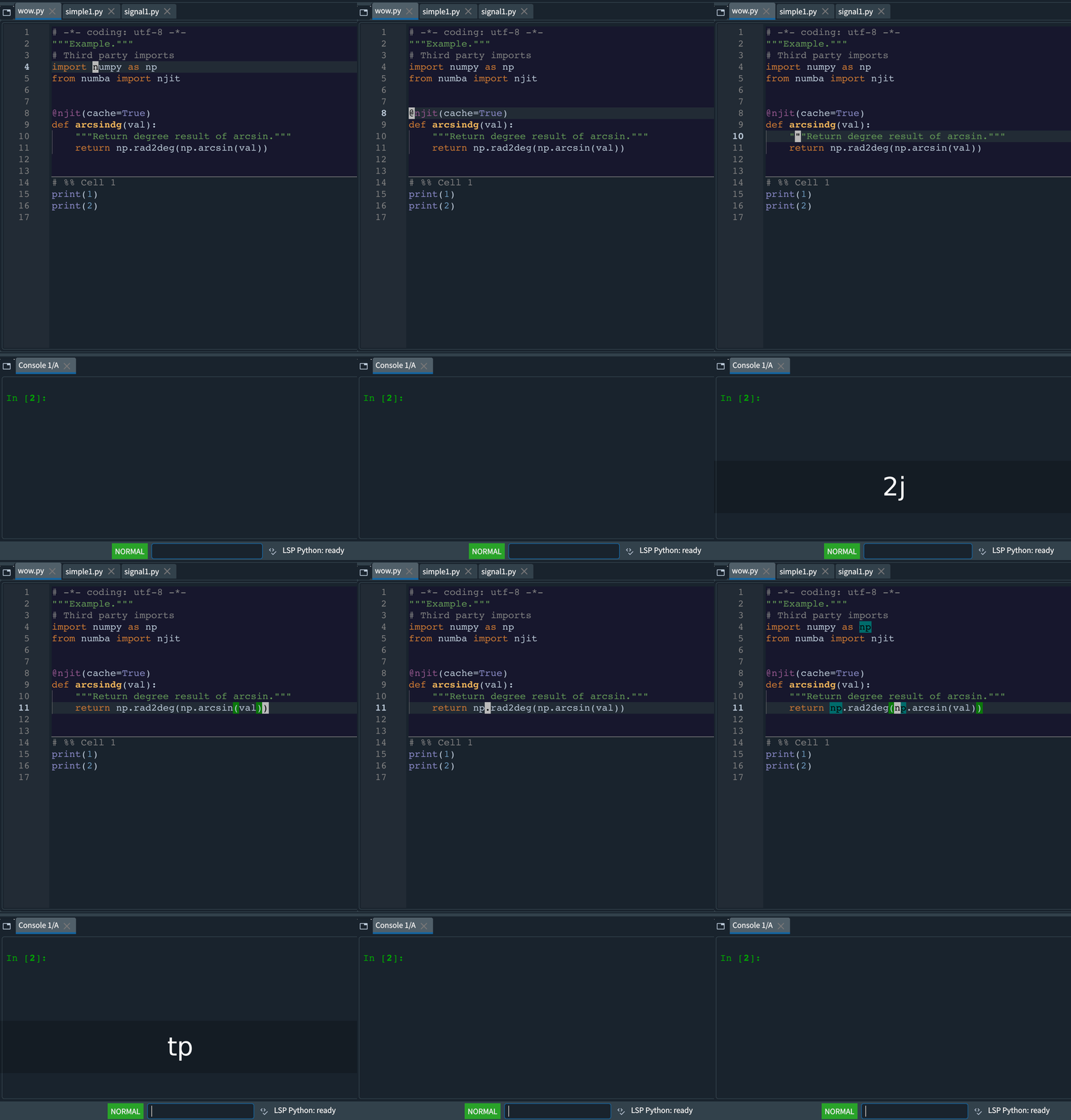
Supported Vim motions include
hjkl,^u,%,iw,i(,/,?,n,N,;and more. -
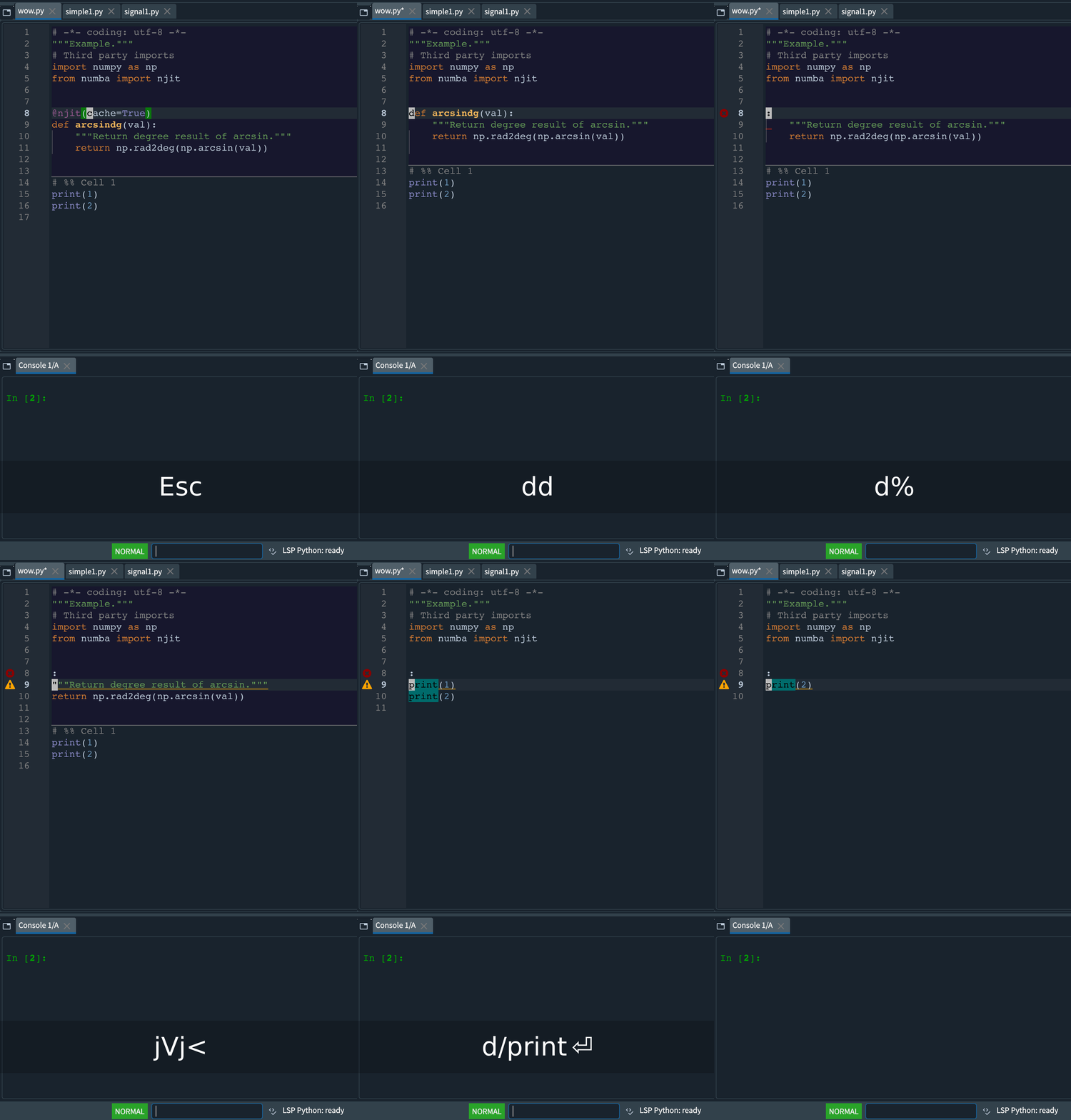
You can combine operators with motions. Examples:
diw,di(,c%,c/foo,cn,ygg,d2w,2d2Wand more. -
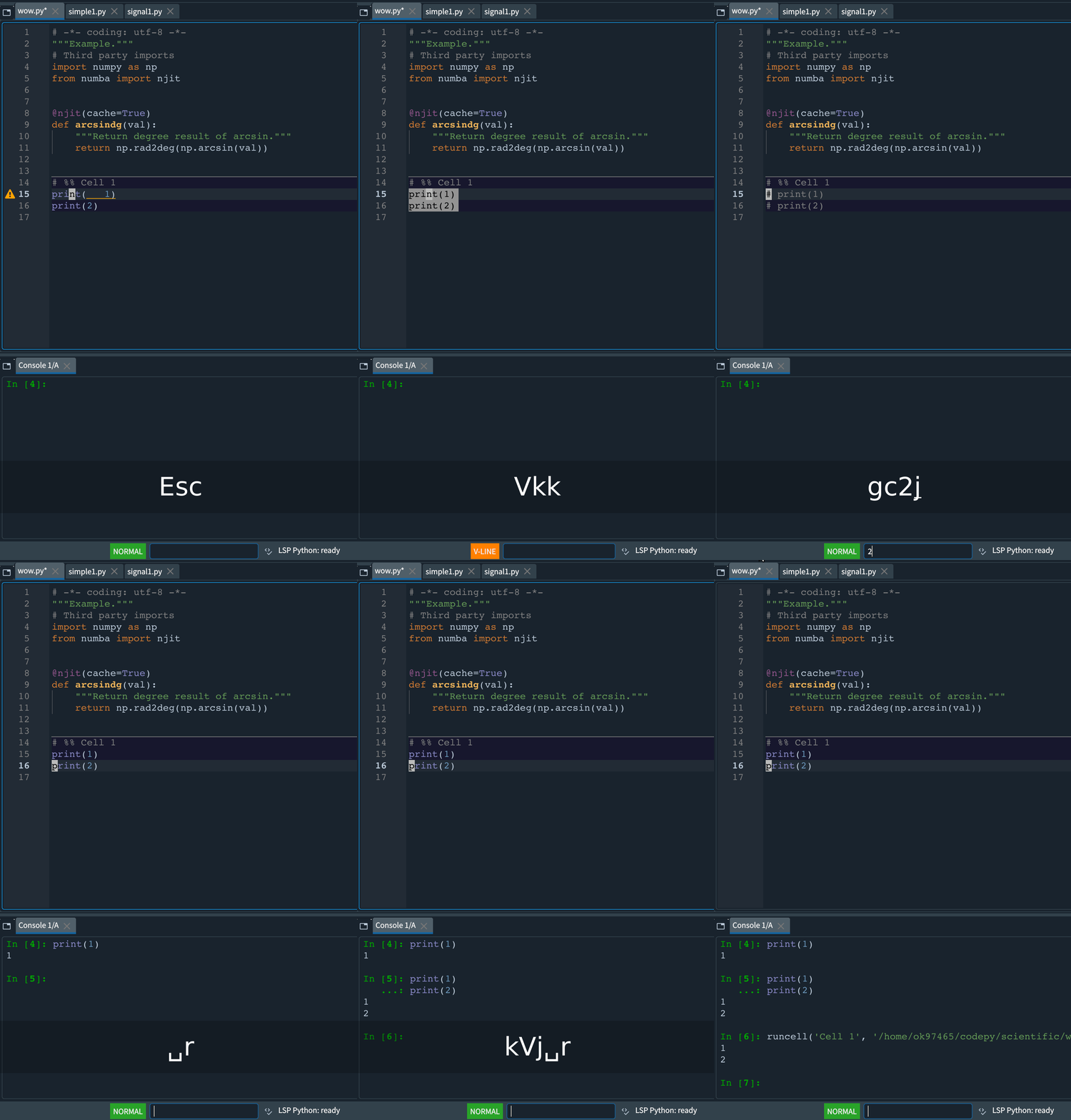
Spyder commands such as running a selection, formatting, and toggling comments are also available.
-
Macro support is experimental.
| Movements | Combination | Spyder command |
|---|---|---|
 |
 |
 |
Installation
You can install this plugin either directly from PyPI or locally.
Install from PyPI
pip install spyder-okvim
Install Locally
To install from a local copy:
pip install -U .
Note
If spyder-vim is installed, uninstall it first to avoid conflicts:
pip uninstall spyder-vim
Modes
The following modes are supported:
- Normal
- Visual
- Visual Line
Actions
The following actions are supported:
- x, s, r
- C, D, S
- dd, cc, yy
- <<, >>
- ==, ={motion}, gg=G
- p, P
- d{motion}, c{motion}
- <{motion}, >{motion}
- gu{motion}, gU{motion} g~{motion}, ~
- u, ^R
- J
- .
Use == to reindent the current line, 3== for three lines, =j for the
current and next line, or gg=G for the whole document. Reindent uses Spyder's
indentation rules and the active document's space/tab settings, changes only
leading whitespace, and supports undo and . repeat. Python dedents and
multiline string contents are preserved. Use <leader>f for full formatting.
Motions
The following motions are supported:
- hjkl
- 0, ^, $
- w, W, b, e
- iw, iW, aw, aW, ip, ap
- i()[]{}bB, a()[]{}bB, i'", a'", and inner/around backticks
- G, g
- :{number}
- ^D, ^U, ^F, ^B
- HLM
- %
- [[, ]], {{, }}
- f, F, t, T, ;, ,
- /, ?, N, n
- Enter, Space, Backspace
- easymotion
Mark
Use m{mark} to set a mark at the current cursor position and ' or ` to jump back to it. Uppercase marks are saved in Spyder's configuration folder so they persist across sessions.
Vim keys
- ^A : Add [count] to number
- ^X : Subtract [count] to number
- K : Inspect current object
- gd : Go to definition.
- gt, gT : Cycle to next/previous file.
- zz, zt, tb : Cursor line to some locations of screen.
- ZZ : Save and close current file.
- q, @: macro
- :marks: Displays the list of currently set marks.
- :jumps: Displays the list of currently set jumplist.
- :vs, :vsp, :vsplit: Splits the current editor into side-by-side views.
- Ctrl+w then h/j/k/l: Moves to the left/down/up/right editor split in Normal mode. Disable Spyder's Ctrl+w shortcut to use this sequence.
- Ctrl+w then c: Closes the current split if Spyder permits closing it.
Jump list
The jump list is a core Vim feature that tracks recently visited
locations. Okvim records each position so you can return with Ctrl+o and
move forward with Ctrl+i. Locations are added when opening files with
Ctrl+p and when running gd. Because Spyder's "go to definition" works
asynchronously, Okvim pushes the current location immediately and adds the
new one once navigation finishes. If the cursor never moves within two
seconds, that temporary entry is discarded.
Special keys
- <leader>f : autoformat the curruent file
- <leader>b : toggle a breakpoint
- <leader>d : debug the current cell without advancing
- <leader>D : debug the selection or current line without advancing
- <leader>r : run the selection or current line in the console.
- <leader>enter : run cell and advance
- <leader>p : Spyder switcher
- <leader>s : Spyder symbol switcher
- [d : go to previous warning/error
- ]d : go to next warning/error
- gc{motion} : toggle comments (works in visual mode)
- gcc : toggle the comment for the current line
- [c, ]c : go to previousr/next cell
- yic, dic, cid : Operate on the entire current cell (yank, delete, or change respectively)
In either Spyder switcher, use Ctrl+p and Ctrl+n to select the previous
and next item while keeping focus in the search field.
The default leader key is Space. Press Space then d to debug a cell, or
Space then Shift+d to debug the visual selection (the current line when
nothing is selected).
Search and replace
Use :s or :substitute to replace
matches in the current file. Each changing command is one undo step (u),
with redo through Ctrl+r.
| Command | Result |
|---|---|
:s/foo/bar/ |
Replace the first match on the current line |
:%s/foo/bar/g |
Replace every match on every line |
:3,8s/foo/bar/g |
Replace within lines 3 through 8, inclusive |
:.,$s/foo/bar/g |
Replace from the current line through the last line |
:s#old/path#new/path#g |
Use an alternate delimiter |
:s/foo//g |
Delete matches |
:s/foo |
Delete the first match on the current line |
:s//bar/g |
Reuse the last confirmed search pattern |
:s/foo/bar/g 3 |
Replace on the current line and the next two lines |
:%s/(foo)+/[\1]/g |
Use Qt capture groups and replacement references |
:%s/foo/bar/gn |
Count matches without changing text |
:%s/foo/bar/ge |
Replace all matches, allowing macros to continue if none are found |
:%s/foo/bar/gc |
Confirm each replacement |
:s or :& |
Repeat the last substitution on the current line, without flags |
:&& |
Repeat the last substitution, keeping its flags |
:~ |
Use the latest search pattern with the previous replacement |
During confirmation, use y to replace, n to skip, a to replace all remaining
matches, l to replace once and stop, or q/Escape to stop. Approved changes
remain one undo step. Ctrl+o and Ctrl+i navigate between the substitution's
origin and destination. Confirmation cannot be replayed in macros, and Vim's
confirmation scrolling keys (Ctrl+e/Ctrl+y) are not supported.
Patterns use the same Qt regular expressions as / search, rather than
Vim's pattern syntax: use (group) and +, not \(group\) and \+.
Replacements support &, \0–\9, \&, \\, \t and \b; missing captures
expand to empty text and an unrecognized escape such as \z inserts z.
Line breaks, case conversion, expression replacements (\=), and previous
replacement expansion (~ within replacement text) are not supported.
Use numeric, ., $, or % line addresses; relative, mark, and search
addresses are not supported. Unlike Vim, identical replacements do not add an
undo step. A plain ~ in a replacement is currently literal.
Vim Surround
- Supported surroundings: '"()[]{}bB
The following actions are supported:
- ys{motion}{surroundings} in normal mode: add surroundings in pairs.
- ds{surroundings} in normal mode: delete surroundings in pairs.
- cs{surroundings}{surroundings} in normal mode: change surroundings in pairs.
- S{surroundings} in visual mode: add surroundings in pairs.
Fuzzy path finder
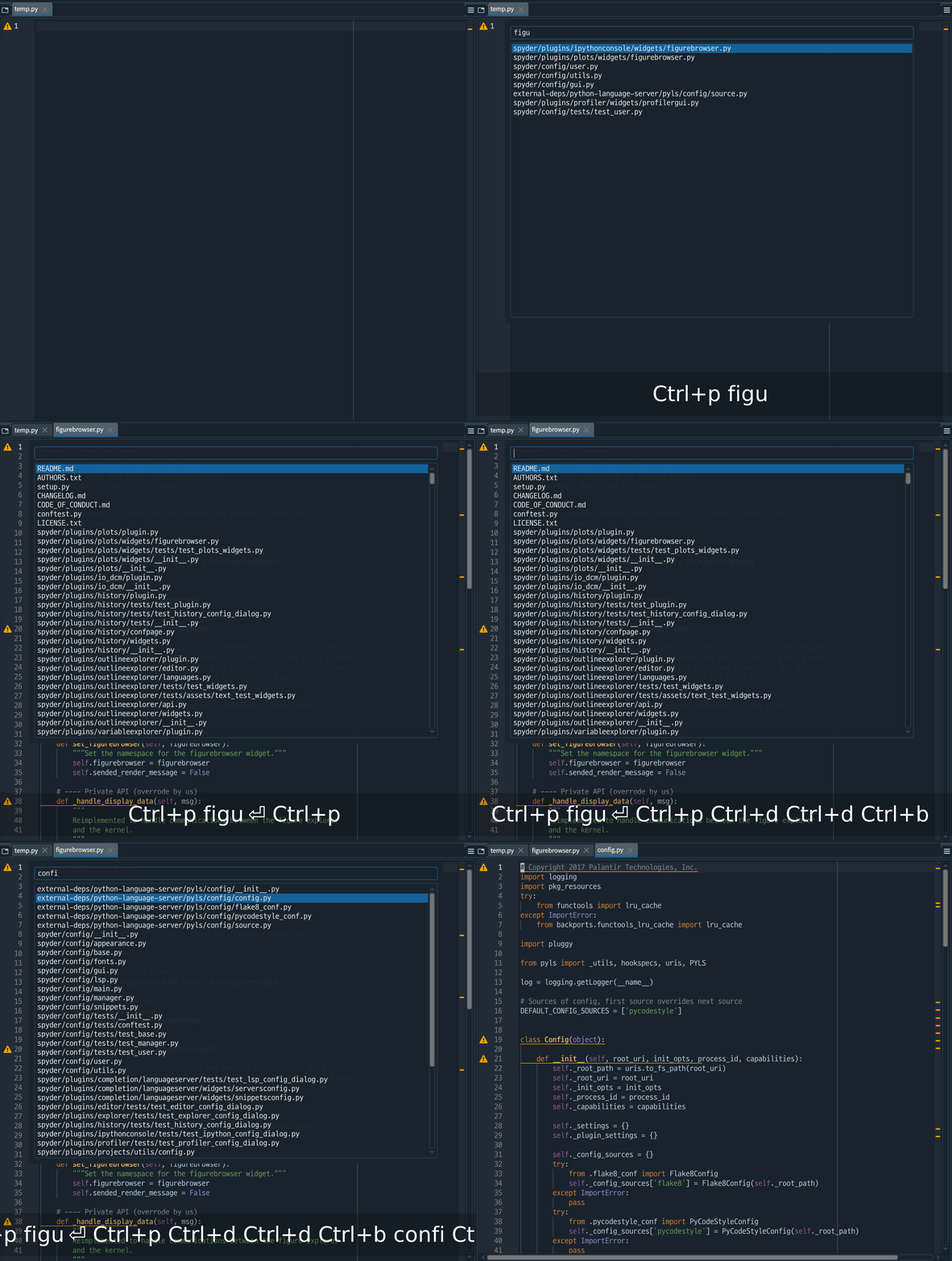
Press Ctrl+p to open the fuzzy path finder. Spyder uses the same shortcut as a
global command, so you may need to reassign Spyder's default Ctrl+p binding to
use this feature.
Use ^p, ^n, ^f, ^b, ^u, and ^d to navigate the list.
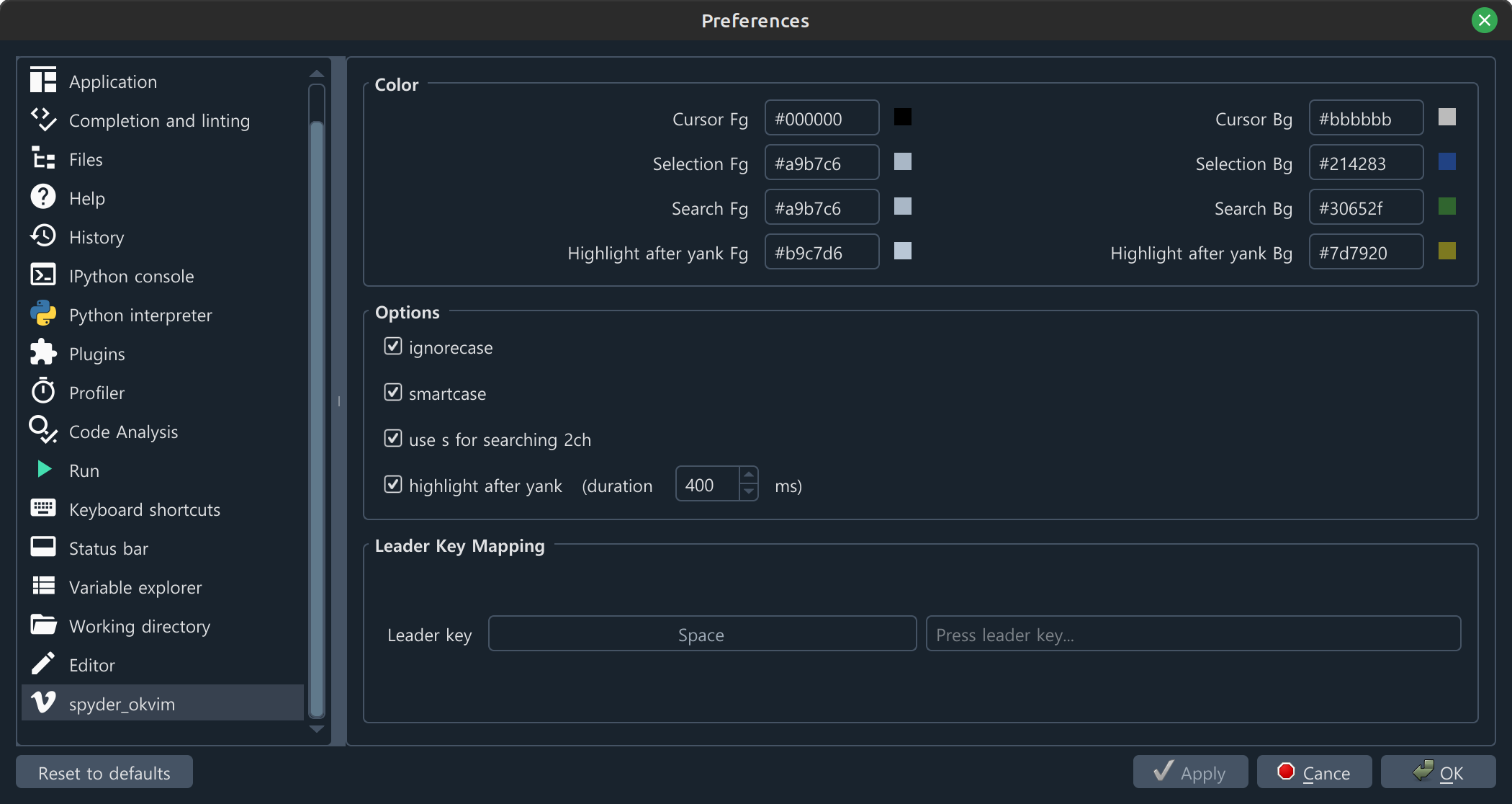
Config page
Easymotion
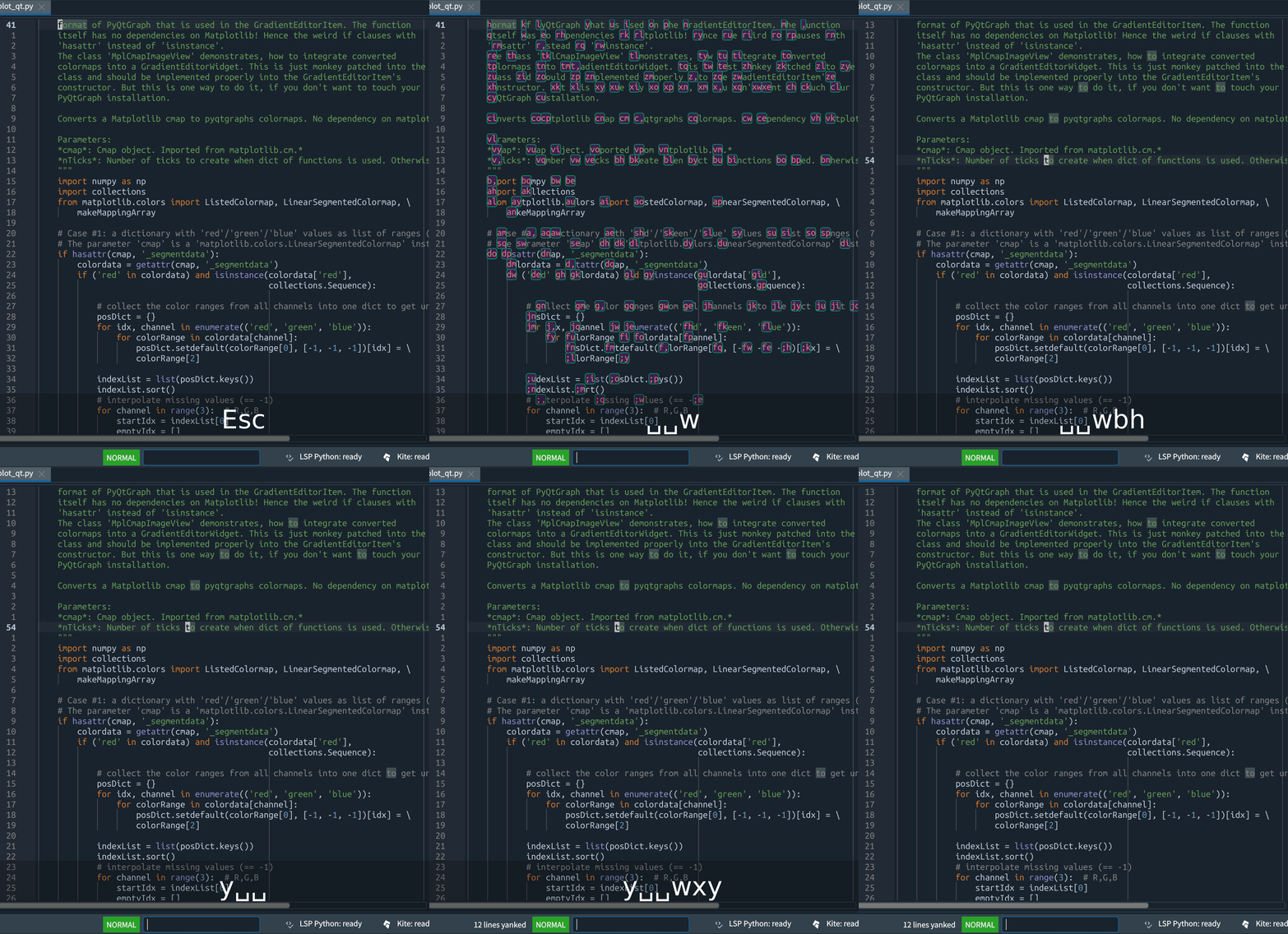
EasyMotion commands work with any operator that accepts a motion.
| Motion Command | Description |
|---|---|
<leader><leader> w |
Start of word forwards |
<leader><leader> b |
Start of word backwards |
<leader><leader> j |
Start of line forwards |
<leader><leader> k |
Start of line backwards |
<leader><leader> f <char> |
Find character forwards |
<leader><leader> F <char> |
Find character backwards |
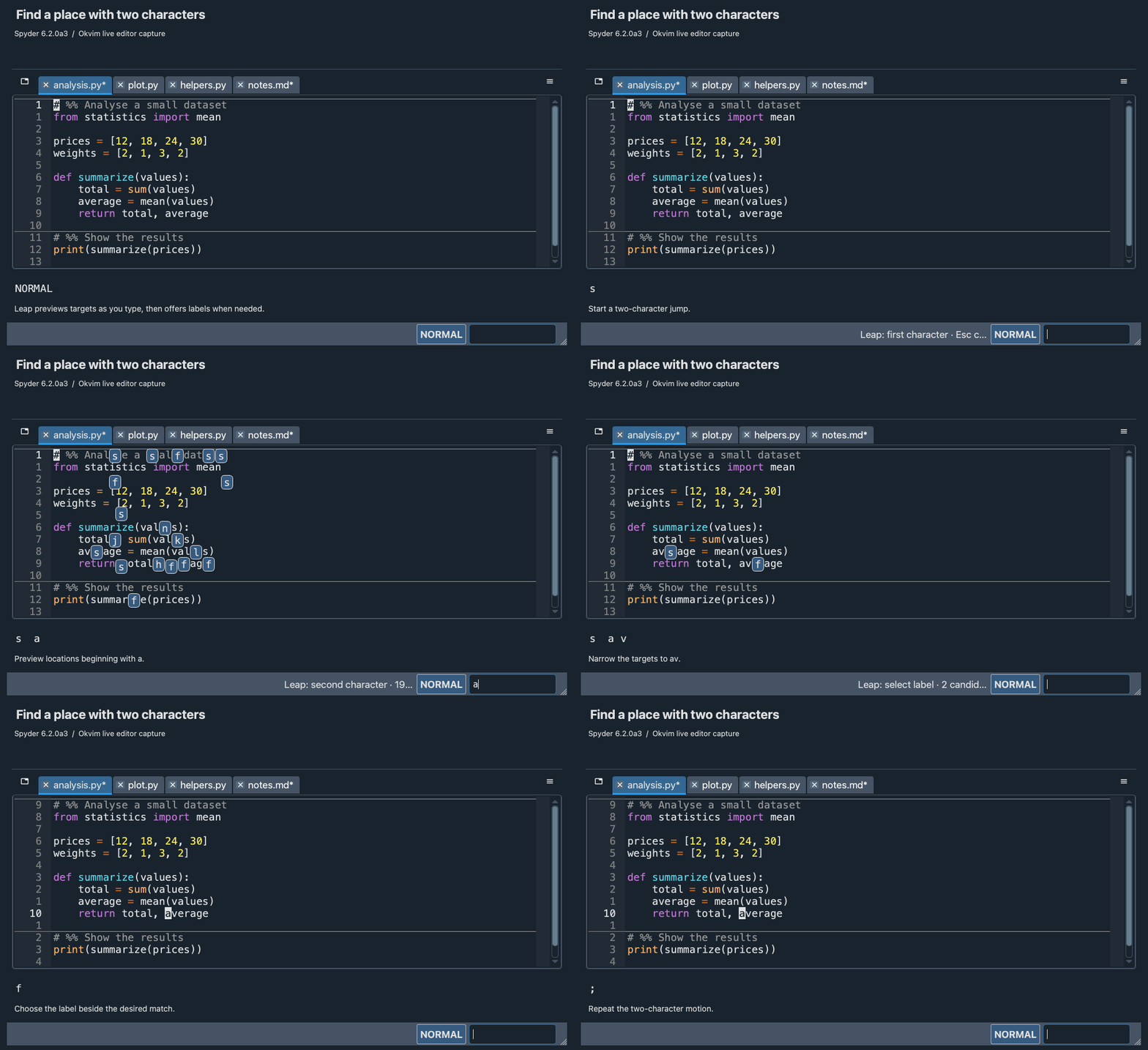
Search two characters (like leap.nvim)
Jump to any location specified by two characters.
Works across lines, with operators (including repeat .), motion-repeat (; and ,), and visual mode.
Press s followed by two characters.
For operators use z because s belongs to vim-surround.
When there are matches in another group, hints appear around the group.
Development and tests
Design notes describe command groups, state ownership, host operations and input lifetimes. Related handlers stay together in each module; the structure does not require one file per class.
Run the normal suite, including the pure model/storage tests in root tests/:
python runtests.py
Set QT_API and PYTEST_QT_API to the same installed binding for GUI tests and
test each binding in a separate process. Pure tests can run without Qt or Spyder:
PYTEST_DISABLE_PLUGIN_AUTOLOAD=1 python -m pytest -q tests
Integration fixtures create the editor only for tests requesting vim_bot.
Test setup/reset helpers live in tests/qt_support.py; tests that change plugin
settings apply them through VimWidget.apply_settings() or the reset helper.
Native IME tests must also run on the native platform (cocoa on macOS,
windows on Windows), separately from offscreen checks.
Window integration tests
The real-window matrix targets the paired Spyder fork, including its window and popup lifetime fixes. It is opt-in so the ordinary suite can also run against stock Spyder:
SPYDER_OKVIM_WINDOW_INTEGRATION=1 SPYDER_PYTEST=True \
QT_QPA_PLATFORM=offscreen QT_API=pyqt5 PYTEST_QT_API=pyqt5 \
PYTEST_DISABLE_PLUGIN_AUTOLOAD=1 python -m pytest -q -p pytestqt.plugin \
  spyder_okvim/spyder/tests/test_editor_windows.py
1 maintainer

Metadata
1 maintainer
Release files for spyder-okvim 0.11.0
For a detailed explanation of source distributions (sdists) and built distributions (wheels), please see the package formats documentation.
Source distribution (sdist)
| File | Size | Uploaded | Provenance | Actions |
|---|---|---|---|---|
| spyder_okvim-0.11.0.tar.gz | 171.8 kB | Without provenance | Details for spyder_okvim-0.11.0.tar.gz |
Built distribution (wheel)
| File | Interpreter | ABI | Platform | Actions Reset |
|---|---|---|---|---|
| spyder_okvim-0.11.0-py3-none-any.whl | Python 3 | none | any | Details for spyder_okvim-0.11.0-py3-none-any.whl |
Total release size: 371.6 kB
Release files / spyder_okvim-0.11.0.tar.gz
| Download URL | spyder_okvim-0.11.0.tar.gz |
|---|---|
| Size | 171.8 kB |
| Tags | Source |
|
SHA-256 checksum How to use checksums |
507c1c660bbe7066f168b8be7b4012044455319dd931f161dbf4c4d0eec1919b
|
|
BLAKE2b-256 checksum How to use checksums |
b005bce7d144a985f2d1d9a7c671bc29fcda94c7a1751b9f80e48054410685e1
|
| Upload date | |
|
Uploaded using Trusted Publishing? What is trusted publishing? |
No |
| Uploaded via |
twine/7.0.0 CPython/3.13.9
|
Release files / spyder_okvim-0.11.0-py3-none-any.whl
| Download URL | spyder_okvim-0.11.0-py3-none-any.whl |
|---|---|
| Size | 199.8 kB |
| Tags | Python 3 |
|
SHA-256 checksum How to use checksums |
3d3d8af7b1fb62381dc242fc2b133ca36c85e564f5317f8ae6f2f8116c132e4b
|
|
BLAKE2b-256 checksum How to use checksums |
77a31c673d0502ff80de9965568d357847ad9ecfced03130d366732b39fc5f18
|
| Upload date | |
|
Uploaded using Trusted Publishing? What is trusted publishing? |
No |
| Uploaded via |
twine/7.0.0 CPython/3.13.9
|
Security for spyder-okvim 0.11.0
Provenance
Provenance describes where a file came from. On PyPI, provenance is shared via attestations, which provide a verifiable record of the build or publishing details. View details, limitations and caveats.
No provenance found
None of the files in this release were uploaded with provenance metadata.
A note on package security
PyPI is a repository for distributing packages, not a service for auditing them. While third-party security researchers and our staff do their best to detect and remove malicious packages, PyPI cannot guarantee the quality, security or suitability of any given package.
To learn more about protecting yourself from malicious actors, visit our package security documentation.














