

The lazygit of SQL databases
Connect and query your database from your terminal in seconds.


pipx install sqlit-tui

Connect
Supports all major databases: SQL Server, PostgreSQL, MySQL, SQLite, MariaDB, FirebirdSQL, Oracle, DuckDB, CockroachDB, ClickHouse, Snowflake, Databricks, Supabase, CloudFlare D1, Turso, Athena, BigQuery, Spanner, RedShift, IBM Db2, SAP HANA, Teradata, Exasol, Trino, Presto, Apache Flight SQL, Apache Impala, SurrealDB and osquery.

Query
Syntax highlighting. History. Vim-style keybindings.

Results
Load millions of rows. Inspect data, filter by content, fuzzy search.

Docker Discovery
Automatically finds running database containers. Press 'Enter' to connect, sqlit figures out the details for you.

Features
Connection manager: Save and switch connections without CLI args
Just run sqlit: No CLI config needed, pick a connection and go
Multi-database support: PostgreSQL, MySQL, SQLite, SQL Server, and 10+ more
Docker integration: Auto-detect running database containers
Cloud CLI integration: Easily browse and connect to your external databases through Azure, AWS and GCP CLI's
SSH tunnels: Connect to remote databases securely with password or key auth
Secure credentials: Passwords stored in your OS keyring
Vim-style editing: Modal editing for terminal purists
Query history: Searchable, per-connection history
Filter results: Fuzzy search through millions of rows
Context-aware help: Keybindings shown on screen
Browse databases: Tables, views, procedures, indexes, triggers, sequences
Autocomplete: Sophisticated SQL completion engine for tables, columns, and procedures
CLI mode: Execute SQL from the command line
Themes: Rose Pine, Tokyo Night, Nord, Gruvbox
Dependency wizard: Auto-install missing drivers
Motivation
Throughout my career, the undesputed truth was that heavy GUI's like SSMS was the only respectable way to access a database. It didn't matter that I wasn't a DBA, or that I didn't need complex performance graphs. I was expected to install a gigabyte-heavy behemoth that took ages to launch all for the mere purpose of running a few queries to update and view a couple of rows.
When I switched to Linux, I was suddenly unable to return to the devil I know, and I asked myself: how do I access my data now?
The popular answer was VS Code's SQL extension. But why should we developers launch a heavy Electron app designed for coding just to execute SQL?
I had recently grown fond of Terminal UI's for their speed and keybinding focus. I looked for SQL TUIs, but the options were sparse. The ones I found lacked the user-friendliness and immediate "pick-up-and-go" nature of tools I loved, like lazygit, and I shortly returning to vscode sql extension.
Something wasn't right. I asked myself, why is it that running SQL queries can't be enjoyable? So I created sqlit.
sqlit is for the developer who just wants to query their database with a user friendly UI without their RAM being eaten alive. It is a lightweight, beautiful, and keyboard-driven TUI designed to make accessing your data enjoyable, fast and easy like it should be-- all from inside your favorite terminal.
Installation
# pipx (recommended)
pipx install sqlit-tui

# uv
uv tool install sqlit-tui

# pip
pip install sqlit-tui

# Arch Linux (AUR)
yay -S sqlit

# Nix (flake)
nix run github:Maxteabag/sqlit
Usage
sqlit
The keybindings are shown at the bottom of the screen.
Try it without a database
Want to explore the UI without connecting to a real database? Run with mock data:
sqlit --mock=sqlite-demo
CLI
sqlit -c "MyConnection"
sqlit --connection "MyConnection"

# Run a query
sqlit query -c "MyConnection" -q "SELECT * FROM Users"

# Output as CSV or JSON
sqlit query -c "MyConnection" -q "SELECT * FROM Users" --format csv
sqlit query -c "MyConnection" -f "script.sql" --format json

# Create connections for different databases
sqlit connections add mssql --name "MySqlServer" --server "localhost" --auth-type sql
sqlit connections add postgresql --name "MyPostgres" --server "localhost" --username "user" --password "pass"
sqlit connections add mysql --name "MyMySQL" --server "localhost" --username "user" --password "pass"
sqlit connections add cockroachdb --name "MyCockroach" --server "localhost" --port "26257" --database "defaultdb" --username "root"
sqlit connections add sqlite --name "MyLocalDB" --file-path "/path/to/database.db"
sqlit connections add turso --name "MyTurso" --server "libsql://your-db.turso.io" --password "your-auth-token"
sqlit connections add firebird --name "MyFirebird" --server "localhost" --username "user" --password "pass" --database "employee"
sqlit connections add athena --name "MyAthena" --athena-region-name "us-east-1" --athena-s3-staging-dir "s3://my-bucket/results/" --athena-auth-method "profile" --athena-profile-name "default"
sqlit connections add athena --name "MyAthenaKeys" --athena-region-name "us-east-1" --athena-s3-staging-dir "s3://my-bucket/results/" --athena-auth-method "keys" --username "ACCESS_KEY" --password "SECRET_KEY"

# Connect via SSH tunnel
sqlit connections add postgresql --name "RemoteDB" --server "db-host" --username "dbuser" --password "dbpass" \
  --ssh-enabled --ssh-host "ssh.example.com" --ssh-username "sshuser" --ssh-auth-type password --ssh-password "sshpass"

# Fetch password from a secrets manager (1Password, pass, Vault, etc.)
sqlit connections add postgresql --name "ProdDB" --server "prod.example.com" --username "dbuser" \
  --password-command "op read 'op://Work/prod-db/password'"

# Temporary (not saved) connection
sqlit connect sqlite --file-path "/path/to/database.db"

# Connect via URL - scheme determines database type (postgresql://, mysql://, sqlite://, etc.)
sqlit postgresql://user:pass@localhost:5432/mydb
sqlit mysql://root@localhost/testdb
sqlit sqlite:///path/to/database.db

# Save a connection via URL
sqlit connections add --url dbtype://user:pass@host/db --name "MyDB"

# Provider-specific CLI help
sqlit connect -h
sqlit connect supabase -h
sqlit connections add -h
sqlit connections add supabase -h

# Manage connections
sqlit connections list
sqlit connections delete "MyConnection"
Keybindings
| Key | Action |
|---|---|
i |
Enter INSERT mode |
Esc |
Back to NORMAL mode |
e / q / r |
Focus Explorer / Query / Results |
s |
SELECT TOP 100 from table |
h |
Query history |
d |
Clear query |
n |
New query (clear all) |
y |
Copy query (when query editor is focused) |
v / y / Y / a |
View cell / Copy cell / Copy row / Copy all |
Ctrl+Q |
Quit |
? |
Help |
Vim Motions (Query Editor, NORMAL mode)
Use with operators like y, d, c (e.g. dw, y$).
| Motion | Action |
|---|---|
h / j / k / l |
Move cursor left / down / up / right |
w / W |
Next word / WORD |
b / B |
Previous word / WORD |
0 / $ |
Line start / end |
gg / G |
File start / end |
f{c} / F{c} |
Find char forward / backward |
t{c} / T{c} |
Till char forward / backward |
% |
Matching bracket |
Commands Menu (<space>)
| Key | Action |
|---|---|
<space>c |
Connect to database |
<space>x |
Disconnect |
<space>z |
Cancel running query |
<space>e |
Toggle Explorer |
<space>f |
Toggle Maximize |
<space>t |
Change theme |
<space>h |
Help |
<space>q |
Quit |
Autocomplete triggers automatically in INSERT mode. Use Tab to accept.
Configuration
Connections and settings are stored in $XDG_CONFIG_HOME/sqlit/ (default: ~/.config/sqlit/). Override the location by setting SQLIT_CONFIG_DIR.
Custom keybindings
Edit the keymap.json file in your sqlit config dir. See config/keymap.template.json for the full default keymap. Keymap.json need to only contain the overriding keymaps.
FAQ
Databricks authentication
The Databricks extra includes the SQL connector and the SDK required for service-principal OAuth.
PATs and client secrets are kept in the OS credential store, including connections created with
connections add --url-stdin. A PAT URL has this shape:
databricks://token:TOKEN@HOST/CATALOG?http_path=/sql/1.0/warehouses/WAREHOUSE_ID.
Use stdin to keep the URL out of shell history and process arguments. Browser OAuth does not ask
for a database password. Unity Catalog and the legacy Hive metastore use their respective metadata APIs.
Exasol authentication and TLS
For Exasol SaaS, select username/password authentication and use the database username from
connection details with your personal access token as the password. OpenID access/refresh token
modes are for those credential types, not SaaS PATs. The selected secret uses the OS credential
store. Default TLS follows pyexasol's certificate verification; use --tls-mode require only
when deliberately connecting to a self-signed development server. verify-ca validates the CA,
while verify-full also checks the hostname.
How are sensitive credentials stored?
Connection details are stored in connections.json inside the config directory, but passwords are stored in your OS keyring when available (macOS Keychain, Windows Credential Locker, Linux Secret Service).
How does sqlit compare to Harlequin, Lazysql, etc.?
sqlit is inspired by lazygit - you can just jump in and there's no need for external documentation. The keybindings are shown at the bottom of the screen and the UI is designed to be intuitive without memorizing shortcuts.
Key differences:
- No need for external documentation - Sqlit embrace the "lazy" approach in that a user should be able to jump in and use it right away intuitively. There should be no setup instructions. If python packages are required for certain adapters, sqlit will help you install them as you need them.
- No CLI config required - Just run
sqlitand pick a connection from the UI - Lightweight - While Lazysql or Harlequin offer more features, I experienced that for the vast majority of cases, all I needed was a simple and fast way to connect and run queries. Sqlit is focused on doing a limited amount of things really well.
Inspiration
sqlit is built with Textual and inspired by:
Contributing
See CONTRIBUTING.md for development setup, testing, and CI steps.
Driver Reference
Most of the time you can just run sqlit and connect. If a Python driver is missing, sqlit will show (and often run) the right install command for your environment.
| Database | Driver package | pipx |
pip / venv |
|---|---|---|---|
| SQLite | (built-in) | (built-in) | (built-in) |
| PostgreSQL / CockroachDB / Supabase | psycopg2-binary |
pipx inject sqlit-tui psycopg2-binary |
python -m pip install psycopg2-binary |
| SQL Server | mssql-python |
pipx inject sqlit-tui mssql-python |
python -m pip install mssql-python |
| MySQL | PyMySQL |
pipx inject sqlit-tui PyMySQL |
python -m pip install PyMySQL |
| MariaDB | PyMySQL |
pipx inject sqlit-tui PyMySQL |
python -m pip install PyMySQL |
| Oracle | oracledb |
pipx inject sqlit-tui oracledb |
python -m pip install oracledb |
| DuckDB | duckdb |
pipx inject sqlit-tui duckdb |
python -m pip install duckdb |
| ClickHouse | clickhouse-connect |
pipx inject sqlit-tui clickhouse-connect |
python -m pip install clickhouse-connect |
| Turso | libsql |
pipx inject sqlit-tui libsql |
python -m pip install libsql |
| Cloudflare D1 | requests |
pipx inject sqlit-tui requests |
python -m pip install requests |
| Snowflake | snowflake-connector-python |
pipx inject sqlit-tui snowflake-connector-python |
python -m pip install snowflake-connector-python |
| Databricks | databricks-sql-connector |
pipx inject sqlit-tui databricks-sql-connector databricks-sdk |
python -m pip install databricks-sql-connector databricks-sdk |
| Firebird | firebirdsql |
pipx inject sqlit-tui firebirdsql |
python -m pip install firebirdsql |
| Athena | pyathena |
pipx inject sqlit-tui pyathena |
python -m pip install pyathena |
| BigQuery | google-cloud-bigquery |
pipx inject sqlit-tui google-cloud-bigquery |
python -m pip install google-cloud-bigquery |
| Spanner | google-cloud-spanner |
pipx inject sqlit-tui google-cloud-spanner |
python -m pip install google-cloud-spanner |
| Exasol | pyexasol |
pipx inject sqlit-tui pyexasol |
python -m pip install pyexasol |
| Apache Arrow Flight SQL | adbc-driver-flightsql |
pipx inject sqlit-tui adbc-driver-flightsql |
python -m pip install adbc-driver-flightsql |
| Apache Impala | impyla |
pipx inject sqlit-tui impyla |
python -m pip install impyla |
| Trino | trino |
pipx inject sqlit-tui trino |
python -m pip install trino |
| SurrealDB | surrealdb |
pipx inject sqlit-tui surrealdb |
python -m pip install surrealdb |
| osquery | osquery |
pipx inject sqlit-tui osquery |
python -m pip install osquery |
SSH Tunnel Support
SSH tunnel functionality requires additional dependencies. Install with the ssh extra:
# pipx
pipx install 'sqlit-tui[ssh]'

# uv
uv tool install 'sqlit-tui[ssh]'

# pip
pip install 'sqlit-tui[ssh]'
If you try to create an SSH connection without these dependencies, sqlit will detect this and show you the exact command to install them for your environment.
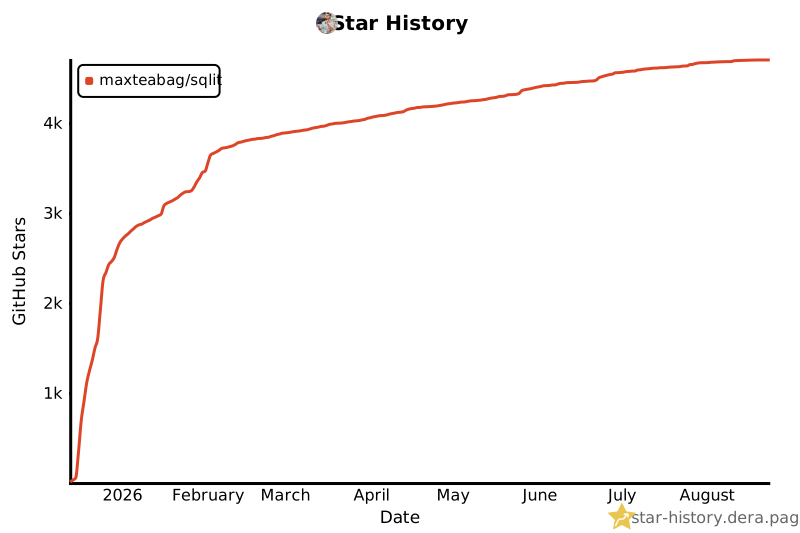
Star History
License
MIT
1 maintainer

Metadata
1 maintainer
Release files for sqlit-tui 1.6.4
For a detailed explanation of source distributions (sdists) and built distributions (wheels), please see the package formats documentation.
Source distribution (sdist)
| File | Size | Uploaded | Provenance | |
|---|---|---|---|---|
| sqlit_tui-1.6.4.tar.gz | 10.7 MB | With provenance | Details |
Built distribution (wheel)
| File | Interpreter | ABI | Platform | Reset |
|---|---|---|---|---|
| sqlit_tui-1.6.4-py3-none-any.whl | Python 3 | none | any | Details |
Total release size: 11.4 MB
Release files / sqlit_tui-1.6.4.tar.gz
| Download URL | sqlit_tui-1.6.4.tar.gz |
|---|---|
| Size | 10.7 MB |
| Tags | Source |
|
SHA-256 checksum How to use checksums |
7f7058b062c0e868bde867047928283909abaa27eb9bb527603b83fe71bdf1d6
|
|
BLAKE2b-256 checksum How to use checksums |
7039c84577fdade8a260ad1b7396ce3eba53e6404ca31df45d86c557e0978417
|
| Upload date | |
|
Uploaded using Trusted Publishing? What is trusted publishing? |
Yes |
| Uploaded via |
twine/7.0.0 CPython/3.13.14
|
Provenance
Provenance describes where a file came from. On PyPI, provenance is shared via attestations, which provide a verifiable record of the build or publishing details. View details, limitations and caveats.


PyPI Publish Attestation
PyPI verified that this artifact, at this checksum, originated from the publisher listed below.
Signed by GitHub Actions, verified by PyPI on Sep 5, 2026.
Transparency logRelease files / sqlit_tui-1.6.4-py3-none-any.whl
| Download URL | sqlit_tui-1.6.4-py3-none-any.whl |
|---|---|
| Size | 733.2 kB |
| Tags | Python 3 |
|
SHA-256 checksum How to use checksums |
c940de22cb61a0e2cf912dbe0a67183e03fde100b232e74df05d858ba76f8cac
|
|
BLAKE2b-256 checksum How to use checksums |
29df88e666ff3e038b8aa70b33083ad1a28966d79e0ed7f57cb8f6cf08646e25
|
| Upload date | |
|
Uploaded using Trusted Publishing? What is trusted publishing? |
Yes |
| Uploaded via |
twine/7.0.0 CPython/3.13.14
|
Provenance
Provenance describes where a file came from. On PyPI, provenance is shared via attestations, which provide a verifiable record of the build or publishing details. View details, limitations and caveats.
PyPI Publish Attestation
PyPI verified that this artifact, at this checksum, originated from the publisher listed below.
Signed by GitHub Actions, verified by PyPI on Sep 5, 2026.
Transparency logSecurity for sqlit-tui 1.6.4
Provenance
Provenance describes where a file came from. On PyPI, provenance is shared via attestations, which provide a verifiable record of the build or publishing details. View details, limitations and caveats.
Full provenance
All 2 files in this release have been uploaded with provenance metadata.
Attestation for sqlit_tui-1.6.4.tar.gz
PyPI Publish Attestation
PyPI verified that this artifact, at this checksum, originated from the publisher listed below.
Signed by GitHub Actions, verified by PyPI on Sep 5, 2026.
Transparency logA note on package security
PyPI is a repository for distributing packages, not a service for auditing them. While third-party security researchers and our staff do their best to detect and remove malicious packages, PyPI cannot guarantee the quality, security or suitability of any given package.














