
Next-generation data transformation framework


Project description

SQLMesh is a next-generation data transformation framework designed to ship data quickly, efficiently, and without error. Data teams can run and deploy data transformations written in SQL or Python with visibility and control at any size.
It is more than just a dbt alternative.

Core Features

Get instant SQL impact and context of your changes, both in the CLI and in the SQLMesh VSCode Extension
Virtual Data Environments
- See a full diagram of how Virtual Data Environments work
- Watch this video to learn more
- Create isolated development environments without data warehouse costs
- Plan / Apply workflow like Terraform to understand potential impact of changes
- Easy to use CI/CD bot for true blue-green deployments
Efficiency and Testing
Running this command will generate a unit test file in the tests/ folder: test_stg_payments.yaml
Runs a live query to generate the expected output of the model
sqlmesh create_test tcloud_demo.stg_payments --query tcloud_demo.seed_raw_payments "select * from tcloud_demo.seed_raw_payments limit 5"

# run the unit test
sqlmesh test
MODEL (
  name tcloud_demo.stg_payments,
  cron '@daily',
  grain payment_id,
  audits (UNIQUE_VALUES(columns = (
      payment_id
  )), NOT_NULL(columns = (
      payment_id
  )))
);

SELECT
    id AS payment_id,
    order_id,
    payment_method,
    amount / 100 AS amount, /* `amount` is currently stored in cents, so we convert it to dollars */
    'new_column' AS new_column, /* non-breaking change example  */
FROM tcloud_demo.seed_raw_payments
test_stg_payments:
model: tcloud_demo.stg_payments
inputs:
    tcloud_demo.seed_raw_payments:
      - id: 66
        order_id: 58
        payment_method: coupon
        amount: 1800
      - id: 27
        order_id: 24
        payment_method: coupon
        amount: 2600
      - id: 30
        order_id: 25
        payment_method: coupon
        amount: 1600
      - id: 109
        order_id: 95
        payment_method: coupon
        amount: 2400
      - id: 3
        order_id: 3
        payment_method: coupon
        amount: 100
outputs:
    query:
      - payment_id: 66
        order_id: 58
        payment_method: coupon
        amount: 18.0
        new_column: new_column
      - payment_id: 27
        order_id: 24
        payment_method: coupon
        amount: 26.0
        new_column: new_column
      - payment_id: 30
        order_id: 25
        payment_method: coupon
        amount: 16.0
        new_column: new_column
      - payment_id: 109
        order_id: 95
        payment_method: coupon
        amount: 24.0
        new_column: new_column
      - payment_id: 3
        order_id: 3
        payment_method: coupon
        amount: 1.0
        new_column: new_column
- Never build a table more than once
- Track what data’s been modified and run only the necessary transformations for incremental models
- Run unit tests for free and configure automated audits
- Run table diffs between prod and dev based on tables/views impacted by a change
Level Up Your SQL
Write SQL in any dialect and SQLMesh will transpile it to your target SQL dialect on the fly before sending it to the warehouse.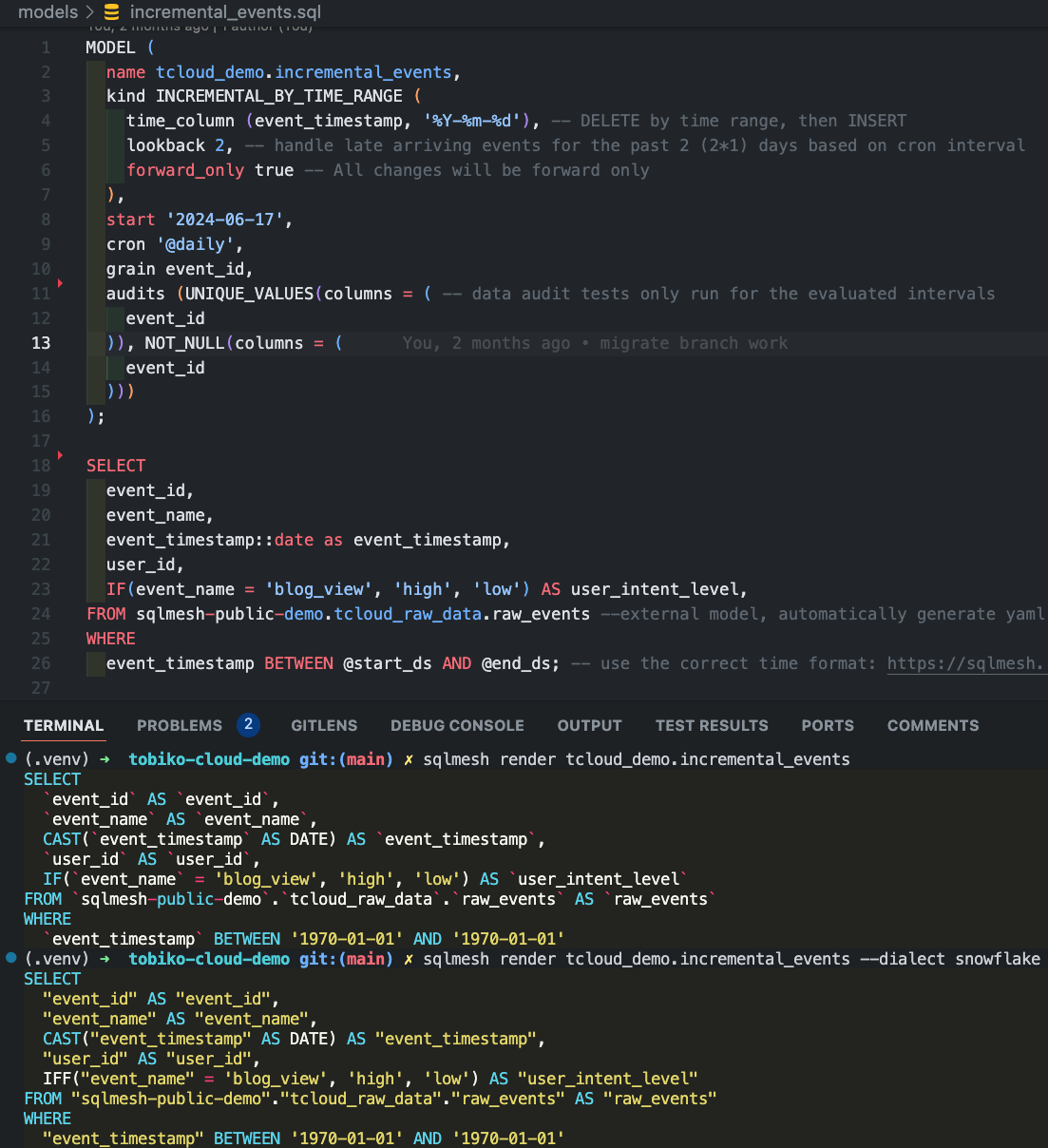
- Debug transformation errors before you run them in your warehouse in 10+ different SQL dialects
- Definitions using simply SQL (no need for redundant and confusing
Jinja+YAML) - See impact of changes before you run them in your warehouse with column-level lineage
For more information, check out the website and documentation.
Getting Started
Install SQLMesh through pypi by running:
mkdir sqlmesh-example
cd sqlmesh-example
python -m venv .venv
source .venv/bin/activate
pip install 'sqlmesh[lsp]' # install the sqlmesh package with extensions to work with VSCode
source .venv/bin/activate # reactivate the venv to ensure you're using the right installation
sqlmesh init # follow the prompts to get started (choose DuckDB)
Note: You may need to run
python3orpip3instead ofpythonorpip, depending on your python installation.
Windows Installation
mkdir sqlmesh-example
cd sqlmesh-example
python -m venv .venv
.\.venv\Scripts\Activate.ps1
pip install 'sqlmesh[lsp]' # install the sqlmesh package with extensions to work with VSCode
.\.venv\Scripts\Activate.ps1 # reactivate the venv to ensure you're using the right installation
sqlmesh init # follow the prompts to get started (choose DuckDB)
Follow the quickstart guide to learn how to use SQLMesh. You already have a head start!
Follow the crash course to learn the core movesets and use the easy to reference cheat sheet.
Follow this example to learn how to use SQLMesh in a full walkthrough.
Join Our Community
Together, we want to build data transformation without the waste. Connect with us in the following ways:
- Join the Tobiko Slack Community to ask questions, or just to say hi!
- File an issue on our GitHub
- Send us an email at hello@tobikodata.com with your questions or feedback
- Read our blog
Contribution
Contributions in the form of issues or pull requests (from fork) are greatly appreciated.
Read more on how to contribute to SQLMesh open source.
Watch this video walkthrough to see how our team contributes a feature to SQLMesh.
Release history Release notifications | RSS feed


Download files
Download the file for your platform. If you're not sure which to choose, learn more about installing packages.
Source Distribution
Built Distribution
Filter files by name, interpreter, ABI, and platform.
If you're not sure about the file name format, learn more about wheel file names.
Copy a direct link to the current filters
File details
Details for the file sqlmesh-0.231.2.dev1.tar.gz.
File metadata
- Download URL: sqlmesh-0.231.2.dev1.tar.gz
- Upload date:
- Size: 13.3 MB
- Tags: Source
- Uploaded using Trusted Publishing? No
- Uploaded via: twine/6.2.0 CPython/3.10.20
File hashes
| Algorithm | Hash digest | |
|---|---|---|
| SHA256 |
3b7328cf501b8e20c4bdf29c99f6388fd1df13aea6525b58628a638a95fd5f20
|
|
| MD5 |
626795e5a0178eccd2d301b4cbfc4ee6
|
|
| BLAKE2b-256 |
b023ebe379d9be55049444104ca1d63f11aa44930a7f7646b498f3b27cd4040f
|
File details
Details for the file sqlmesh-0.231.2.dev1-py3-none-any.whl.
File metadata
- Download URL: sqlmesh-0.231.2.dev1-py3-none-any.whl
- Upload date:
- Size: 5.6 MB
- Tags: Python 3
- Uploaded using Trusted Publishing? No
- Uploaded via: twine/6.2.0 CPython/3.10.20
File hashes
| Algorithm | Hash digest | |
|---|---|---|
| SHA256 |
0b6298025d404cb2e9cfdaae056ffc81b94b8b1ee883aabc91c077e735948fdd
|
|
| MD5 |
67af1f0c8c86018b2ff3c5b6e7abcbc9
|
|
| BLAKE2b-256 |
13f2e81981c8df26ae56d1161a9affeaae41c1abac9f246838456852174427d9
|






