
SQLShell
A fast SQL interface for analyzing data files ✨
Query CSV, Parquet, Excel files with SQL • DuckDB powered • No database setup required





What SQLShell Does
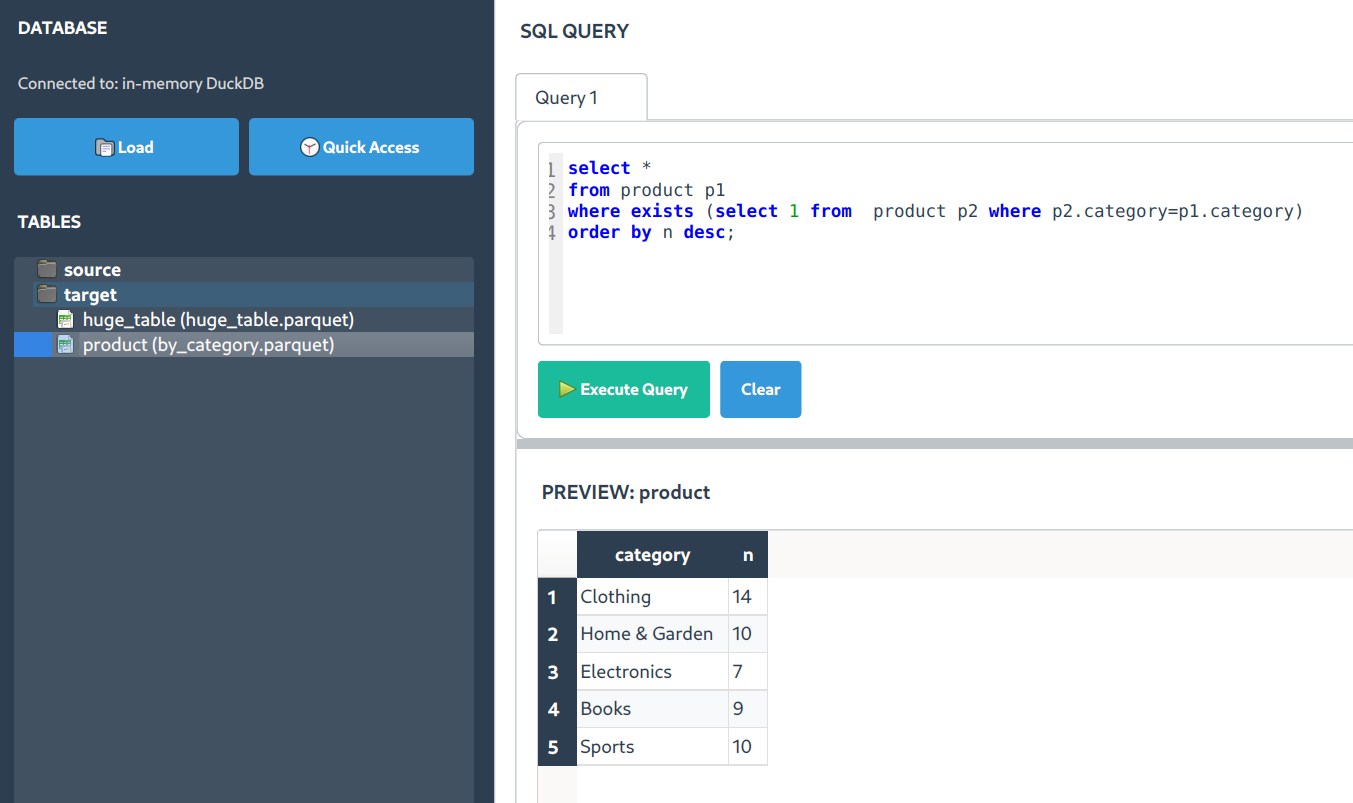
SQLShell is a desktop SQL interface specifically designed for analyzing data files. It's not a database client - instead, it lets you load CSV, Parquet, Excel, and other data files and query them with SQL using DuckDB's fast analytical engine.
Folder sources
Choose Add Folder Source… from the View menu or the tables sidebar menu to make Excel, CSV, TXT, Parquet, and Delta sources available recursively. A linked folder icon identifies the source; subfolders preserve the directory hierarchy. Excel workbooks use their first worksheet. SQLite and DuckDB files remain separate connections.
Adding a folder or reopening a saved project only registers its tables. Data loads when a table is queried or previewed, so unused files consume no table-data memory. Refresh Folder rescans and loads its tables, including newly added files; Refresh All includes every folder source. Ctrl/Shift-select tables to refresh only that selection. Removed tables stay excluded until restored through Restore Excluded Files…. Removing a source never deletes its files.
🔥 Key Features
|
⚡ Fast File Analysis Load data files and search through millions of rows quickly. Built on DuckDB for analytical performance. |
🎯 Smart Execution
|
🧠 SQL Autocompletion Context-aware suggestions that understand your loaded tables and column names. |
📁 File-Based Data Analysis
Important: SQLShell works with data files, not live databases. It's designed for:
- 📊 Data Files - CSV, Parquet, Excel, TSV, JSON files
- 🗃️ Local Analysis - Load files from your computer for SQL analysis
- ⚡ Fast Queries - DuckDB engine optimized for analytical workloads
- 🔍 Data Exploration - Search and filter capabilities across your datasets
Not supported: Live database connections (MySQL, PostgreSQL, etc.). Use dedicated database clients for those.
💫 What Makes SQLShell Useful
- 🏎️ DuckDB Powered - Fast analytical queries on data files
- 📊 Multiple File Formats - CSV, Parquet, Excel, Delta, TSV, JSON support
- 🎨 Clean Interface - Simple SQL editor with result display
- 🔍 Search Functionality - Find data across result sets quickly
- 🚀 Zero Database Setup - No server installation or configuration needed
🚀 Quick Install
📥 Download (Recommended)
Pre-built executables — no Python installation required:
| Platform | Download | Install |
|---|---|---|
| 🪟 Windows | SQLShell Installer (.exe) | Run the installer |
| 🐧 Linux (Debian/Ubuntu) | SQLShell (.deb) | sudo dpkg -i sqlshell_*.deb |
🐍 Install via pip
Alternatively, install with pip if you have Python:
pip install sqlshell
sqls
That's it! 🎉 SQLShell opens and you can start loading data files.
🐧 Linux Users - One-Time Setup for Better Experience
# Create dedicated environment (recommended)
python3 -m venv ~/.venv/sqlshell
source ~/.venv/sqlshell/bin/activate
pip install sqlshell

# Add convenient alias
echo 'alias sqls="~/.venv/sqlshell/bin/sqls"' >> ~/.bashrc
source ~/.bashrc
💻 Alternative Launch Methods
If sqls doesn't work immediately:
python -c "import sqlshell; sqlshell.start()"
⚡ Getting Started
- Launch:
sqls - Load Data: Click "Load Files" to import your CSV, Parquet, or Excel files
- Query: Write SQL queries against your loaded data
- Execute: Hit
Ctrl+EnterorF5to run queries - Search: Press
Ctrl+Fto search through results

🔍 Search and Filter Features
⚡ Result Search with Ctrl+F
Once you have query results, use Ctrl+F to search across all columns:
- Cross-column search - Finds terms across all visible columns
- Case-insensitive - Flexible text matching
- Instant feedback - Filter results as you type
- Numeric support - Search numbers and dates
💪 Practical Use Cases
| Use Case | Search Term | What It Finds |
|---|---|---|
| Error Analysis | "error" |
Error messages in log files |
| Data Quality | "null" |
Missing data indicators |
| ID Tracking | "CUST_12345" |
Specific customer records |
| Pattern Matching | "*.com" |
Email domains |
Workflow: Load file → Query data → Ctrl+F → Search → ESC to clear
🤖 Data Analysis Features
🔮 Text Encoding
Right-click text columns to create binary indicator columns for analysis:
-- Original data
SELECT category FROM products;
-- "Electronics", "Books", "Clothing"

-- After encoding
SELECT
    category_Electronics,
    category_Books,
    category_Clothing
FROM products_encoded;
📊 Column Analysis
Right-click columns for quick statistical analysis and correlation insights.
🚀 Power User Features
⚡ F5/F9 Quick Execution
F5- Execute all SQL statements in sequenceF9- Execute only the current statement (where cursor is positioned)- Useful for: Testing queries step by step
🧠 SQL Autocompletion
- Press
Ctrl+Spacefor suggestions - After SELECT: Available columns from loaded tables
- After FROM/JOIN: Loaded table names
- After WHERE: Column names with appropriate operators
📊 File Format Support
SQLShell can load and query:
- CSV/TSV - Comma and tab-separated files
- Parquet - Column-oriented format
- Excel - .xlsx and .xls files
- JSON - Structured JSON data
- Delta - Delta Lake format files
📝 Query Examples
Basic File Analysis
-- Load and explore your CSV data
SELECT * FROM my_data LIMIT 10;

-- Aggregate analysis
SELECT
    category,
    AVG(price) as avg_price,
    COUNT(*) as count
FROM sales_data
GROUP BY category
ORDER BY avg_price DESC;
Multi-File Analysis
-- Join data from multiple loaded files
SELECT
    c.customer_name,
    SUM(o.order_total) as total_spent
FROM customers c
JOIN orders o ON c.customer_id = o.customer_id
GROUP BY c.customer_name
ORDER BY total_spent DESC
LIMIT 10;
🎯 Perfect For
|
📊 Data Analysts
🔬 Data Scientists
|
💼 Business Analysts
🛠️ Developers
|
📋 Requirements
- Python 3.8+
- Auto-installed dependencies: PyQt6, DuckDB, Pandas, NumPy
System Requirements: SQLShell is a desktop application that works on Windows, macOS, and Linux.
💡 Tips for Better Productivity
🚀 Typical Workflow
- Load files (drag & drop or Load Files button)
- Explore structure (
SELECT * FROM table_name LIMIT 5) - Build analysis (use F9 to test statements)
- Search results (Ctrl+F for specific data)
- Export findings (copy results or save queries)
🔧 Advanced Features
📊 Table Analysis Tools
Right-click loaded tables for:
- Column profiling - Data types, null counts, unique values
- Quick statistics - Min, max, average for numeric columns
- Sample data preview - Quick look at table contents
🔮 Column Operations
Right-click column headers in results:
- Text encoding - Create binary columns from categories
- Statistical summary - Distribution and correlation info
- Data type conversion - Format suggestions
⚡ Performance Tips
- File format matters - Parquet files load faster than CSV
- Use LIMIT - for initial exploration of large files
- Column selection - Select only needed columns for better performance
- Indexing - DuckDB automatically optimizes common query patterns
🤝 Contributing
SQLShell is open source and welcomes contributions!
git clone https://github.com/oyvinrog/SQLShell.git
cd SQLShell
pip install -e .
Ways to contribute:
- 🐛 Report bugs and issues
- 💡 Suggest new features
- 📖 Improve documentation
- 🔧 Submit pull requests
- ⭐ Star the repo to show support
📄 License
MIT License - feel free to use SQLShell in your projects!
Ready to analyze your data files with SQL?
📥 Download for Windows/Linux or install via pip:
pip install sqlshell && sqls
⭐ Star us on GitHub if SQLShell helps with your data analysis!
📥 Download • 🚀 Get Started • 📖 Documentation • 🐛 Report Issues
A simple tool for SQL-based file analysis
1 maintainer

Metadata
1 maintainer
Release files for sqlshell 5.0.6
For a detailed explanation of source distributions (sdists) and built distributions (wheels), please see the package formats documentation.
Source distribution (sdist)
| File | Size | Uploaded | Provenance | |
|---|---|---|---|---|
| sqlshell-5.0.6.tar.gz | 5.1 MB | With provenance | Details |
Built distribution (wheel)
| File | Interpreter | ABI | Platform | Reset |
|---|---|---|---|---|
| sqlshell-5.0.6-py3-none-any.whl | Python 3 | none | any | Details |
Total release size: 10.1 MB
Release files / sqlshell-5.0.6.tar.gz
| Download URL | sqlshell-5.0.6.tar.gz |
|---|---|
| Size | 5.1 MB |
| Tags | Source |
|
SHA-256 checksum How to use checksums |
795b91dbb5e4d570d99d0fd25358e2f6dfe1e8b99c2b5b28b6213443fb0c9365
|
|
BLAKE2b-256 checksum How to use checksums |
ab25235804a98f53670b863d3e5221f5833a6293ddd8c3cc164ec7f5b7e3710d
|
| Upload date | |
|
Uploaded using Trusted Publishing? What is trusted publishing? |
Yes |
| Uploaded via |
twine/7.0.0 CPython/3.13.16
|
Provenance
Provenance describes where a file came from. On PyPI, provenance is shared via attestations, which provide a verifiable record of the build or publishing details. View details, limitations and caveats.


PyPI Publish Attestation
PyPI verified that this artifact, at this checksum, originated from the publisher listed below.
Signed by GitHub Actions, verified by PyPI on Oct 24, 2026.
Transparency logRelease files / sqlshell-5.0.6-py3-none-any.whl
| Download URL | sqlshell-5.0.6-py3-none-any.whl |
|---|---|
| Size | 5.0 MB |
| Tags | Python 3 |
|
SHA-256 checksum How to use checksums |
7b75b6d968647f65686bbab20876a4a3273e11dd0087e7a42d9744a49ece6854
|
|
BLAKE2b-256 checksum How to use checksums |
98a0fd86239e9809954270bd03533edb5966bf4b391e5c75773f22db905f9060
|
| Upload date | |
|
Uploaded using Trusted Publishing? What is trusted publishing? |
Yes |
| Uploaded via |
twine/7.0.0 CPython/3.13.16
|
Provenance
Provenance describes where a file came from. On PyPI, provenance is shared via attestations, which provide a verifiable record of the build or publishing details. View details, limitations and caveats.
PyPI Publish Attestation
PyPI verified that this artifact, at this checksum, originated from the publisher listed below.
Signed by GitHub Actions, verified by PyPI on Oct 24, 2026.
Transparency logSecurity for sqlshell 5.0.6
Provenance
Provenance describes where a file came from. On PyPI, provenance is shared via attestations, which provide a verifiable record of the build or publishing details. View details, limitations and caveats.
Full provenance
All 2 files in this release have been uploaded with provenance metadata.
Attestation for sqlshell-5.0.6.tar.gz
PyPI Publish Attestation
PyPI verified that this artifact, at this checksum, originated from the publisher listed below.
Signed by GitHub Actions, verified by PyPI on Oct 24, 2026.
Transparency logA note on package security
PyPI is a repository for distributing packages, not a service for auditing them. While third-party security researchers and our staff do their best to detect and remove malicious packages, PyPI cannot guarantee the quality, security or suitability of any given package.
To learn more about protecting yourself from malicious actors, visit our package security documentation.














