
Enhanced SQL profiling and introspection for applications using sqlalchemy

Project description
sqltap - a library for profiling and introspecting SQL queries made through SQLAlchemy
sqltap helps you quickly understand:
- how many times a sql query is executed
- how much time your sql queries take
- where your application is issuing sql queries from
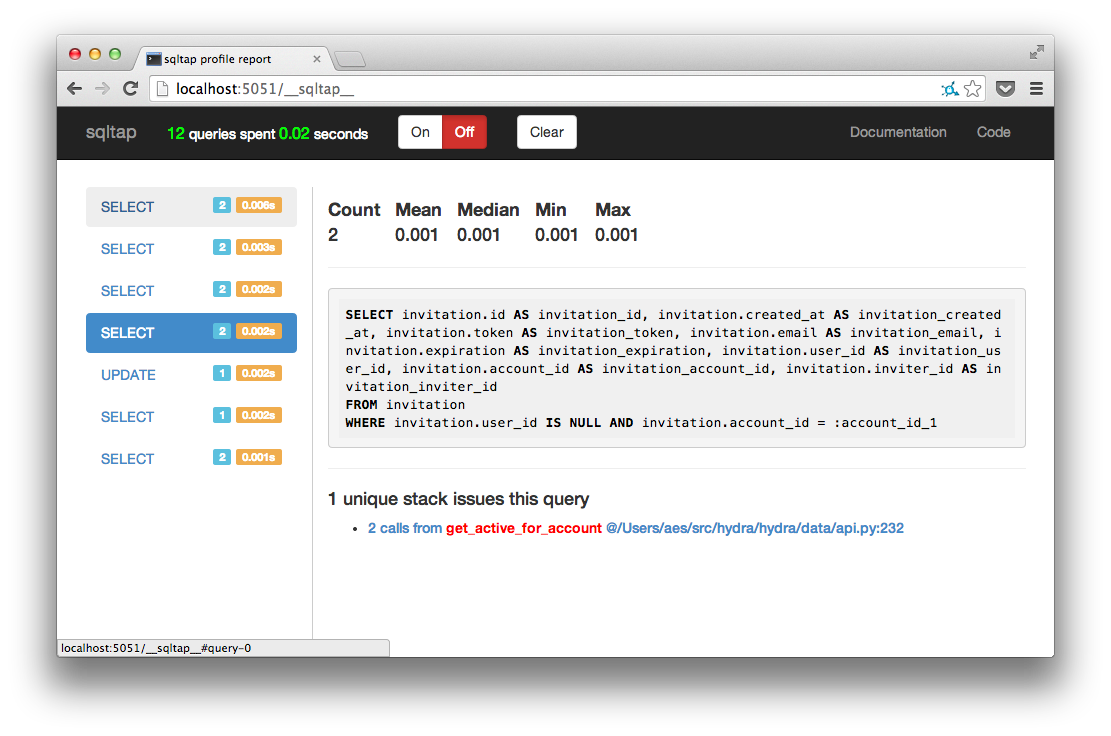
Full Documentation
http://sqltap.inconshreveable.com
Motivation
When you work at a high level of abstraction, it’s more common for your code to be inefficient and cause performance problems. SQLAlchemy’s ORM is excellent and gives you the flexibility to fix these inefficiencies if you know where to look! sqltap is a library that hooks into SQLAlchemy to collect metrics on all queries you send to your databases. sqltap can help you find where in your application you are generating slow or redundant queries so that you can fix them with minimal effort.
Quickstart Example
import sqltap

profiler = sqltap.start()
session.query(Knights).filter_by(who_say = 'Ni').all()
statistics = profiler.collect()
sqltap.report(statistics, "report.html")
WSGI integration
You can easily integrate SQLTap into any WSGI application. This will create an up-to-date report page at /__sqltap__ where you can dynamically enable/disable the profiling so you can easily run it selectively in production. Integrating is super-easy:
import sqltap.wsgi

wsgi_app = sqltap.wsgi.SQLTapMiddleware(wsgi_app)
For example, to integrate with a Flask application:
import sqltap.wsgi

app.wsgi_app = sqltap.wsgi.SQLTapMiddleware(app.wsgi_app)
Text report
Sometimes we want to profile sqlalchemy on remote servers. It's very inconvenient to view HTML format SQLTap report on these servers. Alternatively, SQLTap provides text profiling report in a human-readable way.
import sqltap

profiler = sqltap.start()
session.query(Knights).filter_by(who_say = 'Ni').all()
statistics = profiler.collect()
sqltap.report(statistics, "report.txt", report_format="text")
Advanced Example
import sqltap

def context_fn(*args):
    """ Associate the request path, unique id with each query statistic """
    return (framework.current_request().path,
            framework.current_request().id)

# start the profiler immediately
profiler = sqltap.start(user_context_fn=context_fn)

def generate_reports():
    """ call this at any time to generate query reports reports """
    all_stats = []
    per_request_stats = collections.defaultdict(list)
    per_page_stats = collections.defaultdict(list)

    qstats = profiler.collect()
    for qs in qstats:
        all_stats.append(qs)

        page = qstats.user_context[0]
        per_page_stats[page].append(qs)

        request_id = qstats.user_context[1]
        per_request_stats[request_id].append(qs)

    # report with all queries
    sqltap.report(all_stats, "report_all.html")

    # a report per page
    for page, stats in per_page_stats.items():
        sqltap.report(stats, "report_page_%s.html" % page)

    # a report per request
    for request_id, stats in per_request_stats.items():
        sqltap.report(stats, "report_request_%s.html" % request_id)
Testing
Run the sqltap tests:
python setup.py test
License
Apache
Release history Release notifications | RSS feed


Download files
Download the file for your platform. If you're not sure which to choose, learn more about installing packages.
Source Distributions
Built Distribution
Filter files by name, interpreter, ABI, and platform.
If you're not sure about the file name format, learn more about wheel file names.
Copy a direct link to the current filters
File details
Details for the file sqltap_profiler-1.0.0-py3-none-any.whl.
File metadata
- Download URL: sqltap_profiler-1.0.0-py3-none-any.whl
- Upload date:
- Size: 14.7 kB
- Tags: Python 3
- Uploaded using Trusted Publishing? No
- Uploaded via: twine/6.2.0 CPython/3.11.10
File hashes
| Algorithm | Hash digest | |
|---|---|---|
| SHA256 |
35bdcf81d94cd166fc395d866424c7fc3fbcde5f740117d87f06598b6995a633
|
|
| MD5 |
279a9ed09208613cd768d2fe5dd1aa5b
|
|
| BLAKE2b-256 |
9baf5ee6bb247f99564f8ac118914bf627c6a9935ef10ce5af094d8d0f724155
|






