
A game using AI for player tracking inspired by Squid Game TV series, featuring an animated doll with laser.

Project description
Squid Game Doll 🔴🟢
English | Italiano
An AI-powered "Red Light, Green Light" robot inspired by the Squid Game TV series. This project uses computer vision and machine learning for real-time player recognition and tracking, featuring an animated doll that signals game phases and an optional laser targeting system for eliminated players.
🎯 Features:
- Real-time player detection and tracking using YOLO neural networks
- Face recognition for player registration
- Interactive animated doll with LED eyes and servo-controlled head
- Optional laser targeting system for eliminated players (work in progress)
- Support for PC (with CUDA), NVIDIA Jetson Nano (with CUDA), and Raspberry Pi 5 (with Hailo AI Kit)
- Configurable play areas and game parameters
🏆 Status: First working version demonstrated at Arduino Days 2025 in FabLab Bergamo, Italy.
🎮 Quick Start
Prerequisites
- Python 3.9+ with Poetry
- Webcam (Logitech C920 recommended)
- Optional: ESP32 for doll control, laser targeting hardware
Installation
Method 1: PC (Windows/Linux)
# 1. Install Poetry
pip install poetry

# 2. Install base dependencies + PyTorch for PC
poetry install --extras standard

# 3. Optional: CUDA support for NVIDIA GPU (better performance)
poetry run pip install torch torchvision torchaudio --index-url https://download.pytorch.org/whl/cu121 --force-reinstall

# 4. Install Ultralytics (required for AI detection)
poetry run pip install ultralytics --no-deps
poetry run pip install tqdm seaborn psutil py-cpuinfo thop requests PyYAML
Method 2: NVIDIA Jetson Orin
# 1. Install Poetry
pip install poetry

# 2. Install base dependencies (WITHOUT PyTorch)
poetry install

# 3. Install Jetson-optimized PyTorch manually
poetry run pip install https://github.com/ultralytics/assets/releases/download/v0.0.0/torch-2.5.0a0+872d972e41.nv24.08-cp310-cp310-linux_aarch64.whl
poetry run pip install https://github.com/ultralytics/assets/releases/download/v0.0.0/torchvision-0.20.0a0+afc54f7-cp310-cp310-linux_aarch64.whl

# 4. Install Ultralytics without dependencies (prevents PyTorch overwrite)
poetry run pip install ultralytics --no-deps
poetry run pip install tqdm seaborn psutil py-cpuinfo thop requests PyYAML

# 5. Install ONNX Runtime GPU for Jetson
poetry run pip install https://github.com/ultralytics/assets/releases/download/v0.0.0/onnxruntime_gpu-1.20.0-cp310-cp310-linux_aarch64.whl

# 6. Optional: CUDA OpenCV for maximum performance (see JETSON_ORIN.md)
# After building CUDA OpenCV system-wide:
VENV_PATH=$(poetry env info --path)
cp -r /usr/lib/python3/dist-packages/cv2* "$VENV_PATH/lib/python3.10/site-packages/"
Method 3: Raspberry Pi 5 with Hailo AI Kit
# 1. Install Poetry
pip install poetry

# 2. Install base dependencies
poetry install

# 3. Install Hailo AI infrastructure
poetry run pip install git+https://github.com/hailo-ai/hailo-apps-infra.git

# 4. Download pre-compiled Hailo models
wget https://hailo-model-zoo.s3.eu-west-2.amazonaws.com/ModelZoo/Compiled/v2.14.0/hailo8l/yolov11m.hef

# 5. Install PyTorch for Raspberry Pi (if not automatically installed)
poetry install --extras standard
Platform Detection
The application automatically detects your platform and uses the appropriate AI backend:
- PC: Uses Ultralytics YOLO with PyTorch
- Jetson Orin: Uses TensorRT-optimized YOLO with CUDA acceleration
- Raspberry Pi: Uses Hailo AI accelerated models (.hef files)
Setup and Run
- Configure play areas (first-time setup):
# Using Python module
poetry run python -m squid_game_doll --setup

# Or using console script (after installation)
squid-game-doll --setup
- Run the game:
# Using Python module
poetry run python -m squid_game_doll

# Or using console script (after installation)
squid-game-doll
- Run with laser targeting (requires ESP32 setup):
# Using Python module
poetry run python -m squid_game_doll -k -i 192.168.45.50

# Or using console script
squid-game-doll -k -i 192.168.45.50
🎯 How It Works
Game Flow
Players line up 8-10m from the screen and follow this sequence:
- 📝 Registration (15s): Stand in the starting area while the system captures your face
- 🟢 Green Light: Move toward the finish line (doll turns away, eyes off)
- 🔴 Red Light: Freeze! Any movement triggers elimination (doll faces forward, red eyes)
- 🏆 Victory/💀 Elimination: Win by reaching the finish line or get eliminated for moving during red light
Game Phases Visual Guide
| Phase | Screen | Doll State | Action |
|---|---|---|---|
| Loading | 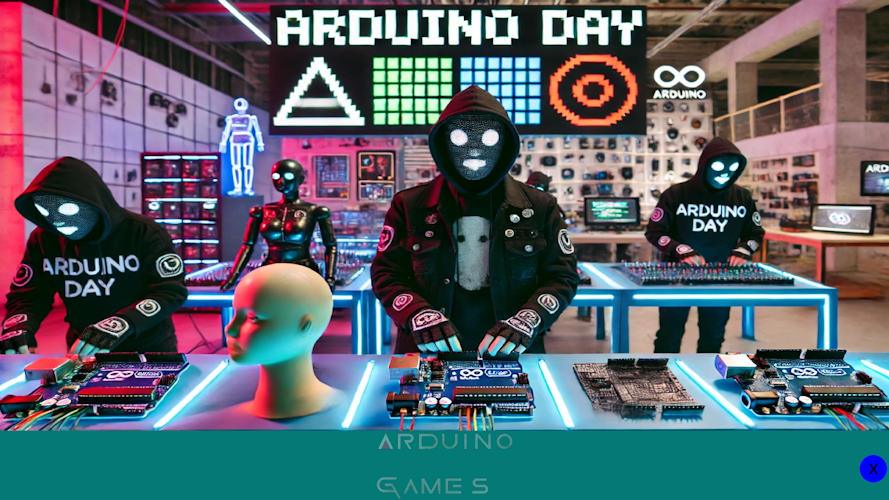 |
Random movement | Attracts crowd |
| Registration | 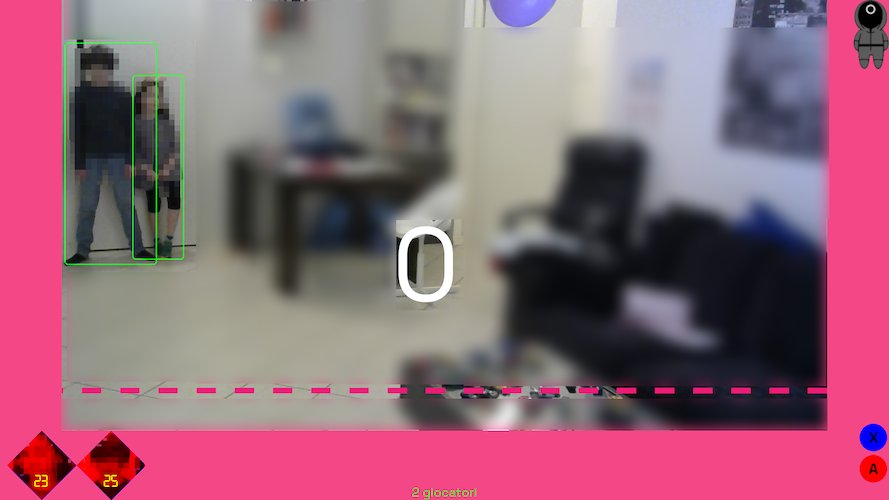 |
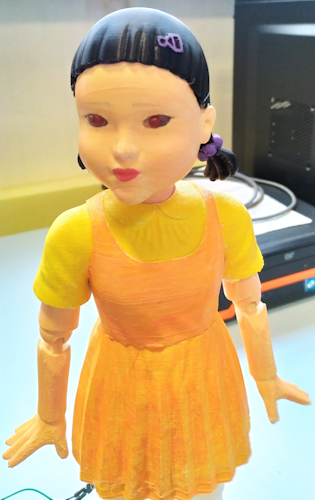 |
Face capture |
| Green Light | 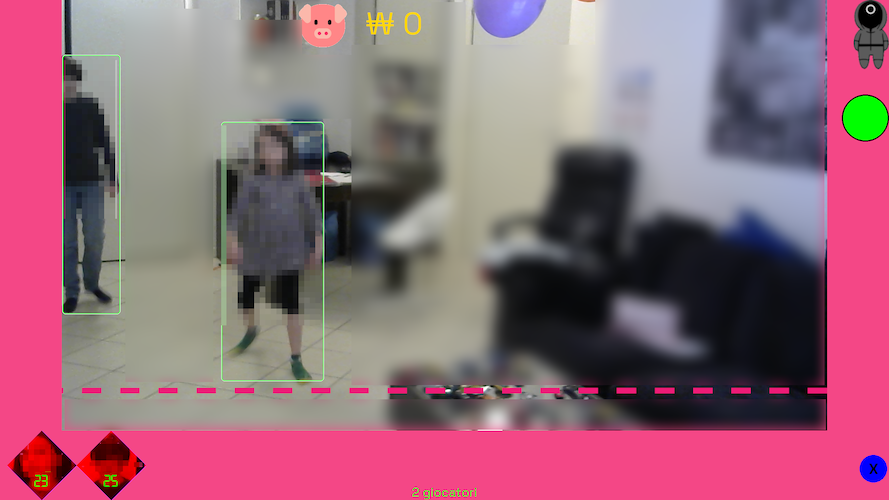 |
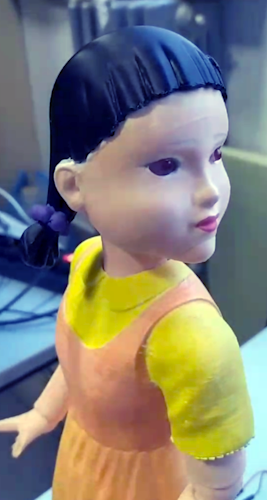 |
Players move |
| Red Light | 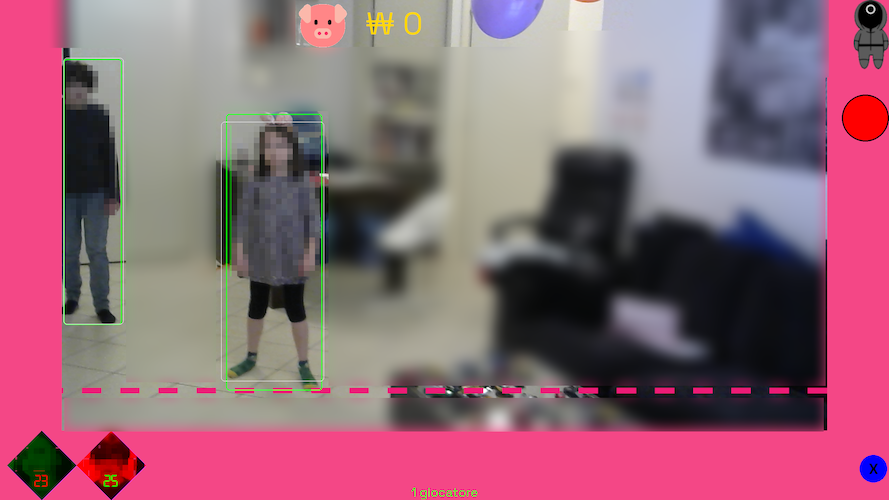 |
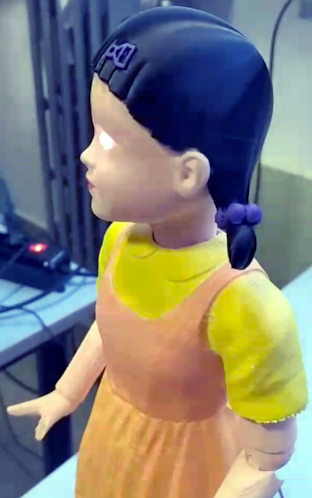 |
Motion detection |
⚙️ Configuration
The setup mode allows you to configure play areas and camera settings for optimal performance.
Area Configuration
You need to define three critical areas:
- 🎯 Vision Area (Yellow): The area fed to the neural network for player detection
- 🏁 Finish Area: Players must reach this area to win
- 🚀 Starting Area: Players must register in this area initially
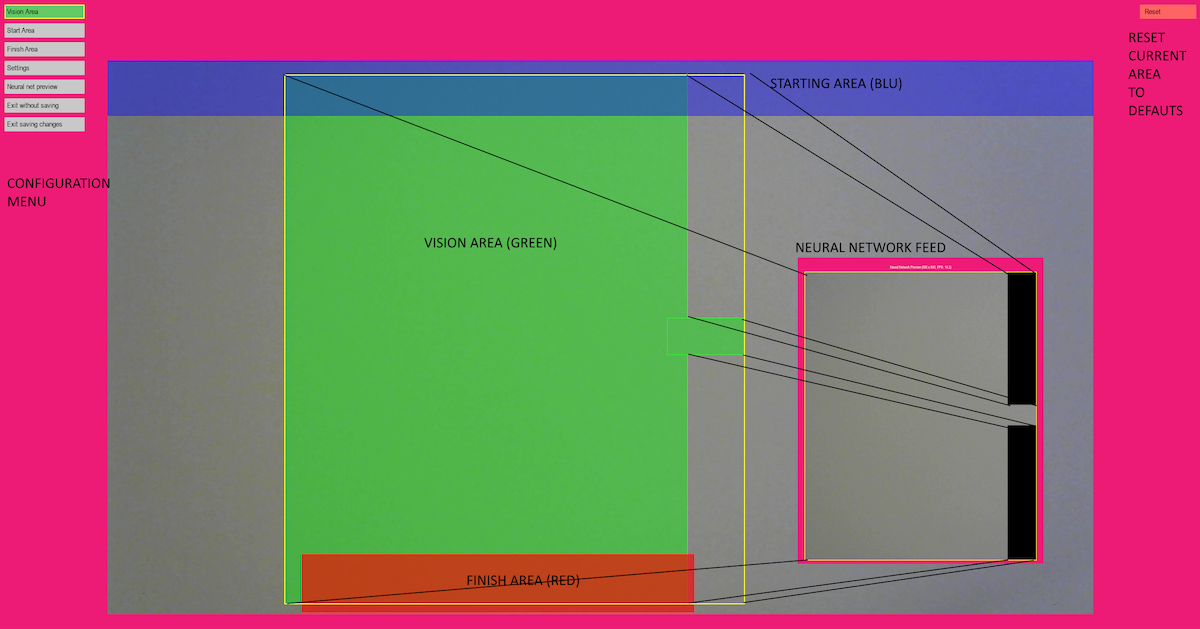
Configuration Steps
- Run setup mode:
poetry run python -m squid_game_doll --setup - Draw rectangles to define play areas (vision area must intersect with start/finish areas)
- Adjust settings in the SETTINGS menu (confidence levels, contrast)
- Test performance using "Neural network preview"
- Save configuration to
config.yaml
Important Notes
- Vision area should exclude external lights and non-play zones
- Webcam resolution affects neural network input (typically resized to 640x640)
- Proper area configuration is essential for game mechanics to work correctly
🔧 Hardware Requirements
Supported Platforms
| Platform | AI Acceleration | Performance | Best For |
|---|---|---|---|
| PC with NVIDIA GPU | CUDA | 30+ FPS | Development, High Performance |
| NVIDIA Jetson Nano | CUDA | 15-25 FPS | Mobile Deployment, Edge Computing |
| Raspberry Pi 5 + Hailo AI Kit | Hailo 8L | 10-15 FPS | Production Deployment |
| PC (CPU only) | None | 3-5 FPS | Basic Testing |
Required Components
Core System
- Computer: PC (Windows/Linux), NVIDIA Jetson Nano, or Raspberry Pi 5
- Webcam: Logitech C920 HD Pro (recommended) or compatible USB webcam
- Display: Monitor or projector for game interface
Doll Hardware
- Controller: ESP32C2 MINI Wemos board
- Servo: 1x SG90 servo motor (head movement)
- LEDs: 2x Red LEDs (eyes)
- 3D Parts: Printable doll components (see
hardware/doll-model/)
Optional Laser Targeting System (Work in Progress)
⚠️ Safety Warning: Use appropriate laser safety measures and follow local regulations.
Status: Basic targeting implemented but requires refinement for production use.
Components:
- Servos: 2x SG90 servo motors for pan-tilt mechanism
- Platform: Pan-and-tilt platform (~11 EUR)
- Laser: Choose one option:
- Green 5mW: Higher visibility, safer for eyes, less precise focus
- Red 5mW: Better focus, lower cost
- 3D Parts: Laser holder (see
hardware/proto/Laser Holder v6.stl)
Play Space Requirements
- Area: 10m x 10m indoor space recommended
- Distance: Players start 8-10m from screen
- Lighting: Controlled lighting for optimal computer vision performance
Detailed Installation
- PC Setup: See installation instructions above
- Raspberry Pi 5: See INSTALL.md (Italiano) for complete Hailo AI Kit setup
- ESP32 Programming: Use Thonny IDE with MicroPython (see
esp32/folder)
🎲 Command Line Options
poetry run python -m squid_game_doll [OPTIONS]
# or
squid-game-doll [OPTIONS]
Available Options
| Option | Description | Example |
|---|---|---|
-m, --monitor |
Monitor index (0-based) | -m 0 |
-w, --webcam |
Webcam index (0-based) | -w 0 |
-f, --fixed-image |
Fixed image for testing (instead of webcam) | -f test_image.jpg |
-k, --killer |
Enable ESP32 laser shooter | -k |
-i, --tracker-ip |
ESP32 IP address | -i 192.168.45.50 |
-j, --joystick |
Joystick index | -j 0 |
-n, --neural_net |
Custom neural network model | -n yolov11m.hef |
-c, --config |
Config file path | -c my_config.yaml |
-s, --setup |
Setup mode for area configuration | -s |
Example Commands
Basic setup:
# First-time configuration
poetry run python -m squid_game_doll --setup -w 0

# Run game with default settings
poetry run python -m squid_game_doll
Advanced configuration:
# Full setup with laser targeting
poetry run python -m squid_game_doll -m 0 -w 0 -k -i 192.168.45.50

# Custom model and config
poetry run python -m squid_game_doll -n custom_model.hef -c custom_config.yaml

# Testing with fixed image instead of webcam
poetry run python -m squid_game_doll -f pictures/test_image.jpg
🤖 AI & Computer Vision
Neural Network Models
- PC (Ultralytics): YOLOv8/v11 models for object detection and tracking
- NVIDIA Jetson Nano: CUDA-optimized YOLOv11 models with automatic platform detection
- Raspberry Pi (Hailo): Pre-compiled Hailo models optimized for edge AI
- Face Detection: OpenCV Haar cascades for player registration and identification
Performance Optimization
Platform-Specific Optimizations
NVIDIA Jetson Nano:
- Automatic CUDA acceleration with optimized PyTorch wheels
- CUDA OpenCV support for GPU-accelerated image processing (optional)
- Reduced input size (416px vs 640px) for faster inference
- FP16 precision for 2x speed improvement
- Optimized thread count for ARM processors
- Jetson-specific model selection (yolo11n.pt for optimal speed/accuracy balance)
- TensorRT optimization available via
optimize_for_jetson.pyscript
Raspberry Pi 5 + Hailo:
- Hardware-accelerated inference using Hailo 8L AI processor
- Optimized .hef models compiled specifically for Hailo architecture
- Parallel processing between ARM CPU and Hailo AI accelerator
PC with NVIDIA GPU:
- Full CUDA acceleration with maximum input resolution
- High-precision models for best accuracy
- Multi-threaded processing for real-time performance
General Performance
- Object Detection: 3-30+ FPS depending on hardware and optimization
- Face Extraction: CPU-bound with OpenCV Haar cascades (GPU-accelerated with CUDA OpenCV)
- Image Processing: 2-5x speedup with CUDA OpenCV for color conversions and resizing
- Laser Detection: Computer vision pipeline using threshold + dilate + Hough circles
Model Resources
- Hailo Model Zoo
- Neural Network Implementation Details
- Laser Spot Detection Models - Pre-trained YOLOv5l6 models for laser tracking
🛠️ Development & Testing
Code Quality Tools
# Install development dependencies
poetry install --with dev

# Code formatting
poetry run black .

# Linting
poetry run flake8 .

# Run tests
poetry run pytest
Performance Profiling
# Profile the application
poetry run python -m cProfile -o game.prof -m squid_game_doll

# Visualize profiling results
poetry run snakeviz ./game.prof
Game Interface
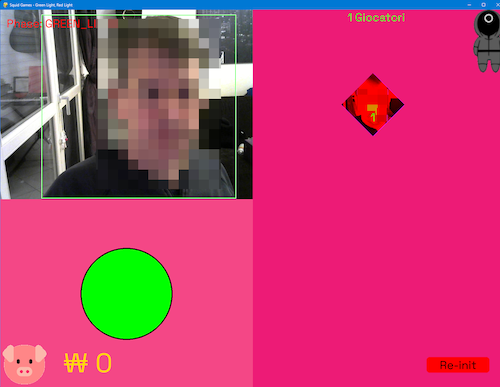
The game uses PyGame as the rendering engine with real-time player tracking overlay.
🎯 Laser Targeting System (Advanced)
Computer Vision Pipeline
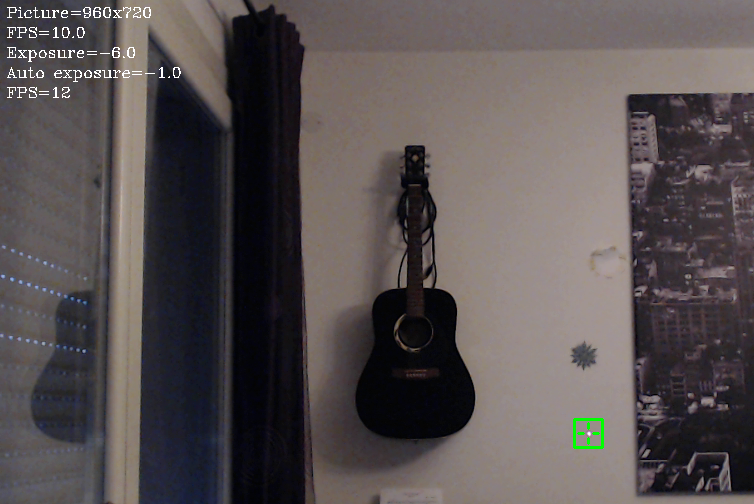
The laser targeting system uses a sophisticated computer vision approach to detect and track laser dots:
Detection Algorithm
- Channel Selection: Extract R, G, B channels or convert to grayscale
- Thresholding: Find brightest pixels using
cv2.threshold() - Morphological Operations: Apply dilation to enhance spots
- Circle Detection: Use Hough Transform to locate circular laser dots
- Validation: Adaptive threshold adjustment for single-dot detection
# Key processing steps
diff_thr = cv2.threshold(channel, threshold, 255, cv2.THRESH_TOZERO)
masked_channel = cv2.dilate(masked_channel, None, iterations=4)
circles = cv2.HoughCircles(masked_channel, cv2.HOUGH_GRADIENT, 1, minDist=50,
                          param1=50, param2=2, minRadius=3, maxRadius=10)
Critical Considerations
- Webcam Exposure: Manual exposure control required (typically -10 to -5 for C920)
- Surface Reflectivity: Different surfaces affect laser visibility
- Color Choice: Green lasers often perform better than red
- Timing: 10-15 second convergence time for accurate targeting
Troubleshooting
| Issue | Solution |
|---|---|
| Windows slow startup | Set OPENCV_VIDEOIO_MSMF_ENABLE_HW_TRANSFORMS=0 |
| Poor laser detection | Adjust exposure settings, check surface types |
| Multiple false positives | Increase threshold, mask external light sources |
🚧 Known Issues & Future Improvements
Current Limitations
- Vision System: Combining low-exposure laser detection with normal-exposure player tracking
- Laser Performance: 10-15 second targeting convergence time
- Hardware Dependency: Manual webcam exposure calibration required
Roadmap
- Retrain YOLO model for combined laser/player detection
- Implement depth estimation for faster laser positioning
- Automatic exposure calibration system
- Enhanced surface reflection compensation
Completed Features
- ✅ 3D printable doll with animated head and LED eyes
- ✅ Player registration and finish line detection
- ✅ Configurable motion sensitivity thresholds
- ✅ GitHub Actions CI/CD and automated testing
📚 Additional Resources
- Installation Guide: INSTALL.md (Italiano) for Raspberry Pi setup
- CUDA OpenCV Setup: OPENCV_JETSON.md for Jetson Nano GPU acceleration
- ESP32 Development: Use Thonny IDE for MicroPython
- Neural Networks: Hailo AI implementation details
- Camera Optimization: OpenCV camera performance tips
📖 Citations and Attribution
Laser Spot Detection Neural Network
This project uses pre-trained laser spot detection models from the ADVRHumanoids research group. The YOLOv5l6 laser detection model (yolov5l6_e200_b8_tvt302010_laser_v5.pt) is automatically downloaded during setup from:
- Model Repository: https://zenodo.org/records/10471835
- Source Project: nn_laser_spot_tracking
Academic Citations
If you use this project's laser detection capabilities in academic research, please cite the following papers:
Robotics and Autonomous Systems (2025):
@article{TORIELLI2025105054,
    title = {An intuitive tele-collaboration interface exploring laser-based interaction and behavior trees},
    journal = {Robotics and Autonomous Systems},
    volume = {185},
    pages = {105054},
    year = {2025},
    issn = {0921-8890},
    doi = {https://doi.org/10.1016/j.robot.2025.105054},
    url = {https://www.sciencedirect.com/science/article/pii/S092188902500140X},
    author = {Davide Torielli and Edoardo Lamon and Luca Muratore and Arash Ajoudani and Nikos G. Tsagarakis},
}
IEEE Robotics and Automation Letters (2024):
@ARTICLE{10602529,
    title={A Laser-Guided Interaction Interface for Providing Effective Robot Assistance to People With Upper Limbs Impairments},
    author={Torielli, Davide and Lamon, Edoardo and Muratore, Luca and Ajoudani, Arash and Tsagarakis, Nikos G.},
    journal={IEEE Robotics and Automation Letters},
    year={2024},
    volume={9},
    number={9},
    pages={8170-8177},
    doi={10.1109/LRA.2024.3439528}
}
Acknowledgments
We thank the ADVRHumanoids research group at the Italian Institute of Technology for their excellent work on neural network-based laser spot tracking and for making their pre-trained models publicly available.
📄 License
This project is open source. See the LICENSE file for details.
Release history Release notifications | RSS feed


Download files
Download the file for your platform. If you're not sure which to choose, learn more about installing packages.
Source Distribution
Built Distribution
Filter files by name, interpreter, ABI, and platform.
If you're not sure about the file name format, learn more about wheel file names.
Copy a direct link to the current filters
File details
Details for the file squid_game_doll-0.3.0.tar.gz.
File metadata
- Download URL: squid_game_doll-0.3.0.tar.gz
- Upload date:
- Size: 7.6 MB
- Tags: Source
- Uploaded using Trusted Publishing? Yes
- Uploaded via: twine/6.1.0 CPython/3.13.7
File hashes
| Algorithm | Hash digest | |
|---|---|---|
| SHA256 |
df3a4b2bba1c99768054613b530c74d34c3849917799559e23050af2be7389fe
|
|
| MD5 |
227a112a87cdd133608e934fda03d8b4
|
|
| BLAKE2b-256 |
8c71151dd0345b71af6a0bbf7884fa8b3c1f8ddaa46fedf07fe759e19b980fb9
|
Provenance
The following attestation bundles were made for squid_game_doll-0.3.0.tar.gz:
Publisher:
publish.yml on fablab-bergamo/squid-game-doll
-
Statement:
-
Statement type:
https://in-toto.io/Statement/v1 -
Predicate type:
https://docs.pypi.org/attestations/publish/v1 -
Subject name:
squid_game_doll-0.3.0.tar.gz -
Subject digest:
df3a4b2bba1c99768054613b530c74d34c3849917799559e23050af2be7389fe - Sigstore transparency entry: 483745544
- Sigstore integration time:
-
Permalink:
fablab-bergamo/squid-game-doll@4dae30717afc7c089a38538385db6dae01a1f64c -
Branch / Tag:
refs/heads/main - Owner: https://github.com/fablab-bergamo
-
Access:
public
-
Token Issuer:
https://token.actions.githubusercontent.com -
Runner Environment:
github-hosted -
Publication workflow:
publish.yml@4dae30717afc7c089a38538385db6dae01a1f64c -
Trigger Event:
workflow_dispatch
-
Statement type:
File details
Details for the file squid_game_doll-0.3.0-py3-none-any.whl.
File metadata
- Download URL: squid_game_doll-0.3.0-py3-none-any.whl
- Upload date:
- Size: 7.6 MB
- Tags: Python 3
- Uploaded using Trusted Publishing? Yes
- Uploaded via: twine/6.1.0 CPython/3.13.7
File hashes
| Algorithm | Hash digest | |
|---|---|---|
| SHA256 |
128fb8e1bef806dbddcde8839a6963bfcc8dde376e55c219484063a415f50990
|
|
| MD5 |
a266995261b00a1cfbe17eff8e60f737
|
|
| BLAKE2b-256 |
9461f955a10172cd383f84a797ae18819ac7758972f4e0bc5f818aeec0e34309
|
Provenance
The following attestation bundles were made for squid_game_doll-0.3.0-py3-none-any.whl:
Publisher:
publish.yml on fablab-bergamo/squid-game-doll
-
Statement:
-
Statement type:
https://in-toto.io/Statement/v1 -
Predicate type:
https://docs.pypi.org/attestations/publish/v1 -
Subject name:
squid_game_doll-0.3.0-py3-none-any.whl -
Subject digest:
128fb8e1bef806dbddcde8839a6963bfcc8dde376e55c219484063a415f50990 - Sigstore transparency entry: 483745550
- Sigstore integration time:
-
Permalink:
fablab-bergamo/squid-game-doll@4dae30717afc7c089a38538385db6dae01a1f64c -
Branch / Tag:
refs/heads/main - Owner: https://github.com/fablab-bergamo
-
Access:
public
-
Token Issuer:
https://token.actions.githubusercontent.com -
Runner Environment:
github-hosted -
Publication workflow:
publish.yml@4dae30717afc7c089a38538385db6dae01a1f64c -
Trigger Event:
workflow_dispatch
-
Statement type:






