
ssh-keyup



Set up passwordless SSH in one command on any Linux or RouterOS device, such as Raspberry Pi, NVIDIA Jetson or MikroTik routers.
Tired of juggling ssh-keygen, ssh-copy-id (missing on Windows) and ~/.ssh/config edits every time you set up a new device?
ssh-keyup handles all three in one interactive session.

Quickstart
Needs Python 3.8+ and OpenSSH tools (ssh, ssh-keygen) in PATH:
- Windows 10/11: Python from python.org or Microsoft Store. OpenSSH Client via Settings > Optional Features or Git for Windows.
- Linux:
sudo apt install python3 openssh-client(usually pre-installed).
Install globally with pip:
pip install ssh-keyup

ssh-keyup   # ready to use anywhere
Tip: If
ssh-keyupis missing or runs an old version after install, new script sits in a folder outside PATH (pip warns about this). Add that folder to PATH, or install with pipx instead:
pipx install ssh-keyup
Or run directly without installing:
git clone https://github.com/Kurokesu/ssh-keyup.git
cd ssh-keyup
python ssh_keyup.py   # Windows
python3 ssh_keyup.py  # Linux
Follow prompts, enter remote password once and you're done. Alias now works in anything that reads ~/.ssh/config:
Terminal:
ssh mypi # no password, ever again
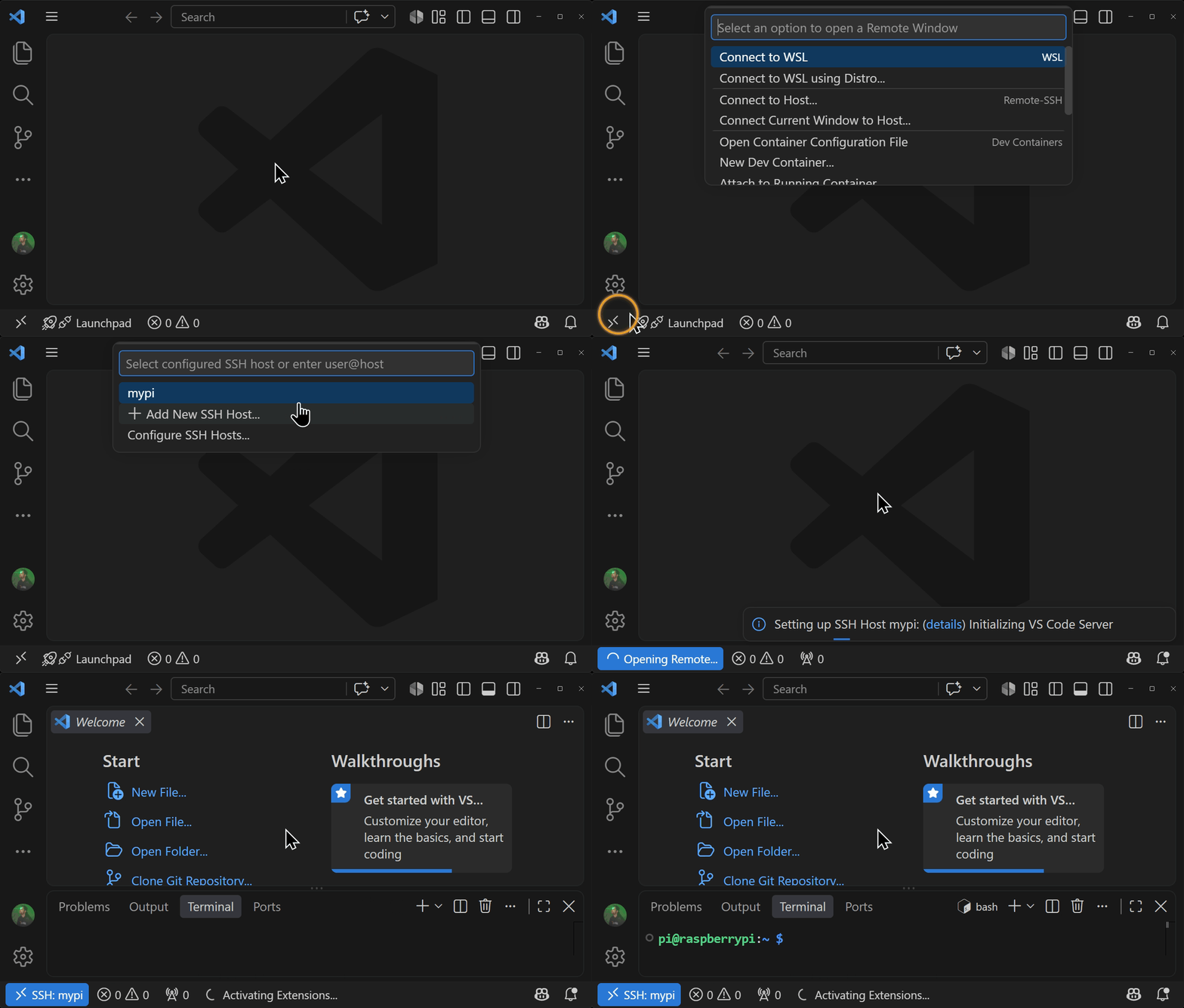
VS Code: Remote - SSH works out of the box. Press Ctrl+Shift+P, select Remote-SSH: Connect to Host and pick your alias for a full IDE on the device, no password:
Usage
Skip prompts
ssh-keyup pi@192.168.1.23 mypi        # user, host and alias in one go
ssh-keyup pi@192.168.1.23:2222 mypi   # non-default SSH port
ssh-keyup admin@192.168.88.1 router   # RouterOS, detected automatically
Flags (--host, --user, --alias, --port, --os, --key-type) work too, see ssh-keyup --help
Set up a fleet
for host in 192.168.1.10 192.168.1.11 192.168.1.12; do
  ssh-keyup pi@$host
done
Manage entries
List or remove entries ssh-keyup manages:
ssh-keyup --list
ssh-keyup --remove mypi   # deletes its key pair too
How it works
                    local                        remote
check connection    -------- SSH port -------->  sshd
generate key        ~/.ssh/id_ed25519_mypi
deploy public key   -------- public key ------>  ~/.ssh/authorized_keys
update ssh config   ~/.ssh/config
Features
- Works on Windows OpenSSH, where
ssh-copy-iddoes not exist - Never touches your password. Only the public key is piped over SSH and OpenSSH prompts for the password itself
- Separate key per device (
~/.ssh/id_ed25519_<alias>), Ed25519 by default or RSA with--key-type rsa - Deploys in a single SSH session, one password prompt total
- Adds a named entry to
~/.ssh/config, works instantly withssh <alias>and VS Code Remote SSH - Checks host is reachable first, so typos surface before keys exist
- Detects RouterOS and imports the key its way
- Recovers from host key mismatches and stale SSH config entries after a reflash
- Entry management, list or retire devices without leaving stale keys behind
- Zero dependencies, standard library plus system OpenSSH
FAQ
How do I set up passwordless SSH from Windows by hand?
Usual commands:
ssh-keygen -t ed25519
type $env:USERPROFILE\.ssh\id_ed25519.pub | ssh pi@raspberrypi.local "cat >> ~/.ssh/authorized_keys"
notepad $env:USERPROFILE\.ssh\config   # then add a Host block by hand
Works once. Same key lands on every device, ~/.ssh keeps default permissions that sshd may reject and each new device means another config edit.
Is there ssh-copy-id for Windows?
Not built in. Windows OpenSSH does not ship it and RouterOS has no authorized_keys for it to append to. ssh-keyup covers both as an ssh-copy-id alternative:
| ssh-keyup | ssh-copy-id | |
|---|---|---|
| Works on Windows OpenSSH | yes | no |
| Works with RouterOS | yes | no |
| Separate key per device | yes | no |
Sets authorized_keys permissions |
yes | yes |
Writes ~/.ssh/config alias |
yes | no |
| Recovers from changed host key | yes | no |
| Entry management | yes | no |
How do I fix "REMOTE HOST IDENTIFICATION HAS CHANGED"?
Reflashing creates a new host key, so next ssh refuses to connect:
@@@@@@@@@@@@@@@@@@@@@@@@@@@@@@@@@@@@@@@@@@@@@@@@@@@@@@@@@@@
@    WARNING: REMOTE HOST IDENTIFICATION HAS CHANGED!     @
@@@@@@@@@@@@@@@@@@@@@@@@@@@@@@@@@@@@@@@@@@@@@@@@@@@@@@@@@@@
IT IS POSSIBLE THAT SOMEONE IS DOING SOMETHING NASTY!
...
Offending ECDSA key in ~/.ssh/known_hosts:3
Host key verification failed.
Run ssh-keyup again. It detects a changed key, shows new fingerprint for confirmation, clears stale known_hosts entry with ssh-keygen -R and redeploys. Usually a reflash is behind it, but this warning can also mean a real man-in-the-middle, so ssh-keyup asks instead of trusting silently.
Does --remove clean up entries on the device?
No. It deletes local key pair and ~/.ssh/config entry. Line in the device's authorized_keys (or /user/ssh-keys entry on RouterOS) stays until removed there.
What devices are supported?
Any Linux device reachable over SSH: Raspberry Pi, NVIDIA Jetson, Orange Pi, VMs, servers. Any distribution works (Raspberry Pi OS, DietPi, Ubuntu and others). Any RouterOS 7.12 or newer device, MikroTik routers or CHR alike, is detected from SSH banner and gets its own key import, --os routeros forces it.
Can I use an RSA key instead of Ed25519?
Yes. --key-type rsa generates a 4096-bit RSA key for devices or policies that will not take Ed25519. Keys carry their type in the name, id_ed25519_mypi or id_rsa_mypi, so switching type for an alias leaves the old key alone and ssh-keyup offers to delete it once the new one is verified working.
How do I add an SSH key to a MikroTik router from Windows?
By hand on RouterOS 7:
ssh-keygen -t ed25519
scp $env:USERPROFILE\.ssh\id_ed25519.pub admin@192.168.88.1:
ssh admin@192.168.88.1 "/user/ssh-keys/import public-key-file=id_ed25519.pub user=admin"
Works, with two password prompts and the default key shared across devices again. ssh-keyup admin@192.168.88.1 router does it in one session with one prompt, RouterOS is detected from SSH banner. Login user needs policy permission (full group has it) and firmware 7.12 or newer, older RouterOS rejects Ed25519 keys with unable to load key file (wrong format or bad passphrase).
Why does RouterOS refuse my password over SSH after adding a key?
That is the default: once a user has a key, RouterOS stops accepting that user's password over SSH. WinBox and WebFig are unaffected, and password SSH can be turned back on under /ip/ssh.
2 maintainers


Release files for ssh-keyup 1.4.0
For a detailed explanation of source distributions (sdists) and built distributions (wheels), please see the package formats documentation.
Source distribution (sdist)
| File | Size | Uploaded | |
|---|---|---|---|
| ssh_keyup-1.4.0.tar.gz | 30.4 kB | Details |
Built distribution (wheel)
| File | Interpreter | ABI | Platform | Reset |
|---|---|---|---|---|
| ssh_keyup-1.4.0-py3-none-any.whl | Python 3 | none | any | Details |
Total release size: 61.0 kB
Release files / ssh_keyup-1.4.0.tar.gz
| Download URL | ssh_keyup-1.4.0.tar.gz |
|---|---|
| Size | 30.4 kB |
| Tags | Source |
|
SHA-256 checksum How to use checksums |
af295dd0ea62876d7c1422c2e627eca926915b8e3203b9446bd8489585128eec
|
|
BLAKE2b-256 checksum How to use checksums |
6b2fbcbd8e2c3a845c7fdab33506cb4778e7163a1cbabb5669273d5b99b3f6d6
|
| Upload date | |
|
Uploaded using Trusted Publishing? What is trusted publishing? |
Yes |
| Uploaded via |
twine/7.0.0 CPython/3.13.14
|
Provenance
Provenance describes where a file came from. On PyPI, provenance is shared via attestations, which provide a verifiable record of the build or publishing details. View details, limitations and caveats.


PyPI Publish Attestation
PyPI verified that this artifact, at this checksum, originated from the publisher listed below.
Signed by GitHub Actions, verified by PyPI on Sep 24, 2026.
Transparency logRelease files / ssh_keyup-1.4.0-py3-none-any.whl
| Download URL | ssh_keyup-1.4.0-py3-none-any.whl |
|---|---|
| Size | 30.6 kB |
| Tags | Python 3 |
|
SHA-256 checksum How to use checksums |
828996649b63efc7ffb794c7fccddba3339e2ffa14e5dab47c3163c47e18b361
|
|
BLAKE2b-256 checksum How to use checksums |
947d28917081bafd4e8d07a3d465011419b3862aca1bffe00e0201ff0e5cff88
|
| Upload date | |
|
Uploaded using Trusted Publishing? What is trusted publishing? |
Yes |
| Uploaded via |
twine/7.0.0 CPython/3.13.14
|
Provenance
Provenance describes where a file came from. On PyPI, provenance is shared via attestations, which provide a verifiable record of the build or publishing details. View details, limitations and caveats.
PyPI Publish Attestation
PyPI verified that this artifact, at this checksum, originated from the publisher listed below.
Signed by GitHub Actions, verified by PyPI on Sep 24, 2026.
Transparency log













