
Passwordless SSH setup for Raspberry Pi, NVIDIA Jetson, or any Linux device
Verified details
These details have been verified by PyPIProject links
GitHub Statistics
Maintainers


Project description
ssh-keyup



Set up passwordless SSH on Raspberry Pi, NVIDIA Jetson or any Linux device in one command.
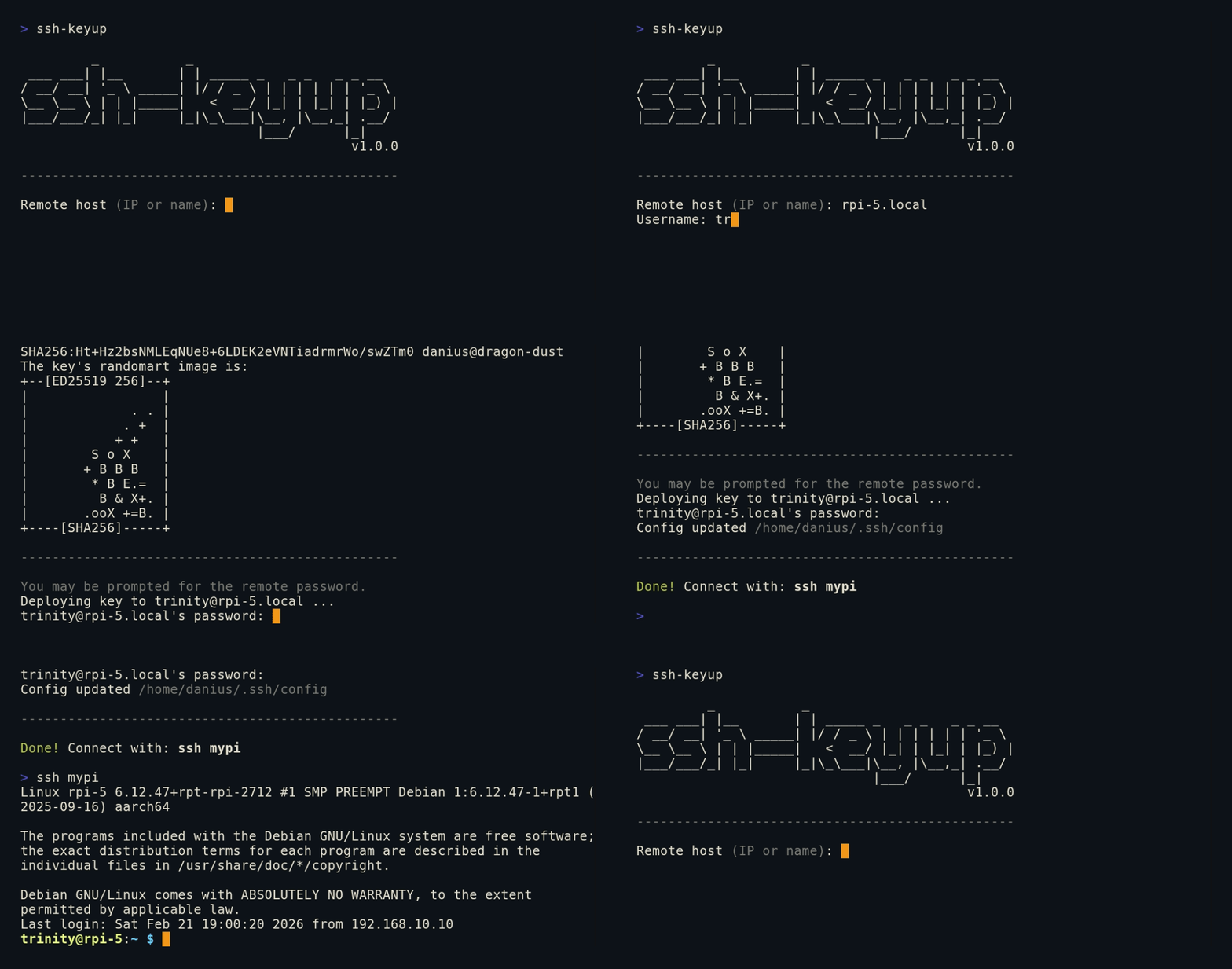
Tired of juggling ssh-keygen, ssh-copy-id (missing on Windows) and ~/.ssh/config edits every time you set up a new device? ssh-keyup handles all three in a single interactive session.
Quickstart
Install globally with pip:
pip install ssh-keyup

ssh-keyup   # ready to use anywhere
Or run directly without installing:
git clone https://github.com/Kurokesu/ssh-keyup.git
cd ssh-keyup
python ssh_keyup.py   # Windows
python3 ssh_keyup.py  # Linux
Follow the prompts, enter the remote password once and you're done.
SSH from terminal:
ssh mypi # no password, ever again
Or open VSCode Remote - SSH, your ~/.ssh/config is already set up. Press Ctrl+Shift+P, select Remote-SSH: Connect to Host, pick your alias and get a full IDE on your remote device, no password:

Skip the prompts by passing arguments:
ssh-keyup pi@192.168.1.23 mypi # user, host and alias in one go
Or configure a whole fleet:
for host in 192.168.1.10 192.168.1.11 192.168.1.12; do
  ssh-keyup pi@$host
done
Flags (--host, --user, --alias) work too, see ssh-keyup --help.
List or remove entries ssh-keyup manages:
ssh-keyup --list
ssh-keyup --remove mypi   # deletes its key pair too
Why?
# without ssh-keyup (repeat for every new device)
ssh-keygen -t ed25519 -N "" -f ~/.ssh/id_ed25519_rpi5
scp ~/.ssh/id_ed25519_rpi5.pub trinity@192.168.1.23:~/
ssh trinity@192.168.1.23 "mkdir -p ~/.ssh && chmod 700 ~/.ssh"
ssh trinity@192.168.1.23 "cat ~/id_ed25519_rpi5.pub >> ~/.ssh/authorized_keys && chmod 600 ~/.ssh/authorized_keys && rm ~/id_ed25519_rpi5.pub"
nano ~/.ssh/config # add Host entry manually
...

# with ssh-keyup
ssh-keyup
Prerequisites
Python 3.8+ and OpenSSH tools (ssh, ssh-keygen) must be in PATH.
- Windows 10/11: Install Python from python.org or the Microsoft Store. OpenSSH Client is included via Settings > Optional Features or ships with Git for Windows.
- Linux:
sudo apt install python3 openssh-client(usually pre-installed).
Features
- Generates a per-host Ed25519 key pair (
~/.ssh/id_ed25519_<alias>) - Deploys public key to remote host in a single SSH session, only one password prompt
- Never touches your password.
ssh-keyuponly pipes the public key and SSH handles password authentication directly through its own terminal - Adds a named entry to
~/.ssh/config, works instantly withssh <alias>and VSCode Remote SSH - Detects and recovers from host key mismatches (common after reflashing)
- Handles re-runs gracefully: reuses existing keys or offers regeneration, detects duplicate config entries
- Works with any device reachable over SSH: Raspberry Pi, NVIDIA Jetson, Orange Pi, VMs, servers
- Zero dependencies, Python 3.8+ standard library only
- Installs via
pipor runs as a single script
Project details
Verified details
These details have been verified by PyPIProject links
GitHub Statistics
Maintainers
Release history Release notifications | RSS feed


Download files
Download the file for your platform. If you're not sure which to choose, learn more about installing packages.
Source Distribution
Built Distribution
Filter files by name, interpreter, ABI, and platform.
If you're not sure about the file name format, learn more about wheel file names.
Copy a direct link to the current filters
File details
Details for the file ssh_keyup-1.1.0.tar.gz.
File metadata
- Download URL: ssh_keyup-1.1.0.tar.gz
- Upload date:
- Size: 23.3 kB
- Tags: Source
- Uploaded using Trusted Publishing? Yes
- Uploaded via: twine/6.1.0 CPython/3.13.14
File hashes
| Algorithm | Hash digest | |
|---|---|---|
| SHA256 |
afe78946b888f24035c1082141f5b4f982405559059220d078f8b78b3a9914f0
|
|
| MD5 |
a7faf40a6b6741c929f476a04df392c1
|
|
| BLAKE2b-256 |
89f19cda4f448e68f38f34686e80f916bf4edf78f2c066d6c5c62df5c4ea5e7f
|
Provenance
The following attestation bundles were made for ssh_keyup-1.1.0.tar.gz:
Publisher:
release.yml on Kurokesu/ssh-keyup
-
Statement:
-
Statement type:
https://in-toto.io/Statement/v1 -
Predicate type:
https://docs.pypi.org/attestations/publish/v1 -
Subject name:
ssh_keyup-1.1.0.tar.gz -
Subject digest:
afe78946b888f24035c1082141f5b4f982405559059220d078f8b78b3a9914f0 - Sigstore transparency entry: 2218813041
- Sigstore integration time:
-
Permalink:
Kurokesu/ssh-keyup@8acc21ec1c7fd97b2987b98fcb83dad705bb07a9 -
Branch / Tag:
refs/tags/v1.1.0 - Owner: https://github.com/Kurokesu
-
Access:
public
-
Token Issuer:
https://token.actions.githubusercontent.com -
Runner Environment:
github-hosted -
Publication workflow:
release.yml@8acc21ec1c7fd97b2987b98fcb83dad705bb07a9 -
Trigger Event:
push
-
Statement type:
File details
Details for the file ssh_keyup-1.1.0-py3-none-any.whl.
File metadata
- Download URL: ssh_keyup-1.1.0-py3-none-any.whl
- Upload date:
- Size: 23.8 kB
- Tags: Python 3
- Uploaded using Trusted Publishing? Yes
- Uploaded via: twine/6.1.0 CPython/3.13.14
File hashes
| Algorithm | Hash digest | |
|---|---|---|
| SHA256 |
0313997010592d72a5a0ce5c301f503f3f1e7d1ee93d7b52c0ad84cb81cf41be
|
|
| MD5 |
df70a02b9cb9bb2b16b499847e169ed4
|
|
| BLAKE2b-256 |
3fac10270d5719eb44fb70d9d0061d7759b8de7f64b30c358cc3070b038d7cd8
|
Provenance
The following attestation bundles were made for ssh_keyup-1.1.0-py3-none-any.whl:
Publisher:
release.yml on Kurokesu/ssh-keyup
-
Statement:
-
Statement type:
https://in-toto.io/Statement/v1 -
Predicate type:
https://docs.pypi.org/attestations/publish/v1 -
Subject name:
ssh_keyup-1.1.0-py3-none-any.whl -
Subject digest:
0313997010592d72a5a0ce5c301f503f3f1e7d1ee93d7b52c0ad84cb81cf41be - Sigstore transparency entry: 2218813101
- Sigstore integration time:
-
Permalink:
Kurokesu/ssh-keyup@8acc21ec1c7fd97b2987b98fcb83dad705bb07a9 -
Branch / Tag:
refs/tags/v1.1.0 - Owner: https://github.com/Kurokesu
-
Access:
public
-
Token Issuer:
https://token.actions.githubusercontent.com -
Runner Environment:
github-hosted -
Publication workflow:
release.yml@8acc21ec1c7fd97b2987b98fcb83dad705bb07a9 -
Trigger Event:
push
-
Statement type:






