
A local, encrypted password manager with a web UI.

Project description
sspwd – super secret password





A local, encrypted password manager with a built-in web UI.
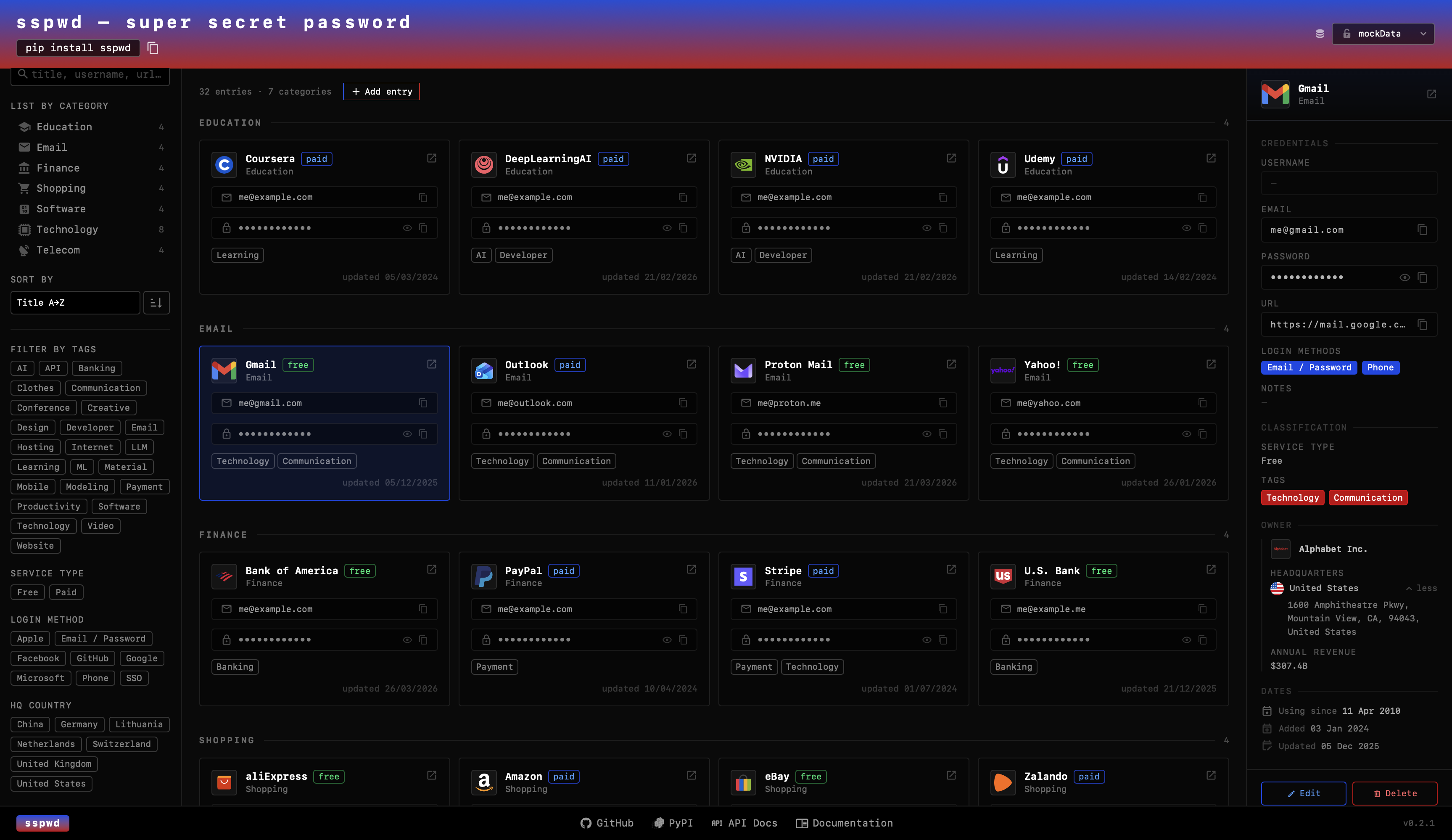
Passwords are stored in ~/.sspwd/default/vault.db — fully encrypted with a key
derived from your master password. Nothing leaves your machine.
Tech Stack
Backend
Python — package language
FastAPI — REST API for the web UI
SQLite — local encrypted vault database
Argon2id + AES-256-GCM — key derivation and authenticated encryption via
argon2-cffi+cryptographypytest — test suite with coverage reporting
Frontend
React — interactive UI
Vite — frontend build tool and dev server
TypeScript — type-safe components
Tailwind CSS — utility-first styling
Iconify — service and brand icons
CLI
Click — CLI commands (
serve,add,list,get,delete,projects)
Packaging
PyPI — distributed as an installable Python package
Installation
pip install sspwd
Requires Python ≥ 3.10.
Quick start
Web UI
sspwd serve
Opens http://127.0.0.1:7523 in your default browser. Enter your master
password when prompted (a new vault is created automatically on first run).
CLI
# Add an entry
sspwd add

# List all entries
sspwd list

# Search
sspwd list --search github

# Show a single entry (reveals password)
sspwd get 3

# Delete an entry
sspwd delete 3
Custom vault location
sspwd serve --vault-dir /path/to/my/vault
Security
| Detail | Value |
|---|---|
| Encryption | AES-256-GCM (authenticated — detects tampering via built-in auth tag) |
| Key derivation | Argon2id — memory-hard, OWASP 2024 recommended |
| Argon2id parameters | time=3, memory=64 MiB, parallelism=2 |
| Key size | 256-bit |
| Nonce | 12 bytes, random per encryption call (never reused) |
| Storage | SQLite (~/.sspwd/{project}/vault.db) |
| Key never stored | Derived in memory on unlock, discarded on server exit |
Vault files explained
| File | Purpose |
|---|---|
salt.bin |
32 random bytes, created once. Makes your key unique to this vault — the same password on two vaults produces two completely different keys. Not secret on its own. |
verify.bin |
A tiny AES-256-GCM encrypted file containing a known plaintext. Decrypted on every unlock to verify the master password immediately — wrong password → InvalidTag → 401, before any entry data is touched. |
vault.db |
SQLite database. All password and notes fields are AES-256-GCM encrypted. Titles and usernames are stored in plaintext for search. |
icons/ |
User-uploaded icon files, served locally. |
The master password is never stored anywhere. It is entered in the browser when unlocking a project, used to derive the key via Argon2id, and the key lives only in process memory for the lifetime of the server session.
Development
git clone https://github.com/yauheniya-ai/sspwd
cd sspwd/pypi

# Install in editable mode with dev extras
pip install -e ".[dev]"

# Run tests
pytest

# Lint
ruff check src tests
Building the React UI
cd ../frontend
npm install
npm run build
# Copy dist/ into pypi/src/sspwd/ui/static/
cp -r dist/* ../pypi/src/sspwd/ui/static/
License
MIT — see LICENSE.
Release history Release notifications | RSS feed


Download files
Download the file for your platform. If you're not sure which to choose, learn more about installing packages.
Source Distribution
Built Distribution
Filter files by name, interpreter, ABI, and platform.
If you're not sure about the file name format, learn more about wheel file names.
Copy a direct link to the current filters
File details
Details for the file sspwd-0.2.0.tar.gz.
File metadata
- Download URL: sspwd-0.2.0.tar.gz
- Upload date:
- Size: 260.6 kB
- Tags: Source
- Uploaded using Trusted Publishing? No
- Uploaded via: twine/6.2.0 CPython/3.10.11
File hashes
| Algorithm | Hash digest | |
|---|---|---|
| SHA256 |
524910a1fd3750b540386964df985544a6b28d0f7ac068cba2a7b1d40a06ce4d
|
|
| MD5 |
5728d3fc7d7bea647e56066d2e5e553c
|
|
| BLAKE2b-256 |
d9271ec924652607f63c6e8c6e594b85d284370211f3d82944a68e1334d29604
|
File details
Details for the file sspwd-0.2.0-py3-none-any.whl.
File metadata
- Download URL: sspwd-0.2.0-py3-none-any.whl
- Upload date:
- Size: 250.8 kB
- Tags: Python 3
- Uploaded using Trusted Publishing? No
- Uploaded via: twine/6.2.0 CPython/3.10.11
File hashes
| Algorithm | Hash digest | |
|---|---|---|
| SHA256 |
f30181d1e83b2ee6baeed1ebc3f7f8e5361e4a1df7d88dece758b90f6b42e034
|
|
| MD5 |
2bb3e0305bb9afad8dd2c10890f71bdf
|
|
| BLAKE2b-256 |
c54116ae3a11df8354ae91f0006ab5da4cba6935f6b834b975c8216565896201
|






