
A local, encrypted password manager with a web UI.

Project description
sspwd – super secret password






A local, encrypted password manager with a built-in web UI.
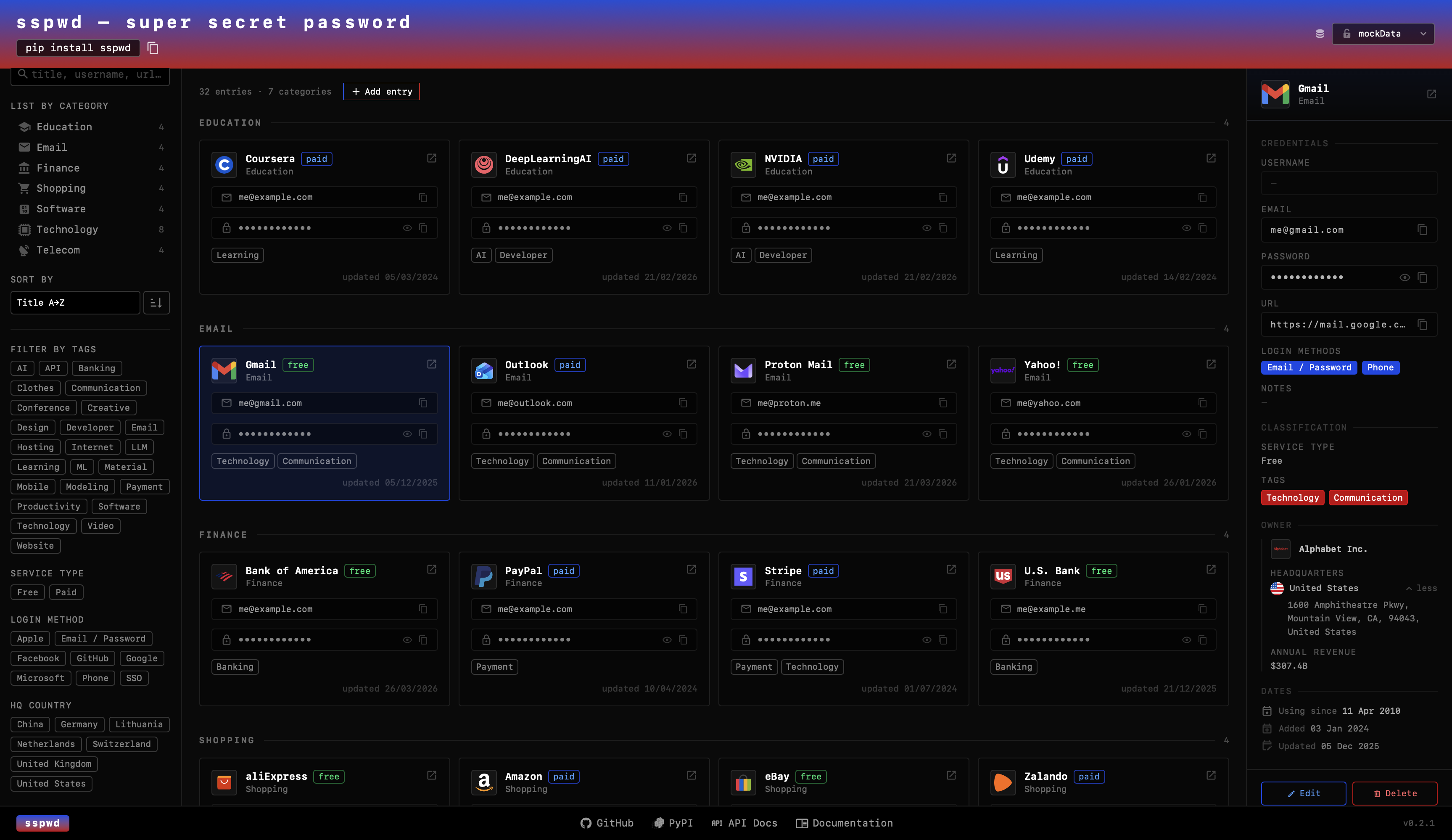
Passwords are stored in ~/.sspwd/default/vault.db — fully encrypted with a key
derived from your master password. Nothing leaves your machine.
Tech Stack
Backend
Python — package language
FastAPI — REST API for the web UI
SQLite — local encrypted vault database
Argon2id + AES-256-GCM — key derivation and authenticated encryption
pytest — test suite with coverage reporting
Frontend
React — interactive UI
Vite — frontend build tool and dev server
TypeScript — type-safe components
Tailwind CSS — utility-first styling
Iconify — service and brand icons
CLI
Click — CLI commands (
serve,add,list,get,delete,projects)
Packaging
PyPI — distributed as an installable Python package
Installation
pip install sspwd
Requires Python ≥ 3.10.
Alternatively, to install sspwd as a global CLI tool in an isolated environment, use pipx:
brew install pipx && pipx ensurepath && pipx install sspwd
Restart your terminal or run source ~/.zshrc, then use sspwd.
Quick start
Web UI
sspwd serve
Opens http://127.0.0.1:7523 in your browser — no password required at startup. The UI launches in demo mode (mockData). Select a project from the dropdown to unlock it with its master password, or create a new one.
mockData        ← demo data, no password needed
default    🔒   ← click to unlock with master password
work       🔒   ← separate encrypted vault
+ new           ← create a new project
CLI
# Start the server (opens browser automatically)
sspwd serve

# Start without opening the browser
sspwd serve --no-browser

# Work with a specific project
sspwd add --project work
sspwd list --project work
sspwd list --project work --search github

# Show a single entry by ID (reveals password)
sspwd get 3 --project work

# Delete an entry
sspwd delete 3 --project work

# List all existing projects
sspwd projects

# Change master password
sspwd change-password --project demo
All CLI commands that access a vault will prompt for the master password.
How it works
flowchart TD
    A([sspwd serve]) --> B[FastAPI server starts ➜ opens UI]

    B --> D{Select<br>a project}

    D -->|New project| E[Enter name + set master password]
    D -->|Existing project| F[Enter master password]

    E --> G[Argon2id derives 256-bit key from password + salt]
    F --> G

    G --> H{verify.bin<br>decryption}
    H -->|InvalidTag| I[Wrong password ➜ 401 Unauthorized]
    H -->|OK| J[Project unlocked ➜ entries loaded]

    J --> L{Action}

    L -->|Add / Edit| M[AES-256-GCM encrypt password + notes]
    M --> N[(~/.sspwd/project/vault.db )]

    L -->|Delete| N
    L -->|Upload icon| O[(~/.sspwd/project/icons/)]

    N --> P[Key discarded on server exit]
    O --> P
Projects
Each project is a completely isolated, separately encrypted vault:
~/.sspwd/
├── default/          ← created automatically on first use
│   ├── vault.db      ← encrypted entries
│   ├── salt.bin      ← 32-byte random salt (unique per project)
│   ├── verify.bin    ← encrypted sentinel for password verification
│   └── icons/        ← uploaded custom icons
├── work/
│   └── ...
└── private/
    └── ...
Projects can have different master passwords. Switching between them in the UI prompts for the relevant password only once per server session.
Security
| Detail | Value |
|---|---|
| Encryption | AES-256-GCM (authenticated — detects tampering via built-in auth tag) |
| Key derivation | Argon2id — memory-hard, OWASP 2025 recommended |
| Argon2id parameters | time=3, memory=64 MiB, parallelism=2 |
| Key size | 256-bit |
| Nonce | 12 bytes, random per encryption call, never reused |
| Storage | SQLite (~/.sspwd/{project}/vault.db) |
| Key never stored | Derived in memory on unlock, discarded on server exit |
Vault files explained
| File | Purpose |
|---|---|
salt.bin |
32 random bytes, generated once at vault creation. Makes your key unique to this vault — the same password on two vaults produces two completely different keys. Not a secret on its own. |
verify.bin |
A tiny AES-256-GCM encrypted blob containing a known plaintext. Decrypted on every unlock attempt — wrong password raises InvalidTag immediately, before any entry data is touched. |
vault.db |
SQLite database. password and notes fields are AES-256-GCM encrypted. Titles and usernames are stored in plaintext to support search. |
icons/ |
User-uploaded icon files (PNG, SVG, WEBP), served locally by the FastAPI server. |
The master password is never stored anywhere. It is entered in the browser UI, used to derive the AES key via Argon2id, and the key lives only in process memory for the lifetime of the server session. Stopping sspwd serve discards it.
Backup: Your vault is local only — there is no sync. Back it up with:
rsync -av ~/.sspwd/ ~/path/to/backup/
How sspwd compares
| sspwd | Browser (Safari/Chrome) | 1Password / Bitwarden | macOS Keychain | |
|---|---|---|---|---|
| Local-only | ✅ | ❌ cloud sync | ❌ cloud sync | ✅ |
| Open source | ✅ | ❌ | Bitwarden ✅ | ❌ |
| Audit the encryption source code | ✅ | ❌ | Bitwarden ✅ | ❌ |
| No account needed | ✅ | ❌ | ❌ | ✅ |
| Project / workspace isolation | ✅ | ❌ | ❌ | ❌ |
| Tags, categories, metadata | ✅ | ❌ | partial | ❌ |
| Custom icons | ✅ | ❌ | ✅ | ❌ |
| Browser autofill extension | ❌ | ✅ | ✅ | ✅ |
| Mobile / cross-device | planned | ✅ | ✅ | ✅ macOS/iOS |
Browser managers (Safari Keychain, Chrome Passwords) sync to Apple/Google servers by default. Even with strong client-side encryption, you are trusting a corporation's infrastructure, account security, and update pipeline. Their browser extension autofill is also a real attack surface — extensions request access to read and modify all pages, making a compromised extension a universal credential harvester. In comparison, the copy-paste method is more deliberate and phishing-resistant.
1Password / Bitwarden are the closest conceptual relatives — master password, local encryption, structured entries. Bitwarden is open-source and self-hostable. Their advantage is cross-device sync and mobile apps; their disadvantage is mandatory account setup, cloud dependency (unless self-hosted), and no project isolation without a paid Teams plan.
macOS Keychain is local and OS-integrated but has no organisational structure, no web UI, is macOS-only, and is difficult to export or script against.
sspwd's advantage is zero setup, zero accounts, zero cloud, and the ability to keep personal, work, and project credentials in cleanly separated encrypted vaults — with a searchable, filterable UI accessible from any browser on localhost.
Contributing
- Fork the repository
- Create a feature branch (
git checkout -b feature/my-change) - Make your changes
- Run the test suite:
pytest --cov=src --cov-report=term-missing - Submit a pull request
License
MIT — see LICENSE.
Release history Release notifications | RSS feed


Download files
Download the file for your platform. If you're not sure which to choose, learn more about installing packages.
Source Distribution
Built Distribution
Filter files by name, interpreter, ABI, and platform.
If you're not sure about the file name format, learn more about wheel file names.
Copy a direct link to the current filters
File details
Details for the file sspwd-0.2.10.tar.gz.
File metadata
- Download URL: sspwd-0.2.10.tar.gz
- Upload date:
- Size: 255.4 kB
- Tags: Source
- Uploaded using Trusted Publishing? No
- Uploaded via: twine/6.2.0 CPython/3.10.11
File hashes
| Algorithm | Hash digest | |
|---|---|---|
| SHA256 |
bcc78984bd7364624df8915030af5b254031387539f45e06315365bc8deb7754
|
|
| MD5 |
e966c656e82d2f931b76c0dfe95f24a3
|
|
| BLAKE2b-256 |
30f74e2d3ccebe4c513965a179114f749bb193cc42588122e9ccf18db16c3f94
|
File details
Details for the file sspwd-0.2.10-py3-none-any.whl.
File metadata
- Download URL: sspwd-0.2.10-py3-none-any.whl
- Upload date:
- Size: 238.5 kB
- Tags: Python 3
- Uploaded using Trusted Publishing? No
- Uploaded via: twine/6.2.0 CPython/3.10.11
File hashes
| Algorithm | Hash digest | |
|---|---|---|
| SHA256 |
44d5f3bc9dc3b9e2d929d15387947a60315a4e26858fae204a9400c5079bfd91
|
|
| MD5 |
4f77fdc3af884016071355b9f16a39f5
|
|
| BLAKE2b-256 |
a16427b6c16646d13b4ebf063b83146a4ce4b7cf6b2805d0bb05fc5bb173ea46
|






