




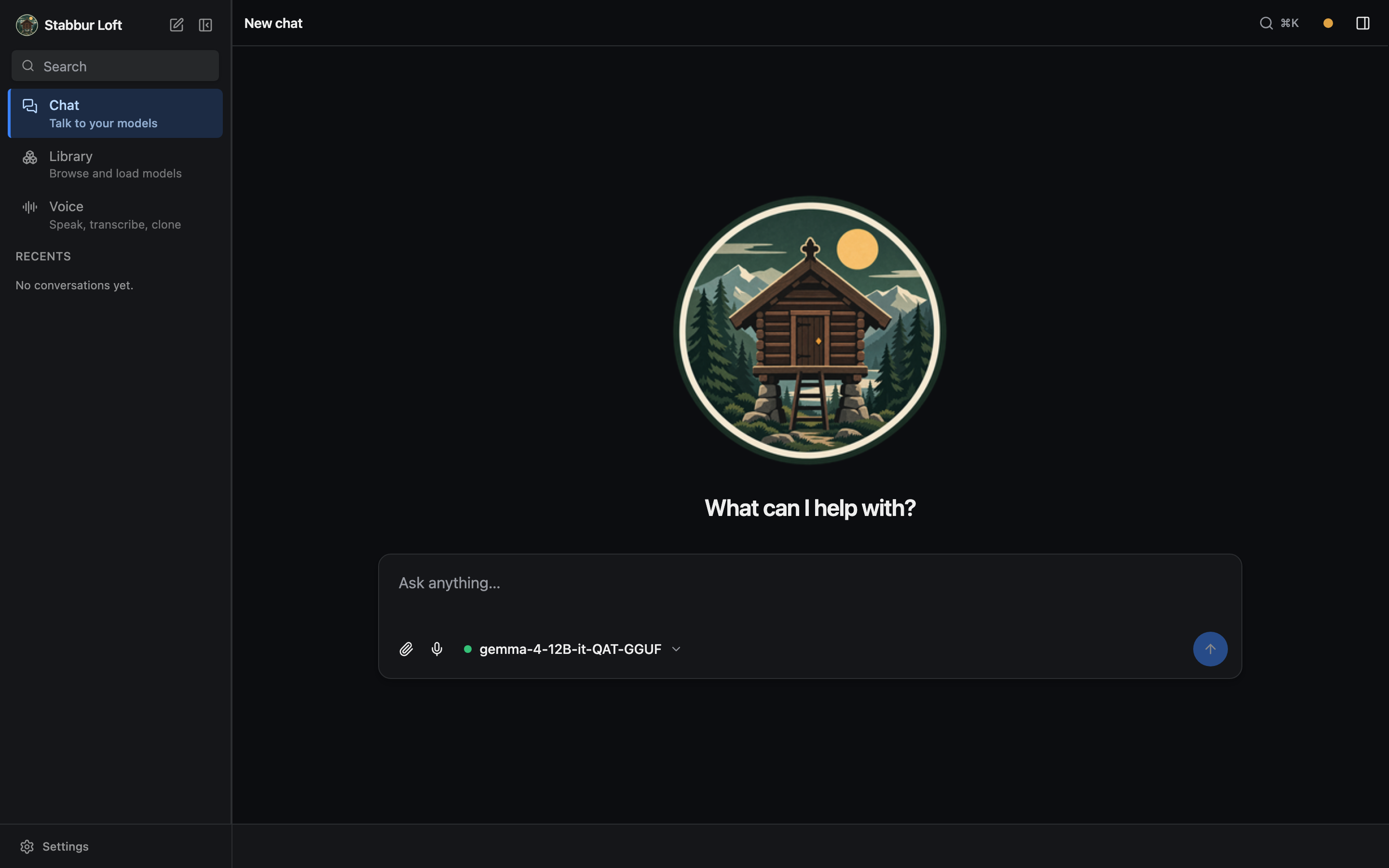
A tool for building and keeping a full local library of LLM models. It discovers models from Hugging Face, Ollama, and LM Studio, pulls them into a single library (browse via a Typer CLI or a browser chat UI), and runs them from there. The library lives under one configurable root you point at an external drive (e.g. a 5TB drive).
sb is stabbur. Both names run the same app — sb chat is stabbur chat. These docs
use the short form throughout; use whichever you prefer.
The name. A stabbur is the Norwegian storehouse — raised on pillars, off the ground and out of the damp, where a household kept what it had gathered and wanted to keep. That is what this is: your models, pulled in from wherever they came from and kept somewhere of your own, on your own box, rather than in someone else's cloud.
The web UI is the Loft — the storehouse's upper floor, reached by its own ladder, where what was worth keeping was actually kept and looked over. The CLI fills the store; the loft is where you go in and use it.
Source-available, not open-source. Copyright (c) 2026 Morten Hansen (see
LICENSE). You may run and evaluate it freely on your own hardware — that is why it is on PyPI. Redistributing it, hosting it as a service, or building a commercial product on it needs written permission: contact morten@winterop.com.
Layout
src/stabbur/
├── config.py          # Pydantic settings (STABBUR_* env vars)
├── models.py          # Catalog / entry / result models
├── catalog.py         # Aggregates listing + pull across sources
├── library.py         # Scans the on-drive library (gguf/ mlx/ voice/ ...)
├── capabilities.py    # Detects per-model tools/vision/audio + context
├── runtime.py         # Serves a model (llama.cpp / mlx_lm / mlx-vlm)
├── voice/             # Voice models: registry, import, TTS/STT runtime
├── cli/              # Typer CLI package, one module per command group (entry: `stabbur` → stabbur.cli:main)
├── app.py             # FastAPI app factory
├── routers/           # health + catalog (browse/pull) + serving (load/chat/audio) endpoints
└── sources/           # huggingface / ollama / lmstudio adapters
Setup
uv sync                       # stabbur itself (needs Python 3.13 + uv)
brew install llama.cpp        # baseline runtime: GGUF chat (build from source on Linux)
make install-mlx              # optional: MLX runtimes (Apple Silicon)
uv sync --extra voice         # optional: mlx-audio voice runtimes (Apple Silicon)
make frontend                 # optional: build the web UI (needs Bun)
export STABBUR_LIBRARY_ROOT=/path/to/your/library   # required: where your library lives
sb doctor                   # verify what's installed
Point stabbur at a library. stabbur won't guess a location — set STABBUR_LIBRARY_ROOT
(a per-machine shell/.env value; an external drive is the intended home). Without
it, library commands fail with a clear message instead of silently using ./data.
Install globally (run stabbur from any directory):
uv tool install --editable ".[mlx,voice,web,benchmark]"   # from a checkout: stabbur on your PATH, code edits live
uv tool install "git+https://github.com/winterop-com/stabbur" # or straight from git (requires repo access; core CLI)
# then put STABBUR_LIBRARY_ROOT in your shell profile (~/.zshrc) so it applies everywhere
Only uv sync + llama.cpp are needed to run GGUF models; the rest are optional.
The benchmark extra adds the sb benchmark eval command; drop it if you don't need it.
See getting started for details.
stabbur ships as a single self-contained wheel — the bundled first-party MCP servers are vendored
into the stabbur package (src/stabbur/mcp_servers/*) rather than published alongside it — so
there is nothing else to install.
CLI
sb library ls                     # your library (the models on your drive)
sb library sources                # models in app caches (HF/Ollama/LM Studio) you could pull
sb library pull lmstudio lmstudio-community/gemma-4-12B-it-QAT-GGUF
sb library pull ollama gemma4:31b --move   # copy to the library, then delete the local copy
sb doctor                         # pre-flight: runtimes, library, project
sb serve --ui                     # browse + chat in the browser (Chat · Voice · Library)
sb chat gemma-4-12B-it-QAT-GGUF -p "hi"             # one-shot, scriptable
sb chat gemma-4-12B-it-QAT-GGUF -p "?" -i pic.jpg   # image input (vision model)
sb voice ls                       # voice models (TTS/STT) in the library
sb voice import --all             # import known voice models to the library
sb voice speak -v af_heart "hello there"           # text-to-speech (Kokoro)
sb voice speak --model voxcpm2 --instruct "a calm older man" "hi there"  # design a voice
sb init mybot                     # scaffold a self-contained project assistant
sb configure                      # (in a project) change its model, tools, voice, library
Two model families: Chat (language models you talk to — text in/out; some
also read images/audio or call tools) and Voice (TTS speaks, STT transcribes).
stabbur detects each chat model's capabilities and runs the right runtime — GGUF via
llama.cpp (llama-server, --mmproj for vision/audio), MLX via mlx_lm/mlx-vlm.
The web UI's Library lists both families; the Voice studio does TTS/STT
(Kokoro, VoxCPM2 with voice design + cloning, Whisper); in chat you can attach images/audio,
dictate with the mic (Whisper), and read replies aloud (Kokoro by default). See
the voice guide.
Full docs: docs/ (run make docs to serve the site locally) —
getting started, the library, pulling, running & chatting, the web UI, the Chrome side panel,
the DHIS2 assistant, and the architecture.
Models on another box
You don't need the weights on the machine you're sitting at. Point stabbur at any
OpenAI-compatible /v1 — a llama-server in router mode on a workstation, an LM Studio
server, anything that speaks the protocol:
sb serve --ui --upstream http://gpu-box:8080/v1   # web UI here, models there
sb chat --server http://gpu-box:8080/v1           # same, from the terminal
The agent loop, tools, confirm gate, chat history, and UI all run locally; only generation is remote. Both prefer whatever model the remote already has loaded, so attaching never evicts it — useful when the far end holds one model at a time.
Several at once. --upstream is repeatable, and your local library is listed alongside the
remotes, so the picker shows everything you can reach from one place. Names are derived from the
host (http://gpu-box:8080/v1 becomes gpu-box); declare them yourself with [[backends]] in the
machine config when you want your own. A backend that is unreachable shows as one row saying so
rather than failing the whole list.
API
sb serve exposes an OpenAI-compatible surface plus browse/voice endpoints:
/api/status, /api/library, /api/voice, /api/chat (tool-aware SSE),
/v1/* (proxied to the loaded model), and /v1/audio/speech +
/v1/audio/transcriptions. See the web UI guide for the
full endpoint table and the single-origin proxy design.
Chrome side panel & the DHIS2 assistant
stabbur ships an MV3 Chrome side panel (extension/, built with WXT) — a thin client for
a local or remote sb serve that puts your own model + tools next to any page. It builds
in two flavors from one codebase: the generic stabbur panel and stabbur for DHIS2
(STABBUR_FLAVOR=dhis2).
Pointed at a DHIS2 project (sb init mydhis2 --template dhis2), it becomes the north-star
assistant: chat grounded in the page you are viewing, a target banner (verify + tab
match/mismatch), and "Use my login" — mint a read-only, GET-scoped Personal Access Token
in the DHIS2 tab's own security context and hand it to stabbur once, so the tools act as you
(with a session-cookie fallback). Everything runs against your own local model; nothing
leaves the box.
cd extension && bun install && bun run build          # -> extension/.output/chrome-mv3(-dhis2)
# chrome://extensions -> Load unpacked -> the built dir; then `sb serve` and open the panel
See the Chrome side panel guide and the verified prompt catalog.
Configuration
Two separate concepts:
-
The library location — where your models live. Set
STABBUR_LIBRARY_ROOT(a per-machine value; shell profile or.env). stabbur requires it — without one, library/chat/serve commands fail with a clear message rather than silently using a local folder. An external drive is the intended home:export STABBUR_LIBRARY_ROOT=/path/to/your/library # e.g. a mounted external drive
-
A project (
stabbur.toml, viasb init <dir>) — a purpose-built assistant:[project].model+system_prompt, with tools in a sibling.mcp.json(standardmcpServers). In a project — or any subdirectory of one, since the manifest is found by walking up likegitfinds.git—sb serve/sb chatbind to that model (like--model, with its tools + prompt); outside a project it's free-play (pick/switch any model). A project uses the machine library by default.
Precedence (high → low): CLI flags, STABBUR_* env vars, stabbur.toml, .env,
~/.config/stabbur/config.toml (machine defaults).
| Key / env var | Purpose |
|---|---|
STABBUR_LIBRARY_ROOT (or library_root) |
the library location (required) |
STABBUR_OLLAMA_MODELS_DIR, STABBUR_LMSTUDIO_MODELS_DIR |
source caches to pull from |
STABBUR_HF_TOKEN |
HF token (uses your HF login if unset) |
STABBUR_DEFAULT_MAX_TOKENS (or default_max_tokens) |
per-turn /api/chat generation cap (default 4096; 0 = unbounded) |
Develop
Work on a <type>/<short-description> branch and land it through a pull request — main is
public and published from (a tag on it ships to PyPI, and this README is the PyPI project page),
so nothing goes straight there. Merge a PR once its checks are green rather than letting them
queue: branches that wait drift, and stacked branches turn one conflict into several.
make lint    # ruff format + check, mypy, pyright (mutates)
make check   # same, read-only (CI gate) + tests
make test    # pytest
make build   # uv build (wheel + sdist)
1 maintainer

Metadata
1 maintainer
Release files for stabbur 0.11.0
For a detailed explanation of source distributions (sdists) and built distributions (wheels), please see the package formats documentation.
Source distribution (sdist)
| File | Size | Uploaded | |
|---|---|---|---|
| stabbur-0.11.0.tar.gz | 2.5 MB | Details |
Built distribution (wheel)
| File | Interpreter | ABI | Platform | Reset |
|---|---|---|---|---|
| stabbur-0.11.0-py3-none-any.whl | Python 3 | none | any | Details |
Total release size: 5.1 MB
Release files / stabbur-0.11.0.tar.gz
| Download URL | stabbur-0.11.0.tar.gz |
|---|---|
| Size | 2.5 MB |
| Tags | Source |
|
SHA-256 checksum How to use checksums |
ea1737f92abfe57fa49402901a764da8e9bbd116979e126bc1fb770cbce61e24
|
|
BLAKE2b-256 checksum How to use checksums |
087efec9cc90307d2316270c4187d0f61d95ca670bfd54324c66441c3985dc06
|
| Upload date | |
|
Uploaded using Trusted Publishing? What is trusted publishing? |
Yes |
| Uploaded via |
twine/7.0.0 CPython/3.13.14
|
Provenance
Provenance describes where a file came from. On PyPI, provenance is shared via attestations, which provide a verifiable record of the build or publishing details. View details, limitations and caveats.


PyPI Publish Attestation
PyPI verified that this artifact, at this checksum, originated from the publisher listed below.
Signed by GitHub Actions, verified by PyPI on Sep 2, 2026.
Transparency logRelease files / stabbur-0.11.0-py3-none-any.whl
| Download URL | stabbur-0.11.0-py3-none-any.whl |
|---|---|
| Size | 2.6 MB |
| Tags | Python 3 |
|
SHA-256 checksum How to use checksums |
569c48a40629f5c4d08ac2e73e64eeedc489abd69b9ecfdf501ffde436228467
|
|
BLAKE2b-256 checksum How to use checksums |
6f9a28a31a0e2188f8f9777ad01c43a1a4ca9ade4605342dc3fc7332b63332d1
|
| Upload date | |
|
Uploaded using Trusted Publishing? What is trusted publishing? |
Yes |
| Uploaded via |
twine/7.0.0 CPython/3.13.14
|
Provenance
Provenance describes where a file came from. On PyPI, provenance is shared via attestations, which provide a verifiable record of the build or publishing details. View details, limitations and caveats.
PyPI Publish Attestation
PyPI verified that this artifact, at this checksum, originated from the publisher listed below.
Signed by GitHub Actions, verified by PyPI on Sep 2, 2026.
Transparency log













