
StableI2I
Official implementation of StableI2I: Spotting Unintended Changes in Image-to-Image Transition (ICML 2026)
Questions: lijiayang.cs@gmail.com · looking forward to your ⭐





📌 TODOs
- release code
- release ckpt
- release pip-pkg (PyPI)
- release arxiv
- ICML version paper
Overview
Most image-to-image (I2I) evaluations focus on instruction following and perceptual quality. They rarely check whether the output still preserves the semantic correspondence and spatial structure of the input. StableI2I is a unified evaluation framework for content fidelity and pre–post consistency across editing and restoration, without requiring a reference image.
Evaluation prompts are bundled in the Python package. Callers only pass the input image, output image, and task prompt.
Install
pip install stablei2i
The runtime matches Qwen3-VL (transformers>=4.57.0). From source:
git clone https://github.com/Henry-Lee-real/StableI2I.git
cd StableI2I
pip install -e .
Checkpoints
| Checkpoint | Use when |
|---|---|
lijiayangCS/StableI2I_PLUS |
Numeric fidelity score (mode="score"), online RL reward |
lijiayangCS/StableI2I |
Fine-grained semantic / structure / low-level diagnosis (mode="simple" or "cot") |
StableI2I defaults to lijiayangCS/StableI2I_PLUS. You can also pass a local folder.
Quick Start
Load the judge once, then reuse it.
from stablei2i import StableI2I

judge = StableI2I(model="lijiayangCS/StableI2I_PLUS")  # or a local ckpt path
Images may be a file path, PIL.Image, numpy array, or torch.Tensor.
Single pair
result = judge.evaluate(
    input_image="before.png",
    output_image="after.png",
    prompt="Add a wooden bench along the path.",
    mode="cot",  # simple | cot | score, or a list of them
    dimensions="semantic,structure,lowlevel",
)
print(result["result"])
JSONL batch
Each line needs id, input_image, output_image. prompt is optional. Aliases before_image / after_image are accepted.
{"id":"case-1","input_image":"example/000155856.jpg","output_image":"example/000155856_dup2.png","prompt":"Add a wooden bench along the path."}
rows = judge.evaluate_jsonl(
    "test_jsonl/sample.jsonl",
    output_jsonl="outputs/results.jsonl",
    mode="cot",
)
Online evaluation / RL
Keep one StableI2I in the training process and score in-memory images. score mode returns 0–10; normalize=True maps it to [0, 1].
reward = judge.reward(src_image, gen_image, prompt, normalize=True)
reward_fn = judge.as_reward_fn(normalize=True)  # (input, output, prompt) -> float

# GRPO / custom loop
r = reward_fn(src_image, gen_image, task_prompt)
For training, disable forced CuDNN determinism:
judge = StableI2I(model="lijiayangCS/StableI2I_PLUS", deterministic=False, gpu_id=0)
CLI
# single pair
stablei2i \
  --input-image before.png \
  --output-image after.png \
  --prompt "Restore the image." \
  --mode score \
  --ckpt lijiayangCS/StableI2I_PLUS

# jsonl
stablei2i \
  --jsonl test_jsonl/sample.jsonl \
  --ckpt lijiayangCS/StableI2I_PLUS \
  --mode cot \
  --dimensions semantic,structure,lowlevel \
  --output-jsonl outputs/results.jsonl
python test.py ... is the same entry as stablei2i. Full flags, JSONL rules, and output schemas: infer.md.
Modes
| Mode | What it runs | Typical output |
|---|---|---|
simple |
Semantic / structure / low-level branches | { "Semantic": ..., "Structure": ..., "Low-Level": ... } |
cot |
Main branches + follow-up reasoning when an issue is flagged | Adds Semantic_think / Low-Level_think |
score |
Fidelity score 0–10 | { "Score": { "score": 8 } } |
Pass several modes at once (--mode simple,cot,score) to group results by mode name.
Web Demo
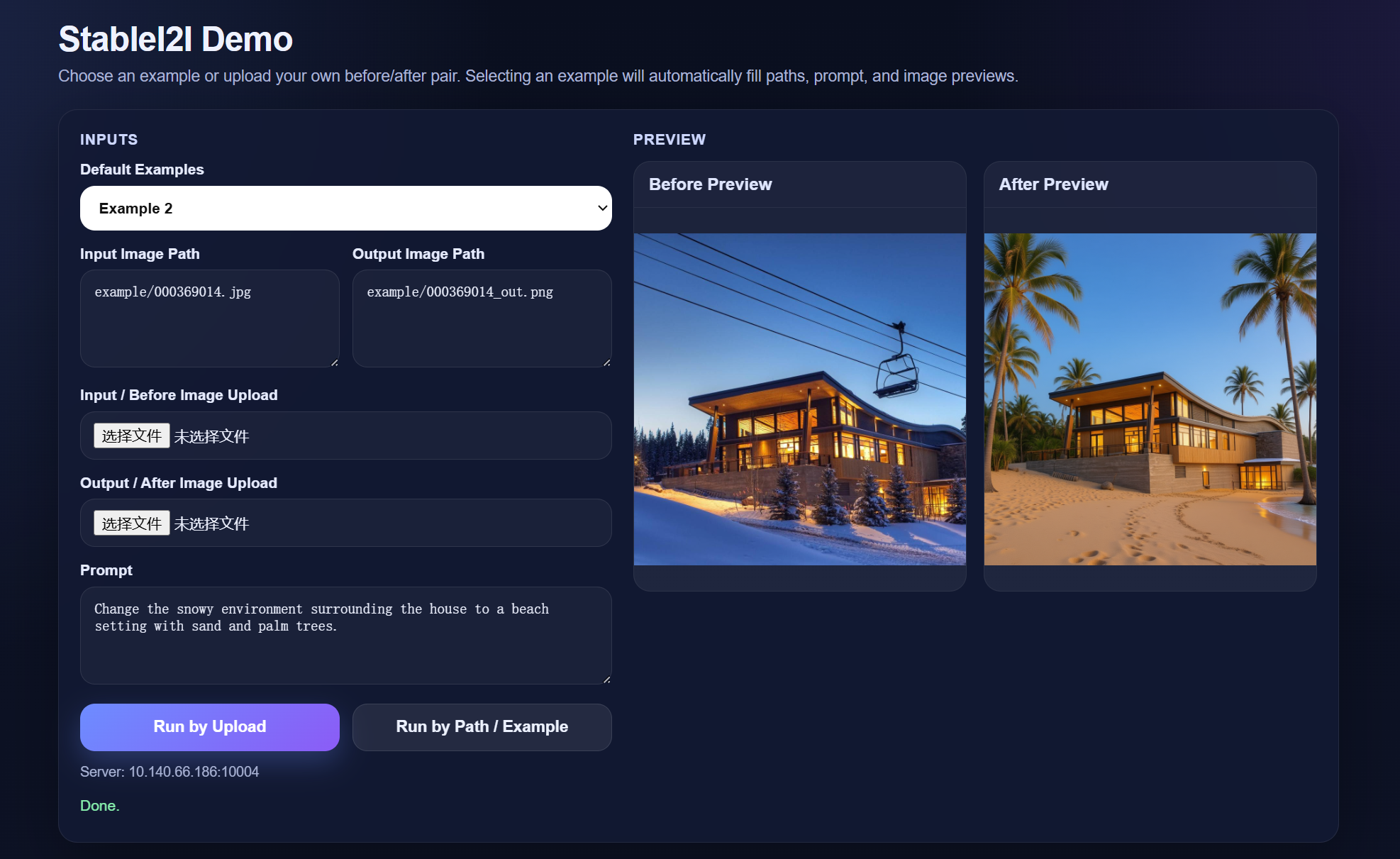
app.py starts a FastAPI UI (built-in examples, local path, upload).
export MODEL_PATH=path/to/ckpt
export GPU_ID=0
export HOST=127.0.0.1
export PORT=10004
python app.py
Then open http://127.0.0.1:10004
Training
- SFT: official Qwen3-VL finetuning
- GRPO / alignment: ms-swift, using
StableI2I.as_reward_fn()as the online fidelity reward
Citation
@article{li2026stablei2i,
  title={StableI2I: Spotting Unintended Changes in Image-to-Image Transition},
  author={Li, Jiayang and Cao, Shuo and Li, Xiaohui and Zhang, Zhizhen and Zhu, Kaiwen and Duan, Yule and Qiao, Yu and Zhang, Jian and Liu, Yihao},
  journal={arXiv preprint arXiv:2605.04453},
  year={2026}
}
1 maintainer

Metadata
1 maintainer
Release files for stablei2i 0.1.1
For a detailed explanation of source distributions (sdists) and built distributions (wheels), please see the package formats documentation.
Source distribution (sdist)
| File | Size | Uploaded | |
|---|---|---|---|
| stablei2i-0.1.1.tar.gz | 24.6 kB | Details |
Built distribution (wheel)
| File | Interpreter | ABI | Platform | Reset |
|---|---|---|---|---|
| stablei2i-0.1.1-py3-none-any.whl | Python 3 | none | any | Details |
Total release size: 48.9 kB
Release files / stablei2i-0.1.1.tar.gz
| Download URL | stablei2i-0.1.1.tar.gz |
|---|---|
| Size | 24.6 kB |
| Tags | Source |
|
SHA-256 checksum How to use checksums |
5c2b6cd17236ddcbc1c1cbbfcaf151593b4d5e9e1579dd2f6700cddc031db002
|
|
BLAKE2b-256 checksum How to use checksums |
e68c02016ab2ae8b0f8d71f8a275a2bd0ef1836e25f204f6532a0c29094c9f85
|
| Upload date | |
|
Uploaded using Trusted Publishing? What is trusted publishing? |
No |
| Uploaded via |
twine/6.2.0 CPython/3.9.6
|
Release files / stablei2i-0.1.1-py3-none-any.whl
| Download URL | stablei2i-0.1.1-py3-none-any.whl |
|---|---|
| Size | 24.2 kB |
| Tags | Python 3 |
|
SHA-256 checksum How to use checksums |
458fb70e15d3ff66316eeafa98e03c7f0f3ce234f6462beceb9ce1826869472a
|
|
BLAKE2b-256 checksum How to use checksums |
2f05f1621e1c8d40163a952dbe20b62474cade9f99d0de50d7456101a1d4d7f0
|
| Upload date | |
|
Uploaded using Trusted Publishing? What is trusted publishing? |
No |
| Uploaded via |
twine/6.2.0 CPython/3.9.6
|














