
StableI2I
Official implementation of StableI2I: Spotting Unintended Changes in Image-to-Image Transition (ICML 2026)
Any questions can be consulted -> (Email:lijiayang.cs@gmail.com)
Looking forward to your ⭐!
📌 TODOs
- release code
- release ckpt
- release pip-pkg
- release arxiv
- ICML version paper




Core Concept:
In most real-world image-to-image (I2I) scenarios, existing evaluations primarily focus on instruction following and the perceptual quality or aesthetics of the generated images. However, they largely fail to assess whether the output image preserves the semantic correspondence and spatial structure of the input image. To address this limitation, we propose StableI2I, a unified and dynamic evaluation framework that explicitly measures content fidelity and pre--post consistency across a wide range of I2I tasks without requiring reference images, including image editing and image restoration. In addition, we construct StableI2I-Bench, a benchmark designed to systematically evaluate the accuracy of MLLMs on such fidelity and consistency assessment tasks. Extensive experimental results demonstrate that StableI2I provides accurate, fine-grained, and interpretable evaluations of content fidelity and consistency, with strong correlations to human subjective judgments. Our framework serves as a practical and reliable evaluation tool for diagnosing content consistency and benchmarking model performance in real-world I2I systems.
Python Package
Install from PyPI:
pip install stablei2i
From source:
pip install -e .
# or
pip install git+https://github.com/Henry-Lee-real/StableI2I.git
The evaluation prompt templates are bundled in the package. Callers only pass the input image, output image, and task prompt.
Load the judge once, then reuse it for single-pair eval, JSONL eval, or online RL rewards:
from stablei2i import StableI2I

judge = StableI2I(model="lijiayangCS/StableI2I_PLUS")  # or a local ckpt path

# single pair (path / PIL / numpy / torch tensor)
result = judge.evaluate(
    input_image="before.png",
    output_image="after.png",
    prompt="Add a wooden bench along the path.",
    mode="cot",  # simple | cot | score
)

# jsonl batch
rows = judge.evaluate_jsonl("test_jsonl/sample.jsonl", output_jsonl="outputs/results.jsonl")

# online RL reward: 0-10 by default, or normalize to [0, 1]
reward = judge.reward(before, after, prompt, normalize=True)
reward_fn = judge.as_reward_fn(normalize=True)  # callable(input, output, prompt) -> float
CLI (same interface as test.py):
stablei2i --input-image before.png --output-image after.png --prompt "Restore the image." --mode score --ckpt lijiayangCS/StableI2I_PLUS
stablei2i --jsonl test_jsonl/sample.jsonl --ckpt path/to/ckpt --mode cot --output-jsonl outputs/results.jsonl
See infer.md for JSONL format, modes, and RL notes.
Environment Setting:
Install dependencies:
pip install -r requirements.txt
The specific environment is consistent with that of Qwen3-VL. For the library API, pip install stablei2i is enough.
APP Usage:
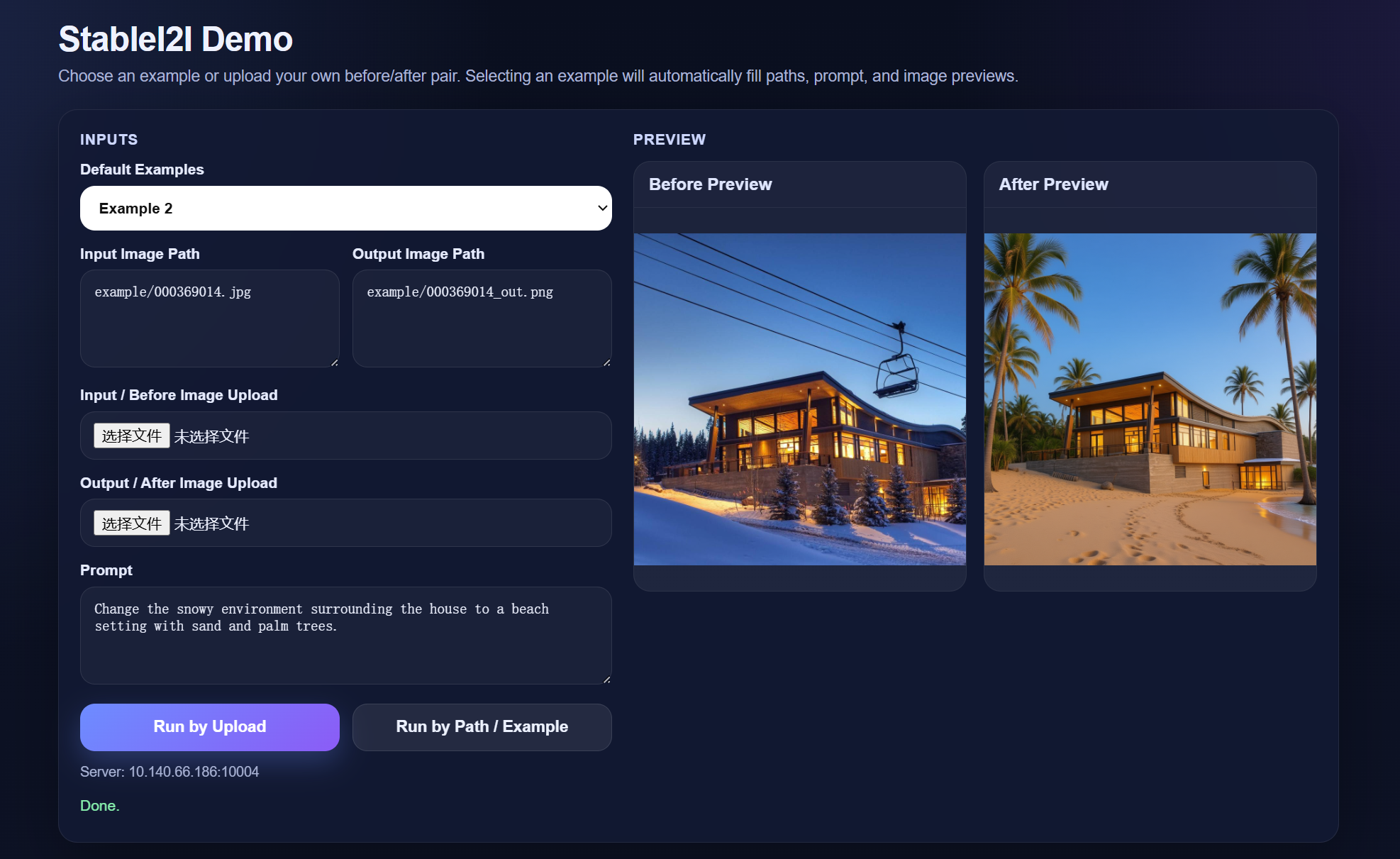
app.py is the local web demo and API entry. Running it starts a FastAPI service with a browser UI.
Example:
set MODEL_PATH=path/to/ckpt
set GPU_ID=0
set HOST=127.0.0.1
set PORT=10004
python app.py
Then open:
http://127.0.0.1:10004
The demo supports:
- built-in examples
- inference by local image path
- inference by image upload
- summarized semantic / structure / low-level results
Inference
See infer.md.
Training
Recommended official references:
- Qwen3-VL: QwenLM/Qwen3-VL
- Swift: modelscope/ms-swift
Notes:
- For SFT, start from the official Qwen3-VL finetuning workflow.
- For GRPO and related alignment training, use Swift.
Citation
If you find our work helpful for your research, please consider citing our work.
@article{li2026stablei2i,
  title={StableI2I: Spotting Unintended Changes in Image-to-Image Transition},
  author={Li, Jiayang and Cao, Shuo and Li, Xiaohui and Zhang, Zhizhen and Zhu, Kaiwen and Duan, Yule and Qiao, Yu and Zhang, Jian and Liu, Yihao},
  journal={arXiv preprint arXiv:2605.04453},
  year={2026}
}
1 maintainer

Download files
Download the file for your platform. If you're not sure which to choose, learn more about installing packages.
Source Distribution
Built Distribution
Filter files by name, interpreter, ABI, and platform.
If you're not sure about the file name format, learn more about wheel file names.
Copy a direct link to the current filters
File details
Details for the file stablei2i-0.1.0.tar.gz.
File metadata
- Download URL: stablei2i-0.1.0.tar.gz
- Upload date:
- Size: 24.6 kB
- Tags: Source
- Uploaded using Trusted Publishing? No
- Uploaded via:
twine/6.2.0 CPython/3.9.6
File hashes
| Algorithm | Hash digest | |
|---|---|---|
| SHA256 |
88bd1d59c041d12d48b33fef625e5f1c22ae36e4d7977e3430a4eba5bd080d5a
|
|
| MD5 |
b027641fe8b8d0a41bf2bb87c69b84a0
|
|
| BLAKE2b-256 |
d975ea4c5cbb7fd1b60e2a2eeeadfe7bfafa4dff78e8eaab2f55a4b7a34c2527
|
File details
Details for the file stablei2i-0.1.0-py3-none-any.whl.
File metadata
- Download URL: stablei2i-0.1.0-py3-none-any.whl
- Upload date:
- Size: 24.1 kB
- Tags: Python 3
- Uploaded using Trusted Publishing? No
- Uploaded via:
twine/6.2.0 CPython/3.9.6
File hashes
| Algorithm | Hash digest | |
|---|---|---|
| SHA256 |
1e7ce4ed60644189dad407ada2ebea00337b9eecb5e99a03f5a8eb8a6bf569bf
|
|
| MD5 |
4cd4b16eae26c7e61aef6301eab53020
|
|
| BLAKE2b-256 |
192a78437f1abb7883be4851ffdd18056df6a869a319c32aff5dd9589cb1acd5
|














