
Universal AWS resource browser for local emulators
Verified details
These details have been verified by PyPIProject links
GitHub Statistics
Maintainers

Project description

StackPort
Universal AWS resource browser for local emulators and real AWS accounts.
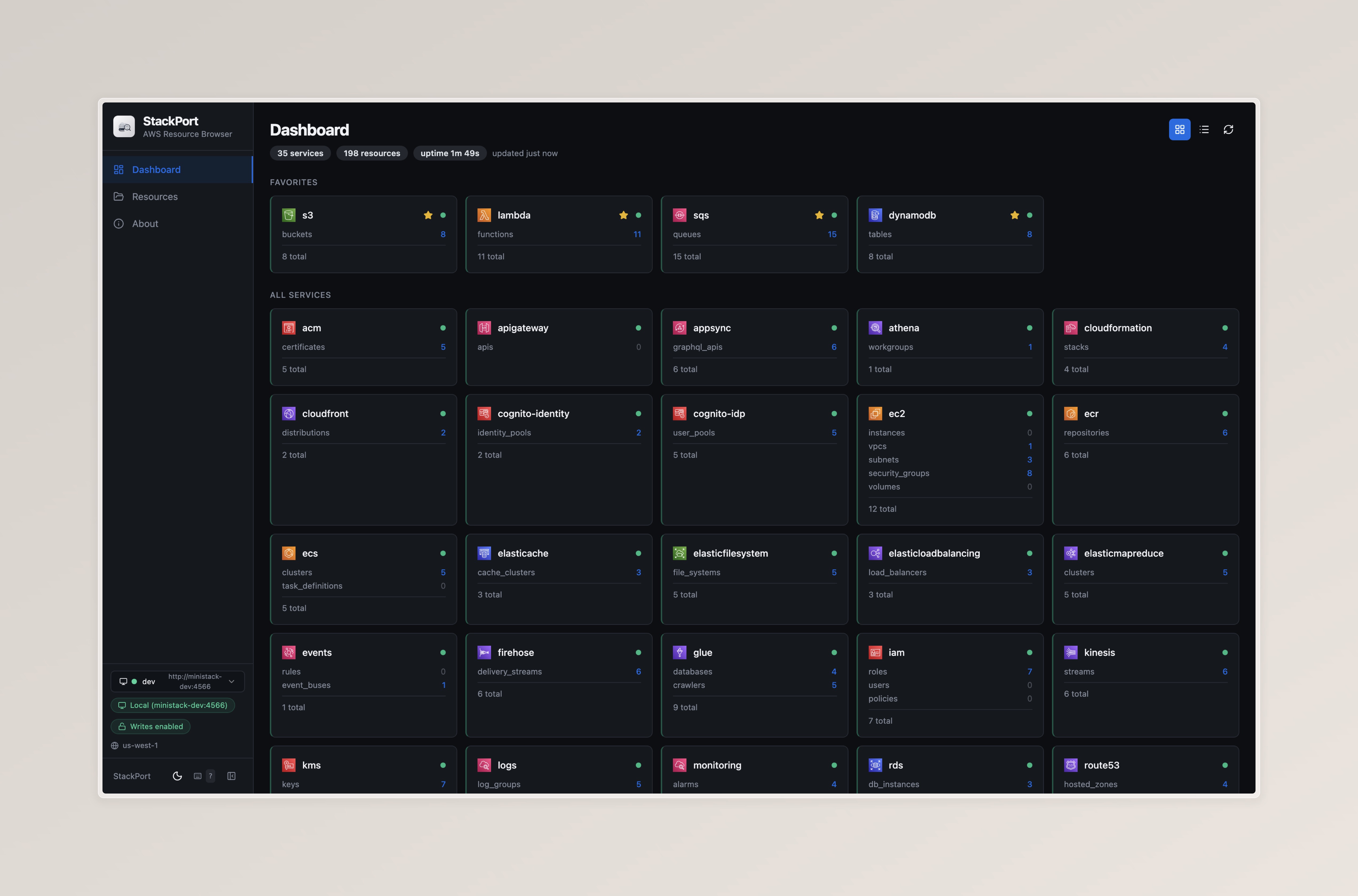
Browse, inspect, and manage resources across 35 AWS services with dedicated UIs for S3, DynamoDB, Lambda, SQS, IAM, EC2, CloudWatch Logs, and Secrets Manager.






Screenshots
Dashboard — Service overview with resource counts and health status
DynamoDB Browser — Query and scan tables with schema visualization

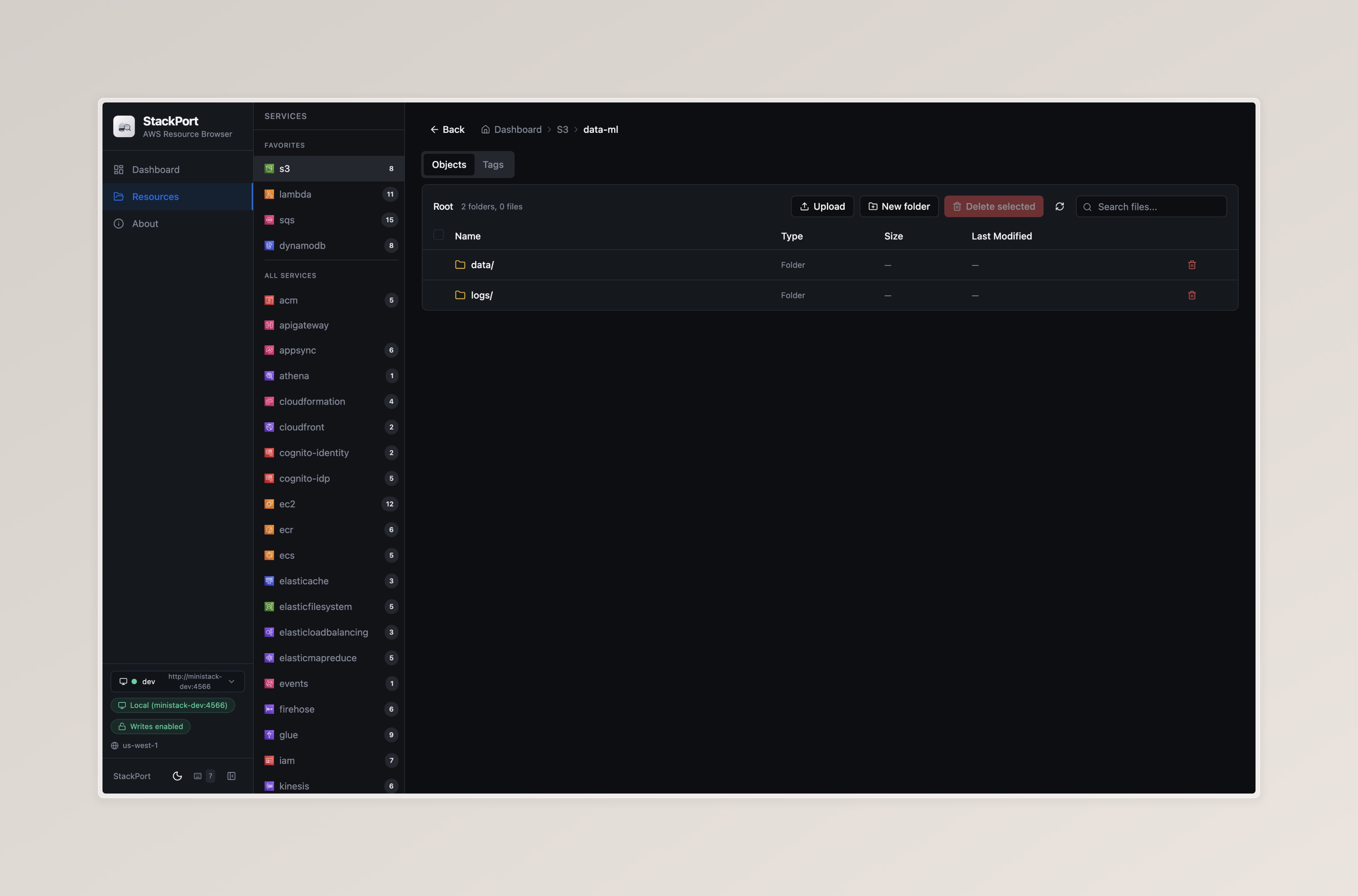
S3 Browser — File browser with upload, download, folder navigation, and tagging
Features
- Browse and inspect resources across 35 AWS services
- 8 dedicated service UIs for S3, DynamoDB, Lambda, SQS, IAM, EC2, CloudWatch Logs, and Secrets Manager
- Write operations — upload/delete S3 objects, query DynamoDB, invoke Lambda, send/receive SQS messages
- Real AWS support — connect to real AWS accounts with read-only mode by default
- Tag management — unified tagging across 21 resource types
- CLI —
stackport status,list,describe,exportwith JSON/CSV/table output - Real-time dashboard with WebSocket-powered live updates
- Keyboard shortcuts — 16 shortcuts for fast navigation (press
?to view) - Single Docker image, works with MiniStack, LocalStack, Moto, or any AWS-compatible endpoint
Quick Start
With a local emulator (recommended)
# Start MiniStack (or LocalStack, Moto, etc.)
pip install ministack && ministack

# Start StackPort
pip install stackport
stackport
# Open http://localhost:8080
With real AWS
# Using AWS profile (read-only by default)
AWS_PROFILE=my-profile stackport

# Using explicit credentials
AWS_ACCESS_KEY_ID=AKIA... AWS_SECRET_ACCESS_KEY=... AWS_REGION=us-west-2 stackport

# Disable write operations (read-only mode)
STACKPORT_ALLOW_WRITES=false AWS_PROFILE=my-profile stackport
When connected to real AWS, StackPort shows a warning banner and operates in read-only mode unless writes are explicitly enabled.
Docker Compose (MiniStack + StackPort)
This example uses MiniStack as the emulator, but you can swap it for LocalStack, Moto, or any AWS-compatible endpoint — just update AWS_ENDPOINT_URL.
curl -O https://raw.githubusercontent.com/DaviReisVieira/stackport/main/examples/docker-compose.yml
docker compose up -d
# Open http://localhost:8080
Docker (standalone)
docker run -p 8080:8080 -e AWS_ENDPOINT_URL=http://host.docker.internal:4566 davireis/stackport
Other emulators
StackPort works with any AWS-compatible endpoint — just set AWS_ENDPOINT_URL:
# LocalStack
AWS_ENDPOINT_URL=http://localhost:4566 stackport

# Moto
AWS_ENDPOINT_URL=http://localhost:5000 stackport

# MinIO (S3 only)
AWS_ENDPOINT_URL=http://localhost:9000 stackport

# Any custom endpoint
AWS_ENDPOINT_URL=http://my-emulator:4566 stackport
Multiple endpoints
Switch between multiple AWS endpoints from the UI. Configure named endpoints with STACKPORT_ENDPOINTS:
# Connect to a local emulator and a real AWS account (empty URL = real AWS)
STACKPORT_ENDPOINTS="local=http://localhost:4566,nprod=" \
  AWS_PROFILE=nprod AWS_REGION=us-west-1 stackport
Docker Compose (local + real AWS):
curl -O https://raw.githubusercontent.com/DaviReisVieira/stackport/main/examples/docker-compose.multi-endpoint.yml
docker compose -f docker-compose.multi-endpoint.yml up -d
# Open http://localhost:8080
See examples/docker-compose.multi-endpoint.yml for a full example with MiniStack + real AWS via profile.
The endpoint selector appears in the sidebar when more than one endpoint is configured. Each endpoint is health-checked independently, and all API requests, caches, and WebSocket subscriptions are scoped to the active endpoint.
Service Browsers
Dedicated UIs (8 services)
| Service | Browse | Write Operations |
|---|---|---|
| S3 | Buckets, objects, folder navigation, search | Upload, download, delete, batch delete, create folders |
| DynamoDB | Tables, schema, items | Query by partition/sort key, scan |
| Lambda | Functions, config, aliases, versions, event sources | Invoke with JSON payload, download code |
| SQS | Queues, messages, attributes | Send, receive, delete messages, purge queue |
| IAM | Users, roles, groups, policies, trust policies | Read-only |
| EC2 | Instances, VPCs, subnets, security groups, volumes | Read-only |
| CloudWatch Logs | Log groups, streams, events with time filtering | Read-only |
| Secrets Manager | Secrets with value reveal, rotation status | Read-only |
Generic Resource Browser (27 services)
All other services use a searchable resource table with JSON detail view, pagination, and export (JSON/CSV).
Tag Management
Unified tag read/write across 21 resource types:
S3 buckets, DynamoDB tables, Lambda functions, SQS queues, IAM users/roles/policies, EC2 instances/security groups/volumes, CloudWatch log groups, Secrets Manager secrets, RDS instances/clusters, SNS topics, KMS keys, ECR repositories, CloudFormation stacks, Step Functions state machines, Kinesis streams, SSM parameters, ELB load balancers, ElastiCache clusters
CLI
# Show service availability and resource counts
stackport status
stackport status --output json

# List resources for a service
stackport list s3
stackport list dynamodb --output csv

# Get resource details
stackport describe s3 buckets my-bucket
stackport describe lambda functions my-func --output json

# Export all resources
stackport export lambda --format json
stackport export ec2 --format csv
All CLI commands accept --endpoint URL and --region REGION overrides.
Keyboard Shortcuts
Press ? anywhere to see all shortcuts.
| Key | Action |
|---|---|
? |
Show shortcuts modal |
b |
Toggle sidebar |
g d |
Go to Dashboard |
g r |
Go to Resources |
/ |
Focus search |
j / k |
Navigate up/down in resource list |
[ / ] |
Previous/next service |
Enter |
Open selected resource |
r |
Refresh current view |
Esc |
Close panel / clear selection |
Configuration
| Variable | Default | Description |
|---|---|---|
AWS_ENDPOINT_URL |
(unset) | AWS endpoint. Unset = real AWS via credential chain |
AWS_REGION |
us-east-1 |
AWS region |
AWS_ACCESS_KEY_ID |
(unset) | AWS access key. Unset = use credential chain |
AWS_SECRET_ACCESS_KEY |
(unset) | AWS secret key. Unset = use credential chain |
AWS_PROFILE |
(unset) | AWS named profile from ~/.aws/credentials |
STACKPORT_PORT |
8080 |
StackPort server port |
STACKPORT_ALLOW_WRITES |
true |
Enable write operations (POST/PUT/DELETE) |
STACKPORT_S3_MAX_UPLOAD_MB |
100 |
Max S3 upload size per object (MiB) |
STACKPORT_SERVICES |
(35 services) | Comma-separated list of services to probe |
STACKPORT_PROBE_TIMEOUT |
5 |
Seconds before a service probe times out |
STACKPORT_CACHE_TTL |
5 |
Seconds to cache service stats |
STACKPORT_PROBE_WORKERS |
10 |
Max concurrent workers for service probing |
STACKPORT_ENDPOINTS |
(unset) | Multiple endpoints: local=http://localhost:4566,staging=http://... |
LOG_LEVEL |
INFO |
Python log level (DEBUG shows healthcheck logs) |
Supported Services (35)
ACM, API Gateway, AppSync, Athena, CloudFormation, CloudFront, Cognito (IDP + Identity), DynamoDB, EC2, ECR, ECS, ElastiCache, EFS, ELB, EMR, EventBridge, Firehose, Glue, IAM, Kinesis, KMS, Lambda, CloudWatch Logs, CloudWatch Monitoring, RDS, Route 53, S3, Secrets Manager, SES, SNS, SQS, SSM, Step Functions, STS, WAFv2
Development
git clone https://github.com/DaviReisVieira/stackport.git
cd stackport

# Backend
pip install -e .
AWS_ENDPOINT_URL=http://localhost:4566 stackport

# Frontend dev (with hot reload)
cd ui && npm install && npm run dev

# Build frontend for production
cd ui && npm run build

# Run tests
python -m pytest tests/ -x --tb=short    # backend (262 tests)
cd ui && npx vitest run                   # frontend (163 tests)

# Typecheck & lint
cd ui && npx tsc -b
cd ui && npx eslint .
See CONTRIBUTING.md for full details.
Architecture
backend/
  main.py          FastAPI app, CORS, read-only middleware, SPA mount
  config.py        All settings from environment variables
  aws_client.py    Cached boto3 client factory
  cache.py         Thread-safe TTL cache
  websocket.py     Real-time probe loop for dashboard
  routes/
    stats.py       Service discovery with concurrent probing
    resources.py   Generic list/detail for all services
    tags.py        Unified tag management (21 types)
    s3.py          S3 file browser with write ops
    dynamodb.py    DynamoDB query/scan
    lambda_svc.py  Lambda invoke/config/code
    sqs.py         SQS send/receive/purge
    iam.py         IAM users/roles/groups/policies
    ec2.py         EC2 instances/VPCs/security groups
    logs.py        CloudWatch log streams/events
    secretsmanager.py  Secret value retrieval

ui/src/
  pages/           Dashboard, ResourceBrowser, About
  components/
    service-views/ S3Browser, DynamoDBBrowser, LambdaBrowser, ...
    ui/            shadcn/ui components (Radix-based)
  hooks/           useFetch, useWebSocket, useKeyboardShortcuts, ...
  lib/             API client, types, service icons, utils
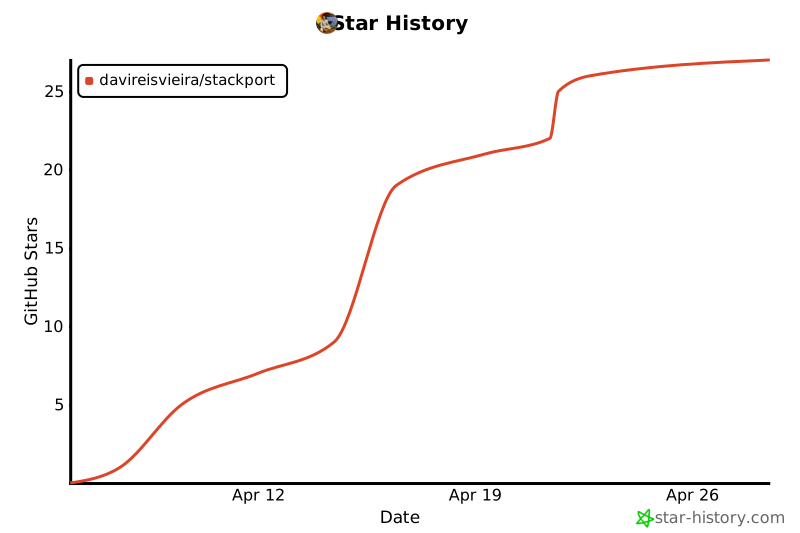
Star History
Contributors

License
MIT
Project details
Verified details
These details have been verified by PyPIProject links
GitHub Statistics
Maintainers
Release history Release notifications | RSS feed


Download files
Download the file for your platform. If you're not sure which to choose, learn more about installing packages.
Source Distribution
Built Distribution
Filter files by name, interpreter, ABI, and platform.
If you're not sure about the file name format, learn more about wheel file names.
Copy a direct link to the current filters
File details
Details for the file stackport-0.2.1.tar.gz.
File metadata
- Download URL: stackport-0.2.1.tar.gz
- Upload date:
- Size: 326.7 kB
- Tags: Source
- Uploaded using Trusted Publishing? Yes
- Uploaded via: twine/6.1.0 CPython/3.13.12
File hashes
| Algorithm | Hash digest | |
|---|---|---|
| SHA256 |
72b558db06f4cfb915088b809ae87d3965c376a58f97e0351ef853f82dd4e543
|
|
| MD5 |
db4059de11e09ed7ecd2526d3a6edb41
|
|
| BLAKE2b-256 |
c660530abd5c1bd46d36ddfabf9e7bfa8906d5110abb256d7bdf5c354825a9c7
|
Provenance
The following attestation bundles were made for stackport-0.2.1.tar.gz:
Publisher:
release.yml on DaviReisVieira/stackport
-
Statement:
-
Statement type:
https://in-toto.io/Statement/v1 -
Predicate type:
https://docs.pypi.org/attestations/publish/v1 -
Subject name:
stackport-0.2.1.tar.gz -
Subject digest:
72b558db06f4cfb915088b809ae87d3965c376a58f97e0351ef853f82dd4e543 - Sigstore transparency entry: 1365421696
- Sigstore integration time:
-
Permalink:
DaviReisVieira/stackport@8b63e13d90a015e2a7535b49c105f3b3d9f97677 -
Branch / Tag:
refs/tags/v0.2.1 - Owner: https://github.com/DaviReisVieira
-
Access:
public
-
Token Issuer:
https://token.actions.githubusercontent.com -
Runner Environment:
github-hosted -
Publication workflow:
release.yml@8b63e13d90a015e2a7535b49c105f3b3d9f97677 -
Trigger Event:
push
-
Statement type:
File details
Details for the file stackport-0.2.1-py3-none-any.whl.
File metadata
- Download URL: stackport-0.2.1-py3-none-any.whl
- Upload date:
- Size: 326.4 kB
- Tags: Python 3
- Uploaded using Trusted Publishing? Yes
- Uploaded via: twine/6.1.0 CPython/3.13.12
File hashes
| Algorithm | Hash digest | |
|---|---|---|
| SHA256 |
bdd236c74a6ffc5318137e5fcd26a5d8ff640b3db399323c53f42c7a668c2dcb
|
|
| MD5 |
578be8444172a1e867c93d64ff4ee964
|
|
| BLAKE2b-256 |
75643608498997a1822c9e210eed210ff6e42f89e919803f05f778a4427eb96f
|
Provenance
The following attestation bundles were made for stackport-0.2.1-py3-none-any.whl:
Publisher:
release.yml on DaviReisVieira/stackport
-
Statement:
-
Statement type:
https://in-toto.io/Statement/v1 -
Predicate type:
https://docs.pypi.org/attestations/publish/v1 -
Subject name:
stackport-0.2.1-py3-none-any.whl -
Subject digest:
bdd236c74a6ffc5318137e5fcd26a5d8ff640b3db399323c53f42c7a668c2dcb - Sigstore transparency entry: 1365421796
- Sigstore integration time:
-
Permalink:
DaviReisVieira/stackport@8b63e13d90a015e2a7535b49c105f3b3d9f97677 -
Branch / Tag:
refs/tags/v0.2.1 - Owner: https://github.com/DaviReisVieira
-
Access:
public
-
Token Issuer:
https://token.actions.githubusercontent.com -
Runner Environment:
github-hosted -
Publication workflow:
release.yml@8b63e13d90a015e2a7535b49c105f3b3d9f97677 -
Trigger Event:
push
-
Statement type:






