
stagepipe





Run your slow, blocking steps in parallel, and let every item move on the moment the next step is free.
A tiny pipeline for plain Python: no event loop, no server, no dependencies, a few hundred lines of standard library. You say how many workers each stage gets; stagepipe keeps them all busy.
from stagepipe import Stage, run

pages = run(files, [
    Stage("render", render_page, workers=4),               # fast, CPU
    Stage("ocr",    read_text,   workers=3),               # medium, native code
    Stage("llm",    ask_model,   workers=8),               # slow, waiting on the network
    Stage("save",   write_out,   workers=1, ordered=True), # must see pages in order
], max_in_flight=12)
Page 1 can be saving while page 9 is still being rendered. Nobody waits for the slowest page, and memory stays bounded.
Why stagepipe
Lightweight. One file, standard library only (threading and queue). Nothing to run,
nothing to configure, nothing written to disk. It lives inside your process and disappears
when the call returns. import stagepipe adds under 0.1 MB to a bare Python process (16 to 96 KB
across Python 3.10 to 3.14 on Linux, Windows and macOS) and takes about a millisecond; a running
pipeline adds a few hundred KB. The machinery itself costs roughly 3 to 10 microseconds per item
(a hundred thousand items per second or more through a single no-op stage).
Fast, where it counts. Real pipelines are limited by the slowest stage, not by the framework. stagepipe makes sure the slow stage is never starved and the fast stages never sit idle waiting for it. Same workload, three ways (40 items through stages of 0.02 s, 0.30 s and 0.05 s):
| Approach | Total time | First result after |
|---|---|---|
| One item at a time | 14.8 s | 0.4 s |
| Parallel, but stage by stage (wait for all items before the next stage) | 3.7 s | 1.7 s |
| stagepipe | 2.3 s | 0.4 s |
The 2.3 s is close to the floor for this workload: the last stage has one worker and 40 items at
0.05 s each, which alone takes 2.0 s. (Measured on Windows 11, CPython 3.12.10 and 3.15.0rc2;
the script is bench/ in the repo.)
Reliable by being small. Few moving parts, no global state, every run is independent (you can run several at once). Shutdown, errors and cancel paths are covered by a stress suite that runs randomized pipelines (random sizes, worker counts and window sizes), failures in the first and last stage, bad configuration, and checks that no threads are left behind. It already runs in two production services (see Status). Known gaps are listed honestly there.
Built for small memory. The target is serverless functions, containers with a few hundred MB,
and small devices. That is why there is no broker, no database and no event loop: nothing to
start, nothing resident. max_in_flight caps how many items exist at once, so a fast first stage
cannot render 500 page images while a slow stage is still on page 3. Measured in a fresh process
(CPython 3.12, Windows), 2,000 items of 20 KB each through two stages:
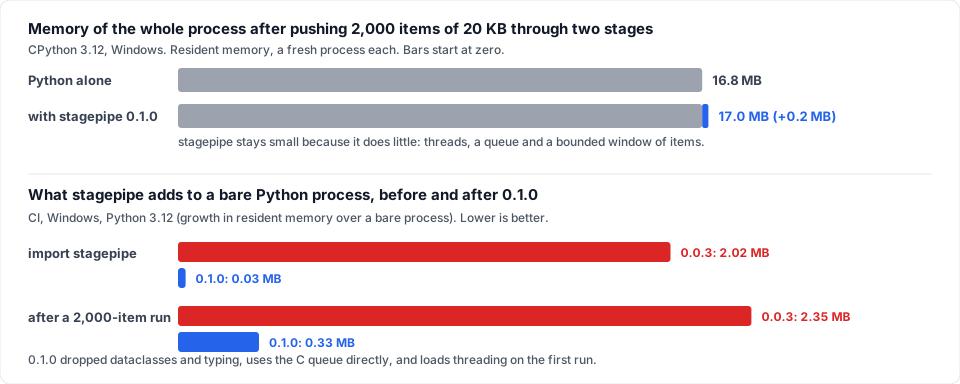
The whole process grows by 0.2 MB (the Python heap peaks at 0.5 MB), and import stagepipe alone
costs 0.03 MB where 0.0.x cost about 2 MB. Reproduce with bench/memory.py.
A word on comparisons: stagepipe is small because it does little. It chains blocking functions
through thread pools and queues, nothing more. Libraries built on an event loop, such as
aiostream, carry more machinery (loading asyncio alone
is about 6 MB) and offer far more in return: a full set of stream operators, merging, windowing and
much else. If you need that, or your code is async, they are the better choice. stagepipe is for the
narrower case where blocking functions in stages should cost almost nothing to run.
Continuous integration repeats the footprint measurement on Linux, Windows and macOS for every Python from 3.10 to 3.14, and the full table is published in docs/BENCHMARKS.md. Across those 15 combinations, importing stagepipe cost between 16 and 96 KB of resident memory (0.5 to 2 ms), a run of 2,000 items of 20 KB added 0.3 to 0.8 MB, and the machinery cost between 2.6 and 6.6 microseconds per item for a one-stage run (3.5 to 9.8 for three).
Seconds, not nanoseconds. stagepipe is for pipelines whose steps take milliseconds to minutes (an OCR page, an API call, a transcode), where running in parallel saves seconds. Ten microseconds of bookkeeping per item disappears next to that. So whenever speed and footprint pull in different directions, footprint wins: we are happy to spend a few milliseconds to save kilobytes.
Where the 2 MB went. Version 0.0.x imported about 2.4 MB: measured by importing each module alone in a fresh process (the numbers overlap, because these modules share dependencies):
| Import | Extra resident memory | What 0.1.0 does instead |
|---|---|---|
dataclasses |
about 1.7 MB (it pulls in inspect, re and more) |
Stage is a few lines of plain Python with __slots__. |
typing |
about 0.7 MB (only for type hints) | Annotations are never evaluated at run time; type checkers still read them. |
queue |
about 0.4 MB | The C queue underneath is used directly. |
threading and the queue |
needed to run | Loaded on the first run(), not at import stagepipe. |
Items are also pulled lazily from the input (a generator is never turned into a list), workers let
go of the last item they handled as soon as they are idle, and keep_results=False keeps nothing
at all, so memory stays flat however many items go through.
The idea in one picture
Most hand-rolled parallel code processes stage by stage: do all the rendering, then all the OCR, then all the saving. The slowest stage sets the pace for everyone, and nothing finishes until nearly the end.
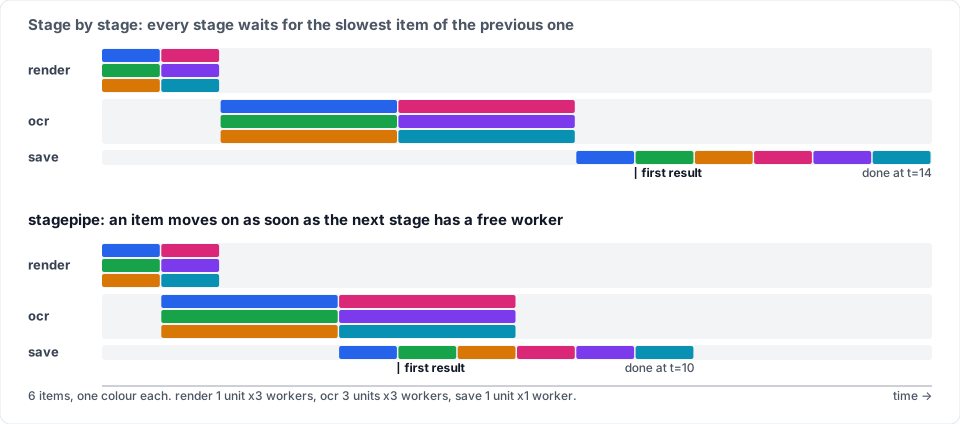
Same six items, same workers, same stage durations. The only difference is that stagepipe does not hold an item back to wait for its siblings.
With stagepipe each stage has its own pool of workers and its own queue. A finished item goes straight onto the next stage's queue.
Quick start
pip install stagepipe
import time
from stagepipe import Stage, run

def download(url, i):          # slow, waits on the network
    time.sleep(0.3)
    return f"<html for {url}>"

def parse(html, i):            # fast
    return html.upper()

def store(doc, i):             # needs the original order
    print("stored", i, doc)
    return doc

urls = [f"https://example.org/{n}" for n in range(10)]

docs = run(urls, [
    Stage("download", download, workers=5),
    Stage("parse",    parse,    workers=2),
    Stage("store",    store,    workers=1, ordered=True),
], max_in_flight=8)
- Each stage function is called as
fn(value, index)and returns the value for the next stage. run()returns the final values in input order.- Ten downloads that would take 3 s one by one take about 0.6 s here.
The knobs
| Option | What it does |
|---|---|
Stage(name, fn, workers=N) |
N threads work on this stage in parallel. Give slow stages more. |
ordered=True |
The stage sees items in index order (needs workers=1). Use it when a stage carries state across items. Earlier stages still run out of order. |
max_in_flight=M |
At most M items are being processed at any moment. Bounds memory and keeps stages balanced. |
cancelled=callable |
Checked before every call; when it returns true the run stops and raises Cancelled. |
Stage(..., init=fn) |
fn() runs once in each worker thread; its result (a model, a session, a client) is passed to the stage function as a third argument: fn(value, index, state). |
keep_results=False |
run() keeps nothing and returns None; consume results in on_done. Memory stays flat however many items go through. |
on_error=... |
What a failing stage function does. None/"raise" (default): stop the run and re-raise. "collect": the item becomes a Failed(stage, index, exc), skips the remaining stages, shows up in the results and in on_done, and everything else carries on. A callable fn(stage, index, value, exc) returns the value to continue with (for example a marker), or raises to stop the run. |
partial=True |
With cancelled: instead of raising Cancelled, run() returns the results so far, with UNFINISHED for the items that had not finished. |
stats=Stats() |
Fills in busy time, queue wait and queue depth per stage; stats.report() prints a table and names the bottleneck (see below). |
on_done=callable |
Called with (index, value) as each item leaves the last stage. Good for progress bars. It runs in a worker thread, and concurrently if the last stage has several workers, so it must be thread-safe (or make the last stage ordered, which has exactly one worker). If it raises, the run is aborted and the exception is re-raised from run(), like an error in a stage. |
By default, if any stage raises, new work stops, workers drain, and the first exception is re-raised
from run(). Interrupting the calling thread (Ctrl-C) stops the run just as promptly; a stage call
that is already running cannot be interrupted, so run() waits for it for up to 30 seconds.
Which stage is the bottleneck?
from stagepipe import Stage, Stats, run

stats = Stats()
run(pages, [Stage("render", render, 4), Stage("ocr", ocr, 3), Stage("save", save, 1, ordered=True)],
    max_in_flight=12, stats=stats)
print(stats.report())
stage        workers  items failed  busy   avg run  avg wait max queue
fast               2     24      0   11%    0.005s    0.007s        12
slow               2     24      0   99%    0.050s    0.179s        10
"slow" is the bottleneck (99% busy): more workers there will speed the run up; more workers on the other stages will not.
wall time 0.61s
busy is the share of the run a stage's workers spent inside the stage function. avg wait is how long items sat in the queue with every worker busy, the number you cannot measure from inside a stage function: it piles up in front of the stage that needs more workers. Only totals are kept, so the report costs no memory that grows with the number of items.
Failures without losing the run
results = run(chunks, stages, on_error="collect")
good   = [r for r in results if not isinstance(r, Failed)]
failed = [r for r in results if isinstance(r, Failed)]     # r.stage, r.index, r.exc
One bad item does not stop a long job, and an ordered stage keeps working because failed items
still travel through it (without being processed).
Examples
Two runnable scripts in examples/.
Both run straight from a clone, with no install and no extra packages.
A pizza kitchen (examples/pizza_kitchen.py), the playful one. Eight orders go through dough,
toppings, two ovens and a boxing station. It prints when each pizza leaves, then a timeline of
what every station was doing, and compares with a kitchen where each station finishes the whole
batch first:
  dough    222223333355555...........788888....................................
  toppings .....22222233333335555555......7888888..............................
  oven     ...........111111111111113333333333333555555555555588888888888888...
  box      .........................12...........34...........56...........788.

Kitchen 1 finished in 2.02s, kitchen 2 in 3.25s: 1.6x faster, and the first pizza left
after 0.78s instead of 3.25s.
Compress a folder (examples/compress_folder.py), the useful one. Read, gzip and write every
file in a folder as separate stages, with max_in_flight=6 so only six files are ever in memory,
however big the folder is. On 24 files it ran about 4x faster than one file at a time.
Point it at your own folders with python examples/compress_folder.py SRC OUT.
Where it fits
stagepipe is for blocking work that spends its time waiting or in native code, which is exactly where threads help:
- Document and image pipelines: render, OCR, vision-model call, save, per page.
- Calling APIs at scale: fetch, transform, upload, with different limits per stage.
- ETL on files: read, decode, enrich, write, without loading the dataset into memory.
- ML inference around a model: prepare on CPU, run on one GPU worker, post-process on CPU.
- Media and archive jobs: transcode, hash, compress, upload.
- Scraping: fetch pages, parse, store, with a polite worker count at the network stage.
Python threads run native code (NumPy, onnxruntime, torch, image libraries, HTTP, subprocesses) in parallel because those release the GIL. Pure-Python number crunching will not speed up in a thread. Use a process pool inside a stage function for that.
Threads, shared resources, and cancelling: what to know
These come from running stagepipe on a real five-stage document pipeline.
-
Threads only help when the work releases the GIL (I/O, onnxruntime, PyTorch). One trap that was measured: PyTorch's CPU thread count is global to the process, so several threads each running a CPU model share a single thread pool. For CPU-bound PyTorch, separate processes scaled better (1.7x in that test). For a GPU, use a stage with one worker.
-
A resource that is not thread-safe (a PDF library, a database handle) goes behind a lock inside the stage function, or in a stage with
workers=1. -
One model or session per worker thread. Use
init, which runs once in each worker thread:def ocr(page, i, session): return session.read(page) Stage("ocr", ocr, workers=4, init=load_model) # four workers, four sessions
-
Cancel, then resume. When a run is cancelled or fails, items that were in flight are dropped, not committed (use
partial=Trueto get back what had finished). So let the last stage save each item atomically (write to a temporary file, then rename), and on the next run skip the items already saved. That makes a cancelled run safe to restart. -
on_doneruns in a worker thread, not in the thread that calledrun(). See the table above.
What it is not
- Not a job queue or scheduler: no broker, no workers on other machines, no persistence (yet, see the roadmap).
- Not a workflow engine with branching graphs (yet): stages form a straight line.
- Not async: there is no event loop. If your code is already
async, see the next section.
Which one should I use?
If your code is already async, use aiostream.
"Already async" means your steps are async def functions that you await: an async HTTP client,
an async database driver, asyncio tasks. Your program already runs an event loop, and
aiostream chains those steps on it directly. Pushing async code through threads would be a step
backwards, and stagepipe would add nothing.
If your steps are ordinary blocking functions, use stagepipe. OCR engines, onnxruntime,
PyTorch, requests, PDF and image libraries, subprocesses: plain def functions you can call
and test on their own. There is no event loop to start and nothing to wrap in async.
Two more reasons to pick stagepipe, both about running small:
- Small memory footprint. No event loop and no heavy imports:
import stagepipeadds under 0.1 MB and a running pipeline a few hundred KB. That matters in serverless functions and on small devices. (An event loop is worth its cost when you use it; stagepipe is for when you would rather not have one.) - Surviving a crash without a database (planned for 0.2, not in 0.0.x yet). The design is plain files: one small file per finished item and an append-only journal, with memory use that does not grow with the number of items. aiostream is a stream-operator library and does not aim at persistence, so there you would build that yourself.
Why not something else?
Checked on Python 3.12 in a clean virtual environment, with blocking functions.
| Option | Verdict |
|---|---|
| concurrent.futures by hand | The right foundation, and stagepipe is a thin layer over threads and queues. Wiring several stages yourself means re-deriving queues, shutdown, error propagation and the in-flight cap in every project. |
| aiostream | Well maintained, far more complete (a rich set of stream operators), and the right choice for async code. Its concurrency limits (task_limit) apply to async functions, so blocking functions need an asyncio.to_thread wrapper per stage and an event loop to run on. stagepipe exists for the case where you would rather have plain blocking functions and no event loop at all, with a very small footprint. Different philosophy, not a replacement. |
| pypeln | The closest idea (pl.thread.map(f, workers=4)), but unmaintained since January 2022. On a clean Python 3.12 environment import pypeln fails with No module named 'pkg_resources' until you install setuptools<81, and output order is not preserved by default. |
| Dask, Ray, Celery, Prefect, Airflow | Excellent, and a different class of tool: schedulers, clusters and brokers. Right when you need machines and dashboards, heavy when you need a function call. |
Status and known limits
Alpha, version 0.1.0. It was extracted from a working document-processing pipeline where it replaces a hand-rolled look-ahead loop, and it passes its tests in CI on CPython 3.10 to 3.14 on Linux, Windows and macOS (and locally on the 3.15 release candidate).
In use today. Two services run it in production, and neither needed a change to the library:
- A document-extraction pipeline: five stages with different worker counts and at most 8 items in flight. Output was identical to the sequential loop on every test page, and cancelling then resuming a job works.
- An audio-transcription service, in three pipelines. One job of three audio chunks took 39 s instead of about 95 s run one after another.
Still missing, and planned (see the roadmap):
- No retries or backoff.
on_errorlets a run survive a failing item, but nothing retries it for you yet. - No persistence. A rerun starts from the beginning unless your last stage saves each item and skips saved ones (the pattern above). Resume after a crash is planned for 0.2, with plain files and no database.
- No shared limit across runs yet (
Stage(limiter=...)), and no fan-out: stages form a straight line.
Everything reported in the 0.0.x issues (Ctrl-C, memory bounded by max_in_flight, failure
handling, timing, partial results, per-worker setup) is fixed in 0.1.0.
Roadmap
Design rule for everything below: memory grows with max_in_flight, never with the number of
items, and nothing needs a database or a server. Features that would break that rule do not ship.
Persistence, for example, will be plain files on disk (one small file per item per stage plus an
append-only journal), read back as a stream; at most one bit per item is kept in memory to
remember what is done, which is 125 KB for a million items.
The aim: stay tiny and dependable, and become the best answer for "I have blocking code in stages and I want it parallel, safe and observable", the niche that async libraries do not cover and that the older thread-based libraries have left behind.
Done in 0.1.0: the basics, trustworthy
- Ctrl-C and cancel stop promptly and cleanly.
- Smaller footprint, because memory is the point of this library: no
dataclassesortypingat run time, nothing imported until the firstrun(), the C queue used directly, input pulled lazily (a generator is never materialised),keep_results=False, and workers that let go of the last item they handled. - Failure policy:
on_error("raise","collect", or a callable), so one bad item never kills a long job. Asked for by both production users, who each wrapped every stage function in try/except. - Partial results on cancel (
partial=True). - Per-worker setup:
Stage(init=...). Asked for by the first real user, who had to build it by hand withthreading.local(). - A bottleneck report (
stats=Stats()): per stage, queue wait against run time, busy share, items done and queue depth. Also asked for by both production users.
Next, still in the 0.1 line
-
retry(n, backoff)as anon_errorpolicy. - Streaming results as an iterator (
for r in stream(...)). - Optional smaller thread stacks for very small containers.
Then: make it safe to rerun and easy to watch (0.2)
- Resume after a crash, with the lightest possible persistence:
run(..., checkpoint=dir, key=fn). When an item finishes the last stage, its result is written to<dir>/<key>.done(temporary file, then an atomic rename); a rerun with the same directory skips every stage for items already done and hands their stored results over, marked as restored. Pluggable serializer (pickle by default), failures never checkpointed so they are retried, duplicate keys rejected, and no memory that grows with the number of items. No database. Asked for by a production user who wrote this save-and-skip logic by hand. - Events for dashboards: a stable, versioned event stream (enter/exit per stage, worker, duration, queue depth) written as JSON lines or sent to a callback. A dashboard can be a separate project that just reads it.
- Shared limits across stages, e.g. a
gpu=1slot that three stages compete for, andStage(limiter=<Semaphore>)so one semaphore caps a resource across several runs in the same process (three runs of 3 workers must not put 9 calls on a service that accepts 4). - A memory budget in bytes, not only an item count.
Later: bigger shapes (0.3 and beyond)
- One-to-many stages (a page becomes several regions) and parallel branches that join again.
- Process-backed stages for CPU-bound Python, with workers recycled after N items to contain leaks. (Measured in a real pipeline: CPU-bound PyTorch ran 1.7x faster in separate processes than in threads.)
- Adaptive concurrency for rate-limited APIs (back off on errors, speed up when healthy).
- Mixed sync and async stages.
- Verified on free-threaded Python builds.
Python versions
Tested in CI on CPython 3.10, 3.11, 3.12, 3.13 and 3.14, on Linux, Windows and macOS, and the
release workflow only publishes if the whole matrix passes. Python 3.15 works locally (release
candidate) and joins the CI matrix and the release workflow as soon as GitHub's runners offer it.
Python 3.15's lazy imports (PEP 810) need nothing from stagepipe: it already imports nothing heavy,
and threading loads on the first run(), so import stagepipe is near-instant on every version.
Want something on this list sooner, or something that is missing? Open an issue and describe your pipeline.
Development
git clone https://github.com/rafaelborja/stagepipe
cd stagepipe
pip install -e .
python tests/stress.py        # plain script, no pytest needed
python bench/bench.py         # speed numbers above
python bench/memory.py        # memory numbers above (needs psutil; aiostream optional)
python bench/footprint.py     # memory and time on your Python and OS
python examples/pizza_kitchen.py
Changelog
See CHANGELOG.md.
Author
Built and maintained by Rafael Borja.
License
Apache License 2.0. See LICENSE.
1 maintainer

Metadata
1 maintainer
Release files for stagepipe 0.1.0
For a detailed explanation of source distributions (sdists) and built distributions (wheels), please see the package formats documentation.
Source distribution (sdist)
| File | Size | Uploaded | |
|---|---|---|---|
| stagepipe-0.1.0.tar.gz | 29.4 kB | Details |
Built distribution (wheel)
| File | Interpreter | ABI | Platform | Reset |
|---|---|---|---|---|
| stagepipe-0.1.0-py3-none-any.whl | Python 3 | none | any | Details |
Total release size: 50.0 kB
Release files / stagepipe-0.1.0.tar.gz
| Download URL | stagepipe-0.1.0.tar.gz |
|---|---|
| Size | 29.4 kB |
| Tags | Source |
|
SHA-256 checksum How to use checksums |
fb432ae9bdfe8f57f9f212bb009376f6065d0f8337ee753af4f2090cdf19d410
|
|
BLAKE2b-256 checksum How to use checksums |
98abe7763761f6c41630c9a1379db4f03c7e0cf259dfddb64da388c5ac19ca43
|
| Upload date | |
|
Uploaded using Trusted Publishing? What is trusted publishing? |
Yes |
| Uploaded via |
twine/7.0.0 CPython/3.13.14
|
Provenance
Provenance describes where a file came from. On PyPI, provenance is shared via attestations, which provide a verifiable record of the build or publishing details. View details, limitations and caveats.


PyPI Publish Attestation
PyPI verified that this artifact, at this checksum, originated from the publisher listed below.
Signed by GitHub Actions, verified by PyPI on Oct 9, 2026.
Transparency logRelease files / stagepipe-0.1.0-py3-none-any.whl
| Download URL | stagepipe-0.1.0-py3-none-any.whl |
|---|---|
| Size | 20.6 kB |
| Tags | Python 3 |
|
SHA-256 checksum How to use checksums |
c593ba5948e66beac9964af87df0a7d3ce16989f7c8c7c29a05de15ea8a22d4f
|
|
BLAKE2b-256 checksum How to use checksums |
3fe28e71764fef76c73025dd5d5c8ca74056e0c7d6c8fd4ebc509f2411f0264d
|
| Upload date | |
|
Uploaded using Trusted Publishing? What is trusted publishing? |
Yes |
| Uploaded via |
twine/7.0.0 CPython/3.13.14
|
Provenance
Provenance describes where a file came from. On PyPI, provenance is shared via attestations, which provide a verifiable record of the build or publishing details. View details, limitations and caveats.
PyPI Publish Attestation
PyPI verified that this artifact, at this checksum, originated from the publisher listed below.
Signed by GitHub Actions, verified by PyPI on Oct 9, 2026.
Transparency log













