
Standpoint




Standpoint belongs to a collection of libraries called AI Helpers developed for building Artificial Intelligence.
Where do you stand?
Standpoint reads a comparison table (options as rows, criteria as columns, numbers in the cells) and produces a 2D positioning map and a YAML file with all the coordinates and coefficients. One command does it.
The method is ordinary Principal Component Analysis (PCA): given many columns of numbers, find the few new directions along which the options actually differ the most, so a whole row of ratings collapses into two numbers that still carry most of what distinguishes it from the rest. People have used it for perceptual maps for a long time. What Standpoint adds is the work you would otherwise do by hand: it orients the map around a reference option, names the axes in plain words (in the language of your columns), colours and labels the points, and writes everything out.
Local-first
Everything runs on your machine: parsing, PCA, orientation, colouring, and rendering
the figure as hand-authored SVG, rasterised to PNG by
resvg: no Vega, no chart-rendering runtime.
Your table is never uploaded, and there is no telemetry, no account, and nothing to
sign up for.
The one thing that reaches out is the axis naming, which asks a
local vision-LLM running on localhost. Standpoint does not hard-code a model: it ships
a committed brief (standpoint/llm.brief.yaml) describing the job, and
best-engine-ai-helper resolves the
best local model for your machine on first use, caching the pick to a gitignored
standpoint/llm.engine.yaml. The weights are fetched once, then everything works offline.
Documentation
Input: a table of options and their ratings.
| Language | Performance | Ease of Learning | Ecosystem | Concurrency | Type Safety | Job Market | Tooling |
|---|---|---|---|---|---|---|---|
| Python | 2 | 5 | 5 | 2 | 2 | 5 | 4 |
| Rust | 5 | 2 | 3 | 5 | 5 | 3 | 4 |
| Go | 4 | 4 | 4 | 5 | 4 | 4 | 4 |
| JavaScript | 3 | 4 | 5 | 3 | 2 | 5 | 3 |
| … |
Output: a positioning map,
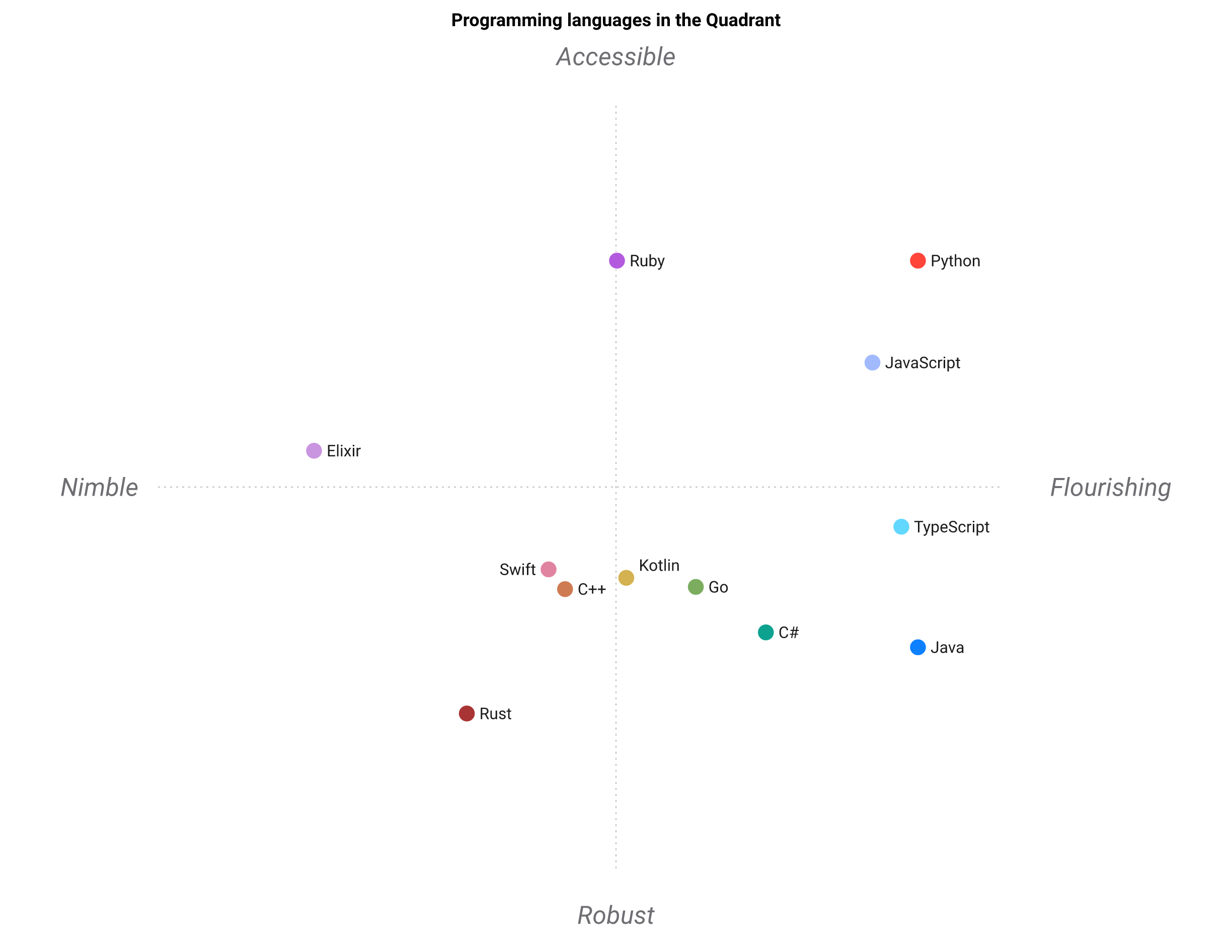
plus a YAML file with every option's coordinates, role, colour, and original values.
Features
- One command, two-fold deliverable: a hand-authored, interactive figure (PNG + SVG, no Vega) and a YAML of coordinates + coefficients.
- Readable axes: PCA keeps the axes as weighted sums of your columns; a local model names the four poles as positive qualities, guarded against acronyms, negatives, and antonym pairs.
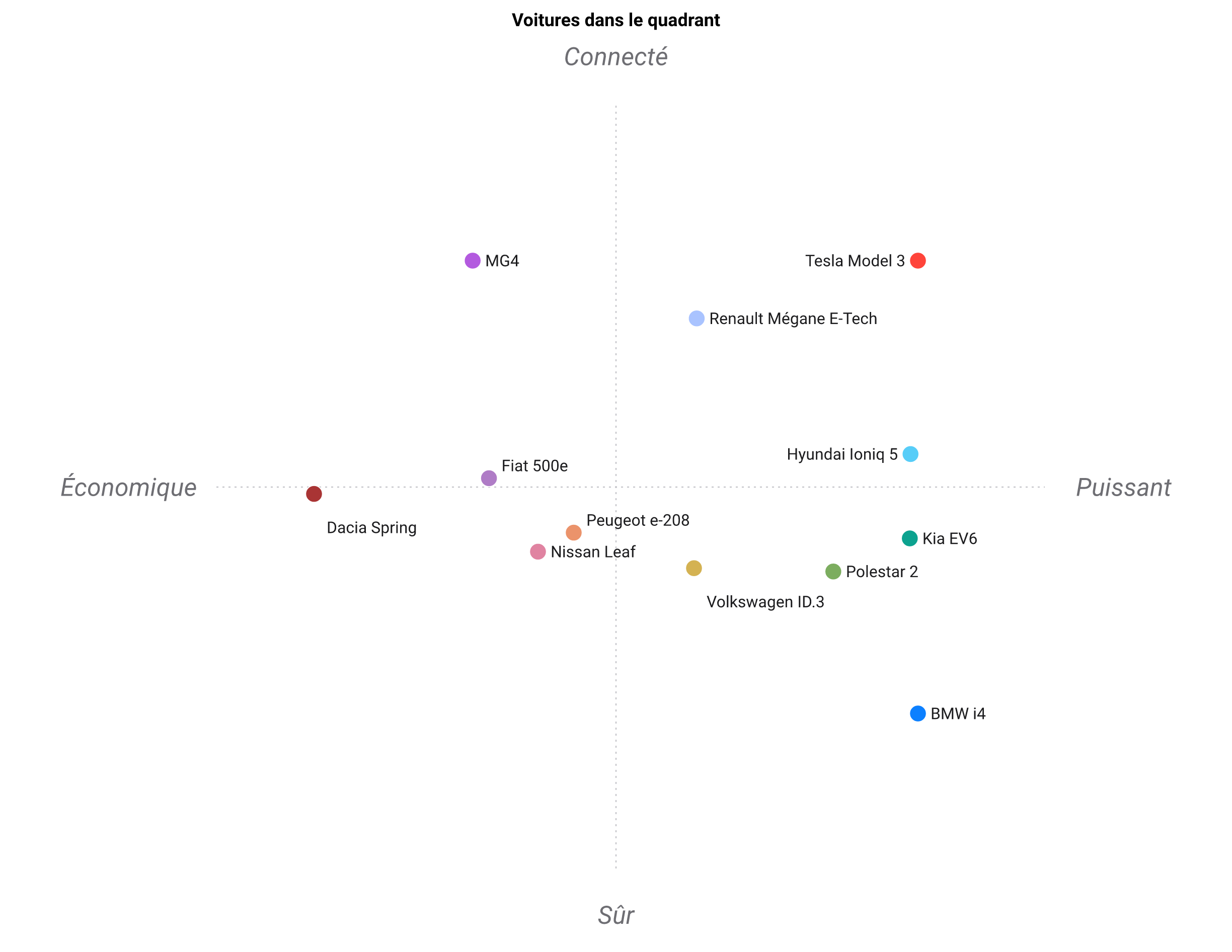
- Multilingual: axis names and the figure title come out in the table's own language (English, French, or Spanish), auto-detected from the column names, so a French table reads Voitures dans le quadrant.
- Reference-oriented: the option you care about is rotated to the top-right; an all-max reference is placed just past the best competitor rather than as an outlier.
- Four highlighted options: the leader, the weakest overall, and the two challengers that reach furthest toward the top and right poles.
- Polarity aware: mark a lower-is-better column with
(↓)(or--lower) and Standpoint names the benefit (Affordable, Portable), never the drawback. - Vision self-check:
--checkasks a local vision model whether the figure reads correctly (leader top-right, labels legible, legend visible).
One engine, seven access surfaces. The same positioning() pipeline is reachable as:
- Library:
import standpoint as sp. - CLI ×2:
standpoint(argparse, always installed) andstandpoint-click(click twin) with identical flags. - GUI:
standpoint-gui→ a single-page browser app at/gui([gui]extra). - HTTP API: a FastAPI app (
POST /api/position), same[gui]extra. - MCP:
standpoint-mcppublishes the API as MCP tools at/mcp([mcp]extra). - Static web app: the same GUI page with the engine compiled to WebAssembly
(Pyodide), built by
webapp/build.pyinto a folder any static host can serve; no server process at all (see GUI.md § Static build).
It also ships as a Claude / OpenCode skill; see skills/standpoint/SKILL.md and the exhaustive TRIGGERS.md.
Installation
The two commands that matter
If you already have Python 3.10–3.13, this is the entire install:
pip install --upgrade standpoint
The same command installs it the first time and updates it every time after —
one thing to remember, not two. Add an extra for the browser GUI / API
(pip install --upgrade "standpoint[gui]") or the MCP server
(pip install --upgrade "standpoint[mcp]"). Using pipx
instead keeps it isolated from every other Python project: pipx install standpoint the first time, pipx upgrade standpoint after.
Everything below is the fuller walkthrough (prerequisites, a virtual environment, troubleshooting) for a machine that doesn't have Python set up yet, or for anyone who wants more control.
Prerequisites: Python 3.10–3.13 and git, cross-platform:
- 🍎 macOS (Homebrew):
brew install python git - 🐧 Ubuntu/Debian:
sudo apt update && sudo apt install -y python3 python3-pip git - 🪟 Windows (PowerShell):
winget install Python.Python.3.12 Git.Git
For axis names, install Ollama and start
it. You do not pick a model: on first use best-engine-ai-helper resolves the best
local vision-LLM for your machine from standpoint/llm.brief.yaml and pulls it once.
- 🍎 macOS:
brew install ollama, thenollama serve & - 🐧 Ubuntu/Debian:
curl -fsSL https://ollama.com/install.sh | sh, thenollama serve & - 🪟 Windows: install from ollama.com/download, then launch it
Use a virtual environment. Installing into the system Python is the #1 cause of "it installed but the command isn't found" or a version conflict with another project:
- 🍎 macOS / 🐧 Ubuntu/Debian:
python3 -m venv .venv && source .venv/bin/activate
python -m pip install --upgrade pip   # an old pip is the #1 cause of install failures
- 🪟 Windows (PowerShell):
python -m venv .venv; .venv\Scripts\Activate.ps1
python -m pip install --upgrade pip
New to Python environments? See 🥸 Tech tips.
From PyPI (recommended)
pip install standpoint             # library + the two CLIs
pip install "standpoint[gui]"      # + the browser GUI and HTTP API
pip install "standpoint[mcp]"      # + the MCP server (over the API)
From source
git clone https://github.com/warith-harchaoui/standpoint.git
cd standpoint
pip install -e .          # or: pip install -r requirements.txt
Or install a specific released version straight from GitHub (the import name is
standpoint; see Releases
for the latest tag):
pip install standpoint
Verify the install
python -c "import standpoint; print(standpoint.__version__)"   # prints the version
standpoint --help                                               # confirms the CLI is on PATH
Troubleshooting
- 🍎🐧
command not found: standpoint: the virtual environment isn't activated, re-runsource .venv/bin/activate; or the install failed silently, re-runpip install standpointand read the last few lines of its output. - 🪟 **
standpointis not recognized...**: same cause on Windows, re-run.venv\Scripts\Activate.ps1, then confirm withGet-Command standpoint`. - 🍎🐧🪟
ModuleNotFoundError: No module named 'standpoint': you're running a different Python than the one you installed into; comparewhich python3/which pip(macOS/Ubuntu) orGet-Command python,Get-Command pip(Windows), then reinstall withpython -m pip install standpointto force the match. - 🍎🐧 GUI: "The local Ollama server is not reachable": start it with
ollama serve(some installs already run it as a background service), then confirm withcurl http://localhost:11434. - 🪟 GUI: "The local Ollama server is not reachable": launch the Ollama app from
the Start menu, then confirm with
Invoke-WebRequest http://localhost:11434. - 🍎🐧🪟 GUI: "The model '...' is not installed":
ollama pull <tag>for the tag in the error (the one resolved instandpoint/llm.engine.yaml, or whichever--modelyou passed); delete that engine file to re-resolve after a hardware change. - 🍎🐧
Address already in useonstandpoint-gui: port 8000 is taken, find the process withlsof -i :8000, or just runuvicorn standpoint.api:app --port 8001on a free port instead. - 🪟
Address already in useonstandpoint-gui: find the process withnetstat -ano | findstr :8000, or runuvicorn standpoint.api:app --port 8001on a free port instead. - 🍎🐧🪟 Old Python (< 3.10): check with
python3 --version(orpython --versionon Windows); Standpoint requires 3.10+. Install a newer Python with the prerequisite commands above rather than patching around the version check.
Usage
standpoint examples/programming_languages.csv --outdir out
# without installing: python3 -m standpoint examples/programming_languages.csv --outdir out
Two equivalent CLIs are installed: standpoint (argparse) and standpoint-click.
As a library:
import standpoint as sp

pos = sp.positioning("examples/programming_languages.csv")
pos.export("out")                 # writes out/python.{png,svg,white.png,white.svg,yaml}
print(pos.axes)
# {'x': 'Concurrency ↔ Ecosystem', 'y': 'Safety ↔ Learning'}
Pick a different local model for the axis names:
standpoint my_table.csv --model qwen3:8b
More in EXAMPLES.md.
As a service: GUI, API, MCP, Docker
pip install "standpoint[gui]"
standpoint-gui                     # browser app → http://localhost:8000/gui
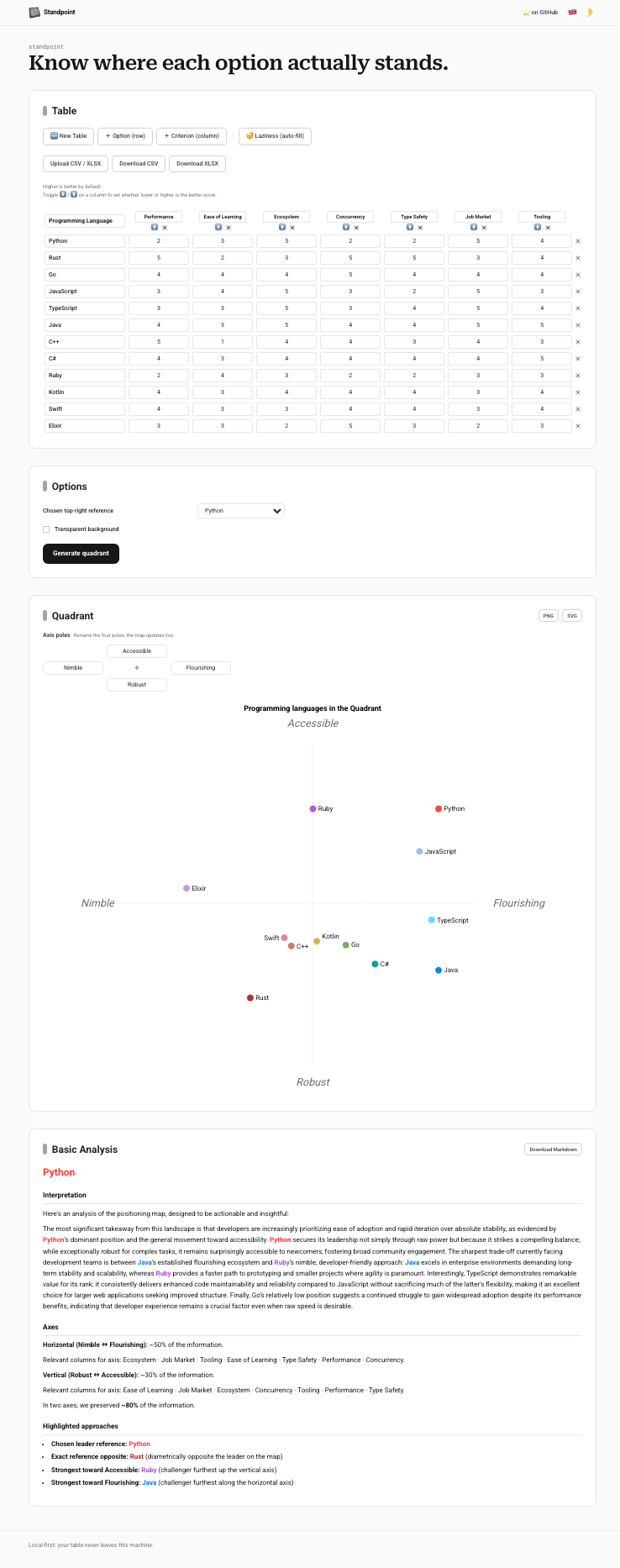
The GUI's backend is a FastAPI app: POST /api/position returns the SVG and
the YAML. Serve it with the MCP endpoint mounted so an
agent can call position as a tool:
pip install "standpoint[mcp]"
standpoint-mcp                     # API + MCP at /mcp (GUI still at /gui)
Or run it all in a container (installs from requirements.txt, serves API + MCP):
docker build -t standpoint .
docker run --rm -p 8000:8000 standpoint
No server at all? python webapp/build.py composes the same GUI as a static
bundle: the engine runs in the visitor's browser via Pyodide, and one in-page
model — Standpoint's own distilled student, downloaded once at page load behind
a full-screen Patience… veil, then cached — names the axes and fills the empty
cells on auto-fill: no server, no key. Upload the folder it writes (--out says
where, --help prints the default) to any static web folder and it just works.
Details in GUI.md § Static build.
For local library work, a thin conda env wraps the same requirements.txt:
conda env create -f environment.yaml && conda activate env-for-standpoint && pip install -e .
Input format
A CSV or Markdown table. The first column holds the option names; the rest are numeric criteria on any scale. Higher means better. Empty cells are filled with the column's minimum, so a missing rating never helps an option.
| Language | Performance | Ease of Learning | Ecosystem | Type Safety | Job Market |
|---|---|---|---|---|---|
| Python | 2 | 5 | 5 | 2 | 5 |
| Rust | 5 | 2 | 3 | 5 | 3 |
| Go | 4 | 4 | 4 | 4 | 4 |
The first row is the reference and goes to the top right. Change it with
--reference "<name>". Mark a lower-is-better column with (↓), e.g.
Price (↓), or list it in --lower.
How it works
- Standardize each criterion to mean 0 and standard deviation 1. PCA is sensitive to scale, so this puts every criterion on equal footing.
- Run PCA and keep two components. The axes stay as weighted sums of the original columns, so you can read them.
- Rotate the map so the reference sits top right. If the reference scores top marks on everything, it is placed just past the best competitor on each axis rather than far off on its own.
- Label it. The four highlighted options (leader, weakest, and the two challengers furthest toward the top and right poles) come straight from the map geometry. Each option takes its own colour from its position. A local model reads the loadings and names the four axis ends, as positive qualities, in your columns' language (English, French, or Spanish).
The figure keeps to a dotted cross for the axes, the pole words at the ends, labels only where they fit, and a legend for the rest.
Notes
- Axis names come from a local model. A guard keeps them positive, distinct, and
free of acronyms; a larger
--modelhelps, and--checkasks the vision model whether the figure reads correctly. - Higher is better by default. For a column where lower is better, mark its header
with
(↓)(Price (↓),Latency (↓)) or pass--lower Price,Latency. Standpoint negates it and names the pole for the benefit ("Affordable", "Portable"), never the drawback. - Every figure is written twice: a transparent
.png/.svgthat drops onto any page, and a white-background.white.png/.white.svgfor dark surfaces where the near-black labels would otherwise vanish on transparency. - It is a 2D projection. The axes carry a stated fraction of the variance, so read it as a summary rather than the whole picture.
Examples
Tracked in examples/, input CSV and generated figures:
| Table | Language | Leader |
|---|---|---|
programming_languages.csv |
en | Python |
cloud_providers.csv |
en | AWS |
laptops.csv |
en | MacBook Air (uses Price (↓) / Weight (↓)) |
voitures_electriques.csv |
fr | Tesla Model 3 |
Development
pip install -r requirements-dev.txt   # or: pip install -e ".[dev]"
python3 -m pytest tests/ -q           # deterministic tests; model-backed ones auto-skip
python3 -m ruff check standpoint tests
python3 -m ruff format --check standpoint tests
The coding standard for this repository is CODING.md; the contribution and versioning policy is in CONTRIBUTING.md.
Author
Credits
PCA perceptual maps are standard (factoextra and FactoMineR in R, prince and
pca in Python); using a model to read the components is a newer idea. Colours
come from the "Good Colors" palette.
Figures are hand-authored SVG, rasterised to PNG by
resvg.
License
BSD 3-Clause, the same license as scikit-learn. See
LICENSE.
1 maintainer

Metadata
1 maintainer
Release files for standpoint 0.9.0
For a detailed explanation of source distributions (sdists) and built distributions (wheels), please see the package formats documentation.
Source distribution (sdist)
| File | Size | Uploaded | |
|---|---|---|---|
| standpoint-0.9.0.tar.gz | 1.3 MB | Details |
Built distribution (wheel)
| File | Interpreter | ABI | Platform | Reset |
|---|---|---|---|---|
| standpoint-0.9.0-py3-none-any.whl | Python 3 | none | any | Details |
Total release size: 2.6 MB
Release files / standpoint-0.9.0.tar.gz
| Download URL | standpoint-0.9.0.tar.gz |
|---|---|
| Size | 1.3 MB |
| Tags | Source |
|
SHA-256 checksum How to use checksums |
7b298bee0f1f506d4f93ee76ea18a0aecb94caeb22be0aad27aeef62a4492ebe
|
|
BLAKE2b-256 checksum How to use checksums |
ae23fc905eafa3b7e5c1e20616e3c0df8b85e89ed794c1dd61ceb9278172a0c4
|
| Upload date | |
|
Uploaded using Trusted Publishing? What is trusted publishing? |
No |
| Uploaded via |
twine/7.0.0 CPython/3.13.13
|
Release files / standpoint-0.9.0-py3-none-any.whl
| Download URL | standpoint-0.9.0-py3-none-any.whl |
|---|---|
| Size | 1.3 MB |
| Tags | Python 3 |
|
SHA-256 checksum How to use checksums |
28c50670ba6870bb5075f45616db5ee08028505316d5559dbedf18360158cc76
|
|
BLAKE2b-256 checksum How to use checksums |
c81bad083e753c5353dc2c200a300173810a2c07b1945c43a52ee1ed4ae3dd25
|
| Upload date | |
|
Uploaded using Trusted Publishing? What is trusted publishing? |
No |
| Uploaded via |
twine/7.0.0 CPython/3.13.13
|














