
starlake-dagster
starlake-dagster is the Starlake Python Distribution for Dagster.
It is recommended to use it in combination with starlake dag generation, but can be used directly as is in your pipelines.
For deep architectural details including graph construction, definitions assembly, and sensor flow, see ARCHITECTURE.md.
Prerequisites
Before installing starlake-dagster, ensure the following minimum versions are installed on your system:
- starlake: 1.5.7 or higher
- python: 3.8 or higher
Installation
pip install starlake-orchestration[dagster] --upgrade
or
pip install starlake-dagster --upgrade
StarlakeDagsterJob
ai.starlake.dagster.StarlakeDagsterJob is an abstract factory class that extends IStarlakeJob[NodeDefinition, AssetKey], StarlakeOptions, and DagsterDataset. It is responsible for generating the Dagster nodes that will run the import, load and transform starlake commands.
DagsterDataset
DagsterDataset extends AbstractEvent[AssetKey] and converts StarlakeDataset.uri to Dagster AssetKey instances:
class DagsterDataset(AbstractEvent[AssetKey]):
    @classmethod
    def to_event(cls, dataset: StarlakeDataset, source: Optional[str] = None) -> AssetKey:
        return AssetKey(dataset.uri)
sl_import
Generates the Dagster node that will run the starlake import command.
def sl_import(
    self,
    task_id: str,
    domain: str,
    tables: set=set(),
    **kwargs) -> NodeDefinition:
    #...
| name | type | description |
|---|---|---|
| task_id | str | the optional task id ({domain}_import by default) |
| domain | str | the required domain to import |
| tables | set | the optional tables to import |
sl_load
Generates the Dagster node that will run the starlake load command.
def sl_load(
    self,
    task_id: str,
    domain: str,
    table: str,
    spark_config: StarlakeSparkConfig=None,
    dataset: Optional[Union[StarlakeDataset, str]]=None,
    **kwargs) -> NodeDefinition:
    #...
| name | type | description |
|---|---|---|
| task_id | str | the optional task id ({domain}_{table}_load by default) |
| domain | str | the required domain of the table to load |
| table | str | the required table to load |
| spark_config | StarlakeSparkConfig | the optional ai.starlake.job.StarlakeSparkConfig |
| dataset | Optional[Union[StarlakeDataset, str]] | the optional dataset to materialize |
sl_transform
Generates the Dagster node that will run the starlake transform command.
def sl_transform(
    self,
    task_id: str,
    transform_name: str,
    transform_options: str=None,
    spark_config: StarlakeSparkConfig=None,
    dataset: Optional[Union[StarlakeDataset, str]]=None,
    **kwargs) -> NodeDefinition:
    #...
| name | type | description |
|---|---|---|
| task_id | str | the optional task id ({transform_name} by default) |
| transform_name | str | the transform to run |
| transform_options | str | the optional transform options |
| spark_config | StarlakeSparkConfig | the optional ai.starlake.job.StarlakeSparkConfig |
| dataset | Optional[Union[StarlakeDataset, str]] | the optional dataset to materialize |
sl_job
Ultimately, all these methods call the sl_job method that needs to be implemented in all concrete factory classes.
def sl_job(
    self,
    task_id: str,
    arguments: list,
    spark_config: StarlakeSparkConfig=None,
    dataset: Optional[Union[StarlakeDataset, str]]=None,
    task_type: Optional[TaskType]=None,
    **kwargs) -> NodeDefinition:
    #...
| name | type | description |
|---|---|---|
| task_id | str | the required task id |
| arguments | list | the required arguments of the starlake command to run |
| spark_config | StarlakeSparkConfig | the optional ai.starlake.job.StarlakeSparkConfig |
| dataset | Optional[Union[StarlakeDataset, str]] | the optional dataset to materialize |
| task_type | Optional[TaskType] | the optional task type |
Init
To initialize this class, you may specify the optional pre load strategy and options to use.
def __init__(
    self,
    filename: str=None,
    module_name: str=None,
    pre_load_strategy: Union[StarlakePreLoadStrategy, str, None]=None,
    options: dict=None,
    **kwargs) -> None:
    """Overrides IStarlakeJob.__init__()
    Args:
        filename (str): The optional filename.
        module_name (str): The optional module name.
        pre_load_strategy (Union[StarlakePreLoadStrategy, str, None]): The pre-load strategy to use.
        options (dict): The options to use.
    """
    super().__init__(filename=filename, module_name=module_name, pre_load_strategy=pre_load_strategy, options=options, **kwargs)
    #...
StarlakePreLoadStrategy
ai.starlake.job.StarlakePreLoadStrategy is an enum that defines the different pre load strategies that can be used to conditionally load tables within a domain.
The pre-load strategy is implemented by the sl_pre_load method that will generate the Dagster node corresponding to the chosen strategy.
def sl_pre_load(
    self,
    domain: str,
    tables: set=set(),
    pre_load_strategy: Union[StarlakePreLoadStrategy, str, None]=None,
    **kwargs) -> Optional[NodeDefinition]:
    #...
| name | type | description |
|---|---|---|
| domain | str | the domain to load |
| tables | set | the optional tables to pre-load |
| pre_load_strategy | Union[StarlakePreLoadStrategy, str, None] | the optional pre load strategy (self.pre_load_strategy by default) |
NONE
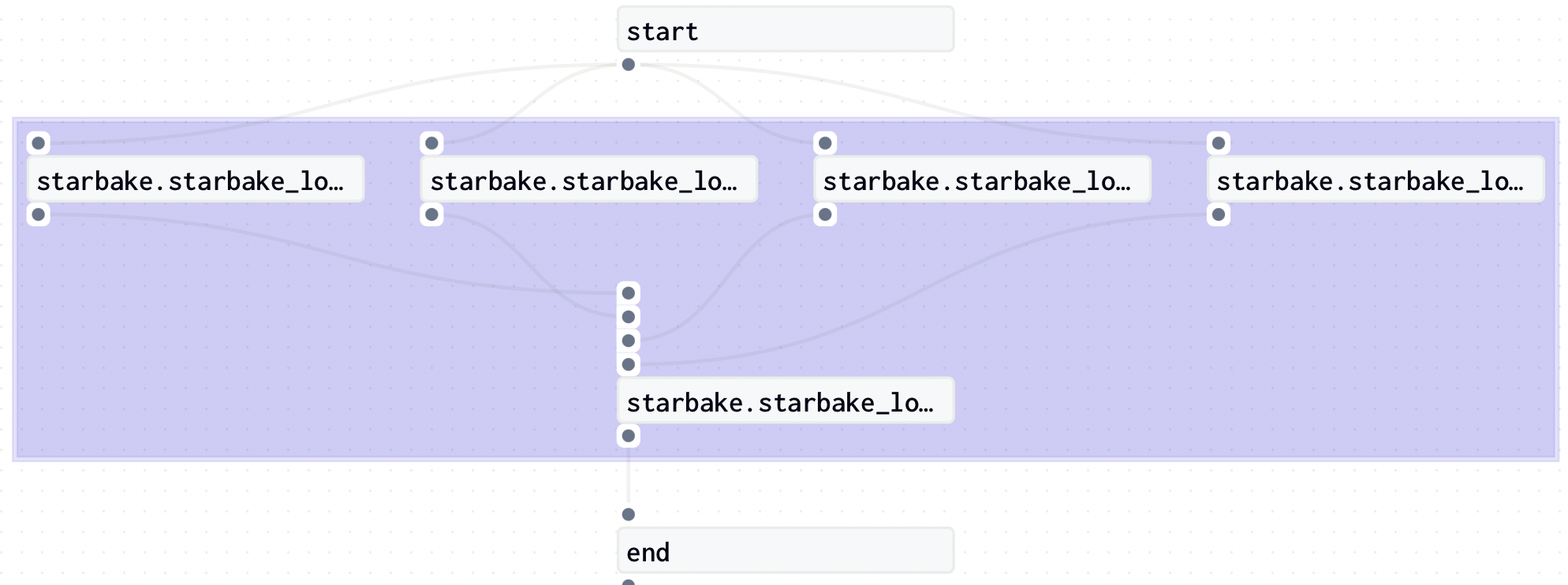
The load of the domain will not be conditioned and no pre-load op will be executed.
IMPORTED
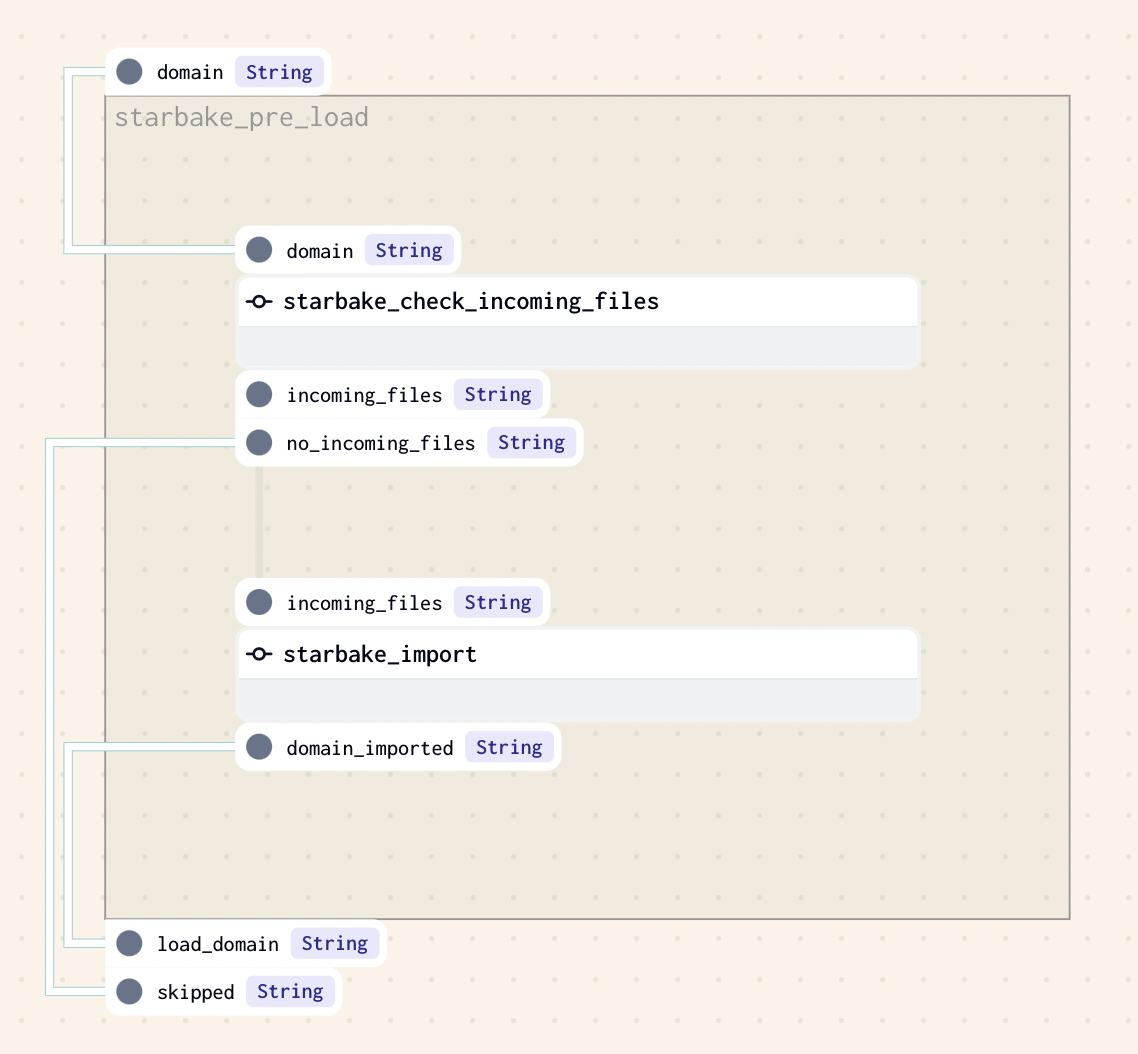
This strategy implies that at least one file is present in the landing area (SL_ROOT/datasets/importing/{domain} by default). If there is one or more files to load, the method sl_import will be called to import the domain before loading it, otherwise the loading of the domain will be skipped.
PENDING
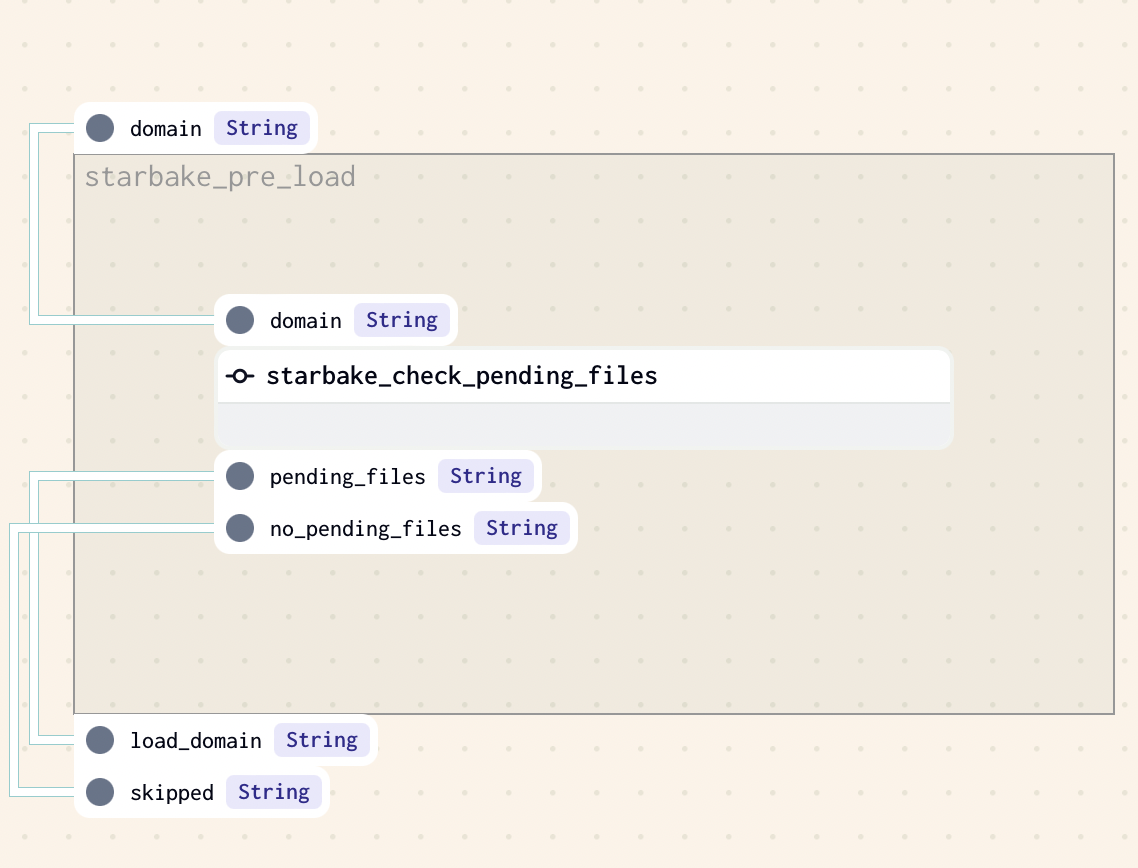
This strategy implies that at least one file is present in the pending datasets area of the domain (SL_ROOT/datasets/pending/{domain} by default), otherwise the loading of the domain will be skipped.
ACK
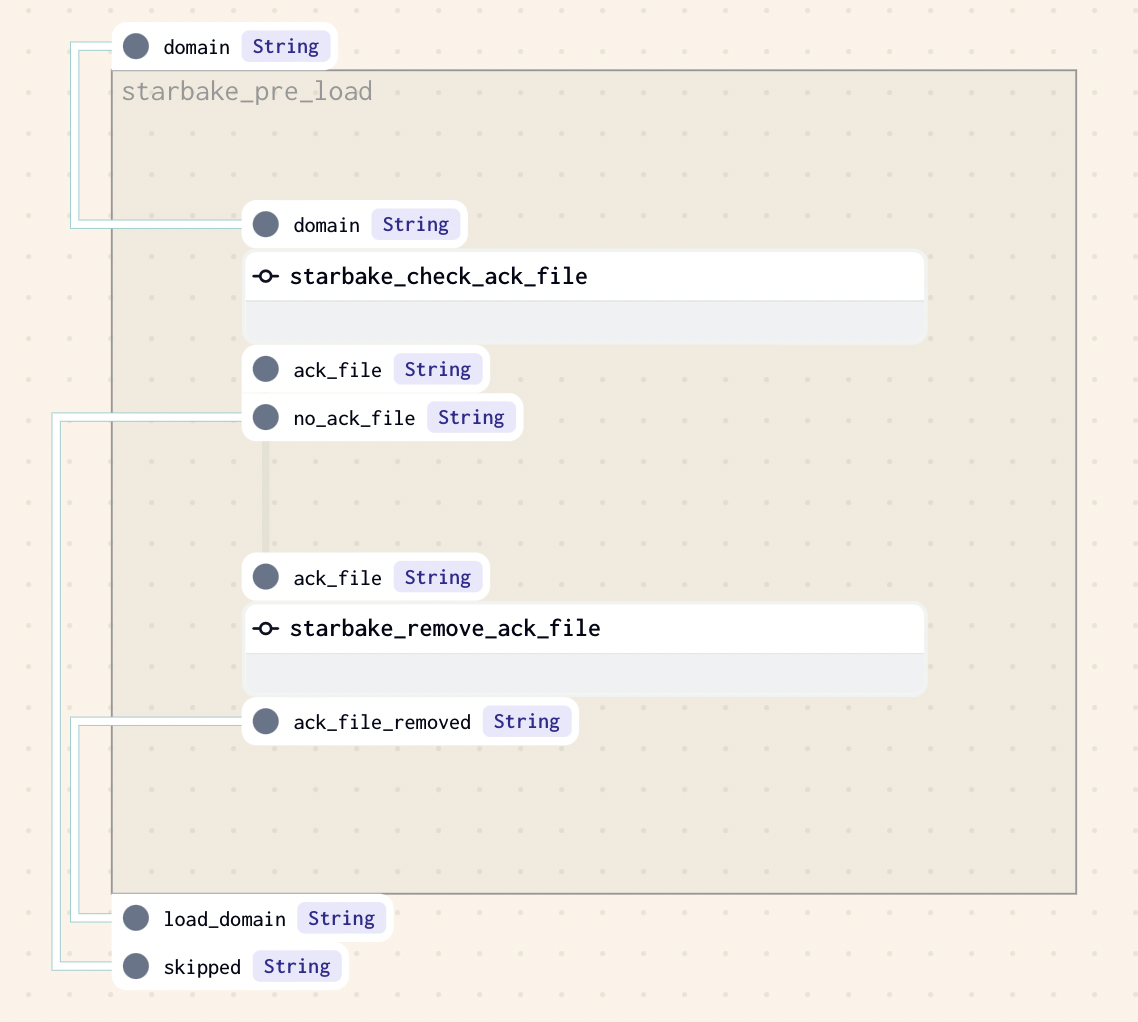
This strategy implies that an ack file is present at the specified path (option global_ack_file_path), otherwise the loading of the domain will be skipped.
Options
The following options can be specified in all concrete factory classes:
| name | type | description |
|---|---|---|
| sl_env_var | str | optional starlake environment variables passed as an encoded json string |
| retries | int | optional number of retries to attempt before failing an op (1 by default) |
| retry_delay | int | optional delay between retries in seconds (300 by default) |
| pre_load_strategy | str | one of none (default), imported, pending or ack |
| global_ack_file_path | str | path to the ack file ({SL_DATASETS}/pending/{domain}/{{{{ds}}}}.ack by default) |
| ack_wait_timeout | int | timeout in seconds to wait for the ack file (1 hour by default); ignored in sensor mode (historically dead on Dagster anyway — preload forces retries=0) |
| dataproc_job_wait_timeout | int | (Dataproc only) timeout in seconds to wait for a submitted job to reach its terminal state (3600 by default) — the submission response is never terminal, so the op polls wait_for_job/get_job; ignored in sensor mode (each poke's wait is bounded by pre_load_timeout); on poll timeout the still-running job is ABANDONED (no cancel primitive) — size it above your longest job |
| pre_load_sensor | bool | true/false (default false) — wrap the pre-load op in an in-op poke loop that re-runs the preload until files arrive, on EVERY execution environment. CAUTION: Dagster has no reschedule primitive, the op HOLDS ITS EXECUTOR SLOT while poking (up to pre_load_timeout seconds). On the cloud variants (cloud_run, dataproc, fargate) each poke RE-SUBMITS the cloud job — full submission overhead per attempt (the slot-holding is lightweight there: the heavy work runs cloud-side between checks), and a genuinely broken invocation (bad config, infra failure) is indistinguishable from "no files yet" and pokes until timeout |
| pre_load_poke_interval | int | seconds between two pokes in sensor mode (300 by default) |
| pre_load_timeout | int | wall-clock timeout in seconds for the pre-load poke loop (3600 by default) |
| pre_load_sensor_soft_fail | bool | true/false (default false) — on timeout skip the downstream loads (optional-output gating) instead of raising Failure |
| pre_load_not_ready_sentinel_path | str | opt-in (absent/blank = off, zero change) — parent prefix for the CLI's --notReadySentinel marker (requires starlake CLI 1.5.15+), resolved to <prefix>/<domain>/<job_name>__<run_id>.notready (sanitized). Scheme is engine-gated at definition time: absolute local/file:// on shell, gs:// on cloud_run/dataproc, s3:// on fargate. See "Pre-load not-ready sentinel" below |
| dataset_triggering_strategy | str | one of ANY or ALL for the multi-asset sensor trigger gate (see Multi-Asset Sensor — a post-gate consistency check still requires all non-optional datasets before a run) |
Pre-load not-ready sentinel
Starlake CLI 1.5.15+ writes a zero-byte marker at --notReadySentinel <uri> on a "not ready" decision and exits 0 — a genuine crash still exits non-zero (or a non-DONE Dataproc state) and never writes the marker. With pre_load_not_ready_sentinel_path set (strictly opt-in), the pre-load verdict becomes deterministic on every variant:
- success + marker absent → READY → proceed (the
resultOutput is yielded); - success + marker present → the marker is consumed (deleted first), then NOT READY is signaled through the existing primitive: bare return → optional-output skip (one-shot), poke-again in the in-op wall-clock loop (sensor mode);
- failed run → REAL FAILURE →
Failureis raised NOW, bypassing the forcedskip_or_startswallow AND the poke loop (opt-in only: without the option a broken invocation still reads as "no files yet" — the documented poke-until-timeout trade-off).
The <job_name>__<run_id> scope is substituted at op RUN time into a per-attempt copy of the command vector (the closure arguments list is never mutated — 6.9/6.10 rule) and into the polled path; the scope is whitelist-sanitized ([A-Za-z0-9_.+:=-]). Consumption uses the core default handlers: local files for shell, ai.starlake.gcp (google-cloud-storage) for gs://, ai.starlake.aws (boto3) for s3:// — install the SDKs with pip install starlake-orchestration[gcp] / [aws]; a missing SDK raises an actionable error naming the extra.
Best-effort-write caveat (CLI design): a failed marker write still ends "success" with no marker. For IMPORTED/PENDING this yields a no-op load; for ACK it can trigger a premature load of un-acked data — keep the sentinel prefix on reliable storage with the ACK strategy.
Consumption identity (gs://): the default handlers authenticate with the WORKER's application-default credentials — cloud_run_service_account impersonation applies only to the gcloud run jobs execute submission, not to the marker probe. Grant the worker identity read/delete on the sentinel prefix (a missing grant raises loudly on every consume; it is never a silent false verdict).
DagsterLogicalDatetimeConfig
DagsterLogicalDatetimeConfig extends Dagster Config and provides the runtime configuration for partition-aware execution:
class DagsterLogicalDatetimeConfig(Config):
    logical_datetime: Optional[str]
    previous_logical_datetime: Optional[str] = None
    dry_run: bool = False
| field | type | description |
|---|---|---|
| logical_datetime | Optional[str] | the logical datetime for the current run |
| previous_logical_datetime | Optional[str] | the logical datetime of the previous run (for incremental) |
| dry_run | bool | if True, skip actual execution and log the command instead |
StarlakeDagsterUtils
StarlakeDagsterUtils is a utility class that provides helper methods for working with Dagster assets, materializations, and datetime encoding within the Starlake framework.
Partition Key Encoding
Partition key datetimes are encoded for safe use as Dagster partition keys:
spaceis replaced withT:(colon) is replaced with.(period)+(plus) is replaced with_(underscore)
StarlakeDagsterUtils.quote_datetime("2024-01-15 10:30:00+00:00")
# Returns: "2024-01-15T10.30.00_00.00"

StarlakeDagsterUtils.unquote_datetime("2024-01-15T10.30.00_00.00")
# Returns: "2024-01-15 10:30:00+00:00"
Key Methods
| method | description |
|---|---|
quote_datetime |
Encode a datetime string for use as a partition key |
unquote_datetime |
Decode a partition key back to a datetime string |
get_logical_datetime |
Resolve the logical datetime from partition key, config, or run launch time |
get_asset |
Get an AssetKey for a dataset, refreshed with the logical datetime |
get_materialization |
Create an AssetMaterialization with metadata (uri, cron, freshness, scheduled_date, dry_run) |
get_materializations |
Batch version of get_materialization for multiple datasets |
get_transform_options |
Compute transform options (data_interval_start/end) from config, partition, or cron |
DagsterOrchestration and DagsterPipeline
DagsterOrchestration extends AbstractOrchestration and provides the high-level orchestration context. DagsterPipeline extends AbstractPipeline and handles the construction of Dagster JobDefinition instances.
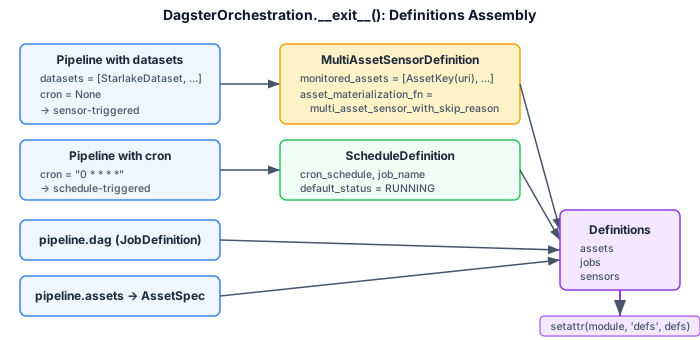
Definitions Assembly
When the orchestration context exits (__exit__), it assembles the final Dagster Definitions including:
- AssetSpec for each pipeline asset
- JobDefinition for each pipeline
- MultiAssetSensorDefinition for pipelines with dataset dependencies
- ScheduleDefinition for cron-based pipelines
Graph Construction
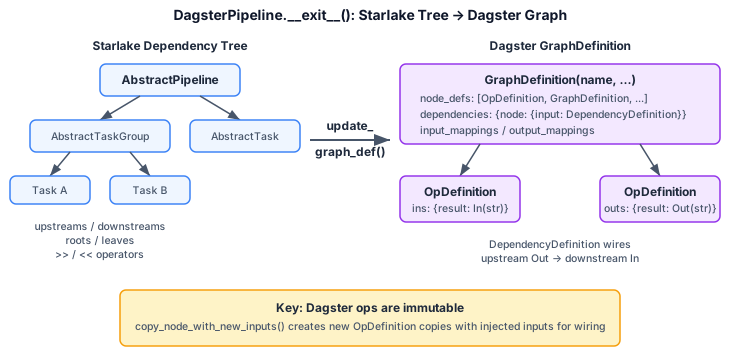
DagsterPipeline builds the Dagster graph by recursively walking the dependency tree to create:
OpDefinitionnodes for individual tasksGraphDefinitionnodes for task groups with nestedDependencyDefinition,InputMapping, andOutputMappingTimeWindowPartitionsDefinitionandPartitionedConfigfor scheduled pipelines
Multi-Asset Sensor
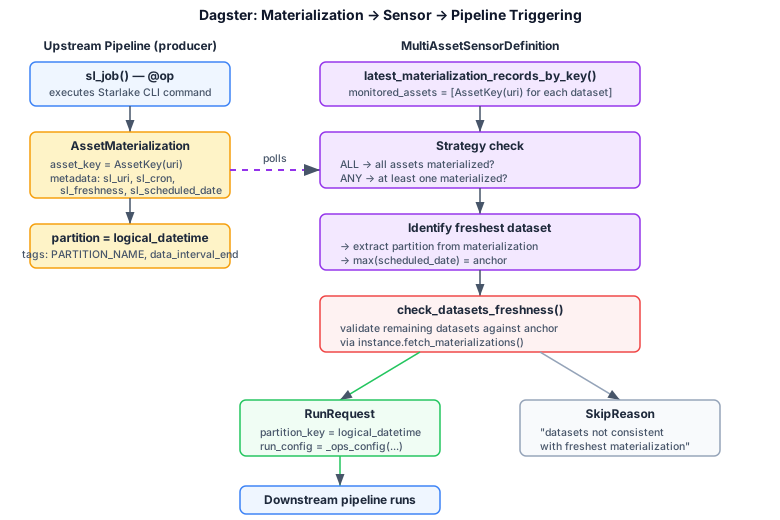
For pipelines with dataset dependencies, a MultiAssetSensorDefinition is created that:
- Monitors upstream
AssetKeymaterializations - Supports
DatasetTriggeringStrategy(ANY or ALL) - Validates freshness of materialized datasets against the expected schedule
- Computes
logical_datetimeandprevious_logical_datetimefor the triggered run
ANY vs ALL semantics. The
dataset_triggering_strategygoverns the trigger gate only: withANY, the sensor passes the gate as soon as one monitored asset has materialized; withALL, every asset must have materialized. Passing the gate does not fire a run by itself — a designed post-gate consistency check then verifies the freshness of all the non-optional datasets the pipeline depends on within the window frame, and the sensor keeps returning aSkipReasonuntil every one of them has materialized consistently. UnderANYwith a partially-materialized upstream set, Dagster therefore does not fire on the first available upstream the way Airflow'sDatasetAny/AssetAnytimetable does. See ARCHITECTURE.md for the detailed sensor flow.
On Premise
StarlakeDagsterShellJob
This class is a concrete implementation of StarlakeDagsterJob that generates nodes using the dagster-shell library. Useful for on premise execution.
An additional SL_STARLAKE_PATH option is required to specify the path to the starlake executable.
Each generated op uses RetryPolicy based on the configured retries and retry_delay options.
StarlakeDagsterShellJob Load Example
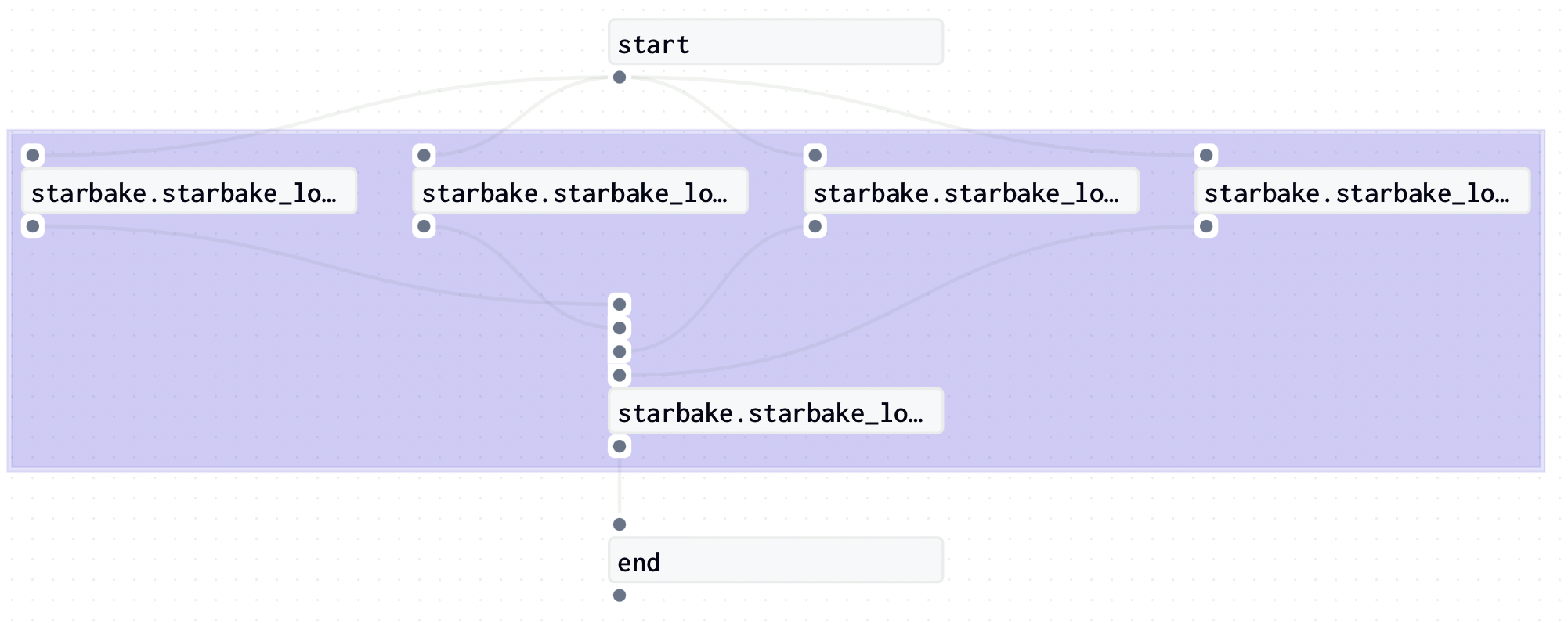
The following example shows how to use StarlakeDagsterShellJob to generate dynamically Jobs that load domains using starlake and record corresponding Dagster assets.
description="""example to load domain(s) using dagster starlake shell job"""

options = {
    # General options
    'sl_env_var':'{"SL_ROOT": "/starlake/samples/starbake"}',
    'retry_delay': '10',
    'pre_load_strategy':'ack',
    # Shell options
    'SL_STARLAKE_PATH':'/starlake/starlake.sh',
}

from ai.starlake.dagster.shell import StarlakeDagsterShellJob

sl_job = StarlakeDagsterShellJob(options=options)

import os

from dagster import AssetKey, ScheduleDefinition, GraphDefinition, Definitions, DependencyDefinition, JobDefinition, In, InputMapping, Out, Output, OutputMapping, graph, op, DefaultScheduleStatus

from dagster._core.definitions.input import InputDefinition

schedules= [
    {
        'schedule': 'None',
        'cron': '0 0 * * *',
        'domains': [
            {
                'name':'starbake',
                'final_name':'starbake',
                'tables': [
                    {
                        'name': 'Customers',
                        'final_name': 'Customers'
                    },
                    {
                        'name': 'Ingredients',
                        'final_name': 'Ingredients'
                    },
                    {
                        'name': 'Orders',
                        'final_name': 'Orders'
                    },
                    {
                        'name': 'Products',
                        'final_name': 'Products'
                    }
                ]
            }
        ]
    }
]

crons = []

pre_tasks = sl_job.pre_tasks()

start = sl_job.dummy_op(task_id="start", ins={"start": In(str)} if pre_tasks else {})

from typing import Union

def load_domain(domain: dict, cron: Union[str, None]) -> GraphDefinition:
    tables = [table["name"] for table in domain["tables"]]

    ins = {"domain": In(str)}

    op_tables = [sl_job.sl_load(task_id=None, domain=domain["name"], table=table, ins=ins, cron=cron) for table in tables]

    ld_end = sl_job.dummy_op(task_id=f"{domain['name']}_load_ended", ins={f"{op_table._name}": In(str) for op_table in op_tables}, out="domain_loaded")

    ld_end_dependencies = dict()

    for op_table in op_tables:
        ld_end_dependencies[f"{op_table._name}"] = DependencyDefinition(op_table._name, 'result')

    ld_dependencies = {
        ld_end._name: ld_end_dependencies
    }

    ld_input_mappings=[
        InputMapping(
            graph_input_name="domain",
            mapped_node_name=f"{op_table._name}",
            mapped_node_input_name="domain",
        )
        for op_table in op_tables
    ]

    ld_output_mappings=[
        OutputMapping(
            graph_output_name="domain_loaded",
            mapped_node_name=f"{ld_end._name}",
            mapped_node_output_name="domain_loaded",
        )
    ]

    ld = GraphDefinition(
        name=f"{domain['name']}_load",
        node_defs=op_tables + [ld_end],
        dependencies=ld_dependencies,
        input_mappings=ld_input_mappings,
        output_mappings=ld_output_mappings,
    )

    pld = sl_job.sl_pre_load(domain=domain["name"], tables=set(tables), cron=cron)

    @op(
        name=f"{domain['name']}_load_result",
        ins={"inputs": In()},
        out={"result": Out(str)},
    )
    def load_domain_result(context, inputs):
        context.log.info(f"inputs: {inputs}")
        yield Output(str(inputs), "result")

    @graph(
        name=f"{domain['name']}",
        input_defs=[InputDefinition(name="domain", dagster_type=str)],
    )
    def domain_graph(domain):
        if pld:
            load_domain, skip = pld(domain)
            return load_domain_result([ld(load_domain), skip])
        else:
            return ld(domain)

    return domain_graph

def load_domains(schedule: dict) -> GraphDefinition:
    cron = schedule['cron']
    if(cron):
        crons.append(ScheduleDefinition(job_name = job_name(schedule), cron_schedule = cron, default_status=DefaultScheduleStatus.RUNNING))

    dependencies = dict()

    nodes = [start]

    if pre_tasks and pre_tasks.output_dict.keys().__len__() > 0:
        result = list(pre_tasks.output_dict.keys())[0]
        if result:
            dependencies[start._name] = {
                'start': DependencyDefinition(pre_tasks._name, result)
            }
            nodes.append(pre_tasks)

    node_defs = [load_domain(domain, cron) for domain in schedule["domains"]]

    ins = dict()

    end_dependencies = dict()

    for node_def in node_defs:
        nodes.append(node_def)
        dependencies[node_def._name] = {
            'domain': DependencyDefinition(start._name, 'result')
        }
        result = f"{node_def._name}_result"
        ins[result] = In(dagster_type=str)
        end_dependencies[result] = DependencyDefinition(node_def._name, 'result')

    end = sl_job.dummy_op(task_id="end", ins=ins, assets=[AssetKey(sl_job.sl_dataset(job_name(schedule), cron=cron))])
    nodes.append(end)
    dependencies[end._name] = end_dependencies

    post_tasks = sl_job.post_tasks(ins = {"start": In(str)})
    if post_tasks and post_tasks.input_dict.keys().__len__() > 0:
        input = list(post_tasks.input_dict.keys())[0]
        if input:
            dependencies[post_tasks._name] = {
                input: DependencyDefinition(end._name, 'result')
            }
            nodes.append(post_tasks)

    return GraphDefinition(
        name=f"schedule_{schedule.get('schedule')}" if len(schedules) > 1 else 'schedule',
        node_defs=nodes,
        dependencies=dependencies,
    )

def job_name(schedule: dict) -> str:
    job_name = os.path.basename(__file__).replace(".py", "").replace(".pyc", "").lower()
    return (f"{job_name}_{schedule['schedule']}" if len(schedules) > 1 else job_name)

def generate_job(schedule: dict) -> JobDefinition:
    return JobDefinition(
        name=job_name(schedule),
        description=description,
        graph_def=load_domains(schedule),
    )

defs = Definitions(
   jobs=[generate_job(schedule) for schedule in schedules],
   schedules=crons,
)
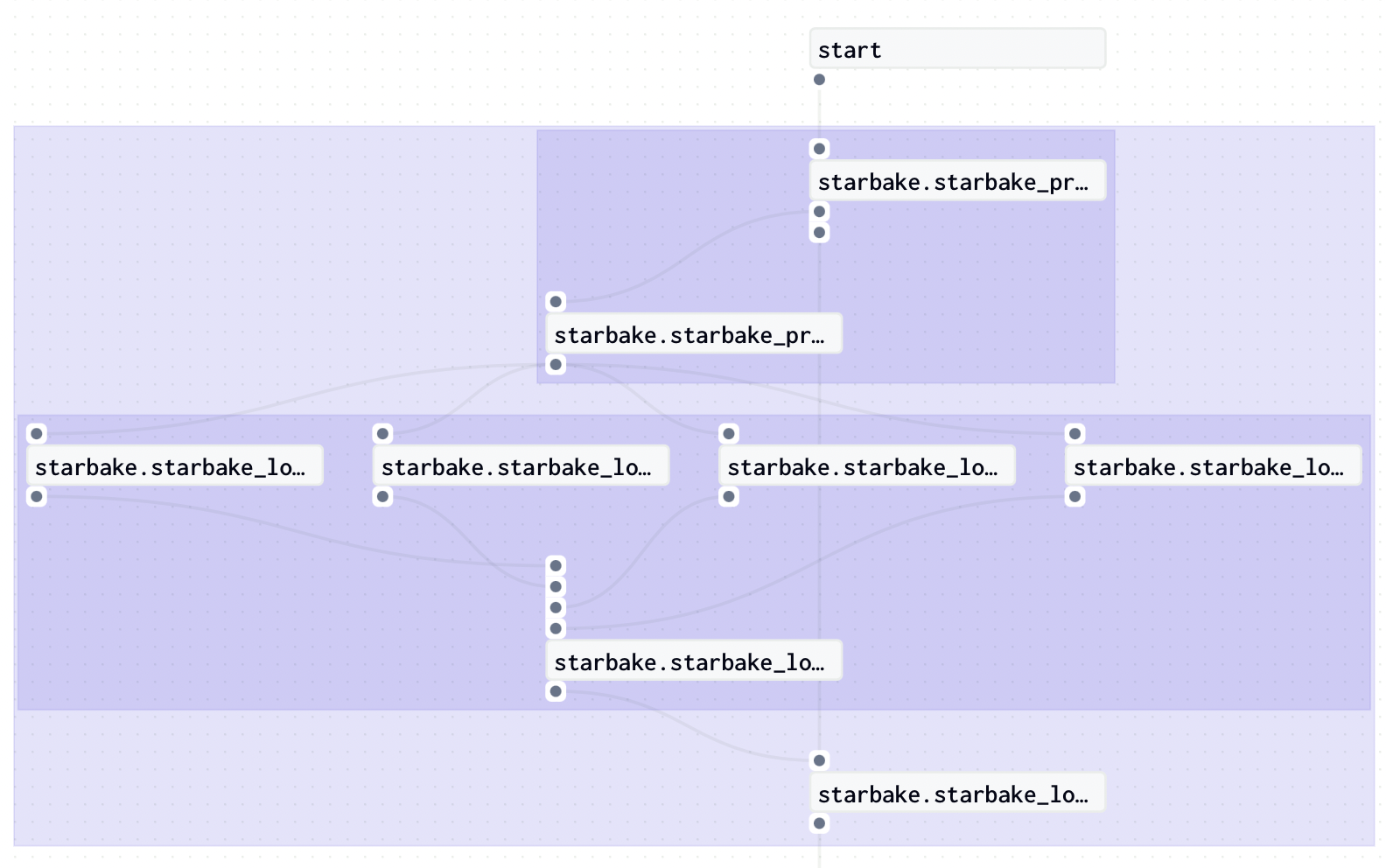
If we want to apply the none pre load strategy instead, we just need to change the pre_load_strategy option to none:
StarlakeDagsterShellJob Transform Example
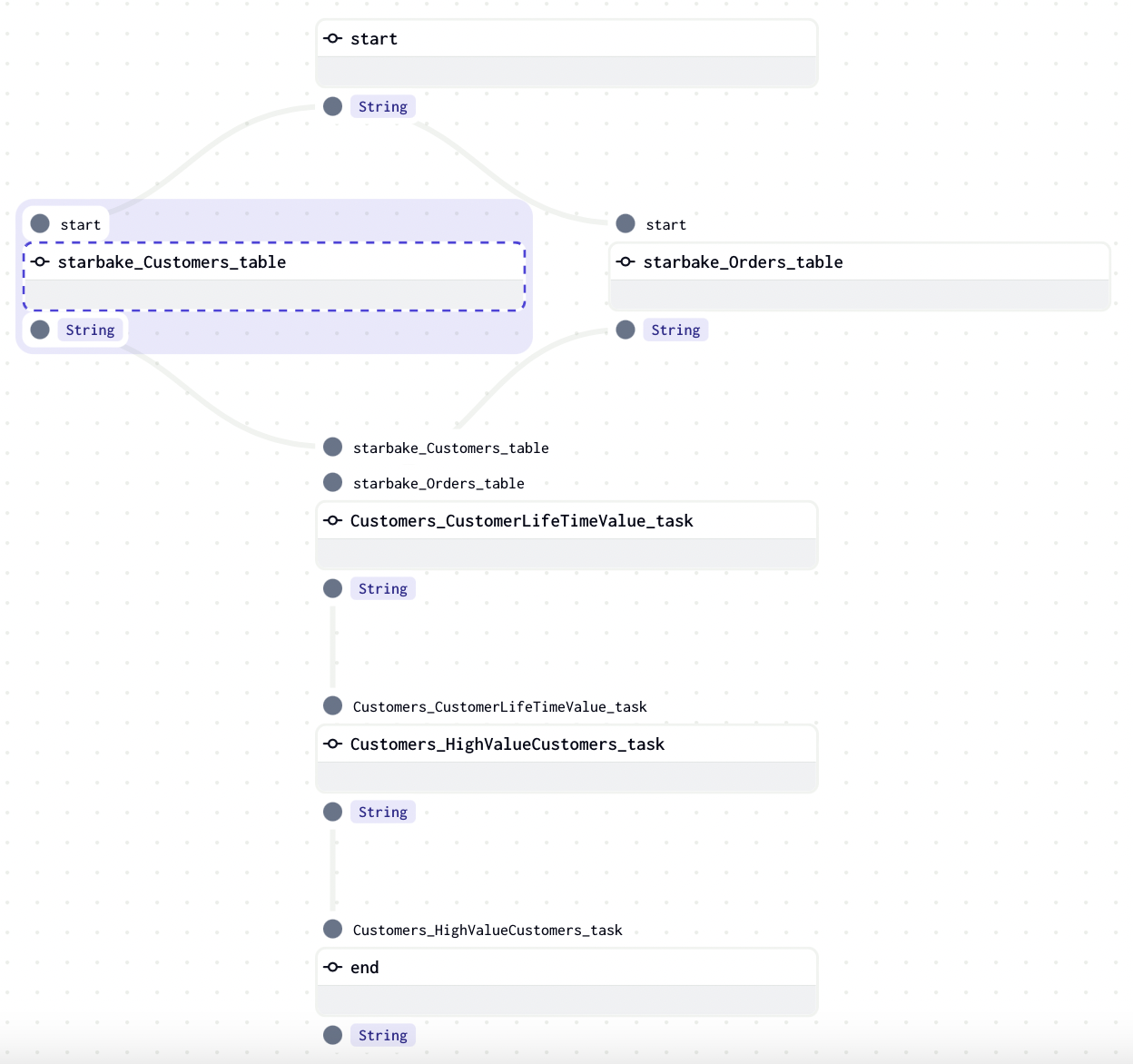
The following example shows how to use StarlakeDagsterShellJob to generate dynamically transform Jobs using starlake and record corresponding Dagster assets.
description="""example of transform using dagster starlake shell job"""

options = {
    # General options
    'sl_env_var':'{"SL_ROOT": "/starlake/samples/starbake"}',
    'retry_delay': '10',
    # Shell options
    'SL_STARLAKE_PATH':'/starlake/starlake.sh',
}

from ai.starlake.dagster.shell import StarlakeDagsterShellJob

sl_job = StarlakeDagsterShellJob(options=options)

# ... (task_deps JSON and job generation logic)
# See the full transform example in the starlake documentation
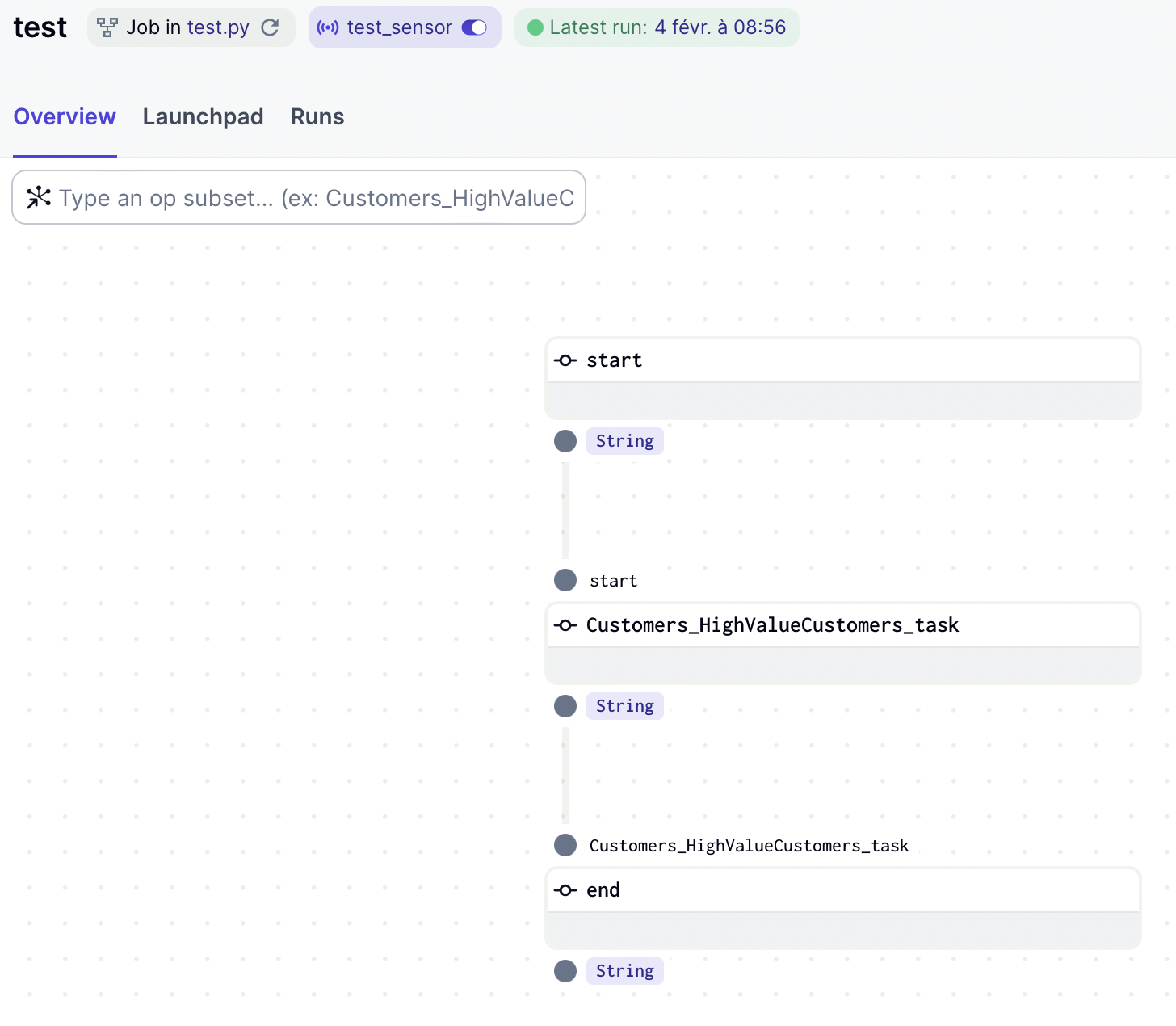
If we want to load the dependencies, we just need to set the run_dependencies option to True:
Google Cloud Platform
StarlakeDagsterDataprocJob
This class is a concrete implementation of StarlakeDagsterJob that overrides the sl_job method to run the starlake command by submitting a Dataproc job to the configured Dataproc cluster.
It delegates to an instance of the dagster_gcp.DataprocResource class the responsibility to:
- create the Dataproc cluster (via
pre_tasks) - submit Dataproc job to the cluster
- delete the Dataproc cluster (via
post_tasks)
This instance is available through the __dataproc__ property of the StarlakeDagsterDataprocJob class and is configured using the ai.starlake.gcp.StarlakeDataprocClusterConfig class.
Dataproc cluster configuration
Additional options may be specified to configure the Dataproc cluster.
| name | type | description |
|---|---|---|
| cluster_id | str | the optional unique id of the cluster that will participate in the definition of the Dataproc cluster name (if not specified) |
| dataproc_name | str | the optional dataproc name of the cluster that will participate in the definition of the Dataproc cluster name (if not specified) |
| dataproc_project_id | str | the optional dataproc project id (the project id on which the composer has been instantiated by default) |
| dataproc_region | str | the optional region (europe-west1 by default) |
| dataproc_subnet | str | the optional subnet (the default subnet if not specified) |
| dataproc_service_account | str | the optional service account (service-{self.project_id}@dataproc-accounts.iam.gserviceaccount.com by default) |
| dataproc_image_version | str | the image version of the dataproc cluster (2.2-debian1 by default) |
| dataproc_master_machine_type | str | the optional master machine type (n1-standard-4 by default) |
| dataproc_master_disk_type | str | the optional master disk type (pd-standard by default) |
| dataproc_master_disk_size | int | the optional master disk size (1024 by default) |
| dataproc_worker_machine_type | str | the optional worker machine type (n1-standard-4 by default) |
| dataproc_worker_disk_type | str | the optional worker disk size (pd-standard by default) |
| dataproc_worker_disk_size | int | the optional worker disk size (1024 by default) |
| dataproc_num_workers | int | the optional number of workers (4 by default) |
| dataproc_cluster_metadata | str | the metadata to add to the dataproc cluster specified as a map in json format |
All of these options will be used by default if no StarlakeDataprocClusterConfig was defined when instantiating StarlakeDagsterDataprocJob.
Dataproc Job configuration
Additional options may be specified to configure the Dataproc job.
| name | type | description |
|---|---|---|
| spark_jar_list | str | the required list of spark jars to be used (using , as separator) |
| spark_bucket | str | the required bucket to use for spark and bigquery temporary storage |
| spark_job_main_class | str | the optional main class of the spark job (ai.starlake.job.Main by default) |
| spark_executor_memory | str | the optional amount of memory to use per executor process (11g by default) |
| spark_executor_cores | int | the optional number of cores to use on each executor (4 by default) |
| spark_executor_instances | int | the optional number of executor instances (1 by default) |
spark_executor_memory, spark_executor_cores and spark_executor_instances options will be used by default if no StarlakeSparkConfig was passed to the sl_load and sl_transform methods.
StarlakeDagsterDataprocJob Load Example
The following example shows how to use StarlakeDagsterDataprocJob to generate dynamically Jobs that load domains using starlake and record corresponding assets.
description="""example to load domain(s) using dagster starlake dataproc job"""

options = {
    # General options
    'sl_env_var':'{"SL_ROOT": "gcs://starlake/samples/starbake"}',
    'pre_load_strategy':'pending',
    # Dataproc cluster configuration
    'dataproc_project_id':'starbake',
    # Dataproc job configuration
    'spark_bucket':'my-bucket',
    'spark_jar_list':'gcs://artifacts/starlake.jar',
}

from ai.starlake.dagster.gcp import StarlakeDagsterDataprocJob

sl_job = StarlakeDagsterDataprocJob(options=options)

# all the code following the instantiation of the starlake job is exactly the same as that defined for StarlakeDagsterShellJob
#...
StarlakeDagsterCloudRunJob
This class is a concrete implementation of StarlakeDagsterJob that overrides the sl_job method to run the starlake command by executing a Cloud Run job via the gcloud CLI.
Cloud Run job configuration
Additional options may be specified to configure the Cloud Run job.
| name | type | description |
|---|---|---|
| cloud_run_project_id | str | the required cloud run project id (the project id on which the composer has been instantiated by default) |
| cloud_run_job_name | str | the required name of the cloud run job |
| cloud_run_job_region | str | the required region of the cloud run job |
| cloud_run_service_account | str | the optional cloud run service account |
StarlakeDagsterCloudRunJob Load Example
description="""example to load domain(s) using dagster starlake cloud run job"""

options = {
    # General options
    'sl_env_var':'{"SL_ROOT": "gcs://starlake/samples/starbake"}',
    'pre_load_strategy':'pending',
    # Cloud Run configuration
    'cloud_run_project_id':'starbake',
    'cloud_run_job_name':'starlake-job',
    'cloud_run_job_region':'europe-west1',
}

from ai.starlake.dagster.gcp import StarlakeDagsterCloudRunJob

sl_job = StarlakeDagsterCloudRunJob(options=options)

# all the code following the instantiation of the starlake job is exactly the same as that defined for StarlakeDagsterShellJob
#...
Amazon Web Services
StarlakeDagsterFargateJob
This class is a concrete implementation of StarlakeDagsterJob that overrides the sl_job method to run the starlake command on AWS Fargate using the StarlakeFargateHelper.
Fargate job configuration
Additional options may be specified to configure the Fargate task.
| name | type | description |
|---|---|---|
| aws_profile | str | the optional AWS profile (default by default) |
| aws_region | str | the optional AWS region (eu-west-3 by default) |
| aws_cluster_name | str | the required ECS cluster name |
| aws_task_private_subnets | list | the optional private subnets for the task |
| aws_task_security_groups | list | the optional security groups for the task |
| aws_task_definition_name | str | the required ECS task definition name |
| aws_task_definition_container_name | str | the required container name within the task definition |
StarlakeDagsterFargateJob Load Example
description="""example to load domain(s) using dagster starlake fargate job"""

options = {
    # General options
    'sl_env_var':'{"SL_ROOT": "s3://starlake/samples/starbake"}',
    'pre_load_strategy':'pending',
    # Fargate configuration
    'aws_region':'eu-west-1',
    'aws_cluster_name':'starlake-cluster',
    'aws_task_definition_name':'starlake-task',
    'aws_task_definition_container_name':'starlake-container',
}

from ai.starlake.dagster.aws import StarlakeDagsterFargateJob

sl_job = StarlakeDagsterFargateJob(options=options)

# all the code following the instantiation of the starlake job is exactly the same as that defined for StarlakeDagsterShellJob
#...
1 maintainer

Download files
Download the file for your platform. If you're not sure which to choose, learn more about installing packages.
Source Distribution
Built Distribution
Filter files by name, interpreter, ABI, and platform.
If you're not sure about the file name format, learn more about wheel file names.
Copy a direct link to the current filters
File details
Details for the file starlake_dagster-0.5.8.tar.gz.
File metadata
- Download URL: starlake_dagster-0.5.8.tar.gz
- Upload date:
- Size: 61.9 kB
- Tags: Source
- Uploaded using Trusted Publishing? No
- Uploaded via:
twine/6.2.0 CPython/3.11.15
File hashes
| Algorithm | Hash digest | |
|---|---|---|
| SHA256 |
b609af5c257d3096a666648ec27adae15f8b3966f010d96f6542f39dd5629b41
|
|
| MD5 |
6b0151e77e056a144d920d07f7ca2b3a
|
|
| BLAKE2b-256 |
4a3e0ddcee0f72b095f2ce35643202a098faf1d78c9767815c6ffc1dd2d71bfc
|
File details
Details for the file starlake_dagster-0.5.8-py3-none-any.whl.
File metadata
- Download URL: starlake_dagster-0.5.8-py3-none-any.whl
- Upload date:
- Size: 59.2 kB
- Tags: Python 3
- Uploaded using Trusted Publishing? No
- Uploaded via:
twine/6.2.0 CPython/3.11.15
File hashes
| Algorithm | Hash digest | |
|---|---|---|
| SHA256 |
dce0067c7e0f9b6add031990957229ef71df4bc66c32680410b4458025817f7f
|
|
| MD5 |
aef0ebb0f73c569a285a888f5be787d0
|
|
| BLAKE2b-256 |
20666b3387e24a290a9fc3fb81ec067d4edae0c8bdf134662461fc7f886e30b4
|














