
Starlake Orchestration
The core Python module for creating, scheduling, and managing data pipelines across multiple orchestration platforms.
What is Starlake?
Starlake is a configuration-driven platform designed to simplify Extract, Load, and Transform (ELT) operations while supporting declarative orchestration of data pipelines. By minimizing coding requirements, it empowers users to create robust data workflows with YAML-based configurations.
Typical Use Case
- Extract: Gather data from sources such as Fixed Position files, DSV (Delimiter-Separated Values), JSON, or XML formats.
- Define or infer structure: Use YAML to describe or infer the schema for each data source.
- Load: Configure and execute the loading process to your data warehouse or other sinks.
- Transform: Build aggregates and join datasets using SQL, Jinja, and YAML configurations.
- Output: Observe your data becoming available as structured tables in your data warehouse.
Flexibility Across Workflows
Starlake supports any or all steps in your data pipeline, allowing for seamless integration into existing workflows:
- Extract: Export selective data from SQL databases into CSV files.
- Preload: Evaluate whether the loading process should proceed, based on a configurable preload strategy.
- Load: Ingest FIXED-WIDTH, CSV, JSON, or XML files, converting them into strongly-typed records stored as Parquet files, data warehouse tables (e.g., Google BigQuery), or other configured sinks.
- Transform: Join loaded datasets and save them as Parquet files, data warehouse tables, or Elasticsearch indices.
What is Starlake Orchestration?
Starlake Orchestration is a Python-based API for creating, scheduling, and managing data pipelines. It abstracts the complexities of various orchestration platforms, offering a unified interface for pipeline orchestration.
It is recommended to use it in combination with starlake dag generation, but it can also be used directly in your DAGs.
Key Features
1. Multi-Orchestrator Support
Starlake Orchestration integrates seamlessly with multiple orchestration frameworks, letting you select the best fit for your requirements.
2. Write Once, Deploy Anywhere
Design your pipelines once and execute them seamlessly across diverse orchestrators and environments without rewriting code. Starlake ensures consistent pipeline definitions, whether you are using Airflow, Dagster, or Snowflake on Google Cloud Platform (GCP), Amazon Web Services (AWS), or on-premises.
Run Starlake jobs effortlessly using GCP Cloud Run, GCP Dataproc, AWS Fargate, or simple shell scripts.
This flexibility empowers teams to:
- Transition seamlessly between execution environments.
- Integrate with cloud-native or on-premises orchestration tools.
- Simplify deployments without compromising functionality or performance.
3. Data Freshness and Scheduling
Starlake Orchestration supports flexible scheduling mechanisms, ensuring your data pipelines deliver up-to-date results:
- Cron-based Scheduling: Automate periodic pipeline runs (e.g., "Run at 2 AM daily").
- Event-Driven Orchestration: Dynamically trigger pipelines using dataset-aware DAGs, ensuring dependencies and lineage are respected.
By leveraging data lineage and dependencies, Starlake Orchestration aligns schedules automatically, ensuring the freshness of interconnected datasets.
4. Simplified Management
With automated schedule alignment and dependency management, Starlake Orchestration eliminates manual adjustments and simplifies pipeline workflows while maintaining reliability.
Prerequisites
- Starlake CLI 1.5.7+
- Python 3.8+
Installation
pip install starlake-orchestration
Package Structure
The core module provides the following packages under ai.starlake:
| Package | Description |
|---|---|
common |
Utility functions, enums, cron helpers (sanitize_id, is_valid_cron, sort_crons_by_frequency, etc.) |
dataset |
Dataset identity, event abstraction, triggering strategies |
job |
Job execution, CLI invocation, pre-load strategies, Spark config |
orchestration |
Pipeline lifecycle, dependency graph, task grouping, factories, CLI entry point |
odbc |
SQL session abstraction (DuckDB, PostgreSQL, MySQL, Redshift, Snowflake, BigQuery) |
aws |
AWS-specific helpers (Fargate configuration) |
gcp |
GCP-specific helpers (Dataproc cluster configuration) |
Main Components
1. IStarlakeJob[T, E]
ai.starlake.job.IStarlakeJob serves as the generic factory interface for creating orchestration tasks. These tasks execute the appropriate Starlake CLI commands, allowing seamless integration with orchestration platforms.
Classification Methods
@classmethod
def sl_orchestrator(cls) -> Union[StarlakeOrchestrator, str, None]:
    """Returns the orchestrator type for this job implementation."""

@classmethod
def sl_execution_environment(cls) -> Union[StarlakeExecutionEnvironment, str, None]:
    """Returns the execution environment type for this job implementation."""
Core Abstract Method
@abstractmethod
def sl_job(
    self,
    task_id: str,
    arguments: list,
    spark_config: Optional[StarlakeSparkConfig] = None,
    dataset: Optional[Union[StarlakeDataset, str]] = None,
    task_type: Optional[TaskType] = None,
    **kwargs
) -> T:
    """Create an orchestrator-specific task that runs a Starlake CLI command."""
| Parameter | Type | Description |
|---|---|---|
| task_id | str |
The required task id |
| arguments | list |
The required arguments of the starlake command to run |
| spark_config | StarlakeSparkConfig |
The optional spark configuration |
| dataset | Union[StarlakeDataset, str] |
The optional dataset to publish |
| task_type | TaskType |
The optional task type |
Factory Methods for Core Starlake Commands
Pre-load
Generates the task that will run the starlake preload command.
def sl_pre_load(
    self,
    domain: str,
    tables: set = set(),
    pre_load_strategy: Union[StarlakePreLoadStrategy, str, None] = None,
    sensor: Optional[bool] = None,
    **kwargs
) -> Optional[T]:
| Parameter | Type | Description |
|---|---|---|
| domain | str |
The required domain to pre-load |
| tables | set |
The optional tables to pre-load |
| pre_load_strategy | Union[StarlakePreLoadStrategy, str, None] |
The optional pre-load strategy (self.pre_load_strategy by default) |
| sensor | Optional[bool] |
Optional sensor-mode override (the pre_load_sensor option by default): when enabled, the pre-load task pokes starlake preload every pre_load_poke_interval seconds within the pre_load_timeout wall-clock window instead of running once (supported on the shell environment everywhere, and on the cloud engines per each orchestrator's README) |
StarlakePreLoadStrategy
ai.starlake.job.StarlakePreLoadStrategy is an enumeration defining preload strategies for conditional domain loading.
-
NONE -- No condition applied; preload tasks are skipped.
-
IMPORTED -- Load only if files exist in the landing area (
SL_ROOT/datasets/importing/{domain}). -
PENDING -- Load only if files exist in the pending datasets area (
SL_ROOT/datasets/pending/{domain}). -
ACK -- Load only if an acknowledgment file exists at the configured path (
global_ack_file_path).
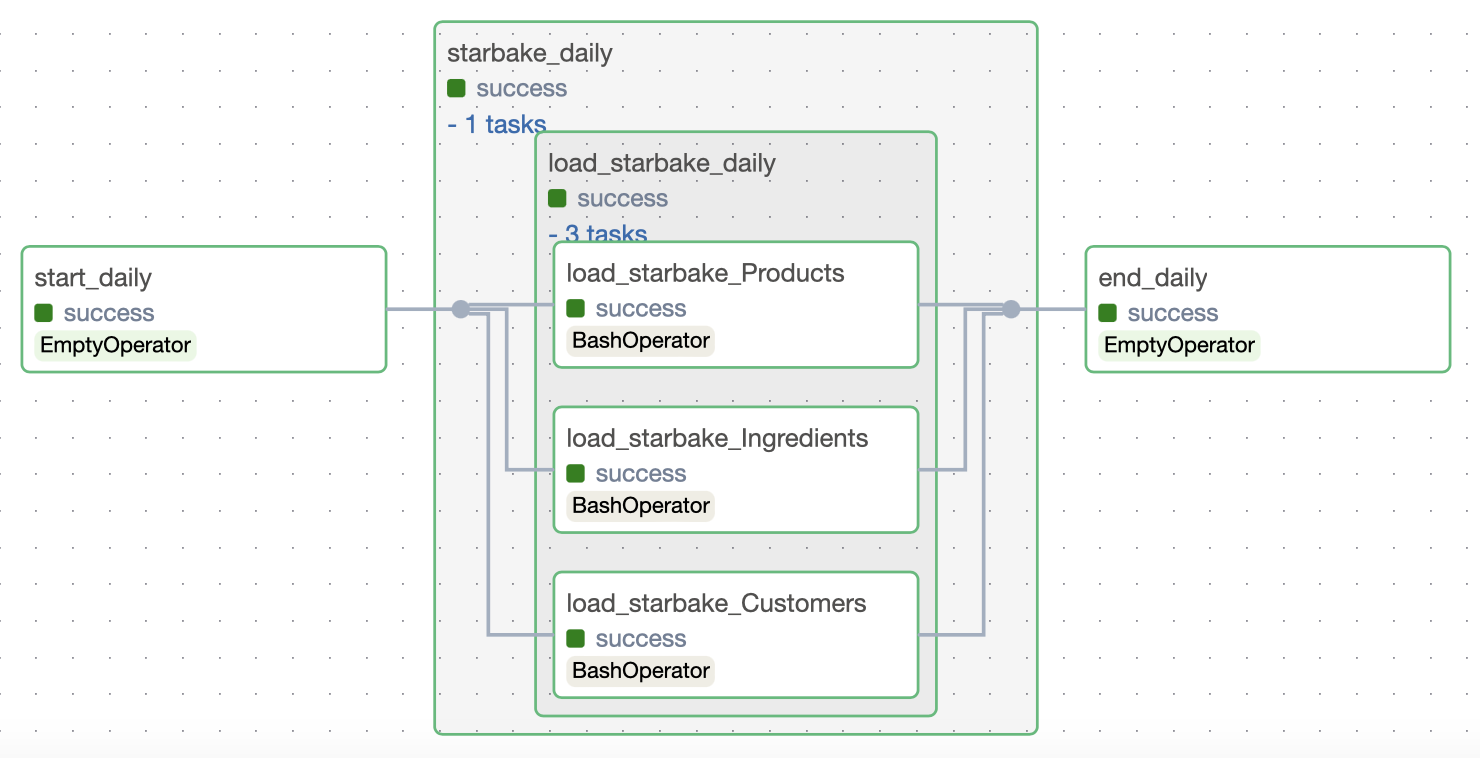
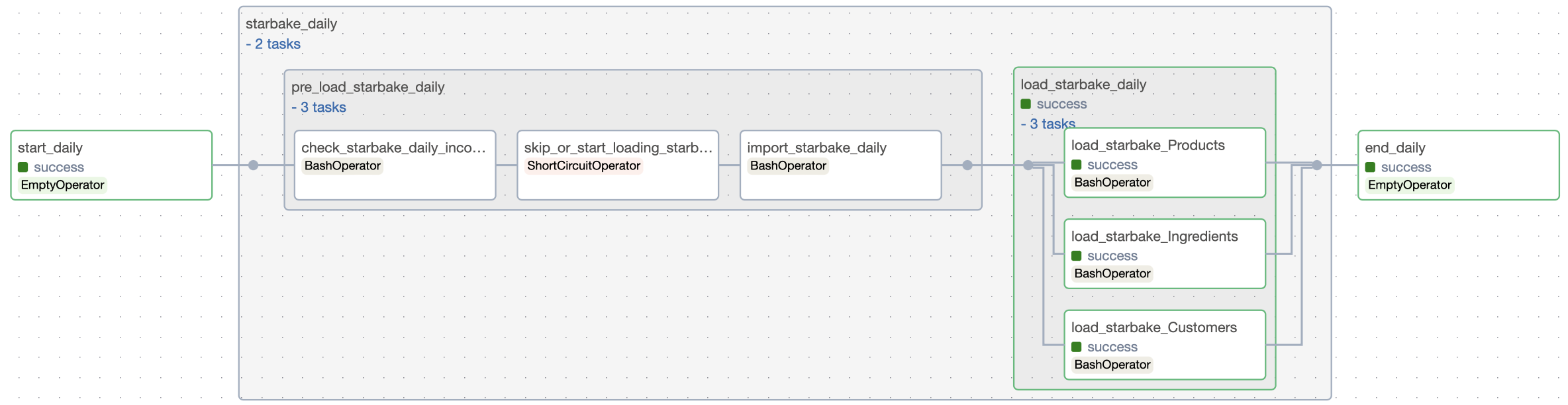
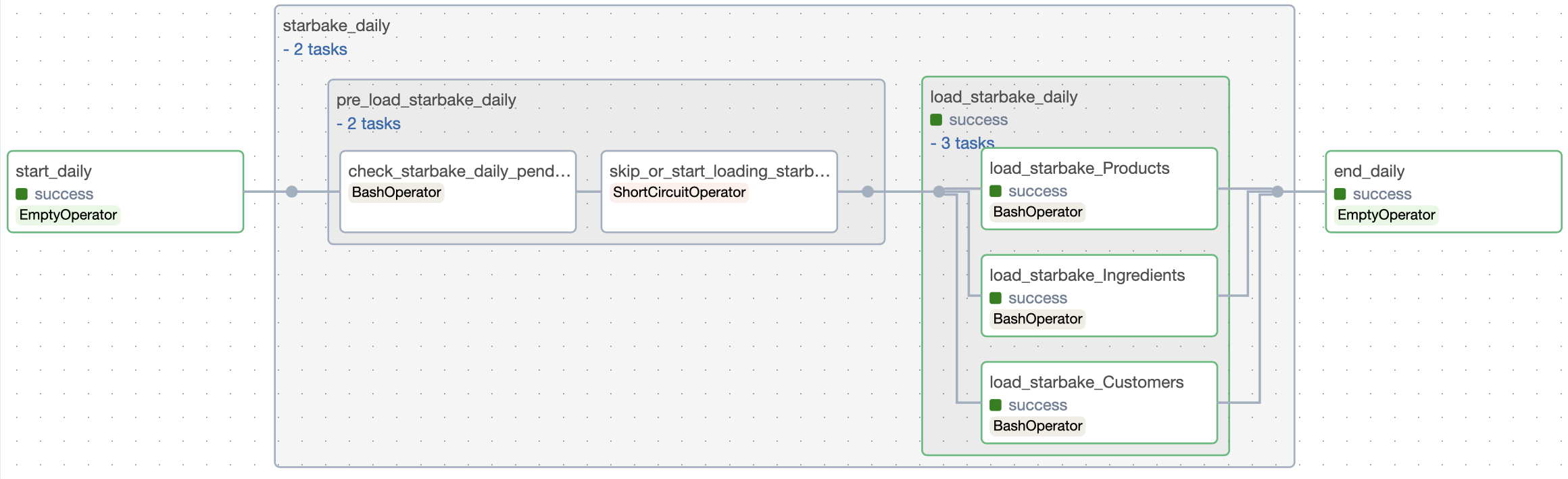
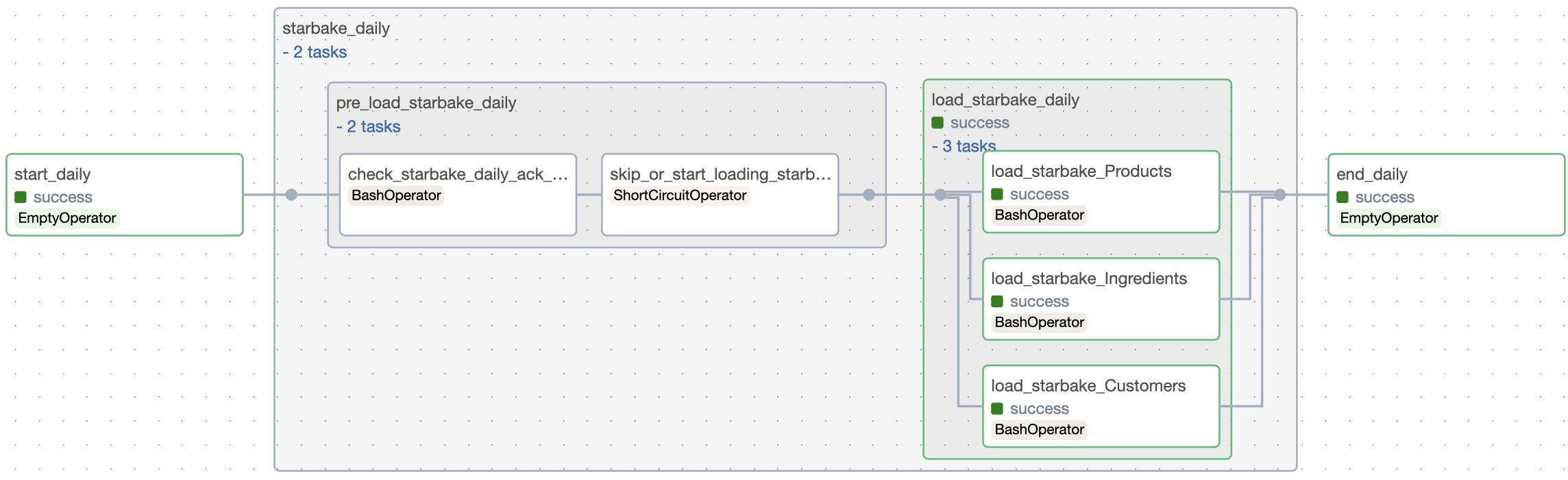
IMPORTED chain: sl_pre_load >> skip_or_start >> sl_import >> sl_load
Pre-load not-ready sentinel
Starlake CLI 1.5.15+ supports preload --notReadySentinel <uri>: on a "not ready" decision (IMPORTED/PENDING empty, ACK file missing) the CLI touches a zero-byte marker at exactly the given URI and exits 0; on "ready" no marker is written; on a genuine crash the process still exits non-zero and never writes the marker. This turns the lossy exit-code channel into a deterministic verdict.
The framework consumes this contract through the opt-in pre_load_not_ready_sentinel_path option (a parent prefix — absent or blank keeps everything byte-identical to today). When set, sl_pre_load appends --notReadySentinel <prefix>/<domain>/<scope>.notready to the CLI arguments for all three strategies, where <scope> is the sanitized run scope (<dag_id>__<run_id> on Airflow, <job_name>__<run_id> on Dagster; whitelist [A-Za-z0-9_.+:=-], anything else mapped to _) substituted at RUN time — never via templating. The uniform verdict wherever the preload outcome is interpreted:
- exit 0 + marker absent → READY → proceed;
- exit 0 + marker present → consume (delete first), then signal NOT READY through the mechanism's existing primitive (skip via
skip_or_start, poke-again in sensor/poke-loop/cloud waiting); - non-zero / engine failure → REAL FAILURE → fail now (opt-in behavior improvement: a crashed CLI no longer reads as "nothing to load", and broken invocations no longer poke until timeout).
Scheme support is engine-gated at definition time: local absolute paths (or file://) on shell, gs:// on cloud_run/dataproc, s3:// on fargate — any mismatch raises a ValueError naming the engine. Default consumption handlers ship in core: local handlers in ai.starlake.sentinel, GCS/S3 handler factories in ai.starlake.gcp/ai.starlake.aws with lazy SDK imports — install them with the extras pip install starlake-orchestration[gcp] (google-cloud-storage) or starlake-orchestration[aws] (boto3). The Airflow cloud paths override the defaults with GCSHook/S3Hook so gcp_conn_id/aws_conn_id and impersonation_chain are honored.
Best-effort-write caveat (CLI design): a failed marker write is logged and swallowed CLI-side — "exit 0 + no marker" can, rarely, mean "not ready but the write failed". For IMPORTED/PENDING this yields a harmless no-op load (the pending area is empty by definition of not-ready). For ACK it is sharper: the ack file was missing but the pending area may hold real files, so a lost write can trigger a premature load of un-acked data — keep the sentinel prefix on reliable storage when using the ACK strategy.
Import
Generates the task for the import command.
def sl_import(
    self,
    task_id: str,
    domain: str,
    tables: set = set(),
    **kwargs
) -> T:
| Parameter | Type | Description |
|---|---|---|
| task_id | str |
The optional task id ({domain}_import by default) |
| domain | str |
The required domain to import |
| tables | set |
The optional tables to import |
Load
Generates the task for the load command.
def sl_load(
    self,
    task_id: str,
    domain: str,
    table: str,
    spark_config: Optional[StarlakeSparkConfig] = None,
    dataset: Optional[Union[StarlakeDataset, str]] = None,
    **kwargs
) -> T:
| Parameter | Type | Description |
|---|---|---|
| task_id | str |
The optional task id (load_{domain}_{table} by default) |
| domain | str |
The required domain of the table to load |
| table | str |
The required table to load |
| spark_config | StarlakeSparkConfig |
The optional spark configuration |
| dataset | Union[StarlakeDataset, str] |
The optional dataset to materialize |
Transform
Generates the task for the transform command.
def sl_transform(
    self,
    task_id: str,
    transform_name: str,
    transform_options: str = None,
    spark_config: Optional[StarlakeSparkConfig] = None,
    dataset: Optional[Union[StarlakeDataset, str]] = None,
    **kwargs
) -> T:
| Parameter | Type | Description |
|---|---|---|
| task_id | str |
The optional task id ({transform_name} by default) |
| transform_name | str |
The transform to run |
| transform_options | str |
The optional transform options |
| spark_config | StarlakeSparkConfig |
The optional spark configuration |
| dataset | Union[StarlakeDataset, str] |
The optional dataset to materialize |
2. StarlakeDataset
ai.starlake.dataset.StarlakeDataset represents the metadata of a dataset produced by a task.
Starlake Orchestration collects all datasets produced by each task into a list of events to trigger per task. At runtime, the orchestrator triggers subsequent events only if their corresponding tasks succeed.
Key properties:
| Property | Type | Description |
|---|---|---|
name / uri |
str |
Dataset identifier (sanitized for orchestrator compatibility) |
cron |
Optional[str] |
Optional cron expression |
sink |
Optional[str] |
domain.table reference |
domain / table |
str |
Computed from sink or name |
url |
str |
Full URL with query parameters |
datasetType |
StarlakeDatasetType |
LOAD or TRANSFORM |
3. StarlakeOptions
ai.starlake.job.StarlakeOptions provides methods to manage and retrieve configuration variables. Variables are resolved in order: options dict -> default_value -> environment variable.
The following options are available for all concrete factory classes derived from IStarlakeJob:
| Option | Type | Description |
|---|---|---|
| default_pool | str |
Pool of slots to use (default_pool by default) |
| sl_env_var | str |
Optional starlake environment variables passed as an encoded JSON string |
| retries | int |
Number of retries to attempt before failing a task (1 by default) |
| retry_delay | int |
Delay between retries in seconds (300 by default) |
| pre_load_strategy | str |
One of none (default), imported, pending, or ack |
| global_ack_file_path | str |
Path to the ack file ({SL_DATASETS}/pending/{domain}/{{ds}}.ack by default) |
| ack_wait_timeout | int |
Timeout in seconds to wait for the ack file (1 hour by default); ignored in sensor mode (pre_load_timeout is the wall-clock window there) |
| pre_load_sensor | bool |
true/false (default false) — turn the pre-load task into a sensor that pokes starlake preload until files arrive. Supported on the SHELL environment everywhere; the CLOUD engines wait through per-orchestrator mechanisms (Airflow deferrable/sensor since 0.6.7, Dagster in-op poke loops since 0.5.3 — see each orchestrator's README) |
| pre_load_poke_interval | int |
Seconds between two pokes in sensor mode (300 by default) |
| pre_load_timeout | int |
Wall-clock timeout in seconds for the pre-load sensor (3600 by default); must be >= pre_load_poke_interval |
| pre_load_sensor_soft_fail | bool |
true/false (default false) — on sensor timeout, skip the downstream loads instead of failing the run |
| pre_load_not_ready_sentinel_path | str |
Opt-in (absent/blank = off, zero change; options-dict only) — parent prefix for the CLI's --notReadySentinel marker (requires starlake CLI 1.5.15+); resolved to <prefix>/<domain>/<scope>.notready with a run-scoped, sanitized <scope> (a bucket root like gs://my-bucket is a valid prefix). Scheme is engine-gated: absolute local/file:// on shell, gs:// on cloud_run/dataproc, s3:// on fargate. When set, sentinel semantics WIN over retry_on_failure for preload: a failed CLI/engine run fails the task instead of being read as "nothing to load". See "Pre-load not-ready sentinel" above |
| dataset_triggering_strategy | str |
One of any (default) or all |
| timezone | str |
Timezone for scheduling (UTC by default) |
4. Abstract Classes
AbstractDependency
Defines task dependencies, ensuring execution order in Directed Acyclic Graphs (DAGs). Operators >> and << allow intuitive chaining and automatically register dependencies in the current TaskGroupContext.
AbstractTask[T]
Wraps concrete orchestration tasks into a unified interface. Auto-registers with the current TaskGroupContext on creation.
AbstractTaskGroup[GT]
Groups related tasks into cohesive units. Supports nested grouping via context managers (with blocks).
AbstractPipeline[U, T, GT, E]
Defines an entire pipeline, combining tasks and task groups. It handles:
- Task management: Adding and managing orchestrator-specific tasks via
@finalmethods (sl_load,sl_transform,sl_import,sl_pre_load). - Dependency management: Ensuring the correct execution order.
- Lifecycle:
start_task(),end_task(),pre_tasks(),post_tasks(). - Execution: Only
run()is abstract -- all other lifecycle methods (deploy(),delete(),dry_run(),backfill()) are concrete.
Pipelines are constructed with either:
StarlakeSchedule-- time-driven: cron expression + list of domains/tables.StarlakeDependencies-- data-driven: parsed fromstarlake dag-generateJSON, with dependency graphs and dataset events.
AbstractOrchestration[U, T, GT, E]
The central abstraction for creating pipelines, tasks, and task groups. Orchestrator-specific implementations extend this class.
Key methods:
sl_orchestrator()-- Returns the orchestrator type.sl_create_pipeline(schedule, dependencies, ...)-- Creates a pipeline instance.sl_create_task_group(group_id, pipeline, ...)-- Creates task groups for organizing related tasks.
5. TaskGroupContext
A context manager responsible for:
- Tracking the current task group or pipeline context via a static
_context_stack. - Automatically adding tasks to the active group.
- Managing dependencies within the group (upstream/downstream relationships, roots, leaves).
6. StarlakeDependencies
Parses JSON dependency graphs (produced by starlake dag-generate) into traversable StarlakeDependency trees. Key capabilities:
graphs()-- Returns traversableTreeNodeMixintrees.get_schedule()-- Computes scheduling from dependencies.retrieve_datasets()-- Extracts datasets for event-driven triggering.
7. Factories
OrchestrationFactory
Handles the dynamic registration and instantiation of concrete orchestration classes.
class OrchestrationFactory:
    @classmethod
    def register_orchestrations_from_package(cls, package_name: str = "ai.starlake") -> None:
        """Dynamically load all AbstractOrchestration subclasses from the given package."""

    @classmethod
    def register_orchestration(cls, orchestration_class: Type[AbstractOrchestration]) -> None:
        """Manually register an orchestration class."""

    @classmethod
    def create_orchestration(cls, job: IStarlakeJob, **kwargs) -> AbstractOrchestration:
        """Create the correct AbstractOrchestration instance based on job.sl_orchestrator()."""
StarlakeJobFactory
Handles the dynamic registration and instantiation of concrete IStarlakeJob classes.
class StarlakeJobFactory:
    @classmethod
    def register_jobs_from_package(cls, package_name: str = "ai.starlake") -> None:
        """Dynamically load all IStarlakeJob subclasses from the given package."""

    @classmethod
    def register_job(cls, job_class: Type[IStarlakeJob]) -> None:
        """Manually register a job class by (orchestrator, execution_environment)."""

    @classmethod
    def create_job(
        cls,
        filename: str,
        module_name: str,
        orchestrator: Union[StarlakeOrchestrator, str],
        execution_environment: Union[StarlakeExecutionEnvironment, str],
        options: dict,
        **kwargs
    ) -> IStarlakeJob:
        """Create the correct IStarlakeJob instance."""
SessionFactory
Creates database sessions for SQL-based orchestration and testing.
class SessionFactory:
    @classmethod
    def session(
        cls,
        provider: SessionProvider = SessionProvider.DUCKDB,
        database: Optional[str] = None,
        schema: Optional[str] = None,
        user: Optional[str] = None,
        password: Optional[str] = None,
        host: Optional[str] = None,
        port: Optional[int] = None,
        **kwargs
    ) -> Session:
        """Create a new session based on the provider."""
Supported providers via SessionProvider: DUCKDB, POSTGRES, MYSQL, REDSHIFT, SNOWFLAKE, BIGQUERY.
Enums Reference
| Enum | Values | Purpose |
|---|---|---|
StarlakeOrchestrator |
AIRFLOW, COMPOSER, DAGSTER, SNOWFLAKE, STARLAKE |
Orchestrator identity (COMPOSER aliases AIRFLOW) |
StarlakeExecutionEnvironment |
CLOUD_RUN, DATAPROC, FARGATE, SHELL, SQL |
Where tasks execute |
StarlakeExecutionMode |
DRY_RUN, RUN, BACKFILL |
Pipeline execution mode |
TaskType |
START, PRELOAD, STAGE, LOAD, TRANSFORM, EMPTY, END |
Task classification (IMPORT deprecated, use STAGE) |
StarlakePreLoadStrategy |
NONE, IMPORTED, ACK, PENDING |
Pre-load behavior |
DatasetTriggeringStrategy |
ALL, ANY |
When to trigger downstream pipelines |
StarlakeDatasetType |
LOAD, TRANSFORM |
Dataset origin type |
StarlakeDependencyType |
TASK, TABLE |
Dependency node type |
CLI
The module includes a command-line interface for executing pipelines directly:
python -m ai.starlake.orchestration <action> --file <path> [--options <options>]
Supported actions: run, dry-run, deploy, delete, backfill.
| Argument | Description |
|---|---|
action |
The action to perform on the pipeline |
--file |
Path to the generated DAG file (or directory containing .py files) |
--options |
Additional options as JSON or key=value pairs |
Example:
python -m ai.starlake.orchestration run --file /path/to/my_dag.py
python -m ai.starlake.orchestration dry-run --file /path/to/dags/ --options '{"key": "value"}'
python -m ai.starlake.orchestration backfill --file /path/to/my_dag.py --options 'start_date=2024-01-01,end_date=2024-01-31'
How to Extend Starlake Orchestration
1. Define a Starlake Job
Implement the IStarlakeJob interface to create a concrete factory class responsible for defining orchestrator-specific tasks.
from ai.starlake.job import IStarlakeJob, StarlakeOrchestrator, StarlakeExecutionEnvironment

class MyStarlakeJob(IStarlakeJob):
    @classmethod
    def sl_orchestrator(cls) -> str:
        return "my_orchestrator"

    @classmethod
    def sl_execution_environment(cls) -> str:
        return "shell"

    def sl_job(self, task_id, arguments, spark_config=None, dataset=None, task_type=None, **kwargs):
        return MyOrchestratorTask(task_id=task_id, command_arguments=arguments, **kwargs)

    def dummy_op(self, task_id, events=None, task_type=None, **kwargs):
        return MyDummyTask(task_id=task_id, **kwargs)

    def skip_or_start_op(self, task_id, upstream_task, **kwargs):
        return None  # or a conditional task

    def to_event(self, dataset, source=None, **kwargs):
        return MyEvent(dataset=dataset, source=source)
2. Implement the Orchestration API
Extend AbstractOrchestration to integrate the new orchestrator's API.
from ai.starlake.orchestration import AbstractPipeline, AbstractTaskGroup, AbstractOrchestration

class MyPipeline(AbstractPipeline):
    def run(self, **kwargs):
        # Execute the pipeline using the orchestrator's API
        ...

class MyTaskGroup(AbstractTaskGroup):
    ...

class MyOrchestration(AbstractOrchestration):
    @classmethod
    def sl_orchestrator(cls) -> str:
        return "my_orchestrator"

    def sl_create_pipeline(self, schedule=None, dependencies=None, **kwargs):
        return MyPipeline(self.job, schedule=schedule, dependencies=dependencies, orchestration=self, **kwargs)

    def sl_create_task_group(self, group_id, pipeline, **kwargs):
        return MyTaskGroup(name=group_id, pipeline=pipeline, **kwargs)
3. Register (Optional)
Registration happens automatically via importlib package discovery when using the factories. For explicit registration:
from ai.starlake.orchestration import OrchestrationFactory
from ai.starlake.job import StarlakeJobFactory

OrchestrationFactory.register_orchestration(MyOrchestration)
StarlakeJobFactory.register_job(MyStarlakeJob)
4. Create and Run a Pipeline
from ai.starlake.job import StarlakeJobFactory, StarlakeExecutionEnvironment
from ai.starlake.orchestration import StarlakeSchedule, StarlakeDomain, StarlakeTable, OrchestrationFactory
from ai.starlake.common import sanitize_id

import os

schedule = StarlakeSchedule(
    name='daily',
    cron='0 0 * * *',
    domains=[
        StarlakeDomain(
            name='starbake',
            final_name='starbake',
            tables=[
                StarlakeTable(name='Customers', final_name='Customers'),
                StarlakeTable(name='Products', final_name='Products'),
            ]
        )
    ]
)

sl_job = StarlakeJobFactory.create_job(
    filename=os.path.basename(__file__),
    module_name=f"{__name__}",
    orchestrator="my_orchestrator",
    execution_environment=StarlakeExecutionEnvironment.SHELL,
    options={}
)

with OrchestrationFactory.create_orchestration(job=sl_job) as orchestration:

    with orchestration.sl_create_pipeline(schedule=schedule) as pipeline:

        start = pipeline.start_task()

        def generate_load_domain(domain: StarlakeDomain):
            with orchestration.sl_create_task_group(group_id=sanitize_id(domain.name), pipeline=pipeline) as ld:
                with orchestration.sl_create_task_group(group_id=sanitize_id(f'load_{domain.name}'), pipeline=pipeline) as load_tables:
                    for table in domain.tables:
                        pipeline.sl_load(
                            task_id=sanitize_id(f'load_{domain.name}_{table.name}'),
                            domain=domain.name,
                            table=table.name,
                        )
                return load_tables
            return ld

        load_domains = [generate_load_domain(domain) for domain in schedule.domains]

        start >> load_domains

        end = pipeline.end_task()
        end << load_domains
Integration Modules
The core starlake-orchestration module is extended by orchestrator-specific integration modules:
| Module | Package | Description |
|---|---|---|
| starlake-airflow | pip install starlake-orchestration[airflow] |
Apache Airflow integration (v2 and v3) |
| starlake-dagster | pip install starlake-orchestration[dagster] |
Dagster integration |
| starlake-snowflake | pip install starlake-orchestration[snowflake] |
Snowflake Tasks integration |
| SQL/ODBC | (included in core) | SQL-based orchestration via ai.starlake.odbc |
Each integration module implements IStarlakeJob, AbstractOrchestration, AbstractPipeline, and AbstractTaskGroup for its target platform. See the individual module READMEs for platform-specific documentation and examples.
Architecture
For detailed architectural documentation including the inheritance hierarchy, design patterns (double factory, context stack, @final invariants), and class-by-class reference, see ARCHITECTURE.md.
1 maintainer

Download files
Download the file for your platform. If you're not sure which to choose, learn more about installing packages.
Source Distribution
Built Distribution
Filter files by name, interpreter, ABI, and platform.
If you're not sure about the file name format, learn more about wheel file names.
Copy a direct link to the current filters
File details
Details for the file starlake_orchestration-0.5.6.tar.gz.
File metadata
- Download URL: starlake_orchestration-0.5.6.tar.gz
- Upload date:
- Size: 78.1 kB
- Tags: Source
- Uploaded using Trusted Publishing? No
- Uploaded via:
twine/6.2.0 CPython/3.11.15
File hashes
| Algorithm | Hash digest | |
|---|---|---|
| SHA256 |
94c1bddc32605aaf97a6289bfb2b4fd2cc2b7ce6ebe0811876330559668ea121
|
|
| MD5 |
0bf444aee47c0e9dd68d51a6f41f0946
|
|
| BLAKE2b-256 |
7930d2bd2ac4f3173993031657cbacec14d4df1e81b346727cf2cea2255af796
|
File details
Details for the file starlake_orchestration-0.5.6-py3-none-any.whl.
File metadata
- Download URL: starlake_orchestration-0.5.6-py3-none-any.whl
- Upload date:
- Size: 86.1 kB
- Tags: Python 3
- Uploaded using Trusted Publishing? No
- Uploaded via:
twine/6.2.0 CPython/3.11.15
File hashes
| Algorithm | Hash digest | |
|---|---|---|
| SHA256 |
0d828cca096326330acd4bbd04f3c6d0d60281a888a36c0b42f2a757ccdf9d0a
|
|
| MD5 |
cd1a5888af2c5204bea2ccfe10b61af4
|
|
| BLAKE2b-256 |
0ed92be3288688b5fe2d63e18e293c9ede8065f9d4f783882b84a428479df673
|














