

Give your code a start. ⚡👀







Status: A useable MVP for parsing into functions, classes, and dicts (via TypedDicts).
Core interface is expected to be mostly stable. Recursive parsing is evolving.
Roadmap: See project board.
Startle lets you transform a python function (or functions) into a command line entry point, e.g:
wc.py:
from pathlib import Path
from typing import Literal

from startle import start


def word_count(
    fname: Path, /, kind: Literal["word", "char"] = "word", *, verbose: bool = False
) -> None:
    """
    Count the number of words or characters in a file.

    Args:
        fname: The file to count.
        kind: Whether to count words or characters.
        verbose: Whether to print additional info.
    """

    text = open(fname).read()
    count = len(text.split()) if kind == "word" else len(text)

    print(f"{count} {kind}s in {fname}" if verbose else count)


start(word_count)
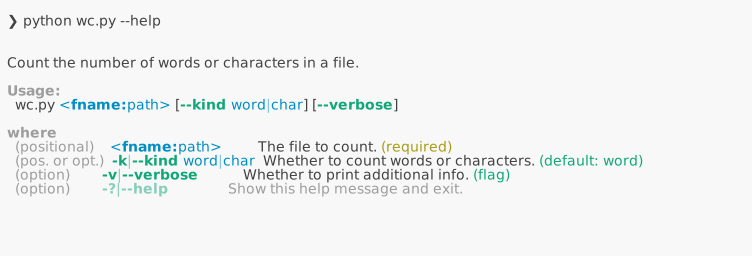
When you invoke start(), it will construct an argparser (based on type hints and docstring),
parse the arguments, and invoke word_count.

You can also invoke start() with a list of functions instead of a single function.
In this case, functions are made available as commands with their own arguments
and options in your CLI. See here.
Startle also allows you to transform a class (possibly a dataclass) into a command line parser:
import random
from dataclasses import dataclass
from typing import Literal

from startle import parse


@dataclass
class Config:
    """
    Configuration for the dice program.

    Attributes:
        sides: The number of sides on the dice.
        count: The number of dice to throw.
        kind: Whether to throw a single die or a pair of dice.
    """

    sides: int = 6
    count: int = 1
    kind: Literal["single", "pair"] = "single"


def throw_dice(cfg: Config) -> None:
    """
    Throw the dice according to the configuration.
    """
    if cfg.kind == "single":
        for _ in range(cfg.count):
            print(random.randint(1, cfg.sides))
    else:
        for _ in range(cfg.count):
            print(random.randint(1, cfg.sides), random.randint(1, cfg.sides))


if __name__ == "__main__":
    cfg = parse(Config, brief="A program to throw dice.")
    throw_dice(cfg)
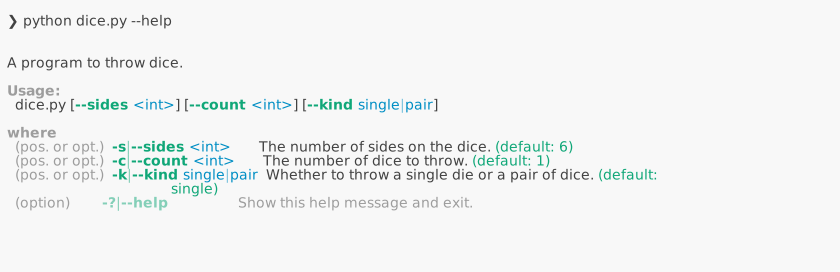
Then dice.py can be executed like:

Startle is inspired by Typer, Fire, and HFArgumentParser, but aims to be non-intrusive, to have stronger type support, and to have intuitive defaults. Thus, some decisions are done differently:
- Use of positional-only or keyword-only argument separators (
/,*, see PEP 570, 3102) are naturally translated into positional arguments or options. See above example (wc.py). - Like Typer and unlike Fire, type hints strictly determine how the individual arguments are parsed and typed.
- Short forms (e.g.
-k,-vabove) are automatically provided based on the initial of the argument. - Variable length arguments are more intuitively handled.
You can use
--things a b c(in addition to--things=a --things=b --things=c). See example. - Like Typer and unlike Fire, help is simply printed and not displayed in pager mode by default, so you can keep referring to it as you type your command.
- Like Fire and unlike Typer, docstrings determine the description of each argument in the help text, instead of having to individually add extra type annotations. This allows for a very non-intrusive design, you can adopt (or un-adopt) Startle with no changes to your functions.
*argsbut also**kwargsare supported, to parse unknown arguments as well as unknown options (--unk-key unk-val). See example.
See all examples, or the documentation for more.
1 maintainer

Metadata
1 maintainer
Release files for startle 0.1.0
For a detailed explanation of source distributions (sdists) and built distributions (wheels), please see the package formats documentation.
Source distribution (sdist)
| File | Size | Uploaded | Provenance | |
|---|---|---|---|---|
| startle-0.1.0.tar.gz | 224.2 kB | With provenance | Details |
Built distribution (wheel)
| File | Interpreter | ABI | Platform | Reset |
|---|---|---|---|---|
| startle-0.1.0-py3-none-any.whl | Python 3 | none | any | Details |
Total release size: 267.6 kB
Release files / startle-0.1.0.tar.gz
| Download URL | startle-0.1.0.tar.gz |
|---|---|
| Size | 224.2 kB |
| Tags | Source |
|
SHA-256 checksum How to use checksums |
8525ac0598038eec4e3aec8c938cc235e0879147db2619cf5e1a6f82679b48e2
|
|
BLAKE2b-256 checksum How to use checksums |
38945a0984f3457cafe1b248abc04c09094bf1a70db5783a2ac1197388ad00ff
|
| Upload date | |
|
Uploaded using Trusted Publishing? What is trusted publishing? |
Yes |
| Uploaded via |
twine/6.1.0 CPython/3.13.12
|
Provenance
Provenance describes where a file came from. On PyPI, provenance is shared via attestations, which provide a verifiable record of the build or publishing details. View details, limitations and caveats.


PyPI Publish Attestation
PyPI verified that this artifact, at this checksum, originated from the publisher listed below.
Signed by GitHub Actions, verified by PyPI on May 24, 2026.
Transparency logRelease files / startle-0.1.0-py3-none-any.whl
| Download URL | startle-0.1.0-py3-none-any.whl |
|---|---|
| Size | 43.4 kB |
| Tags | Python 3 |
|
SHA-256 checksum How to use checksums |
db1e6f01fd80bbfc31caa5b874b2e381d3147368993da9e1b602ab6a1315d571
|
|
BLAKE2b-256 checksum How to use checksums |
913b91012c82362015e05caea72eeb69a8b281de185021c731058abbcda7713e
|
| Upload date | |
|
Uploaded using Trusted Publishing? What is trusted publishing? |
Yes |
| Uploaded via |
twine/6.1.0 CPython/3.13.12
|
Provenance
Provenance describes where a file came from. On PyPI, provenance is shared via attestations, which provide a verifiable record of the build or publishing details. View details, limitations and caveats.
PyPI Publish Attestation
PyPI verified that this artifact, at this checksum, originated from the publisher listed below.
Signed by GitHub Actions, verified by PyPI on May 24, 2026.
Transparency logSecurity for startle 0.1.0
Provenance
Provenance describes where a file came from. On PyPI, provenance is shared via attestations, which provide a verifiable record of the build or publishing details. View details, limitations and caveats.
Full provenance
All 2 files in this release have been uploaded with provenance metadata.
Attestation for startle-0.1.0.tar.gz
PyPI Publish Attestation
PyPI verified that this artifact, at this checksum, originated from the publisher listed below.
Signed by GitHub Actions, verified by PyPI on May 24, 2026.
Transparency logA note on package security
PyPI is a repository for distributing packages, not a service for auditing them. While third-party security researchers and our staff do their best to detect and remove malicious packages, PyPI cannot guarantee the quality, security or suitability of any given package.
To learn more about protecting yourself from malicious actors, visit our package security documentation.














