
Instantly start a CLI from a function
Verified details
These details have been verified by PyPIProject links
GitHub Statistics
Maintainers

Project description

Give your code a start. ⚡👀





[!WARNING]
Startle is alpha and should be considered unstable as its interface is fluid 😅, consider pinning to a version.
Startle lets you transform a python function (or functions) into a command line entry point, e.g:
wc.py:
from pathlib import Path
from typing import Literal

from startle import start


def word_count(
    fname: Path, /, kind: Literal["word", "char"] = "word", *, verbose: bool = False
) -> None:
    """
    Count the number of words or characters in a file.

    Args:
        fname: The file to count.
        kind: Whether to count words or characters.
        verbose: Whether to print additional info.
    """

    text = open(fname).read()
    count = len(text.split()) if kind == "word" else len(text)

    print(f"{count} {kind}s in {fname}" if verbose else count)


start(word_count)
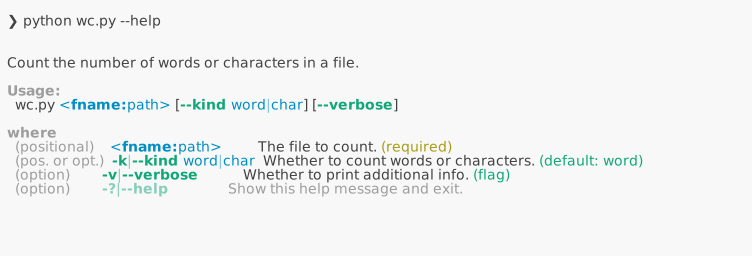
When you invoke start(), it will construct an argparser (based on type hints and docstring),
parse the arguments, and invoke word_count.

You can also invoke start() with a list of functions instead of a single function.
In this case, functions are made available as commands with their own arguments
and options in your CLI. See here.
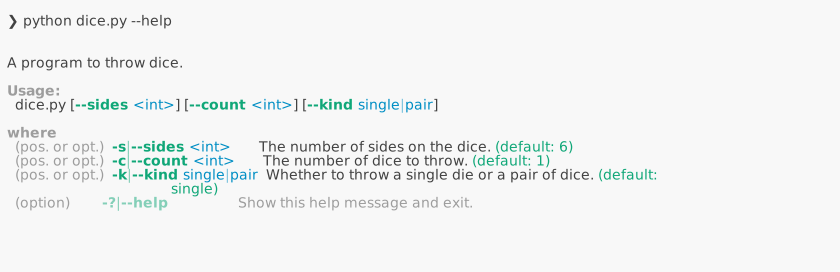
Startle also allows you to transform a class (possibly a dataclass) into a command line parser:
import random
from dataclasses import dataclass
from typing import Literal

from startle import parse


@dataclass
class Config:
    """
    Configuration for the dice program.

    Attributes:
        sides: The number of sides on the dice.
        count: The number of dice to throw.
        kind: Whether to throw a single die or a pair of dice.
    """

    sides: int = 6
    count: int = 1
    kind: Literal["single", "pair"] = "single"


def throw_dice(cfg: Config) -> None:
    """
    Throw the dice according to the configuration.
    """
    if cfg.kind == "single":
        for _ in range(cfg.count):
            print(random.randint(1, cfg.sides))
    else:
        for _ in range(cfg.count):
            print(random.randint(1, cfg.sides), random.randint(1, cfg.sides))


if __name__ == "__main__":
    cfg = parse(Config, brief="A program to throw dice.")
    throw_dice(cfg)
Then dice.py can be executed like:

Startle is inspired by Typer, Fire, and HFArgumentParser, but aims to be non-intrusive, to have stronger type support, and to have saner defaults. Thus, some decisions are done differently:
- Use of positional-only or keyword-only argument separators (
/,*, see PEP 570, 3102) are naturally translated into positional arguments or options. See above example (wc.py). - Like Typer and unlike Fire, type hints strictly determine how the individual arguments are parsed and typed.
- Short forms (e.g.
-k,-vabove) are automatically provided based on the initial of the argument. - Variable length arguments are more intuitively handled.
You can use
--things a b c(in addition to--things=a --things=b --things=c). See example. - Like Typer and unlike Fire, help is simply printed and not displayed in pager mode by default, so you can keep referring to it as you type your command.
- Like Fire and unlike Typer, docstrings determine the description of each argument in the help text, instead of having to individually add extra type annotations. This allows for a very non-intrusive design, you can adopt (or un-adopt) Startle with no changes to your functions.
*argsbut also**kwargsare supported, to parse unknown arguments as well as unknown options (--unk-key unk-val). See example.
See all examples, or the documentation for more.
Project details
Verified details
These details have been verified by PyPIProject links
GitHub Statistics
Maintainers
Release history Release notifications | RSS feed


Download files
Download the file for your platform. If you're not sure which to choose, learn more about installing packages.
Source Distribution
Built Distribution
Filter files by name, interpreter, ABI, and platform.
If you're not sure about the file name format, learn more about wheel file names.
Copy a direct link to the current filters
File details
Details for the file startle-0.0.14.tar.gz.
File metadata
- Download URL: startle-0.0.14.tar.gz
- Upload date:
- Size: 194.8 kB
- Tags: Source
- Uploaded using Trusted Publishing? Yes
- Uploaded via: twine/6.1.0 CPython/3.12.9
File hashes
| Algorithm | Hash digest | |
|---|---|---|
| SHA256 |
4da497e0c33681101cb309213dce4c07395678c19b2d909ca61fe6ecdd859ad4
|
|
| MD5 |
c4685726de17356e58f1d4848a177a80
|
|
| BLAKE2b-256 |
864b48bb2260aa848b88285ec752ec56f8bdc0e65c612f803fa649b232d48731
|
Provenance
The following attestation bundles were made for startle-0.0.14.tar.gz:
Publisher:
publish.yml on oir/startle
-
Statement:
-
Statement type:
https://in-toto.io/Statement/v1 -
Predicate type:
https://docs.pypi.org/attestations/publish/v1 -
Subject name:
startle-0.0.14.tar.gz -
Subject digest:
4da497e0c33681101cb309213dce4c07395678c19b2d909ca61fe6ecdd859ad4 - Sigstore transparency entry: 264592955
- Sigstore integration time:
-
Permalink:
oir/startle@ed1ae95660f0f86100f7b750df406fe2644cc647 -
Branch / Tag:
refs/tags/v0.0.14 - Owner: https://github.com/oir
-
Access:
public
-
Token Issuer:
https://token.actions.githubusercontent.com -
Runner Environment:
github-hosted -
Publication workflow:
publish.yml@ed1ae95660f0f86100f7b750df406fe2644cc647 -
Trigger Event:
release
-
Statement type:
File details
Details for the file startle-0.0.14-py3-none-any.whl.
File metadata
- Download URL: startle-0.0.14-py3-none-any.whl
- Upload date:
- Size: 30.8 kB
- Tags: Python 3
- Uploaded using Trusted Publishing? Yes
- Uploaded via: twine/6.1.0 CPython/3.12.9
File hashes
| Algorithm | Hash digest | |
|---|---|---|
| SHA256 |
ec00165196da278c6b21259c69c4e1e25799ba917181d1986bc1aae9342437d5
|
|
| MD5 |
8caa9828167917f745060fdbc9de5148
|
|
| BLAKE2b-256 |
60eaaf4ee739fd78975852242026a53a7b8dc5e2f30e6948375dab679907e9d1
|
Provenance
The following attestation bundles were made for startle-0.0.14-py3-none-any.whl:
Publisher:
publish.yml on oir/startle
-
Statement:
-
Statement type:
https://in-toto.io/Statement/v1 -
Predicate type:
https://docs.pypi.org/attestations/publish/v1 -
Subject name:
startle-0.0.14-py3-none-any.whl -
Subject digest:
ec00165196da278c6b21259c69c4e1e25799ba917181d1986bc1aae9342437d5 - Sigstore transparency entry: 264592956
- Sigstore integration time:
-
Permalink:
oir/startle@ed1ae95660f0f86100f7b750df406fe2644cc647 -
Branch / Tag:
refs/tags/v0.0.14 - Owner: https://github.com/oir
-
Access:
public
-
Token Issuer:
https://token.actions.githubusercontent.com -
Runner Environment:
github-hosted -
Publication workflow:
publish.yml@ed1ae95660f0f86100f7b750df406fe2644cc647 -
Trigger Event:
release
-
Statement type:






