
Startup Factory
Your AI agents can write code. Startup Factory turns them into a delivery team.
From product intent to reviewed, tested, production-ready software — coordinated through the project board you already use.
Open source · MIT licensed · Multi-model · Tracker-native · Cloud-agnostic · Fail-closed
AI made implementation faster. It did not make product delivery automatic.
I'm Alex Ischenko, an AI-first CTO and product builder. For more than 20 years, I have built and scaled software across Fintech, Insurance, SaaS, E-commerce, Healthcare, Gaming, and AI. I have led engineering organizations of up to 150 people and helped build products serving 20M+ daily users and platforms handling billions of clicks each month.
When I started building ExecMatchAI with more than 30 AI agents and supporting AI-native startups as a fractional CTO, I found a new bottleneck. The agents could produce code quickly. I was still acting as the message bus — clarifying scope, routing work, reconciling branches, checking reviews, updating the board, recovering failed runs, and deciding what was safe to ship.
Startup Factory is my answer. It turns your product board into the operating system for an AI engineering team. A Product Manager turns intent into executable work. A Principal Architect designs the solution. A Sceptical Principal Architect tries to break it. Builders implement isolated slices. Independent reviewers judge exact packages. A deterministic integrator verifies and merges. Production delivery stays behind explicit policy, current evidence, and human approval.
And you are not locked into one AI model. Mix Claude, Codex, Gemini, DeepSeek, or other agents across different roles — using different models to challenge each other, reduce correlated bias, and bring different perspectives to the same problem.
This is the system I use for real startup delivery. I am sharing it as open source because builders should not have to choose between AI speed and engineering discipline.
The unit of progress is not a prompt, a diff, or a line of code. It is a verified product outcome.
Startup Factory does not replace your coding agent, repository, project-management tool, CI/CD system, cloud, or engineering stack. It coordinates them.
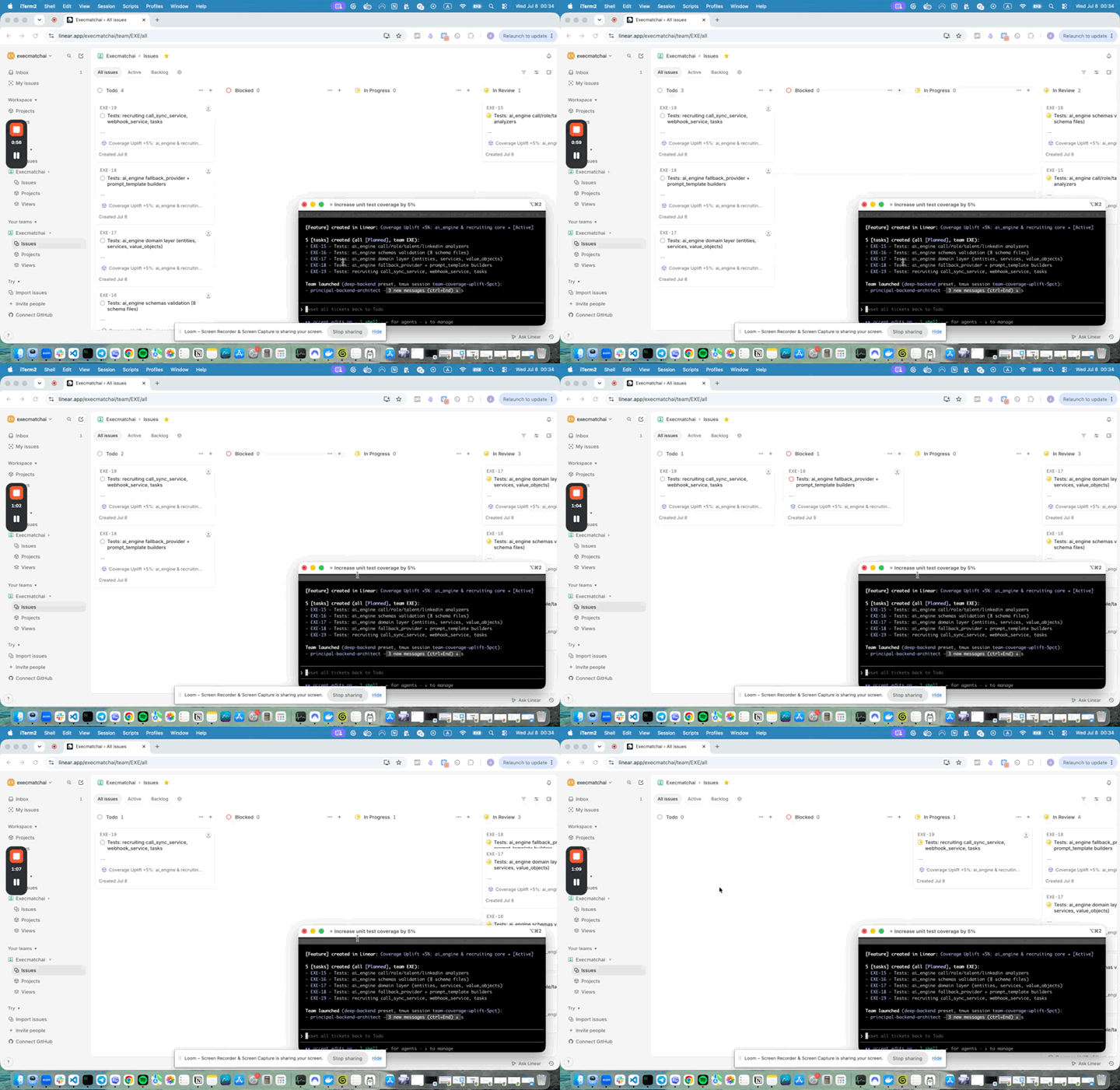
Table of contents
- Who it is for
- Quick start (two minutes, no accounts)
- Ten easy prompts for startup delivery
- See the factory work
- This is not another coding copilot
- The delivery loop
- Meet the team
- Six ready-to-run teams
- Bring your own agents, tracker, and stack
- Choose how much autonomy you want
- Safety is part of the architecture
- What's new
- Documentation
- Project status
- Contributing
- License
Who it is for
| You are | Startup Factory helps you |
|---|---|
| A founder or CTO who still ships | Turn product intent into structured execution without becoming the dispatcher for every AI coding session. |
| A solo builder who wants a team, not a blank prompt | Add product, architecture, implementation, QA, security, and review roles around the agent you already use. |
| A technical lead adopting coding agents | Separate design, implementation, review, integration, and release authority instead of trusting one long agent loop. |
| An AI-first engineering team | Mix Claude, Codex, Gemini, Aider, DeepSeek Harness, or another file-reading CLI by role while keeping one shared workflow. |
| A team already living in a product board | Keep scope, progress, findings, approvals, blockers, and delivery state where product decisions already happen. |
Use your coding agent directly for a one-line fix. Startup Factory earns its keep when work crosses roles, branches, reviews, trackers, or production. See Meet the team for the roles it adds.
Quick start (two minutes, no accounts)
Start with one agent and the local Markdown tracker. You do not need a Linear or Jira account, an application server, or a coordinator database. Hosted trackers come later, in Project-management tools.
From your project root:
uvx startup-factory@latest install --agent codex
uvx startup-factory@latest init --agent codex --mode solo \
  --product-management-tool Markdown --apply
Using Claude Code instead? Replace codex with claude-code. The installer also supports aider and deepseek-harness; see Coding agents and models.
Now ask your agent:
Plan a feature: add CSV export to the reports page.
Startup Factory creates the feature and its tasks under .workspace/task-manager/. Continue in plain language:
Start task 1.
Send task 1 to review.
Finalize task 1.
That is the smallest useful loop:
PLAN -> BUILD -> REVIEW -> VERIFY
Run it on one small, real feature. You will know quickly whether the workflow fits.
Safe updates
Preview and apply an update with the same release CLI. It recognizes the selected project installation and performs a complete preflight before any destination mutation:
uvx startup-factory@latest update --agent codex --dry-run
uvx startup-factory@latest update --agent codex
For Claude Code, use --agent claude-code. You can also ask your agent:
Fetch latest Startup Factory skill.
Existing project configuration remains byte-for-byte untouched by default,
while newly introduced config files are installed. Destination-only files under
the documented adapters/, extensions/, and teams/ extension points are
also preserved. A generated ownership manifest lets later updates delete an
upstream extension that has been retired without mistaking project-owned files
for upstream files. A legacy installation without a manifest is migrated
conservatively: destination-only extension files are kept. If a later upstream
release introduces a file at a project-owned extension path, the update fails
before mutation instead of overwriting it:
config/project-management.config.mdconfig/planning.config.mdconfig/team.config.mdconfig/statuses.config.jsonconfig/automation.config.jsonconfig/deployment.config.jsonconfig/guardrails.config.json
To intentionally replace those files with upstream defaults too:
uvx startup-factory@latest update --agent codex --overwrite-config
To verify the owned runtime independently of preserved configuration and custom extensions:
uvx startup-factory@latest verify --agent codex
The release CLI uses a sibling staging directory, an installation lock, and a backup swap with rollback. Interrupted copying cannot silently turn a valid installation into a partial one. Its main operator options are:
| Option | Purpose |
|---|---|
--agent codex|claude-code|aider|deepseek-harness |
Select the native project skill directory. |
--project PATH |
Resolve the agent directory relative to another project. |
--install-dir PATH |
Override the mapped installation directory. |
--bundle PATH |
For install/update, use an explicitly supplied local canonical archive. |
--overwrite-config |
For install/update, replace all seven preserved project configuration files. |
--dry-run |
For install/update, print the plan without writing the destination or lock. |
--mode solo|team|autonomous|release |
Select the initialization/readiness profile; protected modes are inspection-only in phase one. |
--apply |
For init, atomically apply a supported preview; without it initialization is read-only. |
--product-management-tool ADAPTER |
For init, select an installed regular adapter without accepting credentials. |
--json |
Emit machine-readable output for operator automation. |
The --mode profiles are described in Choose how much autonomy you want, and --product-management-tool accepts any adapter listed in Project-management tools.
Legacy or source-installed copies can continue to use the shell compatibility updater from their installed bundle:
bash .agents/skills/startup-factory/bin/update-installed-skill.sh --dry-run
bash .agents/skills/startup-factory/bin/update-installed-skill.sh
bash .agents/skills/startup-factory/tests/run-all.sh --smoke
It requires git, rsync, and python3, accepts --remote-url and --ref,
and defaults to main; prefer a reviewed tag or exact commit. The compatibility
updater builds and validates a sibling staging tree under an installation lock,
then uses a backup swap so a failed copy cannot partially replace the live
skill. Before activation it verifies that the selected tracker adapter and
configured STATUS_CONFIG both exist in the staged result. It also parses the
retained board and checks its status names, transitions, initial/terminal
states, and mappings for the selected project-management tool, returning a
specific error before mutation if they are incompatible. Existing canonical
config, the configured custom status board, and destination-only project files
are preserved by default. Path plus Git-object ownership metadata lets a later
update delete a retired upstream file only when its installed bytes still match
the previously installed source; legacy path-only metadata is migrated
conservatively.
Each successful source-managed update records the exact fetched commit in
.startup-factory-source-install.json. The console reports the planned or
applied filesystem-entry count; when the install directory is Git-ignored it
also explains why git status and git diff cannot display those changes.
Ten easy prompts for startup delivery
Replace the brackets and paste. Each prompt assumes the same rules: use the installed Startup Factory skill, keep agents inside their assigned roles, require current tests and independent review, deploy only through the protected release executor, and stop visibly when a gate or approval is missing.
The Senior Security Engineer already exists and reviews independently; an implementation engineer writes the fix. For continuous work, use bounded
pm-agent.pypasses — not one endless LLM session.
1. Ship a product feature
Deliver [FEATURE] from [TRACKER] to production with Startup Factory. Launch the
full-stack team, define measurable acceptance criteria, build and test isolated
slices, review independently, deploy the approved commit, and verify [OUTCOME].
2. Clear the Linear bug queue
In Linear [TEAM/PROJECT], process queued tickets labelled "Bug". Choose the right
team per ticket, require security review, reproduce each bug with a failing test,
fix it, run regressions, deploy safely, and report the result.
3. Fix cloud infrastructure and backups
Audit [CLOUD/ENVIRONMENT] with the deep-infra team. Fix drift through IaC, review
IAM, networking, monitoring, cost, backups, and restore readiness; validate the
plan and rollback, obtain production approval, then verify the service.
4. Harden product security
Harden [SERVICE/FEATURE] with the deep-security team. Threat-model it, implement
the highest-risk fixes, run authorized abuse tests, require independent security
approval, deploy the verified commit, and monitor for regressions.
5. Build a regression safety net
Create a regression suite for [PRODUCT]. Launch the appropriate engineering team
with QA review, cover critical journeys and past incidents with reliable
unit/API/E2E tests, remove flakiness, run them in CI, and publish release criteria.
6. Turn customer feedback into a roadmap
Analyze [FEEDBACK SOURCE] with Startup Factory. Group evidence-backed themes,
rank them by impact, confidence, and effort, create scoped tracker features, and
deliver the approved top priority with measurable acceptance criteria.
7. Improve onboarding conversion
Improve [ONBOARDING STEP] from [BASELINE] to [TARGET]. Launch the full-stack
team, instrument the funnel, define experiment guardrails, ship the change,
verify real analytics, and recommend keep, iterate, or rollback.
8. Prevent a production incident from recurring
Investigate [INCIDENT] with the appropriate backend or infra team. Build an
evidence-based timeline, fix the root cause, add tests, alerts, and a runbook,
rehearse recovery safely, then verify the production signals.
9. Run a safe data migration
Migrate [DATA/SYSTEM] with the deep-backend team. Use a backward-compatible
expand/contract plan, rehearse on representative non-production data, verify
integrity and rollback, obtain production approval, then monitor completion.
10. Ship an AI feature responsibly
Deliver [AI FEATURE] with the deep-llm team. Define quality, safety, latency,
and cost thresholds; secure prompts, tools, and data; run reproducible evals,
release gradually, and monitor drift, failures, and spend.
See the factory work
Here is the shape of a typical governed feature:
You
  "Deliver organization invitations with roles and audit logging."

Product Manager
  Creates one [feature], measurable acceptance criteria, and a dependency-aware
  set of [tasks].

Principal Architect
  Designs the data model, API, authorization boundaries, rollout, and tests.

Sceptical Principal Architect
  Challenges tenant isolation, replay behavior, migration safety, and rollback.
  The design does not proceed until material objections are resolved.

Builders
  Implement backend, frontend, infrastructure, or LLM slices in isolated task
  branches and worktrees.

Independent review board
  Reviews one exact package. Findings return the [task] to a fresh, traceable
  attempt instead of silently approving changed code.

Integrator
  Runs the configured build, test, lint, and format checks, then merges only the
  approved package.

Protected release (optional)
  Deploys only the approved commit with current CI, policy, and human-approval
  evidence, then verifies the target.

Project board
  Keeps the scope, owners, decisions, progress, blockers, findings, approvals,
  and delivery state visible throughout the run.
One board. Different roles. No agent grades its own homework.
This is not another coding copilot
Startup Factory is the coordination and governance layer around the coding agents you already use.
| A typical agent loop | Startup Factory |
|---|---|
| One chat contains the plan and state | The project board and durable task records remain the source of truth |
| The same agent plans, builds, and reviews | Product, architecture, implementation, review, integration, and release authority are separated |
| One model does every job | Different models and CLIs can be assigned by role and task profile |
| Agents edit one shared checkout | Each implementation attempt gets its own task branch and worktree |
| Review can become stale while the code keeps changing | Reviewers judge an exact, digest-bound package |
| Failure means restarting or guessing | Events, checkpoints, attempts, and outboxes make interrupted work recoverable |
| Success is claimed in prose | Status changes, checks, evidence, and approvals are written and verified |
| The coding session can reach production | Production credentials stay with a separate, policy-gated release executor |
No single agent is asked to be the product manager, architect, implementer, reviewer, integrator, and release authority for its own work.
The delivery loop
Startup Factory is a process, not a bag of prompts:
Plan -> Design -> Challenge -> Build -> Review -> Integrate -> Release -> Verify -> Learn
flowchart LR
    A[Product intent] --> B[Product plan]
    B --> C[Architecture]
    C --> D[Adversarial challenge]
    D --> E[Task workers in isolated worktrees]
    E --> F[Independent review board]
    F -->|findings| E2[Fresh traceable attempt]
    E2 --> F
    F -->|approved exact package| G[Deterministic integration]
    G --> H[Ready to deploy]
    H --> I[Protected release]
    I --> J[Production verification]
    J --> K[Retrospective and reusable learnings]
Every stage has an owner, an allowed set of actions, and a visible handoff. The complete lifecycle is documented in reference/lifecycle.md, and the multi-agent protocol lives in reference/orchestration.md.
Meet the team
| Role | Responsibility | What it does not do |
|---|---|---|
| Product Manager | Turns product intent into acceptance criteria, tasks, dependencies, and measurable outcomes | Does not write code or waive architecture and review gates |
| Team Lead | Owns dispatch, coordination, process integrity, and independent quality review | Does not write implementation code or override another mandatory gate |
| Principal Architect | Proposes the architecture, contracts, risks, migration path, and validation strategy | Does not implement and then approve its own design |
| Sceptical Principal Architect | Tries to disprove the design, expose hidden assumptions, and force safer alternatives | Does not become a second implementer |
| Builders | Implement bounded backend, frontend, infrastructure, security, data, or LLM tasks | Do not merge or declare themselves production-ready |
| QA and Security reviewers | Add independent evidence for the gates required by the task or team | Do not rewrite the reviewed package while approving it |
| Integrator | Verifies the approved package with deterministic repository checks and performs serialized integration | Does not redesign or silently repair rejected work |
| Release Executor | Applies an approved production plan using isolated credentials and verifies the result | Is not an LLM and does not infer missing approval |
Every preset team includes three distinct core review-board roles — Team Lead, Principal Architect, and Sceptical Principal Architect — plus a dedicated integrator. The presets are listed in Six ready-to-run teams.
Six ready-to-run teams
| Preset | Use it for |
|---|---|
full-stack |
Product features spanning schema, API, and UI |
deep-backend |
Domain logic, data models, APIs, migrations, and performance |
deep-frontend |
UI architecture, complex client state, and design-system work |
deep-security |
Threat-model-driven security work and hardening of your own codebase |
deep-infra |
Cloud infrastructure, CI/CD, reliability, observability, and operations |
deep-llm |
LLM products, RAG, evaluation, serving, safety, latency, and cost |
Each team uses the same delivery loop and authority model. Only the specialist roster changes. See teams/README.md for launch and extension details.
Bring your own agents, tracker, and stack
Coding agents and models
The package installer has first-class targets for:
| Agent | Installer value |
|---|---|
| Claude Code | --agent claude-code |
| OpenAI Codex CLI | --agent codex |
| Aider | --agent aider |
| DeepSeek Harness | --agent deepseek-harness |
Team roles are configured through command templates, so you can mix runtimes. For example, use Claude for the Team Lead and Principal Architect, Codex for the Sceptical Principal Architect and security review, Gemini for review diversity, and DeepSeek Harness or Aider for selected implementation tasks.
config/team.config.md is the entire LLM coupling: one line per role giving the shell command that runs it. The launcher composes each agent's startup prompt into a file and substitutes its path for {prompt_file}:
TEAM_LEAD_CMD="claude -p \"$(cat '{prompt_file}')\" --permission-mode acceptEdits"
PRINCIPAL_ARCHITECT_CMD="claude -p \"$(cat '{prompt_file}')\" --permission-mode acceptEdits"
SCEPTICAL_ARCHITECT_CMD="codex exec --approve-for-me \"$(cat '{prompt_file}')\""
BACKEND_CMD="codex exec --approve-for-me \"$(cat '{prompt_file}')\""
REVIEWER_CMD="gemini --yolo \"$(cat '{prompt_file}')\""
TEAM_DEFAULT_CMD="claude -p \"$(cat '{prompt_file}')\" --permission-mode acceptEdits"
Command templates for common CLIs:
| LLM / CLI | Command template |
|---|---|
| Claude Code | claude -p "$(cat '{prompt_file}')" --permission-mode acceptEdits |
| Codex CLI | codex exec --approve-for-me "$(cat '{prompt_file}')" |
| Gemini CLI | gemini --yolo "$(cat '{prompt_file}')" |
| DeepSeek Harness | dsh --profile headless "$(cat '{prompt_file}')" |
| Any file-reading CLI | yourcli --prompt-file {prompt_file} |
Command resolution per role: an explicit <ROLE>_CMD value is used; <ROLE>_CMD=null disables the role; an absent key falls back to TEAM_DEFAULT_CMD. That fallback is why the many specialist preset roles need no per-role keys — set TEAM_DEFAULT_CMD once and override only the roles you want on a different model. The three core review-board roles are the exception: a launch fails before any agent starts if one of their commands is null or unresolved.
⚠️ Safety: these templates use unattended execution modes (
acceptEdits,--approve-for-me,--yolo). Codex keeps its workspace-write sandbox and routes approval requests through automatic review. Workers may commit untrusted checkpoints only to task branches; only the integrator writes the feature branch. Every implementer is isolated in its own git worktree — but still run teams on a branch you can throw away, and review the tracker before merging to your main branch.
The contract is intentionally thin: provide the prompt, let the agent read and edit files within its assigned boundary, capture the result, and trust the exit status. Adding another compatible CLI should not require rewriting the orchestration core.
Project-management tools
| Tracker | Best for | Adapter |
|---|---|---|
| Markdown | Local evaluation, offline work, and zero-account setup | adapters/Markdown.md |
| Linear | Product-led startup and scale-up teams | adapters/Linear.md |
| Jira | Established engineering and enterprise workflows | adapters/Jira.md |
| GitHub Issues | Teams that keep planning close to the repository | adapters/GitHubIssues.md |
| Your own tool | Internal systems or another project-management platform | adapters/_TEMPLATE.md |
The workflow speaks one generic vocabulary — [feature], [task], [subtask], and configured statuses — while each adapter translates it into the selected tool.
Credentials live in environment variables, never in the config files, and a hosted tracker needs its access wired once. See reference/tracker-access.md for the exact key, scope, and env-var setup per tool.
Engineering stack
Startup Factory is language-, framework-, cloud-, and CI-provider-agnostic. Your repository defines the real build, test, lint, format, deployment, rollback, and verification commands.
Choose how much autonomy you want
Start small and add authority only when the environment is ready.
| Mode | What runs | Best use |
|---|---|---|
| Solo | One installed agent follows the lifecycle; self-review is labelled as self-review and cannot impersonate independent approval | Learning the workflow and shipping small features |
| Team | Authenticated specialist agents work through separate roles, packages, worktrees, and mandatory review gates | Normal multi-agent delivery |
| Autonomous | A deterministic supervisor scans the board, restores in-flight state, and launches only eligible bounded work | Carefully controlled unattended queues |
| Release | A separate executor applies an exact, approved production plan and verifies the target | Governed production delivery |
init --apply configures the safe solo and team starting modes; the full flag list is in Safe updates. Autonomous board processing and production release are intentionally off by default and require external configuration, identities, sandboxes, hooks, and readiness checks. Read Safety is part of the architecture before turning either on.
Safety is part of the architecture
Autonomous agents are useful only when their authority is bounded.
Startup Factory provides:
- A code-owned DENY / REQUIRE HUMAN APPROVAL / ALLOW policy contract.
- Exact package, commit, artifact, environment, expiry, and approval binding.
- Independent roles that cannot approve work outside their authority.
- Serialized integration and verified status transitions.
- Durable denial, blocker, attempt, and delivery records.
- Automation and production delivery that remain disabled until explicitly configured.
- A credential-separated release executor. Ordinary coding agents do not receive production credentials.
- Fail-closed behavior when evidence is missing, stale, malformed, or inconsistent.
Startup Factory is not an operating-system sandbox. Run agents with real filesystem, process, network, and identity isolation appropriate to your environment. Repository-level policy is an additional boundary, not a replacement for host security.
Read the full contracts before enabling unattended or production operation:
What's new in 0.1.21
This release documents what the README rewrite would otherwise have dropped.
Troubleshooting and tracker access were reachable only from the old README, so
replacing it would have removed them from the project entirely. They now live in
reference/troubleshooting.md and
reference/tracker-access.md, and the README
links to both.
What's new in 0.1.20
This release makes an idle dispatch pass affordable and a stalled board visible, and stops a relaunch destroying verdicts the previous boot had enqueued.
A pass now asks the adapter for a cheap change token and reuses the cached
[feature] export when nothing moved, so an idle pass costs a couple of requests
instead of hundreds — a watch loop at the default cadence could otherwise
exhaust an hourly hosted-tracker budget with no work having changed. Reuse is
bounded on every side: a full export runs at least every
EXPORT_MAX_REUSE_SECONDS, the token is recorded only after a successful
export, and an adapter that cannot promise the token moves whenever the export
would simply omits it.
launch-team.sh health adds a board-level line per team, because every role
reaching exited is the normal end of a pass and per-role output cannot
separate a board that finished from one nobody is driving.
Gate capabilities are minted with a stable instance, so relaunching a role replaced its active pointer and orphaned every artifact the previous boot had enqueued — including independent review verdicts. Supersession no longer blocks publication; the unexpired lease is the bound. Explicit revocation still stops a capability, now through durable tombstones that also cover capabilities an earlier relaunch had superseded.
What's new in 0.1.19
This release rewrites the README as a landing page. It leads with what Startup
Factory is, who it is for, and a two-minute quick start, then hands off to
SKILL.md and reference/ for operational detail.
Navigation is new: a table of contents, section anchors, and cross-links between
related sections. The role-to-command mapping from
config/team.config.md is documented alongside the
unattended-execution safety note, and ### Safe updates keeps the update,
verify, and preserved-configuration contract in the README.
No runtime, adapter, or packaging behavior changes in this release.
What's new in 0.1.18
This release fixes the public installation check that gates a release. The step
retries while a freshly published version propagates, but the version comparison
ran inside the if body, so the first not-yet-propagated answer aborted the step
instead of retrying — and because the GitHub release job depends on that check,
a transient lag could leave a version published to PyPI while the tag and GitHub
release were skipped entirely.
The comparison is now part of the retry condition, so propagation lag is retried as intended while a genuinely wrong published version still fails the release after the retry budget is exhausted.
What's new in 0.1.17
This release keeps an exhaustive tracker read inside a hosted tracker's request
budget, so a dispatch pass can complete on a [feature] with hundreds of
[task] items.
Previously the Linear project export hydrated comments, labels, and relations
with one request per connection per issue, and the Jira export and board scan
read comments once per [task]. On a large [feature], a single pass could
exceed an hourly request budget before finishing, so it never persisted its
projection and the next pass repeated the same work. Both adapters now hydrate
from the paginated read they already perform, and any connection reporting a
further page still falls back to the exhaustive per-item read — a truncated or
malformed response is never treated as complete.
Two projection defects are fixed alongside it. Managed [feature] projections
are now tracker comments rather than project fields, because a short description
is length-capped and a content document is reformatted by the tracker, so
neither could hold a projection verifiable as stored; a block left in either
field by an earlier version is retired on the next upsert. The [task]
projection also no longer back-fills completed history it never tracked, and it
skips archived items instead of failing the pass that encounters one.
What's new in 0.1.16
This release adds project-scoped agent health monitoring. Teams can use
launch-team.sh health [--json] [--watch] to see typed agent status across the
current Git project, including linked worktrees, without exposing agents from
other projects. Fresh, self-reported implementation percentages are shown when
available; otherwise the view reports trusted elapsed time.
Watch mode observes immediately and then every five minutes without waking an
LLM. For unattended operation, pm-agent.py --healthcheck atomically publishes
the same presentation-only snapshot, while its health clock remains independent
of portfolio scanning. Health data never controls lifecycle, scheduling,
reviews, integration, or releases.
Documentation
| Start here | What it covers |
|---|---|
SKILL.md |
The operational front door and supported user requests |
reference/lifecycle.md |
Planning, starting, reviewing, finalizing, blocking, automation, and release scenarios |
reference/orchestration.md |
Task packets, worktrees, mailboxes, dispatch, gates, attempts, and integration |
teams/README.md |
Team presets, roles, launch modes, and extension rules |
reference/vocabulary.md |
Tool-neutral entities, statuses, mappings, and naming rules |
reference/automation.md |
Deterministic board monitoring and bounded task dispatch |
reference/guardrails.md |
Denied actions, exact human approvals, and allowed operations |
reference/deployment.md |
Provider-neutral, recoverable production delivery |
reference/evidence-providers.md |
Commit-bound external evidence and provider contracts |
reference/tracker-access.md |
Wiring a tracker: access mechanisms, scopes, and credential env vars |
reference/troubleshooting.md |
Symptoms an operator hits, and what each fail-closed stop means |
config/ |
Tracker, planning, team, automation, guardrail, and deployment configuration |
adapters/ |
Shipped project-management adapters and the custom adapter template |
| GitHub Releases | Version history and release notes |
Claude Code users can optionally connect obra/superpowers for planning intake. Startup Factory still owns task execution, worktrees, dispatch, review, integration, and release. See reference/superpowers-planning.md.
Project status
Startup Factory is early-stage open-source software under active development. Start with Markdown and solo or team mode. Pin a reviewed package version in controlled environments and upgrade through Safe updates, and do not enable autonomous or production operation until the documented readiness checks pass.
The framework is deliberately explicit. It would rather stop visibly than invent state, skip a gate, or pretend that work shipped.
Contributing
Startup Factory is designed to be extended:
- Add a project-management adapter.
- Add a coding-agent runtime.
- Add a specialist role or team preset.
- Improve a lifecycle, security, or release control.
- Share a reproducible delivery case study.
Issues and pull requests are welcome. Please keep changes compatible with the tool-neutral workflow and the fail-closed authority model.
License
MIT. Use it, fork it, improve it, and make it yours.
Built for builders who want AI speed without giving up engineering discipline.
1 maintainer

Metadata
1 maintainer
Release files for startup-factory 0.1.21
For a detailed explanation of source distributions (sdists) and built distributions (wheels), please see the package formats documentation.
Source distribution (sdist)
| File | Size | Uploaded | Provenance | Actions |
|---|---|---|---|---|
| startup_factory-0.1.21.tar.gz | 748.5 kB | With provenance | Details for startup_factory-0.1.21.tar.gz |
Built distribution (wheel)
| File | Interpreter | ABI | Platform | Actions Reset |
|---|---|---|---|---|
| startup_factory-0.1.21-py3-none-any.whl | Python 3 | none | any | Details for startup_factory-0.1.21-py3-none-any.whl |
Total release size: 1.5 MB
Release files / startup_factory-0.1.21.tar.gz
| Download URL | startup_factory-0.1.21.tar.gz |
|---|---|
| Size | 748.5 kB |
| Tags | Source |
|
SHA-256 checksum How to use checksums |
b95a86ed592c8f134e7ef6248ade58f26ee5016bd3a6a8b95768e6b8eb7de3c7
|
|
BLAKE2b-256 checksum How to use checksums |
9a08e29600a1d646c78ee28249d8abee3e152e440467740bd290df817474a4cb
|
| Upload date | |
|
Uploaded using Trusted Publishing? What is trusted publishing? |
Yes |
| Uploaded via |
twine/6.1.0 CPython/3.13.13
|
Provenance
Provenance describes where a file came from. On PyPI, provenance is shared via attestations, which provide a verifiable record of the build or publishing details. View details, limitations and caveats.


PyPI Publish Attestation
PyPI verified that this artifact, at this checksum, originated from the publisher listed below.
Signed by GitHub Actions, verified by PyPI on Sep 3, 2026.
Transparency logRelease files / startup_factory-0.1.21-py3-none-any.whl
| Download URL | startup_factory-0.1.21-py3-none-any.whl |
|---|---|
| Size | 728.1 kB |
| Tags | Python 3 |
|
SHA-256 checksum How to use checksums |
7bd9809d1c12fcf99b3f0696188b360d62e68e0f4a0ec2dc80a053c0c8213e19
|
|
BLAKE2b-256 checksum How to use checksums |
aa8fdb48c8b9daa9b42b8e3f5fa83d2c999d4d4f9ad629c451fe89436103998c
|
| Upload date | |
|
Uploaded using Trusted Publishing? What is trusted publishing? |
Yes |
| Uploaded via |
twine/6.1.0 CPython/3.13.13
|
Provenance
Provenance describes where a file came from. On PyPI, provenance is shared via attestations, which provide a verifiable record of the build or publishing details. View details, limitations and caveats.
PyPI Publish Attestation
PyPI verified that this artifact, at this checksum, originated from the publisher listed below.
Signed by GitHub Actions, verified by PyPI on Sep 3, 2026.
Transparency logSecurity for startup-factory 0.1.21
Provenance
Provenance describes where a file came from. On PyPI, provenance is shared via attestations, which provide a verifiable record of the build or publishing details. View details, limitations and caveats.
Full provenance
Both files in this release have been uploaded with provenance metadata.
Attestation for startup_factory-0.1.21.tar.gz
PyPI Publish Attestation
PyPI verified that this artifact, at this checksum, originated from the publisher listed below.
Signed by GitHub Actions, verified by PyPI on Sep 3, 2026.
Transparency logA note on package security
PyPI is a repository for distributing packages, not a service for auditing them. While third-party security researchers and our staff do their best to detect and remove malicious packages, PyPI cannot guarantee the quality, security or suitability of any given package.
To learn more about protecting yourself from malicious actors, visit our package security documentation.














