

stata-code












|

|
Stanford REAP × CoPaper.AI · an academic–industrial AI toolkit for empirical research
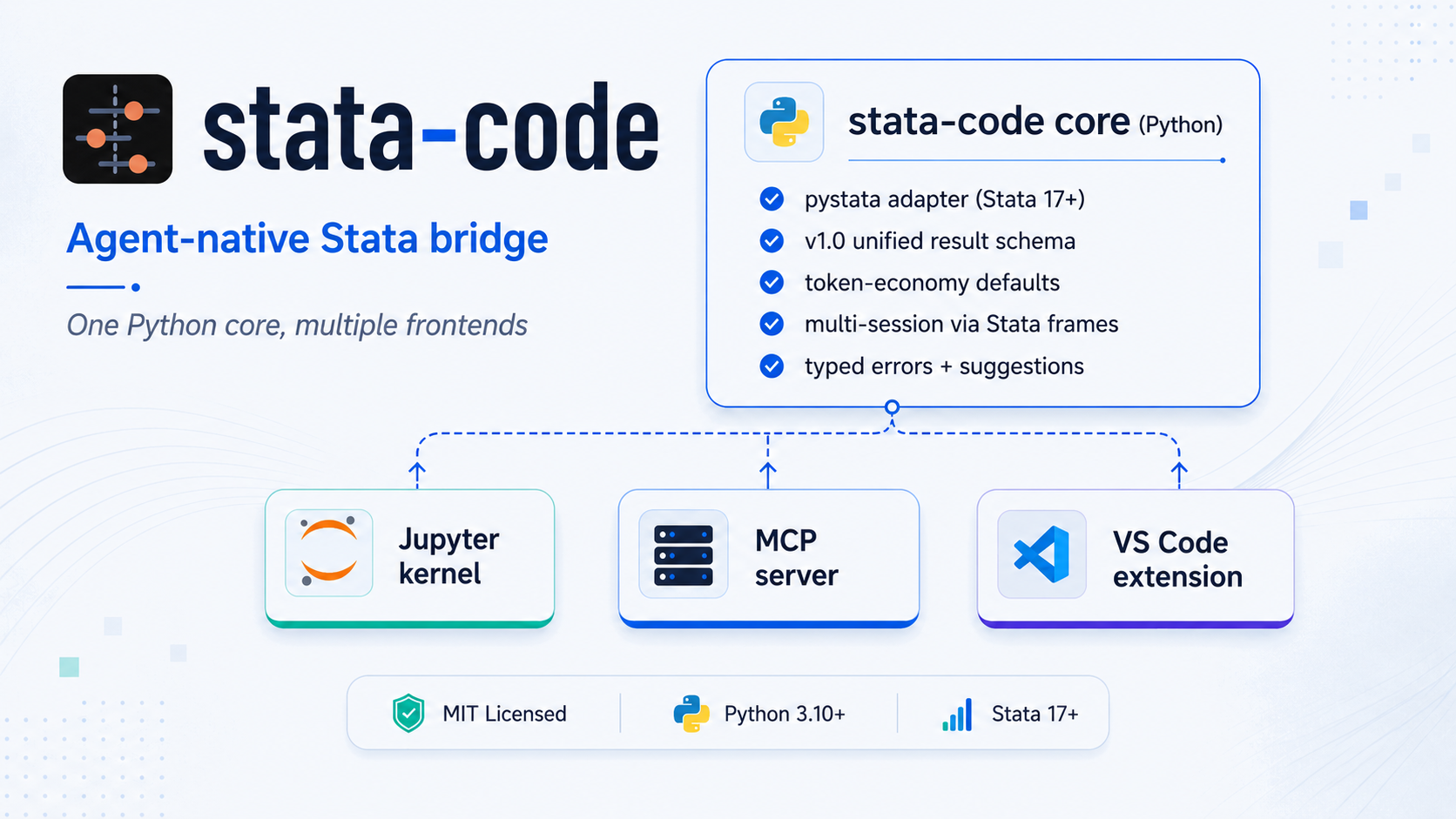
Agent-native Stata bridge — one Python core, multiple frontends.
stata-code lets you drive Stata from modern environments: an LLM agent (Claude Code, Cursor, Claude Desktop), a Jupyter notebook, or a VS Code editor session. All frontends share one Python core and return a stable, structured, agent-friendly result schema.
For empirical economists. Drive Stata in plain language: run DiD, IV, RDD, and publication-ready esttab tables in one conversation — then cross-check each estimate across Stata and Python so you only trust results that agree (the Cunningham cross-package robustness check).
Try it in 60 seconds with Claude Code — no global install needed:
claude mcp add stata-code --scope user -- uvx --from "stata-code[mcp]" stata-code-mcp
Then just ask:
"Using
data/cfps_panel.dta, run a two-way fixed-effects regression of monthly wage on the treatment (controls:age age2 edu industry), then test heterogeneous effects with Callaway-Sant'Anna, and export anesttabtable."
stata-code writes the do-file, runs it, returns the table, and interprets the result — and can re-estimate the same ATT with StatsPAI to confirm the two stacks agree. These workflows ship as one-call MCP prompts (did_event_study, iv_2sls, rdd, publication_table, cross_validate_did) backed by an on-demand recipe library.
Why stata-code: MIT-licensed · ships as an MCP server, a bundled agent skill, a Jupyter kernel, a VS Code extension, and a plain-terminal CLI (stata-code run) · one structured, token-economy result schema (typed errors, native r() / e()) · runs on Stata 17+ via pystata or Stata 13+ via a console backend that needs no pystata · a zero-Python standalone binary · a default command-safety guard for unattended agents · cross-stack validation with StatsPAI for the Cunningham check.
                    ┌────────────────────────────────────────┐
                    │     stata-code core (Python)           │
                    │                                        │
                    │   • pystata 17+ / console 13+ backends │
                    │   • v1.0 unified result schema         │
                    │   • token-economy defaults             │
                    │   • multi-session via Stata frames     │
                    │   • typed errors + suggestions         │
                    └────────────────────────────────────────┘
                       ↑              ↑              ↑
              ┌────────┴────┐  ┌──────┴─────┐  ┌────┴────────────┐
              │  Jupyter    │  │  MCP       │  │  VS Code        │
              │  kernel     │  │  server    │  │  extension      │
              └─────────────┘  └────────────┘  └─────────────────┘
A fourth frontend, a plain-terminal CLI (stata-code run / lint / setup), gives any agent that can shell out — or a bare terminal — the same typed RunResult. And the core runs two backends: pystata (Stata 17+, in-memory sessions) or a console backend (Stata 13+ in batch mode, no pystata) — both returning the identical schema.
Status: v0.12 (July 2026) — the core, MCP server, Jupyter kernel, VS Code extension, and CLI work end-to-end against Stata 18 MP; the console backend broadens coverage to Stata 13+ without pystata. v0.12 adds a resident session daemon so consecutive CLI runs share data in memory, on top of v0.11's agent-ergonomics work: bounded result payloads, background execution for multi-minute jobs, error localization inside do-files, automatic log-handle cleanup, and generated-file reporting — see the changelog. The test suite covers schema, runner, console parser, MCP, kernel, notebook, run-index, subprocess-pool, command policy, linter, and VS Code modules; CI also checks linting, type safety, schema generation, package metadata, and VSIX packaging. License: MIT.
Four workflows the current tree explicitly supports for end users and agents:
- Run Stata from a plain terminal or a zero-Python binary.
stata-code run analysis.do(or-e "code", or stdin) prints the same structuredRunResult— text or--json— so any agent that can shell out gets the typed error loop without MCP.--backend consoleruns Stata 13+ with no pystata, and a standalone binary needs no Python install at all. See From the Command Line. - Run Stata code from a Jupyter notebook.
pip install "stata-code[kernel]"+stata-code-kernel install --userregisters a Stata kernel that the Jupyter Notebook UI, JupyterLab, and the VS Code Jupyter extension all pick up by name. Cells render Stata logs, graphs, and warnings inline (the kernel logo bundled since v0.5 makes it appear in VS Code's kernel picker too). See As a Jupyter Kernel. - Optional agent "fix and rerun" loop.
stata_runreturns typederror.kind/line/contextplussuggestionson every failure. By default Claude Code only reports diagnostics — but if you explicitly say "fix this and rerun until it passes", the agent uses the same fields to edit your.dofile and re-callstata_rununtil the run is green. The repair loop is opt-in: failed runs are diagnostics first, not automatic rewrite permission. See Error Recovery in Agent Workflows. - Economist workflow guides. The bundled skill and cookbook now cover
modern DiD, IV/weak-IV, RDD, table export, data-MCP handoff, and
cross-stack parity audits.
stata-coderuns and audits the Stata leg; R, Python, and official data MCPs remain separate tools with explicit handoff files and source metadata. Seeskills/stata-code/references/andexamples/.
Why this exists
The Stata AI / agent tooling landscape is fragmented; see References-tools.md:
- Existing MCP servers (SepineTam/stata-mcp, tmonk/mcp-stata) are AGPL-3.0, which is not a fit for closed-source or commercial integration.
- The popular VS Code AI extension (hanlulong/stata-mcp) is MIT, but it bundles the MCP server inside the extension, making standalone reuse awkward.
- Each tool wraps
pystatawith its own result shape, so agents have to special-case each integration. - Many existing tools were designed for humans first and then bolted onto MCP; they often dump long logs and base64 graph blobs into every reply, burning tokens by default.
stata-code is designed to fill that gap:
- MIT-licensed, with no copyleft contagion.
- One shared result schema for every frontend: SCHEMA.md.
- Agent-native by default: typed errors, structured
r()/e(), log refs, graph refs, and suggestion seeds. - One core, multiple frontends: Jupyter kernel, MCP server, and VS Code extension.
For the project's clean-room policy around AGPL/GPL Stata projects, see LICENSE-POLICY.md.
Install
Requirements: Python 3.10+, plus either Stata 17+ (using the pystata
shipped by Stata, for in-memory sessions) or Stata 13+ (via the console
backend, which needs no pystata and is stateless).
# from PyPI
pip install stata-code

# with the MCP server and Jupyter kernel extras
pip install "stata-code[mcp,kernel]"

# or from source (editable install for development)
git clone https://github.com/brycewang-stanford/stata-code.git
cd stata-code
pip install -e ".[mcp,kernel]"
Naming note. The PyPI distribution is
stata-code(hyphen), but the Python import isstata_code(underscore — Python identifiers can't contain hyphens). Same convention asscikit-learn→import sklearn. So:pip install stata-code,from stata_code import run.
Note: pystata is not on PyPI; it ships with Stata. stata-code auto-discovers it on macOS at /Applications/Stata/utilities/pystata and at equivalent Linux / Windows paths. If your install is elsewhere, add it to PYTHONPATH before importing.
Verify the local setup with the read-only doctor:
stata-code doctor
stata-code doctor --json          # machine-readable output
stata-code doctor --no-stata-probe # skip live Stata initialization
stata-code doctor --workspace /path/to/project --no-user-config-scan
The doctor reports the package/Python version, MCP and Jupyter extras, pystata
discovery, console scripts on PATH, common project/user MCP client config
files, client/VS Code configuration hints, and a best-effort Stata
version/edition probe. It never edits shell, Stata, Claude, Cursor, or VS Code
config.
Quick Start
See examples/ for end-to-end cookbook entries: basic regression, DiD, graphs, multi-session, and large matrices.
As a Python Library
The package-level run() / execute() API uses the same subprocess-backed
runner as the MCP server, so long calls honor timeout_ms and pystata
stdout redirection stays isolated from the caller process.
from stata_code import run

r = run("sysuse auto, clear")
r = run("regress mpg weight")

if r.ok:
    print(r.results.e.scalars["r2"])           # 0.6515 (native float)
    print(r.results.e.macros["cmd"])           # "regress"
    b = r.results.e.matrices["b"]
    print(dict(zip(b.cols, b.values[0])))      # {"weight": -0.006, "_cons": 39.44}
else:
    print(r.error.kind, r.error.message)       # ErrorKind.VARNAME_NOT_FOUND, "..."
    for s in r.error.suggestions:
        print("hint:", s.action)               # "Did you mean `mpg`?"
From the Command Line (Bash)
Any agent or script that can shell out gets the same structured engine — no MCP
required. stata-code run executes a .do file, one or more -e snippets, or
code piped on stdin, and prints the RunResult:
stata-code run analysis.do                 # run a do-file, text summary
stata-code run -e "sysuse auto" -e "regress mpg weight"
stata-code run analysis.do --json          # full RunResult JSON (for agents)
echo "summarize price" | stata-code run -   # read code from stdin
stata-code run model.do --graphs out/       # also export graphs to out/
stata-code run job.do --session modelA --timeout-ms 120000
Exit code is 0 on success and 1 on a Stata / adapter error, so it drops into
CI and scripted fix-and-rerun loops. stata-code lint analysis.do runs the
static checker (unbalanced braces, missing end, dangling ///) without
touching Stata.
Backends — Stata 13+ without pystata. --backend selects how code runs:
pystata (Stata 17+, in-memory sessions), console (Stata 13+ batch, no pystata,
stateless), or auto (default: pystata when available, else console). The console
backend drives the Stata command-line executable and parses the log into the same
typed RunResult — typed r()/e(), the estimation table, and the error
taxonomy — so older Stata and pystata-free environments are first-class:
stata-code run analysis.do --backend console
export STATA_CODE_STATA_CLI=/usr/local/stata18/stata-mp   # if not auto-found
Zero-Python binary. A standalone stata-code executable (built by
scripts/build_standalone.py, with a ready-to-use
CI workflow template at
packaging/standalone.github-workflow.yml)
bundles the runtime and needs no Python install. Paired with --backend console,
it is a fully Python-free path to typed Stata results.
The Session Daemon (State Across Invocations)
By default every stata-code run starts a fresh process, so in-memory data dies
with it. The daemon subcommand moves the subprocess pool into a resident
process behind a Unix socket, and consecutive run --daemon calls then land in
the same Stata session:
stata-code run --daemon -e 'sysuse auto, clear' -e 'gen z = price/1000'
stata-code run --daemon -e 'summarize z'       # new process, z is still there
stata-code run --daemon -e 'regress price mpg'
stata-code run --daemon -e 'display e(r2)'     # e() from the previous process too
The first run --daemon starts the daemon on demand — no manual step needed. You
can also drive it explicitly:
stata-code daemon start                    # detached (--foreground to stay attached)
stata-code daemon status                   # pid, uptime, live sessions
stata-code daemon status --json
stata-code daemon stop
stata-code daemon restart
stata-code daemon start --idle-timeout 0   # 0 disables idle retirement
Worth knowing:
- Session isolation is unchanged.
--session otheris still a separate Stata frame / worker inside the daemon; sessions cannot see each other's data. - It retires itself after 30 idle minutes so a forgotten daemon does not sit on
a Stata license slot. Tune with
--idle-timeout;0disables it. - Unix socket only, never TCP. The daemon executes arbitrary Stata code, so it is deliberately reachable only through a mode-0600 socket inside a mode-0700 directory. The command-safety guard still applies.
- Requires the pystata backend.
--backend consoleis stateless batch execution by design, so pairing it with a daemon is an error rather than a silent no-op. - Long socket paths degrade gracefully.
sun_pathcaps out around 104 bytes; when the natural location is longer (a deep home directory, a longXDG_RUNTIME_DIR), the socket moves to a short/tmppath derived from a hash of the intended one. Every entry point derives it the same way, so clients still find the daemon.
Plain stata-code run, run --daemon, and the MCP server all drive the same
engine and return the same RunResult schema — they differ only in how long the
Stata session lives.
One-Command Client Setup
stata-code setup writes the MCP server entry into a client's config — the
opt-in, mutating counterpart to the read-only doctor. It preserves other
servers and backs up any file it overwrites:
stata-code setup --all                 # Claude Code, Cursor, VS Code (project)
stata-code setup --claude --dry-run    # preview without writing
stata-code setup --vscode --python .venv/bin/python   # pin an interpreter
stata-code setup --codex               # print a copy-paste TOML snippet
Command Safety
By default the runner blocks OS-escape and file-deletion commands (shell,
winexec, erase, rm, rmdir, and the ! shell escape) before they reach
Stata, so an autonomous agent loop can't delete files or run arbitrary shell
commands. A block returns a policy_blocked result (rc=-4) rather than
running. It is a guard rail, not a sandbox; tune it with environment variables:
STATA_CODE_COMMAND_POLICY=off      # disable the guard entirely
STATA_CODE_POLICY_ALLOW=shell      # allow specific commands (comma-separated)
STATA_CODE_POLICY_BLOCK=python     # block additional commands
As an MCP Server
After pip install "stata-code[mcp]", the stata-code-mcp binary is on your PATH. You can wire it into Claude Code, Cursor, Claude Desktop, or any other MCP-compatible client.
Claude Code via claude mcp add (recommended)
If you have not installed Claude Code yet, see anthropics/claude-code.
The fastest way is the claude mcp add CLI. Pick a scope based on how widely you want stata-code available:
# user scope — install once, available in every Claude Code workspace on this machine
claude mcp add stata-code --scope user -- stata-code-mcp

# local scope — only for the current workspace (your local Claude config, not committed)
claude mcp add stata-code --scope local -- stata-code-mcp

# project scope — written into ./.mcp.json so collaborators on this repo share it
claude mcp add stata-code --scope project -- stata-code-mcp
Then launch claude and type /mcp to confirm stata-code shows up with its 21 tools (stata_run, stata_run_status, list_background_runs, stata_info, get_log, search_log, get_graph, get_matrix, inspect_data, lint_do, install_package, list_sessions, cancel_session, reset_session, notebook_outline, notebook_get_cell, notebook_locate, notebook_edit_cell, notebook_insert_cell, notebook_delete_cell, list_runs).
Error Recovery in Agent Workflows
stata_run does not rewrite the source .do file or change code on its own. It executes the submitted Stata code, so that code may still create logs, graphs, tables, or other outputs as usual. When Stata fails, stata_run returns typed diagnostics (error.kind, error.message, error.line, error.context) plus best-effort suggestions. That supports two distinct Claude Code workflows:
- For "run this do-file" or "verify this code", Claude can report the failure and suggested next steps without changing source files.
- For "fix this and rerun until it passes", Claude can use the same structured error fields to edit the
.dofile, callstata_runagain, and iterate.
If you want the repair loop, say so explicitly. Otherwise, treat failed runs as diagnostics first, not as automatic permission to rewrite code.
uvx (no global pip install)
If you prefer not to pip install stata-code globally, run it ephemerally through uv:
claude mcp add stata-code --scope user -- uvx --from "stata-code[mcp]" stata-code-mcp
uvx will resolve and cache stata-code on first launch. Note: pystata is not on PyPI, so it still has to be locatable on the host. The runner adds the standard Stata install path (e.g. /Applications/Stata/utilities/pystata on macOS) to sys.path automatically; if your Stata lives elsewhere, set PYTHONPATH in the env block.
Claude Code via plugin marketplace
This repository also ships a Claude Code plugin manifest (.claude-plugin/). Once you've added the marketplace to your Claude Code config, two commands wire up both the MCP server and the agent skill that teaches Claude the v1.0 result schema:
claude plugin marketplace add brycewang-stanford/stata-code
claude plugin install stata-code
The plugin registers the stata-code MCP server and installs the stata-code skill so Claude branches on error.kind, calls get_log(ref) lazily, and uses the notebook-edit tools without you re-explaining them every session.
Other MCP clients (Cursor / Claude Desktop / Cline / Continue / Windsurf / Antigravity)
Most non-Claude-Code MCP clients accept the same JSON snippet. Drop it into the client's MCP config file:
| Client | Config file |
|---|---|
| Claude Desktop | macOS: ~/Library/Application Support/Claude/claude_desktop_config.json; Windows: %APPDATA%\Claude\claude_desktop_config.json |
| Cursor | ~/.cursor/mcp.json (user) or <workspace>/.cursor/mcp.json (project) |
| Windsurf | ~/.codeium/windsurf/mcp_config.json |
| Cline (VS Code) | settings: cline.mcpServers |
| Continue | ~/.continue/config.json under experimental.modelContextProtocolServers |
| Antigravity / generic | ~/.claude/mcp.json or whatever the client documents |
{
  "mcpServers": {
    "stata-code": {
      "command": "stata-code-mcp"
    }
  }
}
Or, when the binary is not on PATH, run it as a module:
python -m stata_code.mcp
When stata-code-mcp lives inside a project virtualenv (recommended for reproducibility), point the client at the absolute path:
{
  "mcpServers": {
    "stata-code": {
      "command": "/abs/path/to/.venv/bin/stata-code-mcp"
    }
  }
}
For uvx-only setups, set "command": "uvx" and "args": ["--from", "stata-code", "stata-code-mcp"].
MCP troubleshooting
If stata_run reports adapter_crash with worker emitted non-JSON: '\n',
upgrade to stata-code>=0.6.4, then restart the MCP client so it launches a
fresh server process. Also check that the client is resolving the expected
stata-code-mcp binary; project virtualenv installs should use the absolute
.venv/bin/stata-code-mcp path instead of relying on a global PATH entry.
If an OpenAI-backed client reports API Error: 400 Invalid schema for function 'mcp__stata-code__notebook_insert_cell' and mentions a top-level oneOf,
upgrade to stata-code>=0.6.5, then restart the MCP client. Older server
processes keep advertising the stale schema until they are restarted.
The MCP server registers 21 tools:
| Tool | Purpose |
|---|---|
stata_run |
Execute Stata code and return a v1.0 RunResult JSON; include_results / include_estimation bound the payload, timeout_ms enforces a hard deadline, run_in_background returns a job id |
stata_run_status |
Poll a background run's status and result; wait_ms blocks up to a bounded time |
list_background_runs |
List background runs tracked by this server |
stata_info |
Report Stata edition, version, and capabilities |
get_log |
Fetch the full log behind a log:// ref |
search_log |
Search matching lines inside a stored log:// payload |
get_graph |
Fetch graph bytes behind a graph:// ref (ImageContent) |
get_matrix |
Fetch matrix payloads behind a matrix:// ref |
inspect_data |
Run describe + codebook and return compact dataset metadata |
lint_do |
Statically check do-file source (unbalanced braces, missing end, dangling ///) before spending a run |
install_package |
Install an SSC or explicit net install package and verify it resolves |
list_sessions |
Enumerate live sessions |
cancel_session |
Cancel a session; the subprocess-backed path terminates in-flight runs and short-circuits pending ones |
reset_session |
Drop a session's data |
notebook_outline |
Compact per-cell index of a .ipynb (cell_id, type, preview) |
notebook_get_cell |
One cell's full source plus a token-economic outputs summary |
notebook_locate |
Find cells by snippet / regex / pasted error text |
notebook_edit_cell |
Atomically replace one cell's source (preserves id, clears outputs) |
notebook_insert_cell |
Insert a new cell with a fresh nbformat 4.5+ UUID |
notebook_delete_cell |
Remove a cell by id |
list_runs |
Query run-bundle manifests (filter by notebook / cell_id / session / since / ok, page with limit / offset) |
For modern MCP clients, these tools now return structured results through
structuredContent with outputSchema metadata, while still keeping the
serialized JSON text block for older clients. The server also exposes MCP
resources:
| Resource | Purpose |
|---|---|
stata://schema/run-result |
JSON Schema for stata_run structured output |
stata://server/capabilities |
Server instructions, tools, and resource templates |
stata://sessions |
Current subprocess-backed Stata sessions |
log://... |
Full log text from a truncated stata_run result |
graph://... |
Captured graph image bytes |
matrix://... |
Deferred large matrix payloads |
MCP prompts are available for common agent workflows:
run_do_file_and_report, debug_stata_error,
fix_and_rerun_until_passes, replication_audit,
plan_cross_stack_parity_audit, data_mcp_to_stata_handoff,
summarize_estimation_results, run_notebook_cell_and_report,
fix_and_rerun_notebook_cell, did_event_study, iv_2sls, rdd,
publication_table, and cross_validate_did.
As a Jupyter Kernel
stata-code ships a Jupyter kernel as part of the Python package — there is no separate "Jupyter plugin" in the JupyterLab extension marketplace. Installation is two steps: pip install the package with the kernel extra, then register the kernelspec with Jupyter.
Prerequisites: Stata 17+ installed locally with a valid license (the kernel calls Stata via pystata), and Python 3.10+ with jupyter/jupyterlab already on the same environment.
# 1. Install stata-code with the kernel extra (pulls in ipykernel)
pip install "stata-code[kernel]"

# 2. Register the kernelspec into Jupyter's user data dir
stata-code-kernel install --user
# Or, equivalently:
# python -m stata_code.kernel install --user
Verify the kernel is registered:
jupyter kernelspec list
# should include an entry named `stata`
Then open Jupyter Notebook / JupyterLab (or a .ipynb in VS Code), pick Stata in the kernel selector, and run Stata commands in cells. Logs, graphs, and warnings render inline.
JupyterLab's Extension Manager only installs front-end JS extensions, so it cannot install a kernel —
pip installplus theinstall --userstep above is the only supported path.
As a VS Code Extension
The companion extension is on the Marketplace as brycewang-stanford.stata-code-vscode. It spawns stata-code-mcp as a child process and adds syntax highlighting, an Outline view for **# sections and program define blocks, code-lens "Run cell" and "Run section" actions on .do files, a seven-view sidebar (sessions / last result / data variables / run history / logs / graphs / outputs) — including an agent-native equivalent of Stata's Variables window and an Outputs panel that surfaces the esttab tables and export files each run writes to disk — status-bar indicators, completions, help lookup, conservative variable rename, and inline diagnostics from the v1.0 typed errors.
# from the VS Code CLI
code --install-extension brycewang-stanford.stata-code-vscode
Or open the Extensions sidebar in VS Code and search stata-code. The extension is also available from Open VSX so Cursor, Windsurf, and other VS Code-compatible editors can install it without going through the Microsoft Marketplace.
On first activation the extension probes for stata-code-mcp on PATH (and in any workspace .venv / venv). If nothing resolves, it shows a one-time install hint with the exact pip install "stata-code[mcp]" command — choose Don't show again to silence it for the installed extension version.
If the extension or an MCP client cannot find the server, run
stata-code doctor --no-stata-probe in the same Python environment. It reports
whether stata-code-mcp is on PATH and suggests absolute-path or
python -m stata_code.mcp fallbacks for GUI clients whose PATH differs from
your shell. It also reads common MCP config files in the current workspace and
user config directories so you can see whether a client is already wired to
stata-code.
Cell and section conventions
The extension recognizes two complementary structural markers inside .do files. Either can be mixed in the same file; they do not conflict.
| Marker | Purpose | Example |
|---|---|---|
* %% [title] |
Cell boundary. Each marker gets a ▶ Run Cell code-lens; "Run Cell" submits the lines between this marker and the next one. Compatible with the Jupyter-style cell convention used by kylebutts/vscode-stata. |
* %% 02 model fit |
**# title … **###### title |
Section heading, 1–6 levels deep. Each heading gets a ▶ Run Section code-lens and contributes to the Outline view. "Run Section" submits the heading through the next equal- or higher-level heading, matching the hierarchical execution model from ZihaoVistonWang.stata-all-in-one. |
**## DiD specification |
program define … end blocks are also surfaced in the Outline, nested under whichever section contains them.
The extension still requires the MCP extra on your system Python (pip install "stata-code[mcp]"), so that stata-code-mcp resolves on PATH and can import the MCP SDK. Stata 17+ and a valid Stata license are required as for any other frontend.
Token-Economy Defaults
A typical stata_run response is about 10x smaller than servers that dump logs and images directly. Four design choices drive this:
- Logs return
head+tail+refby default. Full logs are fetched on demand viaget_log(ref), or grepped in place withsearch_log(ref, pattern). A Stata regression log can be about 6,000 tokens;stata-codereturns about 600 by default. - Graphs return refs, not inline base64. A 30 KB PNG can become about 50,000 base64 tokens; returning a ref avoids that unless the agent actually needs the bytes. When they are requested inline, they come back as real MCP image content blocks — viewable by a vision-capable client, rather than base64 buried in a JSON string that costs tokens and shows nothing.
- Each estimation is described once. By default (
include_results: "scalars")r()/e()scalars and macros are inline, while every matrix becomes amatrix://stub carrying just its shape. Without this, one regression ships the same numbers four times —e(b),e(V)'s label lists,e(beta),r(table)— on top ofresults.estimation, which already holds the typed coefficient table. A 123-term regression drops from ~57 KB to ~28 KB. Raw values stay oneget_matrix(ref)away, andinclude_results: "full"restores the old shape. - Errors are typed. Agents can check
err.kind == "varname_not_found"instead of regex-parsing English logs.
Two further knobs matter for fixed-effect-heavy work: include_estimation: "summary" keeps the model-level block and drops per-term rows, and max_coefficients caps the table. Either way estimation.n_coefficients reports the model's true size and coefficients_truncated flags the cut, so a trimmed table is never mistaken for a smaller model.
For example, a misspelled variable returns a structured error:
{
  "ok": false,
  "rc": 111,
  "error": {
    "kind": "varname_not_found",
    "varname": "mpgg",
    "line": 3,
    "source_file": null,
    "context": {
      "before": ["use auto"],
      "failing": "summarize mpgg",
      "after": []
    },
    "suggestions": [
      {"action": "Did you mean `mpg`?", "command": "describe"}
    ],
    "recovery": {
      "category": "user_code",
      "retriable": false,
      "needs_code_change": true,
      "needs_user_input": false
    }
  }
}
When the failing command lives inside a script you invoked (do "analysis.do"), line and context point inside that script and source_file names it — so an agent does not have to re-read the file to find the offending line.
The full schema is in SCHEMA.md.
Architecture
stata_code/
├── core/
│   ├── _runtime.py    # process-singleton pystata wrapper
│   ├── _refs.py       # LRU ref store for log/graph/matrix payloads
│   ├── schema.py      # Pydantic v2 models for the v1.0 result schema
│   ├── errors.py      # rc → ErrorKind mapping + suggestion seeds
│   ├── runner.py      # in-process execute(); collects everything via sfi
│   └── _pool.py       # subprocess workers for public API / MCP hard timeouts
├── mcp/
│   ├── server.py      # MCP server (21 tools)
│   └── ...
├── core/console.py    # console (batch) backend — Stata 13+, no pystata
└── kernel/
    └── kernel.py      # Jupyter kernel
runner.py is the only place that directly talks to pystata. The public Python API and MCP server route calls through _pool.py, whose workers call runner.execute() in an isolated subprocess; the Jupyter kernel uses the in-process runner for notebook interactivity.
Comparison
| stata-code | SepineTam/stata-mcp | hanlulong/stata-mcp | stata-all-in-one | nbstata | |
|---|---|---|---|---|---|
| License | MIT | AGPL-3.0 | MIT | MIT | GPL-3.0 |
| Standalone MCP | ✓ | ✓ | bundled with VS Code | — (bespoke HTTP + copy-paste) | — |
| Jupyter kernel | ✓ | — | — | — | ✓ |
| Unified result schema | ✓ (SCHEMA.md) | per-tool | per-tool | raw log to the agent | per-tool |
| Typed errors + suggestions | ✓ (34 kinds) | — | — | — | — |
| Token-economy defaults | ✓ (log refs, graph refs) | — | — | — | — |
| Command-safety guard | ✓ (shell/erase/rmdir/!) |
✓ (27-rule) | — | — | — |
| Bash / plain-terminal CLI | ✓ (stata-code run) |
✓ | — | — | — |
| One-command client setup | ✓ (stata-code setup) |
✓ (install --all) |
bundled | — | — |
| Static pre-run lint | ✓ (lint_do) |
— | — | — | — |
| Stata 13–16 (no pystata) | ✓ (console backend) | ✓ | — | ✓ (COM/dylib) | — |
| Zero-Python install | ✓ (standalone binary) | — | — | ✓ (VS Code-native) | — |
| Human IDE polish (data viewer, inline graphs) | growing | — | ✓ | ✓ (strongest) | ✓ |
| Multi-session | ✓ (Stata frames) | partial | — | — | — |
| Mature ecosystem | early | ✓ (statamcp.com) | ✓ (11k installs) | ✓ (distributor-backed) | ✓ |
stata-code owns the agent-native, typed-contract lane: one structured
RunResult schema across MCP, Jupyter, VS Code, and a plain-terminal CLI; a
34-kind error taxonomy with recovery contracts; token-economy refs; and now a
console backend (Stata 13+) plus a zero-Python binary. Editor-first tools like
stata-all-in-one lead on human IDE polish and hand the agent raw log text;
stata-code matches their onboarding/version reach while keeping the typed
execution contract they don't have. See
docs/competitive-landscape.md for the full
teardown.
Versus calling the Stata CLI directly
To be clear up front: you can drive Stata from a shell with no tooling at all. Most Stata installs ship a command-line executable, and for one-shot execution it is perfectly good — no reason to add a dependency:
/Applications/Stata/StataMP.app/Contents/MacOS/stata-mp -b do analysis.do
printf 'sysuse auto, clear\nsummarize mpg\nexit, clear\n' | stata-mp -q
What's worth knowing is where that path breaks down. Both columns below drive the
same Stata binary and parse the same log (stata-code via --backend console);
the only difference is the wrapper around it:
plain stata-mp -b |
stata-code run |
|
|---|---|---|
| Exit code on error | 0 — fails silently |
1 |
| How you learn it failed | grep the log for r(111); yourself |
ok=False, rc=111 |
| Error classification | none | [varname_not_found] (34 kinds) |
| Recovery hint | none | "Run describe to list available variables" |
| Getting a coefficient | scrape the aligned ASCII table | e.scalars["r2"] → 0.6515312529087511 (float) |
| State across calls | no | run --daemon (see below) |
The first row is the one that bites: Stata's batch mode returns exit code 0 even
when the code errors out. In an automated loop, an agent sees exit 0, moves on,
and treats a failed run's output as valid.
Rule of thumb:
- One-shot execution ("run this do-file and show me the output") — the plain CLI is fine; don't over-engineer it.
- Scripts / CI (anything that branches on success) — use
stata-code runand get a trustworthy signal for near-zero cost. - Iterative analysis (many rounds, reading intermediate results, deciding the
next step from
e()) — userun --daemonor MCP; otherwise statelessness and text-scraping compound round over round.
Without
--daemon,stata-code runstarts a fresh process per invocation: multiple-esnippets in one call share a session, but in-memory data is gone once the process exits. With--daemonthe data stays in a resident process — see the session daemon.
Roadmap
Done (current tree)
- v1.0 result schema (SCHEMA.md)
pystata-based runner with native-typedr(),e(), and matrices- Multi-session via Stata frames (
session_idaccepts[A-Za-z0-9_-]+; ids such asmodel-aare mapped to private legal frame names internally while the public id is echoed back) - Resident session daemon (
stata-code daemon,run --daemon) so CLI invocations share one live Stata session over a mode-0600 Unix socket, with idle retirement - Per-line error attribution: line number, context, commands_executed
- Graph capture:
png/svg/pdfwith ref store and source-command attribution - Log truncation with ref store
- Warning extraction: 5 categories + generic notes
- 34-kind error taxonomy with canonical suggestions and a machine-readable
recoveryverdict (retriable / needs-code-change / needs-user-input) - MCP server: 21 tools, including notebook navigation / search / atomic edits, the run-bundle index (
list_runs), log grep (search_log), dataset inspection (inspect_data), static linting (lint_do), and package installation (install_package) - Command-safety guard: OS-escape / file-deletion commands (
shell,winexec,erase,rm,rmdir,!) are blocked before Stata runs; configurable viaSTATA_CODE_COMMAND_POLICY/STATA_CODE_POLICY_ALLOW/STATA_CODE_POLICY_BLOCK - Bash / plain-terminal surface:
stata-code run(a.dofile,-esnippets, or stdin) prints the same structuredRunResultany agent that can shell out can consume;stata-code lintruns the linter;stata-code setupwrites MCP client configs - Console (batch) backend (
core/console.py,--backend console,run_console()): drives the Stata command-line executable, parses the log into the same typedRunResult, and supports Stata 13+ with no pystata - Zero-Python standalone binary (
scripts/build_standalone.py+ CI workflow templatepackaging/standalone.github-workflow.yml); with--backend consoleit is a fully Python-free path to typed results - One-click VS Code onboarding: the extension offers to create a workspace
.venvand install the server (command palette: “Stata: Set Up MCP Server”) - Jupyter kernel: rewired to the v1.0 pipeline, kernel logos bundled
- Result-payload budget:
include_results(matrices becomematrix://stubs by default),include_estimation, andmax_coefficients, withget_matrix(ref)to pull raw values on demand - Subprocess-backed hard timeout and cancellation for the public Python API and MCP server:
timeout_ms(now an advertisedstata_runargument, and it budgets queueing too — contention returnsrc=-5/session_busyinstead of blocking),cancel(session_id), and MCPcancel_session - Background execution for multi-minute jobs:
run_in_backgroundreturns a job id;stata_run_status(with a boundedwait_ms) andlist_background_runspoll it - Error localization inside
do/runscripts:error.line+error.contextresolve within the invoked file anderror.source_filenames it; a failed run still carries a full searchable log - Log-handle hygiene: handles leaked by a failed run are closed automatically (
auto_close_logs), so an aborted script cannot make every later run in that session fail with r(604) - Generated-file reporting:
result.outputslists the tables, exports and datasets each run wrote, independent of the run-bundle options - Per-cell repair loop on
.ipynbvianotebook_outline/notebook_get_cell/notebook_edit_cellwith optimistic-concurrencyexpected_sourceguards andorigin_cell_idecho onRunResult - Persistent run bundles +
list_runsquery overmanifest.jsonfiles (filter by cell / origin / session / since / ok; page with limit / offset) - Read-only
stata-code doctor/verifydiagnostics for package version, extras,pystatadiscovery, console scripts, client hints, and optional live Stata version probing - Economist workflow layer: skill references and examples for modern DiD, IV/weak-IV, RDD, table export, data-MCP handoff, and cross-stack parity audits
- JSON Schema artifact auto-generated from
schema.py:schema/run_result.schema.json - VS Code extension published to the Marketplace as
brycewang-stanford.stata-code-vscode: syntax highlighting, section outline/navigation, code-lens cell and section runners, seven-view sidebar (sessions / last result / data variables / run history / logs / graphs / outputs), status bar, completions, conservative variable rename, diagnostics, MCP child-process spawn - Clean-room license policy (LICENSE-POLICY.md)
Next Up
- Streaming / incremental progress for long runs (
log.complete:false, partial log lines). v0.11'srun_in_backgroundalready unblocks the caller for 20-minuteboottest/csdidjobs, but a running job still reports nothing until it finishes - Hard timeout / cancellation for the Jupyter kernel (move it from the direct in-process runner to the subprocess pool, or an equivalent)
- Console backend: graph capture and richer matrix coverage (values currently materialized for the estimation matrices; state is per-call)
- Human IDE polish to match editor-first tools: inline graph rendering + DPI export, a scalable data viewer, and an optional "attach to a running Stata" backend
- Publish the reliability/token benchmark results (typed contract vs. raw-log tools) as evidence, not a claim
- v1.0 — Stable schema, broader Stata edition coverage
See docs/competitive-landscape.md for how these priorities line up against comparable tools, and SCHEMA.md §7 for explicitly out-of-scope items.
Testing
pip install -e ".[dev,mcp,kernel]"
pytest                              # full suite, including Stata tests when Stata is available
pytest -m "not stata_required"      # CI subset; no Stata needed
pytest -m "stata_required" -v       # real-Stata integration tests only
The stata_required marker tags the real-Stata integration tests. CI uses pytest -m "not stata_required" so it does not collect them. Locally without Stata, those tests skip cleanly with the "pystata / Stata 17+ not available" message.
Contributing
Contributions are welcome — see CONTRIBUTING.md for the development setup, the checks CI runs, and PR guidelines. In short:
- Read LICENSE-POLICY.md before opening a PR.
- Add a one-line acknowledgement to your first PR description; the template is in the policy file.
- Tests are required for any new schema field or runner behavior.
Bug reports and support questions go through GitHub issues; security reports go through SECURITY.md.
License
The code is licensed under MIT. LICENSE-POLICY.md explains how this project relates to other Stata projects.
Trademark Notice
Stata is a registered trademark of StataCorp LLC. This project is independent and not affiliated with or endorsed by StataCorp.
Acknowledgements
The Stata tooling landscape that this project builds on and learns from is surveyed in References-tools.md. All listed projects retain their own licenses and authorship; please consult each repository before reuse.
|
|
|
 Visit copaper.ai |
 WeChat: CoPaper.AI |
Maintained by CoPaper.AI, incubated at Stanford REAP / SCCEI · AI Assistant for Empirical Research
1 maintainer

Download files
Download the file for your platform. If you're not sure which to choose, learn more about installing packages.
Source Distribution
Built Distribution
Filter files by name, interpreter, ABI, and platform.
If you're not sure about the file name format, learn more about wheel file names.
Copy a direct link to the current filters
File details
Details for the file stata_code-0.12.0.tar.gz.
File metadata
- Download URL: stata_code-0.12.0.tar.gz
- Upload date:
- Size: 422.9 kB
- Tags: Source
- Uploaded using Trusted Publishing? Yes
- Uploaded via: twine/6.1.0 CPython/3.13.14
File hashes
| Algorithm | Hash digest | |
|---|---|---|
| SHA256 |
538a41849e31d6cdb92426821222e00e50229c40ef81aa41accded77fc2362b0
|
|
| MD5 |
eb1c583352f3a9b19850214269159e43
|
|
| BLAKE2b-256 |
6b3052ceae8b7e266a11527534f29378d396ee98301715c717d9f5312c75b863
|
Provenance
The following attestation bundles were made for stata_code-0.12.0.tar.gz:
Publisher:
release.yml on brycewang-stanford/stata-code
-
Statement:
-
Statement type:
https://in-toto.io/Statement/v1 -
Predicate type:
https://docs.pypi.org/attestations/publish/v1 -
Subject name:
stata_code-0.12.0.tar.gz -
Subject digest:
538a41849e31d6cdb92426821222e00e50229c40ef81aa41accded77fc2362b0 - Sigstore transparency entry: 2273644117
- Sigstore integration time:
-
Permalink:
brycewang-stanford/stata-code@3ddde9f388562a68b3498d46f93e36d17c8a1ee3 -
Branch / Tag:
refs/tags/v0.12.0 - Owner: https://github.com/brycewang-stanford
-
Access:
public
-
Token Issuer:
https://token.actions.githubusercontent.com -
Runner Environment:
github-hosted -
Publication workflow:
release.yml@3ddde9f388562a68b3498d46f93e36d17c8a1ee3 -
Trigger Event:
push
-
Statement type:
File details
Details for the file stata_code-0.12.0-py3-none-any.whl.
File metadata
- Download URL: stata_code-0.12.0-py3-none-any.whl
- Upload date:
- Size: 203.5 kB
- Tags: Python 3
- Uploaded using Trusted Publishing? Yes
- Uploaded via: twine/6.1.0 CPython/3.13.14
File hashes
| Algorithm | Hash digest | |
|---|---|---|
| SHA256 |
5e66316ab1f3c72c30ea7d6cb70952e0211825029b34ce3d52a2f05cc2a39055
|
|
| MD5 |
bd6d58b7de5a3748d1bda43925fff8cf
|
|
| BLAKE2b-256 |
c62c78f07b110d16437f3cbb0d881a41ea24860dfd5ec994b989926bc7b5c397
|
Provenance
The following attestation bundles were made for stata_code-0.12.0-py3-none-any.whl:
Publisher:
release.yml on brycewang-stanford/stata-code
-
Statement:
-
Statement type:
https://in-toto.io/Statement/v1 -
Predicate type:
https://docs.pypi.org/attestations/publish/v1 -
Subject name:
stata_code-0.12.0-py3-none-any.whl -
Subject digest:
5e66316ab1f3c72c30ea7d6cb70952e0211825029b34ce3d52a2f05cc2a39055 - Sigstore transparency entry: 2273644817
- Sigstore integration time:
-
Permalink:
brycewang-stanford/stata-code@3ddde9f388562a68b3498d46f93e36d17c8a1ee3 -
Branch / Tag:
refs/tags/v0.12.0 - Owner: https://github.com/brycewang-stanford
-
Access:
public
-
Token Issuer:
https://token.actions.githubusercontent.com -
Runner Environment:
github-hosted -
Publication workflow:
release.yml@3ddde9f388562a68b3498d46f93e36d17c8a1ee3 -
Trigger Event:
push
-
Statement type:







