
No project description provided
Verified details
These details have been verified by PyPIProject links
GitHub Statistics
Maintainers

Project description
Steamboat



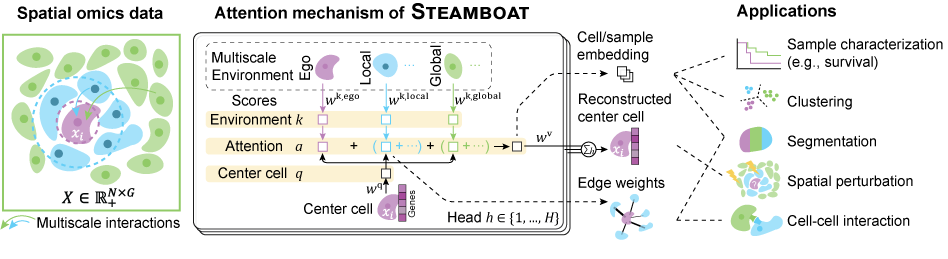
Steamboat is an interpretable machine learning framework leveraging a self-supervised, multi-head attention model that uniquely decomposes the gene expression of a cell into multiple key factors:
- intrinsic cell programs,
- neighboring cell communication, and
- long-range interactions.
These pieces of information are used to generate cell embedding, cell network, and reconstructed gene expression.
System requirements
Hardware
Steamboat can run on a laptop, desktop, or server. The experiments were done on a desktop computer with an RTX 3080 GPU (10GB VRAM). A GPU can significantly reduce the time needed to train the models (more than 5x on the most demanding examples).
Operating system
Steamboat is python-based and run on all mainsteam operating systems. It has been tested on Windows 10 and Springdale Linux.
Software dependencies
Lastest tested working dependency combination
| Package | Tested in 06/2025 | Tested in 12/2025 |
|---|---|---|
| Python | 3.11.5 | 3.19.9 |
| Torch | 2.1.2 (w/ cuda 12.1) | 2.9.1 (w/ cuda 13.0) |
| Scanpy | 1.9.6 | 1.11.5 |
| Squidpy | 1.5.0 | 1.6.6 |
| Scipy | 1.11.4 | 1.16.3 |
| Numpy | 1.26.2 | 2.3.1 |
| Networkx | 3.1 | 3.5 |
| Matplotlib | 3.8.0 | 3.10.6 |
| Seaborn | 0.13.2 | 0.13.2 |
| Scikit-learn | 1.2.2 | 1.7.2 |
Installation
We recommend using Miniconda to create a virtual environment.
conda create -n steamboat python=3.13
conda activate steamboat
pip install steamboat-bio
Installation usually takes about 2 minutes, but can vary depending on computer and network conditions.
Tips for GPU support
Before running pip install steamboat-bio, follow the official guide to install the appropriate Pytorch version for your system and hardware.
The exact commands will depend on your hardware and system. In general, they look like this.
conda create -n steamboat python=3.13
conda activate steamboat
pip install torch torchvision --index-url https://download.pytorch.org/whl/cu130 # DO NOT RUN. ADJUST IT FOR YOUR SYSTEM.
pip install steamboat-bio
Run without installation
If you are interested in modifying the package, or just don't feel like installing it, Steamboat can be imported directly after adding its directory to the path.
git clone https://github.com/ma-compbio/Steamboat
import sys
sys.path.append("/path/of/the/cloned/repository")
You may need to install the dependencies listed in requirements.txt manually.
Basic workflow
import steamboat as sf # "sf" = "Steamboat Factorization"
import steamboat.tools
First, make a list (adatas) of one or more AnnData objects, and preprocess them.
adatas = sf.prep_adatas(adatas, log_norm=True)
dataset = sf.make_dataset(adatas)
Create a Steamboat model and fit it to the data.
model = sf.Steamboat(short_features, n_heads=10, n_scales=3)
model = model.to("cuda") # if GPU acceleration is supported.
model.fit(dataset)
After training, you can check the trained metagenes.
sf.tools.plot_all_transforms(model, top=1)
For clustering and segmentation, run the following lines. Change the resolution to your liking.
sf.tools.neighbors(adata)
sf.tools.leiden(adata, resolution=0.1)
sf.tools.segment(adata, resolution=0.5)
Demos
A few examples in Jupyter notebook are included in the examples folder:
The simulation demo takes about five minutes to run. The mouse brain data takes one hour to train. Other demos take about ten minutes each.
Data used in these examples are available in Google Drive. Trained models are also uploaded.
Documentation
For the full API and real data examples, please visit our documentation.
Project details
Verified details
These details have been verified by PyPIProject links
GitHub Statistics
Maintainers
Release history Release notifications | RSS feed


Download files
Download the file for your platform. If you're not sure which to choose, learn more about installing packages.
Source Distribution
Built Distribution
Filter files by name, interpreter, ABI, and platform.
If you're not sure about the file name format, learn more about wheel file names.
Copy a direct link to the current filters
File details
Details for the file steamboat_bio-0.1.2.tar.gz.
File metadata
- Download URL: steamboat_bio-0.1.2.tar.gz
- Upload date:
- Size: 24.6 kB
- Tags: Source
- Uploaded using Trusted Publishing? Yes
- Uploaded via: twine/6.1.0 CPython/3.13.7
File hashes
| Algorithm | Hash digest | |
|---|---|---|
| SHA256 |
f8136ab8632ee96e792592ad562b2551f3980645bed35aab49613daeeeacd44e
|
|
| MD5 |
40bea77ad1f5e89165747b3883102d50
|
|
| BLAKE2b-256 |
23b11e2cf29cb183081cf50143d0314f4db73b6d9f16a92fe3ab5859a03f918d
|
Provenance
The following attestation bundles were made for steamboat_bio-0.1.2.tar.gz:
Publisher:
pypi.yml on ma-compbio/Steamboat
-
Statement:
-
Statement type:
https://in-toto.io/Statement/v1 -
Predicate type:
https://docs.pypi.org/attestations/publish/v1 -
Subject name:
steamboat_bio-0.1.2.tar.gz -
Subject digest:
f8136ab8632ee96e792592ad562b2551f3980645bed35aab49613daeeeacd44e - Sigstore transparency entry: 760572171
- Sigstore integration time:
-
Permalink:
ma-compbio/Steamboat@2b3e0ae41190f16e5271cdfff00756fafb1b9cf2 -
Branch / Tag:
refs/tags/v0.1.2 - Owner: https://github.com/ma-compbio
-
Access:
public
-
Token Issuer:
https://token.actions.githubusercontent.com -
Runner Environment:
github-hosted -
Publication workflow:
pypi.yml@2b3e0ae41190f16e5271cdfff00756fafb1b9cf2 -
Trigger Event:
release
-
Statement type:
File details
Details for the file steamboat_bio-0.1.2-py3-none-any.whl.
File metadata
- Download URL: steamboat_bio-0.1.2-py3-none-any.whl
- Upload date:
- Size: 23.4 kB
- Tags: Python 3
- Uploaded using Trusted Publishing? Yes
- Uploaded via: twine/6.1.0 CPython/3.13.7
File hashes
| Algorithm | Hash digest | |
|---|---|---|
| SHA256 |
1bc794ec405306c7ecdf3899eeebdbcdcafad8092d4e8ae20c3fd03788f7645c
|
|
| MD5 |
14b1419de14b8dd48e8c8b4b621f5484
|
|
| BLAKE2b-256 |
d3a34327c7f3e9c237b99c3e405e45891a75b032e65438982aa7033ec2473709
|
Provenance
The following attestation bundles were made for steamboat_bio-0.1.2-py3-none-any.whl:
Publisher:
pypi.yml on ma-compbio/Steamboat
-
Statement:
-
Statement type:
https://in-toto.io/Statement/v1 -
Predicate type:
https://docs.pypi.org/attestations/publish/v1 -
Subject name:
steamboat_bio-0.1.2-py3-none-any.whl -
Subject digest:
1bc794ec405306c7ecdf3899eeebdbcdcafad8092d4e8ae20c3fd03788f7645c - Sigstore transparency entry: 760572172
- Sigstore integration time:
-
Permalink:
ma-compbio/Steamboat@2b3e0ae41190f16e5271cdfff00756fafb1b9cf2 -
Branch / Tag:
refs/tags/v0.1.2 - Owner: https://github.com/ma-compbio
-
Access:
public
-
Token Issuer:
https://token.actions.githubusercontent.com -
Runner Environment:
github-hosted -
Publication workflow:
pypi.yml@2b3e0ae41190f16e5271cdfff00756fafb1b9cf2 -
Trigger Event:
release
-
Statement type:






