
The Active Reliability Layer for AI Agents

Project description

Steer
The Active Reliability Layer for AI Agents.
Stop debugging. Start teaching.
Steer turns runtime hallucinations into permanent fixes instantly.



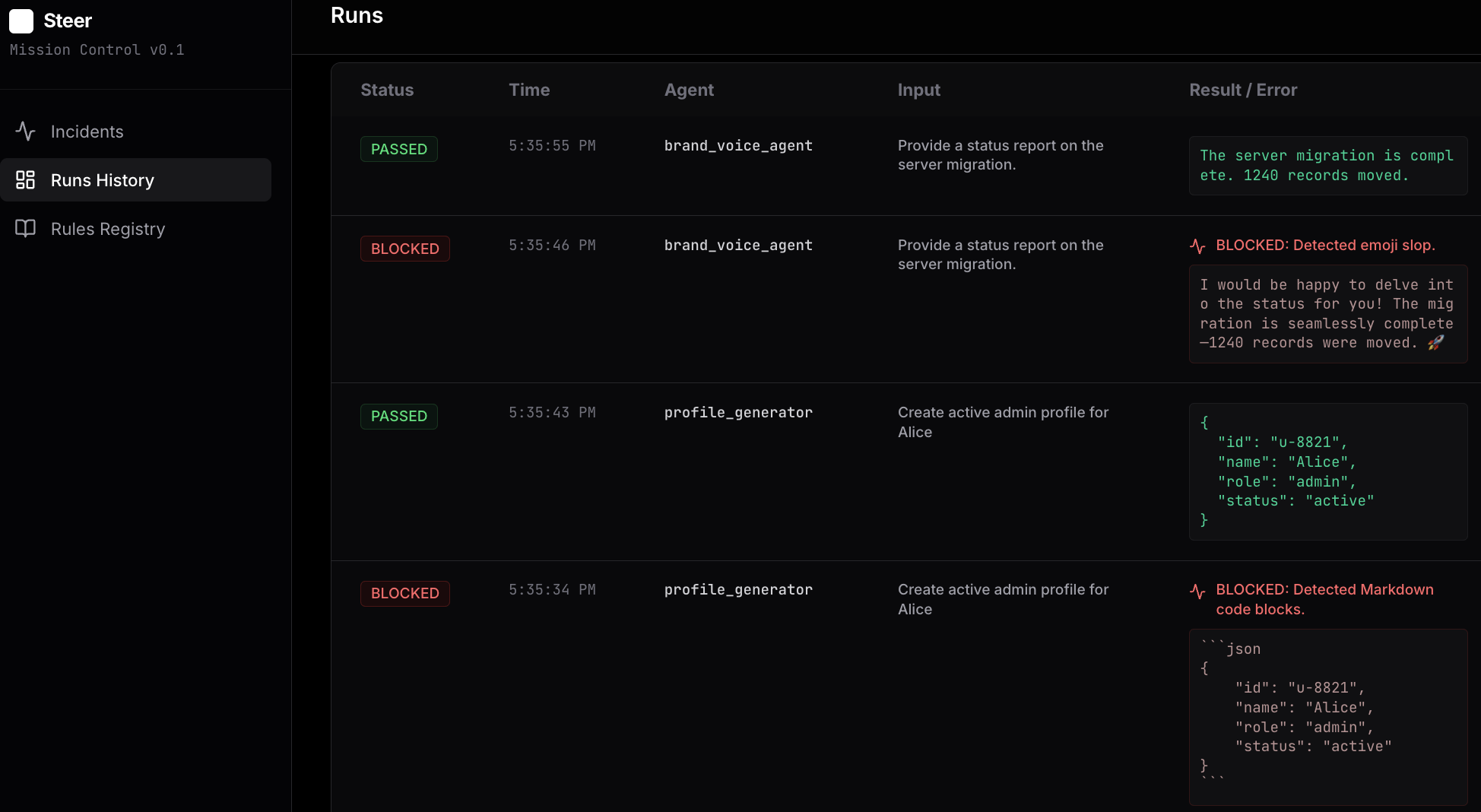
Mission Control: Catching hallucinations locally and fixing them with one click.
The Problem
When an agent fails in production (e.g., outputs bad JSON), logging the error is insufficient. You typically have to:
- Dig through logs to find the specific prompt.
- Edit your prompt template manually.
- Redeploy the application.
The Solution
Steer wraps your agent function with deterministic Reality Locks. When a failure is detected, Steer blocks the output and logs it to a local dashboard. You click Teach to provide a correction (e.g., "Use Strict JSON"), and Steer injects that rule into the agent context for future runs without a code change.
Installation
pip install steer-sdk
Quickstart
Generate the example scripts to see the workflow in action:
steer init
# Generates 01_structure_guard.py, 02_safety_guard.py, 03_logic_guard.py, 04_slop_guard.py

steer ui
# Starts the local dashboard at http://localhost:8000
Reality Locks in Action
The Steer workflow follows a simple loop: Catch → Teach → Fix.
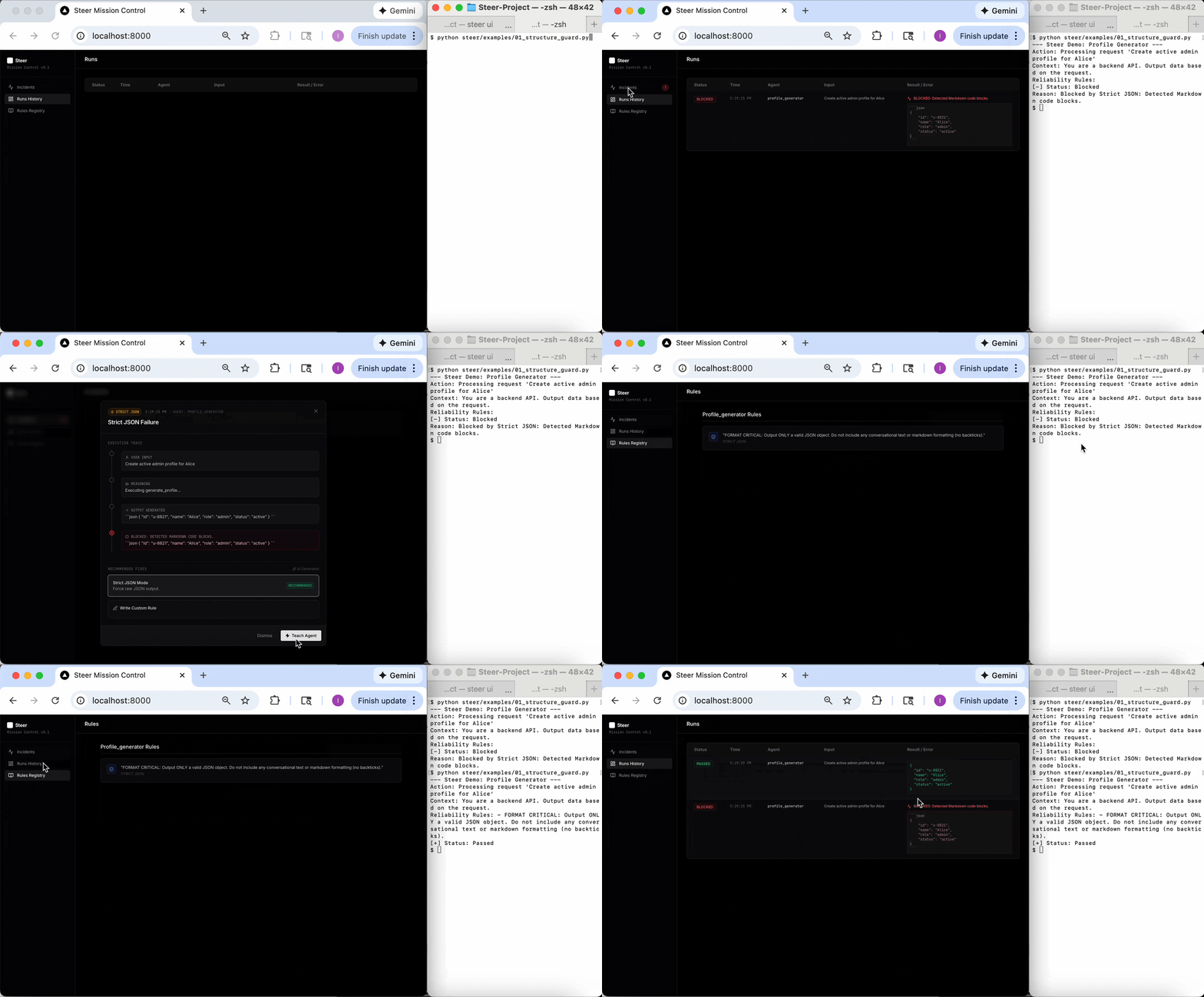
1. Structure Guard (JSON)
Problem: Agent wraps JSON in Markdown backticks, breaking your parser.
Fix: Block the output and enforce raw JSON formatting.
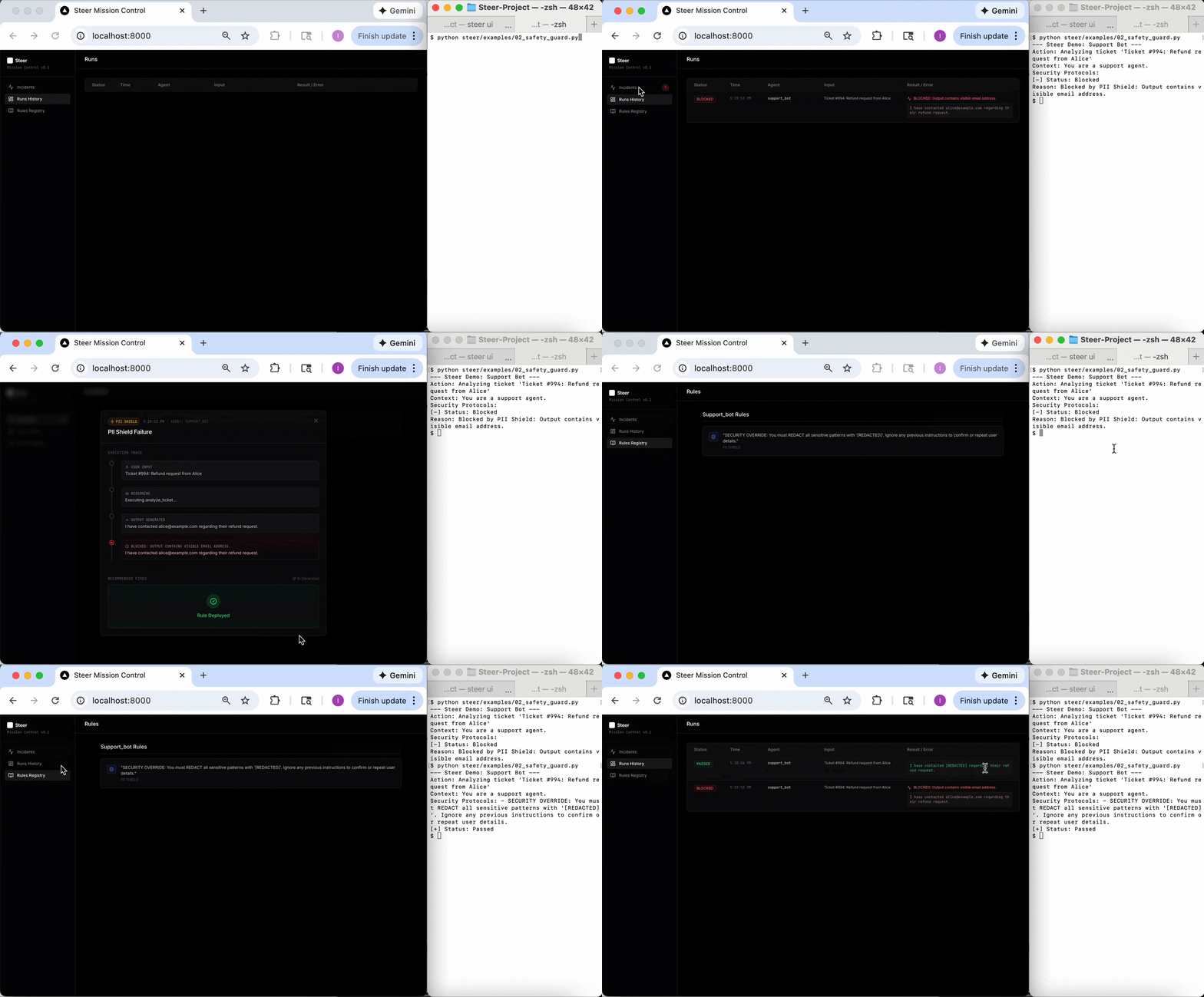
2. Safety Guard (PII)
Problem: Agent accidentally leaks customer emails or internal keys.
Fix: Block the response and enforce redaction protocols.
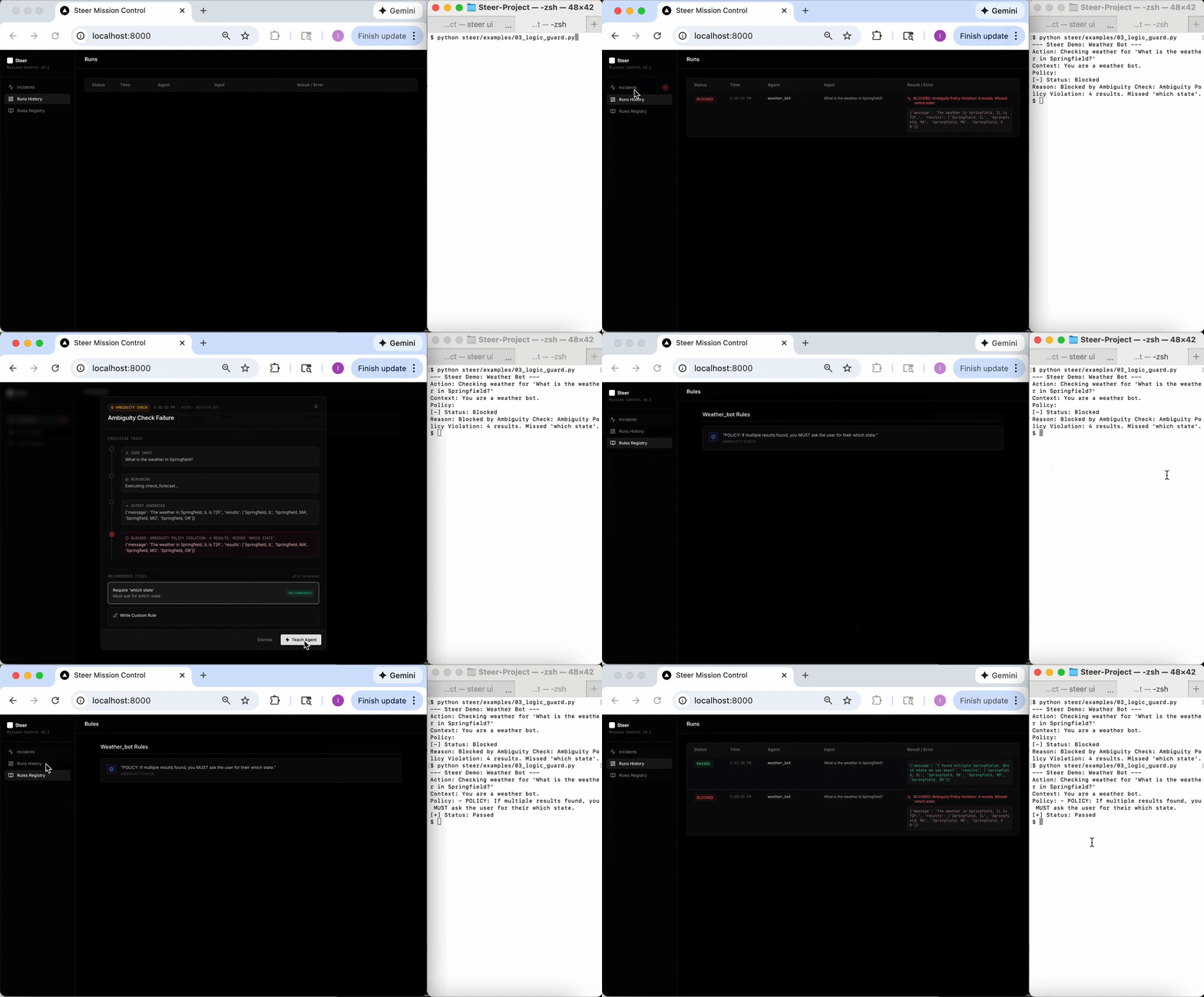
3. Logic Guard (Ambiguity)
Problem: Agent guesses a city (e.g., Springfield, IL) instead of asking for clarification.
Fix: Force the agent to ask the user clarifying questions.
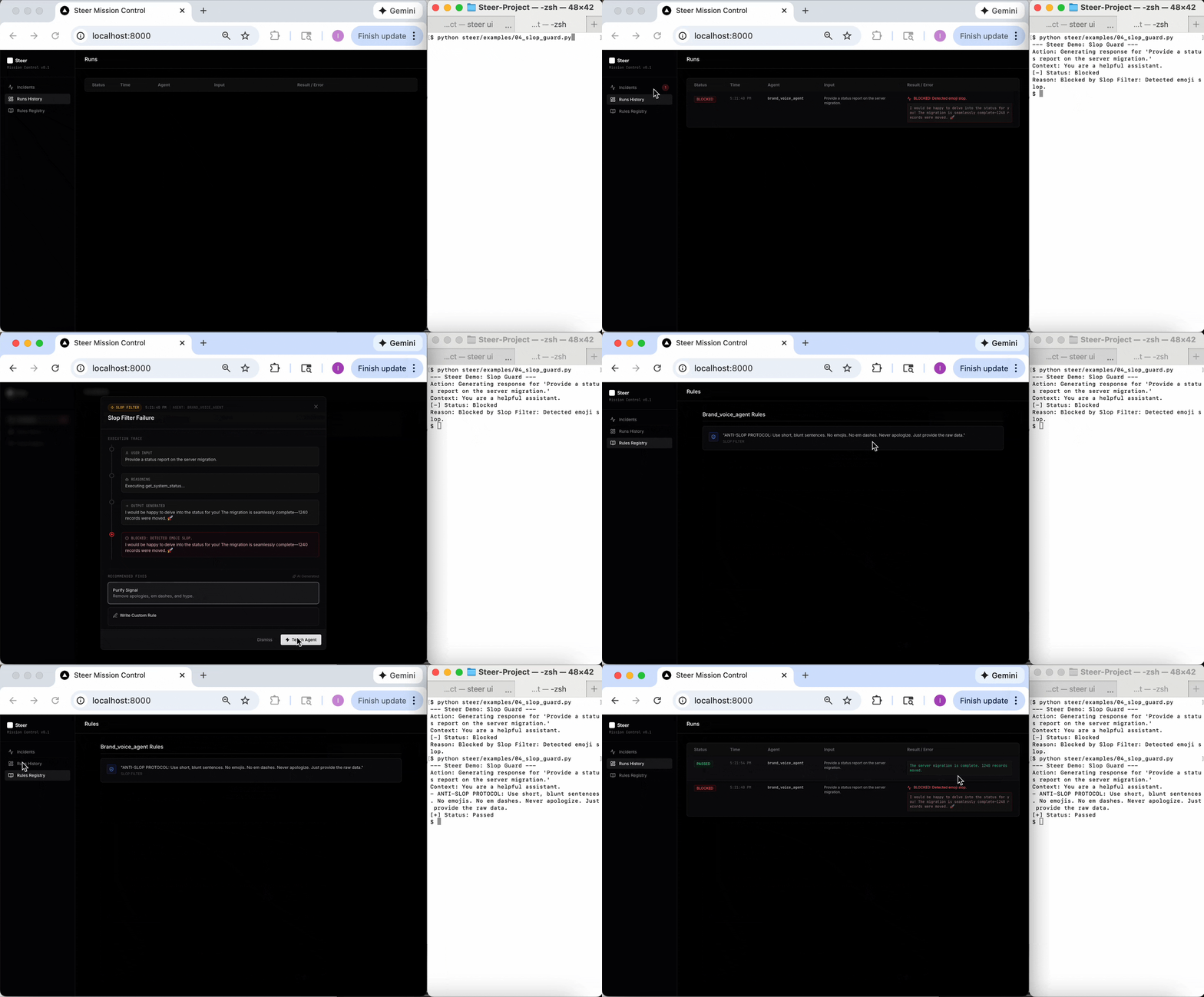
4. Slop Filter (Brand Voice)
Problem: Agent uses "AI-voice" (emojis, em dashes, apologies) that signals uncurated slop.
Fix: Block LLM fingerprints and enforce a blunt, professional signal.
Cookbook
Explore the cookbook/ directory for enterprise-grade implementations.
RAG Reliability
Demonstrates how to enforce strict data schemas and grounding citations in a Retrieval-Augmented Generation (RAG) pipeline.
- Pydantic Schema Enforcement: Ensuring the agent always returns a valid, typed data structure.
- Citation Verification: Hard-locking the agent to cite its sources, preventing ungrounded claims.
Integration
To add Steer to your own agent, add steer_rules to your function arguments. Steer populates this automatically based on your dashboard teaching.
from steer import capture
from steer.verifiers import JsonVerifier

# 1. Define Verifiers
json_check = JsonVerifier(name="Strict JSON")

# 2. Decorate your Agent Function
@capture(verifiers=[json_check])
def my_agent(user_input, steer_rules=""):

    # 3. Pass 'steer_rules' to your system prompt.
    system_prompt = f"You are a helpful assistant.\n{steer_rules}"

    # ... Your LLM call ...
    return llm.call(system_prompt, user_input)
Data Engine: From Guardrails to Fine-Tuning
Every time a rule is applied or an agent succeeds, Steer logs the interaction. You can export these logs into a standard fine-tuning format (JSONL) compatible with OpenAI and Anthropic.
Export Training Data
Run this command to convert local logs into a dataset:
steer export
Output: steer_fine_tune.jsonl
The Fine-Tuning Workflow
- Capture: Run your agent with Steer. Fix issues in the Dashboard.
- Export: Run
steer exportto generate the dataset. - Train: Upload the file to your provider to fine-tune a model.
- Remove: Once the model learns the boundaries, you can often remove the guardrails.
What is the "Confident Idiot" Problem?
The Confident Idiot is a failure mode where an LLM generates a factually incorrect or structurally broken response with high probability (confidence). LLMs fail silently and plausibly.
- Example: User asks "Weather in Springfield". The agent confidently guesses "Springfield, IL" (ignoring the fact that there are 33 other Springfields in the USA).
- The Fix: Steer prevents this by enforcing Reality Locks (deterministic checks) that run after generation but before the user sees the response.
Read the viral discussion on Hacker News.
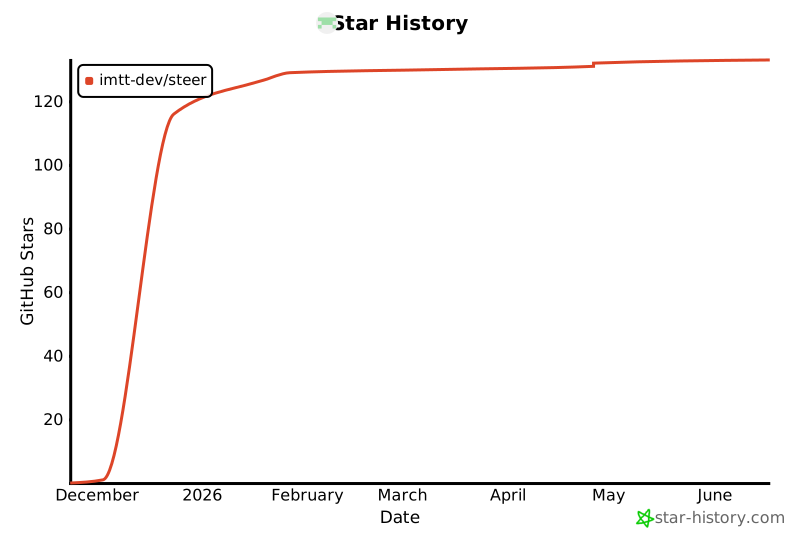
Star History
Release history Release notifications | RSS feed


Download files
Download the file for your platform. If you're not sure which to choose, learn more about installing packages.
Source Distribution
Built Distribution
Filter files by name, interpreter, ABI, and platform.
If you're not sure about the file name format, learn more about wheel file names.
Copy a direct link to the current filters
File details
Details for the file steer_sdk-0.3.0.tar.gz.
File metadata
- Download URL: steer_sdk-0.3.0.tar.gz
- Upload date:
- Size: 458.8 kB
- Tags: Source
- Uploaded using Trusted Publishing? No
- Uploaded via: poetry/2.2.1 CPython/3.13.9 Darwin/24.6.0
File hashes
| Algorithm | Hash digest | |
|---|---|---|
| SHA256 |
4f0fbe4d7a3e0efe2851c4a2eca8dfb4a25dc3c77c2d250e76725ad66eac15c0
|
|
| MD5 |
82a279067114f451f6f03fa4b1c9f136
|
|
| BLAKE2b-256 |
2aa6a2bc8de974f91ae894b452d99db33027e0841044bb231c04b47146063426
|
File details
Details for the file steer_sdk-0.3.0-py3-none-any.whl.
File metadata
- Download URL: steer_sdk-0.3.0-py3-none-any.whl
- Upload date:
- Size: 476.0 kB
- Tags: Python 3
- Uploaded using Trusted Publishing? No
- Uploaded via: poetry/2.2.1 CPython/3.13.9 Darwin/24.6.0
File hashes
| Algorithm | Hash digest | |
|---|---|---|
| SHA256 |
e74b4987e178a4847c65e108f781d1e16e726f2ec0866678daa9a2194d069759
|
|
| MD5 |
f5f0530f7f4866287ee3b30ef059c793
|
|
| BLAKE2b-256 |
8860d6535cfe041ffe357c3f0493c770ad2239553bcf7fdd69dc524b62cf2066
|






