
Stellenpilot




A local, open source job hunt assistant for Germany. Every day it collects fresh job ads from public APIs, scores them against your CV, writes a tailored CV and cover letter for the best matches, and shows everything on a dashboard in your browser. It runs on your own computer. Your CV and your data never leave it, except for the AI model you choose.
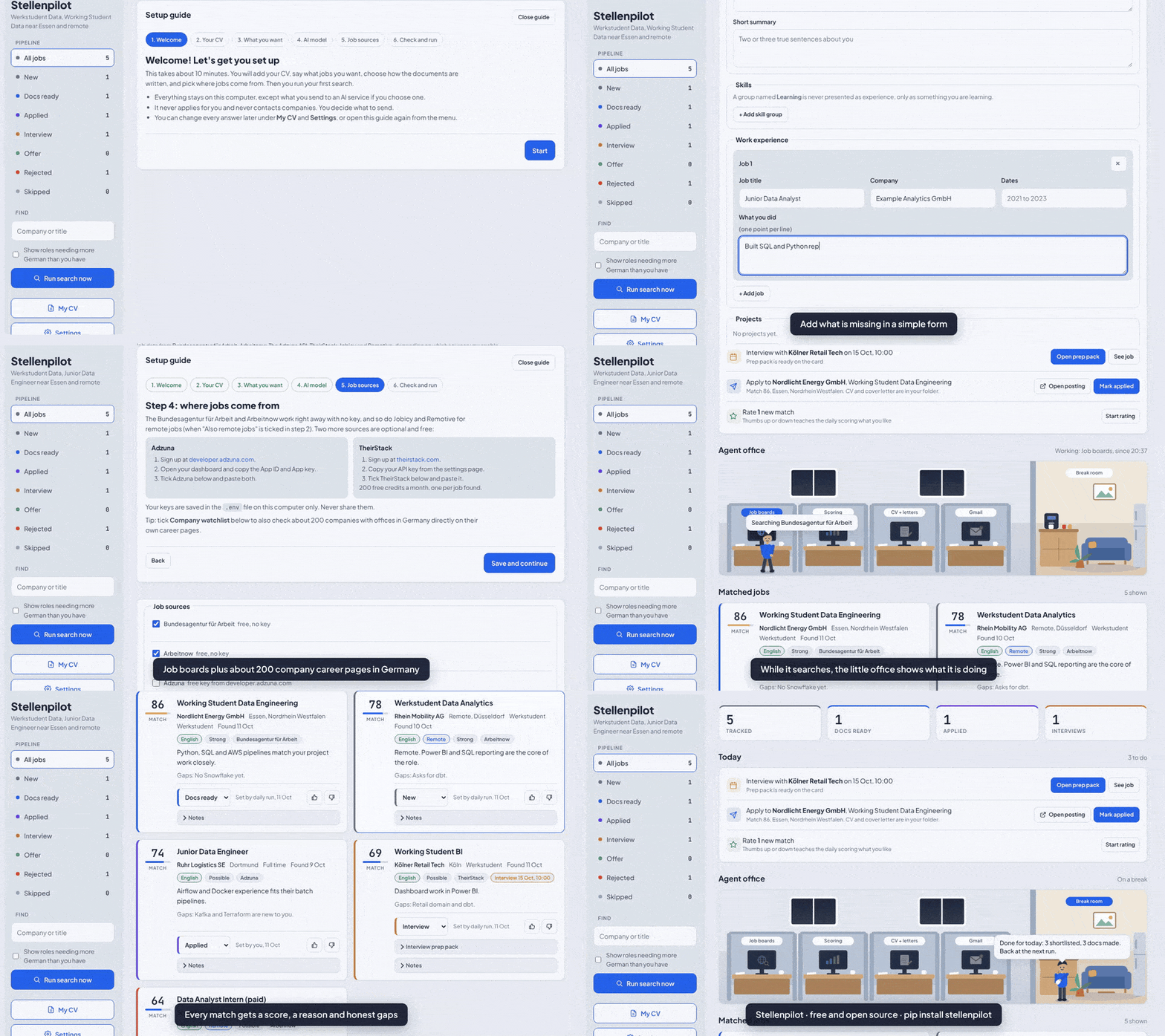
All names, companies and jobs in this demo are fictional.
It never applies for you and never contacts companies. You stay in control of every application.
pip install stellenpilot
stellenpilot serve
Then open http://127.0.0.1:8765 . A short setup walks you through the rest. Works on Windows, macOS and Linux with Python 3.11 or newer.
What it does
- Easy to set up, no files to edit. Four short setup steps in the dashboard: drop your CV, say what jobs you want, pick who writes your documents, and switch on the daily search, with a check at the end. Everything can be changed later under My CV and Settings.
- Runs by itself every day. Switch on Automatic search in Settings and pick a time; it sets up Task Scheduler on Windows or cron on macOS and Linux for you. Or press Search now on Home any time.
- Starts from your CV. Drop it on the dashboard (or run
stellenpilot import cv.pdf) and it turns your existing CV (PDF, DOCX or text) into a profile. Every bullet is checked against your original, and anything the AI left out or made up is flagged. - Collects jobs from the Bundesagentur für Arbeit, Arbeitnow, Adzuna and TheirStack (the last two with your own free keys), plus remote roles from Jobicy and Remotive. It reads several pages per search, within each source's free limits. It removes duplicates across sources.
- Watches companies directly. Switch on the ready made watchlist of about 200 companies with offices in Germany (each checked to have a working job feed), and add your own dream companies that use Greenhouse, Lever, Ashby, Personio or SmartRecruiters. Their new roles show up every day, often before they reach the job boards.
stellenpilot watch <careers link>finds the right entry. - Takes jobs you found yourself. Paste a link or the ad text (from LinkedIn, a friend, anywhere) with
stellenpilot addor the dashboard's "Add a job" panel. It gets scored and tailored like the rest. - Understands German job ads. It reads the German level an ad really asks for (A1 to C2, from phrases like "verhandlungssicher" or "gute Deutschkenntnisse"), compares it with yours, and gives you an English summary of German ads. It writes German cover letters only if your German is B2 or better, because a polished German letter from someone at A2 would suggest a level they do not have.
- Scores each job from 0 to 100 against your profile, with a short reason and honest gaps. Ads that demand fluent German are flagged and skipped (you can switch that off).
- Learns your taste. Mark jobs as a good match or not for you on the dashboard and the next run leans toward what you liked.
- Tailors your CV truthfully. It reorders and selects facts from your profile. It never invents experience. A guard rejects generated text that mentions numbers, tools or language levels your profile does not back up, and falls back to safe text.
- Writes a cover letter and a short report per job: what the ad asks for, what your CV covers, and which gaps to be honest about.
- Exports DOCX and PDF (PDF needs LibreOffice).
- Optional Gmail sync (read only) moves statuses forward when confirmations, interview invitations or rejections arrive.
- Daily digest to you by Telegram or email: top new matches, CVs ready to send, interviews.
- Dashboard with five calm pages. Home: what is ready to send, interviews coming up and the newest matches. Jobs: every job with why it fits, honest gaps, your documents, notes and interview prep. Applications: a board you drag cards across, plus reply rates by source, the skill gaps employers mention most and a weekly summary. My CV and Settings, including Gmail. A small 3D office shows what the search is doing right now.
Install
New to Python or the terminal? Follow INSTALL.md: step by step for Windows, macOS, Linux and Docker, from installing Python to your first search.
With pip (recommended):
pip install stellenpilot
mkdir my-hunt
cd my-hunt
stellenpilot serve      # open http://127.0.0.1:8765, a short setup walks you through the rest
"stellenpilot is not recognized"? pip put the command in a folder that is not on your PATH (it prints a yellow warning saying so). Start it with python -m stellenpilot serve instead (python3 on macOS and Linux). That always works.
Update later with pip install -U stellenpilot. Your files in my-hunt are never touched by an update.
From the source code instead: you need Python 3.11 or newer (or Docker, see below). Works on Windows, macOS and Linux. On Debian or Ubuntu also install python3-venv. On Windows use python where the commands below say python; on macOS and Linux it may be python3.
git clone https://github.com/srvskr1/stellenpilot.git
cd stellenpilot
python -m venv .venv
# Windows: .venv\Scripts\activate    macOS or Linux: source .venv/bin/activate
pip install -e .

mkdir my-hunt
cd my-hunt
stellenpilot init      # creates config.toml, profile.toml and .env
stellenpilot demo      # optional: fictional sample jobs, to look around first
stellenpilot serve     # open http://127.0.0.1:8765
Prefer Docker? No Python needed:
mkdir data
docker compose build
docker compose run --rm stellenpilot init
docker compose up -d      # http://127.0.0.1:8765
See docs/docker.md for daily runs and details.
Then make it yours, all on the dashboard. Setup opens by itself the first time:
- Your CV: drop the file. It is read and saved; check the details later under My CV. Bullets are copied word for word, so keep them short and true.
- What jobs: job titles, your city, how far you would travel, and your German level.
- Who writes your documents: the free Built-in AI (one download, then it runs on your computer), Claude with an API key, Ollama, or no AI for now.
- Done: switch on the daily search and press Find my first jobs.
Extra job sources with free keys (Adzuna, TheirStack) and all other options are under Settings, which also has Run setup again.
Prefer files? Everything is also in profile.toml, config.toml and .env, and stellenpilot run searches from the terminal. stellenpilot doctor checks the setup.
To start fresh after the demo, delete jobhunt.db.
Choosing an AI model
Built-in AI (easiest, free)
Pick Built-in AI in setup or in Settings, AI model and press Download. Stellenpilot downloads the llama.cpp engine and a small open model once, into ~/.stellenpilot/ai, then runs everything on your computer. No account, no key, nothing to install by hand. It starts by itself when a search needs it and stops a few minutes later to free the memory.
| model | download | memory | writing |
|---|---|---|---|
| Standard: Qwen3.5 4B (default) | 2.7 GB | about 6 GB free | better |
| Light: Qwen3.5 2B | 1.3 GB | runs with 8 GB in total | simpler, about twice as fast |
How fast is it? It runs on the processor, so it is slower than Claude:
- Standard on a typical laptop: about 20 to 40 seconds to score one job, and 1 to 2 minutes for a CV with its cover letter. Light is about twice as fast.
- To keep searches short, an AI on your own computer reads the 20 most promising new jobs of each search (picked by keywords); the others keep a keyword score. Change it with
max_ai_jobsunder[llm]. - A daily search with the AI takes about 10 to 20 minutes with Standard, or 5 to 10 with Light. It runs in the background. Without AI it takes a minute or two.
- Measured on our small test server with only 2 processor cores: Standard needed 67 seconds per job and 2 minutes per CV and letter; Light 32 seconds and about 1 minute. Older laptops can be that slow; newer ones and Macs with Apple chips are faster.
- After the download, Test speed in Settings measures your own computer.
The laptop figures are estimates from published CPU benchmarks for these model sizes, not measured on every computer.
All options
Set [llm] in config.toml:
| provider | what you need | notes |
|---|---|---|
none |
nothing | Keyword scoring and template letters. Works offline, less precise. |
builtin |
press Download once in Settings | Local and free, set up by Stellenpilot. model = "standard" or "light". |
ollama |
Ollama running, a pulled model | Local and free. Nothing leaves your computer. |
lmstudio |
LM Studio with its server started | Local and free. |
llamacpp, vllm, local |
a running server | Any OpenAI compatible local server. |
anthropic |
ANTHROPIC_API_KEY in .env |
Claude through the Anthropic API. |
openai |
OPENAI_API_KEY in .env |
OpenAI API. |
Which local model?
Pick an instruction tuned version ("instruct" or "chat"), because the tool asks for JSON answers.
| your computer | try | download |
|---|---|---|
| 8 GB RAM, no GPU | ministral-3:3b or qwen3.5:2b. Expect rougher scores and shorter letters. |
about 3 GB |
| 16 GB RAM, or a GPU with 8 GB | qwen3.5:4b (default pick), or ministral-3:8b if many of your ads are in German |
4 to 6 GB |
| GPU with 16 GB or more | qwen3.5:9b or gemma4:12b |
7 to 9 GB |
Why these (checked on their model cards, October 2026): all are Apache 2.0, run in Ollama, and handle JSON well. Qwen3.5 covers 201 languages; Ministral 3 lists German among its main languages and is built for JSON output; Gemma 4 is Google's newest small family. Qwen3.5 and Gemma 4 can "think" before answering, which makes them slow; Stellenpilot switches that off for Ollama (set think = true under [llm] to turn it back on).
What we saw in testing with a very small model (Qwen2.5 1.5B on 2 CPU cores): the pipeline worked end to end, the German check and the truth guard did their job, and the cover letter stayed truthful. But the model gave every job the same score and wrote a two sentence letter, and each answer took about a minute. Small models are fine for trying the setup, not for real use.
Full setup for Ollama, LM Studio, llama.cpp, vLLM and Docker, plus speed tips and troubleshooting: docs/local-llm.md. Run stellenpilot doctor to check that your model server is reachable and the model is installed.
Job sources
| source | key | cost and limits | terms you should know |
|---|---|---|---|
| Bundesagentur für Arbeit | none | free | Community documented endpoint (jobsuche.api.bund.dev). No published limits, so requests are kept small. |
| Arbeitnow | none | free | Their terms require a link back to arbeitnow.com. The dashboard shows it. |
| Adzuna | free, from developer.adzuna.com | default 250 calls a day | Allowed for personal research. Adzuna must be credited; every Adzuna job links to Adzuna. Returns short snippets, not full ads. |
| TheirStack | free, from theirstack.com | 200 credits a month, 1 credit per job | Keys may not be shared. Each user needs their own. |
| Jobicy | none | free, one pass an hour at most | Remote jobs only. Credit Jobicy with a link to the listing; the dashboard does this. |
| Remotive | none | free, about 4 calls a day at most | Remote jobs only, one call per run. Small feed, delayed by a day. Credit and link back to Remotive; the dashboard does this. |
There is no LinkedIn, StepStone or Indeed scraper on purpose. LinkedIn's and StepStone's terms forbid scraping, and Indeed has no public job search API. See docs/sources.md for the details and links.
Run it every day
Switch on Automatic search in the dashboard's Settings and pick a time. It sets up Task Scheduler on Windows or cron on macOS and Linux for you. Doing it by hand: docs/scheduling.md.
Daily digest (optional)
See docs/digest.md for Telegram (two minutes) or email.
Other countries
Set country in config.toml. Adzuna covers 19 countries, Jobicy and Remotive cover remote roles open to your country, TheirStack and the company watchlist cover any country, and the Bundesagentur and Arbeitnow cover Germany only (they are skipped elsewhere).
Gmail status sync (optional)
See docs/gmail.md. It uses read only access with your own Google Cloud OAuth client.
Commands
| command | does |
|---|---|
stellenpilot init |
create config, profile and .env from the examples |
stellenpilot doctor |
check the setup and keys |
stellenpilot run |
search, score, tailor, and sync Gmail if enabled |
stellenpilot run --no-tailor |
search and score only |
stellenpilot serve |
start the dashboard on 127.0.0.1:8765 |
stellenpilot gmail |
sync statuses from Gmail once |
stellenpilot demo |
load fictional sample jobs |
stellenpilot import cv.pdf |
turn your CV into profile.imported.toml to review |
stellenpilot add LINK |
add a job from a careers page link |
stellenpilot add --text ad.txt --title "..." --company "..." --tailor |
add a pasted ad and tailor it now |
stellenpilot watch LINK |
find the watchlist entry for a company |
stellenpilot notify-test |
send a test digest |
stellenpilot telegram-id |
show your Telegram chat id |
Use --home PATH to keep your files in another folder.
Privacy and safety
- Everything is stored in
jobhunt.dband theoutputfolder next to your config. Both are ignored by git, together withconfig.toml,profile.toml,.envand Gmail tokens. - The dashboard listens on 127.0.0.1 only. Write requests need a custom header, so other websites cannot change your data through your browser.
- Your profile and job ads are sent to the AI provider you configure. Choose
noneor a local model if you want nothing to leave your machine. - Read every tailored document before you send it. The truth guard checks digits and the tools it knows (see
VOCABinstellenpilot/score.py). It cannot judge spelled out numbers or vague claims, so you are the final check. - Skills in a profile group named "Learning" are never presented as experience; documents may only say you are learning them.
Project layout
stellenpilot/
  sources/      one module per job API
  pipeline.py   the daily run: collect, score, tailor, Gmail
  score.py      LLM or keyword scoring, taste from your ratings
  tailor.py     truthful CV plan, DOCX, cover letter, report, PDF
  server.py     local dashboard API
  web/          dashboard page
  examples/     example config and profile
tests/          offline tests: python -m unittest discover -s tests
Uninstall completely
Do these steps in order. Steps 1 and 2 matter most: they stop the daily search before the program is gone.
1. Stop the dashboard. Press Ctrl+C in the terminal where stellenpilot serve runs (Docker: docker compose down).
2. Remove the automatic daily search, if you switched it on. Easiest: in the dashboard open Settings, switch off Search every day under Automatic search and press Save changes. If the dashboard is already gone:
- Windows (PowerShell):
schtasks /Delete /TN "Stellenpilot daily search" /F - macOS and Linux: run
crontab -eand delete the line that ends with# jobhunt-daily
3. Remove the program.
- Installed with pip: activate the environment you installed it in, then
pip uninstall stellenpilot. Delete that environment folder too if you made one just for it (for examplestellenpilot-envor.venv). - Installed from source: delete the
stellenpilotfolder you cloned or unzipped (the environment.venvis inside it). - Docker: in the project folder run
docker compose down, thendocker rmi ghcr.io/srvskr1/stellenpilot(anddocker image pruneto free the space of any self built image).
4. Delete your data. Your workspace folder (my-hunt, or data for Docker) holds everything personal: your CV profile, .env with your API keys, the job database, the generated CVs and cover letters, run.log, backups and the Gmail token.json. Delete the whole folder. The only other place is the Built-in AI folder .stellenpilot in your home folder, if you downloaded it (see step 5).
5. Close your accounts and keys (optional, but good practice):
- API keys you created for it: delete them at Adzuna, TheirStack, Anthropic or OpenAI.
- Gmail sync: remove access at https://myaccount.google.com/permissions and delete the Google Cloud project you made for it.
- Telegram digest: send
/deletebotto @BotFather. - Built-in AI: press Remove the AI files in Settings, or delete the folder
.stellenpilotin your home folder (C:\Users\<you>\.stellenpiloton Windows). It holds the engine and the model, about 1.5 to 4 GB. - Ollama model:
ollama rm qwen3.5:4b(or the model you pulled), and uninstall Ollama or LM Studio if you only used them for this.
LibreOffice and Python stay installed; remove them like any other app if you no longer need them.
Contributing
Issues and pull requests are welcome. New sources should use an official or clearly permitted API, follow the shape in stellenpilot/sources/__init__.py, and come with an offline test.
Credits and license
MIT, see LICENSE. Credits for ideas and data are in NOTICE.md.
1 maintainer

Metadata
1 maintainer
Release files for stellenpilot 0.5.1
For a detailed explanation of source distributions (sdists) and built distributions (wheels), please see the package formats documentation.
Source distribution (sdist)
| File | Size | Uploaded | |
|---|---|---|---|
| stellenpilot-0.5.1.tar.gz | 150.8 kB | Details |
Built distribution (wheel)
| File | Interpreter | ABI | Platform | Reset |
|---|---|---|---|---|
| stellenpilot-0.5.1-py3-none-any.whl | Python 3 | none | any | Details |
Total release size: 291.7 kB
Release files / stellenpilot-0.5.1.tar.gz
| Download URL | stellenpilot-0.5.1.tar.gz |
|---|---|
| Size | 150.8 kB |
| Tags | Source |
|
SHA-256 checksum How to use checksums |
6313160291ebf5adb40ef8a4ec8f93ef92318951852f84e614d5a4ae93840eb2
|
|
BLAKE2b-256 checksum How to use checksums |
95ff54c3c291016d8486777f8e401e30c98eb1fb0a6b07acbcc5734ba4bd1b71
|
| Upload date | |
|
Uploaded using Trusted Publishing? What is trusted publishing? |
Yes |
| Uploaded via |
twine/7.0.0 CPython/3.13.14
|
Provenance
Provenance describes where a file came from. On PyPI, provenance is shared via attestations, which provide a verifiable record of the build or publishing details. View details, limitations and caveats.


PyPI Publish Attestation
PyPI verified that this artifact, at this checksum, originated from the publisher listed below.
Signed by GitHub Actions, verified by PyPI on Oct 13, 2026.
Transparency logRelease files / stellenpilot-0.5.1-py3-none-any.whl
| Download URL | stellenpilot-0.5.1-py3-none-any.whl |
|---|---|
| Size | 140.9 kB |
| Tags | Python 3 |
|
SHA-256 checksum How to use checksums |
ce779a54b604e9c10911e45cfe86a237874f29eeadf7bcf3e648fa2a7d001783
|
|
BLAKE2b-256 checksum How to use checksums |
66dd03db189502e164d77102e19af971cb37c303e5af5502bf0bda57be0fb379
|
| Upload date | |
|
Uploaded using Trusted Publishing? What is trusted publishing? |
Yes |
| Uploaded via |
twine/7.0.0 CPython/3.13.14
|
Provenance
Provenance describes where a file came from. On PyPI, provenance is shared via attestations, which provide a verifiable record of the build or publishing details. View details, limitations and caveats.
PyPI Publish Attestation
PyPI verified that this artifact, at this checksum, originated from the publisher listed below.
Signed by GitHub Actions, verified by PyPI on Oct 13, 2026.
Transparency log













