
A tool for automated stratigraphic log visualisation

Project description

A Tool for Automated Stratigraphic Log Visualisation
A Python-based framework for automated visualisation of creating standardised, reproducible, and digitally integrated stratigraphic logs.




Key Features
-
Simple Input Format: Use CSV, Excel or similar files to structure your data with a range of supported column types (lithology, grain size, features, lenses, contacts, etc.) and let stratapy handle the visualisation
-
Vast Customisation: Tailor every aspect of your logs, from layout and styling to colours and symbology, with a simple parameter-based interface
-
Standardised Symbology: Access a curated library of geological symbols and patterns, including USGS standard lithology patterns
-
Multi-Figure Functionality: Create complex, multi-panel figures with ease, enabling comprehensive visualisation of stratigraphic data
-
Publication-Quality Output: Generate high-resolution figures suitable for academic publication and professional presentations
-
Accessible for Non-Programmers: Designed with user-friendliness in mind, enabling geoscientists of all programming skill levels to create stunning visualisations
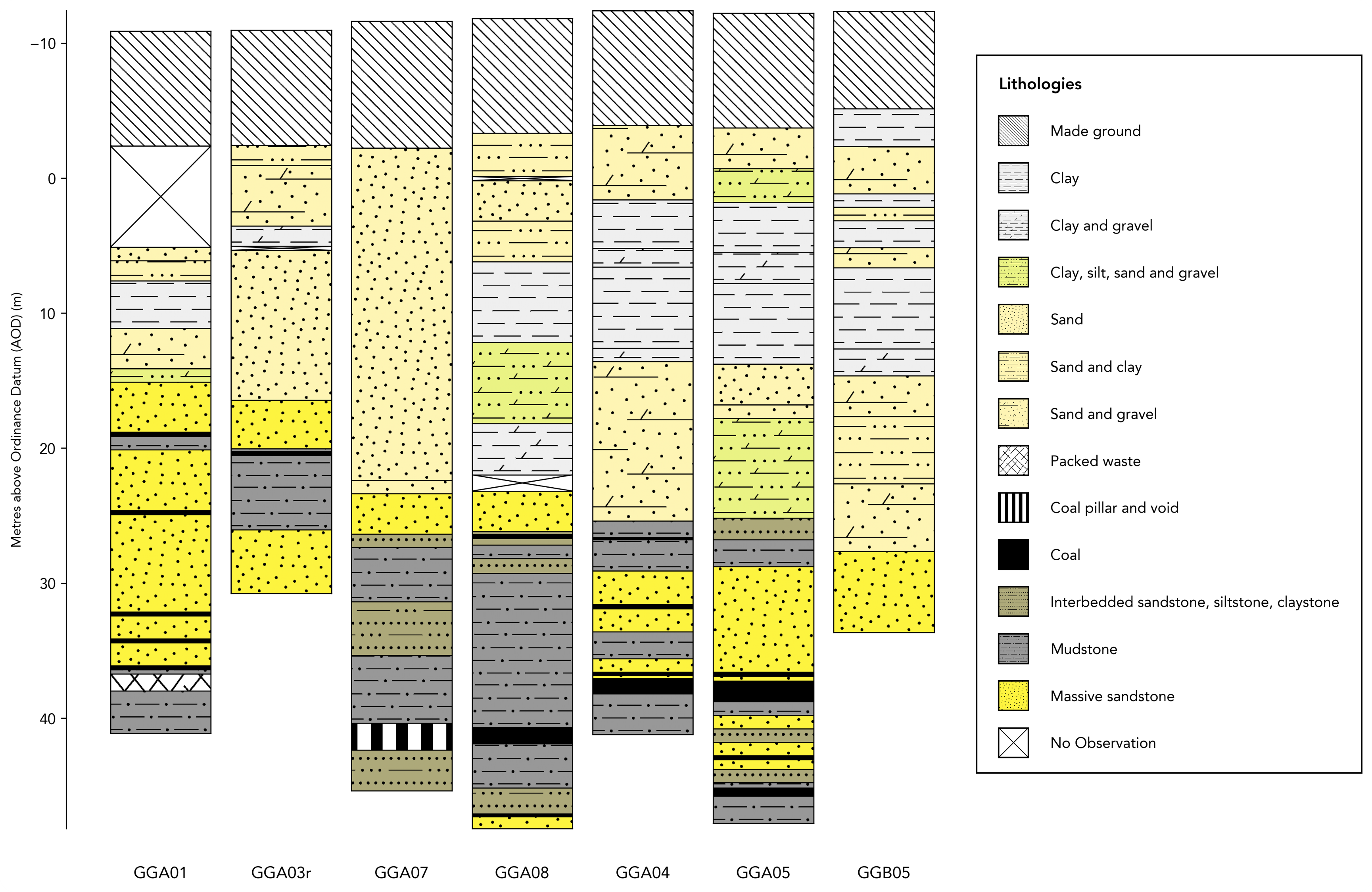
For more examples, see the documentation or try it out online with this Google Colab notebook.
Quick Start
Installation
pip install stratapy
Basic Usage
import stratapy as sp

# Load and plot a log
log = sp.load_log('path/to/file.csv')
log.plot()
log.save('output.png')
Multi-Panel Figures
import stratapy as sp

# Automatically plot multiple logs in a single figure
files = ['log1.csv', 'log2.csv', 'log3.csv']
panel = sp.multi_fig(files)
panel.save('output.png')
Use Online - No Installation Required
Try out stratapy immediately without any installation using this Google Colab notebook.
See the Online Platforms section of the documentation for more details.
Documentation
For full API reference and tutorials, visit our ReadTheDocs page.
Citation
If you use this software in your research or otherwise, please cite it as follows:
Smith, et al. (2026). stratapy: A Tool for Automated Stratigraphic Log Visualisation. Zenodo. https://doi.org/10.5281/zenodo.XXXXXXX
For detailed citation metadata, see CITATION.cff or use the following BibTeX entry:
@software{smith_stratapy_2026,
    author = {Smith, Jack Lee and Antoniou, Christina and Alexander, Ruaridh},
    title = {{stratapy: A Python tool for automated stratigraphic log visualisation}},
    month = {3},
    year = {2026},
    publisher = {Zenodo},
    version = {v0.9.0},
    doi = {},
    url = {https://github.com/Jack6228/stratapy}
}
License
Distributed under the BSD 3-Clause License. See LICENSE for more information.
Release history Release notifications | RSS feed


Download files
Download the file for your platform. If you're not sure which to choose, learn more about installing packages.
Source Distribution
Built Distribution
Filter files by name, interpreter, ABI, and platform.
If you're not sure about the file name format, learn more about wheel file names.
Copy a direct link to the current filters
File details
Details for the file stratapy-0.9.0.tar.gz.
File metadata
- Download URL: stratapy-0.9.0.tar.gz
- Upload date:
- Size: 17.6 MB
- Tags: Source
- Uploaded using Trusted Publishing? No
- Uploaded via: twine/6.2.0 CPython/3.13.11
File hashes
| Algorithm | Hash digest | |
|---|---|---|
| SHA256 |
9e682e4b0f8b688782b7a18a4c5f8e9748dcffaf3f1a70f15e71fb1b0bca4c18
|
|
| MD5 |
45859c33339b3019edb57c5baaff6aa3
|
|
| BLAKE2b-256 |
646baa5ee581a34c861a3cc6f069aff8d942073f157fa0ba01426dd11f5a6d88
|
File details
Details for the file stratapy-0.9.0-py3-none-any.whl.
File metadata
- Download URL: stratapy-0.9.0-py3-none-any.whl
- Upload date:
- Size: 17.6 MB
- Tags: Python 3
- Uploaded using Trusted Publishing? No
- Uploaded via: twine/6.2.0 CPython/3.13.11
File hashes
| Algorithm | Hash digest | |
|---|---|---|
| SHA256 |
c2ab9b8abb46cadadaf6a85af3dcdb6b983ddee5bb79a1808492b24c8acbb84e
|
|
| MD5 |
61f3335c08cd1ddb729efda29700d019
|
|
| BLAKE2b-256 |
6affc959afee7d1508ccb02d6f6c3d24dd5c3014ee8c18ff9fa8fc14f2e457eb
|






