
Strava MCP server with secure token handling and summary-first analytics

Project description
Strava Activity MCP Server







A small Model Context Protocol (MCP) server that exposes your Strava athlete data to language-model tooling.
After the first browser-based authorization, the server uses the saved refresh_token to automatically refresh your session; no further URL-redirected logins are required on subsequent runs.
This package provides a lightweight MCP server which communicates with the Strava API and exposes a few helper tools (authorization URL, token exchange/refresh, and fetching athlete activities) that language models or other local tools can call.
The project is intended to be used locally (for example with Claude MCP integrations) and is published on PyPI as strava-activity-mcp-server.
Installation
Install from PyPI with pip (recommended inside a virtual environment):
pip install strava-activity-mcp-server
Requirements
- Python >= 3.10 (see
pyproject.toml) - The package depends on
mcp[cli]andrequests(installed from PyPI).
Quick start
After installing, you can run the MCP server using the provided console script or by importing and calling main().
Run via the console script (entry point defined in pyproject.toml):
strava-activity-mcp-server
Or, from Python:
from strava_activity_mcp_server import main
main()
By default the server starts the MCP runtime; when used with an MCP-aware client (for example Msty MCP orsome other MCP integrations such Claude, LM Tool and etc.) the exposed tools become callable.
Authentication (Strava OAuth)
This server requires Strava OAuth credentials to access athlete data. You will need:
- STRAVA_CLIENT_ID
- STRAVA_CLIENT_SECRET
Steps:
-
Create a Strava API application at https://www.strava.com/settings/api and note your Client ID and Client Secret. Use
localhostas the Authorization Callback Domain. -
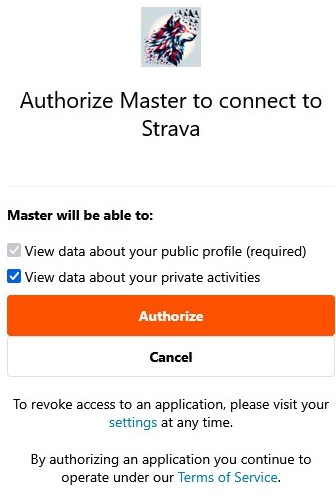
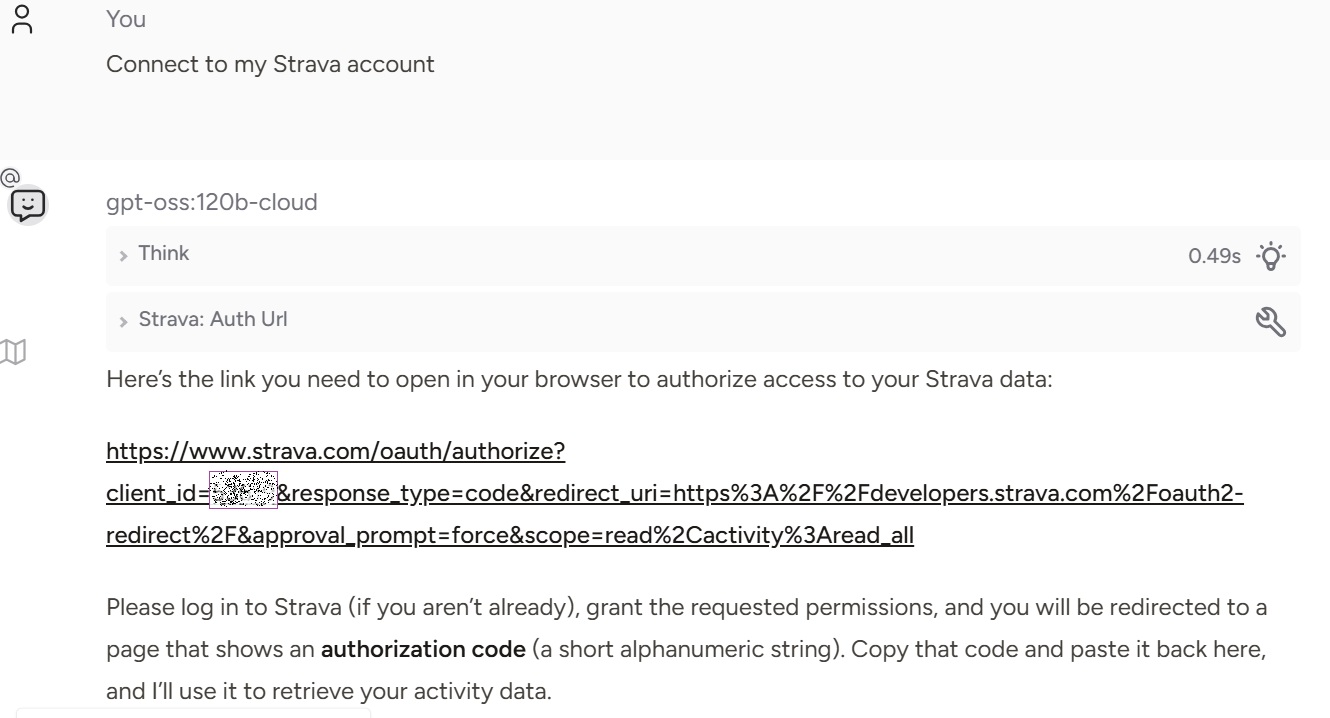
Initial authorization: call the
strava.auth.urltool to generate an authorization URL (see IMAGE below), open it in your browser, and grant access. This step is only needed the first time to obtain an authorization code. -
Copy the
codefrom the redirected URL (Image below). Use the provided tools to exchange it for access/refresh tokens. -
After the initial authorization, a token file named
strava_mcp_tokens.jsonis created and stored in your home directory (for example on Windows:C:\\Users\\<YourUserName>\\strava_mcp_tokens.json). This file contains yourrefresh_token, which will be used automatically for subsequent logins. After the first authorization you do not need to open the browser flow again; future runs refresh the access token from the locally storedrefresh_token.

Recommended credential setup on Windows (simple and persistent)
To avoid putting real credentials in MCP client JSON files, set your credentials once as Windows user environment variables:
- Open Start and search for:
Edit environment variables for your account - Under User variables, create:
STRAVA_CLIENT_ID= your numeric client ID (digits only, no quotes)STRAVA_CLIENT_SECRET= your client secret
- Fully restart your MCP client (for example Msty) so it picks up the new variables.
PowerShell alternative (one-time setup):
[Environment]::SetEnvironmentVariable("STRAVA_CLIENT_ID", "YOUR_ID_HERE", "User")
[Environment]::SetEnvironmentVariable("STRAVA_CLIENT_SECRET", "YOUR_SECRET_HERE", "User")
Notes:
- Do not include surrounding quotes in the saved value (for example store
12345, not"12345"). STRAVA_CLIENT_IDmust be an integer value; otherwise tools return:STRAVA_CLIENT_ID must be an integer.
Exposed Tools (what the server provides)
The MCP server exposes the following tools (tool IDs shown). These map to functions in src/strava_activity_mcp_server/strava_activity_mcp_server.py and cover both initial authorization and subsequent refresh flows.
Canonical tool IDs use dot notation (for example strava.auth.url). URI-style aliases (for example strava://auth/url) are kept for backwards compatibility.
-
strava.auth.url(alias:strava://auth/url) — Build the Strava OAuth authorization URL.- Inputs:
client_id(int, optional; readsSTRAVA_CLIENT_IDif omitted) - Output: Authorization URL string
- Inputs:
-
strava.auth.refresh(alias:strava://auth/refresh) — Refresh tokens using a refresh token and persist them locally.- Inputs:
refresh_token(str),client_id(int, optional),client_secret(str, optional) - Output: sanitized status only (token values are not returned)
- Inputs:
-
strava.athlete.stats(alias:strava://athlete/stats) — Exchange an authorizationcodefor tokens and then fetch one page of recent activities.- Inputs:
code(str),client_id(int, optional),client_secret(str, optional),after(int, optional),before(int, optional),page(int, optional),per_page(int, optional) - Output:
{ activities, token_status, save }(token values redacted)
- Inputs:
-
strava.athlete.stats-with-token(alias:strava://athlete/stats-with-token) — Fetch one page of recent activities using an existing access token.- Inputs:
access_token(str),after(int, optional),before(int, optional),page(int, optional),per_page(int, optional) - Output: Activity list (JSON)
- Inputs:
-
strava.auth.save(alias:strava://auth/save) — Save tokens to~\strava_mcp_tokens.json.- Inputs:
tokens(dict) - Output:
{ ok, path }or error
- Inputs:
-
strava.auth.load(alias:strava://auth/load) — Load tokens from~\strava_mcp_tokens.json.- Inputs: none
- Output:
{ ok, path, token_status }or error (token values redacted)
-
strava.athlete.refresh-and-stats(alias:strava://athlete/refresh-and-stats) — Load saved refresh token, refresh access token, save it, and fetch one page of activities.- Inputs:
client_id(int, optional),client_secret(str, optional),after(int, optional),before(int, optional),page(int, optional),per_page(int, optional) - Output:
{ activities, token_status }(token values redacted)
- Inputs:
-
strava.session.start(alias:strava://session/start) — Convenience entry: if tokens exist, refresh and fetch; otherwise return an auth URL to begin initial authorization.- Inputs:
client_id(int, optional),client_secret(str, optional),after(int, optional),before(int, optional),page(int, optional),per_page(int, optional) - Output: Either refreshed activity payload with
token_statusmetadata, or{ auth_url, token_file_checked }
- Inputs:
-
strava.athlete.fetch-all(alias:strava://athlete/fetch-all) — Fetch all pages deterministically.- Inputs:
access_token(optional),after(optional),before(optional),per_page(default50),max_pages(default10),retry_count(default2),detail_level(summarydefault, ordetailed),detail_max_rows(capped) - Stop behavior: iterates until page size is
< per_pageormax_pagesis reached. - Output (default): compact summary + meta; detailed rows only when explicitly requested.
- Inputs:
These tools are intended to be called by MCP clients.
strava.trimp.banister— Fetch all athlete activities (paged), filter to activities with heart-rate, compute Banister TRIMP, and rank variability.- Alias:
strava://trimp/account-report - Inputs:
sex(male/female),hr_rest,hr_max, optional paging (per_page,max_pages) and filters (after,before), plusdetail_level(summarydefault, ordetailed) anddetail_max_rows(capped) - Output (default): compact TRIMP summary and sport variability; detailed
activitiesrows are only included in explicit detailed mode.
- Alias:
Activity Filtering
The server now supports advanced filtering for Strava activities through URL parameters. The following filter parameters are available for activity-related tools:
after(int, optional): An epoch timestamp to filter activities that have taken place after a certain timebefore(int, optional): An epoch timestamp to filter activities that have taken place before a certain timepage(int, optional): The page number of activities to retrieve (default=1)per_page(int, optional): Number of activities per page (max=200)- Default values:
strava.athlete.statsuses 30; analytics flows default to 50 for safer LLM context usage.
- Default values:
Filtering Examples
- Get activities from the last 30 days:
after=1640995200(epoch timestamp for Jan 1, 2022) - Get activities from a specific date range:
after=1640995200&before=1643673600 - Get the first 10 activities:
page=1&per_page=10 - Get activities from page 2 with 50 per page:
page=2&per_page=50
These filters work with the following tools:
strava.athlete.stats/strava://athlete/statsstrava.athlete.stats-with-token/strava://athlete/stats-with-tokenstrava.athlete.refresh-and-stats/strava://athlete/refresh-and-statsstrava.session.start/strava://session/startstrava.athlete.fetch-all/strava://athlete/fetch-all
Example flows
- Get an authorization URL and retrieve tokens
- Call
strava.auth.url(orstrava://auth/url) with yourclient_idand open the returned URL in your browser. - After authorizing, Strava will provide a
code.
- Fetch recent activities
- Use
strava.athlete.statsfor single-page activity retrieval. If the access token is expired, use the refresh flow to get a new access token.
- Fetch filtered activities
- Get activities from the last 7 days: Use
strava.athlete.stats-with-tokenwithafterparameter set to epoch timestamp - Get paginated results: Use
pageandper_pageparameters to control the number of activities returned - Get activities from a specific date range: Combine
afterandbeforeparameters
- Fetch all pages reliably
- Use
strava.athlete.fetch-allfor full-history retrieval. - For analytics/reporting over all activities (including Banister TRIMP), prefer this high-level tool or
strava.trimp.banisterwhich now uses deterministic pagination internally.
Client config example and quick inspector test
Any MCP-capable client can launch the server using a config similar to the following (example file often called mcp.json or config.json).
Recommended for Msty on Windows: keep real credentials out of the JSON file and rely on Windows user environment variables.
{
  "command": "uvx",
  "args": [
    "strava-activity-mcp-server"
  ]
}
If your MCP client supports environment-variable interpolation, this pattern may also work:
{
  "command": "uvx",
  "args": [
    "strava-activity-mcp-server"
  ],
  "env": {
    "STRAVA_CLIENT_ID": "${STRAVA_CLIENT_ID}",
    "STRAVA_CLIENT_SECRET": "${STRAVA_CLIENT_SECRET}"
  }
}
If interpolation is not supported by your MCP client, it may pass the literal text ${STRAVA_CLIENT_ID} and ${STRAVA_CLIENT_SECRET}. In that case, remove the env block and rely on inherited Windows user variables.
To quickly test the server using the Model Context Protocol inspector tool, run:
npx @modelcontextprotocol/inspector uvx strava-activity-mcp-server
This will attempt to start the server with the uvx transport and connect the inspector to the running MCP server instance named strava-activity-mcp-server.
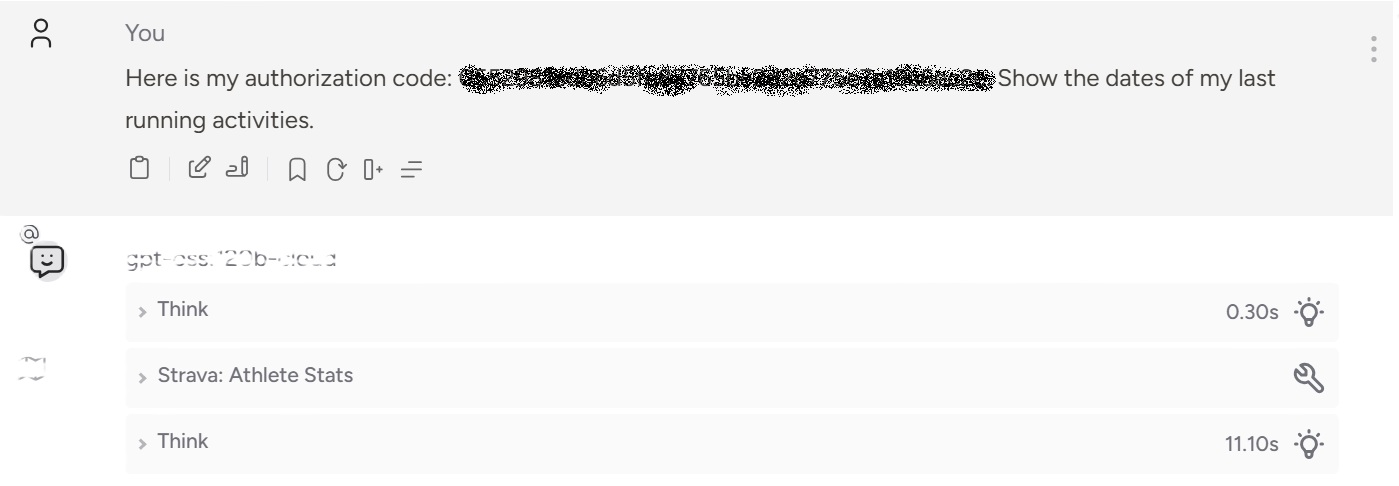
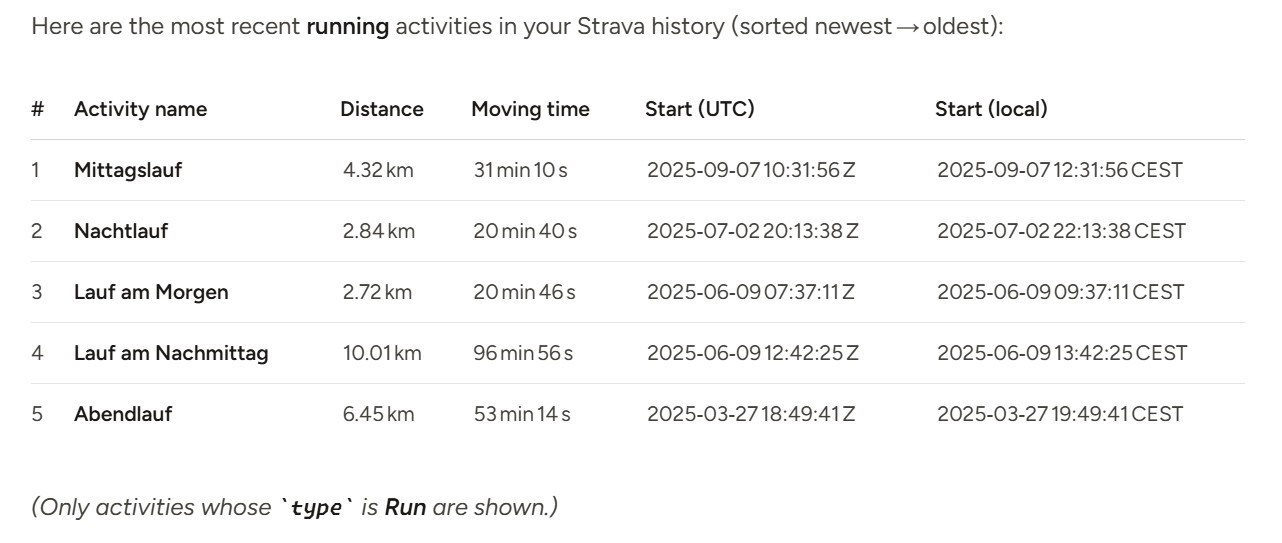
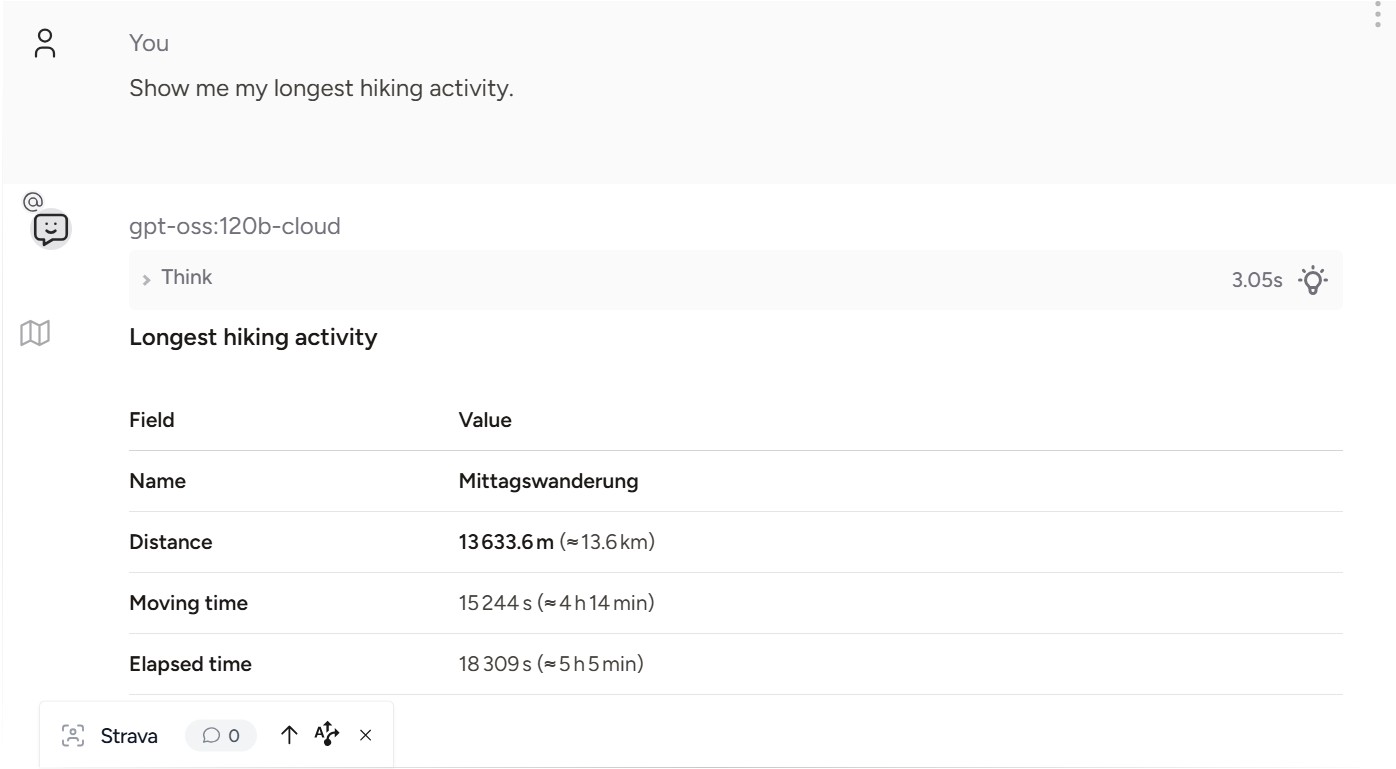
Chat example using MCP in Msty Studio
Contributing
Contributions are welcome. Please open issues or pull requests that include a clear description and tests where applicable.
License
This project is licensed under the GNU GENERAL PUBLIC LICENSE — see the LICENSE file for details.
Links
- Source: repository root
- Documentation note: see
README.mdfor an example MCP configuration - Changelog: see
CHANGELOG.mdfor last changes
Release history Release notifications | RSS feed


Download files
Download the file for your platform. If you're not sure which to choose, learn more about installing packages.
Source Distribution
Built Distribution
Filter files by name, interpreter, ABI, and platform.
If you're not sure about the file name format, learn more about wheel file names.
Copy a direct link to the current filters
File details
Details for the file strava_activity_mcp_server-1.0.4.tar.gz.
File metadata
- Download URL: strava_activity_mcp_server-1.0.4.tar.gz
- Upload date:
- Size: 122.0 kB
- Tags: Source
- Uploaded using Trusted Publishing? No
- Uploaded via: twine/6.2.0 CPython/3.13.7
File hashes
| Algorithm | Hash digest | |
|---|---|---|
| SHA256 |
4e5aef1725498f2ed133bdd4b8e38fad2550f6519302131a9a8a086726de79a1
|
|
| MD5 |
bfc7cbb6e3aabde8b28b0ca35df6a809
|
|
| BLAKE2b-256 |
83c71d6bea02dc33c4712553a2f82462678e64e8cc572bb3e6048c448bcc562e
|
File details
Details for the file strava_activity_mcp_server-1.0.4-py3-none-any.whl.
File metadata
- Download URL: strava_activity_mcp_server-1.0.4-py3-none-any.whl
- Upload date:
- Size: 28.3 kB
- Tags: Python 3
- Uploaded using Trusted Publishing? No
- Uploaded via: twine/6.2.0 CPython/3.13.7
File hashes
| Algorithm | Hash digest | |
|---|---|---|
| SHA256 |
debea506fa5046021802286af88644cddae4650909a35c52c31552659dd20ca2
|
|
| MD5 |
cd760e58d7c1e2b3e76b0da6649c6f34
|
|
| BLAKE2b-256 |
5382d81e6b5c62fd96167c1dfb99a50ff01b3df147d293ecc78acd9bf9417362
|






